基于 Astro 构建,搭配 React、TypeScript、Tailwind CSS 与 Radix UI 颜色系统
Astro博客
slate-blog — Astro 博客模板
作者 SlateDesign
Slate blog 是一个基于 Astro 的极简博客主题,支持 Markdown/MDX 写作、明暗模式、标签筛选、RSS 与 Algolia 搜索,并可通过配置文件开关可选页面与阅读辅助功能。
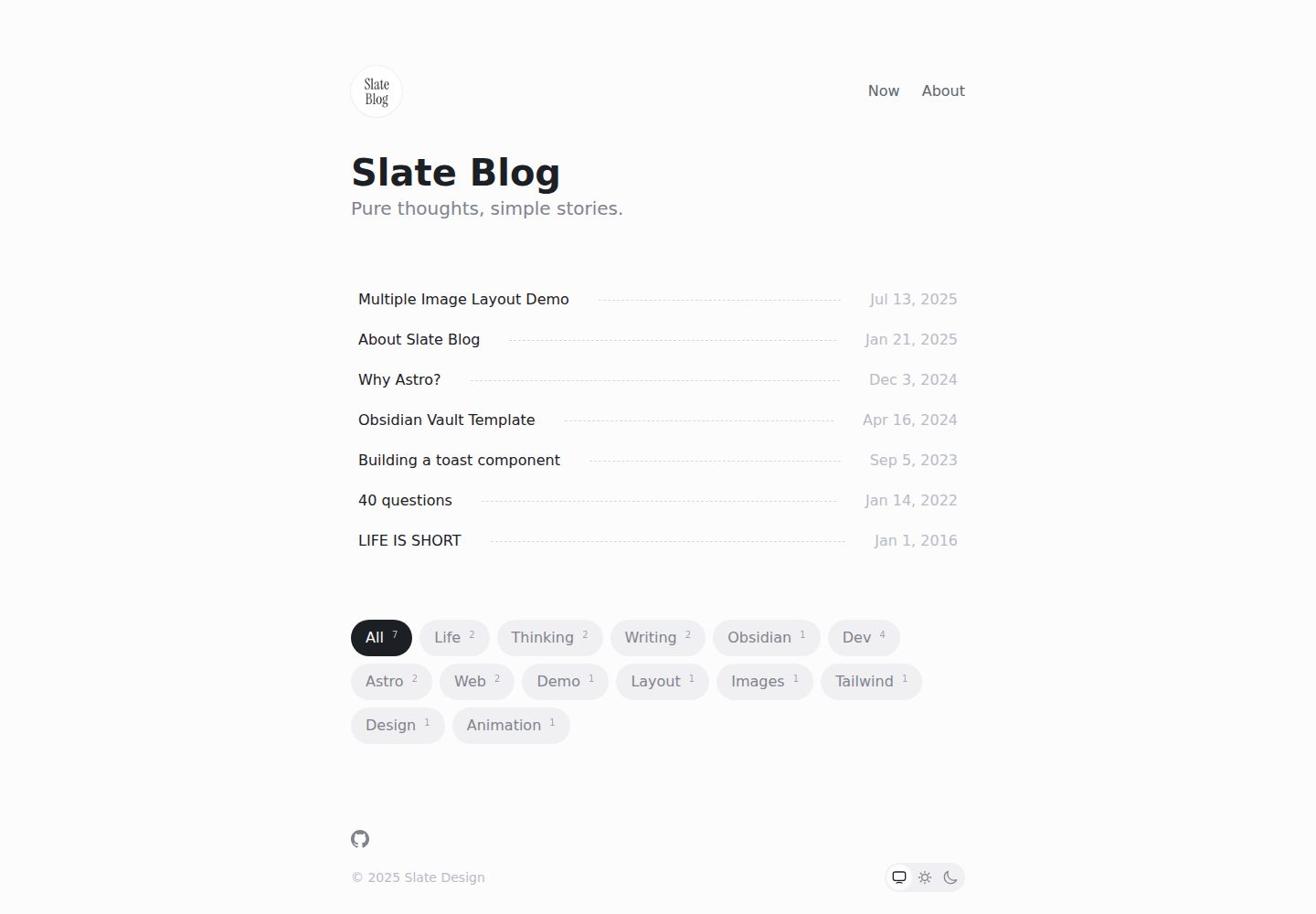
看看你的网站会是什么样
浏览真实页面截图,比较内容排版与手机效果。点击下方缩略图切换,放大查看整页细节。
全部页面与视图 3
截图用于了解视觉与布局,交互效果请以实际项目为准。
采集于 2026-09-30查看来源
值得关注的模板亮点
从已有项目资料中,快速了解它的特点。
文章以 Markdown/MDX 存放于 src/content/post,文件名对应 URL 路径
通过根目录 slate.config.ts 集中配置站点、主题、社交链接、搜索与订阅等选项
支持明暗模式、标签筛选、RSS 订阅、Algolia 搜索与 SEO 优化
可选 Now/About 页面与“Read with ChatGPT”入口,删除对应文件即可关闭
支持容器语法、LaTeX 数学公式、图片说明与代码高亮主题跟随明暗模式
模板详细介绍
Slate blog 是一个以内容为中心的极简博客主题,使用 Astro 构建,并搭配 React、TypeScript、Tailwind CSS 与 Radix UI 颜色系统。文章存放在 src/content/post 目录,支持 Markdown 与 MDX,文件名即 URL 路径。主题通过根目录的 slate.config.ts 集中配置站点信息、主题模式、头像、社交链接、页脚、阅读时长、最后修改时间、相关文章、阅读进度、渐进模糊、ChatGPT 阅读入口、Algolia 搜索和 Follow 订阅认证等选项。
内容层面,首页固定提供标签筛选,相关文章推荐默认关闭,开启后按标签重合度 70% 与发布时间接近度 30% 计算推荐。文章导航在存在章节标题时自动启用,移动端目录对话框支持遮罩关闭、Escape 键、焦点恢复和减少动态效果偏好。阅读进度仅控制圆形指示器;关闭渐进模糊后,浮动标题仍会显示,并回退为半透明背景与普通背景模糊。
可选页面方面,src/content/now.md 与 src/content/about.md 分别控制 /now 和 /about 页面及其导航入口,删除对应文件即可移除路由、导航和站点地图地址。两者共用与文章一致的 Markdown 排版管线,支持代码块、表格、数学公式、容器语法和图片说明。开启 readWithChatGPT 后,会在新标签页打开 chatgpt.com,并以预填提示词携带文章规范链接;主题本身不调用 ChatGPT API,也不发送凭据。
使用限制与说明:主题配置中的 site、title、description 等字段需要按实际部署填写;Algolia 搜索需先部署站点并向 Algolia 申请 apiKey,配置后重新部署;Follow 订阅认证需注册 Follow 账号、部署站点、在 Follow 中添加 RSS 链接并重新部署。仓库采用 MIT 许可证,允许免费使用、修改、商用和分发该版本代码,但分发时需保留版权声明和许可声明;演示图片、字体、图标等第三方素材需按各自许可单独核对,域名、托管、数据库、支付或 AI 等外部服务可能另外收费。
Astro博客
适合你的项目吗?
适用场景
- 个人技术博客或写作站点,需要极简阅读体验与 Markdown/MDX 写作流程
- 希望用 Obsidian 等工具管理笔记并发布为博客文章的用户
- 需要标签筛选、相关文章推荐、RSS 订阅与 Algolia 搜索的博客
- 需要明暗模式、移动端目录、阅读进度等阅读辅助功能的站点
- 希望通过配置文件开关可选页面与功能,而不修改核心代码的部署场景
适合人群
- 偏好极简设计、以内容为中心的写作者
- 使用 Astro 并希望快速搭建博客的开发者
- 需要中文与英文混排、Pangu 间距和代码高亮的博客
- 需要 RSS、Algolia 搜索和 SEO 基础配置的独立博客
- 接受 MIT 许可并自行核对第三方素材与外部服务费用的使用者
上手与定制指南
结合仓库当前版本的说明,按下面的资料检查内容、配置与运行要求。
- 1
使用 npm run dev、yarn dev 或 pnpm dev 启动本地服务,使用对应 build 命令构建
- 2
在根目录 slate.config.ts 中填写 site、title、description 等站点信息
- 3
Algolia 搜索需先部署站点并申请 apiKey,配置后重新部署
- 4
Follow 订阅认证需注册账号、部署站点、添加 RSS 链接并重新部署
- 5
删除 src/content/now.md 或 src/content/about.md 可分别关闭对应页面及其导航与站点地图地址
授权与来源资料
使用条件与限制
免费使用 · 保留许可声明本次收录的是公开仓库中采用 MIT 许可的免费版本;免费范围为该版本代码,不代表外部服务或第三方素材免费。
使用时需要遵守
- 允许免费使用、修改、商用和分发该版本代码。
- 分发代码副本或实质性部分时,保留原作者版权声明和完整 MIT 许可声明。
- 代码按现状提供;担保与责任限制以原许可证及适用法律为准。
额外费用与待核对事项
- Algolia 搜索为可选功能,需先部署站点并向 Algolia 申请 apiKey,配置后重新部署;不申请则无法使用该搜索功能。
- Follow 订阅认证为可选功能,需注册 Follow 账号、部署站点、在 Follow 中添加 RSS 链接并重新部署,依赖外部服务。
- “Read with ChatGPT”为可选入口,默认关闭;开启后跳转至外部 chatgpt.com,受其隐私政策约束,主题本身不调用 API 或发送凭据。
- 若将仓库 fork 后设为私有,默认会失去与上游仓库的关联,需通过 pnpm sync-latest 手动同步最新版本。
- 演示图片、字体、图标及其他第三方素材需按各自许可核对,不能仅凭代码的 MIT 许可判断。
- 域名、托管、数据库、支付或 AI 等外部服务可能另外收费。
查看原文依据
Permission is hereby granted, free of charge
许可证原文
Apply for an `apiKey` at [algolia](https://docsearch.algolia.com/apply/)
README 原文
Register a [follow](https://follow.is/) account
README 原文
Enabling `readWithChatGPT` opens `chatgpt.com` in a new tab
README 原文
https://github.com/SlateDesign/slate-blog/blob/main/LICENSE.txthttps://github.com/SlateDesign/slate-blog/blob/main/README.mdIf you fork the repository and set it to private, you will lose the association with the upstream repository by default.
README 原文
DeepSeek 根据仓库许可证和 README 整理 ·2026-10-01。结果仅覆盖已读取资料,依赖、图片、字体及后续条款变更以各自原文为准。
项目核对记录与介绍依据
模板资料
- 来源平台
- GitHub
- 资料与维护参考分
- 资料较完整 · 91 / 100
- 技术栈
- Astro
- 网站类型
- 博客
这个分数如何计算
本站按许可资料(最高30分)、演示链接(12分)、预览图(10分)、Star数(15分)、记录的维护时间(15分)、描述完整度(8分)、功能记录(5分)和分类资料(5分)计算。它不是代码、安全或性能测试,也不是 Google 评分;有链接不代表已实测可用。
这个项目需要核对什么
- 记录的仓库更新时间
- 2026-09-20
- 截图检查日期
- 2026-10-01
已收录演示链接。请用你的内容与屏幕尺寸检查;有演示不代表表单、认证或支付已经可用。
目录记录的主要技术栈是 Astro。请通过依赖清单和锁文件核对实际版本与托管要求。这些说明基于收录资料,不代表代码审计或部署实测。
查看具体选型方法 →介绍的制作与核对状态
介绍由 AI 辅助整理目录与仓库资料。仓库作者不等于这篇介绍的审核者。
已完成服务器许可规则与 AI 来源核对;未经过人工编辑审核。
查看当时使用的来源资料
SHA-256: 81abe2de832afa804fbed88daebbc3496fa66246ccbf2f3b94863b85d100d3d9
2026-10-01T13:57:49.597Z
来源文件 / 仓库# Slate blog
English · [中文](./README-zh_CN.md)
## Why We build it?
We love writing and sharing, and we appreciate well-crafted products. That’s why we created this minimalist theme, focusing on content itself, providing a smooth and pure writing and reading experience. Built on the latest framework, it’s faster, lighter, and more efficient.
It also works seamlessly with [Obsidian](https://obsidian.md/), helping you turn your notes into published posts effortlessly.
## ✨ Features
- Minimalist design theme
- Mobile-first responsive layout
- Light and dark mode support
- Quick setup with zero configuration required
- Draft mode with local preview and automatic production filtering
- Built-in RSS feed with Follow authentication
- Integrated Algolia search functionality
- Comprehensive SEO optimization for better search rankings
- Horizontal multi-image layout with automatic column distribution
- Pangu spacing for mixed Chinese, Latin text, and numbers
- Code highlighting that follows the light and dark themes
- Tag filters on the home page and optional related-post recommendations
- Active desktop navigation and an accessible mobile table of contents
- Circular reading progress with a progressive-blur floating title
- Optional Markdown-powered Now and About pages
- Optional “Read with ChatGPT” action
## 🪜 Framework
- Astro + React + Typescript
- Tailwindcss + @radix-ui/colors
- Updated to [Tailwind CSS v4.0](https://tailwindcss.com/blog/tailwindcss-v4) (Jan 10, 2025)
- Docsearch
## 🔨 Usage
```bash
# Start local server
npm run dev
# or
yarn dev
# or
pnpm dev
# Build
npm run build
# or
yarn build
# or
pnpm build
```
> If you fork the repository and set it to private, you will lose the association with the upstream repository by default. You can sync the latest version of Slate Blog by running `pnpm sync-latest`.
## 🗂 Directory Structure
```
- plugins/ # Custom plugins
- src/
├── assets/ # Asset files
├── components/ # Components
├── content/ # Content collections and optional pages
│ ├── now.md # Optional /now page; delete to disable
│ ├── about.md # Optional /about page; delete to disable
│ └── post/ # Blog articles
├── helpers/ # Business logic
├── pages/ # Pages
└── typings/ # Common types
```
> Articles are stored in the `src/content/post` directory, supporting markdown and mdx formats. The filename is the path name. For example, `src/content/post/my-first-post.md` => `https://your-blog.com/blog/my-first-post`.
### Optional Now page
`src/content/now.md` enables the `/now` page and its Header navigation entry. The included example means this is enabled by default. It uses the same Markdown pipeline and typography as blog articles, including code blocks, tables, math, containers, and image captions. Delete `src/content/now.md` to remove the navigation entry, route, and sitemap address.
### Optional About page
`src/content/about.md` is the exact switch for the `/about` page and its Header navigation entry. The repository template includes this file, so About is enabled by default. `/about` uses the full article/Now Markdown pipeline and typography, including code blocks, tables, math, containers, and image captions. Deleting `src/content/about.md` removes the About navigation, route, and sitemap URL without disabling Now.
## Configuration
Theme configuration is done through `slate.config.ts` in the root directory.
| Option | Description | Type | Default |
| --- | --- | --- | --- |
| site | Final deployment link | `string` | - |
| title | Website title | `string` | - |
| description | Website description | `string` | - |
| lang | Language | `string` | `zh-CN` |
| theme | Theme | `{ mode: 'auto' \| 'light' \| 'dark', enableUserChange: boolean }` | `{ mode: 'auto', enableUserChange: true }` |
| avatar | Avatar | `string` | - |
| sitemap | Website sitemap configuration | [SitemapOptions](https://docs.astro.build/en/guides/integrations-guide/sitemap/) | - |
| readTime | Show reading time | `boolean` | `false` |
| lastModified | Show last modified time | `boolean` | `false` |
| relatedPosts | Related-post recommendations | `{ enabled?: boolean, limit?: number }` | `{ enabled: false, limit: 3 }` |
| readingProgress | Show circular progress in the floating article title | `boolean` | `true` |
| progressiveBlur | Use a fading blur behind the floating article title | `boolean` | `true` |
| readWithChatGPT | Show an external “Read with ChatGPT” action | `boolean` | `false` |
| algolia | Docsearch configuration | `{ appId: string, apiKey: string, indexName: string }` | - |
| follow | Follow subscription authentication configuration | `{ feedId: string, userId: string }` | - |
| footer | Website footer configuration | `{ copyright: string }` | - |
| socialLinks | Social Links Configuration | `{ icon: [SocialLinkIcon](#SocialLinkIcon), link: string, ariaLabel?: string }` | - |
### SocialLinkIcon
```ts
type SocialLinkIcon =
| 'dribbble'
| 'facebook'
| 'figma'
| 'github'
| 'instagram'
| 'link'
| 'mail'
| 'notion'
| 'rss'
| 'threads'
| 'x'
| 'youtube'
| { svg: string };
```
### Algolia Application
1. Deploy your site first
2. Apply for an `apiKey` at [algolia](https://docsearch.algolia.com/apply/)
3. After successful application, configure `algolia` in `slate.config.ts`
4. Redeploy your site
### Follow Subscription Authentication
1. Register a [follow](https://follow.is/) account
2. Deploy your site
3. Click the `+` button on Follow, select `RSS` subscription, and enter the `rss` link (usually `[site]/rss.xml`, where `site` is the value of `site` in `slate.config.ts`)
4. Redeploy
## Article Frontmatter Description
| Option | Description | Type | Required |
| --- | --- | --- | --- |
| title | Article title | `string` | Yes |
| description | Article description | `string` | No |
| tags | Article tags | `string[]` | No |
| draft | Whether it's a draft. When not provided or `false`, `pubDate` must be provided; drafts are only visible in local preview | `boolean` | No |
| pubDate | Article publication date | `date` | No, required when `draft` is `false` |
**For more details, check the `src/content/config.ts` file**
Tags are always available as filters on the home page. When related posts are enabled, tag overlap contributes 70% of the recommendation score and publication date proximity contributes 30%.
```ts
export default defineConfig({
// Other options...
relatedPosts: {
enabled: true,
limit: 3,
},
});
```
Desktop and mobile article navigation are always enabled when an article has section headings. The mobile dialog supports overlay dismissal, Escape, focus restoration, and reduced-motion preferences.
`readingProgress` controls only the circular indicator. When `progressiveBlur` is `false`, the floating title remains visible and falls back to a translucent background with ordinary backdrop blur.
Enabling `readWithChatGPT` opens `chatgpt.com` in a new tab with the canonical article URL in a prefilled prompt. The theme does not call the ChatGPT API or send credentials; following the link leaves your site and is subject to ChatGPT's privacy policy.
### Example
```md
---
title: 40 questions
description: This repo maintains revisons and translations to the list of 40 questions I ask myself each year and each decade.
tags:
- Life
- Thinking
- Writing
pubDate: 2025-01-06
---
```
## Markdown Syntax Support
In addition to standard Markdown syntax, the following extended syntax is supported:
### Basic Syntax
- Headers, lists, blockquotes, code blocks and other basic syntax
- Tables
- Links and images
- **Bold**, _italic_, and ~strikethrough~ text
### Extended Syntax
#### Container syntax
Using `:::` markers
```md
:::info
This is an information prompt
:::
```
#### LaTeX Mathematical Formulas
- Inline formula: $E = mc^2$
- Block formula: $$ E = mc^2 $$
#### Support for image captions
```md

```
## Updates
### Version 1.8.0
- Added an optional, complete-Markdown About page driven by `src/content/about.md`
- Shared exact file discovery between the independent Now and About pages
### Version 1.7.0
- Added an optional, complete-Markdown Now page driven by `src/content/now.md`
- Added conditional Header navigation and route generation with file-based opt-out
### Version 1.6.0
- Added active desktop section navigation and an accessible mobile contents dialog
- Added circular reading progress and default-on progressive blur
- Added an optional external “Read with ChatGPT” entry, disabled by default
### Version 1.5.0
- Added fixed-enabled tag filtering on the home page
- Added optional related-post recommendations, disabled by default
- Added deterministic recommendation scoring and localized discovery states
### Version 1.4.0
- Replaced Heti with Pangu and removed the article-page runtime CDN dependency
- Added light and dark code highlighting themes
- Improved mobile heading sizes and overflow handling for long code, tables, and images
### Version 1.3.0
- Support Social Links
- Optimize RSS article detail generation.
- Add a script to synchronize the latest slate-blog version
### Version 1.2.0
- Support i18n (English and Chinese)
- Fixed known issues
### Version 1.1.1
- Fixed known issues
### Version 1.1.0
- Upgraded to support [Tailwind CSS v4.0](https://tailwindcss.com/blog/tailwindcss-v4)
- Added dark mode support
- Fixed known issues
## Blogs using this theme
Here are some blogs built with this theme:
- [Bluepikachu](https://bluepika.life/)
- [Chieh的随笔](https://blog.chieh.nyc.mn/)
- [Feazur](https://blog.feazur.com/)
- [Folay's Blog](https://www.folay.top/)
- [LeeZhian](https://leezhian.com/)
- [nmsisecho](https://astro-example-liard.vercel.app/)
- [Randy's Blog](https://lutaonan.com/)
- [Sulle orme dell'Alfiere Nero](https://sulleormedellalfierenero.pusi77.eu.org/)
- [三墩冰室](https://lmd.gg/)
- [小企鹅爸爸的生活](https://www.penguinpapa.life/)
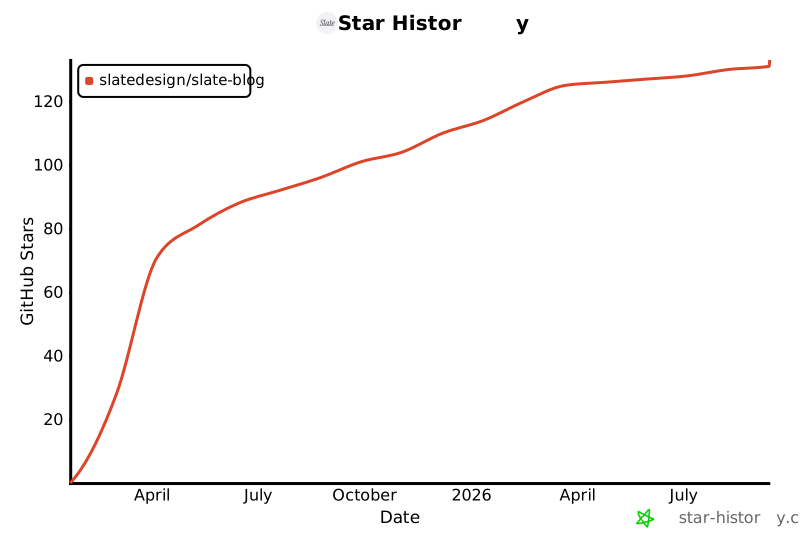
## Star History
[](https://www.star-history.com/#SlateDesign/slate-blog&Date)
看看同类模板
对比同技术栈与用途的模板,找到更适合的视觉与内容结构。

astrowind
⭕️ AstroWind: A free template using Astro v7 and Tailwind CSS v4. Astro starter theme.
Astro · 博客

astro-paper
A minimal, accessible and SEO-friendly Astro blog theme.
Astro · 博客

fuwari
✨A static blog template built with Astro.
Astro · 博客

Firefly
Firefly 是一款基于 Astro 的静态博客主题,由 CuteLeaf 在 saicaca 的 Fuwari 模板基础上二次开发,主打清新美观的视觉风格。
Astro · 博客

astro-theme-cactus
A simple Astro theme. Use it to create your blog or website.
Astro · 作品集

astrofy
Astrofy is a free and open-source template for your Personal Portfolio Website built with Astro and TailwindCS…
Astro · 作品集