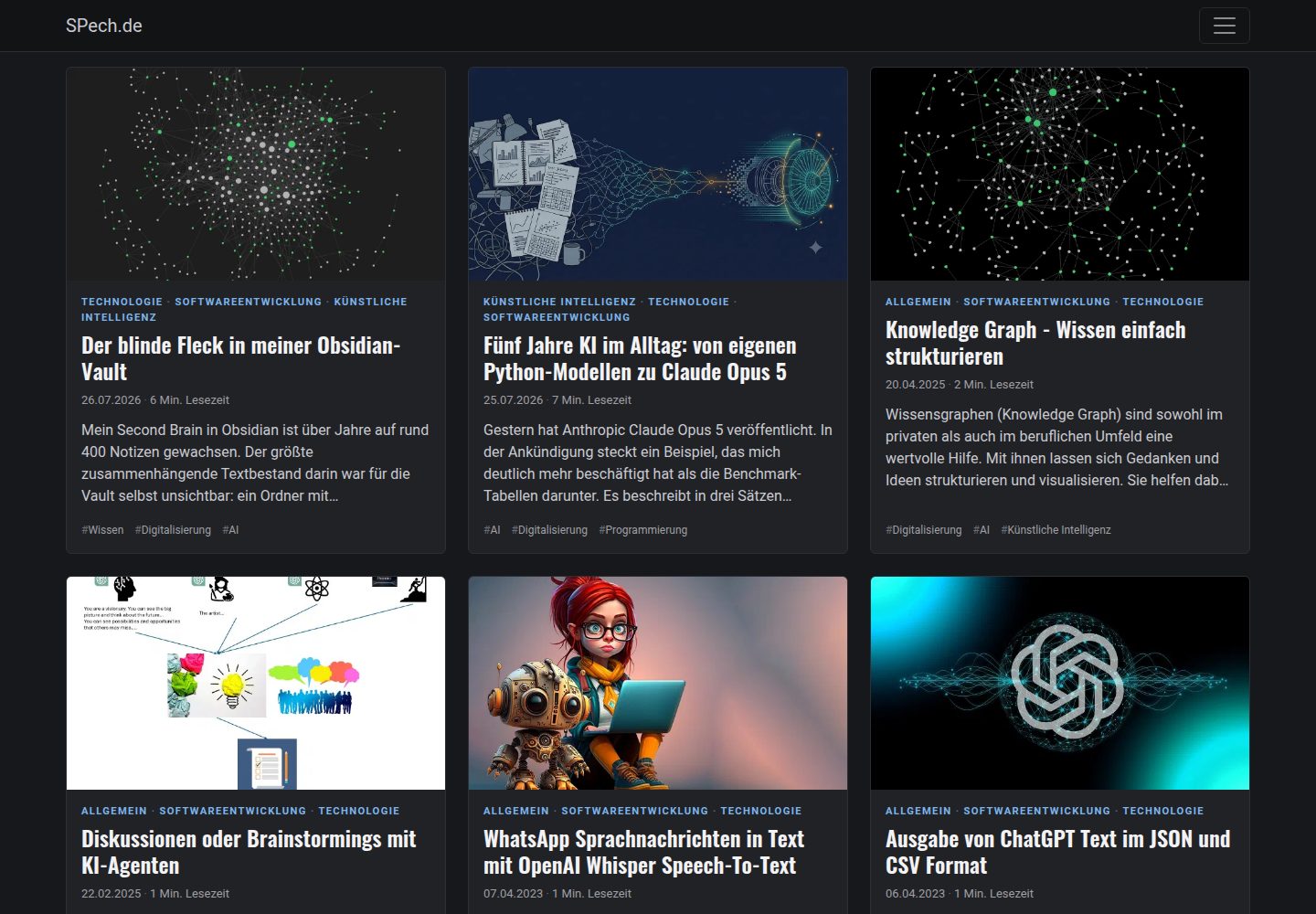
Provides multiple color themes including dark, light, blue, and Bootstrap default
HugoHTMLBlog
bootstrap-bp-hugo-theme — Hugo Blog Template
By spech66
A Bootstrap-based Hugo blog theme offering out-of-the-box configuration for color themes, SEO metadata, automatic image scaling and WebP conversion, and multilingual support.
Explore the design
Compare the page layouts and mobile experience. Open any screenshot for a closer look.
Desktop homepage1 / 2
Desktop captureTop of page
Actual screenshot captured by the server browser.
All pages & views 2
Screenshots show visual appearance; interactive behavior may differ.
Recorded 2026-10-03View source
What stands out
A quick read of the recorded project description.
Featured images are automatically scaled and converted to WebP, and used for Open Graph and Twitter Cards
Supports Schema.org structured data, including Event-type pages
Does not load the full Bootstrap JavaScript bundle by default, retaining only a small navigation script
Supports multilingual and i18n, with social icons output as inline SVG
Bootstrap components are compiled on demand; Modal, Carousel, etc. can be enabled by overriding import files
Template Details
This is a Hugo blog theme built on Bootstrap, with the repository under the MIT license. The theme is organized around Hugo's templating and configuration mechanisms, primarily aimed at personal blogs, article lists, and content-oriented sites. It provides multiple color themes (dark, light, blue, or Bootstrap default) and supports adjusting behaviors such as start page columns, date format, list grouping, summary display, menu expansion, and reading time display via params in config.toml.
For content presentation, the theme supports page archetypes including Page, Post, Audio, Video, Quote, and Link. Cards display categories, dates, reading time, and tags, and accent colors can be adjusted via custom CSS variables. For images, the theme uses Hugo's feature/cover naming convention to set featured images, automatically scales and converts them to WebP, and uses them for Open Graph and Twitter Cards. The theme also provides an img-post shortcode for floating images within content.
For SEO and structured data, the theme supports Schema.org, Open Graph, and metadata. Schema.org can be enabled after configuring the author; pages with front matter such as datum generate Event structured data. The theme includes two menus, main and footer. Social icons are output as inline SVG, with icon data stored in data/bpicons.json and extensible by the user.
For performance and resource control, the theme does not load the full Bootstrap JavaScript bundle by default, retaining only a navigation script of about 1 KB. Bootstrap components are compiled on demand; Modal, Carousel, Tooltip, etc. are not included by default. To use them, copy and uncomment the corresponding imports in the site and enable bootstrapJS. Custom CSS/JS can be merged and minified into a single file, or included separately via configuration or page metadata. The theme supports multilingual and i18n, and removes Hugo's native Google Analytics template.
HugoHTMLBlog
Is it right for your project?
Use Cases
- Building a personal blog centered on article lists and card displays
- Content sites that need automatic featured image processing and WebP output
- Sites that want to configure Open Graph, Twitter Cards, and Schema.org metadata for articles
- Hugo projects that need multilingual support and custom menus and social icons
Suitable For
- Developers building blogs with Hugo who want to customize based on Bootstrap
- Sites that need out-of-the-box SEO metadata and structured data configuration
- Users who want to adjust layout and display behavior via config.toml parameters
- Projects that need to include Bootstrap components on demand to control page resources
Getting started & customization
Use these recorded setup notes alongside the repository instructions for your chosen version.
- 1
Create a themes folder in the Hugo site directory and clone the theme repository into it via git clone.
- 2
Configure site parameters based on the config.toml in exampleSite, such as startPageColumns, themeColor, showPostSummary, etc.
- 3
To use Bootstrap components such as Modal and Carousel, copy the theme's assets/sass/_bootstrap-imports.scss to the site and uncomment the corresponding lines, and set bootstrapJS = true.
- 4
Custom styles can be written to assets/css/custom.css and scripts to assets/js/custom.js; the theme will merge and minify them with the theme files.
- 5
The theme has removed Hugo's native Google Analytics template; if analytics are needed, integrate them separately.
License & source material
Usage conditions & limitations
Free to use · keep license noticeThis entry covers the free version under the MIT license in the public repository; the free scope is the code of this version and does not imply that external services or third-party assets are free.
Must comply with when using
- Free use, modification, commercial use, and distribution of this version's code are permitted.
- When distributing copies or substantial portions of the code, retain the original author's copyright notice and the full MIT license notice.
- The code is provided as is; warranties and limitations of liability are governed by the original license and applicable law.
Additional costs & items to verify
- The theme has removed Hugo's native Google Analytics template; if website analytics are needed, a third-party analytics service must be integrated separately, which may involve external accounts or costs.
- When using Bootstrap components that require JavaScript, such as Modal, Carousel, and Tooltip, bootstrapJS = true must be set additionally for the corresponding scripts to load.
- The theme no longer includes Font Awesome and does not load the full Bootstrap JavaScript bundle by default; if these features are needed, they must be included separately via csscdn or bootstrapJS configuration.
- The icon glyphs in the theme come from Font Awesome Free 5 under the CC BY 4.0 license, which differs from the theme code's MIT license; attribution and other conditions must be observed when using them.
- Demo images, fonts, icons, and other third-party assets must be checked against their respective licenses and cannot be judged solely by the code's MIT license.
- External services such as domains, hosting, databases, payments, or AI may incur additional charges.
View Original Text Basis
Permission is hereby granted, free of charge
Original License Text
The native Hugo Google Analytics template has been removed!
Original README
Components that need JavaScript also require `bootstrapJS = true`.
Original README
Font Awesome is no longer part of the theme and the Bootstrap JavaScript bundle is no longer loaded by default.
Original README
https://github.com/spech66/bootstrap-bp-hugo-theme/blob/master/LICENSEhttps://github.com/spech66/bootstrap-bp-hugo-theme/blob/master/README.mdThe icons are stored in `data/bpicons.json` (glyphs from [Font Awesome Free 5](https://fontawesome.com/license/free), CC BY 4.0).
Original README
Compiled by DeepSeek based on repository license and README ·2026-10-03. Results only cover the materials read; dependencies, images, fonts, and subsequent term changes are subject to their respective original texts.
Project checks & description sources
Template Information
- Source platforms
- Hugo Themes
- Documentation and maintenance reference score
- More documented · 92 / 100
- Technologies
- Hugo · HTML
- Website type
- Blog
How this score is calculated
Our heuristic uses license records (up to 30), a demo link (12), a preview (10), stars (15), recorded maintenance (15), description completeness (8), feature records (5) and classification data (5). It is not a code, security or performance test, or a Google score. A link does not establish tested functionality.
What to verify for this project
- Repository update recorded
- 2026-10-03
- Screenshot last checked
- 2026-10-03
A demo link is listed. Check it with your own content and viewport sizes; its presence does not confirm that forms, authentication or payments work.
The catalog identifies Hugo as the primary stack. Check the actual dependency manifest and lockfile for versions and hosting requirements. These notes use recorded metadata, not a code audit or a deployment test.
Use a selection guide →How this description was prepared
AI-assisted description based on catalog records and repository material. Repository authors are not automatically the reviewers of this description.
Automatically checked against source and license rules; no manual editorial review.
Inspect the recorded source material
SHA-256: 378aa5b790706d77f5ad99d77e466531089bdadb6293ac6e4555c76e6cac554b
2026-10-03T07:55:37.053Z
Source file / repository
# Bootstrap-BP hugo theme
[Bootstrap v5](https://getbootstrap.com/) based Hugo theme which provides out of the box best practices like performance and SEO readiness. Featured images will be resized automatically. This is based on the [Hugo docs](https://gohugo.io/templates/homepage/), [hugo-best-practices](https://github.com/spech66/hugo-best-practices), [Front-End Checklist](https://github.com/thedaviddias/Front-End-Checklist) and the [Front-End Performance Checklist](https://github.com/thedaviddias/Front-End-Performance-Checklist). Contains four different color themes.
Other themes by Sebastian Pech: [Bootstrap-BP](https://github.com/spech66/bootstrap-bp-hugo-theme), [Materialize-BP](https://github.com/spech66/materialize-bp-hugo-theme),
[Bootstrap-BP hugo startpage](https://github.com/spech66/bootstrap-bp-hugo-startpage).
## Table of contents
<!-- START doctoc generated TOC please keep comment here to allow auto update -->
<!-- DON'T EDIT THIS SECTION, INSTEAD RE-RUN doctoc TO UPDATE -->
- [Bootstrap-BP hugo theme](#bootstrap-bp-hugo-theme)
- [Table of contents](#table-of-contents)
- [Features](#features)
- [Install the theme](#install-the-theme)
- [Update the theme](#update-the-theme)
- [Run example site](#run-example-site)
- [Configuration and theme specific settings](#configuration-and-theme-specific-settings)
- [Screenshots of configurations](#screenshots-of-configurations)
- [Google Analytics](#google-analytics)
- [Page templates / archetypes](#page-templates--archetypes)
- [Schema.org support](#schemaorg-support)
- [Images, Open Graph and Twitter Cards](#images-open-graph-and-twitter-cards)
- [Menus](#menus)
- [Social Icons](#social-icons)
- [Icons](#icons)
- [Custom CSS/JS](#custom-cssjs)
- [Post cards](#post-cards)
- [Floating images](#floating-images)
- [Performance: Bootstrap parts, JavaScript and Font Awesome](#performance-bootstrap-parts-javascript-and-font-awesome)
<!-- END doctoc generated TOC please keep comment here to allow auto update -->
## Features
- Color themes
- SEO best practices supported (Schema.org, open graph, meta information, ...)
- Automatically resizing of images and conversion to WebP (partial `image-webp.html`, used by cards, `optfigure` and `featurette-image`)
- One minified file per resource only (js, css)
- CDN font support (Google Fonts, ...)
- Optional masonry-like mode for startpage
- Settings for easy customization of layouts and features
- Multiple page templates / archetypes supported
- Icons for Social Media as inline SVG (no icon font)
- No Bootstrap JavaScript bundle by default (~1 KB navigation script)
- Custom css/js
- Floating images in posts (shortcode `img-post`)
- Multilingual and i18n support
- ...
## Install the theme
With Git installed, run the following commands inside the Hugo site folder. If Hugo has not yet been installed, read the setup guide [here](https://gohugo.io/getting-started/quick-start/).
```sh
mkdir themes
cd themes
git clone https://github.com/spech66/bootstrap-bp-hugo-theme.git
```
You can get a zip of the latest version of the theme from the [home page](https://github.com/spech66/bootstrap-bp-hugo-theme) and extract it to the themes folder.
## Update the theme
Go to the themes folder as in the installation and run the following command.
```sh
git pull
```
## Run example site
Go to the `exampleSite` folder from the theme `themes/bootstrap-bp-hugo-theme/exampleSite` and run the following command.
```sh
hugo server --themesDir ../..
```
## Configuration and theme specific settings
Most settings should be done with hugo specific variables. There are only a few (optional) additional `[params]`.
Use the `config.toml` from the `exampleSite` subdirectory as base.
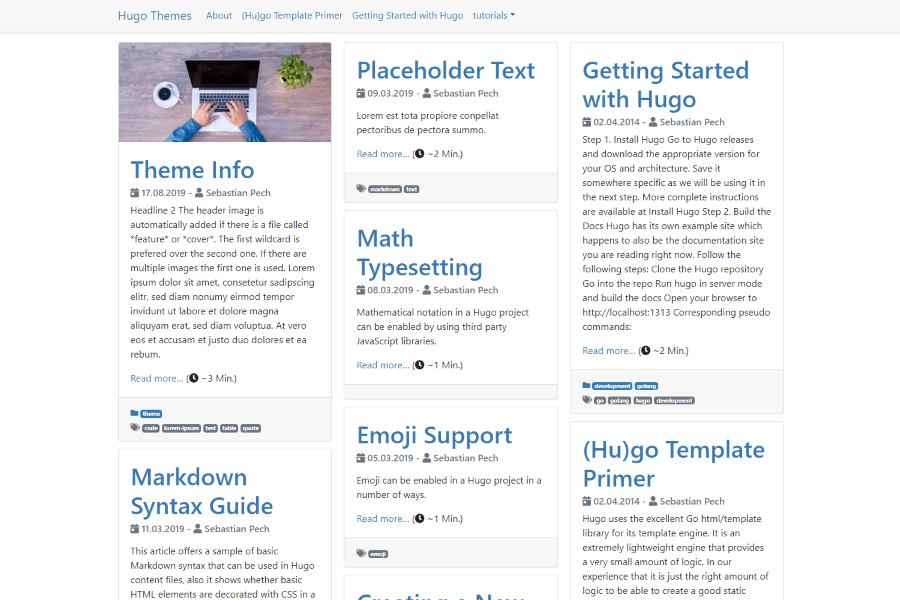
- `startPageColumns = true` will show the start page in a Masonry-like mode.
- `customDateFormat = "02.01.2006"` to override the date format.
- `showListsGrouped = true` to add headers for every year.
- `showPostSummary = true` to only show a summary on index and lists.
- `alwaysExpandMenu = true` to expand the menu on non-mobile devices otherwise the mobile button is shown on all devices.
- `themeColor` set to dark, light, blue (do not set for bootstrap default).
- `hideReadingTime` to hide reading time.
- `bootstrapJS = true` to load the full Bootstrap JavaScript bundle (modals, tooltips, carousels, ...). Default: only a small navigation script.
## Screenshots of configurations
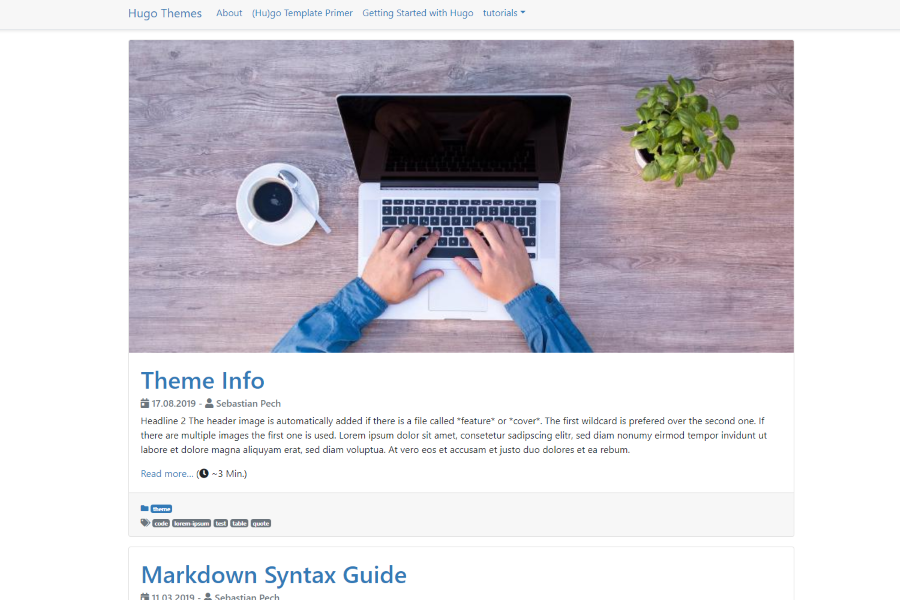
`startPageColumns = false`
`startPageColumns = true`
## Google Analytics
The native Hugo Google Analytics template has been removed!
## Page templates / archetypes
This theme has support for the following archetypes. Based on the specified types the layout and functionality of a page is slightly changed.
- Page (not on the startpage)
- Post (regular post/blog pages)
- Audio (shows spotify in the header)
- Video (shows youtube in the header)
- Quote (highlights a quote and the author)
- Link (show a link with the page title)
## Schema.org support
Provide one author to enable the Schema.org support.
```yaml
[params.author]
name = "Sebastian Pech"
```
Pages with a `datum` in the front matter (courses, workshops, events) get an `Event` schema. Used parameters: `datum`, `enddatum` or `termine` (list with `end`), `ort`, `adresse`, `preis` ("kostenlos"/"Spende" becomes 0), `image` and `anmeldung_ab`. The offer's `validFrom` is taken from `anmeldung_ab`, then the page date, then a `YYYY-MM` prefix of the content folder name, otherwise the event start.
## Images, Open Graph and Twitter Cards
This theme uses Hugos `feature/cover` name method to set the optimized feature image. The image named `*feature*` or `*cover*` is used for the posts featured image and get resized. This will also be in the Twitter Cards and Open Graph block.
The header image is automatically added if there is a file called `*feature*` or `*cover*`. The first wildcard is preferred over the second one. If there are multiple images the first one is used.
```yaml
# Site Config toml
title = "My hugo site"
[params]
description = "Text about the site"
# Post yaml
---
title: "{{ replace .Name "-" " " }}"
date: {{ .Date }}
publishdate: {{ now.Format "2006-01-02" }}
lastmod: {{ now.Format "2006-01-02" }}
draft: true
description: "Text about this post"
tags:
- "tag 1"
---
```
## Menus
There are two menus in the theme. `main` and `footer`. Specify the entries in the config or the header of the content. `params.icon` shows an icon from `data/bpicons.json` in front of the name (see [Icons](#icons)).
```yaml
[menu]
[[menu.main]]
identifier = "about"
name = "About"
url = "/about/"
weight = 10
[menu.main.params]
icon = "newspaper"
[[menu.footer]]
identifier = "Imprint"
name = "Imprint"
url = "/imprint/"
weight = 10
[[menu.footer]]
identifier = "categories"
name = "Categories"
url = "/categories/"
weight = 20
[[menu.footer]]
identifier = "tags"
name = "Tags"
url = "/tags/"
weight = 30
```
```yaml
---
[...]
menu = "main"
---
```
## Social Icons
Icons for Social Media. Add the block to the config.
```yaml
# Sets Social Media icons to appear and link to your account. Value should be your
# username unless otherwise noted.
# Code from https://themes.gohugo.io/future-imperfect/ theme
[params.social]
# Coding Communities
github = ""
gitlab = ""
stackoverflow = "" # User Number
bitbucket = ""
jsfiddle = ""
codepen = ""
# Visual Art Communities
deviantart = ""
flickr = ""
behance = ""
dribbble = ""
# Publishing Communities
wordpress = ""
medium = ""
# Professional/Business Oriented Communities
linkedin = ""
linkedin_company = ""
foursquare = ""
xing = ""
slideshare = ""
# Social Networks
facebook = ""
googleplus = ""
reddit = ""
quora = ""
youtube = ""
vimeo = ""
whatsapp = "" # WhatsApp Number
instagram = ""
tiktok = "" # @username
tumblr = ""
twitter = ""
skype = ""
snapchat = ""
pinterest = ""
telegram = ""
discord = "" # invite link
# Email
email = ""
```
## Icons
All icons of the theme are inline SVGs rendered by the `icon.html` partial. Only the icons a page actually uses end up in its HTML, no icon font is downloaded.
```go-html-template
{{ partial "icon.html" "clock" }}
{{ partial "icon.html" (dict "name" "github" "class" "icon-2x") }}
```
The icons are stored in `data/bpicons.json` (glyphs from [Font Awesome Free 5](https://fontawesome.com/license/free), CC BY 4.0). To add your own icon, create `data/bpicons.json` in your site with an entry `"name": {"w": <width>, "d": "<path>"}`. The path uses font units (512 units high, baseline at 0, like the Font Awesome 5 SVG fonts).
## Custom CSS/JS
The theme provides two ways for custom css/js. The first way is writing your styles to `/assets/css/custom.css` and scripts to `/assets/js/custom.js`. This will merge and minify the styles/scripts with the theme specific files resulting in only one file for the whole website.
The second way is using the Site configuration or the post metadata to target specific files in the `/assets/` folder. This will result in one import line per script/style.
```toml
[params]
js=["/js/test_site.js"]
jscdn=["https://cdn.jsdelivr.net/npm/[email protected]/dist/vue.js"]
css=["/css/test_site.css"]
csscdn=["https://fonts.googleapis.com/css?family=Roboto&display=swap"]
```
```yaml
---
js:
- /js/test.js
jscdn:
- https://cdn.jsdelivr.net/npm/[email protected]/dist/vue.js
css:
- /css/test.css
csscdn:
- https://fonts.googleapis.com/css?family=Roboto:100,300,400,500,700,900
---
```
## Post cards
Cards show the categories as a small line above the title, a meta line (date, reading time; on the full page also last updated and author) and the tags below. Tags that are also a category are skipped, lists show at most three tags. In lists the whole card links to the post and the summary is cut after four lines.
- Accent color of the category line: set `--bp-accent` in your `assets/css/custom.css`, e.g. `:root { --bp-accent: #c2410c; }`. Default is the `$primary` color of the color theme.
- Extra content below the meta line: create `layouts/partials/content_card_body_extra.html` in your site. The theme ships an empty one.
- Reading time label: i18n key `readingTimeShort`.
**Upgrading from older versions:** sites with their own copy of `content_card_body.html` should remove it (or compare it with the new one), otherwise the old meta line and "Read more" link stay.
## Floating images
`img-post` shows a resource of the page (max. 384 px wide, WebP) floating right or left of the text, or centered.
```
{{< img-post file="photo.jpg" alt="Description" type="right" >}}
```
`type` is `right`, `left` or `center` (default). Positional parameters (`path`, `file`, `alt`, `type`) still work, `path` is ignored.
## Performance: Bootstrap parts, JavaScript and Font Awesome
To keep pages small the theme only compiles the Bootstrap components it uses (see `assets/sass/_bootstrap-imports.scss`). Modal, carousel, tooltip, popover, offcanvas, accordion, toasts and a few others are left out.
If you need one of them, copy `assets/sass/_bootstrap-imports.scss` from the theme to `assets/sass/_bootstrap-imports.scss` in your site and uncomment the component. Components that need JavaScript also require `bootstrapJS = true`.
**Upgrading from older versions:** Font Awesome is no longer part of the theme and the Bootstrap JavaScript bundle is no longer loaded by default.
- Bootstrap JavaScript components (modal, tooltip, ...): set `bootstrapJS = true`.
- Menu icons via `pre = "<i class='fas fa-...'></i>"`: replace them with `[menu.main.params] icon = "..."`.
- Font Awesome classes in your content or layouts (`<i class="fas fa-...">`): switch to `{{ partial "icon.html" "name" }}`, or load Font Awesome yourself with the existing `csscdn` parameter:
```toml
[params]
csscdn = ["https://cdnjs.cloudflare.com/ajax/libs/font-awesome/5.15.4/css/all.min.css"]
```
Explore similar templates
Compare previews and descriptions within the same stack and category.

hugo-PaperMod
A fast, clean, responsive Hugo theme for blogs and lightweight portfolios, with three layout modes (Regular, Home-Info, Profile), automatic and manual light/dark themes, Fuse.js client-side search, multilingual support, and built-in Open Graph, Twitter Cards, and Schema.org data.
Hugo · Portfolio

LoveIt
LoveIt is a clean, elegant, and feature-rich Hugo blog theme derived from LeaveIt and KeepIt, MIT-licensed. It offers light/dark modes, responsive layout, multilingual support, and search via Lunr.js or Algolia.
Hugo · Blog

hugo-coder
hugo-coder is a minimalist Hugo blog theme maintained by luizdepra under the MIT license. It provides a clean, text-focused blog appearance, configuration documentation in the docs directory, and a complete exampleSite with hugo.toml.
Hugo · Blog

blowfish
Blowfish is a Hugo personal website and blog theme built with Tailwind CSS 4, focused on lightness, simplicity, and content-first presentation.
Hugo · Blog

hugo-paper
hugo-paper is a simple, clean, and customizable Hugo blog theme configured through config.toml or hugo.toml.
Hugo · Blog

hextra
Hextra is a Hugo theme for documentation and blog sites, built on Hugo and Tailwind CSS with design referencing Nextra.
Hugo · Documentation