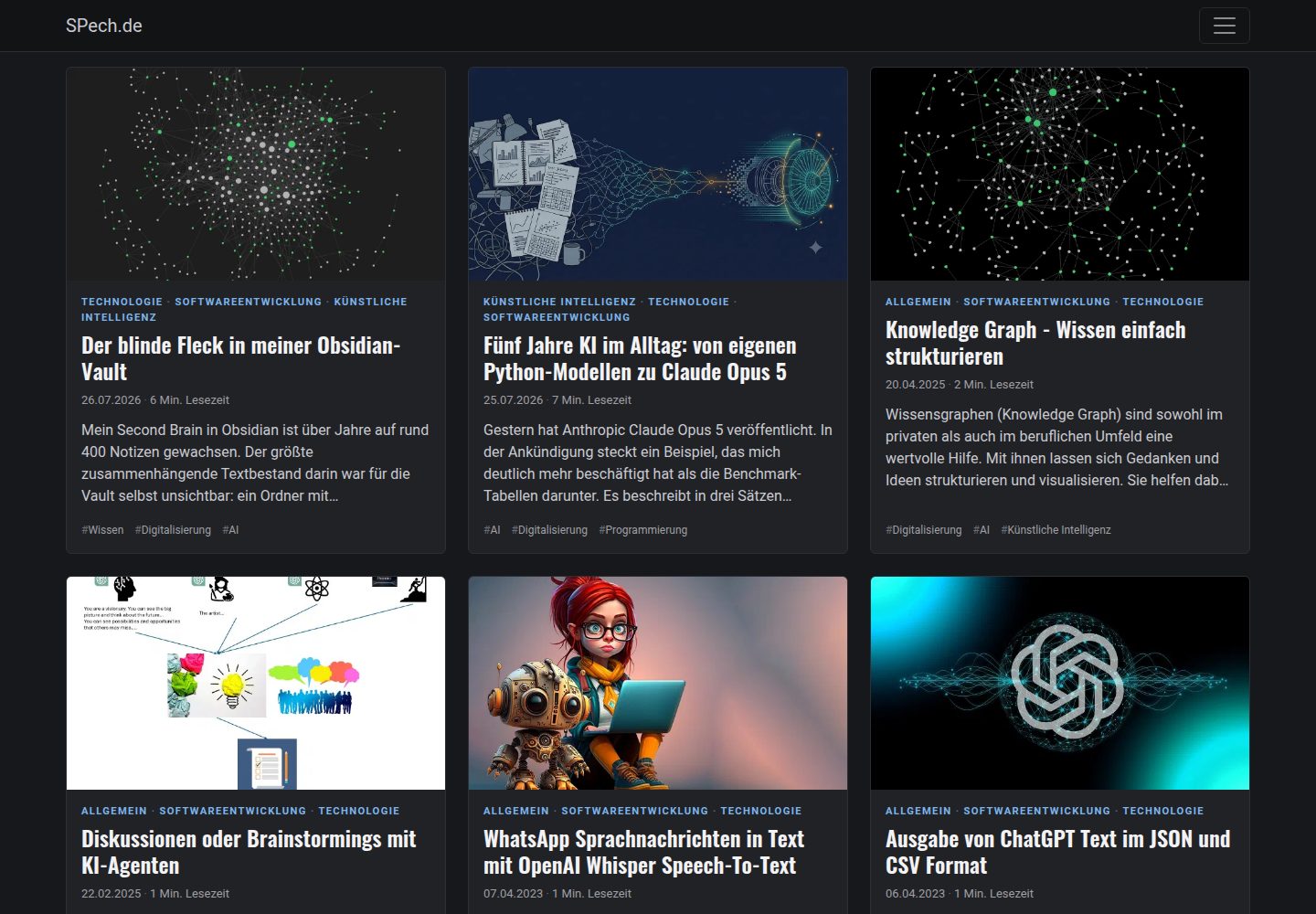
提供 dark、light、blue 及 Bootstrap 默认等多套配色主题
HugoHTML博客
bootstrap-bp-hugo-theme — Hugo 博客模板
作者 spech66
基于 Bootstrap 的 Hugo 博客主题,提供配色主题、SEO 元信息、图片自动缩放与 WebP 转换、多语言等开箱配置。
看看你的网站会是什么样
浏览真实页面截图,比较内容排版与手机效果。点击下方缩略图切换,放大查看整页细节。
全部页面与视图 2
截图用于了解视觉与布局,交互效果请以实际项目为准。
采集于 2026-10-03查看来源
值得关注的模板亮点
从已有项目资料中,快速了解它的特点。
特色图片自动缩放并转换为 WebP,同时用于 Open Graph 与 Twitter Cards
支持 Schema.org 结构化数据,含 Event 类型页面
默认不加载完整 Bootstrap JavaScript 包,仅保留小型导航脚本
支持多语言与 i18n,社交图标以内联 SVG 输出
Bootstrap 组件按需编译,可通过覆盖导入文件启用 Modal、Carousel 等
模板详细介绍
这是一个基于 Bootstrap 构建的 Hugo 博客主题,仓库采用 MIT 许可。主题围绕 Hugo 的模板与配置机制组织,主要面向个人博客、文章列表与内容型站点。它提供多套配色主题(dark、light、blue 或 Bootstrap 默认),并支持通过 config.toml 中的 params 调整起始页分栏、日期格式、列表分组、摘要显示、菜单展开方式、阅读时间显示等行为。
在内容呈现上,主题支持 Page、Post、Audio、Video、Quote、Link 等页面原型,卡片会显示分类、日期、阅读时间与标签,并可通过自定义 CSS 变量调整强调色。图片方面使用 Hugo 的 feature/cover 命名方式设置特色图,自动缩放并转换为 WebP,同时用于 Open Graph 与 Twitter Cards。主题还提供 img-post 短代码实现文中浮动图片。
SEO 与结构化数据方面,主题支持 Schema.org、Open Graph 与元信息,配置作者后可启用 Schema.org;带有 datum 等 front matter 的页面会生成 Event 结构化数据。主题包含 main 与 footer 两个菜单,社交图标以内联 SVG 输出,图标数据存放在 data/bpicons.json,可自行扩展。
性能与资源控制方面,主题默认不加载完整 Bootstrap JavaScript 包,仅保留约 1 KB 的导航脚本;Bootstrap 组件按需编译,Modal、Carousel、Tooltip 等默认未包含,需要时可在站点中复制并取消注释对应导入,同时开启 bootstrapJS。自定义 CSS/JS 可合并压缩为单一文件,也可通过配置或页面元数据单独引入。主题支持多语言与 i18n,并移除了 Hugo 原生的 Google Analytics 模板。
HugoHTML博客
适合你的项目吗?
适用场景
- 搭建以文章列表和卡片展示为主的个人博客
- 需要自动处理特色图片并输出 WebP 的内容站点
- 希望为文章配置 Open Graph、Twitter Cards 与 Schema.org 元信息的站点
- 需要多语言支持并自定义菜单与社交图标的 Hugo 项目
适合人群
- 使用 Hugo 构建博客并希望基于 Bootstrap 定制的开发者
- 需要开箱即用的 SEO 元信息与结构化数据配置的站点
- 希望通过 config.toml 参数调整布局与显示行为的用户
- 需要按需引入 Bootstrap 组件以控制页面资源的项目
上手与定制指南
结合仓库当前版本的说明,按下面的资料检查内容、配置与运行要求。
- 1
在 Hugo 站点目录下创建 themes 文件夹,并通过 git clone 将主题仓库克隆到其中。
- 2
以 exampleSite 中的 config.toml 为基础配置站点参数,如 startPageColumns、themeColor、showPostSummary 等。
- 3
如需使用 Modal、Carousel 等 Bootstrap 组件,将主题的 assets/sass/_bootstrap-imports.scss 复制到站点并取消对应注释,同时设置 bootstrapJS = true。
- 4
自定义样式可写入 assets/css/custom.css,脚本写入 assets/js/custom.js,主题会将其与主题文件合并压缩。
- 5
主题已移除 Hugo 原生 Google Analytics 模板,如需统计需自行接入。
授权与来源资料
使用条件与限制
免费使用 · 保留许可声明本次收录的是公开仓库中采用 MIT 许可的免费版本;免费范围为该版本代码,不代表外部服务或第三方素材免费。
使用时需要遵守
- 允许免费使用、修改、商用和分发该版本代码。
- 分发代码副本或实质性部分时,保留原作者版权声明和完整 MIT 许可声明。
- 代码按现状提供;担保与责任限制以原许可证及适用法律为准。
额外费用与待核对事项
- 主题已移除 Hugo 原生 Google Analytics 模板,如需网站统计须自行接入第三方统计服务,可能涉及外部账号或费用。
- 使用 Modal、Carousel、Tooltip 等需要 JavaScript 的 Bootstrap 组件时,必须额外设置 bootstrapJS = true 才会加载对应脚本。
- 主题不再内置 Font Awesome,也不默认加载完整 Bootstrap JavaScript 包;如需这些功能须自行通过 csscdn 或 bootstrapJS 配置引入。
- 主题内图标字形来自 Font Awesome Free 5,采用 CC BY 4.0 许可,与主题代码的 MIT 许可不同,使用时需遵守其署名等条件。
- 演示图片、字体、图标及其他第三方素材需按各自许可核对,不能仅凭代码的 MIT 许可判断。
- 域名、托管、数据库、支付或 AI 等外部服务可能另外收费。
查看原文依据
Permission is hereby granted, free of charge
许可证原文
The native Hugo Google Analytics template has been removed!
README 原文
Components that need JavaScript also require `bootstrapJS = true`.
README 原文
Font Awesome is no longer part of the theme and the Bootstrap JavaScript bundle is no longer loaded by default.
README 原文
https://github.com/spech66/bootstrap-bp-hugo-theme/blob/master/LICENSEhttps://github.com/spech66/bootstrap-bp-hugo-theme/blob/master/README.mdThe icons are stored in `data/bpicons.json` (glyphs from [Font Awesome Free 5](https://fontawesome.com/license/free), CC BY 4.0).
README 原文
DeepSeek 根据仓库许可证和 README 整理 ·2026-10-03。结果仅覆盖已读取资料,依赖、图片、字体及后续条款变更以各自原文为准。
项目核对记录与介绍依据
模板资料
- 来源平台
- Hugo Themes
- 资料与维护参考分
- 资料较完整 · 92 / 100
- 技术栈
- Hugo · HTML
- 网站类型
- 博客
这个分数如何计算
本站按许可资料(最高30分)、演示链接(12分)、预览图(10分)、Star数(15分)、记录的维护时间(15分)、描述完整度(8分)、功能记录(5分)和分类资料(5分)计算。它不是代码、安全或性能测试,也不是 Google 评分;有链接不代表已实测可用。
这个项目需要核对什么
- 记录的仓库更新时间
- 2026-10-03
- 截图检查日期
- 2026-10-03
已收录演示链接。请用你的内容与屏幕尺寸检查;有演示不代表表单、认证或支付已经可用。
目录记录的主要技术栈是 Hugo。请通过依赖清单和锁文件核对实际版本与托管要求。这些说明基于收录资料,不代表代码审计或部署实测。
查看具体选型方法 →介绍的制作与核对状态
介绍由 AI 辅助整理目录与仓库资料。仓库作者不等于这篇介绍的审核者。
已完成服务器许可规则与 AI 来源核对;未经过人工编辑审核。
查看当时使用的来源资料
SHA-256: 378aa5b790706d77f5ad99d77e466531089bdadb6293ac6e4555c76e6cac554b
2026-10-03T07:55:37.053Z
来源文件 / 仓库
# Bootstrap-BP hugo theme
[Bootstrap v5](https://getbootstrap.com/) based Hugo theme which provides out of the box best practices like performance and SEO readiness. Featured images will be resized automatically. This is based on the [Hugo docs](https://gohugo.io/templates/homepage/), [hugo-best-practices](https://github.com/spech66/hugo-best-practices), [Front-End Checklist](https://github.com/thedaviddias/Front-End-Checklist) and the [Front-End Performance Checklist](https://github.com/thedaviddias/Front-End-Performance-Checklist). Contains four different color themes.
Other themes by Sebastian Pech: [Bootstrap-BP](https://github.com/spech66/bootstrap-bp-hugo-theme), [Materialize-BP](https://github.com/spech66/materialize-bp-hugo-theme),
[Bootstrap-BP hugo startpage](https://github.com/spech66/bootstrap-bp-hugo-startpage).
## Table of contents
<!-- START doctoc generated TOC please keep comment here to allow auto update -->
<!-- DON'T EDIT THIS SECTION, INSTEAD RE-RUN doctoc TO UPDATE -->
- [Bootstrap-BP hugo theme](#bootstrap-bp-hugo-theme)
- [Table of contents](#table-of-contents)
- [Features](#features)
- [Install the theme](#install-the-theme)
- [Update the theme](#update-the-theme)
- [Run example site](#run-example-site)
- [Configuration and theme specific settings](#configuration-and-theme-specific-settings)
- [Screenshots of configurations](#screenshots-of-configurations)
- [Google Analytics](#google-analytics)
- [Page templates / archetypes](#page-templates--archetypes)
- [Schema.org support](#schemaorg-support)
- [Images, Open Graph and Twitter Cards](#images-open-graph-and-twitter-cards)
- [Menus](#menus)
- [Social Icons](#social-icons)
- [Icons](#icons)
- [Custom CSS/JS](#custom-cssjs)
- [Post cards](#post-cards)
- [Floating images](#floating-images)
- [Performance: Bootstrap parts, JavaScript and Font Awesome](#performance-bootstrap-parts-javascript-and-font-awesome)
<!-- END doctoc generated TOC please keep comment here to allow auto update -->
## Features
- Color themes
- SEO best practices supported (Schema.org, open graph, meta information, ...)
- Automatically resizing of images and conversion to WebP (partial `image-webp.html`, used by cards, `optfigure` and `featurette-image`)
- One minified file per resource only (js, css)
- CDN font support (Google Fonts, ...)
- Optional masonry-like mode for startpage
- Settings for easy customization of layouts and features
- Multiple page templates / archetypes supported
- Icons for Social Media as inline SVG (no icon font)
- No Bootstrap JavaScript bundle by default (~1 KB navigation script)
- Custom css/js
- Floating images in posts (shortcode `img-post`)
- Multilingual and i18n support
- ...
## Install the theme
With Git installed, run the following commands inside the Hugo site folder. If Hugo has not yet been installed, read the setup guide [here](https://gohugo.io/getting-started/quick-start/).
```sh
mkdir themes
cd themes
git clone https://github.com/spech66/bootstrap-bp-hugo-theme.git
```
You can get a zip of the latest version of the theme from the [home page](https://github.com/spech66/bootstrap-bp-hugo-theme) and extract it to the themes folder.
## Update the theme
Go to the themes folder as in the installation and run the following command.
```sh
git pull
```
## Run example site
Go to the `exampleSite` folder from the theme `themes/bootstrap-bp-hugo-theme/exampleSite` and run the following command.
```sh
hugo server --themesDir ../..
```
## Configuration and theme specific settings
Most settings should be done with hugo specific variables. There are only a few (optional) additional `[params]`.
Use the `config.toml` from the `exampleSite` subdirectory as base.
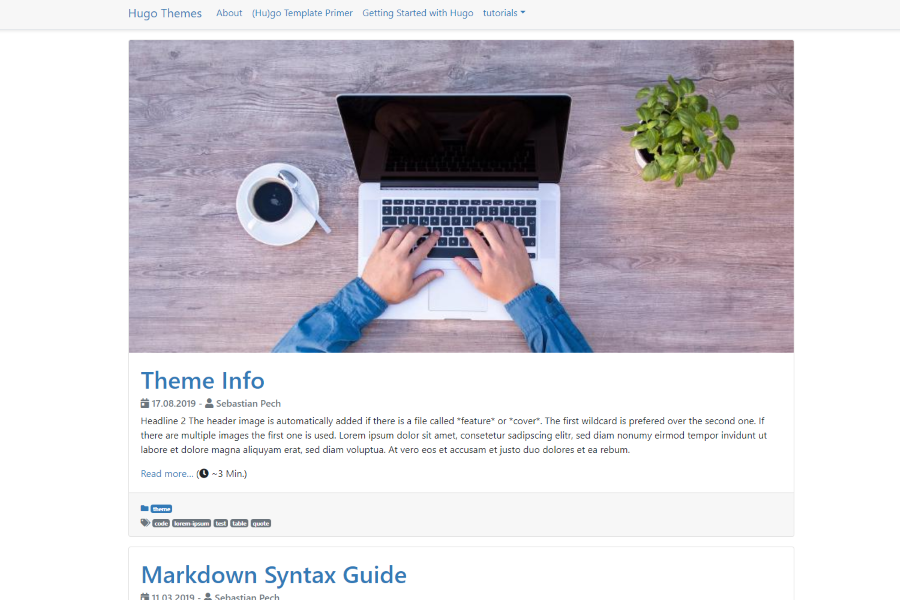
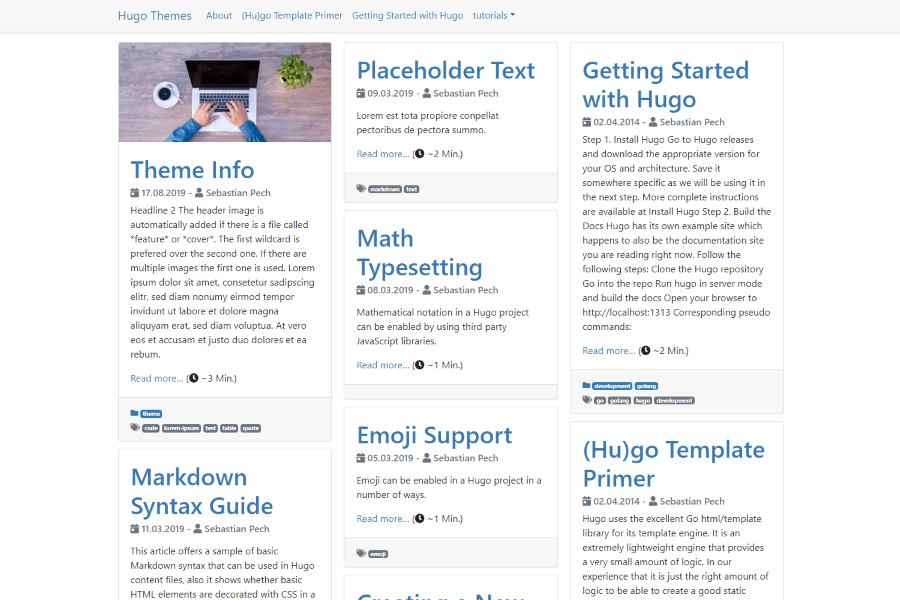
- `startPageColumns = true` will show the start page in a Masonry-like mode.
- `customDateFormat = "02.01.2006"` to override the date format.
- `showListsGrouped = true` to add headers for every year.
- `showPostSummary = true` to only show a summary on index and lists.
- `alwaysExpandMenu = true` to expand the menu on non-mobile devices otherwise the mobile button is shown on all devices.
- `themeColor` set to dark, light, blue (do not set for bootstrap default).
- `hideReadingTime` to hide reading time.
- `bootstrapJS = true` to load the full Bootstrap JavaScript bundle (modals, tooltips, carousels, ...). Default: only a small navigation script.
## Screenshots of configurations
`startPageColumns = false`
`startPageColumns = true`
## Google Analytics
The native Hugo Google Analytics template has been removed!
## Page templates / archetypes
This theme has support for the following archetypes. Based on the specified types the layout and functionality of a page is slightly changed.
- Page (not on the startpage)
- Post (regular post/blog pages)
- Audio (shows spotify in the header)
- Video (shows youtube in the header)
- Quote (highlights a quote and the author)
- Link (show a link with the page title)
## Schema.org support
Provide one author to enable the Schema.org support.
```yaml
[params.author]
name = "Sebastian Pech"
```
Pages with a `datum` in the front matter (courses, workshops, events) get an `Event` schema. Used parameters: `datum`, `enddatum` or `termine` (list with `end`), `ort`, `adresse`, `preis` ("kostenlos"/"Spende" becomes 0), `image` and `anmeldung_ab`. The offer's `validFrom` is taken from `anmeldung_ab`, then the page date, then a `YYYY-MM` prefix of the content folder name, otherwise the event start.
## Images, Open Graph and Twitter Cards
This theme uses Hugos `feature/cover` name method to set the optimized feature image. The image named `*feature*` or `*cover*` is used for the posts featured image and get resized. This will also be in the Twitter Cards and Open Graph block.
The header image is automatically added if there is a file called `*feature*` or `*cover*`. The first wildcard is preferred over the second one. If there are multiple images the first one is used.
```yaml
# Site Config toml
title = "My hugo site"
[params]
description = "Text about the site"
# Post yaml
---
title: "{{ replace .Name "-" " " }}"
date: {{ .Date }}
publishdate: {{ now.Format "2006-01-02" }}
lastmod: {{ now.Format "2006-01-02" }}
draft: true
description: "Text about this post"
tags:
- "tag 1"
---
```
## Menus
There are two menus in the theme. `main` and `footer`. Specify the entries in the config or the header of the content. `params.icon` shows an icon from `data/bpicons.json` in front of the name (see [Icons](#icons)).
```yaml
[menu]
[[menu.main]]
identifier = "about"
name = "About"
url = "/about/"
weight = 10
[menu.main.params]
icon = "newspaper"
[[menu.footer]]
identifier = "Imprint"
name = "Imprint"
url = "/imprint/"
weight = 10
[[menu.footer]]
identifier = "categories"
name = "Categories"
url = "/categories/"
weight = 20
[[menu.footer]]
identifier = "tags"
name = "Tags"
url = "/tags/"
weight = 30
```
```yaml
---
[...]
menu = "main"
---
```
## Social Icons
Icons for Social Media. Add the block to the config.
```yaml
# Sets Social Media icons to appear and link to your account. Value should be your
# username unless otherwise noted.
# Code from https://themes.gohugo.io/future-imperfect/ theme
[params.social]
# Coding Communities
github = ""
gitlab = ""
stackoverflow = "" # User Number
bitbucket = ""
jsfiddle = ""
codepen = ""
# Visual Art Communities
deviantart = ""
flickr = ""
behance = ""
dribbble = ""
# Publishing Communities
wordpress = ""
medium = ""
# Professional/Business Oriented Communities
linkedin = ""
linkedin_company = ""
foursquare = ""
xing = ""
slideshare = ""
# Social Networks
facebook = ""
googleplus = ""
reddit = ""
quora = ""
youtube = ""
vimeo = ""
whatsapp = "" # WhatsApp Number
instagram = ""
tiktok = "" # @username
tumblr = ""
twitter = ""
skype = ""
snapchat = ""
pinterest = ""
telegram = ""
discord = "" # invite link
# Email
email = ""
```
## Icons
All icons of the theme are inline SVGs rendered by the `icon.html` partial. Only the icons a page actually uses end up in its HTML, no icon font is downloaded.
```go-html-template
{{ partial "icon.html" "clock" }}
{{ partial "icon.html" (dict "name" "github" "class" "icon-2x") }}
```
The icons are stored in `data/bpicons.json` (glyphs from [Font Awesome Free 5](https://fontawesome.com/license/free), CC BY 4.0). To add your own icon, create `data/bpicons.json` in your site with an entry `"name": {"w": <width>, "d": "<path>"}`. The path uses font units (512 units high, baseline at 0, like the Font Awesome 5 SVG fonts).
## Custom CSS/JS
The theme provides two ways for custom css/js. The first way is writing your styles to `/assets/css/custom.css` and scripts to `/assets/js/custom.js`. This will merge and minify the styles/scripts with the theme specific files resulting in only one file for the whole website.
The second way is using the Site configuration or the post metadata to target specific files in the `/assets/` folder. This will result in one import line per script/style.
```toml
[params]
js=["/js/test_site.js"]
jscdn=["https://cdn.jsdelivr.net/npm/[email protected]/dist/vue.js"]
css=["/css/test_site.css"]
csscdn=["https://fonts.googleapis.com/css?family=Roboto&display=swap"]
```
```yaml
---
js:
- /js/test.js
jscdn:
- https://cdn.jsdelivr.net/npm/[email protected]/dist/vue.js
css:
- /css/test.css
csscdn:
- https://fonts.googleapis.com/css?family=Roboto:100,300,400,500,700,900
---
```
## Post cards
Cards show the categories as a small line above the title, a meta line (date, reading time; on the full page also last updated and author) and the tags below. Tags that are also a category are skipped, lists show at most three tags. In lists the whole card links to the post and the summary is cut after four lines.
- Accent color of the category line: set `--bp-accent` in your `assets/css/custom.css`, e.g. `:root { --bp-accent: #c2410c; }`. Default is the `$primary` color of the color theme.
- Extra content below the meta line: create `layouts/partials/content_card_body_extra.html` in your site. The theme ships an empty one.
- Reading time label: i18n key `readingTimeShort`.
**Upgrading from older versions:** sites with their own copy of `content_card_body.html` should remove it (or compare it with the new one), otherwise the old meta line and "Read more" link stay.
## Floating images
`img-post` shows a resource of the page (max. 384 px wide, WebP) floating right or left of the text, or centered.
```
{{< img-post file="photo.jpg" alt="Description" type="right" >}}
```
`type` is `right`, `left` or `center` (default). Positional parameters (`path`, `file`, `alt`, `type`) still work, `path` is ignored.
## Performance: Bootstrap parts, JavaScript and Font Awesome
To keep pages small the theme only compiles the Bootstrap components it uses (see `assets/sass/_bootstrap-imports.scss`). Modal, carousel, tooltip, popover, offcanvas, accordion, toasts and a few others are left out.
If you need one of them, copy `assets/sass/_bootstrap-imports.scss` from the theme to `assets/sass/_bootstrap-imports.scss` in your site and uncomment the component. Components that need JavaScript also require `bootstrapJS = true`.
**Upgrading from older versions:** Font Awesome is no longer part of the theme and the Bootstrap JavaScript bundle is no longer loaded by default.
- Bootstrap JavaScript components (modal, tooltip, ...): set `bootstrapJS = true`.
- Menu icons via `pre = "<i class='fas fa-...'></i>"`: replace them with `[menu.main.params] icon = "..."`.
- Font Awesome classes in your content or layouts (`<i class="fas fa-...">`): switch to `{{ partial "icon.html" "name" }}`, or load Font Awesome yourself with the existing `csscdn` parameter:
```toml
[params]
csscdn = ["https://cdnjs.cloudflare.com/ajax/libs/font-awesome/5.15.4/css/all.min.css"]
```
看看同类模板
对比同技术栈与用途的模板,找到更适合的视觉与内容结构。

hugo-PaperMod
PaperMod 是 Hugo 生态里知名度较高的主题之一,定位很明确:给博客和轻量作品集站点提供一套干净、响应式的阅读界面。
Hugo · 作品集

LoveIt
❤️A clean, elegant but advanced blog theme for Hugo 一个简洁、优雅且高效的 Hugo 主题
Hugo · 博客

hugo-coder
A minimalist blog theme for hugo.
Hugo · 博客

blowfish
Personal Website & Blog Theme for Hugo
Hugo · 博客

hugo-paper
🪺 A simple, clean, customizable Hugo theme
Hugo · 博客

hextra
Hextra 是一个 Hugo 主题,定位在文档站与博客之间:既提供侧边栏导航、目录、面包屑、分页这类文档站结构,也能承载博客内容。
Hugo · 文档