Integrated Headless CMS with OAuth for backend content management
AstroBlog
Twilight — Astro Blog Template
By Spr-Aachen
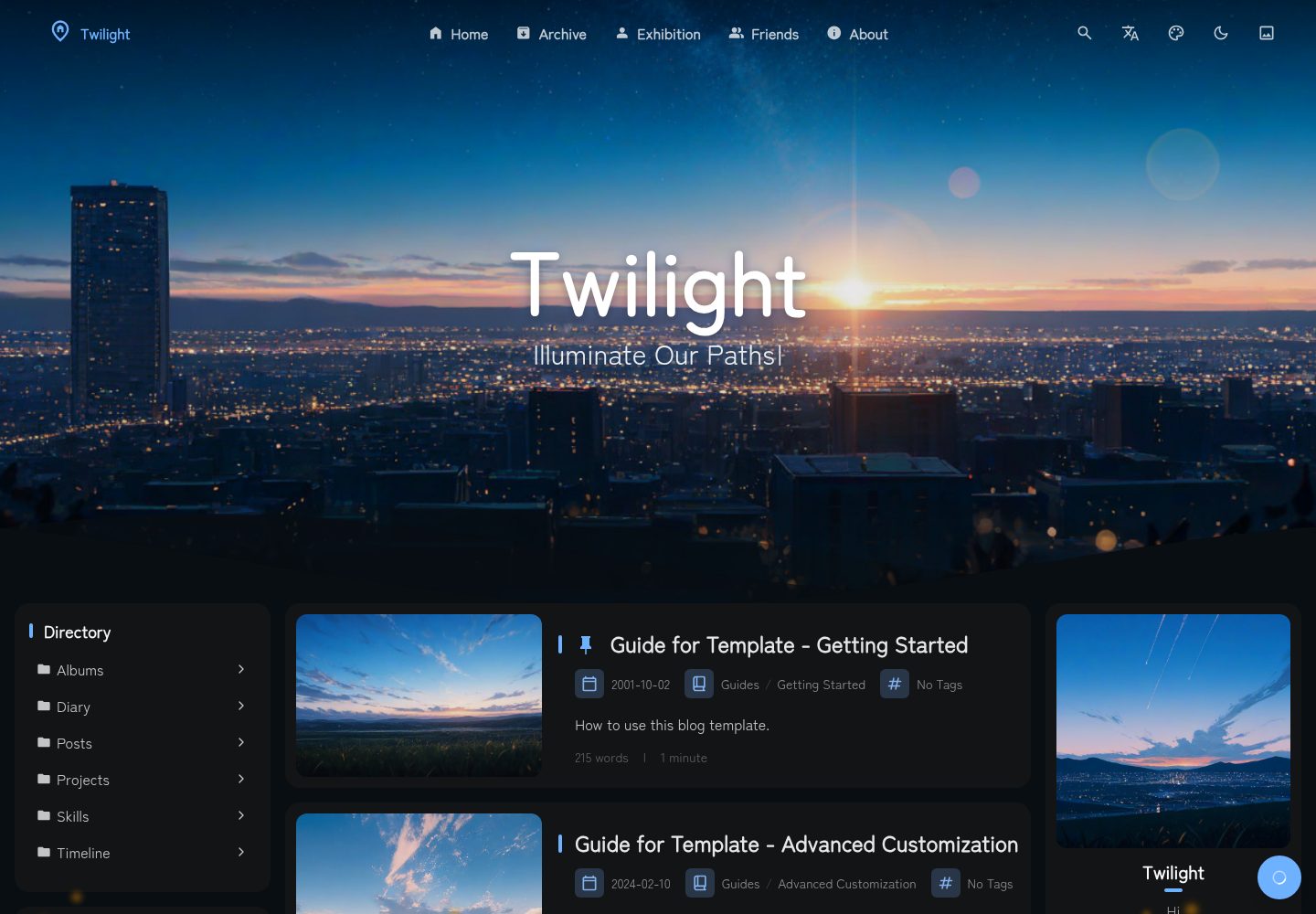
Twilight is an Astro-based static blog template with integrated Headless CMS backend management, featuring built-in content pages for articles, projects, timeline, diary, gallery, and friend links, along with various Markdown enhancement components.
Explore the design
Compare the page layouts and mobile experience. Open any screenshot for a closer look.
Desktop homepage1 / 3
Desktop captureTop of page
Actual screenshot captured by the server browser.
All pages & views 3
Screenshots show visual appearance; interactive behavior may differ.
Recorded 2026-10-04View source
What stands out
A quick read of the recorded project description.
Supports pinned, draft, and AES-encrypted password-protected articles
Built-in information pages for articles, projects and skills, timeline, diary, gallery, and friend links
Markdown enhancements: GitHub repository cards, music cards, callout blocks, code block enhancements, Mermaid, KaTeX
Configurable sidebar widgets, comment systems, music player, and Live2D character widget
Provides multilingual interfaces and static hosting adapters for Cloudflare, Netlify, Vercel, EdgeOne, etc.
Template Details
Twilight is a static blog template built with Astro, positioned as a "static blog with backend management." By integrating a Headless CMS with OAuth, it enables content management through a backend while maintaining static site output. The template centers on blogging and also provides information pages such as project and skill showcases, timeline, diary, gallery, and friend links, and automatically generates article navigation, archives, table of contents, and RSS/Atom feeds.
At the content level, Twilight supports pinned and draft articles, AES-encrypted password-protected articles, and Markdown writing with tags and categories. Markdown enhancements include GitHub repository cards, music cards, callout blocks, code block copy/collapse/line numbers/language badges, Mermaid diagrams, and KaTeX math formulas.
On the interface side, the template offers a configurable loading overlay, a sidebar widget system (profile, announcements, table of contents, categories, tags, statistics, etc.), comment systems (Waline, Twikoo), a music player, a Live2D character widget, and visual options such as transition animations, theme colors, dynamic wallpapers, particle effects, and custom fonts. The template includes three interface languages (en/zh/ja) and over 12 page translation languages, and provides static hosting adapters for Cloudflare, Netlify, Vercel, EdgeOne, as well as Docker support.
For usage, Twilight requires forking or cloning the repository, installing pnpm dependencies, then configuring the blog in twilight.config.yaml and managing content in src/content. The template is MIT licensed, with the free scope covering this version's code; third-party assets such as demo images, fonts, and icons, as well as external services like domains and hosting, must be independently verified and borne by the user.
AstroBlog
Is it right for your project?
Use Cases
- Building a personal static blog with backend content management capabilities
- Displaying comprehensive information pages such as personal projects, skills, timeline, and diary
- Writing scenarios requiring article management features like password-protected articles, drafts, and pinned posts
- Publishing technical content using Markdown enhancement components (repository cards, music, diagrams, formulas)
- Blog sites requiring multilingual interfaces and static hosting deployment
Suitable For
- Individual developers using Astro who want to publish a blog statically
- Writers who need CMS backend content management without maintaining dynamic services
- Personal sites requiring multiple content pages such as project showcases, timeline, and gallery
- Technical bloggers who prefer Markdown writing and need diagram, formula, and code block enhancements
Getting started & customization
Use these recorded setup notes alongside the repository instructions for your chosen version.
- 1
First fork or clone the repository, install pnpm, then run pnpm install to install dependencies
- 2
Configure blog settings in twilight.config.yaml and manage site content in src/content
- 3
Use pnpm dev to start the local development server, pnpm build to build to ./dist/
- 4
CMS integration uses OAuth, requiring configuration of corresponding credentials per documentation
- 5
Code is MIT licensed, but third-party assets such as demo images, fonts, and icons, as well as external services like domains and hosting, must be independently verified and borne by the user
License & source material
Usage conditions & limitations
Free to use · keep license noticeThis entry covers the free version under the MIT license in the public repository; the free scope is limited to this version's code and does not imply that external services or third-party assets are free.
Must comply with when using
- Permits free use, modification, commercial use, and distribution of this version's code.
- When distributing copies or substantial portions of the code, retain the original author's copyright notice and the full MIT license notice.
- Code is provided as-is; warranties and limitations of liability are governed by the original license and applicable law.
Additional costs & items to verify
- CMS integration uses a Headless CMS with OAuth, requiring configuration of corresponding credentials/accounts to use backend content management features.
- Background music player relies on the meting API or a local playlist; using the meting API depends on that external service.
- Visit statistics rely on the Umami analytics service, requiring self-deployment or configuration of Umami to obtain visitor data.
- Comment functionality relies on Waline or Twikoo comment systems, requiring self-deployment or configuration of the corresponding services.
- Deploying to platforms like Cloudflare, Netlify, Vercel, EdgeOne requires bearing the respective hosting service and domain costs.
- Demo images, fonts, icons, and other third-party assets must be verified under their respective licenses and cannot be judged solely by the code's MIT license.
- External services such as domains, hosting, databases, payments, or AI may incur additional charges.
View Original Text Basis
Permission is hereby granted, free of charge
Original License Text
CMS Integration**: Headless CMS with OAuth for easy content management
Original README
Music Player**: Background music with meting API or local playlist support
Original README
Analytics Support**: Umami analytics integration for visitor insights
Original README
Comment System**: Waline and Twikoo comment systems integration
Original README
https://github.com/Spr-Aachen/Twilight/blob/main/LICENSEhttps://github.com/Spr-Aachen/Twilight/blob/main/README.mdMultiple Deployment Adapters**: Support Cloudflare, Netlify, Vercel, EdgeOne and other static hosting platforms
Original README
Compiled by DeepSeek based on repository license and README ·2026-10-04. Results only cover the materials read; dependencies, images, fonts, and subsequent term changes are subject to their respective original texts.
Project checks & description sources
Template Information
- Source platforms
- Astro Themes
- Documentation and maintenance reference score
- More documented · 91 / 100
- Technologies
- Astro
- Website type
- Blog
How this score is calculated
Our heuristic uses license records (up to 30), a demo link (12), a preview (10), stars (15), recorded maintenance (15), description completeness (8), feature records (5) and classification data (5). It is not a code, security or performance test, or a Google score. A link does not establish tested functionality.
What to verify for this project
- Repository update recorded
- 2026-10-02
- Screenshot last checked
- 2026-10-04
A demo link is listed. Check it with your own content and viewport sizes; its presence does not confirm that forms, authentication or payments work.
The catalog identifies Astro as the primary stack. Check the actual dependency manifest and lockfile for versions and hosting requirements. These notes use recorded metadata, not a code audit or a deployment test.
Use a selection guide →How this description was prepared
AI-assisted description based on catalog records and repository material. Repository authors are not automatically the reviewers of this description.
Review declaration: [email protected] · 2026-10-04
Inspect the recorded source material
SHA-256: 0f4334f85c28e216b554f42fb6fb3c45bb91804529770ae27725c402eb49c674
2026-10-04T03:31:52.486Z
Source file / repository<div align = "center">
# Twilight
A CMS integrated static blog template built with Astro framework.
[**🖥️ Live Demo**](https://twilight.spr-aachen.com)
[**📝 Documentation**](https://docs.twilight.spr-aachen.com/en)
[](https://space.bilibili.com/359461611/lists/6641229)
[](https://youtube.com/playlist?list=PLzjq8Hx1SRV7yqZQiACcCJmKPeg5D8JKe&si=Bcz2o0PF8MFvx8ec)
<table style="width: 100%; table-layout: fixed;">
<tr>
<td colspan="5"><img alt="Desktop" src="https://docs.twilight.spr-aachen.com/preview/desktop.jpg" style="max-width: 100%;"></td>
</tr>
<tr>
<td><img alt="Mobile_4" src="https://docs.twilight.spr-aachen.com/preview/mobile_4.jpg" style="max-width: 100%;"></td>
<td><img alt="Mobile_2" src="https://docs.twilight.spr-aachen.com/preview/mobile_2.jpg" style="max-width: 100%;"></td>
<td><img alt="Mobile_1" src="https://docs.twilight.spr-aachen.com/preview/mobile_1.jpg" style="max-width: 100%;"></td>
<td><img alt="Mobile_3" src="https://docs.twilight.spr-aachen.com/preview/mobile_3.jpg" style="max-width: 100%;"></td>
<td><img alt="Mobile_5" src="https://docs.twilight.spr-aachen.com/preview/mobile_5.jpg" style="max-width: 100%;"></td>
</tr>
</table>
</div>
---
<div align = "center">
English | [**中文**](docs/README_ZH.md)
</div>
## ✨ Features
### Content Management
- **CMS Integration**: Headless CMS with OAuth for easy content management
- **Pinned & Draft Posts**: Pin important posts or hide drafts in production
- **Password-Protected Posts**: AES-encrypted articles with password access
- **Automatic Navigation**: Auto-generated post navigation, archive, and TOC
- **Data Visualization**: Visualized personal data like projects, skills, timeline
### Content Pages
- **Blog Posts**: Full-featured markdown blogging with tags and categories
- **Projects & Skills Showcase**: Visual galleries for your portfolio
- **Timeline**: Biography page with education, work, achievements, and skills
- **Diary**: Short-form microblog-style posts with timestamps
- **Albums**: Image gallery with Fancybox lightbox integration
- **Friends Links**: Friend link exchange with icons and descriptions
- **RSS & Atom Feeds**: Dedicated info pages with auto-generated XML feeds
### Markdown Enhancements
- **GitHub Repository Cards**: Embed live repo cards via `::github{repo="..."}`
- **Music Cards**: Inline audio player with lyrics via `::music{...}`
- **Admonitions / Callouts**: Note, tip, warning, and caution styled blocks
- **Code Block Enhancements**: Copy button, collapse, line numbers, language badges
- **Mermaid Diagrams**: Render ` ```mermaid ` code blocks as diagrams
- **KaTeX Math Rendering**: LaTeX math expressions with `$...$` and `$$...$$`
### UI Components
- **Loading Overlay**: Configurable splash screen with spinner animation
- **Sidebar Widget System**: Configurable profile, announcement, TOC, categories, tags, directory, statistics etc.
- **Analytics Support**: Umami analytics integration for visitor insights
- **Comment System**: Waline and Twikoo comment systems integration
- **Music Player**: Background music with meting API or local playlist support
- **PIO Widget**: Interactive Live2D character with customizable dialog
### Visual Effects
- **Smooth Transition Animations**: Polished page component transition animations
- **Customizable Theme Colors**: Real-time customizable color schemes
- **Dynamic Wallpaper System**: Carousel support with multiple display modes
- **Immersive Particle Effects**: Highly customizable animated particles
- **Custom Fonts**: Configurable web fonts via CSS links or local files
### Compatibility
- **Modern & Responsive Design**: Fully optimized for desktop and mobile devices
- **Multilingual Capability**: 3 UI languages (en/zh/ja) & 12+ page translation languages
- **Multiple Deployment Adapters**: Support Cloudflare, Netlify, Vercel, EdgeOne and other static hosting platforms
- **Docker Support**: Ready-to-use Docker and docker-compose setup
## 💻 Configuration
### 0. Fork the repository
Click the `Fork` button in the top-right corner to fork the repository to your GitHub account
### 1. Clone the repository
Click `Code` -> `Open with GitHub Desktop`, or run `git clone <repository-url>` (Git required)
### 2. Install dependencies
Run the following commands in the project directory:
```bash
# Install pnpm if not already installed
npm install -g pnpm
# Install project dependencies
pnpm install
```
### 3. Configure your blog
- [Customize blog settings](https://docs.twilight.spr-aachen.com/en/config/core) inside `twilight.config.yaml`
- [Manage site content](https://docs.twilight.spr-aachen.com/en/config/content) inside `src/content`
### 4. Start the development server:
Run the following command in the project directory:
```bash
pnpm dev
```
## 🚀 Deployment
Deploy your blog to any static hosting platform
## ⚡ Commands
| Command | Action |
|:----------------------------|:------------------------------|
| ~~`pnpm lint`~~ | ~~Check and fix code issues~~ |
| ~~`pnpm format`~~ | ~~Format code with Biome~~ |
| `pnpm check` | Run Astro error checking |
| `pnpm dev` | Start local dev server |
| `pnpm build` | Build site to `./dist/` |
| `pnpm preview` | Preview build locally |
| `pnpm astro ...` | Run Astro CLI commands |
| `pnpm new-post <filename>` | Create a new blog post |
## 🙏 Acknowledgements
- Prototype - [Fuwari](https://github.com/saicaca/fuwari)
- Inspiration - [Yukina](https://github.com/WhitePaper233/yukina) & [Mizuki](https://github.com/matsuzaka-yuki/Mizuki)
- Translation - [translate](https://gitee.com/mail_osc/translate)Explore similar templates
Compare previews and descriptions within the same stack and category.

astrowind
AstroWind is a free, open-source Astro starter theme using Astro and Tailwind CSS, released under the MIT license.
Astro · Blog

astro-paper
AstroPaper is a minimal, responsive, accessible, and SEO-friendly Astro blog theme. Articles are stored as Markdown/MDX in src/content/posts/, with subdirectories affecting URLs.
Astro · Blog

fuwari
Fuwari is a static blog template built with Astro and Tailwind CSS for personal blogs. It manages posts as Markdown files in src/content/posts/, with frontmatter for title, date, description, cover, tags, categories, draft status, and language.
Astro · Blog

Firefly
Firefly is a clean personal blog theme forked from Astro and Fuwari, offering four background modes, single/double sidebar and list/grid layouts, Pagefind client-side full-text search, and a six-language UI.
Astro · Blog

astro-theme-cactus
Astro Cactus is an Astro-based blog and portfolio theme that uses Markdown/MDX content collections to manage posts, notes, and tags, with frontmatter type-checked by a schema.
Astro · Portfolio

astrofy
Astrofy is a free and open-source personal portfolio website template built with Astro and TailwindCSS, with built-in blog, CV timeline, project showcase, store, and RSS feed modules.
Astro · Portfolio