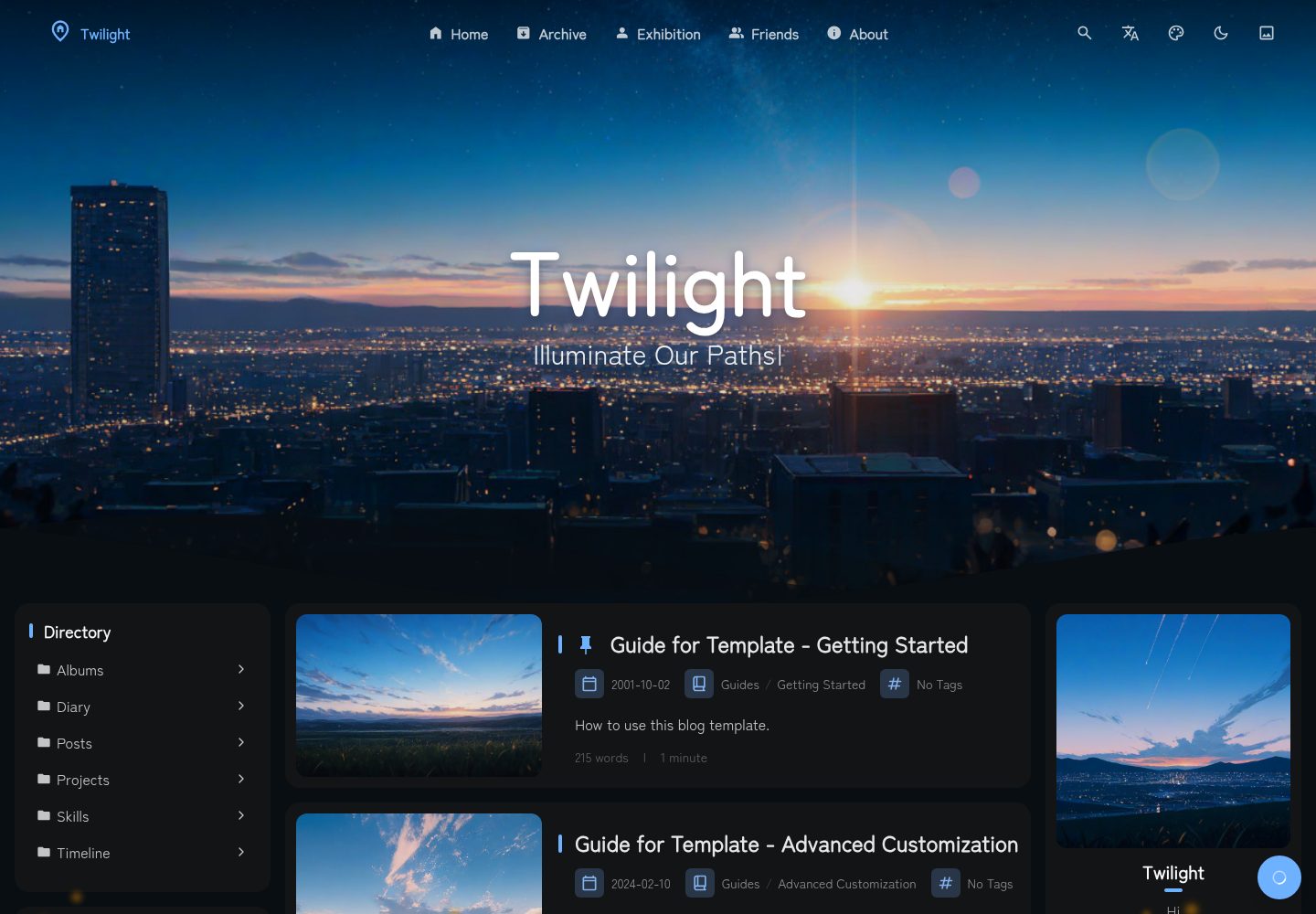
集成带 OAuth 的 Headless CMS,可在后台管理内容
Astro博客
Twilight — Astro 博客模板
作者 Spr-Aachen
Twilight 是一个基于 Astro 的静态博客模板,集成 Headless CMS 后台管理,内置文章、项目、时间线、日记、相册、友链等内容页面与多种 Markdown 增强组件。
看看你的网站会是什么样
浏览真实页面截图,比较内容排版与手机效果。点击下方缩略图切换,放大查看整页细节。
全部页面与视图 3
截图用于了解视觉与布局,交互效果请以实际项目为准。
采集于 2026-10-04查看来源
值得关注的模板亮点
从已有项目资料中,快速了解它的特点。
支持置顶、草稿以及 AES 加密的密码保护文章
内置文章、项目与技能、时间线、日记、相册、友链等信息页面
Markdown 增强:GitHub 仓库卡片、音乐卡片、提示块、代码块增强、Mermaid、KaTeX
可配置侧边栏小部件、评论系统、音乐播放器与 Live2D 角色部件
提供多语言界面与 Cloudflare、Netlify、Vercel、EdgeOne 等静态托管适配
模板详细介绍
Twilight 是一个基于 Astro 构建的静态博客模板,定位为「支持后台管理的静态博客」。它通过集成带 OAuth 的 Headless CMS,让内容管理可以在后台完成,同时保持静态站点的输出形式。模板以博客为核心,同时提供项目与技能展示、时间线、日记、相册、友链等信息页面,并自动生成文章导航、归档、目录以及 RSS/Atom 订阅源。
在内容层面,Twilight 支持置顶与草稿文章、AES 加密的密码保护文章,以及带标签和分类的 Markdown 写作。Markdown 增强包括 GitHub 仓库卡片、音乐卡片、提示块、代码块复制/折叠/行号/语言徽标、Mermaid 图表和 KaTeX 数学公式。
界面方面,模板提供可配置的加载遮罩、侧边栏小部件系统(个人资料、公告、目录、分类、标签、统计等)、评论系统(Waline、Twikoo)、音乐播放器、Live2D 角色部件,以及过渡动画、主题色、动态壁纸、粒子效果和自定义字体等视觉选项。模板内置 en/zh/ja 三种界面语言和 12 种以上页面翻译语言,并提供 Cloudflare、Netlify、Vercel、EdgeOne 等静态托管适配以及 Docker 支持。
使用上,Twilight 需要先 Fork 或克隆仓库,安装 pnpm 依赖,然后在 twilight.config.yaml 中配置博客、在 src/content 中管理内容。模板采用 MIT 许可,免费范围为该版本代码;演示图片、字体、图标等第三方素材以及域名、托管等外部服务需另行核对与承担。
Astro博客
适合你的项目吗?
适用场景
- 搭建带后台内容管理能力的个人静态博客
- 展示个人项目、技能、时间线与日记等综合信息页面
- 需要密码保护文章、草稿与置顶等文章管理功能的写作场景
- 希望使用 Markdown 增强组件(仓库卡片、音乐、图表、公式)发布技术内容
- 需要多语言界面与静态托管部署的博客站点
适合人群
- 使用 Astro 并希望以静态方式发布博客的个人开发者
- 需要 CMS 后台管理内容、又不想维护动态服务的写作者
- 需要项目展示、时间线、相册等多类内容页面的个人站点
- 偏好 Markdown 写作并需要图表、公式、代码块增强的技术博主
上手与定制指南
结合仓库当前版本的说明,按下面的资料检查内容、配置与运行要求。
- 1
先 Fork 或克隆仓库,安装 pnpm 后运行 pnpm install 安装依赖
- 2
在 twilight.config.yaml 中配置博客设置,在 src/content 中管理站点内容
- 3
使用 pnpm dev 启动本地开发服务器,pnpm build 构建到 ./dist/
- 4
CMS 集成使用 OAuth,需要按文档配置对应凭据
- 5
代码采用 MIT 许可,但演示图片、字体、图标等第三方素材及域名、托管等外部服务需另行核对与承担
授权与来源资料
使用条件与限制
免费使用 · 保留许可声明本次收录的是公开仓库中采用 MIT 许可的免费版本;免费范围为该版本代码,不代表外部服务或第三方素材免费。
使用时需要遵守
- 允许免费使用、修改、商用和分发该版本代码。
- 分发代码副本或实质性部分时,保留原作者版权声明和完整 MIT 许可声明。
- 代码按现状提供;担保与责任限制以原许可证及适用法律为准。
额外费用与待核对事项
- CMS 集成使用带 OAuth 的 Headless CMS,需要配置对应凭据/账号才能使用后台内容管理功能。
- 背景音乐播放器依赖 meting API 或本地播放列表,使用 meting API 时需依赖该外部服务。
- 访问统计依赖 Umami 分析服务,需要自行部署或配置 Umami 才能获得访客数据。
- 评论功能依赖 Waline 或 Twikoo 评论系统,需要自行部署或配置对应服务。
- 部署到 Cloudflare、Netlify、Vercel、EdgeOne 等平台需自行承担相应托管服务与域名费用。
- 演示图片、字体、图标及其他第三方素材需按各自许可核对,不能仅凭代码的 MIT 许可判断。
- 域名、托管、数据库、支付或 AI 等外部服务可能另外收费。
查看原文依据
Permission is hereby granted, free of charge
许可证原文
CMS Integration**: Headless CMS with OAuth for easy content management
README 原文
Music Player**: Background music with meting API or local playlist support
README 原文
Analytics Support**: Umami analytics integration for visitor insights
README 原文
Comment System**: Waline and Twikoo comment systems integration
README 原文
https://github.com/Spr-Aachen/Twilight/blob/main/LICENSEhttps://github.com/Spr-Aachen/Twilight/blob/main/README.mdMultiple Deployment Adapters**: Support Cloudflare, Netlify, Vercel, EdgeOne and other static hosting platforms
README 原文
DeepSeek 根据仓库许可证和 README 整理 ·2026-10-04。结果仅覆盖已读取资料,依赖、图片、字体及后续条款变更以各自原文为准。
项目核对记录与介绍依据
模板资料
- 来源平台
- Astro Themes
- 资料与维护参考分
- 资料较完整 · 91 / 100
- 技术栈
- Astro
- 网站类型
- 博客
这个分数如何计算
本站按许可资料(最高30分)、演示链接(12分)、预览图(10分)、Star数(15分)、记录的维护时间(15分)、描述完整度(8分)、功能记录(5分)和分类资料(5分)计算。它不是代码、安全或性能测试,也不是 Google 评分;有链接不代表已实测可用。
这个项目需要核对什么
- 记录的仓库更新时间
- 2026-10-02
- 截图检查日期
- 2026-10-04
已收录演示链接。请用你的内容与屏幕尺寸检查;有演示不代表表单、认证或支付已经可用。
目录记录的主要技术栈是 Astro。请通过依赖清单和锁文件核对实际版本与托管要求。这些说明基于收录资料,不代表代码审计或部署实测。
查看具体选型方法 →介绍的制作与核对状态
介绍由 AI 辅助整理目录与仓库资料。仓库作者不等于这篇介绍的审核者。
审核声明: [email protected] · 2026-10-04
查看当时使用的来源资料
SHA-256: 0f4334f85c28e216b554f42fb6fb3c45bb91804529770ae27725c402eb49c674
2026-10-04T03:31:52.486Z
来源文件 / 仓库<div align = "center">
# Twilight
A CMS integrated static blog template built with Astro framework.
[**🖥️ Live Demo**](https://twilight.spr-aachen.com)
[**📝 Documentation**](https://docs.twilight.spr-aachen.com/en)
[](https://space.bilibili.com/359461611/lists/6641229)
[](https://youtube.com/playlist?list=PLzjq8Hx1SRV7yqZQiACcCJmKPeg5D8JKe&si=Bcz2o0PF8MFvx8ec)
<table style="width: 100%; table-layout: fixed;">
<tr>
<td colspan="5"><img alt="Desktop" src="https://docs.twilight.spr-aachen.com/preview/desktop.jpg" style="max-width: 100%;"></td>
</tr>
<tr>
<td><img alt="Mobile_4" src="https://docs.twilight.spr-aachen.com/preview/mobile_4.jpg" style="max-width: 100%;"></td>
<td><img alt="Mobile_2" src="https://docs.twilight.spr-aachen.com/preview/mobile_2.jpg" style="max-width: 100%;"></td>
<td><img alt="Mobile_1" src="https://docs.twilight.spr-aachen.com/preview/mobile_1.jpg" style="max-width: 100%;"></td>
<td><img alt="Mobile_3" src="https://docs.twilight.spr-aachen.com/preview/mobile_3.jpg" style="max-width: 100%;"></td>
<td><img alt="Mobile_5" src="https://docs.twilight.spr-aachen.com/preview/mobile_5.jpg" style="max-width: 100%;"></td>
</tr>
</table>
</div>
---
<div align = "center">
English | [**中文**](docs/README_ZH.md)
</div>
## ✨ Features
### Content Management
- **CMS Integration**: Headless CMS with OAuth for easy content management
- **Pinned & Draft Posts**: Pin important posts or hide drafts in production
- **Password-Protected Posts**: AES-encrypted articles with password access
- **Automatic Navigation**: Auto-generated post navigation, archive, and TOC
- **Data Visualization**: Visualized personal data like projects, skills, timeline
### Content Pages
- **Blog Posts**: Full-featured markdown blogging with tags and categories
- **Projects & Skills Showcase**: Visual galleries for your portfolio
- **Timeline**: Biography page with education, work, achievements, and skills
- **Diary**: Short-form microblog-style posts with timestamps
- **Albums**: Image gallery with Fancybox lightbox integration
- **Friends Links**: Friend link exchange with icons and descriptions
- **RSS & Atom Feeds**: Dedicated info pages with auto-generated XML feeds
### Markdown Enhancements
- **GitHub Repository Cards**: Embed live repo cards via `::github{repo="..."}`
- **Music Cards**: Inline audio player with lyrics via `::music{...}`
- **Admonitions / Callouts**: Note, tip, warning, and caution styled blocks
- **Code Block Enhancements**: Copy button, collapse, line numbers, language badges
- **Mermaid Diagrams**: Render ` ```mermaid ` code blocks as diagrams
- **KaTeX Math Rendering**: LaTeX math expressions with `$...$` and `$$...$$`
### UI Components
- **Loading Overlay**: Configurable splash screen with spinner animation
- **Sidebar Widget System**: Configurable profile, announcement, TOC, categories, tags, directory, statistics etc.
- **Analytics Support**: Umami analytics integration for visitor insights
- **Comment System**: Waline and Twikoo comment systems integration
- **Music Player**: Background music with meting API or local playlist support
- **PIO Widget**: Interactive Live2D character with customizable dialog
### Visual Effects
- **Smooth Transition Animations**: Polished page component transition animations
- **Customizable Theme Colors**: Real-time customizable color schemes
- **Dynamic Wallpaper System**: Carousel support with multiple display modes
- **Immersive Particle Effects**: Highly customizable animated particles
- **Custom Fonts**: Configurable web fonts via CSS links or local files
### Compatibility
- **Modern & Responsive Design**: Fully optimized for desktop and mobile devices
- **Multilingual Capability**: 3 UI languages (en/zh/ja) & 12+ page translation languages
- **Multiple Deployment Adapters**: Support Cloudflare, Netlify, Vercel, EdgeOne and other static hosting platforms
- **Docker Support**: Ready-to-use Docker and docker-compose setup
## 💻 Configuration
### 0. Fork the repository
Click the `Fork` button in the top-right corner to fork the repository to your GitHub account
### 1. Clone the repository
Click `Code` -> `Open with GitHub Desktop`, or run `git clone <repository-url>` (Git required)
### 2. Install dependencies
Run the following commands in the project directory:
```bash
# Install pnpm if not already installed
npm install -g pnpm
# Install project dependencies
pnpm install
```
### 3. Configure your blog
- [Customize blog settings](https://docs.twilight.spr-aachen.com/en/config/core) inside `twilight.config.yaml`
- [Manage site content](https://docs.twilight.spr-aachen.com/en/config/content) inside `src/content`
### 4. Start the development server:
Run the following command in the project directory:
```bash
pnpm dev
```
## 🚀 Deployment
Deploy your blog to any static hosting platform
## ⚡ Commands
| Command | Action |
|:----------------------------|:------------------------------|
| ~~`pnpm lint`~~ | ~~Check and fix code issues~~ |
| ~~`pnpm format`~~ | ~~Format code with Biome~~ |
| `pnpm check` | Run Astro error checking |
| `pnpm dev` | Start local dev server |
| `pnpm build` | Build site to `./dist/` |
| `pnpm preview` | Preview build locally |
| `pnpm astro ...` | Run Astro CLI commands |
| `pnpm new-post <filename>` | Create a new blog post |
## 🙏 Acknowledgements
- Prototype - [Fuwari](https://github.com/saicaca/fuwari)
- Inspiration - [Yukina](https://github.com/WhitePaper233/yukina) & [Mizuki](https://github.com/matsuzaka-yuki/Mizuki)
- Translation - [translate](https://gitee.com/mail_osc/translate)看看同类模板
对比同技术栈与用途的模板,找到更适合的视觉与内容结构。

astrowind
⭕️ AstroWind: A free template using Astro v7 and Tailwind CSS v4. Astro starter theme.
Astro · 博客

astro-paper
A minimal, accessible and SEO-friendly Astro blog theme.
Astro · 博客

fuwari
✨A static blog template built with Astro.
Astro · 博客

Firefly
Firefly 是一款基于 Astro 的静态博客主题,由 CuteLeaf 在 saicaca 的 Fuwari 模板基础上二次开发,主打清新美观的视觉风格。
Astro · 博客

astro-theme-cactus
A simple Astro theme. Use it to create your blog or website.
Astro · 作品集

astrofy
Astrofy is a free and open-source template for your Personal Portfolio Website built with Astro and TailwindCS…
Astro · 作品集