Built-in French, English, Spanish, and Portuguese, with automatic language detection via middleware
Next.jsReactPortfolio
next-typescript-i18n-zod — Next.js Portfolio Template
By Steviggio
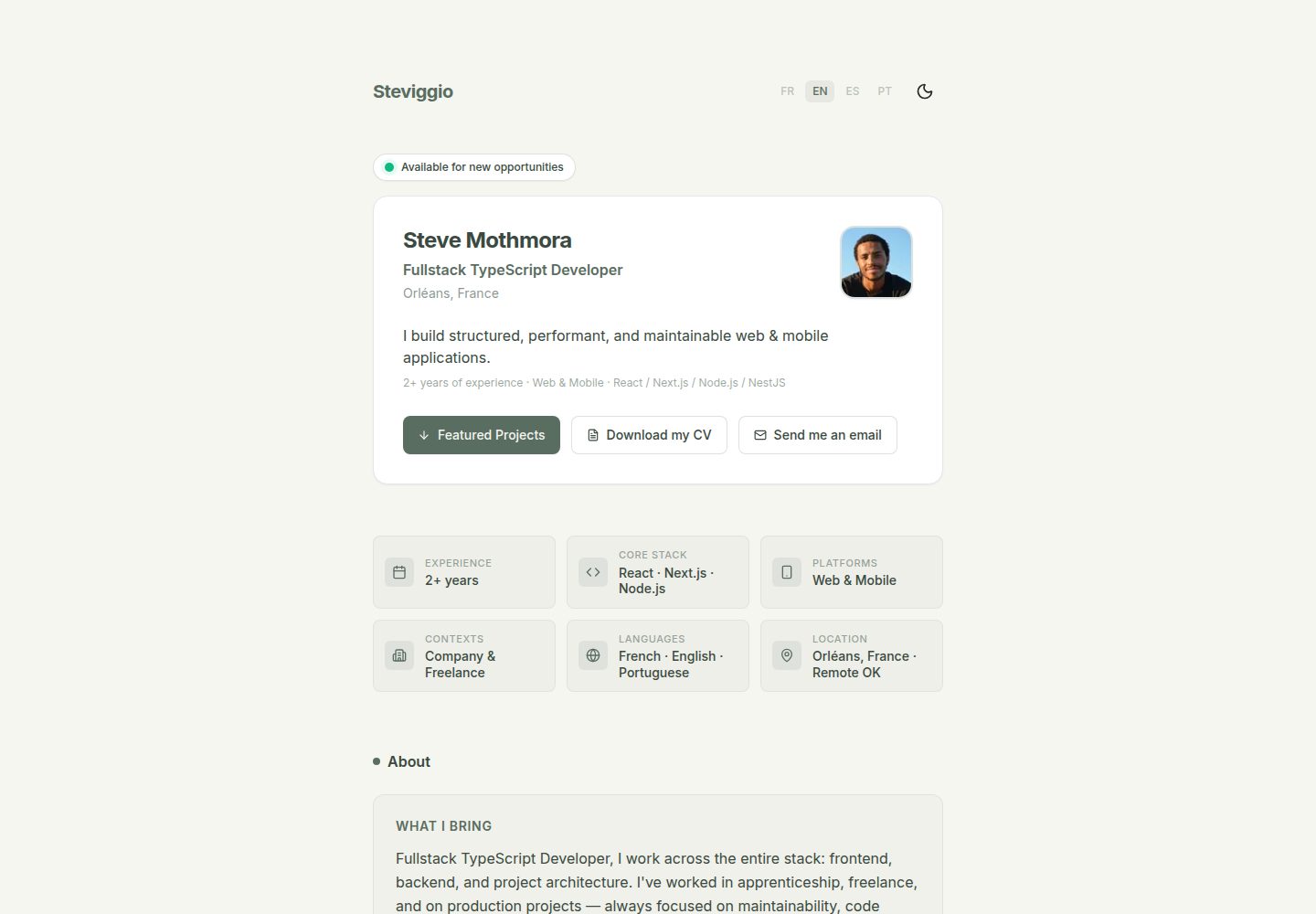
A multilingual portfolio template built on Next.js 16, Tailwind CSS, and Zod, with built-in French, English, Spanish, and Portuguese and light/dark theme switching.
Explore the design
Compare the page layouts and mobile experience. Open any screenshot for a closer look.
Desktop homepage1 / 2
Desktop captureTop of page
Actual screenshot captured by the server browser.
All pages & views 2
Screenshots show visual appearance; interactive behavior may differ.
Recorded 2026-10-14View source
What stands out
A quick read of the recorded project description.
Uses Zod to validate whether portfolio data (projects, profile) conforms to the predefined schema
Supports light/dark theme switching via next-themes and TailwindCSS
Portfolio content is centralized in portfolio.repository.ts, while interface copy is placed in JSON dictionaries divided by language
The README states that dynamic Open Graph and SEO metadata are generated based on the selected language
Preconfigured ESLint, TypeScript, and optional Git pre-commit hooks
Template Details
This is a portfolio website template built with Next.js 16, Tailwind CSS, and Zod; the README describes it as lightweight, easy to deploy, and highly customizable. The project uses the App Router and implements internationalization through the dynamic route src/app/[lang]/, with built-in French, English, Spanish, and Portuguese, and language detection handled automatically by middleware (proxy.ts). Portfolio data (projects, profile) is centralized in src/features/portfolio/data/portfolio.repository.ts, and Zod is used to validate whether the data meets the field requirements defined in src/features/portfolio/types/portfolio.schema.ts. Interface copy and project descriptions are stored in JSON dictionaries under src/features/dictionaries/, managed in separate files per language. Theme switching relies on next-themes and TailwindCSS; visual variables such as colors are adjusted in tailwind.config.ts, and fonts are set in src/app/[lang]/layout.tsx. The README also mentions generating dynamic metadata (Open Graph and SEO) based on the selected language, as well as preconfigured ESLint, TypeScript, and optional Git pre-commit hooks. The README does not provide specific dependency version numbers, deployment platform configuration details, or performance verification methods; the Lighthouse score is only self-reported in the README.
Next.jsReactPortfolio
Is it right for your project?
Use Cases
- Building a personal portfolio website to showcase projects and profile information
- A developer's personal site that needs multilingual (French, English, Spanish, Portuguese) presentation
- Projects that want to constrain content data structures with Zod to avoid missing fields
- Static showcase pages that need light/dark theme switching and basic SEO metadata configuration
Suitable For
- Developers familiar with Next.js App Router and TypeScript
- Those who need a multilingual portfolio template and are willing to maintain JSON dictionary files
- Users who want to manage projects and personal information through centralized data files
Getting started & customization
Use these recorded setup notes alongside the repository instructions for your chosen version.
- 1
After cloning the repository, enter the directory and run npm install to install dependencies
- 2
Run npm run dev to start the local development server, and visit http://localhost:3000 to preview
- 3
Modify projects and profile information in src/features/portfolio/data/portfolio.repository.ts
- 4
Modify interface copy and project descriptions in the JSON files under src/features/dictionaries/
- 5
To add a language, declare it in i18n-config.ts, adjust proxy.ts as needed, create a new dictionary JSON, and import it in src/app/[lang]/dictionnaries.ts
License & source material
Usage conditions & limitations
Free to use · keep license noticeThis entry covers the free version under the MIT license in the public repository; the free scope is the code of that version and does not mean that external services or third-party assets are free.
Must comply with when using
- Free use, modification, commercial use, and distribution of this version's code are permitted.
- When distributing copies or substantial portions of the code, retain the original author's copyright notice and the complete MIT license notice.
- The code is provided as is; warranties and limitations of liability are governed by the original license and applicable law.
Additional costs & items to verify
- Demo images, fonts, icons, and other third-party assets must be checked against their respective licenses and cannot be judged solely by the code's MIT license.
- External services such as domains, hosting, databases, payments, or AI may incur separate charges.
View Original Text Basis
https://github.com/Steviggio/next-typescript-i18n-zod/blob/main/LICENSEhttps://github.com/Steviggio/next-typescript-i18n-zod/blob/main/README.mdPermission is hereby granted, free of charge
Original License Text
Compiled by DeepSeek based on repository license and README ·2026-10-14. Results only cover the materials read; dependencies, images, fonts, and subsequent term changes are subject to their respective original texts.
Project checks & description sources
Template Information
- Source platforms
- GitHub
- Documentation and maintenance reference score
- More documented · 85 / 100
- Technologies
- Next.js · React
- Website type
- Portfolio
How this score is calculated
Our heuristic uses license records (up to 30), a demo link (12), a preview (10), stars (15), recorded maintenance (15), description completeness (8), feature records (5) and classification data (5). It is not a code, security or performance test, or a Google score. A link does not establish tested functionality.
What to verify for this project
- Repository update recorded
- 2026-03-19
- Screenshot last checked
- 2026-10-14
A demo link is listed. Check it with your own content and viewport sizes; its presence does not confirm that forms, authentication or payments work.
The catalog identifies Next.js as the primary stack. Check the actual dependency manifest and lockfile for versions and hosting requirements. These notes use recorded metadata, not a code audit or a deployment test.
Use a selection guide →How this description was prepared
AI-assisted description based on catalog records and repository material. Repository authors are not automatically the reviewers of this description.
Review declaration: codex-user-requested-batch-review-20261015 · 2026-10-15
Inspect the recorded source material
SHA-256: 48e5393375bfbcc27a4543659577e393b3df00b963b6460a456b158cf8fbf011
2026-10-14T17:03:43.833Z
Source file / repository# Next.js 16 Portfolio Template
Un template de portfolio moderne, léger et multilingue construit avec Next.js 16, Tailwind CSS, et Zod. Conçu pour être facilement déployable et hautement personnalisable.
### ⚡ Score Lighthouse




---
## ✨ Fonctionnalités Principales
<ul>
<li><b>Internationalisation (i18n)</b> : Support multilingue "out-of-the-box" (Français, Anglais, Espagnol, Portugais inclus). Détection automatique de la langue via middleware.</li>
<li><b>Validation de données strictes</b> : Utilisation de <a href="https://zod.dev/">Zod</a> pour s'assurer que les données de votre portfolio (projets, expériences) sont conformes au schéma attendu.</li>
<li><b>Thème Sombre / Clair</b> : Support intégré pour le basculement entre les thèmes grâce à <code>next-themes</code> et TailwindCSS.</li>
<li><b>Hautement personnalisable</b> : Tous les textes de présentation et contenus sont extraits dans des fichiers de données centraux.</li>
<li><b>Open Graph & SEO Ready</b> : Génération de métadonnées dynamiques en fonction de la langue sélectionnée.</li>
<li><b>CI/CD Ready</b> : Intègre des pre-commits Git Hooks (via config optionnelle), un linting strict ESLint et TypeScript préconfigurés pour faciliter l'intégration continue et les déploiements (ex: Vercel, Netlify, VPS, etc).</li>
</ul>
## 📂 Structure du projet
Aperçu de l'architecture pour vous repérer rapidement :
```text
├── public/ # Assets statiques (images, placeholders)
├── src/
│ ├── app/ # App Router Next.js
│ │ └── [lang]/ # Routes dynamiques d'internationalisation
│ ├── features/ # Modules par fonctionnalité
│ │ ├── dictionaries/ # Fichiers de traduction JSON (fr.json, en.json...)
│ │ └── portfolio/ # Logique, types et données du portfolio
│ │ ├── data/ # Infos personnelles (portfolio.repository.ts)
│ │ └── types/ # Schémas de validation Zod
│ ├── proxy.ts # Middleware Next.js pour i18n
│ └── i18n-config.ts # Configuration des langues supportées
├── tailwind.config.ts # Thème UI et charte graphique
└── next.config.ts # Configurations build et sécurité
```
## 🚀 Installation & Démarrage
<ul>
<li><b>1. Clonez ce dépôt</b> : <code>git clone https://github.com/VOTRE_NOM/next-portfolio-template.git</code></li>
<li><b>2. Accédez au dossier</b> : <code>cd next-portfolio-template</code></li>
<li><b>3. Installez les dépendances</b> : <code>npm install</code></li>
<li><b>4. Lancez le serveur local</b> : <code>npm run dev</code></li>
<li><b>5. Visualisez</b> : Ouvrez <a href="http://localhost:3000">http://localhost:3000</a> dans votre navigateur.</li>
</ul>
## 🛠 Comment personnaliser ce template ?
L'application est divisée en deux couches de données principales : les données de base du profil et les traductions de l'interface.
### 1. Modifier vos informations personnelles (Projets & Expériences)
Toutes vos données principales se trouvent dans le fichier <code>src/features/portfolio/data/portfolio.repository.ts</code>. Vous y définissez la base :
<ul>
<li><b>Projets (<code>projects</code>)</b> : Ajoutez l'identifiant unique (<code>id</code>), le titre, les technologies utilisées et si c'est un Side Project ou non.</li>
<li><b>Profil (<code>profile</code>)</b> : Modifiez votre nom, rôle, liens sociaux (GitHub, LinkedIn) et profil.</li>
</ul>
<i>Note : Zod est là pour vérifier que vous n'oubliez aucun champ requis (voir <code>src/features/portfolio/types/portfolio.schema.ts</code>).</i>
### 2. Gérer les langues (i18n) et les traductions
Les textes de l'interface et les traductions spécifiques de projets sont gérés via des "Dictionnaires" (ex: <code>fr.json</code>) dans <code>src/features/dictionaries/</code>.
<ul>
<li><b>Pour modifier un texte ou une description</b> : Allez dans le fichier JSON ciblé, cherchez la clé (ex: <code>projects.informations.[ID]</code>) et adaptez-la.</li>
<li><b>Pour ajouter une langue</b> :
<ul>
<li>Déclarez-la dans <code>i18n-config.ts</code></li>
<li>Ajustez le <code>proxy.ts</code> si nécessaire</li>
<li>Créez un nouveau fichier JSON dans <code>dictionaries/</code></li>
<li>Importez-le dans <code>src/app/[lang]/dictionnaries.ts</code></li>
</ul>
</li>
</ul>
### 3. Modifier le style et les polices
<ul>
<li><b>Polices</b> : La police principale est intégrée dans le fichier racine <code>src/app/[lang]/layout.tsx</code>.</li>
<li><b>Couleurs</b> : Modifiez <code>tailwind.config.ts</code> pour adapter la charte graphique (les variables de couleurs comme <code>sage</code> ou <code>cream</code>).</li>
</ul>
## 📝 License
Distribué sous la licence MIT. Voir le fichier <code>LICENSE</code> pour plus d'informations.
Explore similar templates
Compare previews and descriptions within the same stack and category.

react-resume-template
A personal resume website template for software developers, built with Next.js, React, and TypeScript and styled with Tailwind CSS. Site content is driven by a single data file at /src/data/data.tsx, with types in dataDef.ts and images in src/images/.
Next.js · Portfolio

nxt-lnk
nxt-lnk is a Next.js-based bio link page template that manages personal information and links via BioData.js and LinksData.js, positioned as a self-hosted alternative to Linktree. It groups links by type, supports enabling/disabling individual links, and offers hexagonal or oval avatars.
Next.js · Portfolio

sylph
Sylph is a minimal portfolio and blog template built on Next.js, supporting MDX/Markdown writing, light/dark themes, and automatic OG image generation. It includes sitemap, robots.txt, metadata, and syntax highlighting, with automatic blog timestamps.
Next.js · Portfolio

sleek-portfolio
A modern, responsive portfolio template built with Next.js 15, TypeScript, Tailwind CSS, and Shadcn UI. It includes an MDX blog, project showcase, work experience timeline, and a contact form that receives messages via Telegram Bot.
Next.js · Portfolio

research-website-template
A React + Next.js template for research personal websites, aimed at PhD students and researchers. It centralizes publications, projects, and other content in src/data as arrays of objects, with optional fields automatically generating UI components.
Next.js · Portfolio

shadcn-portfolio
A developer portfolio template built with Next.js 15, shadcn/ui, Tailwind CSS, and Framer Motion, featuring an MDX blog, light and dark modes, responsive design, and SEO meta tags.
Next.js · Portfolio