Astro static output with no UI framework dependency, about 3 KB of minified native JavaScript per page inlined by Astro
AstroBlogCorporate Website
ST-AI-Agency — Astro Blog Template
By striviothemes
ST-AI-Agency is a free Astro-based theme for AI agencies, featuring a warm orange design, a single-page homepage, and a Markdown blog with almost no JavaScript dependency.
Explore the design
Compare the page layouts and mobile experience. Open any screenshot for a closer look.
Desktop homepage1 / 3
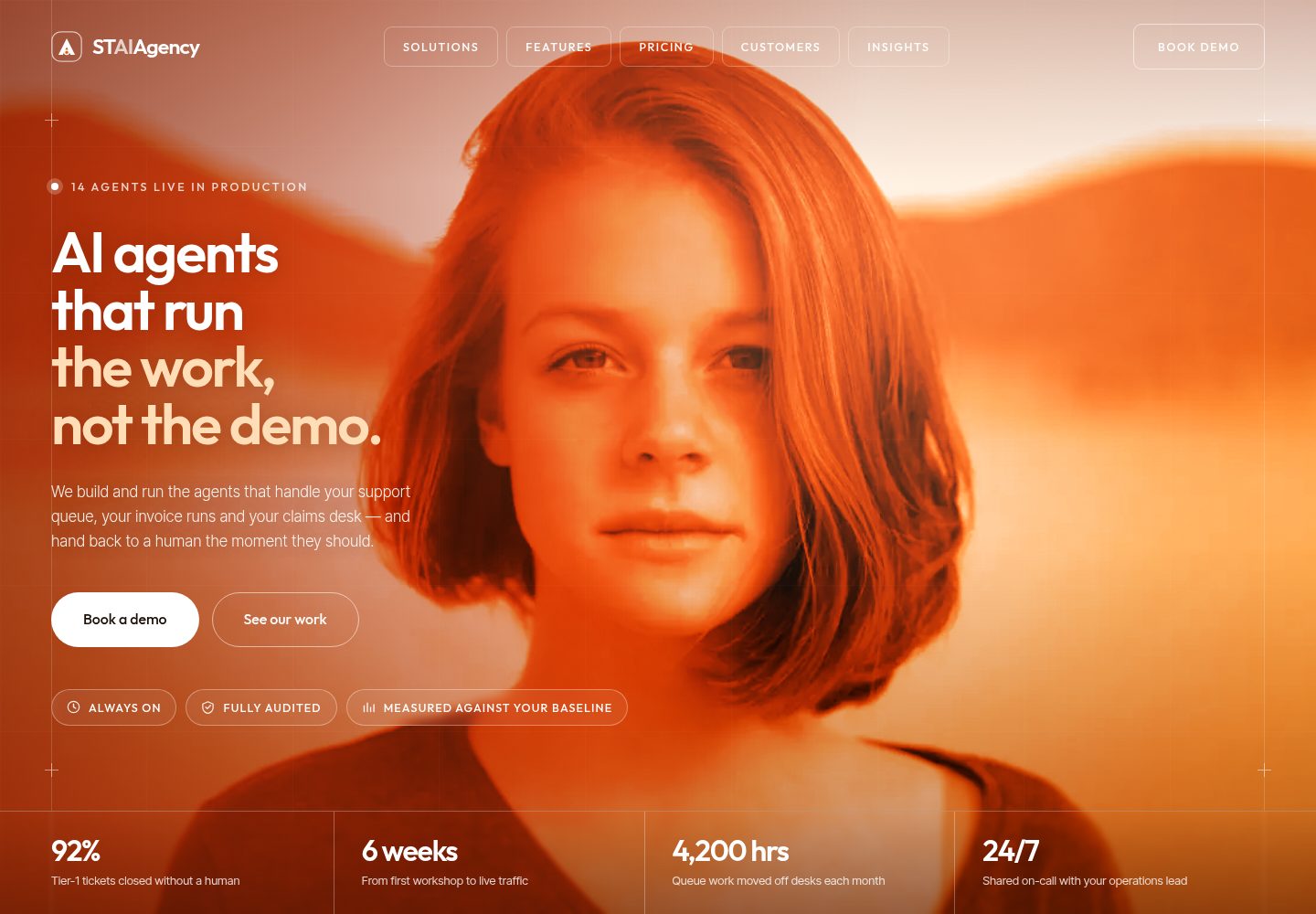
Desktop captureTop of page
Actual screenshot captured by the server browser.
All pages & views 3
Screenshots show visual appearance; interactive behavior may differ.
Recorded 2026-10-04View source
What stands out
A quick read of the recorded project description.
Single-page homepage divided into thematic sections covering solutions, platform features, process, case studies, statistics, industries, testimonials, team, pricing, FAQ, and contact form
Blog uses Astro Content Collections with glob loader, supporting category filtering, featured posts, tags, reading time, and related posts
Built-in SEO outputs: canonical links, Open Graph, Twitter/X cards, JSON-LD, sitemap, robots.txt, and RSS
Accessibility support includes skip links, semantic landmarks, mobile dialog focus trap, FAQ accordion aria-expanded, and reduced motion
Self-hosted Outfit and Inter Tight variable fonts, local WebP images with explicit dimensions
Template Details
ST-AI-Agency is a static Astro theme for AI agencies, automation studios, and consulting firms. The homepage uses a single-page structure, organizing the hero, client bar, solutions, platform features, process, case studies, statistics, industry sections, testimonials, team, pricing, insights preview, FAQ, contact form, and call-to-action into multiple sections with in-page anchor navigation. The blog is built on Astro Content Collections, with each post having its own page including breadcrumbs, author, date, reading time, tags, previous/next navigation, and related posts; the blog index offers featured posts and category filtering, with filtering as progressive enhancement so the page remains usable when JavaScript is disabled. The theme includes built-in SEO outputs such as canonical links, Open Graph and Twitter/X cards, JSON-LD structured data, sitemap, robots.txt, and RSS feed. Styling uses pure CSS and design tokens, fonts are self-hosted, and images are local WebP with explicit dimensions. Forms are static UI and run in demo mode when no endpoint is configured; submissions do not send data.
AstroBlogCorporate website
Is it right for your project?
Use Cases
- Build a single-page marketing website for an AI agency or automation studio to showcase services, process, case studies, and pricing
- Include a Markdown blog within the marketing site to publish articles and automatically generate post pages, RSS, and sitemap
- Projects requiring static deployment with low JavaScript dependency, such as deploying on Vercel, Netlify, or GitHub Pages subpaths
- Site customization where homepage copy, team, pricing, and FAQ content are replaced via a few configuration and data files
Suitable For
- Official website development for AI agencies, AI automation companies, and AI consulting firms
- Astro static site projects needing a single-page homepage plus blog structure
- Developers who value accessibility, SEO outputs, and low JavaScript dependency
- Teams able to configure form service endpoints themselves and replace demo content
Getting started & customization
Use these recorded setup notes alongside the repository instructions for your chosen version.
- 1
Requires Node.js 22.12.0 or newer; the repository includes an .nvmrc file
- 2
After cloning the repository, run npm install, start the development server with npm run dev, and output the static site to dist/ with npm run build
- 3
Contact and subscription forms are in demo mode by default; configure Formspree, Web3Forms, Netlify Forms, or a custom API endpoint in the forms section of src/config/site.ts
- 4
Names, companies, numbers, and quotes in the demo content are fictional and must be replaced with real content before launch
- 5
Demo images are from pxhere.com and marked as CC0; fonts, icons, and other third-party assets must be checked against their respective licenses
License & source material
Usage conditions & limitations
Free to use · keep license noticeThis entry covers the free version under the MIT license in the public repository; the free scope applies to that version's code and does not imply that external services or third-party assets are free.
Must comply with when using
- Free use, modification, commercial use, and distribution of this version's code are permitted.
- When distributing copies or substantial portions of the code, retain the original author's copyright notice and the full MIT license notice.
- The code is provided as is; warranties and limitations of liability are governed by the original license and applicable law.
Additional costs & items to verify
- The README mentions the Formspree form service; actual submissions require configuring a service endpoint, and its usage limits and fees must be checked separately.
- Demo images, fonts, icons, and other third-party assets must be checked against their respective licenses and cannot be judged solely by the code's MIT license.
- External services such as domain, hosting, database, payment, or AI may incur additional fees.
- Names, companies, numbers, and quotes in the demo content are fictional and must be replaced with real content before launch.
- Contact and subscription forms are in demo mode by default; when no endpoint is configured, submissions do not send any data.
- For actual form submissions, you must configure Formspree, Web3Forms, Netlify Forms, or a custom API endpoint yourself.
- People in demo images are unrelated to the fictional names in the demo and must not imply endorsement.
- Third-party assets (images, fonts) retain their respective licenses and are not covered by the MIT license.
View Original Text Basis
Permission is hereby granted, free of charge
Original License Text
**Every name, company, figure and quote in the demo content is fictional.** Replace it with your own before you launch.
Original README
While no endpoint is configured they run in **demo mode**: submitting sends nothing and shows a notice saying so.
Original README
**Your own API.** Set `contactAction` to your endpoint URL.
Original README
The people in these stock photos are not connected to the fictional names used in the demo.
Original README
https://github.com/striviothemes/ST-AI-Agency/blob/main/LICENSEhttps://github.com/striviothemes/ST-AI-Agency/blob/main/README.mdThird-party assets keep their own licenses and are not covered by MIT:
Original README
Compiled by DeepSeek based on repository license and README ·2026-10-04. Results only cover the materials read; dependencies, images, fonts, and subsequent term changes are subject to their respective original texts.
Project checks & description sources
Template Information
- Source platforms
- GitHub
- Documentation and maintenance reference score
- More documented · 85 / 100
- Technologies
- Astro
- Website type
- Blog · Corporate Website
How this score is calculated
Our heuristic uses license records (up to 30), a demo link (12), a preview (10), stars (15), recorded maintenance (15), description completeness (8), feature records (5) and classification data (5). It is not a code, security or performance test, or a Google score. A link does not establish tested functionality.
What to verify for this project
- Repository update recorded
- 2026-10-04
- Screenshot last checked
- 2026-10-04
A demo link is listed. Check it with your own content and viewport sizes; its presence does not confirm that forms, authentication or payments work.
The catalog identifies Astro as the primary stack. Check the actual dependency manifest and lockfile for versions and hosting requirements. These notes use recorded metadata, not a code audit or a deployment test.
Use a selection guide →How this description was prepared
AI-assisted description based on catalog records and repository material. Repository authors are not automatically the reviewers of this description.
Review declaration: [email protected] · 2026-10-05
Inspect the recorded source material
SHA-256: 8504c59261701f8631135f190eef320d6eea927e304bdc87773f4a9075742696
2026-10-04T20:27:25.408Z
Source file / repository# ST AI Agency
**ST AI Agency** is a free Astro AI agency theme for AI agencies, AI automation studios, AI consultancies and AI agent platforms. It has a warm orange, cream and dark-brown design, a single-page homepage with a section for each topic, and a full Markdown blog. It ships almost no JavaScript.
> *AI agents that run the work, not the demo.*

## Demo
**Live demo:** [st-ai-agency.vercel.app](https://st-ai-agency.vercel.app/)
## Features
- **Astro 7** with static output and no UI framework.
- **AI agency design.** A full-bleed hero that tints its photo in the brand colours, editorial service rows, a heat-gradient process band, dark customer cards and arched portraits.
- **Responsive layout** at every width, with a mobile menu below 1200px.
- **One homepage with a section for each topic.** Hero, client strip, AI solutions, platform/features, process, customer results, statistics, industry sectors, testimonial, team, pricing, insights preview, FAQ, contact form and a call-to-action band.
- **Blog** built on Astro Content Collections (Content Layer `glob` loader). Each post gets its own page with breadcrumbs, author, date, reading time, tags, previous/next links and related posts.
- **Blog index** with a featured post and a category filter. The filter is a progressive enhancement and the page works without JavaScript.
- **SEO.** Canonical URLs, Open Graph and Twitter/X cards, JSON-LD (`Organization`, `WebSite`, `BlogPosting`, `BreadcrumbList`), a sitemap, `robots.txt` and an RSS feed.
- **Accessibility**
- Skip link and semantic landmarks.
- Accessible mobile dialog: focus trap, Escape to close, focus returned to the menu button.
- FAQ accordion with `aria-expanded`.
- `aria-current` on real page links only.
- Visible focus states.
- Reduced-motion support.
- Content stays fully readable with JavaScript disabled.
- **Lightweight JavaScript.** About 3 KB of minified vanilla JavaScript per page, inlined by Astro. No framework runtime and no third-party scripts.
- **Easy to customise.** One site config file plus typed data files for every homepage section.
- **Self-hosted fonts** (Outfit and Inter Tight) with no third-party font requests.
- **Optimised local images.** WebP files with explicit dimensions. The hero is preloaded and images further down the page are lazy-loaded.
- **Static form UI** that is honest about being a demo until you connect a provider (Formspree, Netlify Forms, Web3Forms or your own API).
- **Sub-path deploys.** Works at a domain root or under a sub-path, such as a GitHub Pages project site.
## Tech stack
| Tool | Purpose |
| --- | --- |
| [Astro](https://astro.build) 7 | Static site generator, components, content collections |
| [@astrojs/sitemap](https://docs.astro.build/en/guides/integrations-guide/sitemap/) | Generates `sitemap-index.xml` |
| [@astrojs/rss](https://docs.astro.build/en/recipes/rss/) | Generates `rss.xml` for the blog |
| [@fontsource-variable/outfit](https://fontsource.org/fonts/outfit) & [inter-tight](https://fontsource.org/fonts/inter-tight) | Self-hosted variable fonts |
| TypeScript | Typed config, data and scripts |
| Plain CSS | Design tokens and component styles (no Tailwind) |
| Vanilla TypeScript | Header, mobile menu, reveal, FAQ, forms |
Dev-only: `@astrojs/check` and `typescript` for `npm run check`.
## Requirements
- **Node.js 22.12.0 or newer.** This is the minimum for Astro 7. An `.nvmrc` file is included.
- npm 9.6.5 or newer, which ships with Node 22.
## Installation
```bash
git clone https://github.com/striviothemes/ST-AI-Agency.git
cd ST-AI-Agency
npm install
```
## Development
```bash
npm run dev
```
Opens at `http://localhost:4321`. If that port is already taken, Astro picks the next free one and prints it.
## Build
```bash
npm run build
```
The static site is written to `dist/`.
## Preview
```bash
npm run preview
```
This serves the production build locally. Run `npm run check` for TypeScript and Astro diagnostics.
## Project structure
```text
.
├── public/
│ ├── images/ # Optimised WebP photography (CC0)
│ ├── favicon.svg # Monogram favicon
│ └── preview.jpg # Theme preview, also the default social sharing image (1600×900)
├── src/
│ ├── components/
│ │ ├── icons/
│ │ │ ├── icons.ts # Custom SVG icon set
│ │ │ ├── Icon.astro # <Icon name="check" />
│ │ │ └── Logo.astro # ST AI Agency monogram
│ │ ├── Header.astro, MobileMenu.astro, Footer.astro, Newsletter.astro
│ │ ├── Hero.astro, ClientStrip.astro, Solutions.astro, SolutionRow.astro
│ │ ├── Platform.astro, FeatureList.astro, Process.astro
│ │ ├── Customers.astro, CustomerCard.astro, Stats.astro
│ │ ├── Sectors.astro, SectorCard.astro, Testimonials.astro, Team.astro
│ │ ├── Pricing.astro, PricingCard.astro, InsightsPreview.astro, PostCard.astro
│ │ ├── FAQ.astro, ContactCTA.astro, FinalCTA.astro, PageHero.astro
│ │ └── SEO.astro, SectionHeading.astro, Button.astro, Brand.astro, FrameLines.astro
│ ├── config/site.ts # ← brand, contact details, SEO, CTA, forms
│ ├── content/blog/ # ← Markdown blog posts
│ ├── content.config.ts # Blog collection schema
│ ├── data/ # ← all homepage copy and lists
│ ├── layouts/
│ │ ├── BaseLayout.astro
│ │ └── BlogPostLayout.astro
│ ├── pages/
│ │ ├── index.astro # /
│ │ ├── blog/index.astro # /blog
│ │ ├── blog/[slug].astro# /blog/<post>
│ │ ├── 404.astro
│ │ ├── rss.xml.ts
│ │ └── robots.txt.ts
│ ├── scripts/site.ts # Header, menu, reveal, hero drift, forms
│ ├── styles/
│ │ ├── tokens.css # ← colours, fonts, layout scale
│ │ ├── global.css # Reset, layout, type, buttons, motion
│ │ ├── components.css # Homepage sections
│ │ └── blog.css # Page hero, blog, article, 404
│ ├── types.ts # Shared TypeScript interfaces
│ └── utils/ # url(), blog helpers, nav helpers
└── astro.config.mjs
```
### Routes
The theme generates only these pages:
| Route | Source |
| --- | --- |
| `/` | `src/pages/index.astro` |
| `/blog` | `src/pages/blog/index.astro` |
| `/blog/<slug>` | `src/pages/blog/[slug].astro` |
| `/404` | `src/pages/404.astro` |
It also generates `/rss.xml`, `/robots.txt` and `/sitemap-index.xml`. Solutions, features, pricing, customers, sectors, process, team, FAQ and contact are sections of the homepage, reached with anchors such as `/#pricing`.
## Customization
You only need to edit **`src/config/site.ts`**, **`src/data/*`** and **`src/styles/tokens.css`** for most changes.
| What | Where |
| --- | --- |
| Site name, word-mark, tagline, description | `src/config/site.ts` → `name`, `brand`, `tagline`, `description` |
| Email, phone, address, response time | `src/config/site.ts` |
| Social links | `src/config/site.ts` → `social` (remove an entry to hide its icon) |
| SEO defaults, share image, theme colour | `src/config/site.ts` → `seo` |
| Main CTA ("Book a demo") | `src/config/site.ts` → `cta` |
| Copyright line | `src/config/site.ts` → `copyright` |
| Logo / monogram | `src/components/icons/Logo.astro` and `public/favicon.svg` |
| Header, mobile and footer navigation | `src/data/navigation.ts` |
| Hero copy, stats, client names, section headings, CTA band, newsletter | `src/data/home.ts` |
| Solutions (service rows) | `src/data/solutions.ts` |
| Platform features checklist | `src/data/features.ts` |
| Process steps | `src/data/process.ts` |
| Customer case studies | `src/data/customers.ts` |
| Big-number statistics | `src/data/stats.ts` |
| Sectors | `src/data/sectors.ts` |
| Testimonial | `src/data/testimonials.ts` |
| Team | `src/data/team.ts` (supports optional `bio` and `social`) |
| Pricing plans | `src/data/pricing.ts` |
| FAQ | `src/data/faq.ts` |
| Colours | `src/styles/tokens.css` (`--o900`…`--o100`, `--cream`, `--ink`, …) |
| Typography | `src/styles/tokens.css` (`--display`, `--body`) plus the font imports in `src/layouts/BaseLayout.astro` |
| Section order or removal | `src/pages/index.astro` (comment out or reorder components) |
Section titles can contain `<br>` for deliberate line breaks, for example `'Six weeks from<br>workshop to live.'`.
**Every name, company, figure and quote in the demo content is fictional.** Replace it with your own before you launch.
### Changing the colours
The palette is a ramp of oranges (`--o900` darkest to `--o100` lightest) plus neutrals. Change the hex values in `tokens.css` and the theme follows. A few hero gradients in `components.css` (`.hero__duo`, `.hero__warm`, `.hero__scrim`) use literal colour stops so they can be tuned separately. Edit those too if you move far away from orange.
### Changing the fonts
1. Install another Fontsource package, for example `npm i @fontsource-variable/manrope`.
2. Replace the imports at the top of `src/layouts/BaseLayout.astro`, including the two `?url` preload imports.
3. Update `--display` / `--body` in `tokens.css`.
## Adding blog posts
Create a Markdown file in `src/content/blog/`. The file name becomes the URL, so `my-new-post.md` is published at `/blog/my-new-post`.
```markdown
---
title: Your Post Title
description: One or two sentences for cards, meta description and social previews.
pubDate: 2026-10-01
updatedDate: 2026-10-08 # optional
category: Operations
author: Amara Boateng
authorRole: Founder, principal engineer # optional
image: /images/blog-ai-agents.webp # file in /public
imageAlt: Describe the image for screen readers
tags: [AI agents, Operations]
readingTime: 6 # optional; calculated from word count if omitted
featured: false # optional; pins the post as "Latest note" on /blog
draft: false # drafts show in `npm run dev` only
---
Your content in Markdown…
```
The frontmatter is validated by the schema in `src/content.config.ts`, so a typo fails the build with a clear message. The homepage Insights section shows the three newest posts automatically.
## Contact form
The contact and newsletter forms are plain HTML forms. While no endpoint is configured they run in **demo mode**: submitting sends nothing and shows a notice saying so. To connect a provider, edit `forms` in `src/config/site.ts`.
**Formspree:**
```ts
forms: { contactAction: 'https://formspree.io/f/<your-form-id>', newsletterAction: '', netlify: false }
```
**Web3Forms.** Set `contactAction: 'https://api.web3forms.com/submit'`, then add your access key as a hidden field inside the form in `src/components/ContactCTA.astro`:
```html
<input type="hidden" name="access_key" value="YOUR_PUBLIC_ACCESS_KEY" />
```
**Netlify Forms:**
```ts
forms: { contactAction: '', newsletterAction: '', netlify: true }
```
With `netlify: true` the forms get `data-netlify="true"`, a hidden `form-name` field and a honeypot, and they submit normally. Netlify detects them at deploy time.
**Your own API.** Set `contactAction` to your endpoint URL. The form posts `name`, `company`, `email`, `phone`, `workflow` and `message`.
No API keys or credentials are included in the theme.
## Images
All photographs are local WebP files in `public/images/`. They were downloaded from [pxhere.com](https://pxhere.com) and resized and cropped for the theme. Every source page was checked at download time and states that the photo is released under **[CC0 1.0 Universal](https://creativecommons.org/publicdomain/zero/1.0/)** (public domain), so you can redistribute it with the theme. Attribution is not required, but it is listed here for transparency.
| File | Source |
| --- | --- |
| `ai-agency-hero.webp` | [pxhere.com/en/photo/108386](https://pxhere.com/en/photo/108386) |
| `platform-operations-lead.webp` | [pxhere.com/en/photo/912909](https://pxhere.com/en/photo/912909) |
| `solution-support.webp` | [pxhere.com/en/photo/1258982](https://pxhere.com/en/photo/1258982) |
| `solution-finance.webp` | [pxhere.com/en/photo/1238368](https://pxhere.com/en/photo/1238368) |
| `solution-documents.webp` | [pxhere.com/en/photo/655321](https://pxhere.com/en/photo/655321) |
| `solution-research.webp` | [pxhere.com/en/photo/596254](https://pxhere.com/en/photo/596254) |
| `solution-evaluation.webp` | [pxhere.com/en/photo/1170475](https://pxhere.com/en/photo/1170475) |
| `customer-fintech.webp` | [pxhere.com/en/photo/1109918](https://pxhere.com/en/photo/1109918) |
| `customer-healthcare.webp` | [pxhere.com/en/photo/647862](https://pxhere.com/en/photo/647862) |
| `customer-logistics.webp` | [pxhere.com/en/photo/1072796](https://pxhere.com/en/photo/1072796) |
| `sector-banking.webp` | [pxhere.com/en/photo/104014](https://pxhere.com/en/photo/104014) |
| `sector-healthcare.webp` | [pxhere.com/en/photo/1179849](https://pxhere.com/en/photo/1179849) |
| `sector-freight.webp` | [pxhere.com/en/photo/1177716](https://pxhere.com/en/photo/1177716) |
| `sector-software.webp` | [pxhere.com/en/photo/913320](https://pxhere.com/en/photo/913320) |
| `sector-insurance.webp` | [pxhere.com/en/photo/811631](https://pxhere.com/en/photo/811631) |
| `sector-commerce.webp` | [pxhere.com/en/photo/1052603](https://pxhere.com/en/photo/1052603) |
| `testimonial-portrait.webp` | [pxhere.com/en/photo/1278247](https://pxhere.com/en/photo/1278247) |
| `team-member-01.webp` | [pxhere.com/en/photo/706040](https://pxhere.com/en/photo/706040) |
| `team-member-02.webp` | [pxhere.com/en/photo/764654](https://pxhere.com/en/photo/764654) |
| `team-member-03.webp` | [pxhere.com/en/photo/1177669](https://pxhere.com/en/photo/1177669) |
| `team-member-04.webp` | [pxhere.com/en/photo/764641](https://pxhere.com/en/photo/764641) |
| `blog-ai-agents.webp` | [pxhere.com/en/photo/912807](https://pxhere.com/en/photo/912807) |
| `blog-reliable-workflows.webp` | [pxhere.com/en/photo/1072793](https://pxhere.com/en/photo/1072793) |
| `blog-human-in-the-loop.webp` | [pxhere.com/en/photo/764658](https://pxhere.com/en/photo/764658) |
| `blog-production-ready.webp` | [pxhere.com/en/photo/1366450](https://pxhere.com/en/photo/1366450) |
| `blog-customer-support.webp` | [pxhere.com/en/photo/833211](https://pxhere.com/en/photo/833211) |
| `blog-auditable-workflows.webp` | [pxhere.com/en/photo/819795](https://pxhere.com/en/photo/819795) |
| `blog-prototype-to-production.webp` | [pxhere.com/en/photo/723648](https://pxhere.com/en/photo/723648) |
| `blog-measuring-roi.webp` | [pxhere.com/en/photo/611848](https://pxhere.com/en/photo/611848) |
The people in these stock photos are not connected to the fictional names used in the demo. `public/preview.jpg` is composed from screenshots of the theme itself (which include `ai-agency-hero.webp`) plus the theme's own logo and typography.
**Replacing images.** Keep roughly the same aspect ratios (listed in each component's `width`/`height` attributes) and save as WebP for the best results. The theme applies its warm duotone filter through CSS, so any photo picks up the brand look.
## Fonts
| Font | Use | License | Source |
| --- | --- | --- | --- |
| Outfit (variable) | Display / headings | SIL Open Font License 1.1 | [Fontsource](https://fontsource.org/fonts/outfit), [upstream](https://github.com/Outfitio/Outfit-Fonts) |
| Inter Tight (variable) | Body text | SIL Open Font License 1.1 | [Fontsource](https://fontsource.org/fonts/inter-tight), [upstream](https://github.com/rsms/inter) |
Both fonts are installed from npm and served from your own domain, so there are no requests to Google Fonts. The Latin subsets are preloaded. If a font fails to load, the stacks fall back to `system-ui`.
## SVG and icons
The theme uses its own SVG artwork from the original design. It does not use an icon library.
- **`src/components/icons/Logo.astro`** draws the ST AI Agency monogram. It has a `light` variant for the header and a `footer` variant.
- **`src/components/icons/icons.ts`** holds the icon set: clock, shield-check, bars, arrows, check, check-circle, plus, mail, phone, pin, time, LinkedIn, X, GitHub and RSS. Every icon draws with `currentColor`, so CSS controls its colour.
- **`src/components/icons/Icon.astro`** renders an icon: `<Icon name="check" size={16} />`. Icons are decorative (`aria-hidden`) unless you pass a `label`.
To add an icon, append an entry with `viewBox`, `size` and SVG `body` markup to `icons.ts`. The `IconName` type updates automatically.
## Deployment
The theme builds to static files in `dist/`, so it runs on any static host. Before you deploy, set your production URL. It is used for canonical tags, Open Graph, the sitemap and RSS:
- set the `SITE_URL` environment variable, for example `SITE_URL=https://www.example.com`, **or**
- change the default URL in `astro.config.mjs`.
### Vercel
Import the repository at [vercel.com/new](https://vercel.com/new). Vercel detects Astro automatically and uses `npm run build` with output directory `dist`. Add `SITE_URL` under *Settings → Environment Variables*.
### Netlify
Import the repository at [app.netlify.com](https://app.netlify.com). Use build command `npm run build` and publish directory `dist`, and add `SITE_URL` as an environment variable. Set `forms.netlify: true` if you want Netlify Forms.
### Cloudflare Pages
Create a Pages project from your repository. Choose the **Astro** framework preset, or use build command `npm run build` and output directory `dist`. Set `SITE_URL`, and set `NODE_VERSION=22` if the default image uses an older Node.
### GitHub Pages and other static hosts
For GitHub Pages, use the official [withastro/action](https://github.com/withastro/action) workflow described in the [Astro GitHub Pages guide](https://docs.astro.build/en/guides/deploy/github/). For a project site served from a sub-path, set both variables in the workflow:
```yaml
env:
SITE_URL: https://<user>.github.io
BASE_PATH: /st-ai-agency
```
Every internal link goes through the `url()` helper in `src/utils/url.ts`, so the theme works under that sub-path.
For any other host, run `npm run build` and upload the contents of `dist/`. Configure the host to serve `404.html` for missing pages.
## License
The theme is released under the [MIT License](LICENSE).
Third-party assets keep their own licenses and are not covered by MIT:
- **Photographs** in `public/images/` are CC0 1.0 (public domain). Sources are listed under [Images](#images).
- **Fonts** Outfit and Inter Tight are licensed under the SIL Open Font License 1.1. See [Fonts](#fonts).
## Credits
- [Astro](https://astro.build) and the official `@astrojs/sitemap` and `@astrojs/rss` integrations (MIT).
- [Fontsource](https://fontsource.org) packages of **Outfit** (The Outfit Project Authors) and **Inter Tight** (The Inter Project Authors), both SIL OFL 1.1.
- Photography from [pxhere.com](https://pxhere.com), CC0 1.0. Per-file sources are listed under [Images](#images).
- Design, SVG artwork, logo and demo copy: ST AI Agency theme by StrivioThemes.
Explore similar templates
Compare previews and descriptions within the same stack and category.

astrowind
AstroWind is a free, open-source Astro starter theme using Astro and Tailwind CSS, released under the MIT license.
Astro · Blog

astro-paper
AstroPaper is a minimal, responsive, accessible, and SEO-friendly Astro blog theme. Articles are stored as Markdown/MDX in src/content/posts/, with subdirectories affecting URLs.
Astro · Blog

fuwari
Fuwari is a static blog template built with Astro and Tailwind CSS for personal blogs. It manages posts as Markdown files in src/content/posts/, with frontmatter for title, date, description, cover, tags, categories, draft status, and language.
Astro · Blog

Firefly
Firefly is a clean personal blog theme forked from Astro and Fuwari, offering four background modes, single/double sidebar and list/grid layouts, Pagefind client-side full-text search, and a six-language UI.
Astro · Blog

astro-theme-cactus
Astro Cactus is an Astro-based blog and portfolio theme that uses Markdown/MDX content collections to manage posts, notes, and tags, with frontmatter type-checked by a schema.
Astro · Portfolio

astrofy
Astrofy is a free and open-source personal portfolio website template built with Astro and TailwindCSS, with built-in blog, CV timeline, project showcase, store, and RSS feed modules.
Astro · Portfolio