基于 Astro 静态输出,不依赖 UI 框架,每页约 3 KB 压缩后的原生 JavaScript 并由 Astro 内联
Astro博客企业官网
ST-AI-Agency — Astro 博客模板
作者 striviothemes
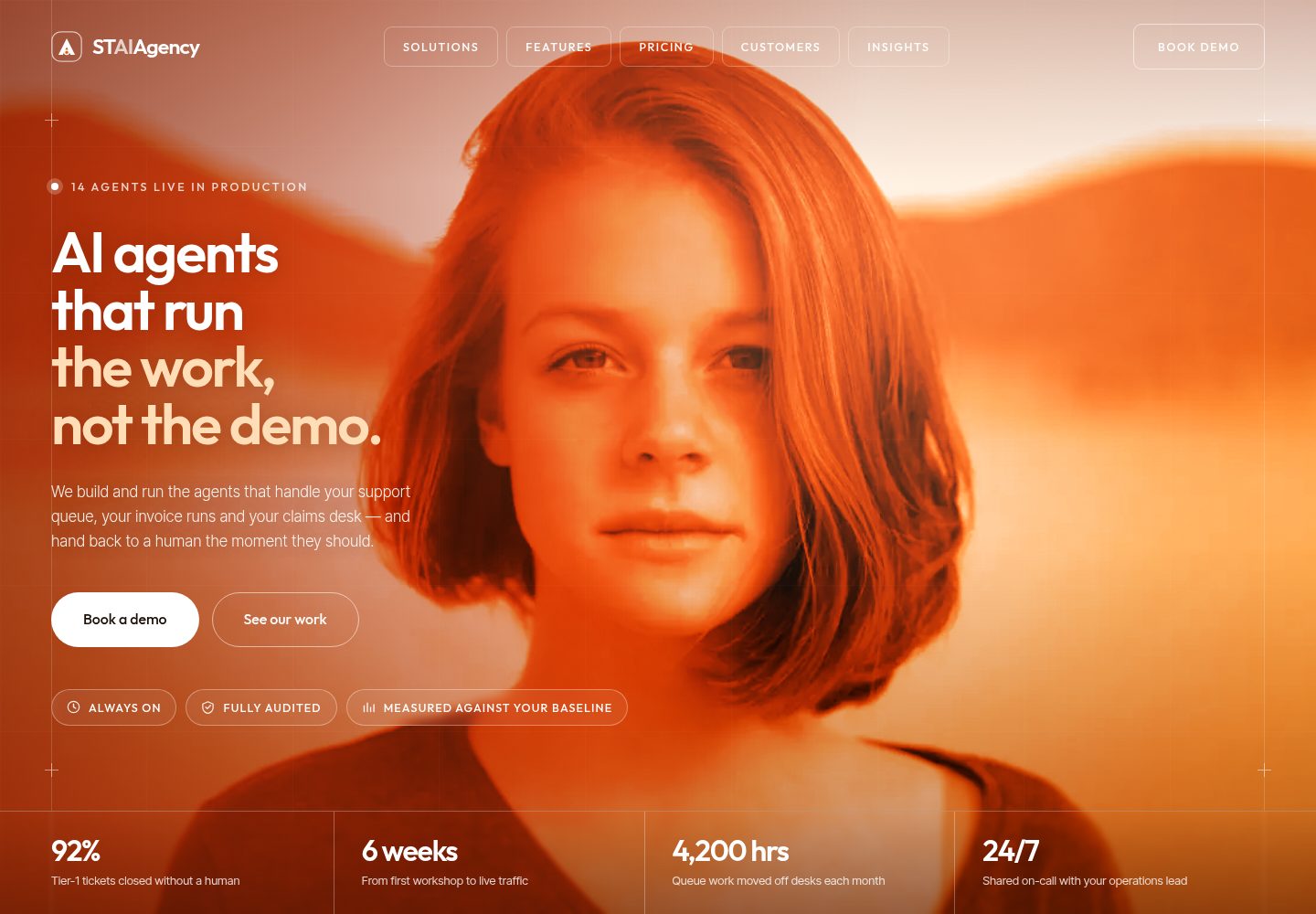
ST-AI-Agency 是一款基于 Astro 的免费 AI 代理机构主题,采用暖橙色设计,包含单页首页与 Markdown 博客,几乎不依赖 JavaScript。
看看你的网站会是什么样
浏览真实页面截图,比较内容排版与手机效果。点击下方缩略图切换,放大查看整页细节。
全部页面与视图 3
截图用于了解视觉与布局,交互效果请以实际项目为准。
采集于 2026-10-04查看来源
值得关注的模板亮点
从已有项目资料中,快速了解它的特点。
单页首页按主题划分区块,涵盖解决方案、平台功能、流程、客户案例、统计、行业、推荐语、团队、定价、FAQ 与联系表单
博客使用 Astro Content Collections 与 glob 加载器,支持分类筛选、精选文章、标签、阅读时间与相关文章
内置 SEO 输出:规范链接、Open Graph、Twitter/X 卡片、JSON-LD、站点地图、robots.txt 与 RSS
无障碍支持包括跳转链接、语义地标、移动端对话框焦点陷阱、FAQ 手风琴 aria-expanded 与减少动态效果
自托管 Outfit 与 Inter Tight 可变字体,图片为本地 WebP 并显式标注尺寸
模板详细介绍
ST-AI-Agency 是面向 AI 代理机构、自动化工作室与咨询公司的 Astro 静态主题。首页采用单页结构,将 Hero、客户条、解决方案、平台功能、流程、客户案例、统计数字、行业板块、推荐语、团队、定价、洞察预览、FAQ、联系表单和行动号召带组织为多个区块,页面内通过锚点跳转。博客基于 Astro Content Collections 构建,每篇文章拥有独立页面,包含面包屑、作者、日期、阅读时间、标签、上一篇/下一篇与相关文章;博客索引提供精选文章与分类筛选,筛选为渐进增强,禁用 JavaScript 时页面仍可用。主题内置 SEO 相关输出,包括规范链接、Open Graph 与 Twitter/X 卡片、JSON-LD 结构化数据、站点地图、robots.txt 与 RSS 订阅源。样式使用纯 CSS 与设计令牌,字体为自托管,图片为本地 WebP 并标注尺寸。表单为静态 UI,未配置端点时以演示模式运行,提交不会发送数据。
Astro博客企业官网
适合你的项目吗?
适用场景
- 为 AI 代理机构或自动化工作室搭建单页营销网站,展示服务、流程、客户案例与定价
- 在营销站点中附带 Markdown 博客,用于发布文章并自动生成文章页、RSS 与站点地图
- 需要静态部署且对 JavaScript 依赖较低的项目,例如部署在 Vercel、Netlify 或 GitHub Pages 子路径下
- 希望以少量配置文件与数据文件替换首页文案、团队、定价和 FAQ 等内容的站点定制
适合人群
- AI 代理机构、AI 自动化公司与 AI 咨询公司的官网建设
- 需要单页首页加博客结构的 Astro 静态站点项目
- 重视无障碍、SEO 输出与低 JavaScript 依赖的开发者
- 能自行配置表单服务端点并替换演示内容的团队
上手与定制指南
结合仓库当前版本的说明,按下面的资料检查内容、配置与运行要求。
- 1
需要 Node.js 22.12.0 或更新版本,仓库包含 .nvmrc 文件
- 2
克隆仓库后运行 npm install,使用 npm run dev 启动开发服务器,npm run build 输出静态站点到 dist/
- 3
联系与订阅表单默认处于演示模式,需在 src/config/site.ts 的 forms 中配置 Formspree、Web3Forms、Netlify Forms 或自有 API 端点
- 4
演示内容中的名称、公司、数字与引述均为虚构,上线前需替换为真实内容
- 5
演示图片来自 pxhere.com 并标注为 CC0,字体、图标及其他第三方素材需按各自许可核对
授权与来源资料
使用条件与限制
免费使用 · 保留许可声明本次收录的是公开仓库中采用 MIT 许可的免费版本;免费范围为该版本代码,不代表外部服务或第三方素材免费。
使用时需要遵守
- 允许免费使用、修改、商用和分发该版本代码。
- 分发代码副本或实质性部分时,保留原作者版权声明和完整 MIT 许可声明。
- 代码按现状提供;担保与责任限制以原许可证及适用法律为准。
额外费用与待核对事项
- README 提及 Formspree 表单服务;真实提交需配置服务端点,其使用额度与费用需单独核对。
- 演示图片、字体、图标及其他第三方素材需按各自许可核对,不能仅凭代码的 MIT 许可判断。
- 域名、托管、数据库、支付或 AI 等外部服务可能另外收费。
- 演示内容中的名称、公司、数字与引述均为虚构,上线前必须替换为真实内容。
- 联系与订阅表单默认处于演示模式,未配置端点时提交不会发送任何数据。
- 如需表单实际提交,需自行配置 Formspree、Web3Forms、Netlify Forms 或自有 API 端点。
- 演示图片中的人物与演示中的虚构姓名无关,不可暗示其代言。
- 第三方素材(图片、字体)保留各自许可,不在 MIT 许可覆盖范围内。
查看原文依据
Permission is hereby granted, free of charge
许可证原文
**Every name, company, figure and quote in the demo content is fictional.** Replace it with your own before you launch.
README 原文
While no endpoint is configured they run in **demo mode**: submitting sends nothing and shows a notice saying so.
README 原文
**Your own API.** Set `contactAction` to your endpoint URL.
README 原文
The people in these stock photos are not connected to the fictional names used in the demo.
README 原文
https://github.com/striviothemes/ST-AI-Agency/blob/main/LICENSEhttps://github.com/striviothemes/ST-AI-Agency/blob/main/README.mdThird-party assets keep their own licenses and are not covered by MIT:
README 原文
DeepSeek 根据仓库许可证和 README 整理 ·2026-10-04。结果仅覆盖已读取资料,依赖、图片、字体及后续条款变更以各自原文为准。
项目核对记录与介绍依据
模板资料
- 来源平台
- GitHub
- 资料与维护参考分
- 资料较完整 · 85 / 100
- 技术栈
- Astro
- 网站类型
- 博客 · 企业官网
这个分数如何计算
本站按许可资料(最高30分)、演示链接(12分)、预览图(10分)、Star数(15分)、记录的维护时间(15分)、描述完整度(8分)、功能记录(5分)和分类资料(5分)计算。它不是代码、安全或性能测试,也不是 Google 评分;有链接不代表已实测可用。
这个项目需要核对什么
- 记录的仓库更新时间
- 2026-10-04
- 截图检查日期
- 2026-10-04
已收录演示链接。请用你的内容与屏幕尺寸检查;有演示不代表表单、认证或支付已经可用。
目录记录的主要技术栈是 Astro。请通过依赖清单和锁文件核对实际版本与托管要求。这些说明基于收录资料,不代表代码审计或部署实测。
查看具体选型方法 →介绍的制作与核对状态
介绍由 AI 辅助整理目录与仓库资料。仓库作者不等于这篇介绍的审核者。
审核声明: [email protected] · 2026-10-05
查看当时使用的来源资料
SHA-256: 8504c59261701f8631135f190eef320d6eea927e304bdc87773f4a9075742696
2026-10-04T20:27:25.408Z
来源文件 / 仓库# ST AI Agency
**ST AI Agency** is a free Astro AI agency theme for AI agencies, AI automation studios, AI consultancies and AI agent platforms. It has a warm orange, cream and dark-brown design, a single-page homepage with a section for each topic, and a full Markdown blog. It ships almost no JavaScript.
> *AI agents that run the work, not the demo.*

## Demo
**Live demo:** [st-ai-agency.vercel.app](https://st-ai-agency.vercel.app/)
## Features
- **Astro 7** with static output and no UI framework.
- **AI agency design.** A full-bleed hero that tints its photo in the brand colours, editorial service rows, a heat-gradient process band, dark customer cards and arched portraits.
- **Responsive layout** at every width, with a mobile menu below 1200px.
- **One homepage with a section for each topic.** Hero, client strip, AI solutions, platform/features, process, customer results, statistics, industry sectors, testimonial, team, pricing, insights preview, FAQ, contact form and a call-to-action band.
- **Blog** built on Astro Content Collections (Content Layer `glob` loader). Each post gets its own page with breadcrumbs, author, date, reading time, tags, previous/next links and related posts.
- **Blog index** with a featured post and a category filter. The filter is a progressive enhancement and the page works without JavaScript.
- **SEO.** Canonical URLs, Open Graph and Twitter/X cards, JSON-LD (`Organization`, `WebSite`, `BlogPosting`, `BreadcrumbList`), a sitemap, `robots.txt` and an RSS feed.
- **Accessibility**
- Skip link and semantic landmarks.
- Accessible mobile dialog: focus trap, Escape to close, focus returned to the menu button.
- FAQ accordion with `aria-expanded`.
- `aria-current` on real page links only.
- Visible focus states.
- Reduced-motion support.
- Content stays fully readable with JavaScript disabled.
- **Lightweight JavaScript.** About 3 KB of minified vanilla JavaScript per page, inlined by Astro. No framework runtime and no third-party scripts.
- **Easy to customise.** One site config file plus typed data files for every homepage section.
- **Self-hosted fonts** (Outfit and Inter Tight) with no third-party font requests.
- **Optimised local images.** WebP files with explicit dimensions. The hero is preloaded and images further down the page are lazy-loaded.
- **Static form UI** that is honest about being a demo until you connect a provider (Formspree, Netlify Forms, Web3Forms or your own API).
- **Sub-path deploys.** Works at a domain root or under a sub-path, such as a GitHub Pages project site.
## Tech stack
| Tool | Purpose |
| --- | --- |
| [Astro](https://astro.build) 7 | Static site generator, components, content collections |
| [@astrojs/sitemap](https://docs.astro.build/en/guides/integrations-guide/sitemap/) | Generates `sitemap-index.xml` |
| [@astrojs/rss](https://docs.astro.build/en/recipes/rss/) | Generates `rss.xml` for the blog |
| [@fontsource-variable/outfit](https://fontsource.org/fonts/outfit) & [inter-tight](https://fontsource.org/fonts/inter-tight) | Self-hosted variable fonts |
| TypeScript | Typed config, data and scripts |
| Plain CSS | Design tokens and component styles (no Tailwind) |
| Vanilla TypeScript | Header, mobile menu, reveal, FAQ, forms |
Dev-only: `@astrojs/check` and `typescript` for `npm run check`.
## Requirements
- **Node.js 22.12.0 or newer.** This is the minimum for Astro 7. An `.nvmrc` file is included.
- npm 9.6.5 or newer, which ships with Node 22.
## Installation
```bash
git clone https://github.com/striviothemes/ST-AI-Agency.git
cd ST-AI-Agency
npm install
```
## Development
```bash
npm run dev
```
Opens at `http://localhost:4321`. If that port is already taken, Astro picks the next free one and prints it.
## Build
```bash
npm run build
```
The static site is written to `dist/`.
## Preview
```bash
npm run preview
```
This serves the production build locally. Run `npm run check` for TypeScript and Astro diagnostics.
## Project structure
```text
.
├── public/
│ ├── images/ # Optimised WebP photography (CC0)
│ ├── favicon.svg # Monogram favicon
│ └── preview.jpg # Theme preview, also the default social sharing image (1600×900)
├── src/
│ ├── components/
│ │ ├── icons/
│ │ │ ├── icons.ts # Custom SVG icon set
│ │ │ ├── Icon.astro # <Icon name="check" />
│ │ │ └── Logo.astro # ST AI Agency monogram
│ │ ├── Header.astro, MobileMenu.astro, Footer.astro, Newsletter.astro
│ │ ├── Hero.astro, ClientStrip.astro, Solutions.astro, SolutionRow.astro
│ │ ├── Platform.astro, FeatureList.astro, Process.astro
│ │ ├── Customers.astro, CustomerCard.astro, Stats.astro
│ │ ├── Sectors.astro, SectorCard.astro, Testimonials.astro, Team.astro
│ │ ├── Pricing.astro, PricingCard.astro, InsightsPreview.astro, PostCard.astro
│ │ ├── FAQ.astro, ContactCTA.astro, FinalCTA.astro, PageHero.astro
│ │ └── SEO.astro, SectionHeading.astro, Button.astro, Brand.astro, FrameLines.astro
│ ├── config/site.ts # ← brand, contact details, SEO, CTA, forms
│ ├── content/blog/ # ← Markdown blog posts
│ ├── content.config.ts # Blog collection schema
│ ├── data/ # ← all homepage copy and lists
│ ├── layouts/
│ │ ├── BaseLayout.astro
│ │ └── BlogPostLayout.astro
│ ├── pages/
│ │ ├── index.astro # /
│ │ ├── blog/index.astro # /blog
│ │ ├── blog/[slug].astro# /blog/<post>
│ │ ├── 404.astro
│ │ ├── rss.xml.ts
│ │ └── robots.txt.ts
│ ├── scripts/site.ts # Header, menu, reveal, hero drift, forms
│ ├── styles/
│ │ ├── tokens.css # ← colours, fonts, layout scale
│ │ ├── global.css # Reset, layout, type, buttons, motion
│ │ ├── components.css # Homepage sections
│ │ └── blog.css # Page hero, blog, article, 404
│ ├── types.ts # Shared TypeScript interfaces
│ └── utils/ # url(), blog helpers, nav helpers
└── astro.config.mjs
```
### Routes
The theme generates only these pages:
| Route | Source |
| --- | --- |
| `/` | `src/pages/index.astro` |
| `/blog` | `src/pages/blog/index.astro` |
| `/blog/<slug>` | `src/pages/blog/[slug].astro` |
| `/404` | `src/pages/404.astro` |
It also generates `/rss.xml`, `/robots.txt` and `/sitemap-index.xml`. Solutions, features, pricing, customers, sectors, process, team, FAQ and contact are sections of the homepage, reached with anchors such as `/#pricing`.
## Customization
You only need to edit **`src/config/site.ts`**, **`src/data/*`** and **`src/styles/tokens.css`** for most changes.
| What | Where |
| --- | --- |
| Site name, word-mark, tagline, description | `src/config/site.ts` → `name`, `brand`, `tagline`, `description` |
| Email, phone, address, response time | `src/config/site.ts` |
| Social links | `src/config/site.ts` → `social` (remove an entry to hide its icon) |
| SEO defaults, share image, theme colour | `src/config/site.ts` → `seo` |
| Main CTA ("Book a demo") | `src/config/site.ts` → `cta` |
| Copyright line | `src/config/site.ts` → `copyright` |
| Logo / monogram | `src/components/icons/Logo.astro` and `public/favicon.svg` |
| Header, mobile and footer navigation | `src/data/navigation.ts` |
| Hero copy, stats, client names, section headings, CTA band, newsletter | `src/data/home.ts` |
| Solutions (service rows) | `src/data/solutions.ts` |
| Platform features checklist | `src/data/features.ts` |
| Process steps | `src/data/process.ts` |
| Customer case studies | `src/data/customers.ts` |
| Big-number statistics | `src/data/stats.ts` |
| Sectors | `src/data/sectors.ts` |
| Testimonial | `src/data/testimonials.ts` |
| Team | `src/data/team.ts` (supports optional `bio` and `social`) |
| Pricing plans | `src/data/pricing.ts` |
| FAQ | `src/data/faq.ts` |
| Colours | `src/styles/tokens.css` (`--o900`…`--o100`, `--cream`, `--ink`, …) |
| Typography | `src/styles/tokens.css` (`--display`, `--body`) plus the font imports in `src/layouts/BaseLayout.astro` |
| Section order or removal | `src/pages/index.astro` (comment out or reorder components) |
Section titles can contain `<br>` for deliberate line breaks, for example `'Six weeks from<br>workshop to live.'`.
**Every name, company, figure and quote in the demo content is fictional.** Replace it with your own before you launch.
### Changing the colours
The palette is a ramp of oranges (`--o900` darkest to `--o100` lightest) plus neutrals. Change the hex values in `tokens.css` and the theme follows. A few hero gradients in `components.css` (`.hero__duo`, `.hero__warm`, `.hero__scrim`) use literal colour stops so they can be tuned separately. Edit those too if you move far away from orange.
### Changing the fonts
1. Install another Fontsource package, for example `npm i @fontsource-variable/manrope`.
2. Replace the imports at the top of `src/layouts/BaseLayout.astro`, including the two `?url` preload imports.
3. Update `--display` / `--body` in `tokens.css`.
## Adding blog posts
Create a Markdown file in `src/content/blog/`. The file name becomes the URL, so `my-new-post.md` is published at `/blog/my-new-post`.
```markdown
---
title: Your Post Title
description: One or two sentences for cards, meta description and social previews.
pubDate: 2026-10-01
updatedDate: 2026-10-08 # optional
category: Operations
author: Amara Boateng
authorRole: Founder, principal engineer # optional
image: /images/blog-ai-agents.webp # file in /public
imageAlt: Describe the image for screen readers
tags: [AI agents, Operations]
readingTime: 6 # optional; calculated from word count if omitted
featured: false # optional; pins the post as "Latest note" on /blog
draft: false # drafts show in `npm run dev` only
---
Your content in Markdown…
```
The frontmatter is validated by the schema in `src/content.config.ts`, so a typo fails the build with a clear message. The homepage Insights section shows the three newest posts automatically.
## Contact form
The contact and newsletter forms are plain HTML forms. While no endpoint is configured they run in **demo mode**: submitting sends nothing and shows a notice saying so. To connect a provider, edit `forms` in `src/config/site.ts`.
**Formspree:**
```ts
forms: { contactAction: 'https://formspree.io/f/<your-form-id>', newsletterAction: '', netlify: false }
```
**Web3Forms.** Set `contactAction: 'https://api.web3forms.com/submit'`, then add your access key as a hidden field inside the form in `src/components/ContactCTA.astro`:
```html
<input type="hidden" name="access_key" value="YOUR_PUBLIC_ACCESS_KEY" />
```
**Netlify Forms:**
```ts
forms: { contactAction: '', newsletterAction: '', netlify: true }
```
With `netlify: true` the forms get `data-netlify="true"`, a hidden `form-name` field and a honeypot, and they submit normally. Netlify detects them at deploy time.
**Your own API.** Set `contactAction` to your endpoint URL. The form posts `name`, `company`, `email`, `phone`, `workflow` and `message`.
No API keys or credentials are included in the theme.
## Images
All photographs are local WebP files in `public/images/`. They were downloaded from [pxhere.com](https://pxhere.com) and resized and cropped for the theme. Every source page was checked at download time and states that the photo is released under **[CC0 1.0 Universal](https://creativecommons.org/publicdomain/zero/1.0/)** (public domain), so you can redistribute it with the theme. Attribution is not required, but it is listed here for transparency.
| File | Source |
| --- | --- |
| `ai-agency-hero.webp` | [pxhere.com/en/photo/108386](https://pxhere.com/en/photo/108386) |
| `platform-operations-lead.webp` | [pxhere.com/en/photo/912909](https://pxhere.com/en/photo/912909) |
| `solution-support.webp` | [pxhere.com/en/photo/1258982](https://pxhere.com/en/photo/1258982) |
| `solution-finance.webp` | [pxhere.com/en/photo/1238368](https://pxhere.com/en/photo/1238368) |
| `solution-documents.webp` | [pxhere.com/en/photo/655321](https://pxhere.com/en/photo/655321) |
| `solution-research.webp` | [pxhere.com/en/photo/596254](https://pxhere.com/en/photo/596254) |
| `solution-evaluation.webp` | [pxhere.com/en/photo/1170475](https://pxhere.com/en/photo/1170475) |
| `customer-fintech.webp` | [pxhere.com/en/photo/1109918](https://pxhere.com/en/photo/1109918) |
| `customer-healthcare.webp` | [pxhere.com/en/photo/647862](https://pxhere.com/en/photo/647862) |
| `customer-logistics.webp` | [pxhere.com/en/photo/1072796](https://pxhere.com/en/photo/1072796) |
| `sector-banking.webp` | [pxhere.com/en/photo/104014](https://pxhere.com/en/photo/104014) |
| `sector-healthcare.webp` | [pxhere.com/en/photo/1179849](https://pxhere.com/en/photo/1179849) |
| `sector-freight.webp` | [pxhere.com/en/photo/1177716](https://pxhere.com/en/photo/1177716) |
| `sector-software.webp` | [pxhere.com/en/photo/913320](https://pxhere.com/en/photo/913320) |
| `sector-insurance.webp` | [pxhere.com/en/photo/811631](https://pxhere.com/en/photo/811631) |
| `sector-commerce.webp` | [pxhere.com/en/photo/1052603](https://pxhere.com/en/photo/1052603) |
| `testimonial-portrait.webp` | [pxhere.com/en/photo/1278247](https://pxhere.com/en/photo/1278247) |
| `team-member-01.webp` | [pxhere.com/en/photo/706040](https://pxhere.com/en/photo/706040) |
| `team-member-02.webp` | [pxhere.com/en/photo/764654](https://pxhere.com/en/photo/764654) |
| `team-member-03.webp` | [pxhere.com/en/photo/1177669](https://pxhere.com/en/photo/1177669) |
| `team-member-04.webp` | [pxhere.com/en/photo/764641](https://pxhere.com/en/photo/764641) |
| `blog-ai-agents.webp` | [pxhere.com/en/photo/912807](https://pxhere.com/en/photo/912807) |
| `blog-reliable-workflows.webp` | [pxhere.com/en/photo/1072793](https://pxhere.com/en/photo/1072793) |
| `blog-human-in-the-loop.webp` | [pxhere.com/en/photo/764658](https://pxhere.com/en/photo/764658) |
| `blog-production-ready.webp` | [pxhere.com/en/photo/1366450](https://pxhere.com/en/photo/1366450) |
| `blog-customer-support.webp` | [pxhere.com/en/photo/833211](https://pxhere.com/en/photo/833211) |
| `blog-auditable-workflows.webp` | [pxhere.com/en/photo/819795](https://pxhere.com/en/photo/819795) |
| `blog-prototype-to-production.webp` | [pxhere.com/en/photo/723648](https://pxhere.com/en/photo/723648) |
| `blog-measuring-roi.webp` | [pxhere.com/en/photo/611848](https://pxhere.com/en/photo/611848) |
The people in these stock photos are not connected to the fictional names used in the demo. `public/preview.jpg` is composed from screenshots of the theme itself (which include `ai-agency-hero.webp`) plus the theme's own logo and typography.
**Replacing images.** Keep roughly the same aspect ratios (listed in each component's `width`/`height` attributes) and save as WebP for the best results. The theme applies its warm duotone filter through CSS, so any photo picks up the brand look.
## Fonts
| Font | Use | License | Source |
| --- | --- | --- | --- |
| Outfit (variable) | Display / headings | SIL Open Font License 1.1 | [Fontsource](https://fontsource.org/fonts/outfit), [upstream](https://github.com/Outfitio/Outfit-Fonts) |
| Inter Tight (variable) | Body text | SIL Open Font License 1.1 | [Fontsource](https://fontsource.org/fonts/inter-tight), [upstream](https://github.com/rsms/inter) |
Both fonts are installed from npm and served from your own domain, so there are no requests to Google Fonts. The Latin subsets are preloaded. If a font fails to load, the stacks fall back to `system-ui`.
## SVG and icons
The theme uses its own SVG artwork from the original design. It does not use an icon library.
- **`src/components/icons/Logo.astro`** draws the ST AI Agency monogram. It has a `light` variant for the header and a `footer` variant.
- **`src/components/icons/icons.ts`** holds the icon set: clock, shield-check, bars, arrows, check, check-circle, plus, mail, phone, pin, time, LinkedIn, X, GitHub and RSS. Every icon draws with `currentColor`, so CSS controls its colour.
- **`src/components/icons/Icon.astro`** renders an icon: `<Icon name="check" size={16} />`. Icons are decorative (`aria-hidden`) unless you pass a `label`.
To add an icon, append an entry with `viewBox`, `size` and SVG `body` markup to `icons.ts`. The `IconName` type updates automatically.
## Deployment
The theme builds to static files in `dist/`, so it runs on any static host. Before you deploy, set your production URL. It is used for canonical tags, Open Graph, the sitemap and RSS:
- set the `SITE_URL` environment variable, for example `SITE_URL=https://www.example.com`, **or**
- change the default URL in `astro.config.mjs`.
### Vercel
Import the repository at [vercel.com/new](https://vercel.com/new). Vercel detects Astro automatically and uses `npm run build` with output directory `dist`. Add `SITE_URL` under *Settings → Environment Variables*.
### Netlify
Import the repository at [app.netlify.com](https://app.netlify.com). Use build command `npm run build` and publish directory `dist`, and add `SITE_URL` as an environment variable. Set `forms.netlify: true` if you want Netlify Forms.
### Cloudflare Pages
Create a Pages project from your repository. Choose the **Astro** framework preset, or use build command `npm run build` and output directory `dist`. Set `SITE_URL`, and set `NODE_VERSION=22` if the default image uses an older Node.
### GitHub Pages and other static hosts
For GitHub Pages, use the official [withastro/action](https://github.com/withastro/action) workflow described in the [Astro GitHub Pages guide](https://docs.astro.build/en/guides/deploy/github/). For a project site served from a sub-path, set both variables in the workflow:
```yaml
env:
SITE_URL: https://<user>.github.io
BASE_PATH: /st-ai-agency
```
Every internal link goes through the `url()` helper in `src/utils/url.ts`, so the theme works under that sub-path.
For any other host, run `npm run build` and upload the contents of `dist/`. Configure the host to serve `404.html` for missing pages.
## License
The theme is released under the [MIT License](LICENSE).
Third-party assets keep their own licenses and are not covered by MIT:
- **Photographs** in `public/images/` are CC0 1.0 (public domain). Sources are listed under [Images](#images).
- **Fonts** Outfit and Inter Tight are licensed under the SIL Open Font License 1.1. See [Fonts](#fonts).
## Credits
- [Astro](https://astro.build) and the official `@astrojs/sitemap` and `@astrojs/rss` integrations (MIT).
- [Fontsource](https://fontsource.org) packages of **Outfit** (The Outfit Project Authors) and **Inter Tight** (The Inter Project Authors), both SIL OFL 1.1.
- Photography from [pxhere.com](https://pxhere.com), CC0 1.0. Per-file sources are listed under [Images](#images).
- Design, SVG artwork, logo and demo copy: ST AI Agency theme by StrivioThemes.
看看同类模板
对比同技术栈与用途的模板,找到更适合的视觉与内容结构。

astrowind
⭕️ AstroWind: A free template using Astro v7 and Tailwind CSS v4. Astro starter theme.
Astro · 博客

astro-paper
A minimal, accessible and SEO-friendly Astro blog theme.
Astro · 博客

fuwari
✨A static blog template built with Astro.
Astro · 博客

Firefly
Firefly 是一款基于 Astro 的静态博客主题,由 CuteLeaf 在 saicaca 的 Fuwari 模板基础上二次开发,主打清新美观的视觉风格。
Astro · 博客

astro-theme-cactus
A simple Astro theme. Use it to create your blog or website.
Astro · 作品集

astrofy
Astrofy is a free and open-source template for your Personal Portfolio Website built with Astro and TailwindCS…
Astro · 作品集