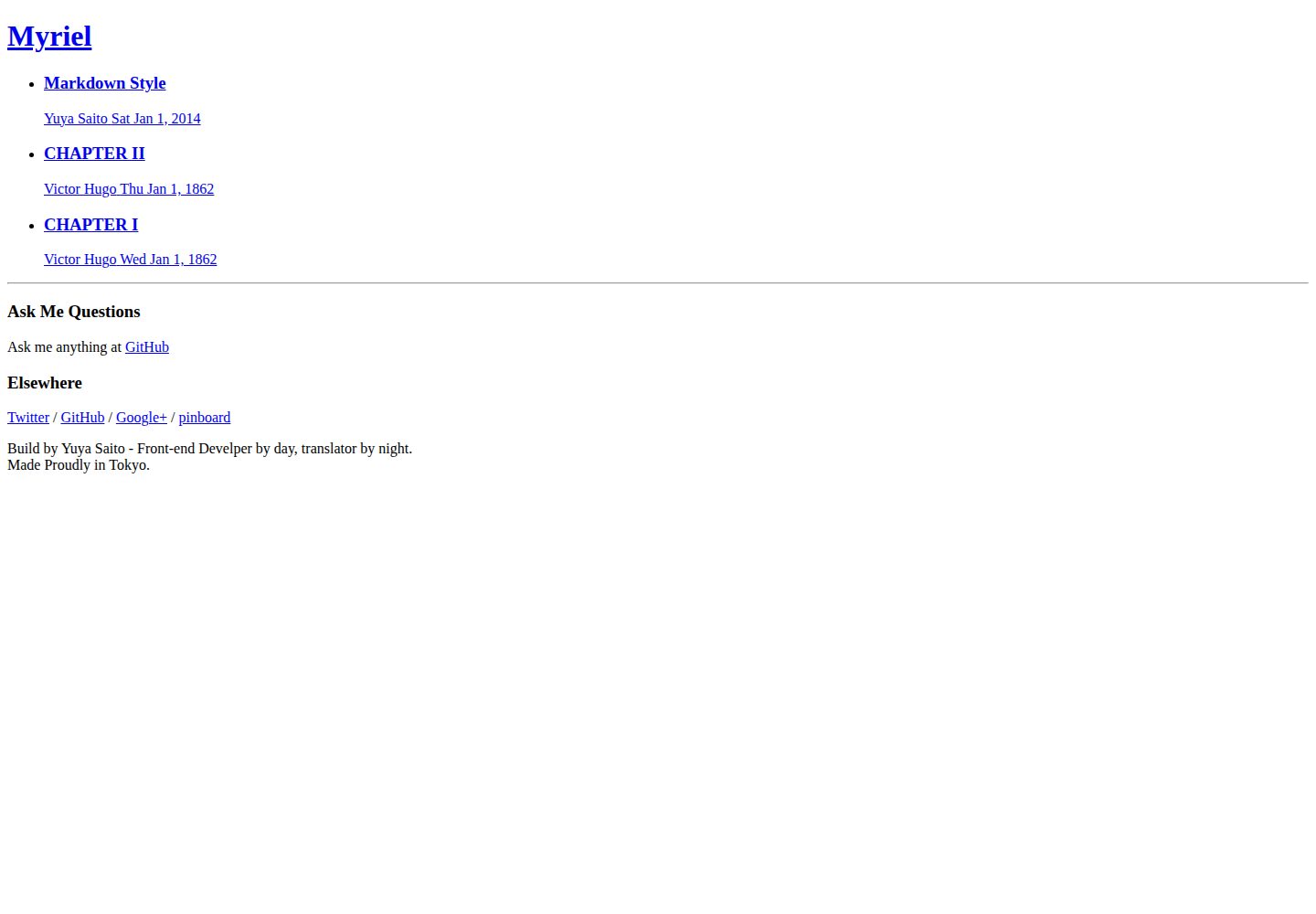
A minimal blog theme designed for Hugo, with a streamlined structure that is easy to modify as needed
HugoBlog
myriel — Hugo Blog Template
By studiomohawk
Myriel is a minimal blog theme for Hugo, licensed under MIT, that concatenates CSS via Node.js scripts and provides a command to create posts.
Explore the design
Compare the page layouts and mobile experience. Open any screenshot for a closer look.
Desktop homepage1 / 2
Desktop captureTop of page
Actual screenshot captured by the server browser.
All pages & views 2
Screenshots show visual appearance; interactive behavior may differ.
Recorded 2026-10-02View source
What stands out
A quick read of the recorded project description.
Styles are centralized in the `_devel/style` directory and concatenated into a single CSS file via the Node tool borschik
Provides the `npm run write --title=...` command for creating new posts
Includes a combination of `npm start` and `npm run devel` for watching changes and live-reloading the preview
The repository includes an online GitHub Pages example to view the default appearance directly
Code is licensed under MIT, permitting use, modification, commercial use, and distribution
Template Details
Myriel is a blog theme written by studiomohawk for Hugo, positioned as a "minimal but flexibly adjustable" blog boilerplate. The repository states its version as 0.0.2, in an early stage; the author explicitly warns that defects may exist and welcomes feedback via GitHub issues.
The theme itself contains no JavaScript, and style files are placed in the `_devel/style` directory, organized according to Hugo's directory conventions. The author does not use a CSS preprocessor; instead, the Node.js tool borschik concatenates CSS into `static/static/style/bundle.css`. New style files must be manually added with `@import` rules in `_devel/style/main.css`.
Prerequisites are installing Hugo and running `npm install` in the repository root to install Node dependencies. Running `hugo server -s . -w` starts a local preview; `npm start` together with `npm run devel` enables simultaneous watching and live reload; `npm run write --title=...` is used to create a new post. The repository includes a GitHub Pages example site.
HugoBlog
Is it right for your project?
Use Cases
- Building a personal blog with Hugo and wanting to start from a minimal theme for customization
- Needing a style organization and concatenation workflow that does not rely on a CSS preprocessor
- Wanting to quickly create new post drafts via the command line
- Running the Hugo server and browser live reload simultaneously during local development
Suitable For
- Developers using Hugo who are willing to adjust the theme styles themselves
- Bloggers who prefer starting minimal and adding features as needed
- Users who can accept installing Node.js and npm dependencies locally
Getting started & customization
Use these recorded setup notes alongside the repository instructions for your chosen version.
- 1
Install Hugo first, and clone the repository locally
- 2
Run `npm install` in the repository root to install Node dependencies
- 3
Run `hugo server -s . -w` to start the local server, accessible by default at http://localhost:1313/
- 4
After modifying CSS, run `npm run watch` so borschik re-concatenates the styles; new files must be added with `@import` in `_devel/style/main.css`
- 5
The theme is currently an early 0.0.2 version; the author warns that defects may exist, so it is advisable to check the repository issues before use
License & source material
Usage conditions & limitations
Free to use · keep license noticeThis entry covers the free version under the MIT license in the public repository; the free scope is the code of this version and does not imply that external services or third-party assets are free.
Must comply with when using
- Free use, modification, commercial use, and distribution of this version's code are permitted.
- When distributing copies or substantial portions of the code, retain the original author's copyright notice and the full MIT license notice.
- The code is provided as is; warranties and limitations of liability are governed by the original license and applicable law.
Additional costs & items to verify
- Using this theme requires installing Node.js and npm dependency modules locally for CSS concatenation and development scripts; the related commands cannot be used without a Node environment.
- Style modifications rely on Yandex's borschik tool to concatenate CSS, which must be installed via npm as an additional third-party build dependency.
- New style files must be manually added with `@import` rules in `_devel/style/main.css`; otherwise they will not be concatenated into the final CSS.
- The project is in an early 0.0.2 stage; the author explicitly warns that defects may exist and does not guarantee stability or production readiness.
- Demo images, fonts, icons, and other third-party assets must be checked against their respective licenses; the code's MIT license alone cannot be used to judge them.
- External services such as domains, hosting, databases, payments, or AI may incur separate charges.
View Original Text Basis
Permission is hereby granted, free of charge
Original License Text
Node.js and several modules which you can install with `npm install` at this root dir
Original README
I am using node [borschik](https://github.com/bem/borschik) from Yandex to concatenate CSS.
Original README
borschik looks for `_devel/style/main.css`, so if you add new file, make sure you add `@import`rule to that file.
Original README
https://github.com/studiomohawk/myriel/blob/master/LICENSEhttps://github.com/studiomohawk/myriel/blob/master/README.mdCurrently, Myriel is version 0.0.2 as you can see it's very early stage so something **should be** broken.
Original README
Compiled by DeepSeek based on repository license and README ·2026-10-02. Results only cover the materials read; dependencies, images, fonts, and subsequent term changes are subject to their respective original texts.
Project checks & description sources
Template Information
- Source platforms
- GitHub
- Documentation and maintenance reference score
- Partly documented · 68 / 100
- Technologies
- Hugo
- Website type
- Blog
How this score is calculated
Our heuristic uses license records (up to 30), a demo link (12), a preview (10), stars (15), recorded maintenance (15), description completeness (8), feature records (5) and classification data (5). It is not a code, security or performance test, or a Google score. A link does not establish tested functionality.
What to verify for this project
- Repository update recorded
- 2014-12-30
- Screenshot last checked
- 2026-10-02
A demo link is listed. Check it with your own content and viewport sizes; its presence does not confirm that forms, authentication or payments work.
The catalog identifies Hugo as the primary stack. Check the actual dependency manifest and lockfile for versions and hosting requirements. These notes use recorded metadata, not a code audit or a deployment test.
Use a selection guide →How this description was prepared
AI-assisted description based on catalog records and repository material. Repository authors are not automatically the reviewers of this description.
Automatically checked against source and license rules; no manual editorial review.
Inspect the recorded source material
SHA-256: 93724244e6f9215300b7f3e6271ed4b64a31741c79b3606d0ffa89932c6235c0
2026-10-02T21:09:49.798Z
Source file / repository# Myriel Myriel is a very minimum yet flexible blog boilerplate for [Hugo](http://hugo.spf13.com/). Currently, Myriel is version 0.0.2 as you can see it's very early stage so something **should be** broken. If you find it, please tell me at [issues](https://github.com/studiomohawk/myriel/issues/new) ## Prerequisite - [Hugo](http://hugo.spf13.com/) - Node.js and several modules which you can install with `npm install` at this root dir (Since I'm new to Go). ## Quickstart - 1: [Install Hugo](http://hugo.spf13.com/overview/quickstart)! - 2: You need to clone this repo on your local machine. ``` git clone [email protected]:studiomohawk/myriel.git ``` `cd` into your cloned repo. - 3: Then, install node dependencies by `npm install` ### Run Hugo ``` hugo server -s . -w ``` Point your browser to <http://localhost:1313/> And you're running Hugo with Myriel theme! ### Example I've setup example at <http://studiomohawk.github.io/myriel/> ### Customize Myriel As you can see, Myriel is very minimum theme, so you do want to customize it to fit your needs. #### Where is CSS? CSS files are located within `_devel/style` dirs. Dirs are structured to follow Hugo’s dirs convention. ##### But, how to modify them? Since I don’t like any of CSS preprocessors, I’ve decided to not use them at all! But as everyone knows that using `@import` is bad for performance, I am using node [borschik](https://github.com/bem/borschik) from Yandex to concatenate CSS. ``` npm run watch ``` This command will start watching css dirs change and when any change detected, borschik will concatenate css and move it to `static/static/style/bundle.css`. borschik looks for `_devel/style/main.css`, so if you add new file, make sure you add `@import`rule to that file. #### Where is JavaScript? At this time, I don’t have any JavaScript! **but** I’m planning to use [browserify](https://github.com/substack/node-browserify) by substack for modularize JavaScript. I already setup necessary commands at `package.json` so if you need to add JavaScript, please check them out. #### So you want to run Hugo, watch and live-reload? ``` npm start ``` and open a diffrent tab/pane/window in console type: ``` npm run devel ``` and open <http://172.19.47.191:3002> OR whereever your console point you to. Will take care everything! (But you need to have Node.js and few Modules) #### It is possible to automate creating a new post? Yes. ``` npm run write --title=your title ```
Explore similar templates
Compare previews and descriptions within the same stack and category.

hugo-PaperMod
A fast, clean, responsive Hugo theme for blogs and lightweight portfolios, with three layout modes (Regular, Home-Info, Profile), automatic and manual light/dark themes, Fuse.js client-side search, multilingual support, and built-in Open Graph, Twitter Cards, and Schema.org data.
Hugo · Portfolio

LoveIt
LoveIt is a clean, elegant, and feature-rich Hugo blog theme derived from LeaveIt and KeepIt, MIT-licensed. It offers light/dark modes, responsive layout, multilingual support, and search via Lunr.js or Algolia.
Hugo · Blog

hugo-coder
hugo-coder is a minimalist Hugo blog theme maintained by luizdepra under the MIT license. It provides a clean, text-focused blog appearance, configuration documentation in the docs directory, and a complete exampleSite with hugo.toml.
Hugo · Blog

blowfish
Blowfish is a Hugo personal website and blog theme built with Tailwind CSS 4, focused on lightness, simplicity, and content-first presentation.
Hugo · Blog

hugo-paper
hugo-paper is a simple, clean, and customizable Hugo blog theme configured through config.toml or hugo.toml.
Hugo · Blog

hextra
Hextra is a Hugo theme for documentation and blog sites, built on Hugo and Tailwind CSS with design referencing Nextra.
Hugo · Documentation