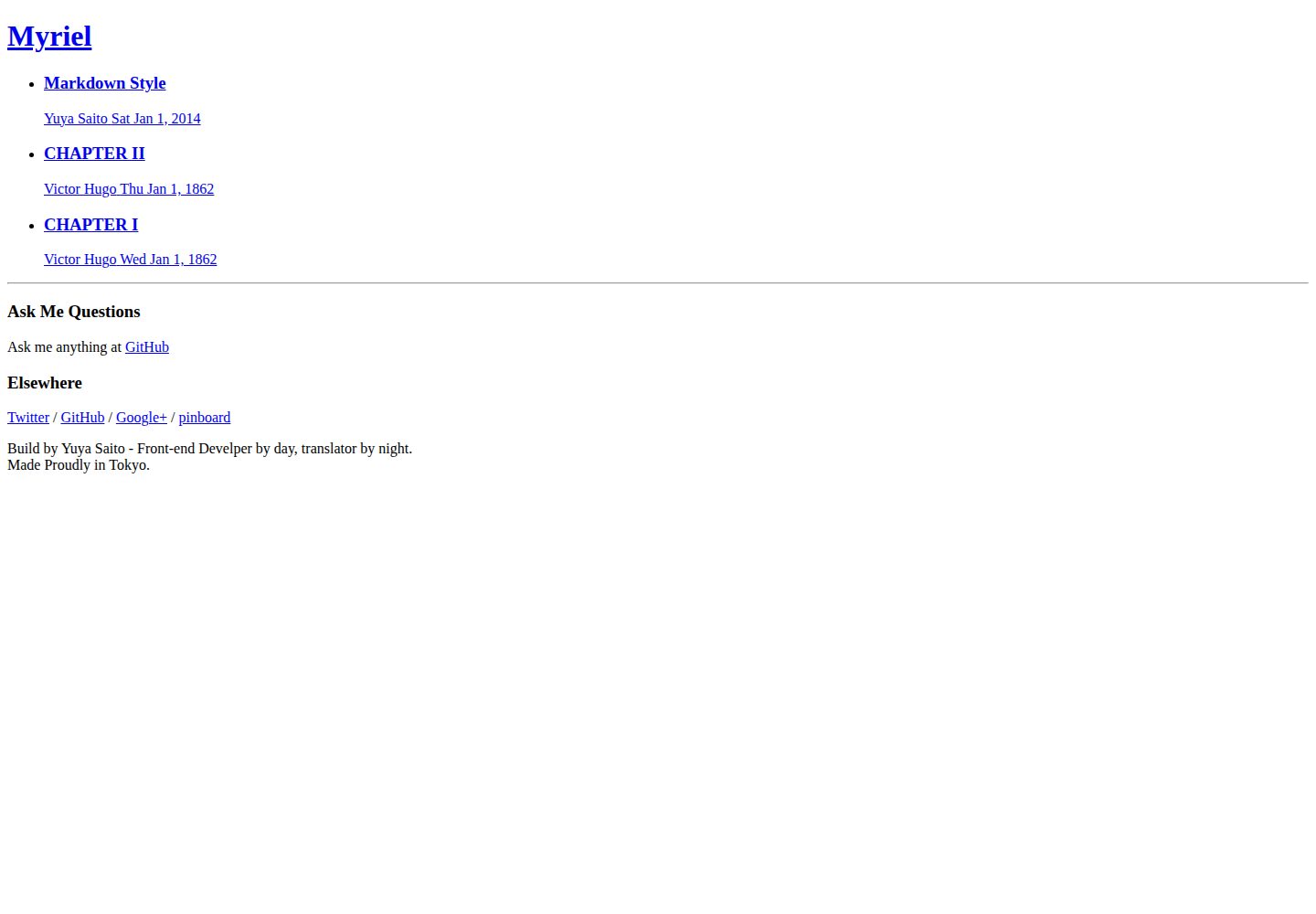
为 Hugo 设计的极简博客主题,结构精简,便于按需修改
Hugo博客
myriel — Hugo 博客模板
作者 studiomohawk
Myriel 是一个面向 Hugo 的极简博客主题,代码采用 MIT 许可,通过 Node.js 脚本拼接 CSS 并提供文章创建命令。
看看你的网站会是什么样
浏览真实页面截图,比较内容排版与手机效果。点击下方缩略图切换,放大查看整页细节。
全部页面与视图 2
截图用于了解视觉与布局,交互效果请以实际项目为准。
采集于 2026-10-02查看来源
值得关注的模板亮点
从已有项目资料中,快速了解它的特点。
样式集中在 `_devel/style` 目录,通过 Node 工具 borschik 拼接为单一 CSS 文件
提供 `npm run write --title=...` 命令用于创建新文章
包含 `npm start` 与 `npm run devel` 组合,用于监听变更并实时刷新预览
仓库附带 GitHub Pages 在线示例,可直接查看默认外观
代码采用 MIT 许可,允许使用、修改、商用与分发
模板详细介绍
Myriel 是 studiomohawk 为 Hugo 编写的博客主题,定位为「最小化但可灵活调整」的博客样板。仓库自述其版本为 0.0.2,处于早期阶段,作者明确提示可能存在缺陷,并欢迎通过 GitHub issues 反馈。
主题本身不包含 JavaScript,样式文件放在 `_devel/style` 目录中,按 Hugo 的目录约定组织。作者不使用 CSS 预处理器,而是借助 Node.js 工具 borschik 把 CSS 拼接为 `static/static/style/bundle.css`;新增样式文件需要在 `_devel/style/main.css` 中手动添加 `@import` 规则。
使用前提是安装 Hugo,并在仓库根目录执行 `npm install` 安装 Node 依赖。运行 `hugo server -s . -w` 可启动本地预览;`npm start` 配合 `npm run devel` 可同时进行监听与实时刷新;`npm run write --title=...` 用于创建新文章。仓库附带一个 GitHub Pages 示例站点。
Hugo博客
适合你的项目吗?
适用场景
- 用 Hugo 搭建个人博客并希望从精简主题开始改造
- 需要一套不依赖 CSS 预处理器的样式组织与拼接流程
- 希望通过命令行快速创建新文章草稿
- 在本地开发时同时运行 Hugo 服务与浏览器实时刷新
适合人群
- 使用 Hugo 并愿意自行调整主题样式的开发者
- 偏好极简起步、按需添加功能的博客作者
- 能接受在本地安装 Node.js 与 npm 依赖的用户
上手与定制指南
结合仓库当前版本的说明,按下面的资料检查内容、配置与运行要求。
- 1
需先安装 Hugo,并克隆仓库到本地
- 2
在仓库根目录执行 `npm install` 安装 Node 依赖
- 3
运行 `hugo server -s . -w` 启动本地服务,默认访问 http://localhost:1313/
- 4
修改 CSS 后需执行 `npm run watch`,由 borschik 重新拼接样式;新增文件要在 `_devel/style/main.css` 中添加 `@import`
- 5
主题当前为 0.0.2 早期版本,作者提示可能存在缺陷,使用前建议先查看仓库 issues
授权与来源资料
使用条件与限制
免费使用 · 保留许可声明本次收录的是公开仓库中采用 MIT 许可的免费版本;免费范围为该版本代码,不代表外部服务或第三方素材免费。
使用时需要遵守
- 允许免费使用、修改、商用和分发该版本代码。
- 分发代码副本或实质性部分时,保留原作者版权声明和完整 MIT 许可声明。
- 代码按现状提供;担保与责任限制以原许可证及适用法律为准。
额外费用与待核对事项
- 使用该主题需在本地安装 Node.js 及 npm 依赖模块,用于 CSS 拼接与开发脚本;未安装 Node 环境时无法使用相关命令。
- 样式修改依赖 Yandex 的 borschik 工具拼接 CSS,需通过 npm 安装该外部工具,属于额外的第三方构建依赖。
- 新增样式文件必须在 `_devel/style/main.css` 中手动添加 `@import` 规则,否则不会被拼接进最终 CSS。
- 项目处于 0.0.2 早期阶段,作者明确提示可能存在缺陷,不保证稳定或可用于生产环境。
- 演示图片、字体、图标及其他第三方素材需按各自许可核对,不能仅凭代码的 MIT 许可判断。
- 域名、托管、数据库、支付或 AI 等外部服务可能另外收费。
查看原文依据
Permission is hereby granted, free of charge
许可证原文
Node.js and several modules which you can install with `npm install` at this root dir
README 原文
I am using node [borschik](https://github.com/bem/borschik) from Yandex to concatenate CSS.
README 原文
borschik looks for `_devel/style/main.css`, so if you add new file, make sure you add `@import`rule to that file.
README 原文
https://github.com/studiomohawk/myriel/blob/master/LICENSEhttps://github.com/studiomohawk/myriel/blob/master/README.mdCurrently, Myriel is version 0.0.2 as you can see it's very early stage so something **should be** broken.
README 原文
DeepSeek 根据仓库许可证和 README 整理 ·2026-10-02。结果仅覆盖已读取资料,依赖、图片、字体及后续条款变更以各自原文为准。
项目核对记录与介绍依据
模板资料
- 来源平台
- GitHub
- 资料与维护参考分
- 资料一般 · 68 / 100
- 技术栈
- Hugo
- 网站类型
- 博客
这个分数如何计算
本站按许可资料(最高30分)、演示链接(12分)、预览图(10分)、Star数(15分)、记录的维护时间(15分)、描述完整度(8分)、功能记录(5分)和分类资料(5分)计算。它不是代码、安全或性能测试,也不是 Google 评分;有链接不代表已实测可用。
这个项目需要核对什么
- 记录的仓库更新时间
- 2014-12-30
- 截图检查日期
- 2026-10-02
已收录演示链接。请用你的内容与屏幕尺寸检查;有演示不代表表单、认证或支付已经可用。
目录记录的主要技术栈是 Hugo。请通过依赖清单和锁文件核对实际版本与托管要求。这些说明基于收录资料,不代表代码审计或部署实测。
查看具体选型方法 →介绍的制作与核对状态
介绍由 AI 辅助整理目录与仓库资料。仓库作者不等于这篇介绍的审核者。
已完成服务器许可规则与 AI 来源核对;未经过人工编辑审核。
查看当时使用的来源资料
SHA-256: 93724244e6f9215300b7f3e6271ed4b64a31741c79b3606d0ffa89932c6235c0
2026-10-02T21:09:49.798Z
来源文件 / 仓库# Myriel Myriel is a very minimum yet flexible blog boilerplate for [Hugo](http://hugo.spf13.com/). Currently, Myriel is version 0.0.2 as you can see it's very early stage so something **should be** broken. If you find it, please tell me at [issues](https://github.com/studiomohawk/myriel/issues/new) ## Prerequisite - [Hugo](http://hugo.spf13.com/) - Node.js and several modules which you can install with `npm install` at this root dir (Since I'm new to Go). ## Quickstart - 1: [Install Hugo](http://hugo.spf13.com/overview/quickstart)! - 2: You need to clone this repo on your local machine. ``` git clone [email protected]:studiomohawk/myriel.git ``` `cd` into your cloned repo. - 3: Then, install node dependencies by `npm install` ### Run Hugo ``` hugo server -s . -w ``` Point your browser to <http://localhost:1313/> And you're running Hugo with Myriel theme! ### Example I've setup example at <http://studiomohawk.github.io/myriel/> ### Customize Myriel As you can see, Myriel is very minimum theme, so you do want to customize it to fit your needs. #### Where is CSS? CSS files are located within `_devel/style` dirs. Dirs are structured to follow Hugo’s dirs convention. ##### But, how to modify them? Since I don’t like any of CSS preprocessors, I’ve decided to not use them at all! But as everyone knows that using `@import` is bad for performance, I am using node [borschik](https://github.com/bem/borschik) from Yandex to concatenate CSS. ``` npm run watch ``` This command will start watching css dirs change and when any change detected, borschik will concatenate css and move it to `static/static/style/bundle.css`. borschik looks for `_devel/style/main.css`, so if you add new file, make sure you add `@import`rule to that file. #### Where is JavaScript? At this time, I don’t have any JavaScript! **but** I’m planning to use [browserify](https://github.com/substack/node-browserify) by substack for modularize JavaScript. I already setup necessary commands at `package.json` so if you need to add JavaScript, please check them out. #### So you want to run Hugo, watch and live-reload? ``` npm start ``` and open a diffrent tab/pane/window in console type: ``` npm run devel ``` and open <http://172.19.47.191:3002> OR whereever your console point you to. Will take care everything! (But you need to have Node.js and few Modules) #### It is possible to automate creating a new post? Yes. ``` npm run write --title=your title ```
看看同类模板
对比同技术栈与用途的模板,找到更适合的视觉与内容结构。

hugo-PaperMod
PaperMod 是 Hugo 生态里知名度较高的主题之一,定位很明确:给博客和轻量作品集站点提供一套干净、响应式的阅读界面。
Hugo · 作品集

LoveIt
❤️A clean, elegant but advanced blog theme for Hugo 一个简洁、优雅且高效的 Hugo 主题
Hugo · 博客

hugo-coder
A minimalist blog theme for hugo.
Hugo · 博客

blowfish
Personal Website & Blog Theme for Hugo
Hugo · 博客

hugo-paper
🪺 A simple, clean, customizable Hugo theme
Hugo · 博客

hextra
Hextra 是一个 Hugo 主题,定位在文档站与博客之间:既提供侧边栏导航、目录、面包屑、分页这类文档站结构,也能承载博客内容。
Hugo · 文档