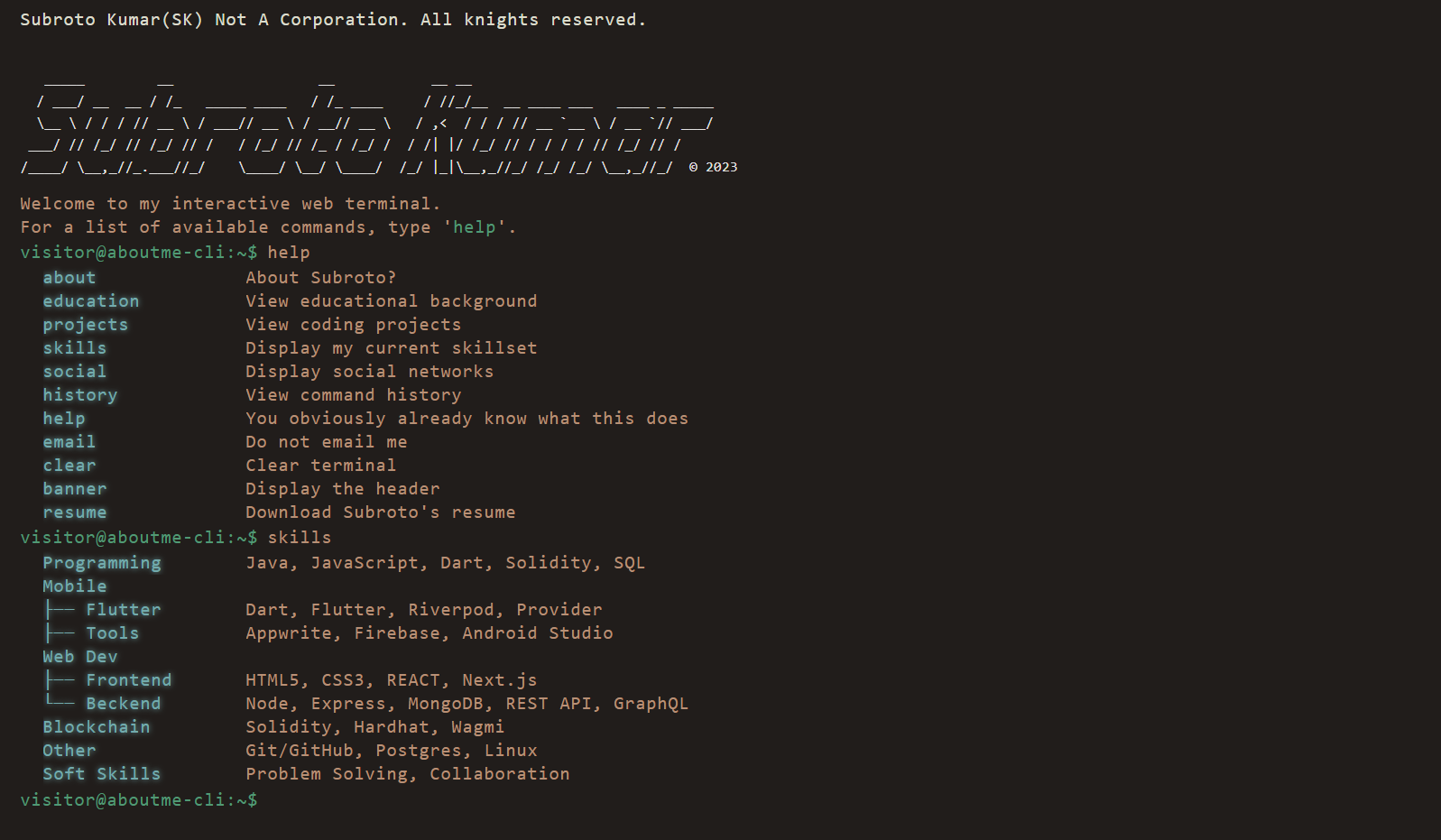
Presents a personal introduction as a web terminal, with visitors browsing content by entering commands
ReactPortfolio
aboutme-cli — React Portfolio Template
By subrotokumar
aboutme-cli is a terminal-style personal website built with React and TypeScript, where visitors enter commands to view the author's background, skills, resume, and social information.
Explore the design
Compare the page layouts and mobile experience. Open any screenshot for a closer look.
Author preview
Author-provided preview
Preview provided in the project README.
One original preview is available. Open the full image to inspect the design.
Screenshots show visual appearance; interactive behavior may differ.
Recorded 2026-10-12View source
What stands out
A quick read of the recorded project description.
Includes built-in information commands such as about, education, resume, skills, social, and email
Provides terminal interaction helper commands such as help, history, clear, and banner
Built with React and TypeScript
The repository uses the MIT license, allowing free use, modification, commercial use, and distribution
Template Details
aboutme-cli turns a personal introduction page into a command-line interface: visitors type commands into a web terminal to retrieve the corresponding information. The project is built on React and TypeScript, and the commands listed in the README include about (background and experience), banner (top banner), clear (clear screen), education (education history), email (email address), help (command list), history (command history), resume (resume), skills/skill (skills), and social (social accounts).
To run locally: clone the repository, enter the project directory, install dependencies with npm install or yarn, then run npm dev or yarn dev to start the development server, and open http://localhost:5173 in a browser. The repository uses the MIT license, permitting free use, modification, commercial use, and distribution of this version of the code, provided the copyright notice and license notice are retained when distributing.
Note: third-party assets such as demo images, fonts, and icons must be checked separately under their respective licenses; external services such as domains and hosting may incur additional charges. The README does not describe production deployment methods, browser compatibility ranges, or accessibility support.
ReactPortfolio
Is it right for your project?
Use Cases
- A developer's personal homepage, using command-line interaction instead of a conventional scrolling introduction page
- A starting point for learning about or modifying a React terminal interaction interface
- Centrally displaying background, education, skills, resume, and social accounts on a personal site
Suitable For
- Developers who want to present personal information in a terminal style
- Users who need a freely modifiable and commercially usable front-end project under the MIT license
- Developers interested in React command-line-style interaction
Getting started & customization
Use these recorded setup notes alongside the repository instructions for your chosen version.
- 1
After cloning the repository, enter the project directory and run npm install or yarn to install dependencies
- 2
Run npm dev or yarn dev to start the development server
- 3
Open http://localhost:5173 in a browser to view the application
- 4
Third-party assets such as demo images, fonts, and icons must be checked separately under their respective licenses
- 5
External services such as domains and hosting may incur additional charges
License & source material
Usage conditions & limitations
Free to use · keep license noticeThis entry covers the free version under the MIT license in the public repository; the free scope is the code of this version and does not mean that external services or third-party assets are free.
Must comply with when using
- Free use, modification, commercial use, and distribution of this version of the code are permitted.
- When distributing copies or substantial portions of the code, retain the original author's copyright notice and the complete MIT license notice.
- The code is provided as is; warranties and limitations of liability are governed by the original license and applicable law.
Additional costs & items to verify
- Demo images, fonts, icons, and other third-party assets must be checked under their respective licenses and cannot be judged solely by the code's MIT license.
- External services such as domains, hosting, databases, payments, or AI may incur additional charges.
View Original Text Basis
https://github.com/subrotokumar/aboutme-cli/blob/main/LICENSEhttps://github.com/subrotokumar/aboutme-cli/blob/main/README.mdPermission is hereby granted, free of charge
Original License Text
Compiled by DeepSeek based on repository license and README ·2026-10-12. Results only cover the materials read; dependencies, images, fonts, and subsequent term changes are subject to their respective original texts.
Project checks & description sources
Template Information
- Source platforms
- GitHub
- Documentation and maintenance reference score
- More documented · 83 / 100
- Technologies
- React
- Website type
- Portfolio
How this score is calculated
Our heuristic uses license records (up to 30), a demo link (12), a preview (10), stars (15), recorded maintenance (15), description completeness (8), feature records (5) and classification data (5). It is not a code, security or performance test, or a Google score. A link does not establish tested functionality.
What to verify for this project
- Repository update recorded
- 2026-02-10
- Screenshot last checked
- 2026-10-12
A demo link is listed. Check it with your own content and viewport sizes; its presence does not confirm that forms, authentication or payments work.
The catalog identifies React as the primary stack. Check the actual dependency manifest and lockfile for versions and hosting requirements. These notes use recorded metadata, not a code audit or a deployment test.
Use a selection guide →How this description was prepared
AI-assisted description based on catalog records and repository material. Repository authors are not automatically the reviewers of this description.
Review declaration: [email protected] · 2026-10-13
Inspect the recorded source material
SHA-256: 10b6a32404f2f8be4d13f5521ccc13f5984e89dbeaef734595c5058ef0243163
2026-10-12T21:37:52.597Z
Source file / repository# ABOUTME-CLI The About Me CLI is an interactive web terminal built with React. It allows visitors to learn more about person by entering various commands such as about, skills, resume, and social.  ## Table of Contents Installation Usage Contributing License ## **Installation** To run the About Me CLI locally, follow these steps: 1. Clone this repository to your local machine. 2. Navigate to the project directory. 3. Run `npm install` or `yarn` to install all dependencies. 4. Run `npm dev` or `yarn dev` to start the development server. 5. Open http://localhost:5173 in your web browser to view the app. ## **Usage** The About Me CLI is a simple and fun way for visitors to learn more about Subroto Kumar, the developer behind the app. The CLI interface allows visitors to type in various commands to access different pieces of information. The following commands are available: - `about`: Show information about my background and experience. - `banner`: Displays the banner at the top of the app. - `clear`: Dlears the terminal screen. - `education`: Show information about my education history. - `email`: Show my email address. - `help`: Displays a list of available commands. - `history`: Displays a list of previously entered commands. - `resume`: Displays my resume. - `skills, skill`: Displays information about my skills. - `social`: Displays my social media handles. ## **Contributing** Contributions are welcome and appreciated. If you encounter any issues or have suggestions for improvements, please create a GitHub issue or submit a pull request. ## **License** The About Me CLI is open source software licensed under the `MIT` License. Feel free to use the code for personal or commercial use.
Explore similar templates
Compare previews and descriptions within the same stack and category.

react-portfolio-template
A React-based developer portfolio template for showcasing projects, work history, and skills. It offers a multi-component layout, dark and light modes, and responsive mobile adaptation, with text and images editable in src/components.
React · Portfolio

personal-website-react
A single-page developer portfolio template built with React and Material-UI, driven by a JSON Resume-compliant resume.json. It offers light/dark theme switching with localStorage persistence, a clean responsive layout, and Create React App tooling for simple builds and static deployment.
React · Portfolio

karngyan.com
A personal website and blog template for developers, built with TanStack Start, React 19, Tailwind CSS v4, and shadcn/ui. It uses MDX for articles with Shiki highlighting and GFM tables, and automatically generates RSS, sitemap, robots.txt, llms.txt, and OG images.
React · Portfolio

react-portfolio-template
A React portfolio template by Ryan Balieiro with a fixed sidebar and page-turn transitions on desktop, bottom navigation on mobile, multilingual support, light/dark themes, and content components for experience, education, skills, projects, and testimonials.
React · Portfolio

portfolio
A data scientist personal portfolio template built with React and MUI, with content centrally managed through configuration files in the assets directory.
React · Portfolio

react-portfolio
A React 16 and Material-UI developer portfolio template that centralizes personal information in a JSON Resume-compliant resume.json, with light/dark theme switching saved to local storage. It currently provides portfolio display only; resume page templates and structured data enhancements are still planned.
React · Portfolio