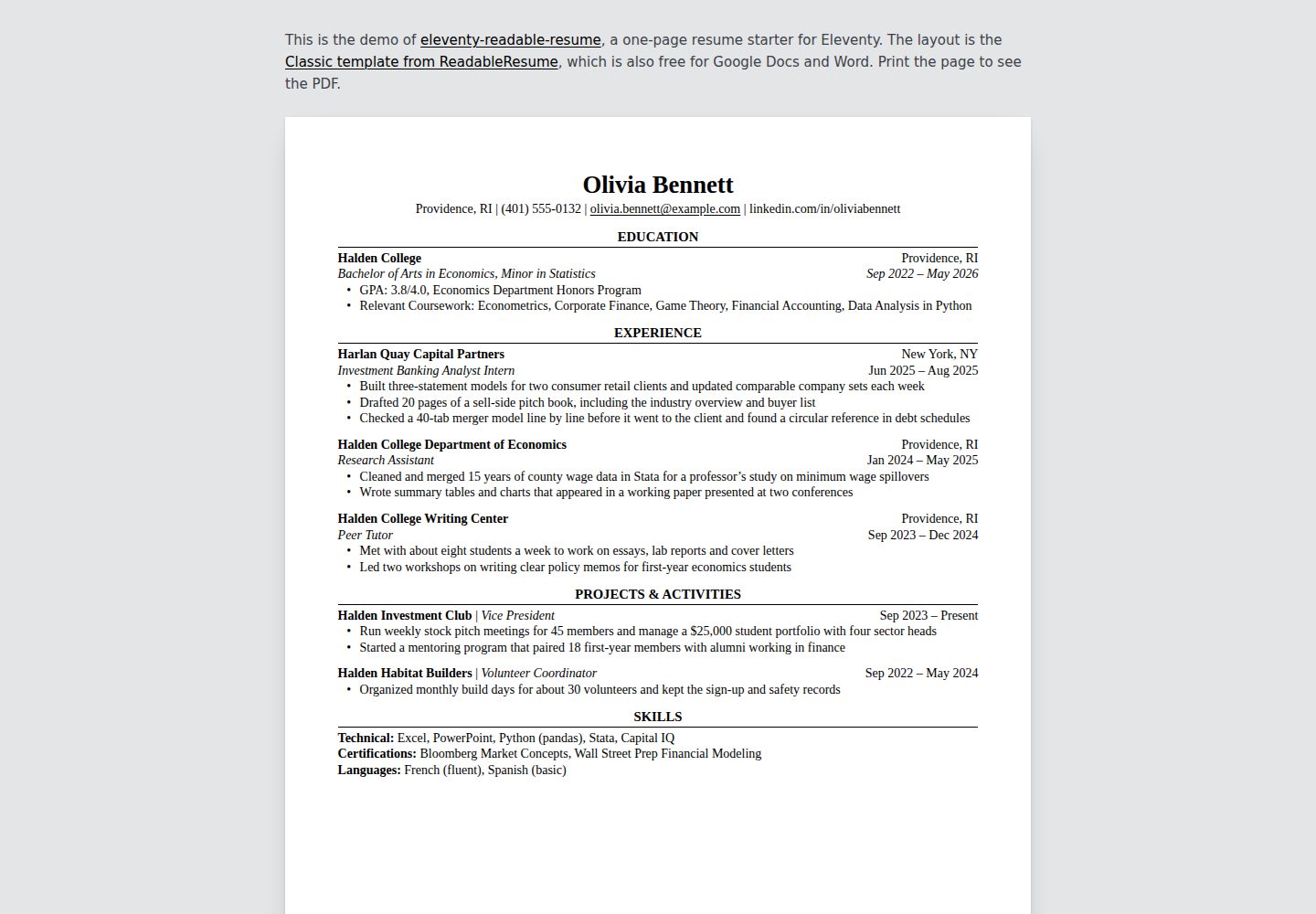
Content is driven entirely by resume.yaml, and the page rebuilds automatically on save
EleventyPortfolioStarter
eleventy-readable-resume — Eleventy Portfolio Template
By supertj
A single-page resume template for Eleventy. Content is written in YAML and rendered as an HTML page that can be printed to PDF, with a single-column layout, no JavaScript and no external assets.
Explore the design
Compare the page layouts and mobile experience. Open any screenshot for a closer look.
Desktop homepage1 / 2
Desktop captureTop of page
Actual screenshot captured by the server browser.
All pages & views 2
Screenshots show visual appearance; interactive behavior may differ.
Recorded 2026-10-17View source
What stands out
A quick read of the recorded project description.
Produces a single HTML file with inline CSS, no JavaScript and no external fonts
Supports three entry layouts (school, company, name), plus skill rows and paragraph text
Inline Markdown supports bold, italics and links
Printing to PDF keeps the single-column reading order for ATS parsing
Paper size can be letter or A4, with margins adjusted automatically
Template Details
This template targets the Eleventy static site generator. You define resume content by editing the resume.yaml file in the project root, and the build produces a single HTML file with inline CSS. The page uses a classic single-column layout with no tables, text boxes or icons, and the HTML follows reading order so applicant tracking systems (ATS) can parse the text. The template supports three entry layouts (school, company, name), plus skill rows and paragraph text, and allows inline Markdown syntax. In contact details, email addresses and links beginning with https:// are converted to links automatically, and a link target can also be set with the url field. For printing, Chrome or Edge can save the page as a PDF; paper size and margins are controlled by the page, with letter and A4 sizes supported. The README does not provide additional notes on browser compatibility, performance or production readiness.
EleventyPortfolioStarter
Is it right for your project?
Use Cases
- You need to create a printable, ATS-friendly resume quickly
- You are building a personal site with Eleventy and want to embed a resume page
- You want to manage resume content as plain-text YAML instead of a rich-text editor
- You need to deploy the resume as a static page with no backend service
Suitable For
- Job seekers familiar with YAML and basic command-line operations
- Developers or technical users working with Eleventy
- Single-page resume scenarios that need an undecorated, readability-focused layout
Getting started & customization
Use these recorded setup notes alongside the repository instructions for your chosen version.
- 1
Requires Node.js 18 or higher
- 2
After cloning the repository, run npm install to install dependencies and npm start to launch the local development server (default http://localhost:8080)
- 3
Edit the resume.yaml file to update resume content; the page rebuilds automatically on save
- 4
Build the production version with npm run build, which outputs to _site/index.html
- 5
When deploying to Netlify, Vercel or Cloudflare Pages, set the build command to npm run build and the output directory to _site
License & source material
Usage conditions & limitations
Free to use · keep license noticeThis listing covers the free version in the public repository, released under the MIT license; the free scope is that version's code and does not mean external services or third-party assets are free.
Must comply with when using
- You may use, modify, use commercially and distribute this version's code free of charge.
- When distributing copies or substantial portions of the code, you must retain the original author's copyright notice and the full MIT license notice.
- The code is provided as is; warranties and limitations of liability are governed by the original license and applicable law.
Additional costs & items to verify
- Demo images, fonts, icons and other third-party assets must be checked against their own licenses; the code's MIT license alone does not determine their terms.
- External services such as domains, hosting, databases, payments or AI may incur separate charges.
- Links on the page (including Markdown links) carry rel="nofollow" by default, except email and phone links; to let search engines follow them, you must edit the rel line in src/_data/resume.js yourself.
- The design uses the Georgia font, which ships with Windows and macOS; Linux, Android and similar systems fall back to Gelasio (which you must install yourself) or Times New Roman/default serif fonts, and different fonts may change line breaks.
- The page displays everything in the contact details, including phone numbers, so check them yourself before publishing.
- YAML entries where a colon is followed by a space (such as GPA: 3.8/4.0) must be quoted, or the build will fail with an error and stop.
- Lines beginning with *, #, &, ! or a quotation mark also need quoting; otherwise YAML parsing fails and the build stops.
- The default paper size is letter; for A4, set paper: a4 in resume.yaml, and margins switch from 0.6 inches to 15 mm.
- Firefox and Safari can also print, but you must confirm the paper size manually in the print dialog because they may not read it from the page.
- Running it requires Node.js 18 or higher.
View Original Text Basis
Permission is hereby granted, free of charge
Original License Text
Links, here and in Markdown, get `rel="nofollow"`, apart from email and phone
Original README
The design uses Georgia, which comes with Windows and macOS, so there's nothing
Original README
The page shows everything in your contact line, phone number included, so
Original README
- A bullet with a colon followed by a space, like `GPA: 3.8/4.0`, needs
Original README
- So does a line that starts with `*`, `#`, `&`, `!` or a quote mark.
Original README
Set `paper: a4` in `resume.yaml` for A4. The margins switch from 0.6 in to
Original README
Firefox and Safari print it too. Check that the paper size in their print
Original README
https://github.com/supertj/eleventy-readable-resume/blob/main/LICENSEhttps://github.com/supertj/eleventy-readable-resume/blob/main/README.mdYou need Node.js 18 or later.
Original README
Compiled by DeepSeek based on repository license and README ·2026-10-17. Results only cover the materials read; dependencies, images, fonts, and subsequent term changes are subject to their respective original texts.
Project checks & description sources
Template Information
- Source platforms
- GitHub
- Documentation and maintenance reference score
- More documented · 85 / 100
- Technologies
- Eleventy
- Website type
- Portfolio · Starter
How this score is calculated
Our heuristic uses license records (up to 30), a demo link (12), a preview (10), stars (15), recorded maintenance (15), description completeness (8), feature records (5) and classification data (5). It is not a code, security or performance test, or a Google score. A link does not establish tested functionality.
What to verify for this project
- Repository update recorded
- 2026-10-17
- Screenshot last checked
- 2026-10-17
A demo link is listed. Check it with your own content and viewport sizes; its presence does not confirm that forms, authentication or payments work.
The catalog identifies Eleventy as the primary stack. Check the actual dependency manifest and lockfile for versions and hosting requirements. These notes use recorded metadata, not a code audit or a deployment test.
Use a selection guide →How this description was prepared
AI-assisted description based on catalog records and repository material. Repository authors are not automatically the reviewers of this description.
Review declaration: codex-user-requested-batch-review-20261018 · 2026-10-18
Inspect the recorded source material
SHA-256: bc0e2c881b35b0a03398f2db3dfcb58afe6179ead8c9e4226d6ae2dfc15d86c8
2026-10-17T17:22:36.341Z
Source file / repository# Readable Resume for Eleventy A one-page resume starter for [Eleventy](https://www.11ty.dev/). You write your resume in a YAML file and get a web page that prints to a clean PDF: serif type, centered section headings over a thin rule, education first. The layout is the Classic template from [ReadableResume](https://readableresume.com), where the same design is available for Google Docs and Word. Demo: https://readableresume.com/eleventy-resume-template [](https://readableresume.com/eleventy-resume-template) Everything sits in one column with no tables, text boxes or icons, and the HTML follows reading order, so the text comes out of the PDF in the order you read it. That's the text applicant tracking systems parse. The build is one HTML file with the CSS inline. No JavaScript, no web fonts, no other files to serve. ## Getting started You need Node.js 18 or later. ```sh git clone https://github.com/supertj/eleventy-readable-resume.git my-resume cd my-resume npm install npm start ``` Then open http://localhost:8080. The page rebuilds every time you save `resume.yaml`. ## Editing your resume Everything on the page comes from [`resume.yaml`](resume.yaml) in the project root: ```yaml name: Olivia Bennett contact: - Providence, RI - (401) 555-0132 - [email protected] - linkedin.com/in/oliviabennett paper: letter sections: - title: Experience entries: - company: Harlan Quay Capital Partners location: New York, NY title: Investment Banking Analyst Intern date: Jun 2025 – Aug 2025 bullets: - Built three-statement models for two consumer retail clients - Drafted 20 pages of a sell-side pitch book ``` Section titles are set in capitals for you, so type them however you like. Whether an entry has a `school`, a `company` or a `name` decides its layout: | Has | Fields | Layout | |---|---|---| | `school` | `school`, `location`, `degree`, `date` | School and location on the first line, degree and dates in italics on the second. | | `company` | `company`, `location`, `title`, `date` | Company and location first, then the job title in italics with the dates. | | `name` | `name`, `role`, `date` | One line, "Name \| Role" with the dates on the right. For clubs, volunteering and projects. | The other fields are optional, and `bullets` works on all three. Leave a field out and it just isn't printed. A section can also have `lines`, one per line, which is how the skills section works. A line written as `Label: text` gets the label in bold: ```yaml - title: Skills lines: - Technical: Excel, PowerPoint, Python (pandas), Stata - Languages: French (fluent), Spanish (basic) ``` Or `text`, for a paragraph such as a short summary: ```yaml - title: Summary text: Economics graduate with two years of research experience in labor data. ``` Inline Markdown works in all of these: `**bold**`, `*italic*` and `[links](https://example.com)`. In the contact line, email addresses and anything starting with `https://` become links. To link shorter text, give the item a `url`: ```yaml contact: - text: github.com/oliviabennett url: https://github.com/oliviabennett ``` Links, here and in Markdown, get `rel="nofollow"`, apart from email and phone links. Take the `rel` lines out of [`src/_data/resume.js`](src/_data/resume.js) if you want search engines to follow them. ### Two YAML things to watch - A bullet with a colon followed by a space, like `GPA: 3.8/4.0`, needs quotes. Without them YAML reads it as a field, and the build stops and tells you which section it's in. - So does a line that starts with `*`, `#`, `&`, `!` or a quote mark. A misspelled field name also stops the build with a message, rather than quietly leaving something off your resume. ## Printing to PDF Open the page in Chrome or Edge, press Ctrl+P (Cmd+P on a Mac), choose **Save as PDF**, and untick **Headers and footers** under More settings. The paper size and margins come from the page itself. Set `paper: a4` in `resume.yaml` for A4. The margins switch from 0.6 in to 15 mm, the same as the Google Docs original. Firefox and Safari print it too. Check that the paper size in their print dialog matches, since they don't always pick it up from the page. ## Changing the design - [`src/_includes/resume.css`](src/_includes/resume.css) has all the styling. Font sizes are in points so the printed page matches the original. - [`src/index.njk`](src/index.njk) is the page template. - [`src/_data/resume.js`](src/_data/resume.js) reads `resume.yaml`, checks it and turns each entry into lines. Add a new kind of entry there. ## Fonts The design uses Georgia, which comes with Windows and macOS, so there's nothing to install on those systems. Elsewhere, such as Linux or Android, the browser falls back to Gelasio if you have it installed (it's free on Google Fonts and drawn to Georgia's proportions), then to Times New Roman or the default serif. A different font can change the line breaks, so print from a computer that has Georgia if the page is close to full. ## Putting it online ```sh npm run build ``` writes the page to `_site/index.html`. Because it's a single file with no assets, it works from any folder: the root of a domain, a GitHub Pages project site or a subfolder of another site, with no path prefix to set. On Netlify, Vercel or Cloudflare Pages, use `npm run build` as the build command and `_site` as the output directory. The page shows everything in your contact line, phone number included, so check that before you publish it. ## License MIT. The person, schools and companies in the sample are made up.
Explore similar templates
Compare previews and descriptions within the same stack and category.

eleventy-base-blog
The officially maintained Eleventy blog starter template, MIT licensed, includes posts, tag pages, archives, an about page, a 404 page, an Atom feed, and sitemap.xml, with per-page CSS bundling, syntax highlighting, and image optimization.
Eleventy · Blog

eleventy-garden
An Eleventy-based digital garden starter template for building a personal knowledge site organized through hyperlinks. It supports Roam-style double-bracket links, backlink display, and hover cards for backlinks.
Eleventy · Starter

eleventastic
Eleventastic is an Eleventy starter kit by Max Böck, used as the base for new 11ty projects. It integrates Sass, Webpack, SVG icon sprites, critical CSS, and HTML minification into the 11ty build without external steps.
Eleventy · Starter

neat-starter
An Eleventy-based static site starter template integrating Netlify CMS, Alpine.js, and Tailwind CSS. It provides a ready-to-run example site, a one-click Netlify deploy button, and an MIT-licensed codebase.
Eleventy · Starter

Eleventy-Starter-Boilerplate
An Eleventy-based blog starter template with Tailwind CSS, Webpack, PostCSS, ESLint, and Prettier, optional Netlify CMS, and built-in SEO metadata, sitemap, and 404 page.
Eleventy · Blog

eleventy-plus-vite
A static site starter combining Eleventy and Vite, with a live-reloading development server, Vite-based production post-processing, a PostCSS pipeline with Autoprefixer and cssnano, critical CSS inlining and asynchronous CSS loading, a web font loading strategy example, fluid typography, basic dark mode, an…
Eleventy · Starter