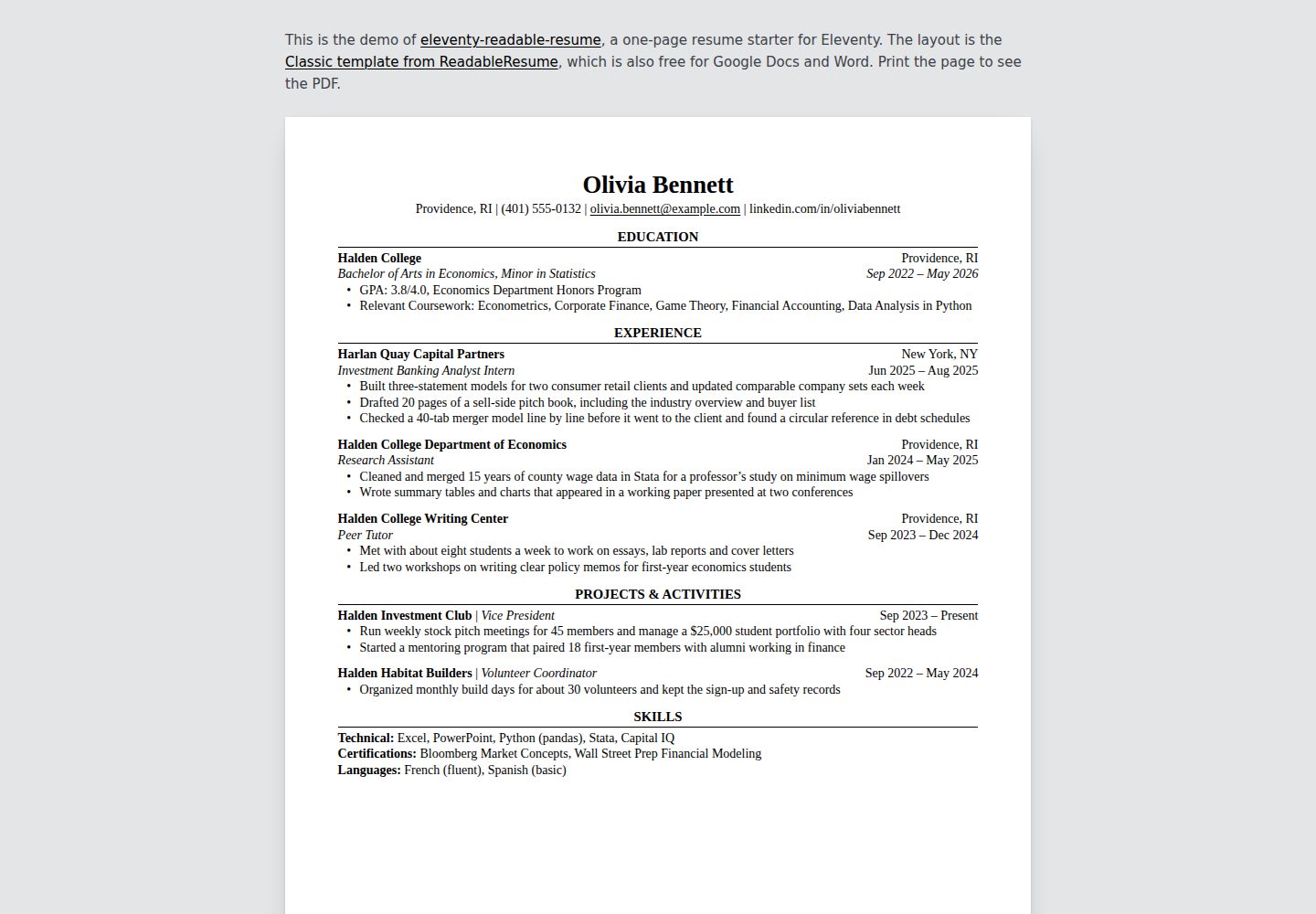
内容完全由 resume.yaml 驱动,保存后自动重建页面
Eleventy作品集启动器
eleventy-readable-resume — Eleventy 作品集模板
作者 supertj
基于 Eleventy 的单页简历模板,使用 YAML 编写内容,生成可打印为 PDF 的 HTML 页面,布局为单栏、无 JavaScript、无外部资源。
看看你的网站会是什么样
浏览真实页面截图,比较内容排版与手机效果。点击下方缩略图切换,放大查看整页细节。
全部页面与视图 2
截图用于了解视觉与布局,交互效果请以实际项目为准。
采集于 2026-10-17查看来源
值得关注的模板亮点
从已有项目资料中,快速了解它的特点。
生成单一 HTML 文件,CSS 内联,无 JavaScript 或外部字体
支持学校、公司、姓名三种条目布局,以及技能行和段落文本
内联 Markdown 支持粗体、斜体和链接
打印为 PDF 时保持单栏阅读顺序,便于 ATS 解析
纸张大小可选 letter 或 A4,边距自动适配
模板详细介绍
该模板面向 Eleventy 静态站点生成器,用户通过编辑项目根目录的 resume.yaml 文件来定义简历内容,构建后生成一个内联 CSS 的单一 HTML 文件。页面采用经典的单栏布局,无表格、文本框或图标,HTML 遵循阅读顺序,便于申请人跟踪系统(ATS)解析文本。模板支持三种条目布局(学校、公司、姓名),以及技能行和段落文本,并允许内联 Markdown 语法。联系方式中的邮箱和以 https:// 开头的链接会自动转换为链接,也可通过 url 字段指定链接地址。打印时,Chrome 或 Edge 可保存为 PDF,纸张大小和边距由页面控制,支持 letter 和 A4 两种尺寸。README 未提供关于浏览器兼容性、性能或生产就绪程度的额外说明。
Eleventy作品集启动器
适合你的项目吗?
适用场景
- 需要快速创建可打印且对 ATS 友好的简历
- 使用 Eleventy 构建个人网站并嵌入简历页面
- 希望以纯文本 YAML 管理简历内容,避免富文本编辑器
- 需要将简历部署为静态页面,无需后端服务
适合人群
- 熟悉 YAML 和基本命令行操作的求职者
- 使用 Eleventy 的开发者或技术用户
- 需要单页、无装饰、注重可读性的简历场景
上手与定制指南
结合仓库当前版本的说明,按下面的资料检查内容、配置与运行要求。
- 1
需要 Node.js 18 或更高版本
- 2
克隆仓库后运行 npm install 安装依赖,npm start 启动本地开发服务器(默认 http://localhost:8080)
- 3
编辑 resume.yaml 文件来更新简历内容,保存后页面自动重建
- 4
构建生产版本使用 npm run build,输出到 _site/index.html
- 5
部署到 Netlify、Vercel 或 Cloudflare Pages 时,构建命令设为 npm run build,输出目录设为 _site
授权与来源资料
使用条件与限制
免费使用 · 保留许可声明本次收录的是公开仓库中采用 MIT 许可的免费版本;免费范围为该版本代码,不代表外部服务或第三方素材免费。
使用时需要遵守
- 允许免费使用、修改、商用和分发该版本代码。
- 分发代码副本或实质性部分时,保留原作者版权声明和完整 MIT 许可声明。
- 代码按现状提供;担保与责任限制以原许可证及适用法律为准。
额外费用与待核对事项
- 演示图片、字体、图标及其他第三方素材需按各自许可核对,不能仅凭代码的 MIT 许可判断。
- 域名、托管、数据库、支付或 AI 等外部服务可能另外收费。
- 页面中的链接(包括 Markdown 链接)默认带有 rel="nofollow",仅邮箱和电话链接除外;如需搜索引擎跟随,需自行修改 src/_data/resume.js 中的 rel 行。
- 设计使用 Georgia 字体,Windows 和 macOS 自带;Linux、Android 等系统会回退到 Gelasio(需自行安装)或 Times New Roman/默认衬线字体,字体不同可能改变换行。
- 页面会显示联系方式中的全部内容,包括电话号码,发布前需自行检查。
- YAML 中冒号后跟空格的条目(如 GPA: 3.8/4.0)需加引号,否则构建会报错停止。
- 以 *、#、&、! 或引号开头的行同样需要加引号,否则 YAML 解析出错导致构建停止。
- 默认纸张为 letter;如需 A4 需在 resume.yaml 中设置 paper: a4,边距会从 0.6 英寸切换为 15 毫米。
- Firefox 和 Safari 也可打印,但需在打印对话框中手动确认纸张大小,因为它们不一定从页面读取。
- 运行需要 Node.js 18 或更高版本。
查看原文依据
Permission is hereby granted, free of charge
许可证原文
Links, here and in Markdown, get `rel="nofollow"`, apart from email and phone
README 原文
The design uses Georgia, which comes with Windows and macOS, so there's nothing
README 原文
The page shows everything in your contact line, phone number included, so
README 原文
- A bullet with a colon followed by a space, like `GPA: 3.8/4.0`, needs
README 原文
- So does a line that starts with `*`, `#`, `&`, `!` or a quote mark.
README 原文
Set `paper: a4` in `resume.yaml` for A4. The margins switch from 0.6 in to
README 原文
Firefox and Safari print it too. Check that the paper size in their print
README 原文
https://github.com/supertj/eleventy-readable-resume/blob/main/LICENSEhttps://github.com/supertj/eleventy-readable-resume/blob/main/README.mdYou need Node.js 18 or later.
README 原文
DeepSeek 根据仓库许可证和 README 整理 ·2026-10-17。结果仅覆盖已读取资料,依赖、图片、字体及后续条款变更以各自原文为准。
项目核对记录与介绍依据
模板资料
- 来源平台
- GitHub
- 资料与维护参考分
- 资料较完整 · 85 / 100
- 技术栈
- Eleventy
- 网站类型
- 作品集 · 启动器
这个分数如何计算
本站按许可资料(最高30分)、演示链接(12分)、预览图(10分)、Star数(15分)、记录的维护时间(15分)、描述完整度(8分)、功能记录(5分)和分类资料(5分)计算。它不是代码、安全或性能测试,也不是 Google 评分;有链接不代表已实测可用。
这个项目需要核对什么
- 记录的仓库更新时间
- 2026-10-17
- 截图检查日期
- 2026-10-17
已收录演示链接。请用你的内容与屏幕尺寸检查;有演示不代表表单、认证或支付已经可用。
目录记录的主要技术栈是 Eleventy。请通过依赖清单和锁文件核对实际版本与托管要求。这些说明基于收录资料,不代表代码审计或部署实测。
查看具体选型方法 →介绍的制作与核对状态
介绍由 AI 辅助整理目录与仓库资料。仓库作者不等于这篇介绍的审核者。
审核声明: codex-user-requested-batch-review-20261018 · 2026-10-18
查看当时使用的来源资料
SHA-256: bc0e2c881b35b0a03398f2db3dfcb58afe6179ead8c9e4226d6ae2dfc15d86c8
2026-10-17T17:22:36.341Z
来源文件 / 仓库# Readable Resume for Eleventy A one-page resume starter for [Eleventy](https://www.11ty.dev/). You write your resume in a YAML file and get a web page that prints to a clean PDF: serif type, centered section headings over a thin rule, education first. The layout is the Classic template from [ReadableResume](https://readableresume.com), where the same design is available for Google Docs and Word. Demo: https://readableresume.com/eleventy-resume-template [](https://readableresume.com/eleventy-resume-template) Everything sits in one column with no tables, text boxes or icons, and the HTML follows reading order, so the text comes out of the PDF in the order you read it. That's the text applicant tracking systems parse. The build is one HTML file with the CSS inline. No JavaScript, no web fonts, no other files to serve. ## Getting started You need Node.js 18 or later. ```sh git clone https://github.com/supertj/eleventy-readable-resume.git my-resume cd my-resume npm install npm start ``` Then open http://localhost:8080. The page rebuilds every time you save `resume.yaml`. ## Editing your resume Everything on the page comes from [`resume.yaml`](resume.yaml) in the project root: ```yaml name: Olivia Bennett contact: - Providence, RI - (401) 555-0132 - [email protected] - linkedin.com/in/oliviabennett paper: letter sections: - title: Experience entries: - company: Harlan Quay Capital Partners location: New York, NY title: Investment Banking Analyst Intern date: Jun 2025 – Aug 2025 bullets: - Built three-statement models for two consumer retail clients - Drafted 20 pages of a sell-side pitch book ``` Section titles are set in capitals for you, so type them however you like. Whether an entry has a `school`, a `company` or a `name` decides its layout: | Has | Fields | Layout | |---|---|---| | `school` | `school`, `location`, `degree`, `date` | School and location on the first line, degree and dates in italics on the second. | | `company` | `company`, `location`, `title`, `date` | Company and location first, then the job title in italics with the dates. | | `name` | `name`, `role`, `date` | One line, "Name \| Role" with the dates on the right. For clubs, volunteering and projects. | The other fields are optional, and `bullets` works on all three. Leave a field out and it just isn't printed. A section can also have `lines`, one per line, which is how the skills section works. A line written as `Label: text` gets the label in bold: ```yaml - title: Skills lines: - Technical: Excel, PowerPoint, Python (pandas), Stata - Languages: French (fluent), Spanish (basic) ``` Or `text`, for a paragraph such as a short summary: ```yaml - title: Summary text: Economics graduate with two years of research experience in labor data. ``` Inline Markdown works in all of these: `**bold**`, `*italic*` and `[links](https://example.com)`. In the contact line, email addresses and anything starting with `https://` become links. To link shorter text, give the item a `url`: ```yaml contact: - text: github.com/oliviabennett url: https://github.com/oliviabennett ``` Links, here and in Markdown, get `rel="nofollow"`, apart from email and phone links. Take the `rel` lines out of [`src/_data/resume.js`](src/_data/resume.js) if you want search engines to follow them. ### Two YAML things to watch - A bullet with a colon followed by a space, like `GPA: 3.8/4.0`, needs quotes. Without them YAML reads it as a field, and the build stops and tells you which section it's in. - So does a line that starts with `*`, `#`, `&`, `!` or a quote mark. A misspelled field name also stops the build with a message, rather than quietly leaving something off your resume. ## Printing to PDF Open the page in Chrome or Edge, press Ctrl+P (Cmd+P on a Mac), choose **Save as PDF**, and untick **Headers and footers** under More settings. The paper size and margins come from the page itself. Set `paper: a4` in `resume.yaml` for A4. The margins switch from 0.6 in to 15 mm, the same as the Google Docs original. Firefox and Safari print it too. Check that the paper size in their print dialog matches, since they don't always pick it up from the page. ## Changing the design - [`src/_includes/resume.css`](src/_includes/resume.css) has all the styling. Font sizes are in points so the printed page matches the original. - [`src/index.njk`](src/index.njk) is the page template. - [`src/_data/resume.js`](src/_data/resume.js) reads `resume.yaml`, checks it and turns each entry into lines. Add a new kind of entry there. ## Fonts The design uses Georgia, which comes with Windows and macOS, so there's nothing to install on those systems. Elsewhere, such as Linux or Android, the browser falls back to Gelasio if you have it installed (it's free on Google Fonts and drawn to Georgia's proportions), then to Times New Roman or the default serif. A different font can change the line breaks, so print from a computer that has Georgia if the page is close to full. ## Putting it online ```sh npm run build ``` writes the page to `_site/index.html`. Because it's a single file with no assets, it works from any folder: the root of a domain, a GitHub Pages project site or a subfolder of another site, with no path prefix to set. On Netlify, Vercel or Cloudflare Pages, use `npm run build` as the build command and `_site` as the output directory. The page shows everything in your contact line, phone number included, so check that before you publish it. ## License MIT. The person, schools and companies in the sample are made up.
看看同类模板
对比同技术栈与用途的模板,找到更适合的视觉与内容结构。

eleventy-base-blog
A starter repository for a blog web site using the Eleventy static site generator.
Eleventy · 博客

eleventy-garden
:seedling: A starter site for building a mind garden with eleventy
Eleventy · 启动器

eleventastic
An Eleventy Starter Kit
Eleventy · 启动器

neat-starter
Starter Template for Netlify CMS, Eleventy, Alpine JS & Tailwind CSS
Eleventy · 启动器

Eleventy-Starter-Boilerplate
🚀 Eleventy Starter is production-ready with SEO-friendly for quickly starting a blog. ⚡ Built with Eleventy, …
Eleventy · 博客

eleventy-plus-vite
A clean and fast Eleventy Starter Project with Vite
Eleventy · 启动器