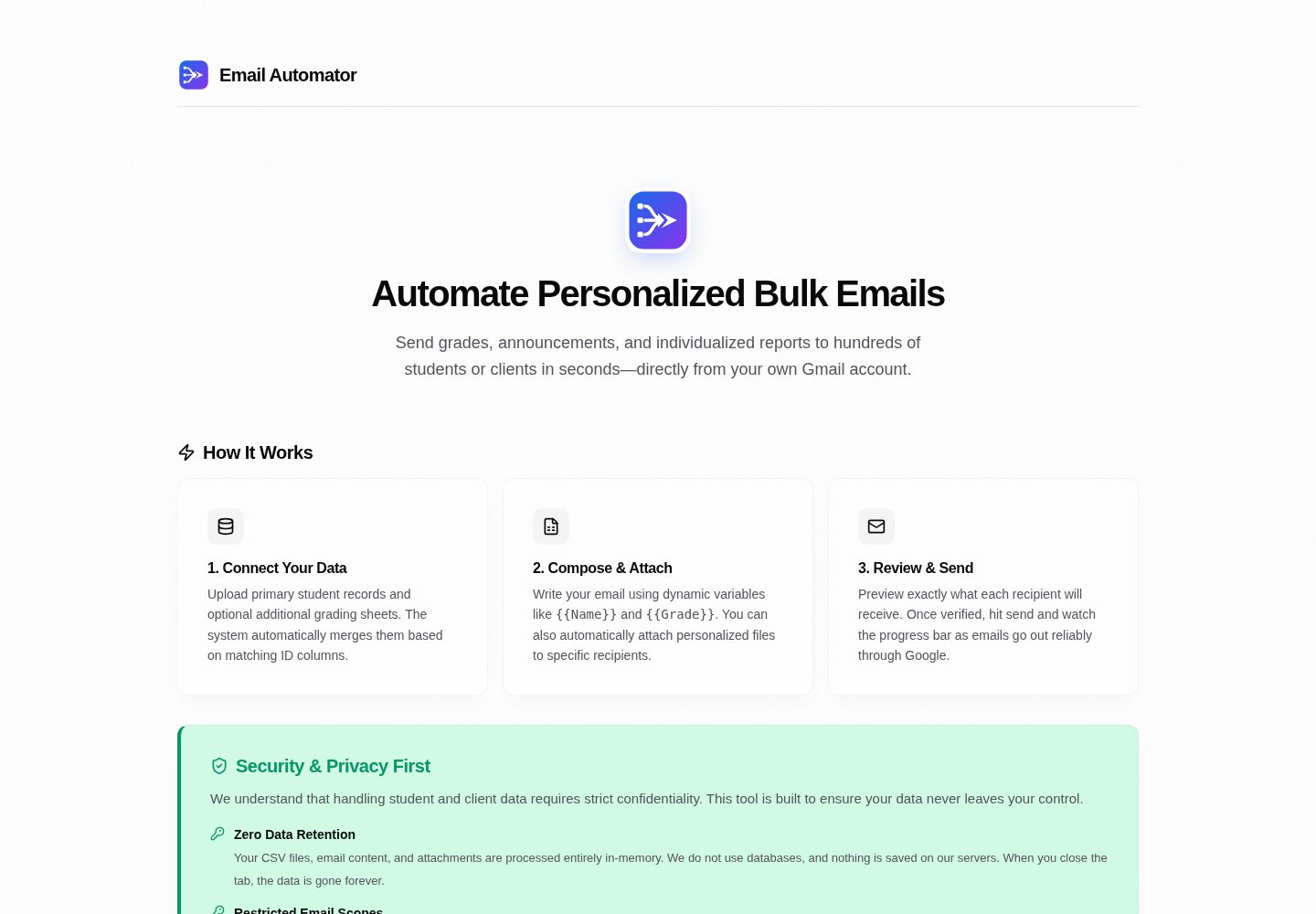
Does not restrict CSV structure; you can specify the recipient email column in the interface and insert any column header as a template variable into the subject, body, CC, and BCC
Next.jsReactAdmin dashboard
email-automator — Next.js Admin dashboard Template
By syedmahi-dev
A Next.js-based bulk email automation backend that supports merging arbitrary CSVs, replacing template variables, automatically matching PDF attachments, and sending through your own Gmail account.
Explore the design
Compare the page layouts and mobile experience. Open any screenshot for a closer look.
Desktop homepage1 / 2
Desktop captureTop of page
Actual screenshot captured by the server browser.
All pages & views 2
Screenshots show visual appearance; interactive behavior may differ.
Recorded 2026-10-06View source
What stands out
A quick read of the recorded project description.
Supports uploading two CSVs and merging them by any key, with case-insensitive matching and trimming of leading and trailing whitespace
Can match attachments such as PDFs by exact filename, prefix, or suffix, and verify attachment counts row by row in the preview table
Provides a searchable, inline-editable, row-deletable preview table before sending to check merge results and CC/BCC expansion
Sends through the user's own Gmail account using the gmail.send scope via Google OAuth 2.0, with CSV parsing and template rendering performed in browser memory
Includes a built-in 2-second interval between sends and supports retrying only failed recipients
Template Details
Email Automator is a backend tool for teachers, team leads, and administrators that moves bulk email workflows for routine institutional communication into the browser. It does not require CSVs to follow a fixed structure: after uploading a table with any column names, you specify in the interface which column contains recipient email addresses, then continue with the remaining steps.
The tool supports uploading two separate CSVs and merging them by any matching key (for example, linking a student roster with a grades table by ID); matching ignores case and trims leading and trailing whitespace. Every CSV column header becomes an insertable template variable for the subject, body, CC, and BCC fields. For attachments, you can upload a batch of individual files, choose the column that represents the file identifier, and automatically match by exact filename, prefix, or suffix. Before sending, an interactive preview table supports search, inline editing, and row deletion, and lets you verify CC, BCC, and attachment counts row by row.
Sending is authorized through Google OAuth 2.0, requesting only the gmail.send scope, and messages are sent from the user's own Gmail account. CSV parsing, merging, template rendering, and file matching all happen in browser memory and are not written to a database. Messages are sent sequentially with a built-in 2-second delay between each; if individual recipients fail, you can retry only the failed items. The project also provides a POST /api/import endpoint for external systems to preload recipient data.
Before use, you must create a project in Google Cloud Console, enable the Gmail API, and configure an OAuth client, and you should also note Google's daily sending quotas (which differ between personal Gmail and Workspace). The repository uses the MIT license, but third-party assets such as demo images, fonts, and icons must be checked separately for licensing.
Next.jsBackend
Is it right for your project?
Use Cases
- Teachers or academic staff merge a student roster with a grades table, then send each student a personalized grade email with the corresponding PDF report attached
- School administrators send personalized admissions, enrollment, or notification emails to applicants
- Teams or nonprofit organizations send personalized internal notices, event schedules, or billing reminders
- External school portals or ERP systems preload recipient data via POST /api/import, then enter the sending interface
- Developers study OAuth delegated sending and purely client-side data processing workflows
Suitable For
- Teachers, academic staff, or administrators who need to send personalized bulk emails according to their own table structure
- Teams that want to send from their own Gmail account without handing recipient data to a third-party bulk email service
- Operations or management scenarios that need to merge two tables by a key before sending messages
- Users who need to match a separate attachment (such as a PDF report) for each recipient
Getting started & customization
Use these recorded setup notes alongside the repository instructions for your chosen version.
- 1
Requires a Node.js environment; clone the repository and run npm install
- 2
Create a project in Google Cloud Console, enable the Gmail API, configure the OAuth consent screen and web application credentials, and add the gmail.send scope
- 3
Copy .env.example to .env.local and fill in NEXTAUTH_URL, NEXTAUTH_SECRET, GOOGLE_CLIENT_ID, and GOOGLE_CLIENT_SECRET
- 4
For local development, set the authorized JavaScript origin to http://localhost:3000 and the redirect URI to http://localhost:3000/api/auth/callback/google
- 5
Run npm run dev, visit http://localhost:3000, sign in with a Google account, and authorize sending permission
License & source material
Usage conditions & limitations
Free to use · keep license noticeThis entry covers the free version in the public repository under the MIT license; the free scope is the code in that version and does not mean external services or third-party assets are free.
Must comply with when using
- You may use, modify, commercialize, and distribute the code in this version for free.
- When distributing copies or substantial portions of the code, retain the original author's copyright notice and the complete MIT license notice.
- The code is provided as is; warranties and limitations of liability are governed by the original license and applicable law.
Additional costs & items to verify
- Demo images, fonts, icons, and other third-party assets must be checked under their respective licenses and cannot be judged solely by the code's MIT license.
- External services such as domains, hosting, databases, payments, or AI may incur separate charges.
- You must have a Google account (personal Gmail or Google Workspace) before use; otherwise OAuth authorization and sending cannot be completed.
- You must create a project in Google Cloud Console and enable the Gmail API yourself; this is an external service configuration requirement.
- You must apply for and configure a Google OAuth client ID and secret yourself; otherwise the application cannot run.
- Sending behavior is subject to Google's global sending policies, and users must ensure compliance themselves.
- Personal Gmail accounts have a daily sending limit of 500 messages; sending cannot continue beyond that.
- Google Workspace accounts have a daily sending limit of 2,000 messages; sending cannot continue beyond that.
- Using this software for malicious, destructive, or deceptive purposes is prohibited, including spam, phishing, and mail bombing.
- Sending unsolicited commercial email that violates CAN-SPAM, GDPR, or local regulations is prohibited.
- Use for phishing, social engineering, credential theft, or identity fraud is prohibited.
- Large-scale mail bombing, DoS attacks on receiving servers, or deliberately evading email filtering systems are prohibited.
- Forging sender identity headers or conducting email spoofing is prohibited.
- Senders must ensure compliance with laws regarding recipient consent and daily sending quotas.
View Original Text Basis
Permission is hereby granted, free of charge
Original License Text
A Google Account (Personal `@gmail.com` or Google Workspace)
Original README
Navigate to the [Google Cloud Console](https://console.cloud.google.com/) and create a new project.
Original README
Copy your **Client ID** and **Client Secret**.
Original README
All dispatches are governed by Google's global sending policies.
Original README
**Personal Gmail (`@gmail.com`)** | **500 emails / day**
Original README
**Google Workspace (Education / Business)** | **2,000 emails / day**
Original README
**This software is strictly prohibited from being utilized for malicious, disruptive, or deceptive operations**
Original README
Disseminating unsolicited commercial electronic mail (Spam) in violation of CAN-SPAM, GDPR, or applicable regional statutory regulations.
Original README
Conducting phishing campaigns, social engineering attacks, credential harvesting, or identity fraud.
Original README
High-volume mail bombing, denial-of-service (DoS) attempts against receiving servers, or deliberate evasion of mail-filtering systems.
Original README
Email spoofing or forging sender identity headers.
Original README
https://github.com/syedmahi-dev/email-automator/blob/main/LICENSEhttps://github.com/syedmahi-dev/email-automator/blob/main/README.mdSenders are responsible for ensuring compliance with recipient consent laws and daily dispatch quotas:
Original README
Compiled by DeepSeek based on repository license and README ·2026-10-06. Results only cover the materials read; dependencies, images, fonts, and subsequent term changes are subject to their respective original texts.
Project checks & description sources
Template Information
- Source platforms
- GitHub
- Documentation and maintenance reference score
- More documented · 80 / 100
- Technologies
- Next.js · React
- Website type
- Admin dashboard
How this score is calculated
Our heuristic uses license records (up to 30), a demo link (12), a preview (10), stars (15), recorded maintenance (15), description completeness (8), feature records (5) and classification data (5). It is not a code, security or performance test, or a Google score. A link does not establish tested functionality.
What to verify for this project
- Repository update recorded
- 2026-10-05
- Screenshot last checked
- 2026-10-06
A demo link is listed. Check it with your own content and viewport sizes; its presence does not confirm that forms, authentication or payments work.
The catalog identifies Next.js as the primary stack. Check the actual dependency manifest and lockfile for versions and hosting requirements. These notes use recorded metadata, not a code audit or a deployment test.
Use a selection guide →How this description was prepared
AI-assisted description based on catalog records and repository material. Repository authors are not automatically the reviewers of this description.
Review declaration: [email protected] · 2026-10-06
Inspect the recorded source material
SHA-256: 34b480823da9c3922a401e0309cd312138b47c0a727577e79bc7f53144699520
2026-10-06T00:07:32.841Z
Source file / repository<div align="center">
<picture>
<source media="(prefers-color-scheme: dark)" srcset="public/branding/email-automator-wordmark-dark.svg">
<img src="public/branding/email-automator-wordmark.svg" alt="Email Automator Logo" width="380">
</picture>
<br/>
<br/>
**A schema-agnostic, zero-retention bulk email automation tool for educators, teams, and administrators.**
Merge arbitrary spreadsheets, template personalized messages, auto-match PDF attachments, and safely send directly through your own Google account.
[](https://emailauto.syedmahi.me)
<br/>
[](LICENSE)
[](https://nextjs.org/)
[](https://react.dev/)
[](https://www.typescriptlang.org/)
[](https://cloud.google.com/)
[](docs/ARCHITECTURE.md)
</div>
---
## What Problem Does Email Automator Solve?
Email Automator was built for the messy reality of everyday institutional communication.
Teachers, university coordinators, and small team leads often sit with two separate spreadsheets—one containing student contact details (`ID`, `Name`, `Student Email`), another containing semester scores or dues (`Roll_No`, `Midterm`, `Final_Grade`)—along with a folder of individual PDF report cards and a strict deadline.
Traditional email tools create serious friction:
- **Rigid CSV Requirements**: Most tools force you to reformat your spreadsheets to fit a rigid template (e.g., column must literally be named `email`).
- **Privacy & Security Risks**: Handing over sensitive student records or billing data to third-party mass mailers or sharing raw account passwords via SMTP compromises institutional security.
- **Fear of Irreversible Mistakes**: A single misaligned column can deliver private academic records or financial details to the wrong person.
**Email Automator** provides a safe, inspectable bridge: upload your spreadsheets exactly as exported from your school portal or Excel, map your columns visually, preview every rendered email in a live confidence grid, and deliver each message directly from your own Google account.
---
## Deterministic Schema-Agnostic Column Mapping
**There is no predefined CSV structure you must follow.** Email Automator accepts any CSV layout and lets you define what columns contain what in the UI:
1. **Flexible Recipient Email Selection**:
- The system automatically detects candidate email columns, but you have full manual control.
- Use the **Recipient Email Column** dropdown to select any column in your dataset (`Email`, `User_Mail`, `ParentEmail`, `Contact`, etc.).
2. **Deterministic Multi-Sheet Merging**:
- Upload two independent CSVs (e.g., Student Master List + Grade Sheet).
- Use the **Match Columns to Merge Data** selector to join them on any matching key (`ID = Roll_No`, `RegNo = StudentID`, etc.). Matching is whitespace-trimmed and case-insensitive.
3. **Universal Variable Interpolation**:
- Every column header in your CSV automatically becomes a dynamic Handlebars variable (`{{Name}}`, `{{Physics_Grade}}`, `{{Due_Balance}}`).
- Click any detected variable pill to insert it directly into your email subject line, body, CC, or BCC fields.
4. **Intelligent Attachment Matching**:
- Upload a batch of individual files (e.g., `1042.pdf`, `Report-1042.pdf`).
- Select which column represents the file identifier (`ID`, `Roll_No`, etc.). The matcher links files by exact, prefixed, or suffixed filenames automatically.
5. **Interactive Confidence Grid (Live Editing)**:
- Preview all merged rows and columns in a live table before sending.
- Search across any field, edit values inline, delete test rows, and verify CC/BCC expansions and attachment counts row by row.
---
## Key Capabilities
- **Direct Google OAuth Delegation**: Uses Google's official OAuth 2.0 flow with a narrow `https://www.googleapis.com/auth/gmail.send` scope. We never read your inbox or store passwords.
- **Zero Server Retention**: CSV parsing, merging, templating, and file matching happen entirely inside volatile browser memory. Nothing is stored in a database.
- **RFC-Compliant MIME Assembly**: Assembles raw multipart MIME messages with UTF-8 encoded subject headers, isolated boundaries, and RFC 2045 76-character base64-chunked attachments.
- **Quota Safeguards & Throttling**: Built-in 2-second rate-limiting delay between messages to respect Google burst limits, with proactive warnings when approaching daily sending ceilings.
- **Targeted Retry**: If any individual recipient fails (e.g., network timeout), retry only the failed recipients without re-emailing those who succeeded.
- **External Import Bridge**: Integrated REST API (`POST /api/import`) allowing upstream school portals or ERPs to stage batches and transfer operators directly into the pre-loaded dispatch interface.
---
## Acceptable Use Policy & Disclaimer
> [!IMPORTANT]
> ### Authorized Use Cases
> **Email Automator** is engineered strictly for **legitimate, authorized educational, academic, operational, and organizational communications**, including:
> - Academic faculty distributing student grades, transcripts, exam schedules, and course notices.
> - Educational administrators sending individualized admission, enrollment, or advisory updates.
> - Corporate, startup, and non-profit operators sending personalized transactional alerts, internal team memos, event schedules, or client billing statements.
> - Developers and systems researchers exploring OAuth-delegated email protocols and client-side data pipelines.
> [!CAUTION]
> ### Prohibited Uses & Abuse Prevention
> **This software is strictly prohibited from being utilized for malicious, disruptive, or deceptive operations**, including:
> - Disseminating unsolicited commercial electronic mail (Spam) in violation of CAN-SPAM, GDPR, or applicable regional statutory regulations.
> - Conducting phishing campaigns, social engineering attacks, credential harvesting, or identity fraud.
> - High-volume mail bombing, denial-of-service (DoS) attempts against receiving servers, or deliberate evasion of mail-filtering systems.
> - Email spoofing or forging sender identity headers.
### Google Sending Quotas & Deliverability Compliance
All dispatches are governed by Google's global sending policies. Senders are responsible for ensuring compliance with recipient consent laws and daily dispatch quotas:
| Account Category | Google 24-Hour Rolling Quota | Recommended Batch Size | Throttling |
| :--- | :--- | :--- | :--- |
| **Personal Gmail (`@gmail.com`)** | **500 emails / day** | $\le 450$ recipients | 2,000 ms per message |
| **Google Workspace (Education / Business)** | **2,000 emails / day** | $\le 1,800$ recipients | 2,000 ms per message |
*Disclaimer: The author and contributors accept no liability for any loss, account suspension, regulatory violation, or damages resulting from the use or misuse of this software.*
---
## Architecture & Security Model
```mermaid
graph TD
subgraph Client ["Client Browser (Volatile Memory Space)"]
CSV1["Primary CSV (e.g. Student Roster)"] --> Parser["Papa Parse Engine"]
CSV2["Secondary CSV (e.g. Exam Scores)"] --> Parser
Parser --> Joiner["Deterministic Key Matcher"]
Joiner --> Graph["In-Memory Recipient Graph"]
Files["File Attachments (PDFs)"] --> AttMatch["Prefix/Suffix Matcher"]
AttMatch --> Graph
Editor["WYSIWYG Rich Text Editor"] --> Hbs["Handlebars Engine"]
Hbs --> Grid["Interactive Confidence Grid"]
Graph --> Grid
Grid -->|Human Review & Inline Edit| Batch["Client Batch Orchestrator"]
end
subgraph Server ["Next.js Server Layer (App Router)"]
Batch -->|Sequential POST with 2s Pacing| ApiRoute["/api/send-email Route"]
AuthGuard["NextAuth Session & Token Guard"] --> ApiRoute
ApiRoute --> Mime["RFC 2045 MIME Packet Builder"]
Mime --> B64["Base64URL Serializer"]
end
subgraph GoogleCloud ["Google Cloud Infrastructure"]
B64 -->|OAuth 2.0 Bearer Authorization| GmailAPI["Gmail REST API v1 (users.messages.send)"]
GmailAPI --> SentFolder["Sender 'Sent' Mailbox (Native DKIM/SPF)"]
GmailAPI --> Recipient["Recipient Inboxes"]
end
```
### Operational Pipeline
```mermaid
flowchart LR
A["1. Upload CSVs"] --> B["2. Join Datasets"]
B --> C["3. Template Body"]
C --> D["4. Map Files"]
D --> E["5. Live Preview"]
E --> F["6. Throttled Send"]
F --> G["7. Delivery Confirmed"]
```
For an in-depth breakdown of trust zones, MIME chunking, and architectural tradeoffs, refer to the [Systems Architecture Documentation](docs/ARCHITECTURE.md).
---
## Getting Started
### Prerequisites
- [Node.js](https://nodejs.org/) (v18.18.0 or later recommended)
- [npm](https://www.npmjs.com/) or [pnpm](https://pnpm.io/)
- A Google Account (Personal `@gmail.com` or Google Workspace)
---
### Step 1: Google Cloud Console Setup
Email Automator authenticates via Google OAuth 2.0 to access the `gmail.send` API.
1. Navigate to the [Google Cloud Console](https://console.cloud.google.com/) and create a new project.
2. Enable the **Gmail API** under **APIs & Services > Library**.
3. Under **APIs & Services > OAuth consent screen**:
- Set User Type to **External** (or **Internal** for Workspace).
- Add scope: `https://www.googleapis.com/auth/gmail.send`.
- Add your Google email under **Test users**.
4. Under **APIs & Services > Credentials**:
- Click **Create Credentials** > **OAuth client ID** > **Web application**.
- Add **Authorized JavaScript origin**: `http://localhost:3000`
- Add **Authorized redirect URI**: `http://localhost:3000/api/auth/callback/google`
- Copy your **Client ID** and **Client Secret**.
> **Need visual step-by-step guidance?** Read our comprehensive [Google OAuth Setup Guide](docs/GOOGLE_OAUTH_SETUP.md) for complete walkthroughs and troubleshooting instructions.
---
### Step 2: Installation & Configuration
1. **Clone the repository:**
```bash
git clone https://github.com/syedmahi-dev/email-automator.git
cd email-automator
```
2. **Install project dependencies:**
```bash
npm install
```
3. **Configure environment variables:**
```bash
cp .env.example .env.local
```
Open `.env.local` and populate your credentials:
```env
NEXTAUTH_URL=http://localhost:3000
NEXTAUTH_SECRET=your_generated_random_secret
GOOGLE_CLIENT_ID=your_client_id.apps.googleusercontent.com
GOOGLE_CLIENT_SECRET=GOCSPX-your_client_secret
```
> **Generating a secret**: Run `openssl rand -base64 32` (or in PowerShell: `[Convert]::ToBase64String((1..32 | ForEach-Object { Get-Random -Minimum 0 -Maximum 256 }))`) to produce a secure `NEXTAUTH_SECRET`.
---
### Step 3: Run the Application
Start the Next.js development server:
```bash
npm run dev
```
Open [http://localhost:3000](http://localhost:3000) in your web browser. Click **Sign in with Google**, authorize the send-only permission, and begin personalizing your email batches.
---
## External Import API Specification
External systems (such as school portals, CRMs, or ERP backends) can programmatically preload recipient data into Email Automator without requiring manual CSV uploads.
### Endpoint: `POST /api/import`
**Request Body (`application/json`):**
```json
{
"students": [
{ "id": "101", "name": "Jane Doe", "email": "[email protected]" },
{ "id": "102", "name": "John Smith", "email": "[email protected]" }
],
"marks": [
{ "id": "101", "midterm": "94", "final": "98" },
{ "id": "102", "midterm": "88", "final": "91" }
]
}
```
**Response (`200 OK`):**
```json
{
"success": true,
"importId": "4a7f92b8c0e12d34567890abcdef1234",
"redirectUrl": "http://localhost:3000/?importId=4a7f92b8c0e12d34567890abcdef1234"
}
```
When the operator navigates to `redirectUrl`, the frontend automatically fetches the staged dataset via `GET /api/import?id=<importId>` and populates the data tables.
---
## Project Structure
```
email-automator/
├── docs/
│ ├── ARCHITECTURE.md # Deep dive into systems design, trust boundaries & MIME protocol
│ └── GOOGLE_OAUTH_SETUP.md # Step-by-step Google Developer Console setup guide
├── public/
│ ├── branding/ # Official logos, wordmarks, and favicon assets
│ │ ├── email-automator-mark.svg
│ │ ├── email-automator-wordmark.svg
│ │ └── email-automator-favicon-192.png
│ └── *.svg # Static SVG vector assets
├── src/
│ ├── app/
│ │ ├── api/
│ │ │ ├── auth/[...nextauth]/route.ts # NextAuth Google OAuth handler
│ │ │ ├── import/route.ts # External system data staging bridge
│ │ │ └── send-email/route.ts # RFC 2045 MIME generator & Gmail API caller
│ │ ├── globals.css # Editorial theme styling tokens & utility rules
│ │ ├── icon.png # Application favicon mark (192x192)
│ │ ├── layout.tsx # Root HTML layout and provider wrapping
│ │ └── page.tsx # Main operational UI (Bulk & Manual sending pipelines)
│ └── components/
│ ├── CsvUploader.tsx # Drag-and-drop CSV parser with Papa Parse
│ ├── DataPreview.tsx # Interactive data table with inline editing & search
│ ├── EmailConfig.tsx # Subject line, dynamic CC/BCC, and attachment manager
│ ├── GoogleSignIn.tsx # OAuth status and Google authentication button
│ ├── LandingPage.tsx # Pre-login informational hero & security overview
│ ├── Providers.tsx # NextAuth SessionProvider wrapper
│ ├── RichTextEditor.tsx # Lightweight browser WYSIWYG text editor
│ └── SmtpSetup.tsx # Legacy direct-SMTP configuration reference
├── .env.example # Environment configuration exemplar
├── LICENSE # Official MIT License
├── package.json # Project dependencies and script definitions
└── tsconfig.json # TypeScript compiler configuration
```
---
## Brand Identity & Assets
The official Email Automator visual identity represents the convergence of disparate, semi-structured datasets into a single, reliable send action:
- **Left Input Nodes**: Represents arbitrary spreadsheet schemas, disparate rows, and external data sources.
- **Center Convergence**: Represents deterministic joining, data normalization, and Handlebars templating.
- **Right Arrow-Envelope**: Represents safe, personalized dispatch directly through the sender's authenticated Google identity.
### Color Palette
| Token | Hex Value | Role |
| :--- | :--- | :--- |
| **Brand Blue** | `#2563EB` | Primary brand accent and send action |
| **Brand Violet** | `#7C3AED` | Convergence gradient and secondary accent |
| **Ink** | `#111827` | Primary dark surfaces and typography |
| **Muted Slate** | `#4B5563` | Secondary text and structural borders |
### Asset Index
All vector and raster assets are located in [`public/branding/`](public/branding/):
- **Full Wordmark (Light)**: [`email-automator-wordmark.svg`](public/branding/email-automator-wordmark.svg)
- **Full Wordmark (Dark)**: [`email-automator-wordmark-dark.svg`](public/branding/email-automator-wordmark-dark.svg)
- **Compact Mark**: [`email-automator-mark.svg`](public/branding/email-automator-mark.svg)
- **Monochrome Mark**: [`email-automator-mark-mono.svg`](public/branding/email-automator-mark-mono.svg)
- **PWA & Favicon**: [`email-automator-favicon-192.png`](public/branding/email-automator-favicon-192.png)
- **High-Res Master Renders**: `email-automator-mark-512.png` and `email-automator-mark-1024.png`
---
## License
This project is licensed under the **[MIT License](LICENSE)**.
```
Copyright (c) 2026 Syed Mahi
Permission is hereby granted, free of charge, to any person obtaining a copy
of this software and associated documentation files (the "Software"), to deal
in the Software without restriction, including without limitation the rights
to use, copy, modify, merge, publish, distribute, sublicense, and/or sell
copies of the Software...
```
Developed by **[Syed Mahi](https://github.com/syedmahi-dev)**.
Explore similar templates
Compare previews and descriptions within the same stack and category.

next-shadcn-dashboard-starter
An MIT-licensed admin dashboard starter built with Next.js 16, shadcn/ui, Tailwind CSS v4, and TypeScript.
Next.js · Admin dashboard

Studio Admin · Radix UI
Studio Admin is an admin dashboard template built with Next.js 16, TypeScript, Tailwind CSS v4, and Shadcn UI.
Next.js · Admin dashboard

free-nextjs-admin-dashboard
A free, open-source admin dashboard template built on Next.js 16, React 19, TypeScript, and Tailwind CSS v4. It provides a collapsible sidebar, charts, tables, authentication forms, modals, dropdowns, and dark mode, with internationalization and RTL support since version 2.4.0.
Next.js · Admin dashboard

materio-mui-nextjs-admin-template-free
Materio Free is a Next.js admin dashboard template based on App Router and MUI, integrating Tailwind CSS and available in TypeScript and JavaScript versions.
Next.js · Admin dashboard
nextjs-postgres-nextauth-tailwindcss-template
A Vercel-maintained Next.js App Router admin dashboard starter with Auth.js GitHub OAuth, Postgres, Tailwind CSS, and Shadcn UI, plus a sample products table, seed endpoint, and CRUD interface.
Next.js · Admin dashboard

shadcn-dashboard-landing-template
An open-source admin dashboard and marketing landing page template built on shadcn/ui and Tailwind CSS, with both Vite + React and Next.js versions in one repository.
Next.js · Admin dashboard