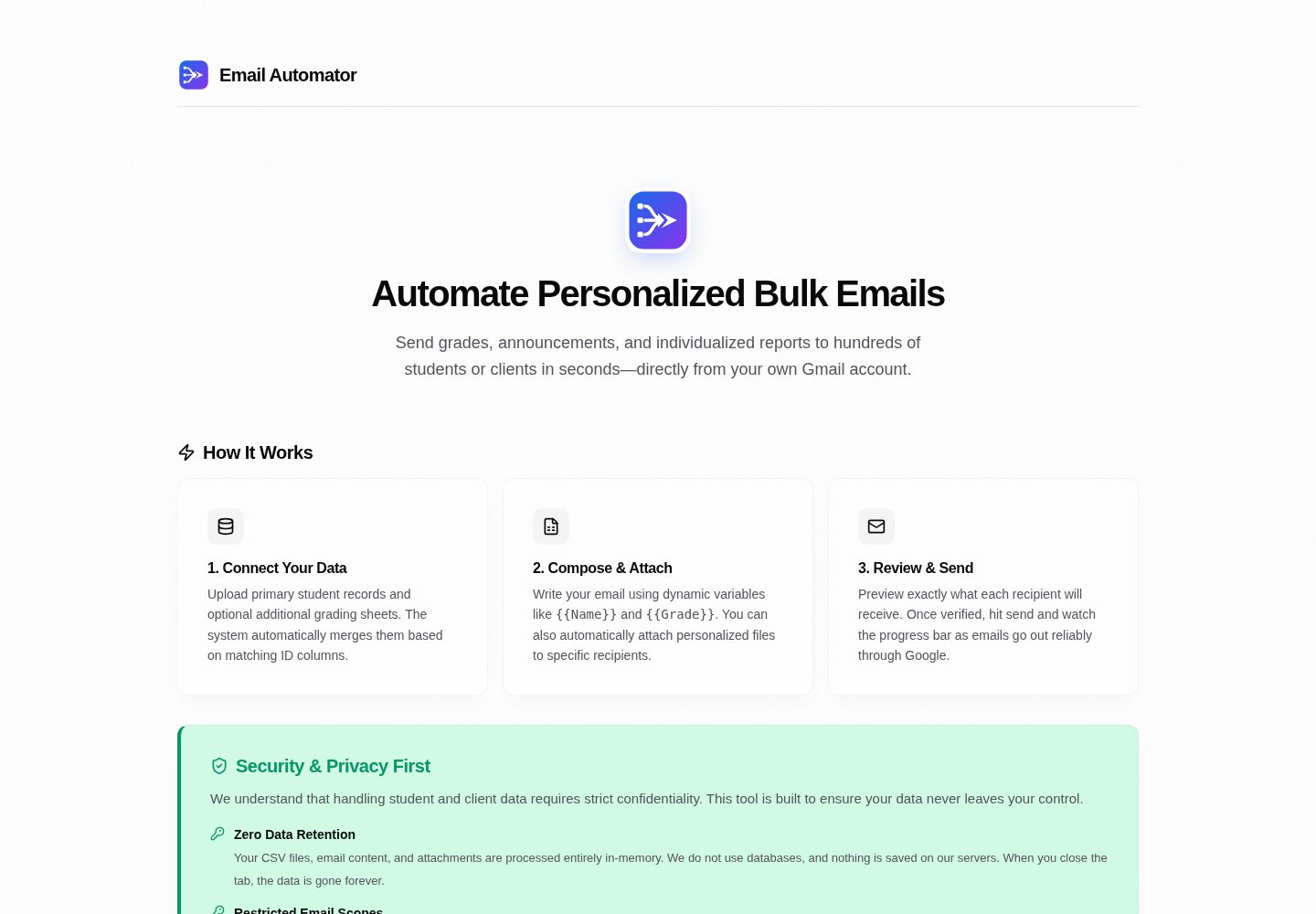
不限定 CSV 结构,可在界面中指定收件人邮箱列,并将任意列头作为模板变量插入主题、正文、抄送和密送
Next.jsReact后台
email-automator — Next.js 后台模板
作者 syedmahi-dev
基于 Next.js 的批量邮件自动化后台,支持任意 CSV 合并、模板变量替换、PDF 附件自动匹配,并通过自有 Gmail 账号发送。
看看你的网站会是什么样
浏览真实页面截图,比较内容排版与手机效果。点击下方缩略图切换,放大查看整页细节。
全部页面与视图 2
截图用于了解视觉与布局,交互效果请以实际项目为准。
采集于 2026-10-06查看来源
值得关注的模板亮点
从已有项目资料中,快速了解它的特点。
支持上传两份 CSV 并按任意键合并,匹配时忽略大小写、去除首尾空白
可按文件名精确、前缀或后缀匹配 PDF 等附件,并在预览表格中逐行核对附件数量
发送前提供可搜索、可行内编辑、可删除行的预览表格,用于检查合并结果与抄送密送展开
通过 Google OAuth 2.0 的 gmail.send 范围由用户自己的 Gmail 账号发送,CSV 解析与模板渲染在浏览器内存中完成
内置每条 2 秒发送间隔,并支持只对失败收件人重试
模板详细介绍
Email Automator 是一个面向教师、团队负责人和管理员的后台工具,用于把日常机构沟通中的批量邮件流程搬到浏览器里完成。它不要求 CSV 遵循固定结构:上传任意列名的表格后,在界面中指定哪一列是收件人邮箱,即可继续后续步骤。
工具支持上传两份独立 CSV 并按任意匹配键合并(例如学生名单与成绩表按 ID 关联),匹配时忽略大小写并去除首尾空白。CSV 的每个列头都会成为可插入的模板变量,用于主题、正文、抄送和密送字段。附件方面,可以上传一批单独文件,选择代表文件标识的列,按文件名精确、前缀或后缀方式自动匹配。发送前提供可交互的预览表格,支持搜索、行内编辑、删除行,并逐行核对抄送、密送和附件数量。
发送通过 Google OAuth 2.0 授权,仅申请 gmail.send 范围,邮件由用户自己的 Gmail 账号发出。CSV 解析、合并、模板渲染和文件匹配均在浏览器内存中完成,不写入数据库。消息按顺序发送,每条之间内置 2 秒延迟;若个别收件人失败,可只重试失败项。项目还提供 POST /api/import 接口,供外部系统预载收件人数据。
使用前需要自行在 Google Cloud Console 创建项目、启用 Gmail API 并配置 OAuth 客户端,同时注意 Google 的每日发送配额(个人 Gmail 与 Workspace 不同)。仓库采用 MIT 许可,但演示图片、字体、图标等第三方素材需单独核对许可。
Next.js后台
适合你的项目吗?
适用场景
- 教师或教务人员把学生名单与成绩表合并后,向每位学生发送个性化成绩邮件并附带对应 PDF 报告
- 学校行政向申请人发送录取、注册或通知类个性化邮件
- 团队或非营利组织发送个性化的内部通知、活动安排或账单提醒
- 外部学校门户或 ERP 通过 POST /api/import 预载收件人数据,再进入发送界面
- 开发者研究 OAuth 委托发送与纯客户端数据处理流程
适合人群
- 需要按自有表格结构批量发送个性化邮件的教师、教务或行政人员
- 希望用自己 Gmail 账号发送、不把收件人数据交给第三方群发服务的团队
- 需要把两份表格按某个键合并后再发信的运营或管理场景
- 需要为每位收件人匹配单独附件(如 PDF 报告)的使用者
上手与定制指南
结合仓库当前版本的说明,按下面的资料检查内容、配置与运行要求。
- 1
需要 Node.js 环境,克隆仓库后执行 npm install
- 2
在 Google Cloud Console 创建项目、启用 Gmail API,并配置 OAuth 同意屏幕与 Web 应用凭据,添加 gmail.send 范围
- 3
复制 .env.example 为 .env.local,填入 NEXTAUTH_URL、NEXTAUTH_SECRET、GOOGLE_CLIENT_ID 和 GOOGLE_CLIENT_SECRET
- 4
本地开发时将授权 JavaScript 来源设为 http://localhost:3000,重定向 URI 设为 http://localhost:3000/api/auth/callback/google
- 5
运行 npm run dev 后访问 http://localhost:3000,使用 Google 账号登录并授权发送权限
授权与来源资料
使用条件与限制
免费使用 · 保留许可声明本次收录的是公开仓库中采用 MIT 许可的免费版本;免费范围为该版本代码,不代表外部服务或第三方素材免费。
使用时需要遵守
- 允许免费使用、修改、商用和分发该版本代码。
- 分发代码副本或实质性部分时,保留原作者版权声明和完整 MIT 许可声明。
- 代码按现状提供;担保与责任限制以原许可证及适用法律为准。
额外费用与待核对事项
- 演示图片、字体、图标及其他第三方素材需按各自许可核对,不能仅凭代码的 MIT 许可判断。
- 域名、托管、数据库、支付或 AI 等外部服务可能另外收费。
- 使用前必须拥有 Google 账号(个人 Gmail 或 Google Workspace),否则无法完成 OAuth 授权与发送。
- 需自行在 Google Cloud Console 创建项目并启用 Gmail API,属于外部服务配置要求。
- 必须自行申请并配置 Google OAuth 客户端 ID 与密钥,否则应用无法运行。
- 发送行为受 Google 全局发送政策约束,使用者需自行确保合规。
- 个人 Gmail 账号每日发送上限为 500 封,超出将无法继续发送。
- Google Workspace 账号每日发送上限为 2,000 封,超出将无法继续发送。
- 禁止将本软件用于恶意、破坏性或欺骗性用途,包括垃圾邮件、钓鱼、邮件轰炸等。
- 禁止发送违反 CAN-SPAM、GDPR 或当地法规的未经请求商业邮件。
- 禁止用于钓鱼、社会工程、凭据窃取或身份欺诈。
- 禁止进行大规模邮件轰炸、对接收服务器发起 DoS 或故意规避邮件过滤系统。
- 禁止伪造发件人身份头或进行邮件欺骗。
- 发送者需自行确保遵守收件人同意相关法律及每日发送配额。
查看原文依据
Permission is hereby granted, free of charge
许可证原文
A Google Account (Personal `@gmail.com` or Google Workspace)
README 原文
Navigate to the [Google Cloud Console](https://console.cloud.google.com/) and create a new project.
README 原文
Copy your **Client ID** and **Client Secret**.
README 原文
All dispatches are governed by Google's global sending policies.
README 原文
**Personal Gmail (`@gmail.com`)** | **500 emails / day**
README 原文
**Google Workspace (Education / Business)** | **2,000 emails / day**
README 原文
**This software is strictly prohibited from being utilized for malicious, disruptive, or deceptive operations**
README 原文
Disseminating unsolicited commercial electronic mail (Spam) in violation of CAN-SPAM, GDPR, or applicable regional statutory regulations.
README 原文
Conducting phishing campaigns, social engineering attacks, credential harvesting, or identity fraud.
README 原文
High-volume mail bombing, denial-of-service (DoS) attempts against receiving servers, or deliberate evasion of mail-filtering systems.
README 原文
Email spoofing or forging sender identity headers.
README 原文
https://github.com/syedmahi-dev/email-automator/blob/main/LICENSEhttps://github.com/syedmahi-dev/email-automator/blob/main/README.mdSenders are responsible for ensuring compliance with recipient consent laws and daily dispatch quotas:
README 原文
DeepSeek 根据仓库许可证和 README 整理 ·2026-10-06。结果仅覆盖已读取资料,依赖、图片、字体及后续条款变更以各自原文为准。
项目核对记录与介绍依据
模板资料
- 来源平台
- GitHub
- 资料与维护参考分
- 资料较完整 · 80 / 100
- 技术栈
- Next.js · React
- 网站类型
- 后台
这个分数如何计算
本站按许可资料(最高30分)、演示链接(12分)、预览图(10分)、Star数(15分)、记录的维护时间(15分)、描述完整度(8分)、功能记录(5分)和分类资料(5分)计算。它不是代码、安全或性能测试,也不是 Google 评分;有链接不代表已实测可用。
这个项目需要核对什么
- 记录的仓库更新时间
- 2026-10-05
- 截图检查日期
- 2026-10-06
已收录演示链接。请用你的内容与屏幕尺寸检查;有演示不代表表单、认证或支付已经可用。
目录记录的主要技术栈是 Next.js。请通过依赖清单和锁文件核对实际版本与托管要求。这些说明基于收录资料,不代表代码审计或部署实测。
查看具体选型方法 →介绍的制作与核对状态
介绍由 AI 辅助整理目录与仓库资料。仓库作者不等于这篇介绍的审核者。
审核声明: [email protected] · 2026-10-06
查看当时使用的来源资料
SHA-256: 34b480823da9c3922a401e0309cd312138b47c0a727577e79bc7f53144699520
2026-10-06T00:07:32.841Z
来源文件 / 仓库<div align="center">
<picture>
<source media="(prefers-color-scheme: dark)" srcset="public/branding/email-automator-wordmark-dark.svg">
<img src="public/branding/email-automator-wordmark.svg" alt="Email Automator Logo" width="380">
</picture>
<br/>
<br/>
**A schema-agnostic, zero-retention bulk email automation tool for educators, teams, and administrators.**
Merge arbitrary spreadsheets, template personalized messages, auto-match PDF attachments, and safely send directly through your own Google account.
[](https://emailauto.syedmahi.me)
<br/>
[](LICENSE)
[](https://nextjs.org/)
[](https://react.dev/)
[](https://www.typescriptlang.org/)
[](https://cloud.google.com/)
[](docs/ARCHITECTURE.md)
</div>
---
## What Problem Does Email Automator Solve?
Email Automator was built for the messy reality of everyday institutional communication.
Teachers, university coordinators, and small team leads often sit with two separate spreadsheets—one containing student contact details (`ID`, `Name`, `Student Email`), another containing semester scores or dues (`Roll_No`, `Midterm`, `Final_Grade`)—along with a folder of individual PDF report cards and a strict deadline.
Traditional email tools create serious friction:
- **Rigid CSV Requirements**: Most tools force you to reformat your spreadsheets to fit a rigid template (e.g., column must literally be named `email`).
- **Privacy & Security Risks**: Handing over sensitive student records or billing data to third-party mass mailers or sharing raw account passwords via SMTP compromises institutional security.
- **Fear of Irreversible Mistakes**: A single misaligned column can deliver private academic records or financial details to the wrong person.
**Email Automator** provides a safe, inspectable bridge: upload your spreadsheets exactly as exported from your school portal or Excel, map your columns visually, preview every rendered email in a live confidence grid, and deliver each message directly from your own Google account.
---
## Deterministic Schema-Agnostic Column Mapping
**There is no predefined CSV structure you must follow.** Email Automator accepts any CSV layout and lets you define what columns contain what in the UI:
1. **Flexible Recipient Email Selection**:
- The system automatically detects candidate email columns, but you have full manual control.
- Use the **Recipient Email Column** dropdown to select any column in your dataset (`Email`, `User_Mail`, `ParentEmail`, `Contact`, etc.).
2. **Deterministic Multi-Sheet Merging**:
- Upload two independent CSVs (e.g., Student Master List + Grade Sheet).
- Use the **Match Columns to Merge Data** selector to join them on any matching key (`ID = Roll_No`, `RegNo = StudentID`, etc.). Matching is whitespace-trimmed and case-insensitive.
3. **Universal Variable Interpolation**:
- Every column header in your CSV automatically becomes a dynamic Handlebars variable (`{{Name}}`, `{{Physics_Grade}}`, `{{Due_Balance}}`).
- Click any detected variable pill to insert it directly into your email subject line, body, CC, or BCC fields.
4. **Intelligent Attachment Matching**:
- Upload a batch of individual files (e.g., `1042.pdf`, `Report-1042.pdf`).
- Select which column represents the file identifier (`ID`, `Roll_No`, etc.). The matcher links files by exact, prefixed, or suffixed filenames automatically.
5. **Interactive Confidence Grid (Live Editing)**:
- Preview all merged rows and columns in a live table before sending.
- Search across any field, edit values inline, delete test rows, and verify CC/BCC expansions and attachment counts row by row.
---
## Key Capabilities
- **Direct Google OAuth Delegation**: Uses Google's official OAuth 2.0 flow with a narrow `https://www.googleapis.com/auth/gmail.send` scope. We never read your inbox or store passwords.
- **Zero Server Retention**: CSV parsing, merging, templating, and file matching happen entirely inside volatile browser memory. Nothing is stored in a database.
- **RFC-Compliant MIME Assembly**: Assembles raw multipart MIME messages with UTF-8 encoded subject headers, isolated boundaries, and RFC 2045 76-character base64-chunked attachments.
- **Quota Safeguards & Throttling**: Built-in 2-second rate-limiting delay between messages to respect Google burst limits, with proactive warnings when approaching daily sending ceilings.
- **Targeted Retry**: If any individual recipient fails (e.g., network timeout), retry only the failed recipients without re-emailing those who succeeded.
- **External Import Bridge**: Integrated REST API (`POST /api/import`) allowing upstream school portals or ERPs to stage batches and transfer operators directly into the pre-loaded dispatch interface.
---
## Acceptable Use Policy & Disclaimer
> [!IMPORTANT]
> ### Authorized Use Cases
> **Email Automator** is engineered strictly for **legitimate, authorized educational, academic, operational, and organizational communications**, including:
> - Academic faculty distributing student grades, transcripts, exam schedules, and course notices.
> - Educational administrators sending individualized admission, enrollment, or advisory updates.
> - Corporate, startup, and non-profit operators sending personalized transactional alerts, internal team memos, event schedules, or client billing statements.
> - Developers and systems researchers exploring OAuth-delegated email protocols and client-side data pipelines.
> [!CAUTION]
> ### Prohibited Uses & Abuse Prevention
> **This software is strictly prohibited from being utilized for malicious, disruptive, or deceptive operations**, including:
> - Disseminating unsolicited commercial electronic mail (Spam) in violation of CAN-SPAM, GDPR, or applicable regional statutory regulations.
> - Conducting phishing campaigns, social engineering attacks, credential harvesting, or identity fraud.
> - High-volume mail bombing, denial-of-service (DoS) attempts against receiving servers, or deliberate evasion of mail-filtering systems.
> - Email spoofing or forging sender identity headers.
### Google Sending Quotas & Deliverability Compliance
All dispatches are governed by Google's global sending policies. Senders are responsible for ensuring compliance with recipient consent laws and daily dispatch quotas:
| Account Category | Google 24-Hour Rolling Quota | Recommended Batch Size | Throttling |
| :--- | :--- | :--- | :--- |
| **Personal Gmail (`@gmail.com`)** | **500 emails / day** | $\le 450$ recipients | 2,000 ms per message |
| **Google Workspace (Education / Business)** | **2,000 emails / day** | $\le 1,800$ recipients | 2,000 ms per message |
*Disclaimer: The author and contributors accept no liability for any loss, account suspension, regulatory violation, or damages resulting from the use or misuse of this software.*
---
## Architecture & Security Model
```mermaid
graph TD
subgraph Client ["Client Browser (Volatile Memory Space)"]
CSV1["Primary CSV (e.g. Student Roster)"] --> Parser["Papa Parse Engine"]
CSV2["Secondary CSV (e.g. Exam Scores)"] --> Parser
Parser --> Joiner["Deterministic Key Matcher"]
Joiner --> Graph["In-Memory Recipient Graph"]
Files["File Attachments (PDFs)"] --> AttMatch["Prefix/Suffix Matcher"]
AttMatch --> Graph
Editor["WYSIWYG Rich Text Editor"] --> Hbs["Handlebars Engine"]
Hbs --> Grid["Interactive Confidence Grid"]
Graph --> Grid
Grid -->|Human Review & Inline Edit| Batch["Client Batch Orchestrator"]
end
subgraph Server ["Next.js Server Layer (App Router)"]
Batch -->|Sequential POST with 2s Pacing| ApiRoute["/api/send-email Route"]
AuthGuard["NextAuth Session & Token Guard"] --> ApiRoute
ApiRoute --> Mime["RFC 2045 MIME Packet Builder"]
Mime --> B64["Base64URL Serializer"]
end
subgraph GoogleCloud ["Google Cloud Infrastructure"]
B64 -->|OAuth 2.0 Bearer Authorization| GmailAPI["Gmail REST API v1 (users.messages.send)"]
GmailAPI --> SentFolder["Sender 'Sent' Mailbox (Native DKIM/SPF)"]
GmailAPI --> Recipient["Recipient Inboxes"]
end
```
### Operational Pipeline
```mermaid
flowchart LR
A["1. Upload CSVs"] --> B["2. Join Datasets"]
B --> C["3. Template Body"]
C --> D["4. Map Files"]
D --> E["5. Live Preview"]
E --> F["6. Throttled Send"]
F --> G["7. Delivery Confirmed"]
```
For an in-depth breakdown of trust zones, MIME chunking, and architectural tradeoffs, refer to the [Systems Architecture Documentation](docs/ARCHITECTURE.md).
---
## Getting Started
### Prerequisites
- [Node.js](https://nodejs.org/) (v18.18.0 or later recommended)
- [npm](https://www.npmjs.com/) or [pnpm](https://pnpm.io/)
- A Google Account (Personal `@gmail.com` or Google Workspace)
---
### Step 1: Google Cloud Console Setup
Email Automator authenticates via Google OAuth 2.0 to access the `gmail.send` API.
1. Navigate to the [Google Cloud Console](https://console.cloud.google.com/) and create a new project.
2. Enable the **Gmail API** under **APIs & Services > Library**.
3. Under **APIs & Services > OAuth consent screen**:
- Set User Type to **External** (or **Internal** for Workspace).
- Add scope: `https://www.googleapis.com/auth/gmail.send`.
- Add your Google email under **Test users**.
4. Under **APIs & Services > Credentials**:
- Click **Create Credentials** > **OAuth client ID** > **Web application**.
- Add **Authorized JavaScript origin**: `http://localhost:3000`
- Add **Authorized redirect URI**: `http://localhost:3000/api/auth/callback/google`
- Copy your **Client ID** and **Client Secret**.
> **Need visual step-by-step guidance?** Read our comprehensive [Google OAuth Setup Guide](docs/GOOGLE_OAUTH_SETUP.md) for complete walkthroughs and troubleshooting instructions.
---
### Step 2: Installation & Configuration
1. **Clone the repository:**
```bash
git clone https://github.com/syedmahi-dev/email-automator.git
cd email-automator
```
2. **Install project dependencies:**
```bash
npm install
```
3. **Configure environment variables:**
```bash
cp .env.example .env.local
```
Open `.env.local` and populate your credentials:
```env
NEXTAUTH_URL=http://localhost:3000
NEXTAUTH_SECRET=your_generated_random_secret
GOOGLE_CLIENT_ID=your_client_id.apps.googleusercontent.com
GOOGLE_CLIENT_SECRET=GOCSPX-your_client_secret
```
> **Generating a secret**: Run `openssl rand -base64 32` (or in PowerShell: `[Convert]::ToBase64String((1..32 | ForEach-Object { Get-Random -Minimum 0 -Maximum 256 }))`) to produce a secure `NEXTAUTH_SECRET`.
---
### Step 3: Run the Application
Start the Next.js development server:
```bash
npm run dev
```
Open [http://localhost:3000](http://localhost:3000) in your web browser. Click **Sign in with Google**, authorize the send-only permission, and begin personalizing your email batches.
---
## External Import API Specification
External systems (such as school portals, CRMs, or ERP backends) can programmatically preload recipient data into Email Automator without requiring manual CSV uploads.
### Endpoint: `POST /api/import`
**Request Body (`application/json`):**
```json
{
"students": [
{ "id": "101", "name": "Jane Doe", "email": "[email protected]" },
{ "id": "102", "name": "John Smith", "email": "[email protected]" }
],
"marks": [
{ "id": "101", "midterm": "94", "final": "98" },
{ "id": "102", "midterm": "88", "final": "91" }
]
}
```
**Response (`200 OK`):**
```json
{
"success": true,
"importId": "4a7f92b8c0e12d34567890abcdef1234",
"redirectUrl": "http://localhost:3000/?importId=4a7f92b8c0e12d34567890abcdef1234"
}
```
When the operator navigates to `redirectUrl`, the frontend automatically fetches the staged dataset via `GET /api/import?id=<importId>` and populates the data tables.
---
## Project Structure
```
email-automator/
├── docs/
│ ├── ARCHITECTURE.md # Deep dive into systems design, trust boundaries & MIME protocol
│ └── GOOGLE_OAUTH_SETUP.md # Step-by-step Google Developer Console setup guide
├── public/
│ ├── branding/ # Official logos, wordmarks, and favicon assets
│ │ ├── email-automator-mark.svg
│ │ ├── email-automator-wordmark.svg
│ │ └── email-automator-favicon-192.png
│ └── *.svg # Static SVG vector assets
├── src/
│ ├── app/
│ │ ├── api/
│ │ │ ├── auth/[...nextauth]/route.ts # NextAuth Google OAuth handler
│ │ │ ├── import/route.ts # External system data staging bridge
│ │ │ └── send-email/route.ts # RFC 2045 MIME generator & Gmail API caller
│ │ ├── globals.css # Editorial theme styling tokens & utility rules
│ │ ├── icon.png # Application favicon mark (192x192)
│ │ ├── layout.tsx # Root HTML layout and provider wrapping
│ │ └── page.tsx # Main operational UI (Bulk & Manual sending pipelines)
│ └── components/
│ ├── CsvUploader.tsx # Drag-and-drop CSV parser with Papa Parse
│ ├── DataPreview.tsx # Interactive data table with inline editing & search
│ ├── EmailConfig.tsx # Subject line, dynamic CC/BCC, and attachment manager
│ ├── GoogleSignIn.tsx # OAuth status and Google authentication button
│ ├── LandingPage.tsx # Pre-login informational hero & security overview
│ ├── Providers.tsx # NextAuth SessionProvider wrapper
│ ├── RichTextEditor.tsx # Lightweight browser WYSIWYG text editor
│ └── SmtpSetup.tsx # Legacy direct-SMTP configuration reference
├── .env.example # Environment configuration exemplar
├── LICENSE # Official MIT License
├── package.json # Project dependencies and script definitions
└── tsconfig.json # TypeScript compiler configuration
```
---
## Brand Identity & Assets
The official Email Automator visual identity represents the convergence of disparate, semi-structured datasets into a single, reliable send action:
- **Left Input Nodes**: Represents arbitrary spreadsheet schemas, disparate rows, and external data sources.
- **Center Convergence**: Represents deterministic joining, data normalization, and Handlebars templating.
- **Right Arrow-Envelope**: Represents safe, personalized dispatch directly through the sender's authenticated Google identity.
### Color Palette
| Token | Hex Value | Role |
| :--- | :--- | :--- |
| **Brand Blue** | `#2563EB` | Primary brand accent and send action |
| **Brand Violet** | `#7C3AED` | Convergence gradient and secondary accent |
| **Ink** | `#111827` | Primary dark surfaces and typography |
| **Muted Slate** | `#4B5563` | Secondary text and structural borders |
### Asset Index
All vector and raster assets are located in [`public/branding/`](public/branding/):
- **Full Wordmark (Light)**: [`email-automator-wordmark.svg`](public/branding/email-automator-wordmark.svg)
- **Full Wordmark (Dark)**: [`email-automator-wordmark-dark.svg`](public/branding/email-automator-wordmark-dark.svg)
- **Compact Mark**: [`email-automator-mark.svg`](public/branding/email-automator-mark.svg)
- **Monochrome Mark**: [`email-automator-mark-mono.svg`](public/branding/email-automator-mark-mono.svg)
- **PWA & Favicon**: [`email-automator-favicon-192.png`](public/branding/email-automator-favicon-192.png)
- **High-Res Master Renders**: `email-automator-mark-512.png` and `email-automator-mark-1024.png`
---
## License
This project is licensed under the **[MIT License](LICENSE)**.
```
Copyright (c) 2026 Syed Mahi
Permission is hereby granted, free of charge, to any person obtaining a copy
of this software and associated documentation files (the "Software"), to deal
in the Software without restriction, including without limitation the rights
to use, copy, modify, merge, publish, distribute, sublicense, and/or sell
copies of the Software...
```
Developed by **[Syed Mahi](https://github.com/syedmahi-dev)**.
看看同类模板
对比同技术栈与用途的模板,找到更适合的视觉与内容结构。

next-shadcn-dashboard-starter
Free, open source, AI-friendly admin dashboard template built with Next.js 16, shadcn/ui, Tailwind CSS, and Ty…
Next.js · 后台

Studio Admin · Radix UI
Modern Admin Dashboard Template built with Shadcn UI and Next.js 16
Next.js · 后台

free-nextjs-admin-dashboard
TailAdmin is a Next.js and Tailwind CSS free, open-source admin dashboard template. Provides developers with t…
Next.js · 后台

materio-mui-nextjs-admin-template-free
An enterprise-grade Next.js admin dashboard template. Made with developer experience first: Next.js v14 (App R…
Next.js · 后台
nextjs-postgres-nextauth-tailwindcss-template
Admin dashboard template.
Next.js · 后台

shadcn-dashboard-landing-template
Accelerate your development with a sleek, open-source admin dashboard and landing page built on Vite-React, Ne…
Next.js · 后台