Uses Next.js 15 App Router, paired with TypeScript and the BlogNow SDK for type support
Next.jsReactBlogStarter
blognow-nextjs-starter — Next.js Blog Template
By synkc0
A blog starter template based on Next.js 15 App Router, TypeScript, and Tailwind CSS, with content managed through BlogNow.Tech, offering a blog list, article detail, search, pagination, dark mode, and SEO configuration.
Explore the design
Compare the page layouts and mobile experience. Open any screenshot for a closer look.
Desktop homepage1 / 2
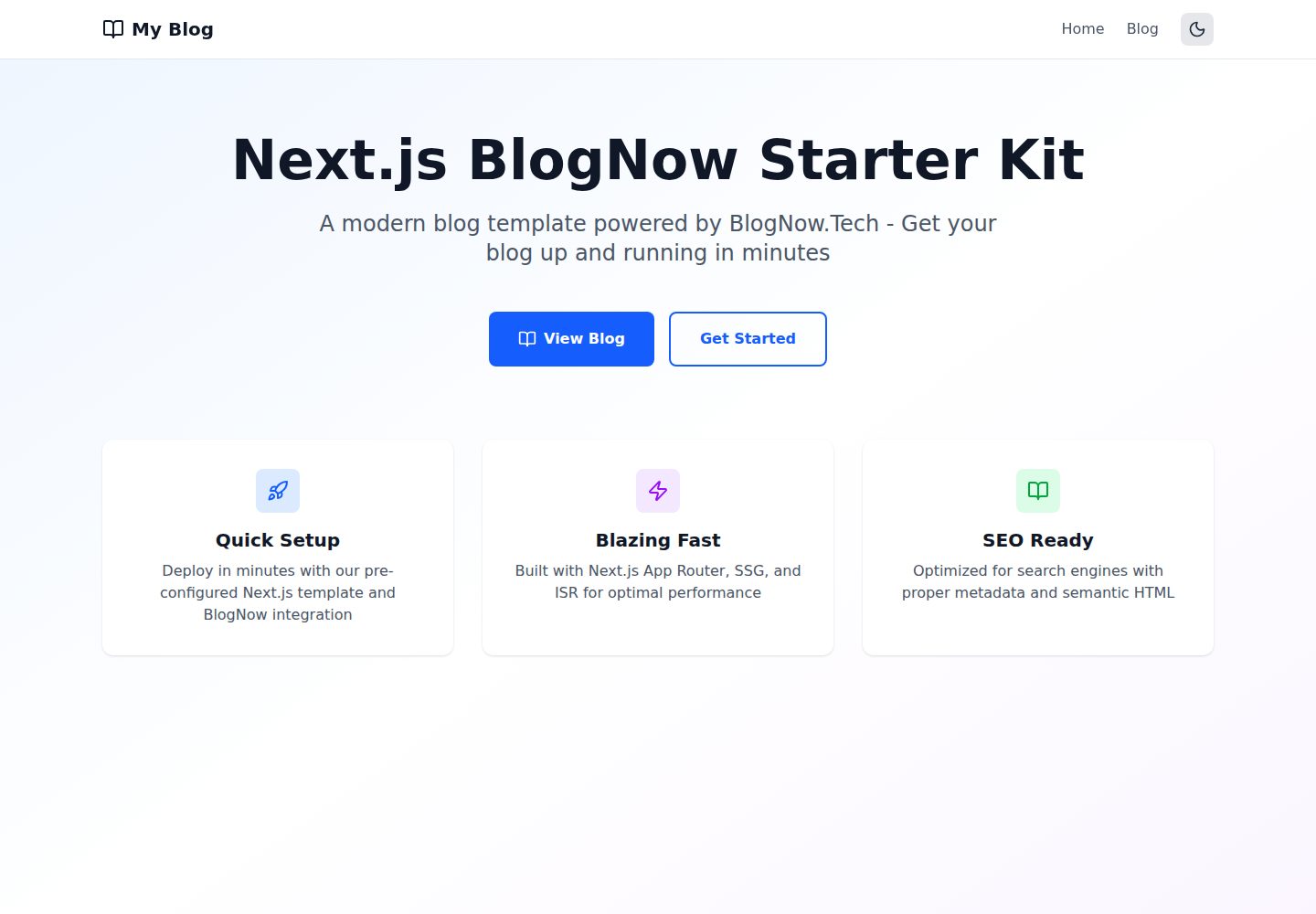
Desktop captureTop of page
Actual screenshot captured by the server browser.
All pages & views 2
Screenshots show visual appearance; interactive behavior may differ.
Recorded 2026-10-14View source
What stands out
A quick read of the recorded project description.
Manages blog content through BlogNow.Tech, supporting tags, categories, image uploads, and scheduled publishing
The blog list page uses server-side pagination, and the article detail page uses SSG with ISR set to revalidate every 5 minutes
Built-in client-side real-time search that can filter the titles and summaries of currently loaded articles
Includes SEO configurations such as a dynamic sitemap, robots.txt, Open Graph, and Twitter Cards
Provides a manual dark mode toggle, with theme preference saved in localStorage
Template Details
This is a Next.js blog starter template that uses BlogNow.Tech as its content source. The README states that it is built with Next.js 15 App Router, TypeScript, and Tailwind CSS v4; blog content is created and managed through the BlogNow dashboard, and the template itself does not include a content editing backend.
The template includes a homepage, a blog list page at /blog, and an article detail page at /blog/[slug]. The list page uses server-side pagination, with Zustand for page caching and client-side search filtering; the article page uses SSG prerendering and sets ISR to revalidate every 5 minutes. The project also provides a dynamic sitemap, robots.txt, Open Graph and Twitter Cards metadata, a dark mode toggle, and social share buttons.
Before use, you need to obtain an API Key from the BlogNow dashboard and configure NEXT_PUBLIC_BLOGNOW_API_KEY in the environment variables, with optional configuration of NEXT_PUBLIC_BLOGNOW_BASE_URL. The README does not provide information on content source support other than BlogNow, nor does it state whether the template includes comments, user authentication, or analytics features.
Next.jsBlogStarter
Is it right for your project?
Use Cases
- Quickly setting up a blog site with content sourced from BlogNow.Tech
- Projects that need blog list pagination, static generation of article details, and basic SEO metadata
- Wanting to reference the implementation of Zustand page caching and client-side search in a Next.js 15 App Router project
- A blog frontend template that needs a dark mode toggle and social share buttons
Suitable For
- Developers using BlogNow.Tech as their blog content management backend
- Frontend developers familiar with Next.js App Router, TypeScript, and Tailwind CSS
- Projects that need a blog starter template and plan to modify components and styles themselves
- Users who want to deploy a blog frontend via Vercel one-click deployment
Getting started & customization
Use these recorded setup notes alongside the repository instructions for your chosen version.
- 1
First register or log in to a BlogNow.Tech account, and obtain an API Key from the dashboard
- 2
For local development, clone the repository and run npm install, then create .env.local and set NEXT_PUBLIC_BLOGNOW_API_KEY, with optional setting of NEXT_PUBLIC_BLOGNOW_BASE_URL
- 3
Run npm run dev to start the development server, accessible by default at http://localhost:3000
- 4
You can clone the repository via the Vercel deploy button and fill in NEXT_PUBLIC_BLOGNOW_API_KEY during deployment
- 5
Blog images use the remote domain cdn.blognow.tech, which is already configured in images.remotePatterns in next.config.ts
License & source material
Usage conditions & limitations
Free to use · keep license noticeThis entry covers the free version under the MIT license in the public repository; the free scope is the code of this version and does not mean that external services or third-party assets are free.
Must comply with when using
- Free use, modification, commercial use, and distribution of this version's code are permitted.
- When distributing copies or substantial portions of the code, retain the original author's copyright notice and the complete MIT license notice.
- The code is provided as is; warranties and limitations of liability are governed by the original license and applicable law.
Additional costs & items to verify
- Demo images, fonts, icons, and other third-party assets must be checked against their respective licenses and cannot be judged solely by the code's MIT license.
- External services such as domains, hosting, databases, payments, or AI may incur additional charges.
- Before use, you must first register or log in to a BlogNow.Tech account and obtain an API Key from the dashboard.
- When deploying to Vercel, the NEXT_PUBLIC_BLOGNOW_API_KEY environment variable must be filled in, otherwise blog content cannot be fetched.
- For local development, NEXT_PUBLIC_BLOGNOW_API_KEY must be configured in .env.local; without this key, the template cannot run.
- Blog content must be created and managed through the BlogNow.Tech dashboard; the template itself does not provide a content editing backend.
- NEXT_PUBLIC_BLOGNOW_API_KEY is required and is a hard prerequisite for using this template.
- Blog images depend on the remote domain cdn.blognow.tech, which is already configured as an external image source in next.config.ts.
View Original Text Basis
Permission is hereby granted, free of charge
Original License Text
### 1. Get Your BlogNow API Key
Original README
2. Enter your `NEXT_PUBLIC_BLOGNOW_API_KEY`
Original README
NEXT_PUBLIC_BLOGNOW_API_KEY=your_api_key_here
Original README
Blog content is managed through [BlogNow.Tech](https://blognow.tech). Use their dashboard to:
Original README
| `NEXT_PUBLIC_BLOGNOW_API_KEY` | Your BlogNow API key | Yes |
Original README
https://github.com/synkc0/blognow-nextjs-starter/blob/main/LICENSEhttps://github.com/synkc0/blognow-nextjs-starter/blob/main/README.mdhostname: "cdn.blognow.tech",
Original README
Compiled by DeepSeek based on repository license and README ·2026-10-14. Results only cover the materials read; dependencies, images, fonts, and subsequent term changes are subject to their respective original texts.
Project checks & description sources
Template Information
- Source platforms
- GitHub
- Documentation and maintenance reference score
- More documented · 85 / 100
- Technologies
- Next.js · React
- Website type
- Blog · Starter
How this score is calculated
Our heuristic uses license records (up to 30), a demo link (12), a preview (10), stars (15), recorded maintenance (15), description completeness (8), feature records (5) and classification data (5). It is not a code, security or performance test, or a Google score. A link does not establish tested functionality.
What to verify for this project
- Repository update recorded
- 2025-12-08
- Screenshot last checked
- 2026-10-14
A demo link is listed. Check it with your own content and viewport sizes; its presence does not confirm that forms, authentication or payments work.
The catalog identifies Next.js as the primary stack. Check the actual dependency manifest and lockfile for versions and hosting requirements. These notes use recorded metadata, not a code audit or a deployment test.
Use a selection guide →How this description was prepared
AI-assisted description based on catalog records and repository material. Repository authors are not automatically the reviewers of this description.
Review declaration: codex-user-requested-batch-review-20261015 · 2026-10-15
Inspect the recorded source material
SHA-256: c3c1ee19595cc074f14d910c0f0fca73a7844f3d4002d6405e442a94aaf3c9c9
2026-10-14T14:40:30.222Z
Source file / repository# Next.js BlogNow Starter Kit
[](https://vercel.com/new/clone?repository-url=https://github.com/synkc0/nextjs-blog-now-starter-kit&env=NEXT_PUBLIC_BLOGNOW_API_KEY&envDescription=Get%20your%20BlogNow%20API%20key%20from%20https://blognow.tech/dashboard&project-name=my-blognow-blog&repository-name=my-blognow-blog)
View Demo - https://blognow-nextjs-starter.vercel.app/blog
A modern, SEO-optimized blog starter template powered by [BlogNow.Tech](https://blognow.tech) and built with Next.js 15, TypeScript, and Tailwind CSS.
## ✨ Features
- 🚀 **Next.js 15 App Router** - Built with the latest Next.js features
- 📝 **BlogNow Integration** - Seamless blog content management
- 🎨 **Tailwind CSS v4** - Modern, responsive design with custom dark mode
- 🔍 **SEO Optimized** - Complete metadata, Open Graph, Twitter Cards, sitemap & robots.txt
- ⚡ **Hybrid Rendering** - SSG for blog posts, server-side pagination for listing
- 🔎 **Real-time Search** - Client-side search with instant filtering
- 📄 **Server-Side Pagination** - On-demand data fetching with URL-based navigation
- 🎯 **Type-Safe** - Full TypeScript support with BlogNow SDK
- 📱 **Responsive Design** - Mobile-first approach with optimized images
- 🌓 **Dark Mode Toggle** - Manual theme switching with localStorage persistence
- 💾 **Smart State Management** - Zustand with intelligent page caching
- 📊 **Optimized Performance** - Page-level caching to minimize API calls
- 🎨 **Rich Typography** - Enhanced blog content styling with proper spacing
## 🚀 Quick Start
### 1. Get Your BlogNow API Key
1. Visit [BlogNow.Tech](https://blognow.tech)
2. Sign up or log in to your account
3. Navigate to your [Dashboard](https://blognow.tech/dashboard)
4. Copy your API key
### 2. Deploy to Vercel
Click the deploy button above and follow the prompts:
1. Connect your GitHub account
2. Enter your `NEXT_PUBLIC_BLOGNOW_API_KEY`
3. Deploy!
### 3. Local Development
Clone the repository and install dependencies:
```bash
git clone https://github.com/synkc0/nextjs-blog-now-starter-kit.git
cd nextjs-blog-now-starter-kit
npm install
```
Create a `.env.local` file in the root directory:
```bash
NEXT_PUBLIC_BLOGNOW_API_KEY=your_api_key_here
NEXT_PUBLIC_BLOGNOW_BASE_URL=https://api.blognow.tech
```
Run the development server:
```bash
npm run dev
```
Open [http://localhost:3000](http://localhost:3000) to see your blog.
## 📁 Project Structure
```
├── src/
│ ├── app/
│ │ ├── blog/
│ │ │ ├── [slug]/
│ │ │ │ └── page.tsx # Individual blog post (SSG)
│ │ │ └── page.tsx # Blog listing (Server-side pagination)
│ │ ├── layout.tsx # Root layout with header
│ │ ├── page.tsx # Home page
│ │ ├── sitemap.ts # Dynamic sitemap generation
│ │ └── robots.ts # SEO robots configuration
│ ├── components/
│ │ ├── BlogCard.tsx # Blog post preview card
│ │ ├── BlogList.tsx # Client-side paginated list
│ │ ├── BlogListWithPagination.tsx # Server-side paginated list
│ │ ├── Header.tsx # Navigation header
│ │ ├── Pagination.tsx # Client-side pagination UI
│ │ ├── SearchBar.tsx # Real-time search input
│ │ ├── ServerPagination.tsx # Server-side pagination UI
│ │ ├── ShareButton.tsx # Social sharing functionality
│ │ └── ThemeToggle.tsx # Dark mode toggle button
│ ├── lib/
│ │ ├── blognow.ts # BlogNow singleton client
│ │ └── cache.ts # SSG cache with async generator
│ └── store/
│ └── blogStore.ts # Zustand store with page caching
├── .env.example
├── .env.local
└── next.config.ts
```
## 🎨 Customization
### Styling
This template uses Tailwind CSS. Customize colors, fonts, and styles in:
- `tailwind.config.ts` - Tailwind configuration
- `src/app/globals.css` - Global styles
- Component files - Individual component styles
### Content
Blog content is managed through [BlogNow.Tech](https://blognow.tech). Use their dashboard to:
- Create and edit blog posts
- Manage tags and categories
- Upload images
- Schedule posts
### Components
Modify or extend components in `src/components/`:
- **BlogCard** - Blog post preview cards with images and metadata
- **BlogList** - Client-side paginated grid (used on homepage)
- **BlogListWithPagination** - Server-side paginated list (used on /blog)
- **SearchBar** - Real-time search with instant filtering
- **ServerPagination** - URL-based pagination controls
- **ThemeToggle** - Dark/light mode switcher
- **Header** - Navigation bar with theme toggle
- **ShareButton** - Social sharing (Twitter, Facebook, LinkedIn)
## 🔧 Configuration
### Environment Variables
| Variable | Description | Required |
| ------------------------------ | -------------------- | -------------------------------------- |
| `NEXT_PUBLIC_BLOGNOW_API_KEY` | Your BlogNow API key | Yes |
| `NEXT_PUBLIC_BLOGNOW_BASE_URL` | BlogNow API base URL | No (default: https://api.blognow.tech) |
### Next.js Configuration
The template includes optimized Next.js configuration for BlogNow images in `next.config.ts`:
```typescript
images: {
remotePatterns: [
{
protocol: "https",
hostname: "cdn.blognow.tech",
pathname: "/**",
},
],
}
```
### Rendering Strategy
The template uses a hybrid rendering approach:
**Blog Listing Page (`/blog`)**
- Server-side pagination with on-demand data fetching
- Zustand store with intelligent page caching
- URL-based navigation (`/blog?page=2`)
- Real-time client-side search filtering
- ISR revalidation every 5 minutes
**Blog Post Pages (`/blog/[slug]`)**
- Static Site Generation (SSG) for optimal performance
- Pre-rendered at build time using cached data
- ISR revalidation every 5 minutes
Adjust revalidation timing in page files:
```typescript
export const revalidate = 300; // seconds
```
### State Management
Zustand store (`src/store/blogStore.ts`) features:
- **Page Caching**: Visited pages are cached to prevent refetching
- **Search Filtering**: Client-side search across current page posts
- **Server Pagination**: Fetches data on-demand per page
- **Loading States**: Built-in loading and error handling
## 🏗️ Architecture Highlights
### Pagination Strategy
- **/blog page**: Server-side pagination with Zustand state management
- **Homepage**: Client-side pagination with all posts loaded
- **Caching**: Pages are cached in Zustand Map to avoid duplicate API calls
- **URL State**: Page number persists in URL query parameters
### Search Implementation
- **Real-time filtering**: Instant search results as you type
- **Scope**: Searches title and excerpt of currently loaded posts
- **UI State**: Hides pagination when search is active
- **Result count**: Displays number of matching posts
### Dark Mode
- **Toggle**: Manual theme switcher in header
- **Persistence**: Theme saved to localStorage
- **Implementation**: Custom Tailwind variant `@variant dark (&:is(.dark *))`
- **Scope**: Applied across all components
## 📚 Learn More
- [BlogNow Documentation](https://blognow.tech/docs)
- [BlogNow SDK](https://www.npmjs.com/package/@blognow/sdk)
- [Next.js Documentation](https://nextjs.org/docs)
- [Tailwind CSS v4](https://tailwindcss.com/docs)
- [Zustand Documentation](https://zustand.docs.pmnd.rs)
## 🤝 Contributing
Contributions are welcome! Please feel free to submit a Pull Request.
## 📄 License
MIT License - feel free to use this template for your projects!
## 🙏 Acknowledgments
- Built with [Next.js](https://nextjs.org)
- Powered by [BlogNow.Tech](https://blognow.tech)
- Styled with [Tailwind CSS](https://tailwindcss.com)
- Icons by [Lucide](https://lucide.dev)
---
**Need Help?** Check out the [BlogNow Documentation](https://blognow.tech/docs) or join our community!
Explore similar templates
Compare previews and descriptions within the same stack and category.

Next.js SaaS Starter
The official Next.js SaaS starter template, integrating email/password authentication, Stripe Checkout subscriptions, a dashboard with user/team CRUD, basic Owner/Member RBAC, and activity logging.
Next.js · SaaS

Next.js Commerce
Vercel's officially maintained Next.js App Router ecommerce starter with deep Shopify integration, offering a complete product catalog, cart, and checkout flow. Core logic is modular for swapping backends, and community provider versions exist for BigCommerce, Medusa, and Saleor.
Next.js · E-commerce

Next-js-Boilerplate
A developer-first Next.js 16 starter with Tailwind CSS 4 and TypeScript, supporting both App Router and Page Router.
Next.js · Starter

tailwind-nextjs-starter-blog
A Next.js and Tailwind CSS blog starter template using Contentlayer for Markdown/MDX, with built-in SEO, code highlighting, and tags. It targets personal technical blogs and migration from Jekyll/Hugo to React, and supports one-click Vercel deployment.
Next.js · Blog

next-forge
next-forge is a Turborepo-based Next.js template maintained by Vercel, positioned as a starting point for SaaS products.
Next.js · Starter

SaaS-Boilerplate
SaaS-Boilerplate is an open-source SaaS starter template built with Next.js App Router, React 19, TypeScript, Tailwind CSS, and Shadcn UI.
Next.js · SaaS