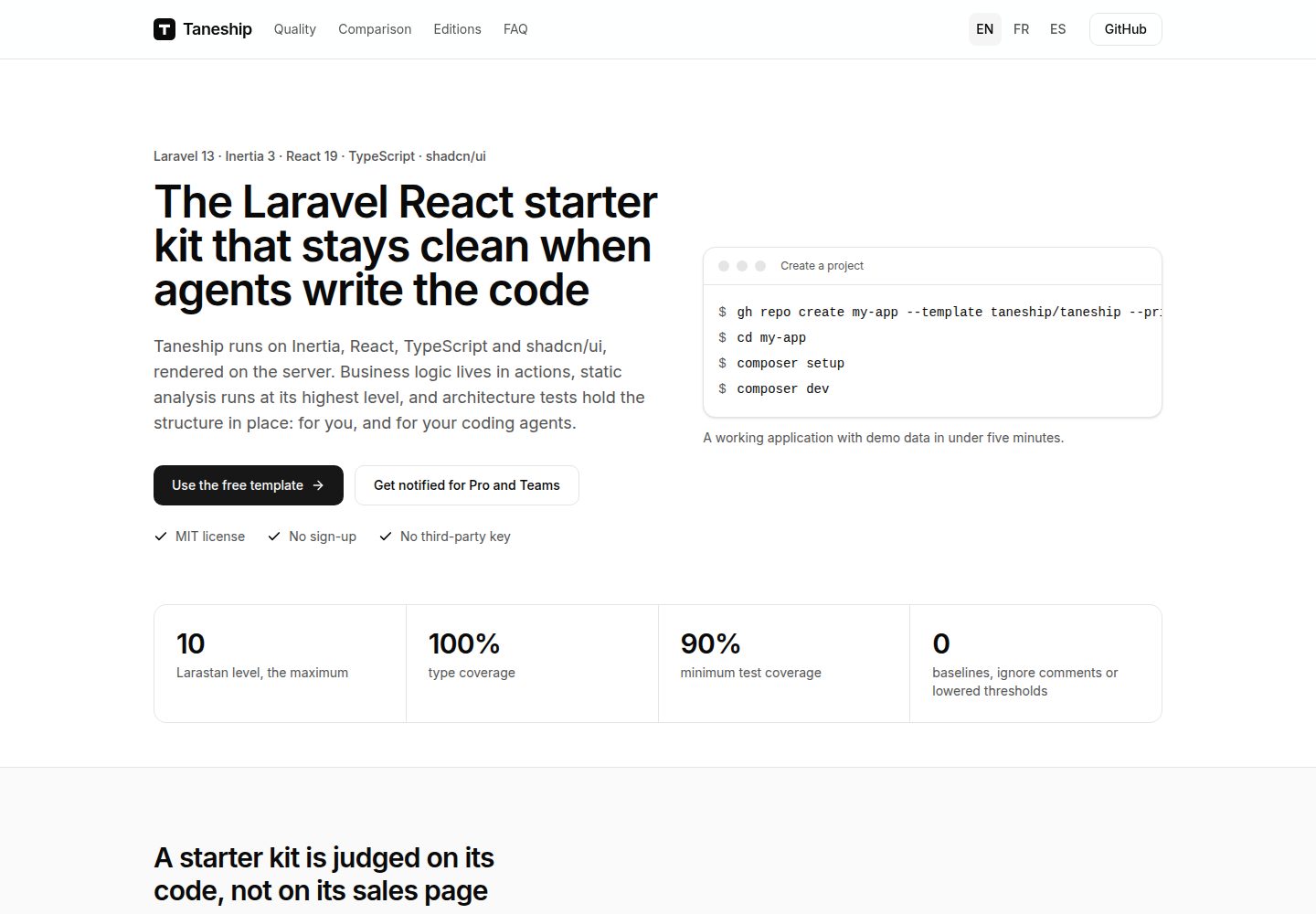
Built on Laravel with an Inertia and React front end and server-side rendering support
LaravelReactStarter
taneship — Laravel Starter Template
By taneship
Taneship is a Laravel starter kit with an Inertia and React front end and server-side rendering support. Business logic lives in actions, and it ships with static analysis, architecture tests, and convention documentation for coding agents.
Explore the design
Compare the page layouts and mobile experience. Open any screenshot for a closer look.
Desktop homepage1 / 2
Desktop captureTop of page
Actual screenshot captured by the server browser.
All pages & views 2
Screenshots show visual appearance; interactive behavior may differ.
Recorded 2026-10-11View source
What stands out
A quick read of the recorded project description.
Business logic is centralized in actions, with the highest level of static analysis and architecture tests constraining structure
Provides AGENTS.md documenting the tech stack, structure, code style, testing, and boundary conventions for multiple coding agents to read
Uses SQLite, the database queue, and the log mail driver by default, and runs without third-party keys
Provides commands such as composer setup, composer dev, composer check, composer fix, composer test, and composer test:browser
Uses the MIT license, permitting free use, modification, commercial use, and distribution of this version's code
Template Details
Taneship is a Laravel starter kit with an Inertia and React front end and server-side rendering (SSR) support. The project places business logic in actions, runs the highest level of static analysis, and uses architecture tests to constrain directory and dependency structure. The repository also provides AGENTS.md, which documents the tech stack, structure, code style, testing, and boundary conventions for coding agents such as Claude Code, Codex, Cursor, Copilot, Gemini CLI, and Junie to read.
Installation and running require PHP 8.5, Composer 2.10, Node.js 24, and npm 11.16 or later; the coverage gate requires PCOV or Xdebug. The project uses SQLite, the database queue, and the log mail driver by default, with no third-party keys required. Running composer setup completes dependency installation, generates .env and the application key, migrates, seeds demo data, and builds the client and server artifacts; composer dev starts the web server, queue worker, log tailing, and Vite dev server together. The demo user is [email protected] with the password password, and seed data is created only outside the production environment.
Production deployment requires PHP 8.5, Node.js 24 (for server-side rendering), and SQLite, PostgreSQL, or MySQL. The build process includes composer install --no-dev, npm ci, npm run build, npm prune --omit=dev, migrations, and optimize; npm run build outputs client artifacts to public/build and server artifacts to bootstrap/ssr. At runtime, the public/ directory must be served through a web server that compresses responses, such as nginx or Caddy, and three processes must be supervised: inertia:start-ssr, queue:work, and schedule:work; if the SSR process stops, pages fall back to browser-side rendering. Behind a load balancer or CDN, TRUSTED_PROXIES must be set; otherwise rate limiting counts all visitors as one, and verification email links are rejected.
The template starts with a single commit, after which all files belong to the user and can be modified freely; releases are provided as vX.Y.Z tags on the main branch with GitHub Release notes, to be taken manually when needed. The repository uses the MIT license, permitting free use, modification, commercial use, and distribution of this version's code, provided the copyright notice and the full MIT license notice are retained when distributing. Third-party assets such as demo images, fonts, and icons, as well as external services such as domains, hosting, databases, payments, or AI, require separate license and cost verification. Taneship Pro and Taneship Teams build on this version for scenarios requiring more features.
LaravelReactStarter kit
Is it right for your project?
Use Cases
- Starting a new project that combines Laravel and React and wants pages rendered on the server
- Teams that want business logic centralized in actions and code structure maintained through static analysis and architecture tests
- Projects collaborating with coding agents such as Claude Code, Codex, Cursor, Copilot, Gemini CLI, or Junie that need unified convention documentation
- Development environments that need to run locally and seed demo data without relying on third-party keys
- Application prototypes or internal projects that need to be freely modified and used commercially under the MIT license
Suitable For
- Developers familiar with Laravel and React who want project structure constrained by conventions and tests
- Web application projects that need server-side rendering and background processes such as queues and scheduling
- Teams that want to include coding agents in their daily development workflow and provide them with clear conventions
- Projects that accept SQLite as the default database and can later switch to PostgreSQL or MySQL
Getting started & customization
Use these recorded setup notes alongside the repository instructions for your chosen version.
- 1
Requires PHP 8.5, Composer 2.10, Node.js 24, and npm 11.16 or later; the coverage gate requires PCOV or Xdebug
- 2
Create a repository via GitHub's Use this template or gh repo create --template taneship/taneship, then run composer setup and composer dev
- 3
The demo user is [email protected] with the password password, and seed data is created only outside the production environment
- 4
Production requires building client and server artifacts and supervising three processes: inertia:start-ssr, queue:work, and schedule:work
- 5
Behind a load balancer or CDN, TRUSTED_PROXIES must be set; otherwise rate limiting and verification email links will fail
License & source material
Usage conditions & limitations
Free to use · keep license noticeThis entry covers the free version in the public repository under the MIT license; the free scope is this version's code and does not imply that external services or third-party assets are free.
Must comply with when using
- Free use, modification, commercial use, and distribution of this version's code are permitted.
- When distributing copies or substantial portions of the code, retain the original author's copyright notice and the full MIT license notice.
- The code is provided as is; warranties and limitations of liability are governed by the original license and applicable law.
Additional costs & items to verify
- Demo images, fonts, icons, and other third-party assets must be checked against their respective licenses and cannot be judged solely by the code's MIT license.
- External services such as domains, hosting, databases, payments, or AI may incur separate charges.
- Taneship Pro and Taneship Teams are paid upgrades for scenarios requiring more features, building on this free version; the free version does not include the additional features of Pro/Teams.
- No third-party keys are required by default; the application runs with SQLite, the database queue, and the log mail driver.
- The demo user and seed data are created only outside the production environment; the production environment does not generate this demo account.
- When deployed behind a load balancer or CDN, TRUSTED_PROXIES must be set to the proxy addresses or CIDR ranges; otherwise the application treats the proxy as the visitor, causing rate limiting to count all visitors as one and verification email links to be rejected.
- When using Claude Code, if the project adds a CLAUDE.md, it must begin with @AGENTS.md; otherwise Claude Code will no longer read the conventions in AGENTS.md.
- Using Laravel Boost's MCP server requires installing its configuration first and approving the laravel-boost server in the coding agent.
View Original Text Basis
Permission is hereby granted, free of charge
Original License Text
Taneship Pro and Taneship Teams start from this edition for applications that need more.
Original README
No third-party key is needed: the application runs on SQLite, the database queue and the `log` mailer.
Original README
The seeders create it outside production only.
Original README
Behind a load balancer or a CDN, set `TRUSTED_PROXIES` to the addresses or CIDR ranges of your proxies, separated by commas, or to `*` when only they can reach the server. Without it, the application takes the proxy for the visitor: rate limits count every visitor as one, and the links of verification mails are refused.
Original README
Claude Code reads `AGENTS.md` only while the project has no `CLAUDE.md`. If you add one, start it with this line, so that it keeps reading the conventions:
Original README
https://github.com/taneship/taneship/blob/main/LICENSEhttps://github.com/taneship/taneship/blob/main/README.mdInstall its configuration, then approve the `laravel-boost` server in your agent:
Original README
Compiled by DeepSeek based on repository license and README ·2026-10-11. Results only cover the materials read; dependencies, images, fonts, and subsequent term changes are subject to their respective original texts.
Project checks & description sources
Template Information
- Source platforms
- GitHub
- Documentation and maintenance reference score
- More documented · 85 / 100
- Technologies
- Laravel · React
- Website type
- Starter
How this score is calculated
Our heuristic uses license records (up to 30), a demo link (12), a preview (10), stars (15), recorded maintenance (15), description completeness (8), feature records (5) and classification data (5). It is not a code, security or performance test, or a Google score. A link does not establish tested functionality.
What to verify for this project
- Repository update recorded
- 2026-10-10
- Screenshot last checked
- 2026-10-11
A demo link is listed. Check it with your own content and viewport sizes; its presence does not confirm that forms, authentication or payments work.
The catalog identifies Laravel as the primary stack. Check the actual dependency manifest and lockfile for versions and hosting requirements. These notes use recorded metadata, not a code audit or a deployment test.
Use a selection guide →How this description was prepared
AI-assisted description based on catalog records and repository material. Repository authors are not automatically the reviewers of this description.
Review declaration: [email protected] · 2026-10-13
Inspect the recorded source material
SHA-256: a91a60aea3fdf832bc483b2510ec06693f08aea06fb08dd35fd09a4deb76c303
2026-10-11T15:41:18.822Z
Source file / repository# Taneship A Laravel starter kit on Inertia and React, rendered on the server. Business logic lives in actions, static analysis runs at its highest level, architecture tests hold the structure in place, and the conventions are written for developers and coding agents alike. ## Requirements - PHP 8.5, with PCOV or Xdebug for the coverage gate - Composer 2.10 - Node.js 24, with npm 11.16 or later No third-party key is needed: the application runs on SQLite, the database queue and the `log` mailer. ## Create a project Create a repository from this template, with "Use this template" on GitHub or with the GitHub CLI: ```bash gh repo create my-app --template taneship/taneship --private --clone ``` Then install and start it: ```bash cd my-app composer setup composer dev ``` The application answers on http://localhost:8000. Sign in as the demo user, `[email protected]` with the password `password`. The seeders create it outside production only. The project starts from a single commit and owns every file from then on: change any of them. Taneship tags its releases `vX.Y.Z` on `main`, each with a [GitHub Release](https://github.com/taneship/taneship/releases) whose notes describe the changes and link to their diff. Take what you want from a release by hand. ## Commands ```bash composer setup # install dependencies, create .env, generate the key, migrate, seed demo data, build the client and server bundles composer dev # run php artisan dev: web server, queue worker, log tail, and the Vite dev server, which also renders pages on the server composer check # run the quality gates that need neither a browser nor the network composer fix # apply the fixes the tools can make on their own composer test # run the Pest suite in parallel, browser tests excluded composer test:browser # build the bundles, start the SSR server, then run the browser tests ``` `npm install` installs the git hooks: before a commit, they fix the staged files, and on a commit they check its message. Set `VP_GIT_HOOKS=0` to turn them off. ## Coding agents [`AGENTS.md`](AGENTS.md) holds the conventions of the project: stack, structure, code style, testing and boundaries. Claude Code, Codex, Cursor, Copilot, Gemini CLI and Junie read it. Add your own conventions to it as the project grows. Claude Code reads `AGENTS.md` only while the project has no `CLAUDE.md`. If you add one, start it with this line, so that it keeps reading the conventions: ``` @AGENTS.md ``` [Laravel Boost](https://laravel.com/docs/boost) gives agents an MCP server that reads the application: routes, database schema, logs and documentation. Install its configuration, then approve the `laravel-boost` server in your agent: ```bash php artisan boost:install --mcp ``` The files it generates are git-ignored, and `boost:install` creates them again on another machine. ## Production Requirements: PHP 8.5, Node.js 24 for server-side rendering, and SQLite, PostgreSQL or MySQL. Build the application: ```bash composer install --no-dev --optimize-autoloader npm ci npm run build npm prune --omit=dev php artisan migrate --force php artisan optimize ``` `npm run build` builds the client bundle into `public/build` and the server bundle into `bootstrap/ssr`. The server bundle imports React and the other runtime packages from `node_modules`, which `npm prune --omit=dev` keeps. Serve `public/` through a web server that compresses its responses, such as nginx or Caddy, and supervise three processes: ```bash php artisan inertia:start-ssr # renders pages on the server. While it is down, pages render in the browser php artisan queue:work # runs queued jobs php artisan schedule:work # runs scheduled tasks, or run php artisan schedule:run every minute from cron ``` Behind a load balancer or a CDN, set `TRUSTED_PROXIES` to the addresses or CIDR ranges of your proxies, separated by commas, or to `*` when only they can reach the server. Without it, the application takes the proxy for the visitor: rate limits count every visitor as one, and the links of verification mails are refused. ## Pro and Teams Taneship Pro and Taneship Teams start from this edition for applications that need more. [See what they add](https://github.com/taneship). ## Contributing and security Read [`CONTRIBUTING.md`](CONTRIBUTING.md) before opening a pull request. Report a vulnerability privately, as [`SECURITY.md`](SECURITY.md) describes. Taneship is open source under the MIT license.
Explore similar templates
Compare previews and descriptions within the same stack and category.

sage
Sage is a WordPress starter theme maintained by Roots, using Laravel Blade components and templates, Vite builds, Tailwind CSS, and built-in block editor support.
Laravel · Starter

wave
Wave is an open-source SaaS starter kit built on Laravel and released under the MIT license.
Laravel · SaaS

filament-starter
A Laravel TALL stack starter template maintained by Log1x, with a preconfigured Filament admin panel and plugins including Curator, Gravatar, Exceptions, Jobs Monitor, Breezy, Peek, and Logger.
Laravel · Starter

electrik
Electrik is a Laravel SaaS starter kit installed as a Composer package, with authentication, teams, Stripe subscription billing, and the Slate 3 interface under the Electrik\ namespace rather than copied into App\.
Laravel · SaaS

php-saas
php-saas is a Laravel-based SaaS starter positioned as an everything-included kit. It generates new projects via a global Composer command and includes authentication with two-factor, API tokens, Stripe and Paddle billing, and project, team, and organization management.
Laravel · SaaS

filament-jetstream
A Laravel starter kit that implements Jetstream-like authentication and account features using Filament's native panels and components. It includes login, registration, two-factor authentication, session management, user profiles, and optional teams and API tokens.
Laravel · Starter