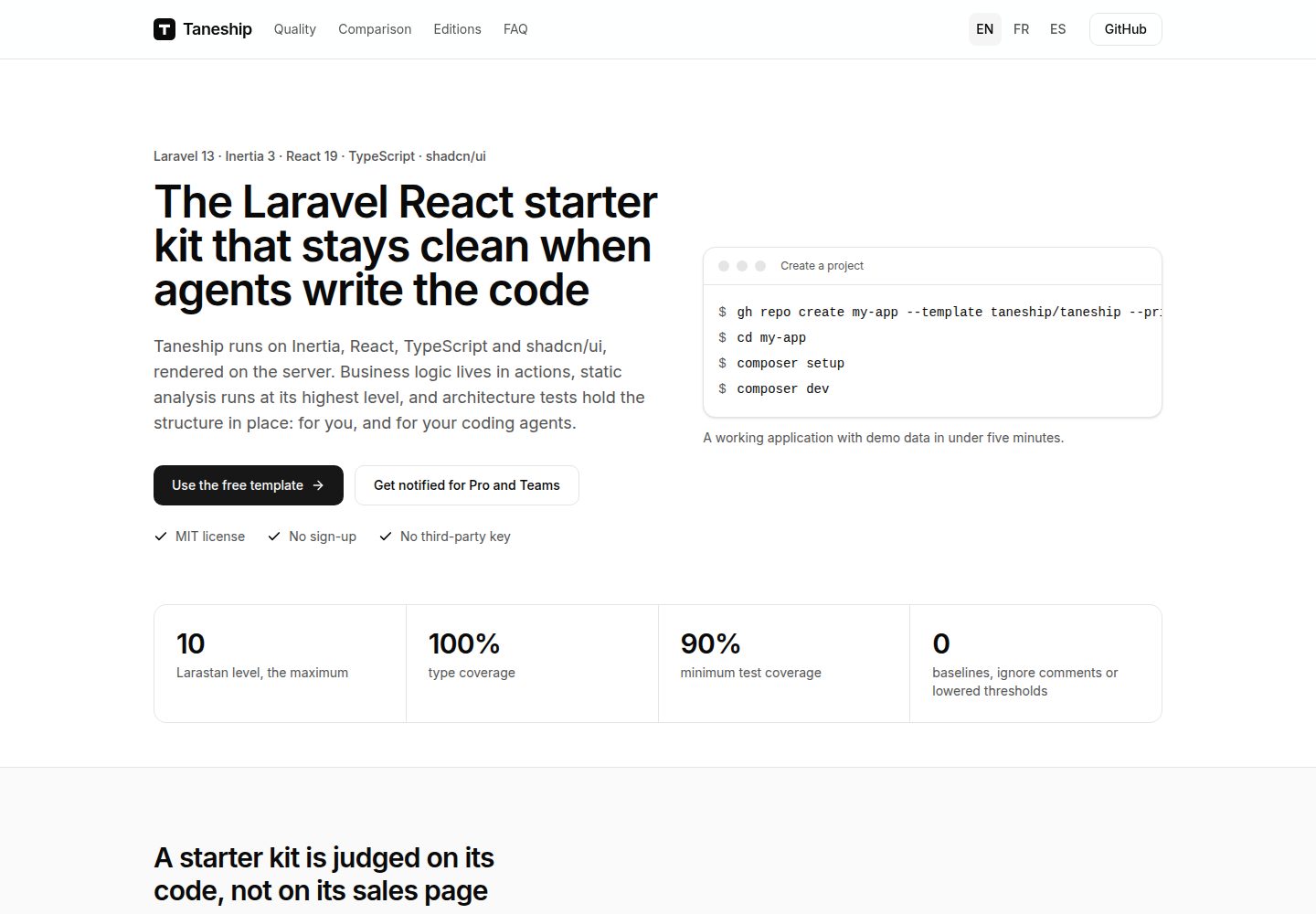
基于 Laravel,前端使用 Inertia 与 React,并支持服务端渲染
LaravelReact启动器
taneship — Laravel 启动器模板
作者 taneship
Taneship 是一个基于 Laravel 的启动器模板,前端使用 Inertia 与 React 并支持服务端渲染,业务逻辑集中在 actions,附带静态分析、架构测试和面向编码代理的约定文档。
看看你的网站会是什么样
浏览真实页面截图,比较内容排版与手机效果。点击下方缩略图切换,放大查看整页细节。
全部页面与视图 2
截图用于了解视觉与布局,交互效果请以实际项目为准。
采集于 2026-10-11查看来源
值得关注的模板亮点
从已有项目资料中,快速了解它的特点。
业务逻辑集中在 actions,配合最高级别静态分析与架构测试约束结构
提供 AGENTS.md,记录技术栈、结构、代码风格、测试与边界约定,供多种编码代理读取
默认使用 SQLite、数据库队列与 log 邮件驱动,无需第三方密钥即可运行
提供 composer setup、composer dev、composer check、composer fix、composer test 与 composer test:browser 等命令
采用 MIT 许可,允许免费使用、修改、商用和分发该版本代码
模板详细介绍
Taneship 是一个 Laravel 启动器模板,前端采用 Inertia 与 React,并支持服务端渲染(SSR)。项目把业务逻辑放在 actions 中,运行最高级别的静态分析,并用架构测试约束目录与依赖结构。仓库同时提供 AGENTS.md,记录技术栈、结构、代码风格、测试与边界约定,供 Claude Code、Codex、Cursor、Copilot、Gemini CLI 和 Junie 等编码代理读取。
安装与运行依赖 PHP 8.5、Composer 2.10、Node.js 24 与 npm 11.16 或更高版本;覆盖率门禁需要 PCOV 或 Xdebug。项目默认使用 SQLite、数据库队列和 log 邮件驱动,不需要第三方密钥。执行 composer setup 完成依赖安装、生成 .env 与应用密钥、迁移、填充演示数据并构建客户端与服务端产物;composer dev 会同时启动 Web 服务器、队列 worker、日志跟踪和 Vite 开发服务器。演示用户为 [email protected],密码为 password,种子数据仅在生产环境之外创建。
生产部署要求 PHP 8.5、Node.js 24(用于服务端渲染)以及 SQLite、PostgreSQL 或 MySQL。构建流程包括 composer install --no-dev、npm ci、npm run build、npm prune --omit=dev、迁移与 optimize;npm run build 会把客户端产物输出到 public/build,把服务端产物输出到 bootstrap/ssr。运行时需通过 nginx 或 Caddy 等压缩响应的 Web 服务器提供 public/ 目录,并监督 inertia:start-ssr、queue:work 和 schedule:work 三个进程;SSR 进程停止时页面会回退到浏览器端渲染。位于负载均衡器或 CDN 之后时,需要设置 TRUSTED_PROXIES,否则限流会把所有访客计为同一个,验证邮件链接也会被拒绝。
模板以单个提交起步,之后所有文件归使用者所有,可以任意修改;发布以 main 分支上的 vX.Y.Z 标签和 GitHub Release 说明提供,需要时手动取用。仓库采用 MIT 许可,允许免费使用、修改、商用和分发该版本代码,分发时需保留版权声明与完整 MIT 许可声明;演示图片、字体、图标等第三方素材以及域名、托管、数据库、支付或 AI 等外部服务需另行核对许可与费用。Taneship Pro 与 Taneship Teams 从该版本出发,面向需要更多功能的场景。
LaravelReact启动器
适合你的项目吗?
适用场景
- 需要 Laravel 与 React 结合、并希望页面在服务端渲染的新项目起步
- 希望业务逻辑集中在 actions、并用静态分析和架构测试维持代码结构的团队
- 使用 Claude Code、Codex、Cursor、Copilot、Gemini CLI 或 Junie 等编码代理协作,需要统一约定文档的项目
- 需要在不依赖第三方密钥的情况下本地运行并填充演示数据的开发环境
- 需要按 MIT 许可自由修改并商用的应用原型或内部项目
适合人群
- 熟悉 Laravel 与 React、希望以约定和测试约束项目结构的开发者
- 需要服务端渲染与队列、调度等后台进程的 Web 应用项目
- 希望把编码代理纳入日常开发流程并为其提供明确约定的团队
- 接受 SQLite 作为默认数据库、后续可切换到 PostgreSQL 或 MySQL 的项目
上手与定制指南
结合仓库当前版本的说明,按下面的资料检查内容、配置与运行要求。
- 1
需要 PHP 8.5、Composer 2.10、Node.js 24 与 npm 11.16 或更高版本;覆盖率门禁需要 PCOV 或 Xdebug
- 2
通过 GitHub 的 Use this template 或 gh repo create --template taneship/taneship 创建仓库,然后运行 composer setup 与 composer dev
- 3
演示用户为 [email protected],密码为 password,种子数据仅在生产环境之外创建
- 4
生产环境需构建客户端与服务端产物,并监督 inertia:start-ssr、queue:work 和 schedule:work 三个进程
- 5
位于负载均衡器或 CDN 之后时需设置 TRUSTED_PROXIES,否则限流与验证邮件链接会出错
授权与来源资料
使用条件与限制
免费使用 · 保留许可声明本次收录的是公开仓库中采用 MIT 许可的免费版本;免费范围为该版本代码,不代表外部服务或第三方素材免费。
使用时需要遵守
- 允许免费使用、修改、商用和分发该版本代码。
- 分发代码副本或实质性部分时,保留原作者版权声明和完整 MIT 许可声明。
- 代码按现状提供;担保与责任限制以原许可证及适用法律为准。
额外费用与待核对事项
- 演示图片、字体、图标及其他第三方素材需按各自许可核对,不能仅凭代码的 MIT 许可判断。
- 域名、托管、数据库、支付或 AI 等外部服务可能另外收费。
- Taneship Pro 与 Taneship Teams 是面向需要更多功能场景的付费升级版本,从本免费版本出发;免费版本不包含 Pro/Teams 的额外功能。
- 默认无需第三方密钥,应用使用 SQLite、数据库队列和 log 邮件驱动运行。
- 演示用户与种子数据仅在生产环境之外创建,生产环境不会生成该演示账号。
- 部署在负载均衡器或 CDN 之后时必须设置 TRUSTED_PROXIES 为代理地址或 CIDR 范围;否则应用会把代理当作访客,导致限流将所有访客计为同一人,且验证邮件链接会被拒绝。
- 使用 Claude Code 时,若项目新增 CLAUDE.md,需以 @AGENTS.md 开头,否则 Claude Code 将不再读取 AGENTS.md 中的约定。
- 使用 Laravel Boost 的 MCP 服务器需先安装其配置,并在编码代理中批准 laravel-boost 服务器。
查看原文依据
Permission is hereby granted, free of charge
许可证原文
Taneship Pro and Taneship Teams start from this edition for applications that need more.
README 原文
No third-party key is needed: the application runs on SQLite, the database queue and the `log` mailer.
README 原文
The seeders create it outside production only.
README 原文
Behind a load balancer or a CDN, set `TRUSTED_PROXIES` to the addresses or CIDR ranges of your proxies, separated by commas, or to `*` when only they can reach the server. Without it, the application takes the proxy for the visitor: rate limits count every visitor as one, and the links of verification mails are refused.
README 原文
Claude Code reads `AGENTS.md` only while the project has no `CLAUDE.md`. If you add one, start it with this line, so that it keeps reading the conventions:
README 原文
https://github.com/taneship/taneship/blob/main/LICENSEhttps://github.com/taneship/taneship/blob/main/README.mdInstall its configuration, then approve the `laravel-boost` server in your agent:
README 原文
DeepSeek 根据仓库许可证和 README 整理 ·2026-10-11。结果仅覆盖已读取资料,依赖、图片、字体及后续条款变更以各自原文为准。
项目核对记录与介绍依据
模板资料
- 来源平台
- GitHub
- 资料与维护参考分
- 资料较完整 · 85 / 100
- 技术栈
- Laravel · React
- 网站类型
- 启动器
这个分数如何计算
本站按许可资料(最高30分)、演示链接(12分)、预览图(10分)、Star数(15分)、记录的维护时间(15分)、描述完整度(8分)、功能记录(5分)和分类资料(5分)计算。它不是代码、安全或性能测试,也不是 Google 评分;有链接不代表已实测可用。
这个项目需要核对什么
- 记录的仓库更新时间
- 2026-10-10
- 截图检查日期
- 2026-10-11
已收录演示链接。请用你的内容与屏幕尺寸检查;有演示不代表表单、认证或支付已经可用。
目录记录的主要技术栈是 Laravel。请通过依赖清单和锁文件核对实际版本与托管要求。这些说明基于收录资料,不代表代码审计或部署实测。
查看具体选型方法 →介绍的制作与核对状态
介绍由 AI 辅助整理目录与仓库资料。仓库作者不等于这篇介绍的审核者。
审核声明: [email protected] · 2026-10-13
查看当时使用的来源资料
SHA-256: a91a60aea3fdf832bc483b2510ec06693f08aea06fb08dd35fd09a4deb76c303
2026-10-11T15:41:18.822Z
来源文件 / 仓库# Taneship A Laravel starter kit on Inertia and React, rendered on the server. Business logic lives in actions, static analysis runs at its highest level, architecture tests hold the structure in place, and the conventions are written for developers and coding agents alike. ## Requirements - PHP 8.5, with PCOV or Xdebug for the coverage gate - Composer 2.10 - Node.js 24, with npm 11.16 or later No third-party key is needed: the application runs on SQLite, the database queue and the `log` mailer. ## Create a project Create a repository from this template, with "Use this template" on GitHub or with the GitHub CLI: ```bash gh repo create my-app --template taneship/taneship --private --clone ``` Then install and start it: ```bash cd my-app composer setup composer dev ``` The application answers on http://localhost:8000. Sign in as the demo user, `[email protected]` with the password `password`. The seeders create it outside production only. The project starts from a single commit and owns every file from then on: change any of them. Taneship tags its releases `vX.Y.Z` on `main`, each with a [GitHub Release](https://github.com/taneship/taneship/releases) whose notes describe the changes and link to their diff. Take what you want from a release by hand. ## Commands ```bash composer setup # install dependencies, create .env, generate the key, migrate, seed demo data, build the client and server bundles composer dev # run php artisan dev: web server, queue worker, log tail, and the Vite dev server, which also renders pages on the server composer check # run the quality gates that need neither a browser nor the network composer fix # apply the fixes the tools can make on their own composer test # run the Pest suite in parallel, browser tests excluded composer test:browser # build the bundles, start the SSR server, then run the browser tests ``` `npm install` installs the git hooks: before a commit, they fix the staged files, and on a commit they check its message. Set `VP_GIT_HOOKS=0` to turn them off. ## Coding agents [`AGENTS.md`](AGENTS.md) holds the conventions of the project: stack, structure, code style, testing and boundaries. Claude Code, Codex, Cursor, Copilot, Gemini CLI and Junie read it. Add your own conventions to it as the project grows. Claude Code reads `AGENTS.md` only while the project has no `CLAUDE.md`. If you add one, start it with this line, so that it keeps reading the conventions: ``` @AGENTS.md ``` [Laravel Boost](https://laravel.com/docs/boost) gives agents an MCP server that reads the application: routes, database schema, logs and documentation. Install its configuration, then approve the `laravel-boost` server in your agent: ```bash php artisan boost:install --mcp ``` The files it generates are git-ignored, and `boost:install` creates them again on another machine. ## Production Requirements: PHP 8.5, Node.js 24 for server-side rendering, and SQLite, PostgreSQL or MySQL. Build the application: ```bash composer install --no-dev --optimize-autoloader npm ci npm run build npm prune --omit=dev php artisan migrate --force php artisan optimize ``` `npm run build` builds the client bundle into `public/build` and the server bundle into `bootstrap/ssr`. The server bundle imports React and the other runtime packages from `node_modules`, which `npm prune --omit=dev` keeps. Serve `public/` through a web server that compresses its responses, such as nginx or Caddy, and supervise three processes: ```bash php artisan inertia:start-ssr # renders pages on the server. While it is down, pages render in the browser php artisan queue:work # runs queued jobs php artisan schedule:work # runs scheduled tasks, or run php artisan schedule:run every minute from cron ``` Behind a load balancer or a CDN, set `TRUSTED_PROXIES` to the addresses or CIDR ranges of your proxies, separated by commas, or to `*` when only they can reach the server. Without it, the application takes the proxy for the visitor: rate limits count every visitor as one, and the links of verification mails are refused. ## Pro and Teams Taneship Pro and Taneship Teams start from this edition for applications that need more. [See what they add](https://github.com/taneship). ## Contributing and security Read [`CONTRIBUTING.md`](CONTRIBUTING.md) before opening a pull request. Report a vulnerability privately, as [`SECURITY.md`](SECURITY.md) describes. Taneship is open source under the MIT license.
看看同类模板
对比同技术栈与用途的模板,找到更适合的视觉与内容结构。

sage
WordPress starter theme with Laravel Blade components and templates, Tailwind CSS, and block editor support
Laravel · 启动器

wave
Wave - The Software as a Service Starter Kit, designed to help you build the SAAS of your dreams 🚀 💰
Laravel · SaaS

filament-starter
A beautiful starting point for your next TALL stack project using Filament. ⚡
Laravel · 启动器

electrik
Laravel SaaS starter kit: auth, teams, Stripe billing, and Slate 3 — Composer package for Laravel 12
Laravel · SaaS

php-saas
The everything-included starter kit for your next idea
Laravel · SaaS

filament-jetstream
A Laravel starter kit built with Filament inspired by Jetstream.
Laravel · 启动器