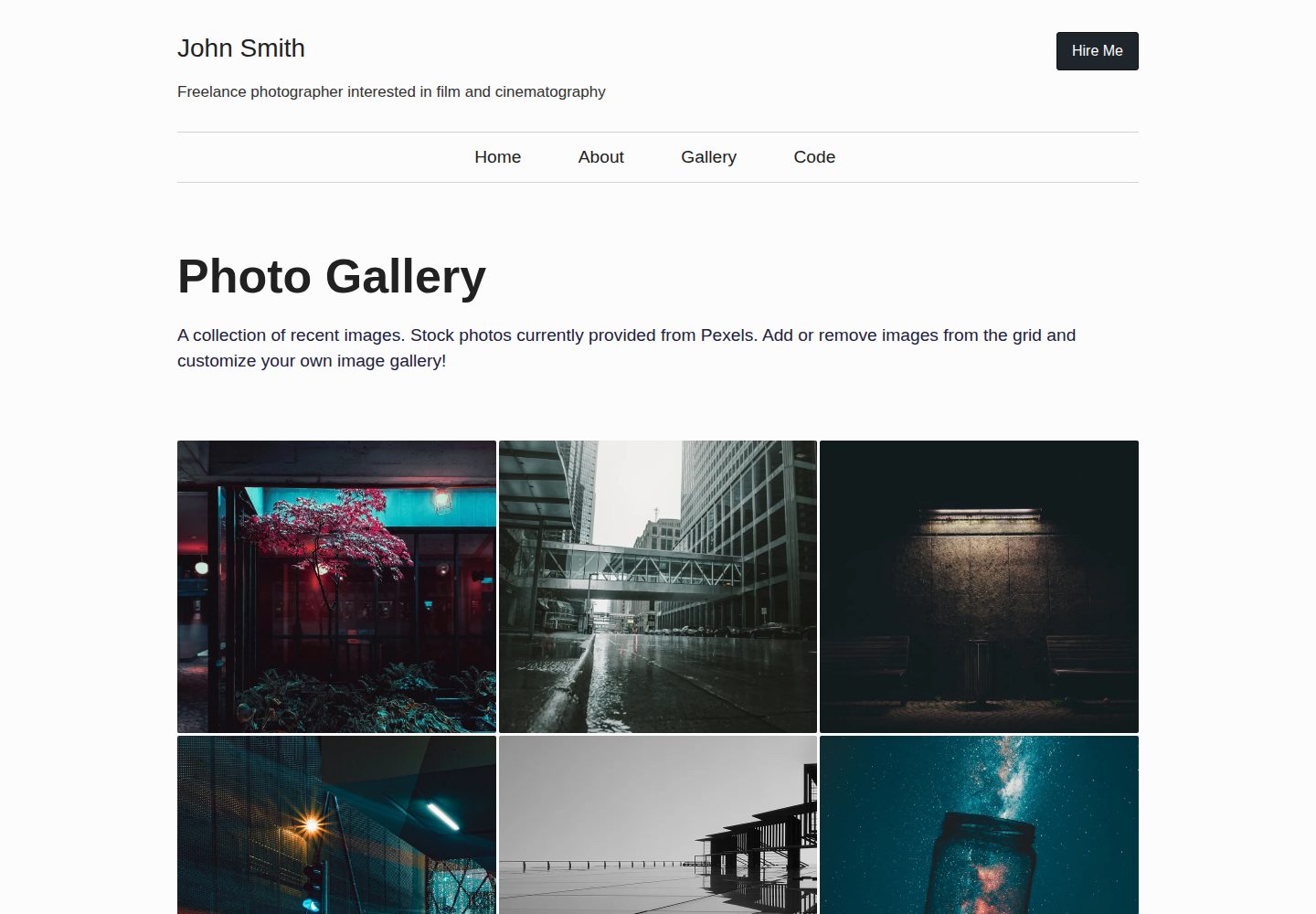
Image metadata is stored centrally in _data/gallery.json, and the homepage gallery and featured page read from it automatically
EleventyTool SiteStarter
eleventy-photo-gallery — Eleventy Tool Template
By tannerdolby
An Eleventy-based responsive image gallery starter template that manages image metadata through a global data file and generates responsive image markup at build time.
Explore the design
Compare the page layouts and mobile experience. Open any screenshot for a closer look.
Desktop homepage1 / 3
Desktop captureTop of page
Actual screenshot captured by the server browser.
All pages & views 3
Screenshots show visual appearance; interactive behavior may differ.
Recorded 2026-09-30View source
What stands out
A quick read of the recorded project description.
At build time, @11ty/eleventy-img generates multi-size, multi-format <picture> responsive markup
Pages include a CSS Grid homepage, a paginated featured images page, a gallery page, and an about page
Styles use SCSS, compiled to CSS at build time, with modular organization via partials, mixins, and variables
Document metadata is populated by eleventy-plugin-metagen to support social sharing
Template Details
This is an Eleventy static site starter template for building a personal photo or artwork gallery. Image information is stored centrally in the global data file _data/gallery.json; each record contains a title, date, author credit, author link, filename, alt text, and image directory. The homepage gallery and featured images page render from this data. During the build, the template uses @11ty/eleventy-img to resize and convert source images and output <picture> responsive markup. Image metadata can also be defined directly in template front matter or in the img shortcode instead of using the global data file.
The page structure includes a homepage that displays images with CSS Grid, a paginated featured images page, a gallery page, and an about page. Styles are written in SCSS and compiled to CSS at build time; the main file is src/_includes/sass/style.scss, which loads variables, mixins, and partials via @use and can be split in a modular way. Document metadata is populated by eleventy-plugin-metagen for social sharing.
Usage limitations: the template itself only provides the gallery skeleton and image processing pipeline; it does not include a CMS, image uploads, or a database. Adding images requires manually placing them in the image directory and maintaining the JSON metadata. Third-party assets such as the demo images, fonts, and icons must be checked separately against their respective licenses.
EleventyTool SiteStarter
Is it right for your project?
Use Cases
- Building a static gallery site to showcase a portfolio for photographers or illustrators
- Serving as a sample project for learning Eleventy image processing and responsive image markup
- Introducing a build-time image transformation pipeline into an existing static site
Suitable For
- Developers familiar with or willing to learn Eleventy and Node build workflows
- Personal projects that need to publish image collections statically without relying on backend services
- Users who want to maintain image files and metadata themselves and do not need an admin interface
Getting started & customization
Use these recorded setup notes alongside the repository instructions for your chosen version.
- 1
After cloning the repository, run npm install and npm run build in order; use npm run start or npm run dev for local preview
- 2
Place images in directories such as src/images/ and add the corresponding metadata objects to _data/gallery.json
- 3
Image metadata can also be defined directly in template front matter or the img shortcode instead of the global data file
- 4
To modify styles, edit src/_includes/sass/style.scss or add SCSS files as partials
- 5
Third-party assets such as demo images, fonts, and icons must be checked against their respective licenses before use
License & source material
Usage conditions & limitations
Free to use · keep license noticeThis listing covers the free version of the public repository under the MIT license; the free scope applies to that version's code and does not mean external services or third-party assets are free.
Must comply with when using
- You may use, modify, commercialize, and distribute the code of this version for free.
- When distributing copies or substantial portions of the code, retain the original author's copyright notice and the full MIT license notice.
- The code is provided as is; warranties and limitations of liability are governed by the original license and applicable law.
Additional costs & items to verify
- Adding images requires manually placing them in the image directory and maintaining the image metadata array in _data/gallery.json; the template does not provide a CMS or upload functionality.
- Using the responsive image feature requires preparing original large images yourself (local files or stock photo sites); the template does not include image assets.
- The README provides a Netlify deployment entry point; hosting requires external services such as Netlify and may involve third-party terms of service and fees.
- Demo images, fonts, icons, and other third-party assets must be checked against their respective licenses and cannot be judged solely by the code's MIT license.
- External services such as domains, hosting, databases, payments, or AI may incur additional charges.
View Original Text Basis
Permission is hereby granted, free of charge
Original License Text
Add images to a folder such as `images` in your project and then supply an array of image metadata objects in a global data file `_data/gallery.json`
Original README
Get a large image from somewhere (your file system, a stock photo website, etc)
Original README
https://github.com/tannerdolby/eleventy-photo-gallery/blob/main/LICENSEhttps://github.com/tannerdolby/eleventy-photo-gallery/blob/main/README.mdDeploy on Netlify
Original README
Compiled by DeepSeek based on repository license and README ·2026-10-01. Results only cover the materials read; dependencies, images, fonts, and subsequent term changes are subject to their respective original texts.
Project checks & description sources
Template Information
- Source platforms
- GitHub
- Documentation and maintenance reference score
- More documented · 96 / 100
- Technologies
- Eleventy
- Website type
- Tool Site · Starter
How this score is calculated
Our heuristic uses license records (up to 30), a demo link (12), a preview (10), stars (15), recorded maintenance (15), description completeness (8), feature records (5) and classification data (5). It is not a code, security or performance test, or a Google score. A link does not establish tested functionality.
What to verify for this project
- Repository update recorded
- 2026-09-24
- Screenshot last checked
- 2026-10-01
A demo link is listed. Check it with your own content and viewport sizes; its presence does not confirm that forms, authentication or payments work.
The catalog identifies Eleventy as the primary stack. Check the actual dependency manifest and lockfile for versions and hosting requirements. These notes use recorded metadata, not a code audit or a deployment test.
Use a selection guide →How this description was prepared
AI-assisted description based on catalog records and repository material. Repository authors are not automatically the reviewers of this description.
Automatically checked against source and license rules; no manual editorial review.
Inspect the recorded source material
SHA-256: 99a1e6816d2a4aa7c411ee29ef60f9a10b0056c92da46d32fe0ee60da159dc56
2026-10-01T13:23:22.317Z
Source file / repository# Eleventy Photo Gallery
A starter site for creating your own photo or art gallery using the [Eleventy](https://github.com/11ty/eleventy) static site generator.
- [Live demo](https://eleventy-gallery.netlify.app/) - View the project live
- [Deploy on Netlify](https://app.netlify.com/) - Host your own custom gallery
## Getting Started
Quickly generate a highly performant photo gallery from this template by clicking the green [Use Template](https://github.com/tannerdolby/eleventy-photo-gallery/generate) button. Creating a template repository provides the same directory structure and files as the original project.
## Features
- Build-time image transformations and responsive image markup in templates using [@11ty/eleventy-img](https://www.11ty.dev/docs/plugins/image/)
- High performance and scalable site with 100s across the board on each page using [Lighthouse](https://developer.chrome.com/docs/lighthouse/overview/). Check it out on the [Eleventy Leaderboards](https://www.11ty.dev/speedlify/eleventy-gallery-netlify-app/)
- Document metadata populated for social share functionality via [eleventy-plugin-metagen](https://github.com/tannerdolby/eleventy-plugin-metagen)
- Home page with CSS grid displaying the gallery of images
- Featured image pages with pagination
- Gallery page
- About me page
- CSS preprocessor SCSS
## Local Setup
1. Clone this repo: `git clone https://github.com/tannerdolby/eleventy-photo-gallery.git`
2. Navigate to your local copy of the project: `cd eleventy-photo-gallery`
3. Install dependencies: `npm install`
4. Build: `npm run build`
5. Serve locally: `npm run start` or `npm run dev`
## Usage
Add images to a folder such as `images` in your project and then supply an array of image metadata objects in a global data file `_data/gallery.json`:
```json
{
"title": "Highway covered in water",
"date": "October 20, 2020",
"credit": "Photo by Josh Hild",
"linkToAuthor": "https://www.pexels.com/photo/highway-covered-in-water-2524368/",
"src": "highway-water.jpg",
"alt": "Skybridge over highway covered in water",
"imgDir": "/images/"
}
```
Once the image data is supplied within the global data file `_data/gallery.json` then the home page gallery images and featured image pages will display responsive images with `<picture>` using `@11ty/eleventy-img`.
If you don't want to use a [global data file](https://www.11ty.dev/docs/data-global/) simply define the image metadata elsewhere such as in your templates front matter or directly inside the `img` shortcode.
### Creating responsive images in templates
1. Get a large image from somewhere (your file system, a stock photo website, etc)
2. Add the original image to the `src/images/` folder (or a folder of your choice)
3. Use the `img` shortcode to generate responsive image markup using `<picture>`
4. This performs image transformations at build-time, creating varying image dimensions in the specified formats (`.jpg`, `.webp`, etc) from the original image, which outputs to the specified `outputDir` in the `img` shortcode within `.eleventy.js`
```js
{% img
src="car.jpg",
alt="A photo of a car",
sizes="(max-width: 450px) 33.3vw, 100vw",
className="my-img",
%}
```
## Compiling SCSS to CSS
All of the projects CSS is compiled from Sass at build-time. The main SCSS file is `src/_includes/sass/style.scss` and thats where partials, mixins, and variables are loaded in with `@use` rules.
If you want to change up the styles, you can write directly in `style.scss` for the changes to be compiled and used.
<details>
<summary>
Otherwise, if you want to continue using a "modular" approach with separate SCSS files. You follow these steps:
</summary>
1. Create a new partial file in a specific directory ('sass/partials', 'sass/mixins', 'sass/vars') like `_some-file.scss` where the underscore prefixed at the beginning signals that the file is a [partial](https://sass-lang.com/documentation/at-rules/use#partials). These files are meant to be loaded as modules and not directly compiled.
2. Write Sass code and style away!
3. Load the stylesheets with a `@forward` rule in the [index files](https://sass-lang.com/documentation/at-rules/use#index-files) like `@forward "./some-file";` within `_index.scss` within the directory so they can be loaded with `@use` in the scss file that is compiled to CSS.
4. Load the stylesheets using `@use` rules from the directory in which you need a specific file. Therefore, if I created a new file within `sass/mixins` called `_url-short.scss` and wanted to load that file in `style.scss`, I would use `@use "mixins" as *` to load the stylesheets within the `mixins` directory as one module while also ensuring the module isn't loaded with a namespace.
_Read more about loading members and namespaces here in [Sass docs](https://sass-lang.com/documentation/at-rules/use#loading-members)_
</details>
## Contributing
Feel free to report any issues and submit feature requests. I built this template for others to use so don't hesitate to let me know what you'd like to see added or modified.
- Open an [issue](https://github.com/tannerdolby/11ty-photo-gallery/issues) for any bugs or feature requests!
- Have a look at the [contributing guidelines](https://github.com/tannerdolby/11ty-photo-gallery/blob/master/CONTRIBUTING.md) before submitting a PR!
Explore similar templates
Compare previews and descriptions within the same stack and category.

eleventy-base-blog
The officially maintained Eleventy blog starter template, MIT licensed, includes posts, tag pages, archives, an about page, a 404 page, an Atom feed, and sitemap.xml, with per-page CSS bundling, syntax highlighting, and image optimization.
Eleventy · Blog

eleventy-garden
An Eleventy-based digital garden starter template for building a personal knowledge site organized through hyperlinks. It supports Roam-style double-bracket links, backlink display, and hover cards for backlinks.
Eleventy · Starter

eleventastic
Eleventastic is an Eleventy starter kit by Max Böck, used as the base for new 11ty projects. It integrates Sass, Webpack, SVG icon sprites, critical CSS, and HTML minification into the 11ty build without external steps.
Eleventy · Starter

neat-starter
An Eleventy-based static site starter template integrating Netlify CMS, Alpine.js, and Tailwind CSS. It provides a ready-to-run example site, a one-click Netlify deploy button, and an MIT-licensed codebase.
Eleventy · Starter

Eleventy-Starter-Boilerplate
An Eleventy-based blog starter template with Tailwind CSS, Webpack, PostCSS, ESLint, and Prettier, optional Netlify CMS, and built-in SEO metadata, sitemap, and 404 page.
Eleventy · Blog

eleventy-plus-vite
A static site starter combining Eleventy and Vite, with a live-reloading development server, Vite-based production post-processing, a PostCSS pipeline with Autoprefixer and cssnano, critical CSS inlining and asynchronous CSS loading, a web font loading strategy example, fluid typography, basic dark mode, an…
Eleventy · Starter