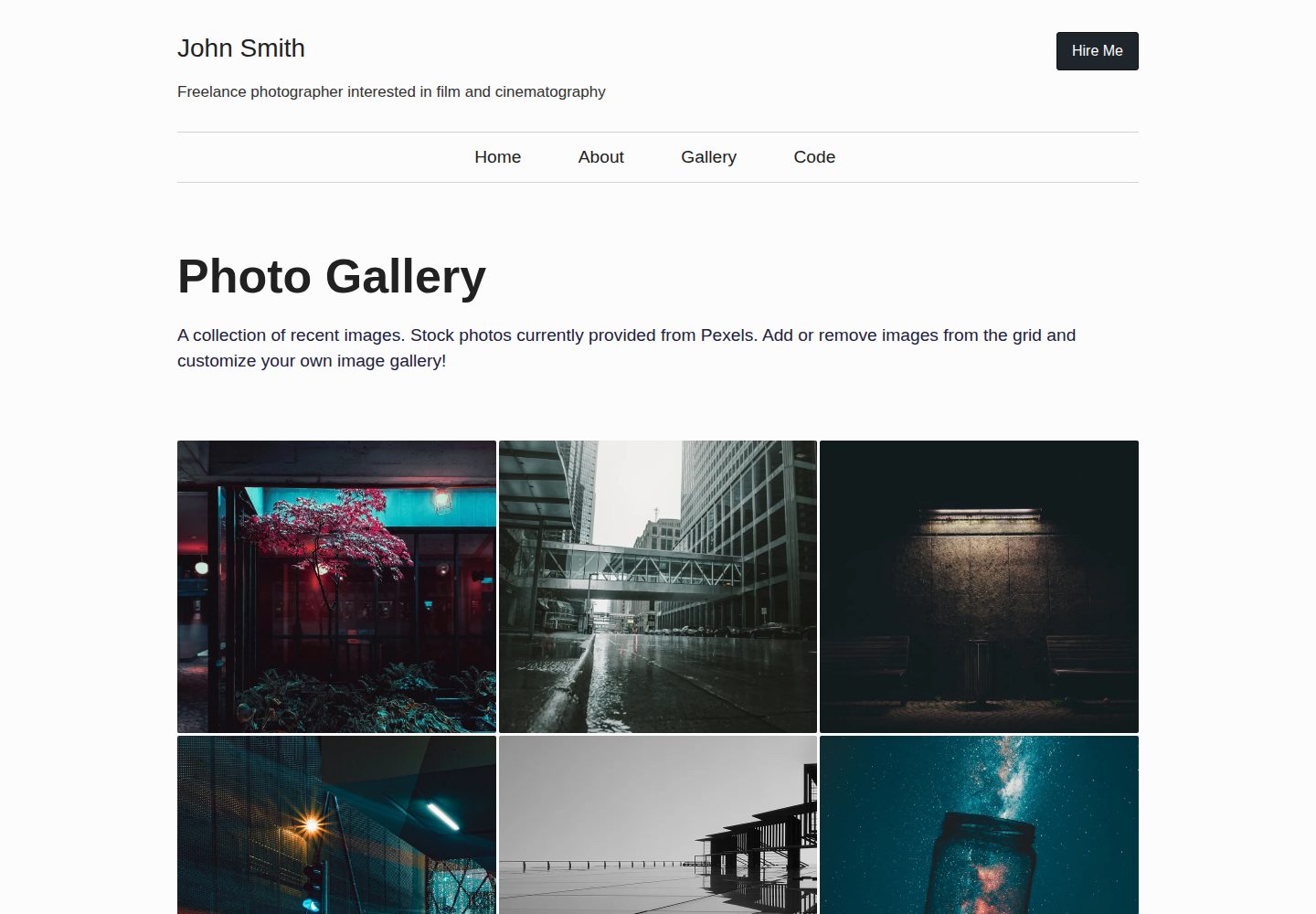
图片元数据集中存放在 _data/gallery.json,首页画廊与精选页自动读取
Eleventy工具站启动器
eleventy-photo-gallery — Eleventy 工具站模板
作者 tannerdolby
基于 Eleventy 的响应式图片画廊启动模板,通过全局数据文件管理图片元数据,在构建时生成响应式图片标记。
看看你的网站会是什么样
浏览真实页面截图,比较内容排版与手机效果。点击下方缩略图切换,放大查看整页细节。
全部页面与视图 3
截图用于了解视觉与布局,交互效果请以实际项目为准。
采集于 2026-09-30查看来源
值得关注的模板亮点
从已有项目资料中,快速了解它的特点。
构建时通过 @11ty/eleventy-img 生成多尺寸、多格式的 <picture> 响应式标记
页面包含 CSS Grid 首页、带分页的精选图片页、画廊页与关于页
样式使用 SCSS,构建时编译为 CSS,支持 partial、mixin 与变量的模块化组织
通过 eleventy-plugin-metagen 填充文档元数据,支持社交分享
模板详细介绍
这是一个用于搭建个人照片或艺术作品画廊的 Eleventy 静态站点启动模板。图片信息集中存放在全局数据文件 _data/gallery.json 中,每条记录包含标题、日期、作者署名、作者链接、文件名、替代文本和图片目录,首页画廊与精选图片页据此渲染。模板在构建阶段借助 @11ty/eleventy-img 对原图做尺寸与格式转换,并输出 <picture> 响应式标记;也可以在模板 front matter 或 img 短代码中直接定义图片元数据,而不使用全局数据文件。
页面结构包括使用 CSS Grid 展示图片的首页、带分页的精选图片页、画廊页和关于页。样式由 SCSS 在构建时编译为 CSS,主文件为 src/_includes/sass/style.scss,通过 @use 加载变量、mixins 与局部文件,可按模块化方式拆分。文档元数据由 eleventy-plugin-metagen 填充,用于社交分享。
使用限制方面:模板本身只提供画廊骨架与图片处理流程,不包含后台管理、图片上传或数据库;新增图片需要手动放入图片目录并维护 JSON 元数据。演示中的图片、字体、图标等第三方素材需按各自许可单独核对。
Eleventy工具站启动器
适合你的项目吗?
适用场景
- 为摄影师或插画师搭建展示作品集的静态画廊站点
- 作为学习 Eleventy 图片处理与响应式图片标记的示例项目
- 在已有静态站点中引入构建期图片转换流程
适合人群
- 熟悉或愿意学习 Eleventy 与 Node 构建流程的开发者
- 需要以静态方式发布图片集、不依赖后端服务的个人项目
- 希望自行维护图片文件与元数据、不需要后台管理界面的使用者
上手与定制指南
结合仓库当前版本的说明,按下面的资料检查内容、配置与运行要求。
- 1
克隆仓库后依次执行 npm install、npm run build,本地预览使用 npm run start 或 npm run dev
- 2
将图片放入 src/images/ 等目录,并在 _data/gallery.json 中补充对应的元数据对象
- 3
也可在模板 front matter 或 img 短代码中直接定义图片元数据,替代全局数据文件
- 4
修改样式时编辑 src/_includes/sass/style.scss,或按 partial 方式新增 SCSS 文件
- 5
演示图片、字体、图标等第三方素材需按各自许可核对后再使用
授权与来源资料
使用条件与限制
免费使用 · 保留许可声明本次收录的是公开仓库中采用 MIT 许可的免费版本;免费范围为该版本代码,不代表外部服务或第三方素材免费。
使用时需要遵守
- 允许免费使用、修改、商用和分发该版本代码。
- 分发代码副本或实质性部分时,保留原作者版权声明和完整 MIT 许可声明。
- 代码按现状提供;担保与责任限制以原许可证及适用法律为准。
额外费用与待核对事项
- 新增图片需手动放入图片目录,并在 _data/gallery.json 中维护图片元数据数组;模板不提供后台管理或上传功能。
- 使用响应式图片功能需自行准备原始大图(本地文件或图库网站),模板不附带图片素材。
- README 提供 Netlify 部署入口,托管需使用 Netlify 等外部服务,可能涉及第三方服务条款与费用。
- 演示图片、字体、图标及其他第三方素材需按各自许可核对,不能仅凭代码的 MIT 许可判断。
- 域名、托管、数据库、支付或 AI 等外部服务可能另外收费。
查看原文依据
Permission is hereby granted, free of charge
许可证原文
Add images to a folder such as `images` in your project and then supply an array of image metadata objects in a global data file `_data/gallery.json`
README 原文
Get a large image from somewhere (your file system, a stock photo website, etc)
README 原文
https://github.com/tannerdolby/eleventy-photo-gallery/blob/main/LICENSEhttps://github.com/tannerdolby/eleventy-photo-gallery/blob/main/README.mdDeploy on Netlify
README 原文
DeepSeek 根据仓库许可证和 README 整理 ·2026-10-01。结果仅覆盖已读取资料,依赖、图片、字体及后续条款变更以各自原文为准。
项目核对记录与介绍依据
模板资料
- 来源平台
- GitHub
- 资料与维护参考分
- 资料较完整 · 96 / 100
- 技术栈
- Eleventy
- 网站类型
- 工具站 · 启动器
这个分数如何计算
本站按许可资料(最高30分)、演示链接(12分)、预览图(10分)、Star数(15分)、记录的维护时间(15分)、描述完整度(8分)、功能记录(5分)和分类资料(5分)计算。它不是代码、安全或性能测试,也不是 Google 评分;有链接不代表已实测可用。
这个项目需要核对什么
- 记录的仓库更新时间
- 2026-09-24
- 截图检查日期
- 2026-10-01
已收录演示链接。请用你的内容与屏幕尺寸检查;有演示不代表表单、认证或支付已经可用。
目录记录的主要技术栈是 Eleventy。请通过依赖清单和锁文件核对实际版本与托管要求。这些说明基于收录资料,不代表代码审计或部署实测。
查看具体选型方法 →介绍的制作与核对状态
介绍由 AI 辅助整理目录与仓库资料。仓库作者不等于这篇介绍的审核者。
已完成服务器许可规则与 AI 来源核对;未经过人工编辑审核。
查看当时使用的来源资料
SHA-256: 99a1e6816d2a4aa7c411ee29ef60f9a10b0056c92da46d32fe0ee60da159dc56
2026-10-01T13:23:22.317Z
来源文件 / 仓库# Eleventy Photo Gallery
A starter site for creating your own photo or art gallery using the [Eleventy](https://github.com/11ty/eleventy) static site generator.
- [Live demo](https://eleventy-gallery.netlify.app/) - View the project live
- [Deploy on Netlify](https://app.netlify.com/) - Host your own custom gallery
## Getting Started
Quickly generate a highly performant photo gallery from this template by clicking the green [Use Template](https://github.com/tannerdolby/eleventy-photo-gallery/generate) button. Creating a template repository provides the same directory structure and files as the original project.
## Features
- Build-time image transformations and responsive image markup in templates using [@11ty/eleventy-img](https://www.11ty.dev/docs/plugins/image/)
- High performance and scalable site with 100s across the board on each page using [Lighthouse](https://developer.chrome.com/docs/lighthouse/overview/). Check it out on the [Eleventy Leaderboards](https://www.11ty.dev/speedlify/eleventy-gallery-netlify-app/)
- Document metadata populated for social share functionality via [eleventy-plugin-metagen](https://github.com/tannerdolby/eleventy-plugin-metagen)
- Home page with CSS grid displaying the gallery of images
- Featured image pages with pagination
- Gallery page
- About me page
- CSS preprocessor SCSS
## Local Setup
1. Clone this repo: `git clone https://github.com/tannerdolby/eleventy-photo-gallery.git`
2. Navigate to your local copy of the project: `cd eleventy-photo-gallery`
3. Install dependencies: `npm install`
4. Build: `npm run build`
5. Serve locally: `npm run start` or `npm run dev`
## Usage
Add images to a folder such as `images` in your project and then supply an array of image metadata objects in a global data file `_data/gallery.json`:
```json
{
"title": "Highway covered in water",
"date": "October 20, 2020",
"credit": "Photo by Josh Hild",
"linkToAuthor": "https://www.pexels.com/photo/highway-covered-in-water-2524368/",
"src": "highway-water.jpg",
"alt": "Skybridge over highway covered in water",
"imgDir": "/images/"
}
```
Once the image data is supplied within the global data file `_data/gallery.json` then the home page gallery images and featured image pages will display responsive images with `<picture>` using `@11ty/eleventy-img`.
If you don't want to use a [global data file](https://www.11ty.dev/docs/data-global/) simply define the image metadata elsewhere such as in your templates front matter or directly inside the `img` shortcode.
### Creating responsive images in templates
1. Get a large image from somewhere (your file system, a stock photo website, etc)
2. Add the original image to the `src/images/` folder (or a folder of your choice)
3. Use the `img` shortcode to generate responsive image markup using `<picture>`
4. This performs image transformations at build-time, creating varying image dimensions in the specified formats (`.jpg`, `.webp`, etc) from the original image, which outputs to the specified `outputDir` in the `img` shortcode within `.eleventy.js`
```js
{% img
src="car.jpg",
alt="A photo of a car",
sizes="(max-width: 450px) 33.3vw, 100vw",
className="my-img",
%}
```
## Compiling SCSS to CSS
All of the projects CSS is compiled from Sass at build-time. The main SCSS file is `src/_includes/sass/style.scss` and thats where partials, mixins, and variables are loaded in with `@use` rules.
If you want to change up the styles, you can write directly in `style.scss` for the changes to be compiled and used.
<details>
<summary>
Otherwise, if you want to continue using a "modular" approach with separate SCSS files. You follow these steps:
</summary>
1. Create a new partial file in a specific directory ('sass/partials', 'sass/mixins', 'sass/vars') like `_some-file.scss` where the underscore prefixed at the beginning signals that the file is a [partial](https://sass-lang.com/documentation/at-rules/use#partials). These files are meant to be loaded as modules and not directly compiled.
2. Write Sass code and style away!
3. Load the stylesheets with a `@forward` rule in the [index files](https://sass-lang.com/documentation/at-rules/use#index-files) like `@forward "./some-file";` within `_index.scss` within the directory so they can be loaded with `@use` in the scss file that is compiled to CSS.
4. Load the stylesheets using `@use` rules from the directory in which you need a specific file. Therefore, if I created a new file within `sass/mixins` called `_url-short.scss` and wanted to load that file in `style.scss`, I would use `@use "mixins" as *` to load the stylesheets within the `mixins` directory as one module while also ensuring the module isn't loaded with a namespace.
_Read more about loading members and namespaces here in [Sass docs](https://sass-lang.com/documentation/at-rules/use#loading-members)_
</details>
## Contributing
Feel free to report any issues and submit feature requests. I built this template for others to use so don't hesitate to let me know what you'd like to see added or modified.
- Open an [issue](https://github.com/tannerdolby/11ty-photo-gallery/issues) for any bugs or feature requests!
- Have a look at the [contributing guidelines](https://github.com/tannerdolby/11ty-photo-gallery/blob/master/CONTRIBUTING.md) before submitting a PR!
看看同类模板
对比同技术栈与用途的模板,找到更适合的视觉与内容结构。

eleventy-base-blog
A starter repository for a blog web site using the Eleventy static site generator.
Eleventy · 博客

eleventy-garden
:seedling: A starter site for building a mind garden with eleventy
Eleventy · 启动器

eleventastic
An Eleventy Starter Kit
Eleventy · 启动器

neat-starter
Starter Template for Netlify CMS, Eleventy, Alpine JS & Tailwind CSS
Eleventy · 启动器

Eleventy-Starter-Boilerplate
🚀 Eleventy Starter is production-ready with SEO-friendly for quickly starting a blog. ⚡ Built with Eleventy, …
Eleventy · 博客

eleventy-plus-vite
A clean and fast Eleventy Starter Project with Vite
Eleventy · 启动器