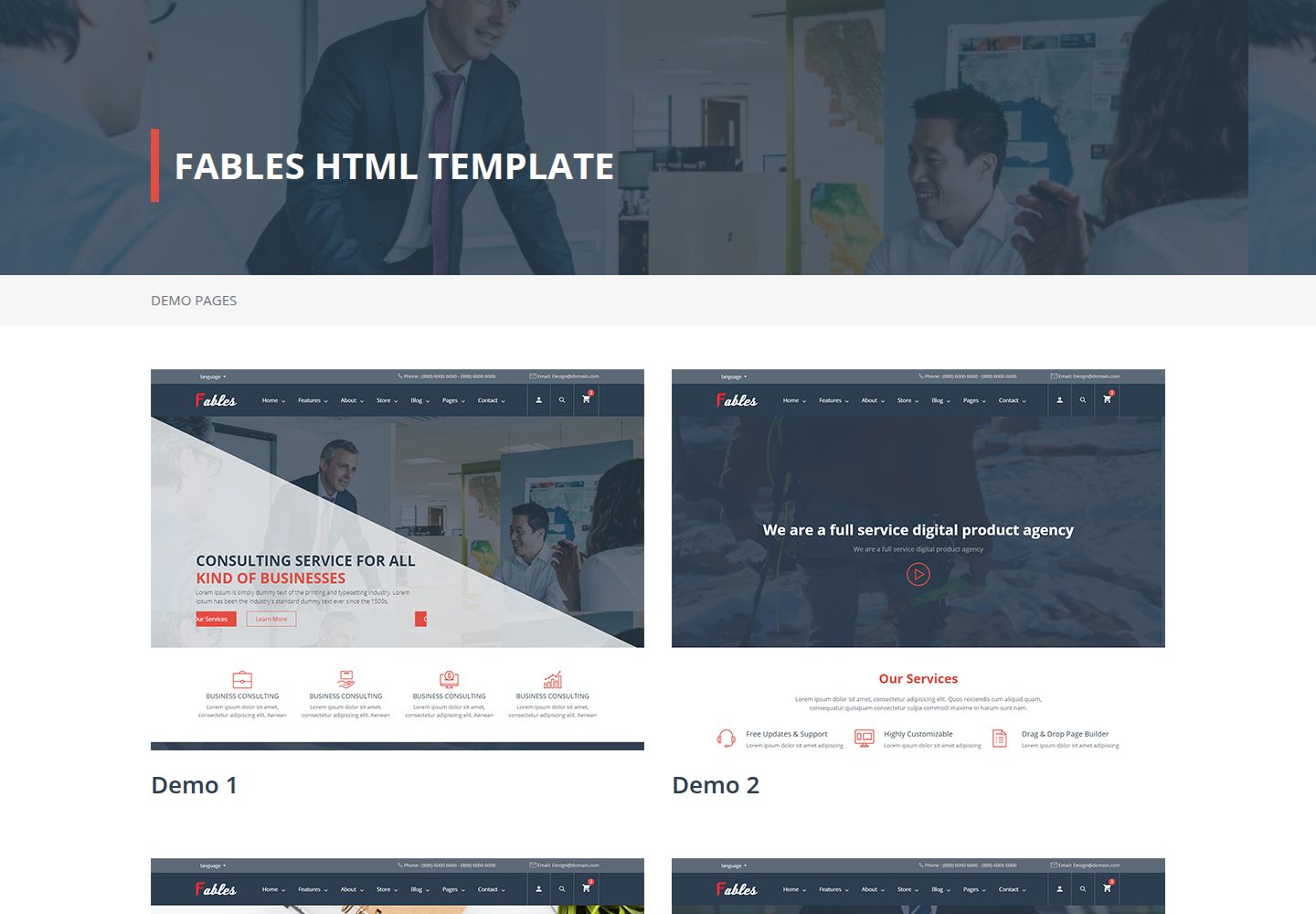
Responsive HTML5 and CSS3 design, suitable for desktop and mobile
HTMLPortfolioCorporate Website
fables — HTML Portfolio Template
By Tech-Labs
Fables is a free responsive HTML5 multipurpose template released by Tech-Labs, offering multiple page designs for corporate websites and portfolios, with code under the MIT license.
Explore the design
Compare the page layouts and mobile experience. Open any screenshot for a closer look.
Desktop homepage1 / 2
Desktop captureTop of page
Actual screenshot captured by the server browser.
All pages & views 2
Screenshots show visual appearance; interactive behavior may differ.
Recorded 2026-10-02View source
What stands out
A quick read of the recorded project description.
Offers diverse page designs including 4 home pages, 3 About Us pages, and 3 Contact Us pages
Includes shop grid/list and single product pages, multiple blog layouts, gallery, and portfolio pages
Built-in blocks such as multiple headers and footers, team, pricing tables, testimonials, and counters
Primary and secondary colors can be switched via CSS class names, with style files separated by function
Integrates front-end libraries such as Bootstrap, Font Awesome, Owl Carousel, and Masonry
Template Details
Fables is a responsive HTML5 template for corporate and portfolio use. The repository is at Tech-Labs/fables on GitHub and is released under the MIT license, allowing free use, modification, commercial use, and distribution of this version of the code. The template is built on front-end libraries such as Bootstrap and Font Awesome, and provides modules including Home, About Us, Shop, Blog, Pages, and Contact Us, along with various header, footer, team, pricing table, testimonial, and counter block designs.
The template includes a large number of page designs: 4 home page designs, 3 About Us designs, 3 Contact Us designs, a shop with grid and list product displays plus a single product page, a blog with multiple category and single-post layouts, and a Pages section that also includes gallery/portfolio, under construction, and 404 pages. Styles are managed separately through custom.css, custom-responsive.css, and fables-icons.css, and class-based switching for primary and secondary colors is provided.
Regarding usage limitations, the template is a static HTML structure. Installation involves uploading the compressed package via FTP and extracting it, then manually modifying basic data such as phone, fax, email, and map coordinates. Third-party assets such as demo images, fonts, and icons must be checked separately under their respective licenses, and external services such as domain and hosting may incur costs.
HTMLPortfolioCorporate Website
Is it right for your project?
Use Cases
- Build a corporate website to present company introduction, services, team, and contact information
- Create a portfolio website for showcasing works or projects
- Build front-end pages for an online store with product listings and single product pages
- Build a blog site with category and single-post layouts
- Create a multi-page site including gallery, under construction, and 404 pages
Suitable For
- Developers who need to quickly build a corporate website or portfolio pages
- Users who prefer static HTML templates and deploy via FTP
- Teams that want to use and modify the template code for free under the MIT license
- Projects that need multiple page design variants and freely combinable headers and footers
Getting started & customization
Use these recorded setup notes alongside the repository instructions for your chosen version.
- 1
Upload the compressed package via FTP and extract it, then modify basic data such as phone, fax, email, and map coordinates
- 2
Style files are located in assets/custom/CSS, scripts in assets/custom/Js, and third-party libraries in vendor/
- 3
Primary color can be switched by adding class names such as fables-main-text-color and fables-main-background-color to elements
- 4
Countdown, map coordinates, and counter values can be modified in the corresponding HTML via data attributes or tag content
- 5
Third-party assets such as demo images, fonts, and icons must be checked separately under their respective licenses; they cannot be judged solely by the code's MIT license
License & source material
Usage conditions & limitations
Free to use · keep license noticeThis entry covers the free version in the public repository under the MIT license; the free scope is this version of the code and does not mean external services or third-party assets are free.
Must comply with when using
- Allows free use, modification, commercial use, and distribution of this version of the code.
- When distributing copies or substantial portions of the code, retain the original author's copyright notice and the complete MIT license notice.
- The code is provided as is; warranties and limitations of liability are governed by the original license and applicable law.
Additional costs & items to verify
- The template consists of static HTML files; you must upload the compressed package via FTP and extract it yourself, then manually modify basic data such as phone, fax, email, and Google Maps coordinates; no backend or automated deployment is provided.
- The map on the contact page relies on external services such as Google Maps; you must configure coordinates yourself and may be subject to third-party service terms and fees.
- Third-party assets such as demo images, fonts, and icons in the template are not covered by the MIT code license and must be checked separately under their respective licenses before use.
- Demo images, fonts, icons, and other third-party assets must be checked under their respective licenses; they cannot be judged solely by the code's MIT license.
- External services such as domain, hosting, database, payment, or AI may incur additional charges.
View Original Text Basis
Permission is hereby granted, free of charge
Original License Text
You Can upload the compressed fils via ftp , then you can extract it and begin to change the basic data such as phone numbers , fax , email , the location of google map according to your personal data .
Original README
there is a map showing the location to make it easy for clients to reach your company .
Original README
https://github.com/Tech-Labs/fables/blob/master/LICENSEhttps://github.com/Tech-Labs/fables/blob/master/README.mdassets/custom/images: This folder contains all the images
Original README
Compiled by DeepSeek based on repository license and README ·2026-10-02. Results only cover the materials read; dependencies, images, fonts, and subsequent term changes are subject to their respective original texts.
Project checks & description sources
Template Information
- Source platforms
- GitHub
- Documentation and maintenance reference score
- Partly documented · 73 / 100
- Technologies
- HTML
- Website type
- Portfolio · Corporate Website
How this score is calculated
Our heuristic uses license records (up to 30), a demo link (12), a preview (10), stars (15), recorded maintenance (15), description completeness (8), feature records (5) and classification data (5). It is not a code, security or performance test, or a Google score. A link does not establish tested functionality.
What to verify for this project
- Repository update recorded
- 2019-09-25
- Screenshot last checked
- 2026-10-02
A demo link is listed. Check it with your own content and viewport sizes; its presence does not confirm that forms, authentication or payments work.
The catalog identifies HTML as the primary stack. Check the actual dependency manifest and lockfile for versions and hosting requirements. These notes use recorded metadata, not a code audit or a deployment test.
Use a selection guide →How this description was prepared
AI-assisted description based on catalog records and repository material. Repository authors are not automatically the reviewers of this description.
Automatically checked against source and license rules; no manual editorial review.
Inspect the recorded source material
SHA-256: 7c1b7e4be4298485c27d891a6dfd161c199afb70ca336664eaf87dcaf136aad4
2026-10-02T15:16:21.121Z
Source file / repository# Multipurpose Corporation HTML5 Template
[](https://tech-labs.github.io/fables/)
Fables is the awesome responsive HTML5 template created for corporate and portfolio websites – business site needn’t be boring! It features a very clean and minimal design that is perfect for showcasing your work. It is also optimized for Retina Displays (used in iPhone, iPad and MacBook Pro Retina).
[Demo](https://tech-labs.github.io/fables/)
## Features
* Responsive HTML5 and CSS3 design
* Css animations
* Multiple Headers and Footers
* Clean and Modern Design
* Clean and Modern Code
* Masonry portfolio layouts
* Easy to edit by changing html classes
* Based on Bootstrap4 the latest version
* Based on fontawesome5 the latest version
* all the libraries used in this template is the latest version .
* Multi-Purpose Design , you can use it as a bussiness template or an online store .
* Web Friendly Fonts
* in this template you have variety of designs , such as the template contains 4 design for home page , three designs for about us page , three designs for contact us page , many dsigns for blog single or blog category , many designs for gallery . all according your need .
## File/Folder Structure
The files are placed in organized folders so to make it easy for you to find files where you will need to do customizations or change other stuffs easily. Below is the folders and details of what they are for
* assets/custom/CSS: This folder contains all style files or stylesheets.
* assets/custom/Fonts: This folder contains all the fonts used for in the Template.
* assets/custom/Js: This folder contains all the scripts
* assets/custom/images: This folder contains all the images
* vendor/: This folder contains all the Libraries Used In this Template like ( animate.css , bootstrap , fancybox , fontawesome , jquery , owlcarousel , popper , WOW).
## Installation
You Can upload the compressed fils via ftp , then you can extract it and begin to change the basic data such as phone numbers , fax , email , the location of google map according to your personal data .
## HTML Structure
On Opening the main Index.html file. You can see the full HTML structure of the Template. Every Section of the Template is properly commented so you can see which section starts/ends.
the template is divided into main six parts :-
1- index : the template contains four different designs we have . (index1.html , index2.html , index3.html , index4.html ). every design of each page contains all you need to add to your home page , it will cover all your needs.
2- about us : the template contains three different designs . we have (about1.html , about2.html , about3.html ). every design of each page contains all you need to add to your about us page like :-
2.1 - you can add the services your company provide .
2.2 - you can add counter to count your clients , your successfull Deal your professional Employee .
you can also show your professional team to your customers .
2.3 - you can add show your Success Partners to give the Confidence to your next clients .
2.4 - you can add show your testimonials and clients opinion .
3- Store : the template contains two different designs about the store ( store_grid_list.html , store_single.html ). the two designs of each page contains all you need to add to your store like :-
3.1 - you can view all products you need in two ways (View them as grid layout or list layout ) .
3.2 - the single product page contains all the data of the product you need to show to your clients such slider , description , number of items you need , the color of the items . also you can share your product to social media with friends .
4- Blog : the template contains many designs about the blog . there are many designs to show your blogs . the designs of each page contains all you need to add to your blog page like :-
4.1 - there are various layouts to show the blog category .
4.2 - there are various layouts to show the single blog page , you may show blog with image or with video or with sider all according to your needs .
4.3 - you can also show your events timeline .
5- page : the template contains many designs about the page . there are many designs to show your pages . the designs of each page contains all you need to add to your page like :-
5.1 - you can show your gallery or your portfolio .
5.2 - there is under construction page , you can show it white preparing your site or a specific page .
5.3 - there 404 page to show when some links not found .
6- contact us : the template contains three designs about contact us page . there are three designs to show your contact us page . the designs of each page contains all you need to add to your contact us page like :-
6.1 - you can add your company data such as (phone number , fax , email , social media links , the address)
6.2 - you can add your location , there is a map showing the location to make it easy for clients to reach your company .
6.3 - there is a form to let your clients message you any time , asking you about any thing , this is a good way to communicate with your clients .
7- Finally Features :
7.1 - Headers & Footers : there is five designs for header and four designd for footer . in this part we collect all headers and footers , you can choose any header or any footer as you want
7.2 - team members : there is three designs you can apply any of them located in 'team.html'
7.3 - pricing table : there is three designs you can apply any of them located in 'pricing-table.html'
7.4 - testimonials : there is four designs you can apply any of them located in 'testimonials.html'
7.4 - blog : there is four designs you can apply any of them located in 'blog.html' 'blog.html'
7.5 - counters : there is four designs you can apply any of them located in 'counters.html'
7.6 - image hover effects : there is seven kinds of animations applied on images we have declared them in the animation section in this documentation .
## CSS Structure
The overall CSS of the Template is distributed into different separate files. Inside the CSS folder, You can find the following CSS files.
* custom.css : It is the main style file of the whole template . that contains all the styles you should use it when you to want to edit some styles like colors , font size , backgrouns ... ,etc .
* custom-responsive.css : it is the file that is responsible for the media queries to view the template in mobile phones and tablets in the best case , and to be fully responsive . it contains alot of screen sizes to cover all screens .
* fables-icons.css : it is the file that is responsibe for the icons in the website .
* some examples to edit some styles througth html . just to change some prepared classes :-
* the main color of the tempalte is the dark blue is named as main color
* when you want to write text with the main color you just give it a class '.fables-main-text-color'
* and if you want to give a specific element a main background . you just add the class '.fables-main-background-color'
* and if tou want to add border to an element with the main color you just add the class '.fables-main-border-color' .
* Note : you can use all the above classes with the 5 colors of the template with the declared way like , '.fables-second-text-color' , '.fables-second-background-color' , '.fables-second-border-color'
## Animation
there is some fantastic animations in this template like
* Translate Effect : to use it , just Surround the '' element with a div containing class of the wanted animation . example :-
```
<div class="image-container translate-effect-right">
<img src="http://via.placeholder.com/350x209" alt="alt image text">
</div>
```
* ZoomIn Effect
```
<div class="image-container zoomIn-effect">
<img src="http://via.placeholder.com/350x209" alt="alt image text">
</div>
```
* ZoomOut Effect
```
<div class="image-container zoomOut-effect">
<img src="http://via.placeholder.com/350x209" alt="alt image text">
</div>
```
* RotateIn Effect'
```
<div class="image-container rotateIn-effect">
<img src="http://via.placeholder.com/350x209" alt="alt image text">
</div>
```
* RotateOut Effect
```
<div class="image-container rotateOut-effect">
<img src="http://via.placeholder.com/350x209" alt="alt image text">
</div>
```
* Shine Effect
```
<div class="image-container shine-effect">
<img src="http://via.placeholder.com/350x209" alt="alt image text">
</div>
```
* Circle Effect
```
<div class="image-container circle-effect">
<img src="http://via.placeholder.com/350x209" alt="alt image text">
</div>
```
## Javascript Structure
This Template uses latest version of jQuery and other JavaScript libraries to add extra functioanlity.
* comming soon counter down you can edit it from the html code inside the 'comming-soon.html' page by editing the date in this code
```
<div id="comming-soon" data-countdown="2019/01/01"></div>
```
* you can change the default location to yours by edit the 'data-lng' & 'data-lat' in the 'contactus.html' file and edit the following code
```
<div id="map" data-lng="31.248848" data-lat="29.966324"
data-icon="assets/custom/images/map-marker.png"
data-zom="12" style="width:100%;height:420px">
</div>
```
* the counters which in the index pages and about pages you can change the values by changing the html code as follows :-
```
<h2 class="" data-count="307">0</h2>
```
where is the zero is the number to start and 307 is the number to reach .
## Changelogs
v1.0 (02.12.2018) - Initial Release
## Sources & Credits
* **jQuery** - [http://jquery.com/](http://jquery.com/)
* **animate** - [https://daneden.github.io/animate.css/](https://daneden.github.io/animate.css/)
* **bootstrap** - [https://getbootstrap.com/](https://getbootstrap.com/)
* **fancybox** - [http://fancyapps.com/fancybox/3/](http://fancyapps.com/fancybox/3/)
* **fontawesome** - [https://fontawesome.com/](https://fontawesome.com/)
* **jQuery.countdown** - [http://hilios.github.io/jQuery.countdown/](http://hilios.github.io/jQuery.countdown/)
* **jquery.circle.progress** - [http://kottenator.github.io/jquery-circle-progress/](http://kottenator.github.io/jquery-circle-progress/)
* **loadscreen** - [http://tobiasahlin.com/spinkit/](http://tobiasahlin.com/spinkit/)
* **masonry** - [https://masonry.desandro.com/](https://masonry.desandro.com/)
* **OffCanvasMenuEffects** - [https://tympanus.net/Development/OffCanvasMenuEffects/sideslide.html](https://tympanus.net/Development/OffCanvasMenuEffects/sideslide.html)
* **owlcarousel** - [https://owlcarousel2.github.io/OwlCarousel2/](https://owlcarousel2.github.io/OwlCarousel2/)
* **jquery Timeline**- [https://www.jqueryscript.net/demo/Create-A-Responsive-Animated-Vertical-Timeline-with-jQuery-CSS3/](https://www.jqueryscript.net/demo/Create-A-Responsive-Animated-Vertical-Timeline-with-jQuery-CSS3/)
* **owlcarousel** - [https://owlcarousel2.github.io/OwlCarousel2/](https://owlcarousel2.github.io/OwlCarousel2/)
* **WOW-master** - [https://mynameismatthieu.com/WOW/](https://mynameismatthieu.com/WOW/)
Explore similar templates
Compare previews and descriptions within the same stack and category.

simplefolio
Simplefolio is a minimal single-page portfolio template for developers, built with HTML, Bootstrap, SCSS, and Parcel under the MIT license. It includes Hero, About, Projects, Contact, and Footer sections, with content edited in /src/index.html and theme colors controlled by two SCSS variables.
HTML · Portfolio

mazer
Mazer is a free and open-source Bootstrap 5 admin dashboard and landing page template that does not depend on jQuery. It provides prebuilt releases, source builds, and CDN inclusion, and includes dark mode, perfect-scrollbar, and ApexCharts examples.
HTML · Admin dashboard

Freelancer
A bright, single-page Bootstrap portfolio template for freelancers, designers, and small studios. It includes a responsive portfolio grid with modal detail windows and an SB Forms contact form that requires an API token.
HTML · Portfolio

Resume
A single-page resume and CV template from Start Bootstrap, built on Bootstrap with a fixed sidebar and content sections.
HTML · Portfolio

Creative
A single-page marketing template by Start Bootstrap for creative agencies and product services, built on Bootstrap with SCSS, featuring a portfolio grid and call-to-action sections. It includes pre-set SB Forms markers for form integration and npm build scripts for source customization.
HTML · Corporate Website

startbootstrap-agency
Agency is a one-page Bootstrap portfolio theme from Start Bootstrap, MIT licensed. It includes a responsive portfolio grid with modal details and a preconfigured SB Forms contact form that requires an API token.
HTML · Corporate Website