响应式 HTML5 与 CSS3 设计,适配桌面与移动端
HTML作品集企业官网
fables — HTML 作品集模板
作者 Tech-Labs
Fables 是 Tech-Labs 发布的免费响应式 HTML5 多用途模板,包含企业官网与作品集所需的多种页面设计,代码采用 MIT 许可。
看看你的网站会是什么样
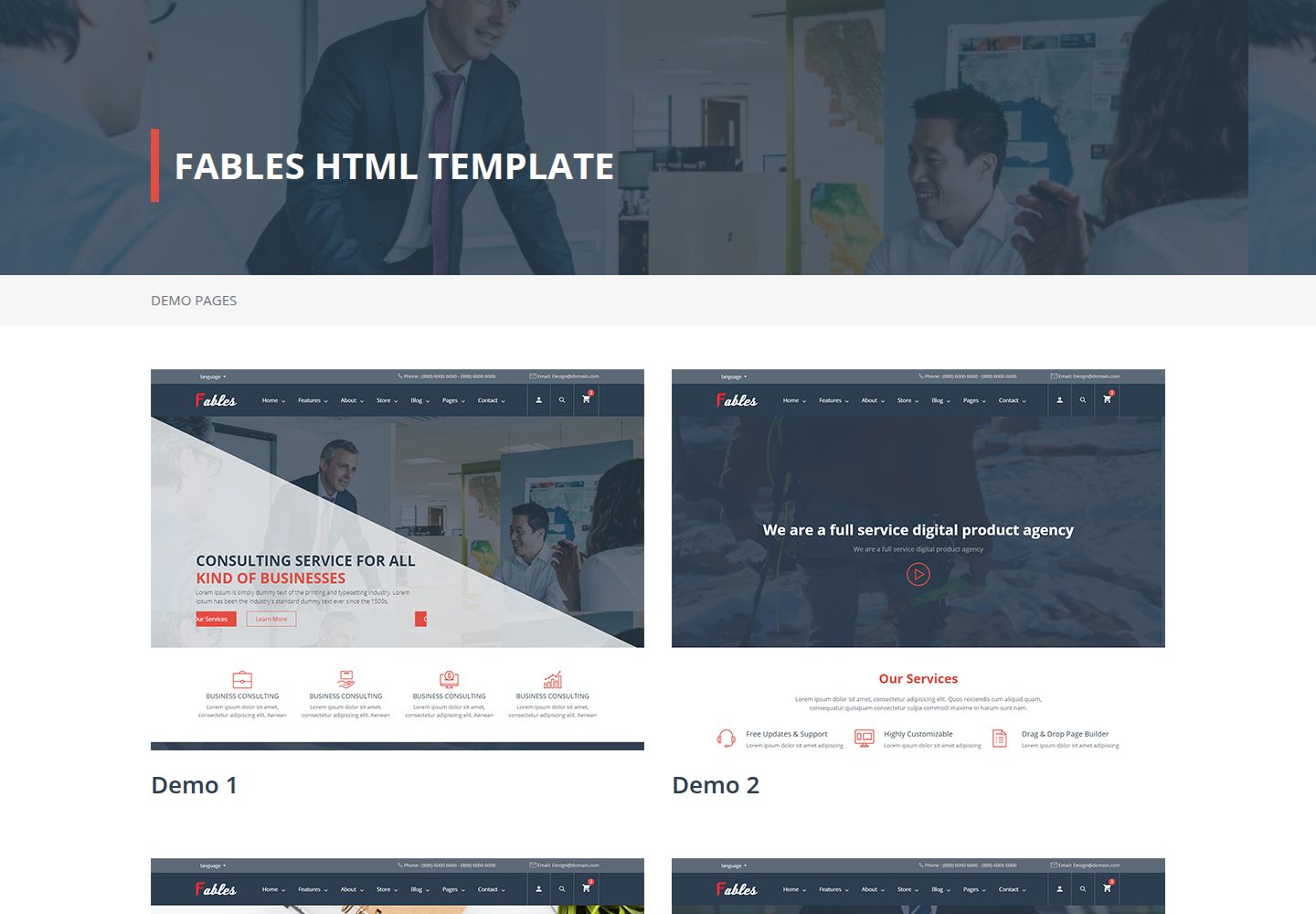
浏览真实页面截图,比较内容排版与手机效果。点击下方缩略图切换,放大查看整页细节。
全部页面与视图 2
截图用于了解视觉与布局,交互效果请以实际项目为准。
采集于 2026-10-02查看来源
值得关注的模板亮点
从已有项目资料中,快速了解它的特点。
提供 4 种首页、3 种关于我们、3 种联系我们等多样页面设计
包含商店网格/列表与单品页、博客多种布局、画廊与作品集页面
内置多种页头与页脚、团队、价格表、评价、计数器等区块
通过 CSS 类名可切换主色与辅助色,样式文件按功能分离
集成 Bootstrap、Font Awesome、Owl Carousel、Masonry 等前端库
模板详细介绍
Fables 是一个面向企业与作品集场景的响应式 HTML5 模板,仓库位于 GitHub 的 Tech-Labs/fables,采用 MIT 许可发布,可免费使用、修改、商用和分发该版本代码。模板基于 Bootstrap 与 Font Awesome 等前端库构建,提供首页、关于我们、商店、博客、页面与联系我们等模块,并包含多种页头、页脚、团队、价格表、评价与计数器等区块设计。
模板的页面设计数量较多:首页有 4 种设计,关于我们有 3 种,联系我们 3 种,商店包含网格与列表两种商品展示以及单品页,博客提供多种分类与单篇布局,页面部分还包含画廊/作品集、施工中页面与 404 页面。样式通过 custom.css、custom-responsive.css 与 fables-icons.css 分离管理,并提供基于类名的主色与辅助色切换方式。
使用限制方面,模板为静态 HTML 结构,安装方式为通过 FTP 上传压缩包并解压,随后手动修改电话、传真、邮箱、地图坐标等基础数据;演示图片、字体、图标等第三方素材需按各自许可单独核对,域名、托管等外部服务可能产生费用。
HTML作品集企业官网
适合你的项目吗?
适用场景
- 搭建企业官网,展示公司介绍、服务、团队与联系方式
- 制作用于展示作品或项目的作品集网站
- 搭建带商品列表与单品页的在线商店前端页面
- 搭建包含分类与单篇布局的博客站点
- 制作包含画廊、施工中页面与 404 页面的多页面站点
适合人群
- 需要快速搭建企业官网或作品集页面的开发者
- 偏好静态 HTML 模板、通过 FTP 部署上线的用户
- 希望基于 MIT 许可免费使用并修改模板代码的团队
- 需要多种页面设计变体、可自由组合页头页脚的项目
上手与定制指南
结合仓库当前版本的说明,按下面的资料检查内容、配置与运行要求。
- 1
通过 FTP 上传压缩包并解压,然后修改电话、传真、邮箱、地图坐标等基础数据
- 2
样式文件位于 assets/custom/CSS,脚本位于 assets/custom/Js,第三方库位于 vendor/
- 3
可通过给元素添加 fables-main-text-color、fables-main-background-color 等类名切换主色
- 4
倒计时、地图坐标与计数器数值可在对应 HTML 中通过 data 属性或标签内容修改
- 5
演示图片、字体、图标等第三方素材需按各自许可单独核对,不能仅凭代码的 MIT 许可判断
授权与来源资料
使用条件与限制
免费使用 · 保留许可声明本次收录的是公开仓库中采用 MIT 许可的免费版本;免费范围为该版本代码,不代表外部服务或第三方素材免费。
使用时需要遵守
- 允许免费使用、修改、商用和分发该版本代码。
- 分发代码副本或实质性部分时,保留原作者版权声明和完整 MIT 许可声明。
- 代码按现状提供;担保与责任限制以原许可证及适用法律为准。
额外费用与待核对事项
- 该模板为静态 HTML 文件,需自行通过 FTP 上传压缩包并解压,然后手动修改电话、传真、邮箱、Google 地图坐标等基础数据;不提供后台或自动部署。
- 联系页面的地图依赖 Google 地图等外部服务,需自行配置坐标并可能受第三方服务条款与费用约束。
- 模板中的演示图片、字体、图标等第三方素材不在 MIT 代码许可范围内,需按各自许可单独核对后方可使用。
- 演示图片、字体、图标及其他第三方素材需按各自许可核对,不能仅凭代码的 MIT 许可判断。
- 域名、托管、数据库、支付或 AI 等外部服务可能另外收费。
查看原文依据
Permission is hereby granted, free of charge
许可证原文
You Can upload the compressed fils via ftp , then you can extract it and begin to change the basic data such as phone numbers , fax , email , the location of google map according to your personal data .
README 原文
there is a map showing the location to make it easy for clients to reach your company .
README 原文
https://github.com/Tech-Labs/fables/blob/master/LICENSEhttps://github.com/Tech-Labs/fables/blob/master/README.mdassets/custom/images: This folder contains all the images
README 原文
DeepSeek 根据仓库许可证和 README 整理 ·2026-10-02。结果仅覆盖已读取资料,依赖、图片、字体及后续条款变更以各自原文为准。
项目核对记录与介绍依据
模板资料
- 来源平台
- GitHub
- 资料与维护参考分
- 资料一般 · 73 / 100
- 技术栈
- HTML
- 网站类型
- 作品集 · 企业官网
这个分数如何计算
本站按许可资料(最高30分)、演示链接(12分)、预览图(10分)、Star数(15分)、记录的维护时间(15分)、描述完整度(8分)、功能记录(5分)和分类资料(5分)计算。它不是代码、安全或性能测试,也不是 Google 评分;有链接不代表已实测可用。
这个项目需要核对什么
- 记录的仓库更新时间
- 2019-09-25
- 截图检查日期
- 2026-10-02
已收录演示链接。请用你的内容与屏幕尺寸检查;有演示不代表表单、认证或支付已经可用。
目录记录的主要技术栈是 HTML。请通过依赖清单和锁文件核对实际版本与托管要求。这些说明基于收录资料,不代表代码审计或部署实测。
查看具体选型方法 →介绍的制作与核对状态
介绍由 AI 辅助整理目录与仓库资料。仓库作者不等于这篇介绍的审核者。
已完成服务器许可规则与 AI 来源核对;未经过人工编辑审核。
查看当时使用的来源资料
SHA-256: 7c1b7e4be4298485c27d891a6dfd161c199afb70ca336664eaf87dcaf136aad4
2026-10-02T15:16:21.121Z
来源文件 / 仓库# Multipurpose Corporation HTML5 Template
[](https://tech-labs.github.io/fables/)
Fables is the awesome responsive HTML5 template created for corporate and portfolio websites – business site needn’t be boring! It features a very clean and minimal design that is perfect for showcasing your work. It is also optimized for Retina Displays (used in iPhone, iPad and MacBook Pro Retina).
[Demo](https://tech-labs.github.io/fables/)
## Features
* Responsive HTML5 and CSS3 design
* Css animations
* Multiple Headers and Footers
* Clean and Modern Design
* Clean and Modern Code
* Masonry portfolio layouts
* Easy to edit by changing html classes
* Based on Bootstrap4 the latest version
* Based on fontawesome5 the latest version
* all the libraries used in this template is the latest version .
* Multi-Purpose Design , you can use it as a bussiness template or an online store .
* Web Friendly Fonts
* in this template you have variety of designs , such as the template contains 4 design for home page , three designs for about us page , three designs for contact us page , many dsigns for blog single or blog category , many designs for gallery . all according your need .
## File/Folder Structure
The files are placed in organized folders so to make it easy for you to find files where you will need to do customizations or change other stuffs easily. Below is the folders and details of what they are for
* assets/custom/CSS: This folder contains all style files or stylesheets.
* assets/custom/Fonts: This folder contains all the fonts used for in the Template.
* assets/custom/Js: This folder contains all the scripts
* assets/custom/images: This folder contains all the images
* vendor/: This folder contains all the Libraries Used In this Template like ( animate.css , bootstrap , fancybox , fontawesome , jquery , owlcarousel , popper , WOW).
## Installation
You Can upload the compressed fils via ftp , then you can extract it and begin to change the basic data such as phone numbers , fax , email , the location of google map according to your personal data .
## HTML Structure
On Opening the main Index.html file. You can see the full HTML structure of the Template. Every Section of the Template is properly commented so you can see which section starts/ends.
the template is divided into main six parts :-
1- index : the template contains four different designs we have . (index1.html , index2.html , index3.html , index4.html ). every design of each page contains all you need to add to your home page , it will cover all your needs.
2- about us : the template contains three different designs . we have (about1.html , about2.html , about3.html ). every design of each page contains all you need to add to your about us page like :-
2.1 - you can add the services your company provide .
2.2 - you can add counter to count your clients , your successfull Deal your professional Employee .
you can also show your professional team to your customers .
2.3 - you can add show your Success Partners to give the Confidence to your next clients .
2.4 - you can add show your testimonials and clients opinion .
3- Store : the template contains two different designs about the store ( store_grid_list.html , store_single.html ). the two designs of each page contains all you need to add to your store like :-
3.1 - you can view all products you need in two ways (View them as grid layout or list layout ) .
3.2 - the single product page contains all the data of the product you need to show to your clients such slider , description , number of items you need , the color of the items . also you can share your product to social media with friends .
4- Blog : the template contains many designs about the blog . there are many designs to show your blogs . the designs of each page contains all you need to add to your blog page like :-
4.1 - there are various layouts to show the blog category .
4.2 - there are various layouts to show the single blog page , you may show blog with image or with video or with sider all according to your needs .
4.3 - you can also show your events timeline .
5- page : the template contains many designs about the page . there are many designs to show your pages . the designs of each page contains all you need to add to your page like :-
5.1 - you can show your gallery or your portfolio .
5.2 - there is under construction page , you can show it white preparing your site or a specific page .
5.3 - there 404 page to show when some links not found .
6- contact us : the template contains three designs about contact us page . there are three designs to show your contact us page . the designs of each page contains all you need to add to your contact us page like :-
6.1 - you can add your company data such as (phone number , fax , email , social media links , the address)
6.2 - you can add your location , there is a map showing the location to make it easy for clients to reach your company .
6.3 - there is a form to let your clients message you any time , asking you about any thing , this is a good way to communicate with your clients .
7- Finally Features :
7.1 - Headers & Footers : there is five designs for header and four designd for footer . in this part we collect all headers and footers , you can choose any header or any footer as you want
7.2 - team members : there is three designs you can apply any of them located in 'team.html'
7.3 - pricing table : there is three designs you can apply any of them located in 'pricing-table.html'
7.4 - testimonials : there is four designs you can apply any of them located in 'testimonials.html'
7.4 - blog : there is four designs you can apply any of them located in 'blog.html' 'blog.html'
7.5 - counters : there is four designs you can apply any of them located in 'counters.html'
7.6 - image hover effects : there is seven kinds of animations applied on images we have declared them in the animation section in this documentation .
## CSS Structure
The overall CSS of the Template is distributed into different separate files. Inside the CSS folder, You can find the following CSS files.
* custom.css : It is the main style file of the whole template . that contains all the styles you should use it when you to want to edit some styles like colors , font size , backgrouns ... ,etc .
* custom-responsive.css : it is the file that is responsible for the media queries to view the template in mobile phones and tablets in the best case , and to be fully responsive . it contains alot of screen sizes to cover all screens .
* fables-icons.css : it is the file that is responsibe for the icons in the website .
* some examples to edit some styles througth html . just to change some prepared classes :-
* the main color of the tempalte is the dark blue is named as main color
* when you want to write text with the main color you just give it a class '.fables-main-text-color'
* and if you want to give a specific element a main background . you just add the class '.fables-main-background-color'
* and if tou want to add border to an element with the main color you just add the class '.fables-main-border-color' .
* Note : you can use all the above classes with the 5 colors of the template with the declared way like , '.fables-second-text-color' , '.fables-second-background-color' , '.fables-second-border-color'
## Animation
there is some fantastic animations in this template like
* Translate Effect : to use it , just Surround the '' element with a div containing class of the wanted animation . example :-
```
<div class="image-container translate-effect-right">
<img src="http://via.placeholder.com/350x209" alt="alt image text">
</div>
```
* ZoomIn Effect
```
<div class="image-container zoomIn-effect">
<img src="http://via.placeholder.com/350x209" alt="alt image text">
</div>
```
* ZoomOut Effect
```
<div class="image-container zoomOut-effect">
<img src="http://via.placeholder.com/350x209" alt="alt image text">
</div>
```
* RotateIn Effect'
```
<div class="image-container rotateIn-effect">
<img src="http://via.placeholder.com/350x209" alt="alt image text">
</div>
```
* RotateOut Effect
```
<div class="image-container rotateOut-effect">
<img src="http://via.placeholder.com/350x209" alt="alt image text">
</div>
```
* Shine Effect
```
<div class="image-container shine-effect">
<img src="http://via.placeholder.com/350x209" alt="alt image text">
</div>
```
* Circle Effect
```
<div class="image-container circle-effect">
<img src="http://via.placeholder.com/350x209" alt="alt image text">
</div>
```
## Javascript Structure
This Template uses latest version of jQuery and other JavaScript libraries to add extra functioanlity.
* comming soon counter down you can edit it from the html code inside the 'comming-soon.html' page by editing the date in this code
```
<div id="comming-soon" data-countdown="2019/01/01"></div>
```
* you can change the default location to yours by edit the 'data-lng' & 'data-lat' in the 'contactus.html' file and edit the following code
```
<div id="map" data-lng="31.248848" data-lat="29.966324"
data-icon="assets/custom/images/map-marker.png"
data-zom="12" style="width:100%;height:420px">
</div>
```
* the counters which in the index pages and about pages you can change the values by changing the html code as follows :-
```
<h2 class="" data-count="307">0</h2>
```
where is the zero is the number to start and 307 is the number to reach .
## Changelogs
v1.0 (02.12.2018) - Initial Release
## Sources & Credits
* **jQuery** - [http://jquery.com/](http://jquery.com/)
* **animate** - [https://daneden.github.io/animate.css/](https://daneden.github.io/animate.css/)
* **bootstrap** - [https://getbootstrap.com/](https://getbootstrap.com/)
* **fancybox** - [http://fancyapps.com/fancybox/3/](http://fancyapps.com/fancybox/3/)
* **fontawesome** - [https://fontawesome.com/](https://fontawesome.com/)
* **jQuery.countdown** - [http://hilios.github.io/jQuery.countdown/](http://hilios.github.io/jQuery.countdown/)
* **jquery.circle.progress** - [http://kottenator.github.io/jquery-circle-progress/](http://kottenator.github.io/jquery-circle-progress/)
* **loadscreen** - [http://tobiasahlin.com/spinkit/](http://tobiasahlin.com/spinkit/)
* **masonry** - [https://masonry.desandro.com/](https://masonry.desandro.com/)
* **OffCanvasMenuEffects** - [https://tympanus.net/Development/OffCanvasMenuEffects/sideslide.html](https://tympanus.net/Development/OffCanvasMenuEffects/sideslide.html)
* **owlcarousel** - [https://owlcarousel2.github.io/OwlCarousel2/](https://owlcarousel2.github.io/OwlCarousel2/)
* **jquery Timeline**- [https://www.jqueryscript.net/demo/Create-A-Responsive-Animated-Vertical-Timeline-with-jQuery-CSS3/](https://www.jqueryscript.net/demo/Create-A-Responsive-Animated-Vertical-Timeline-with-jQuery-CSS3/)
* **owlcarousel** - [https://owlcarousel2.github.io/OwlCarousel2/](https://owlcarousel2.github.io/OwlCarousel2/)
* **WOW-master** - [https://mynameismatthieu.com/WOW/](https://mynameismatthieu.com/WOW/)
看看同类模板
对比同技术栈与用途的模板,找到更适合的视觉与内容结构。

simplefolio
⚡️ A minimal portfolio template for Developers
HTML · 作品集

mazer
Free and Open-source Bootstrap 5 Admin Dashboard Template and Landing Page
HTML · 后台

Freelancer
Freelancer 是 Start Bootstrap 出品的单页作品集模板,专为自由职业者、设计师和小型工作室设计。 页面结构清晰,包含多个内容区块、响应式作品集网格,每个作品项目配有模态窗口展示详情。
HTML · 作品集

Resume
Resume 是 Start Bootstrap 推出的简历与 CV 主题,基于 Bootstrap 构建,采用固定侧边栏加内容区块的结构。
HTML · 作品集

Creative
Creative 是 Start Bootstrap 团队维护的一款单页营销模板,定位明确:为创意机构或产品服务提供一个以作品展示和行动号召为核心的落地页。
HTML · 企业官网

startbootstrap-agency
Agency 是 Start Bootstrap 维护的单页代理商作品集主题,基于 Bootstrap 构建,MIT 许可。
HTML · 企业官网