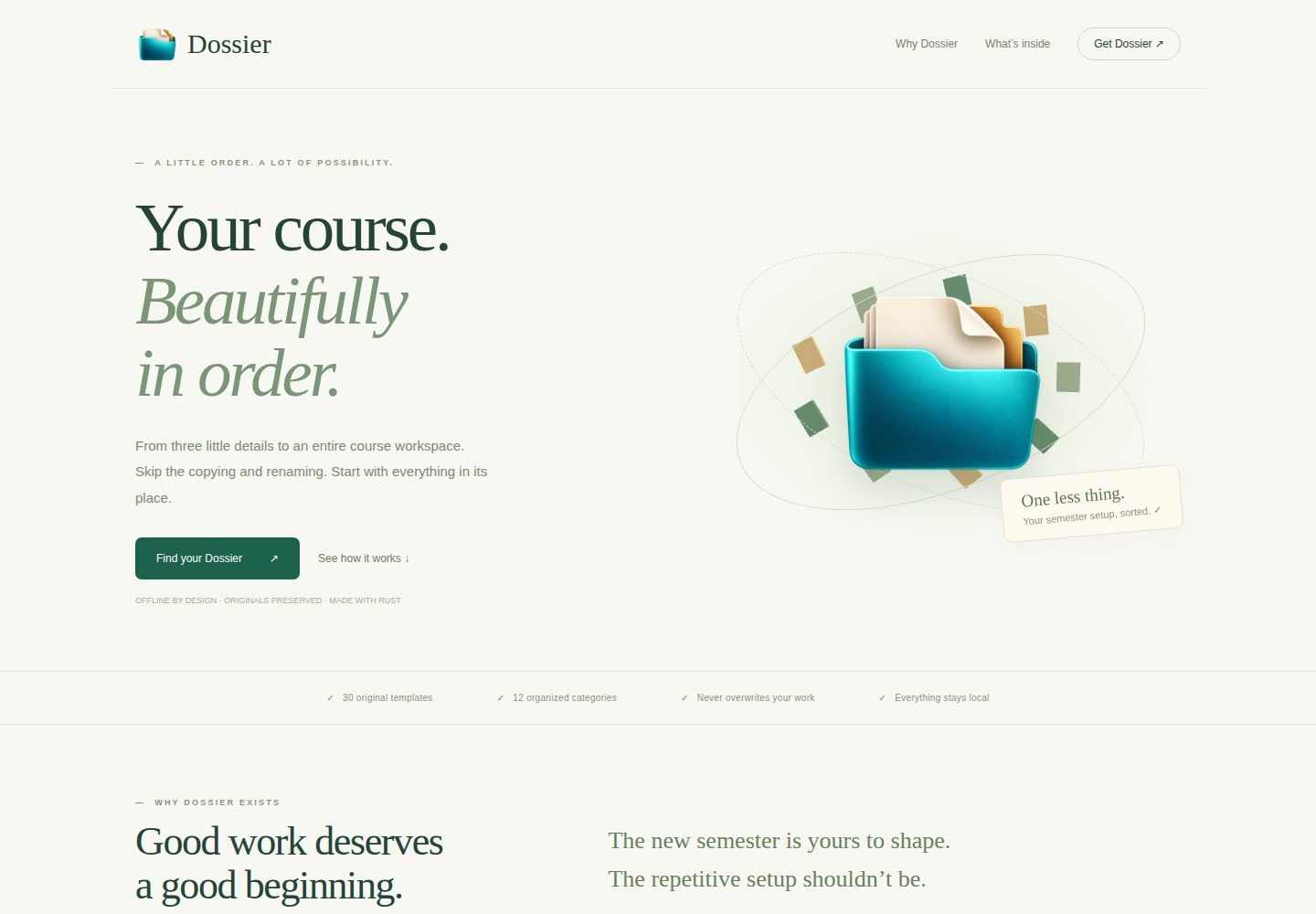
Generates course material folder structures containing 12 subdirectories by semester, course, and section
HTMLCorporate Website
dossier — HTML Business Template
By the-sudipta
Dossier is an offline desktop app that automatically generates course material folder structures containing original templates by semester, course, and section, and provides a standalone command-line tool.
Explore the design
Compare the page layouts and mobile experience. Open any screenshot for a closer look.
Desktop homepage1 / 2
Desktop captureTop of page
Actual screenshot captured by the server browser.
All pages & views 2
Screenshots show visual appearance; interactive behavior may differ.
Recorded 2026-10-01View source
What stands out
A quick read of the recorded project description.
Embeds 30 original Word, Excel, HTML, and text templates without modifying template contents
Provides a Tauri desktop interface and a standalone CLI, both sharing the same Rust generation engine
Existing files are always skipped, and writes use create_new(true) to prevent overwriting
Name validation rejects unsafe characters, reserved names, path traversal, and overly long path components
The CLI outputs a JSON activity summary, with exit codes distinguishing success, generation errors, and argument errors
Template Details
Dossier is a locally running desktop tool for quickly creating standardized material folders for course sections. After the user enters a semester, course name, and section, and selects an existing output directory, the app creates a semester folder according to fixed naming rules, a naming convention description file, a semester to-do HTML file, and a course-section folder containing 12 subdirectories for syllabus, attendance, assignments, lab tests, project reports, answer sheets, grade sheets, CO-PO files, etc., and embeds 30 original Word, Excel, HTML, and text templates. File contents are not parsed or modified; the app only performs four literal path replacements in a specified order.
The desktop app is built on Tauri, uses native HTML, CSS, and JavaScript for its interface, provides a real-time expandable preview, inline validation, and detailed operation logs, and supports hover, keyboard focus, and F1 hint modes. In addition to the graphical interface, the project also provides a standalone CLI that can run on Windows, Linux, and macOS using the same Rust engine to perform generation and output a JSON activity summary.
For security, existing files are always skipped, neither overwritten nor silently repaired; writes use create_new(true) to prevent concurrent runs from overwriting each other; names reject unsafe characters, control characters, Windows reserved names, path traversal components, trailing dots, and overly long path components. The output directory must already exist, and symbolic links and Windows directory junctions in the target path chain are rejected. On failure, the summary lists completed work and the specific failing path, but no rollback or deletion functionality is provided.
Using the desktop version requires an operating system WebView: Windows requires the Microsoft Edge WebView2 Runtime, Linux requires WebKitGTK 4.1 and GTK3, and macOS uses the built-in WKWebView. The standalone CLI does not depend on a WebView. The macOS graphical package is ad-hoc signed and not notarized by Apple, so the first run triggers system verification. Building from source requires the Rust toolchain and Tauri native dependencies; the desktop frontend does not require a Node/npm build.
HTMLCorporate Website
Is it right for your project?
Use Cases
- Batch-create uniformly named material folders for multiple course sections each semester
- Organize syllabi, attendance, assignments, and grade records according to BAETE course file management requirements
- Automatically generate course workspaces via command-line scripts on Windows, Linux, or macOS
- Use the standalone CLI to create folders in environments without a graphical interface
Suitable For
- University teachers or academic administrators who need to repeatedly create course-section folders from fixed templates
- Course managers who want to preserve the original Word and Excel template formats and formulas
- Users who need to generate course material structures in a local offline environment without relying on network services
- Developers who need to batch-process course directories via CLI on Windows, Linux, or macOS
Getting started & customization
Use these recorded setup notes alongside the repository instructions for your chosen version.
- 1
The Windows graphical version requires Microsoft Edge WebView2 Runtime to be installed in advance; Linux requires WebKitGTK 4.1 and GTK3; macOS uses the built-in WKWebView
- 2
The standalone CLI does not depend on a WebView and is suitable for environments without a graphical interface
- 3
The macOS graphical package is ad-hoc signed and not notarized by Apple, so the first launch triggers system verification
- 4
Building from source requires the Rust toolchain and Tauri native dependencies; the desktop frontend does not require a Node/npm build
- 5
The output directory must already exist, and the app will not overwrite, delete, or roll back existing files
License & source material
Usage conditions & limitations
Free to use · keep license noticeThis entry covers the free version under the MIT license in the public repository; the free scope is the code of that version and does not mean that external services or third-party materials are free.
Must comply with when using
- Free use, modification, commercial use, and distribution of that version's code are permitted.
- When distributing copies or substantial portions of the code, retain the original author's copyright notice and the complete MIT license notice.
- The code is provided as is; warranties and limitations of liability are governed by the original license and applicable law.
Additional costs & items to verify
- The Windows graphical interface depends on the system-preinstalled Microsoft Edge WebView2 Runtime; minimal Windows images without this component installed must configure it in advance, otherwise the desktop version cannot start.
- The Linux graphical version requires WebKitGTK 4.1 and GTK3 runtime libraries to be installed on the system; without these dependencies the GUI cannot run; the standalone CLI package is not subject to this limitation.
- The macOS graphical package is only ad-hoc signed and not notarized by Apple, so the first launch triggers system security verification and the user must manually allow it to run.
- When building from source, the first Cargo build requires an internet connection to download dependencies; only subsequent builds using the locked cache can proceed offline.
- The MIT license covers only the application code and does not cover the built-in third-party institutional template content and logos such as school emblems; these original documents retain their original attribution and must not be redistributed or used commercially under the MIT authorization.
- The optional Three.js animation on the repository's index.html showcase page loads scripts from a public CDN and degrades when offline; the desktop app itself does not use that website or any CDN.
- Demo images, fonts, icons, and other third-party materials must be checked against their respective licenses and cannot be judged solely by the code's MIT license.
- External services such as domains, hosting, databases, payments, or AI may incur separate charges.
View Original Text Basis
Permission is hereby granted, free of charge
Original License Text
Windows requires Microsoft Edge WebView2 Runtime
Original README
Linux requires WebKitGTK 4.1 and GTK3
Original README
The GUI packages are ad-hoc signed, not Apple-notarized
Original README
The first Cargo build downloads dependencies
Original README
Original institutional documents retain their existing ownership; the MIT grant does not relicense third-party template content or university marks.
Original README
https://github.com/the-sudipta/dossier/blob/main/LICENSEhttps://github.com/the-sudipta/dossier/blob/main/README.mdIts optional Three.js hero loads a pinned public CDN script
Original README
Compiled by DeepSeek based on repository license and README ·2026-10-01. Results only cover the materials read; dependencies, images, fonts, and subsequent term changes are subject to their respective original texts.
Project checks & description sources
Template Information
- Source platforms
- GitHub
- Documentation and maintenance reference score
- More documented · 80 / 100
- Technologies
- HTML
- Website type
- Corporate Website
How this score is calculated
Our heuristic uses license records (up to 30), a demo link (12), a preview (10), stars (15), recorded maintenance (15), description completeness (8), feature records (5) and classification data (5). It is not a code, security or performance test, or a Google score. A link does not establish tested functionality.
What to verify for this project
- Repository update recorded
- 2026-09-23
- Screenshot last checked
- 2026-10-01
A demo link is listed. Check it with your own content and viewport sizes; its presence does not confirm that forms, authentication or payments work.
The catalog identifies HTML as the primary stack. Check the actual dependency manifest and lockfile for versions and hosting requirements. These notes use recorded metadata, not a code audit or a deployment test.
Use a selection guide →How this description was prepared
AI-assisted description based on catalog records and repository material. Repository authors are not automatically the reviewers of this description.
Automatically checked against source and license rules; no manual editorial review.
Inspect the recorded source material
SHA-256: a1348b0b638aedb4cbd711ccfe52a2dbf77bcbff5baf8a7ae8f3b0e351018f2e
2026-10-01T15:22:35.013Z
Source file / repository<p align="center"><img src="app/assets/logo.png" width="140" alt="Dossier transparent folder icon"></p>
<h1 align="center">Dossier</h1>
<p align="center"><strong>Your course. Beautifully in order.</strong></p>
Build a complete course-section documentation workspace in seconds. Enter a semester, course, and section; choose a folder; create a perfectly named workspace with your original Word, Excel, HTML, and text templates. Everything stays on your computer.
## Project snapshot
| Detail | Implementation |
|---|---|
| Backend | Rust; exclusive, never-overwrite file creation |
| Desktop | Tauri v2; plain HTML, CSS, JavaScript |
| Templates | 30 originals embedded with rust-embed |
| Interface | Live expandable preview, inline validation, detailed activity log |
| Help | Hover/focus hints throughout; F1 hint mode; tap support |
| Branding | Original transparent PNG, multi-resolution ICO, ICNS |
| Platforms | Windows x64, Linux x64, macOS Intel and Apple Silicon build matrix |
| Current verification | See `verification/` and `docs/VERIFICATION.md` for actual local results |
| Release assets | Each versioned release includes GUI packages and independent standalone CLI packages for Windows x64, Linux x64, macOS Intel, and Apple Silicon, plus SHA-256 checksums. |
## Why this exists
Each new course section starts with the same copying, renaming, and folder setup. Dossier removes that repeated work while preserving the institutional templates exactly. Your marksheet formulas, Word formatting, and existing files remain yours.
## What it creates
The semester folder contains `NAMING CONVENTIONS.txt`, a semester TODO HTML file, and a course-section folder with a course checklist, marksheet, and these categories:
1. Course Outline
2. Attendance Record of the Students
3. Assignment Question
4. Lab Test Questions (Final Term Exam, Lab Tasks, Mid Exam, OBE, Quiz)
5. Project Report
6. Answer Scripts (Highest, Medium, Lowest) of Lab Tests
7. Submitted Copy (Highest, Medium, Lowest) of Assignments
8. Examination Result
9. Lab sheet
10. Assessment criteria or rubrics for assignments or projects or lab-activities
11. CO-PO Files
12. PRINT (All, Merged)
The precise original manifest and golden reference are in [the build dossier](docs/CODEX_BUILD_DOSSIER.md). The application only changes path names, using its four literal substitutions in the specified order. File contents are never parsed or modified.
## Requirements
The executable embeds every template and UI asset; no network is used by the desktop app. Tauri still uses the operating system's webview: **Windows requires Microsoft Edge WebView2 Runtime**, Linux requires WebKitGTK 4.1 and GTK3, and macOS uses its built-in WKWebView. A completely bare Windows image without WebView2 needs that prerequisite provisioned beforehand. The standalone `dossier-cli` can run without a webview.
For source builds: Rust 1.98.1 (pinned in `rust-toolchain.toml`) and the [Tauri native prerequisites](https://v2.tauri.app/start/prerequisites/). No Node/npm build is required for the desktop frontend. The first Cargo build downloads dependencies; subsequent locked, cached builds can run offline.
## How to use
**Windows:** Double-click `dist/Dossier.exe`. `dist/dossier-cli.exe` is the standalone console version. Versioned releases include `dossier-windows-x64.exe` and `dossier-cli-windows-x64.exe`.
```powershell
.\Dossier.exe
```
**Linux GUI:** Extract the `.tar.gz` release, then run the binary on a system with the listed GTK/WebKit dependencies. The separate `dossier-cli-linux-x64.tar.gz` standalone package has no GUI or webview dependency.
```sh
tar -xzf dossier-linux-x64.tar.gz
chmod +x dossier
./dossier
```
**macOS GUI:** Choose Intel or Apple Silicon, extract the `.app.zip`, and open `Dossier.app`. Separate `dossier-cli-macos-intel.tar.gz` and `dossier-cli-macos-apple-silicon.tar.gz` packages contain the standalone CLI. The GUI packages are ad-hoc signed, not Apple-notarized; normal macOS first-run verification applies.
```sh
unzip dossier-macos-apple-silicon.app.zip
open Dossier.app
```
In the app, enter the three details, inspect the live preview, choose an existing output folder, and click **Create workspace**. Press **F1** to highlight hints. Hints are available by hover and keyboard focus without enabling this mode.
## Example
`Fall 25-26` + `DS Lab` + `G` creates:
```text
<chosen folder>/Fall 25-26/
NAMING CONVENTIONS.txt
Fall_25-26.TODO_LIST.html
DS Lab [ G ]/
Fall_25-26.DS_Lab_[ G ].OVERALL.MARKSHEET.xlsx
...12 numbered categories and original templates...
```
CLI automation uses the same Rust engine and prints a JSON activity summary:
```powershell
.\dossier-cli.exe --semester "Fall 25-26" --course "DS Lab" --section "G" --output "E:\Course Files"
```
The GUI executable accepts the same flags. For redirected output and scripts on Windows, use the included console executable `dossier-cli.exe` (GUI executables attach to a parent console only when flags are supplied). Exit codes: 0 success, 1 generation error, 2 argument error.
## Build and verify
```sh
cargo test --locked -p dossier-core
cargo build --locked --release --workspace
python scripts/verify.py
```
Run `cargo run -p dossier` for the desktop app, or `scripts/dev.ps1` on this Windows machine to load the saved Rust environment into the current process. The first build requires native build prerequisites. `cargo fmt --all -- --check` and `cargo clippy --workspace --all-targets -- -D warnings` check formatting and lint.
`scripts/verify.py` independently parses Appendix B, compares every generated path, hashes every original ZIP/template/output file, tests reruns, section O, preserved edits, and invalid paths. Temporary acceptance outputs are isolated in a unique test directory. App code never deletes; test harnesses clean their own temporary directories.
`index.html` is a standalone showcase with its logo embedded as a data URI. Its optional Three.js hero loads a pinned public CDN script; the website falls back gracefully when offline. The desktop app does not use this website or any CDN. Opening `app/index.html` in a browser is a clearly explained visual preview; real folder generation is available only inside Tauri.
## Safety notes
- Existing files are skipped unconditionally, never overwritten or silently repaired. Edits are preserved.
- File writes use `create_new(true)` so competing runs cannot overwrite one another.
- Names reject unsafe characters, control characters, reserved Windows names, traversal components, trailing dots, and oversized path components.
- The output location must already exist. Symbolic links and Windows junctions in destination chains are rejected. This is a local personal tool, not a security boundary against a hostile process concurrently replacing parent folders.
- On failure, the summary lists completed work and the exact failing path. If a write is incomplete, that file is retained and explicitly reported. Inspect and move it aside manually before retrying; reruns skip it.
- No rollback, delete, telemetry, accounts, or template-content editing exists.
- Filesystem-specific full-path limits and permissions can still cause a clearly reported partial run. The tool cannot override them.
## Release and showcase
The workflow tests and builds all four targets on a pushed `v*.*.*` tag, then attaches GUI and standalone CLI packages plus `SHA256SUMS.txt` to a GitHub Release. Manual workflow runs build artifacts without publishing. Update the repository slug in `scripts/build_showcase.py` if the future repository is not `the-sudipta/dossier`, then regenerate `index.html`.
## License and citation
Application code uses the [MIT license](LICENSE), the runbook's default. Original institutional documents retain their existing ownership; the MIT grant does not relicense third-party template content or university marks. The icon is original, transparent, and independent of the AIUB crest. See [CITATION.cff](CITATION.cff); a DOI is intentionally absent until one is actually assigned.
Explore similar templates
Compare previews and descriptions within the same stack and category.

mazer
Mazer is a free and open-source Bootstrap 5 admin dashboard and landing page template that does not depend on jQuery. It provides prebuilt releases, source builds, and CDN inclusion, and includes dark mode, perfect-scrollbar, and ApexCharts examples.
HTML · Admin dashboard

Freelancer
A bright, single-page Bootstrap portfolio template for freelancers, designers, and small studios. It includes a responsive portfolio grid with modal detail windows and an SB Forms contact form that requires an API token.
HTML · Portfolio

Creative
A single-page marketing template by Start Bootstrap for creative agencies and product services, built on Bootstrap with SCSS, featuring a portfolio grid and call-to-action sections. It includes pre-set SB Forms markers for form integration and npm build scripts for source customization.
HTML · Corporate Website

startbootstrap-agency
Agency is a one-page Bootstrap portfolio theme from Start Bootstrap, MIT licensed. It includes a responsive portfolio grid with modal details and a preconfigured SB Forms contact form that requires an API token.
HTML · Corporate Website

startbootstrap-landing-page
A general-purpose Bootstrap landing page template from Start Bootstrap, MIT licensed, with a Pug/SCSS/npm build pipeline.
HTML · Corporate Website

Landing-Page
A general-purpose landing page HTML template maintained by Tailwind Toolbox, written in pure HTML and loading the complete Tailwind CSS via CDN.
HTML · Corporate Website