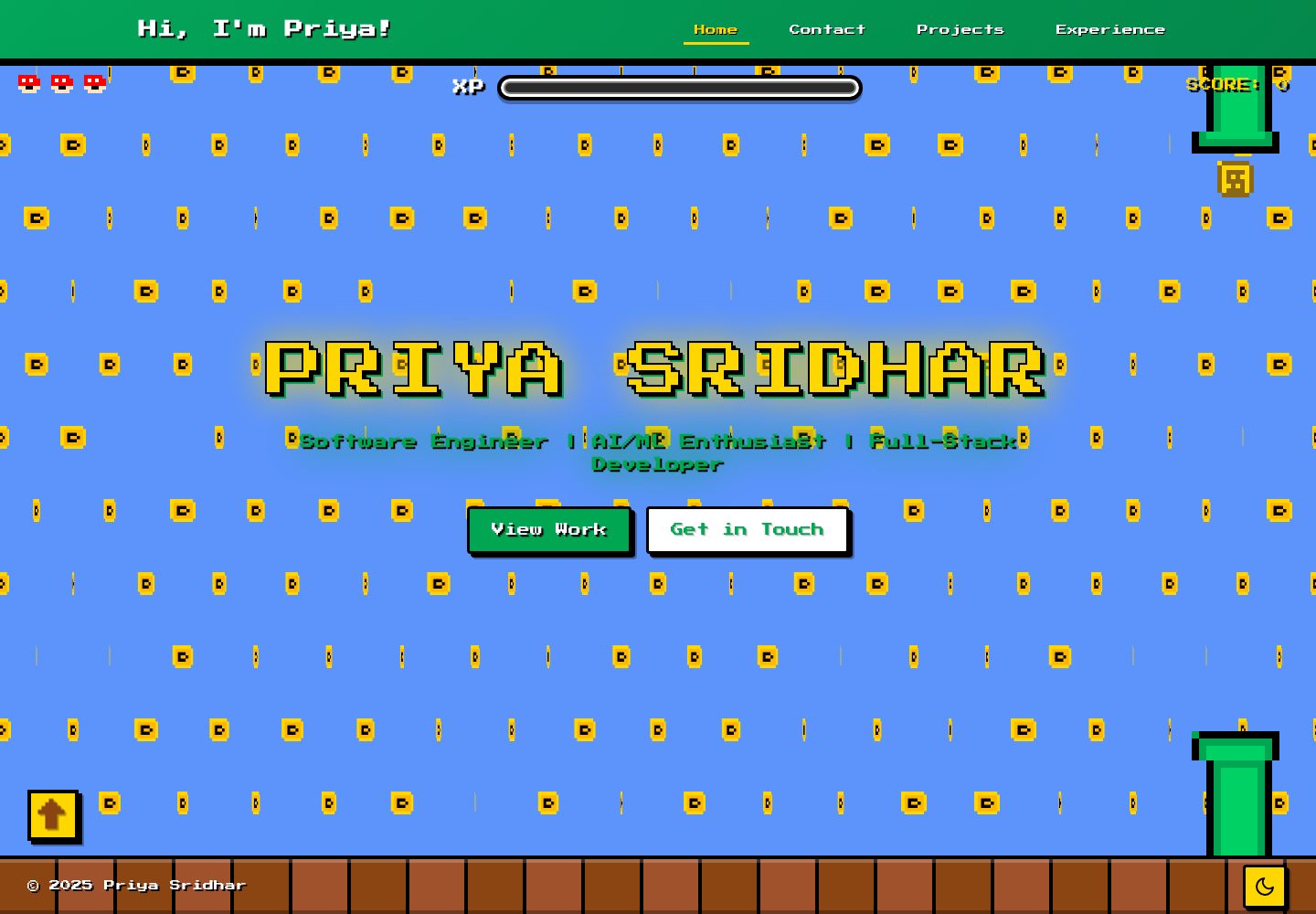
All visual elements are pure CSS pixel art, drawn pixel by pixel with divs and ::before pseudo-elements using box-shadow, without images, SVGs, or icon libraries
HTMLPortfolio
portfolio-website — HTML Portfolio Template
By theperiperi
A retro game (Mario) themed personal portfolio website built with pure CSS pixel art, featuring project showcases, an experience timeline, a Nerd Wall, and light/dark theme switching.
Explore the design
Compare the page layouts and mobile experience. Open any screenshot for a closer look.
Desktop homepage1 / 2
Desktop captureTop of page
Actual screenshot captured by the server browser.
All pages & views 2
Screenshots show visual appearance; interactive behavior may differ.
Recorded 2026-10-13View source
What stands out
A quick read of the recorded project description.
Coin spin uses scaleX between 1 and 0 with steps(8) to achieve an 8-bit staccato effect
Cloud parallax animation generates 30 layers of about 450 elements on desktop, drifting in random directions and dispersing at different scroll speeds, reduced to 10 layers on mobile
About 5,400 lines of vanilla CSS using custom properties, with no Tailwind, Bootstrap, or CSS-in-JS
Light and dark modes are switched via a single data attribute
Content is managed in Markdown, with projects and experience stored under /content/projects/ and /content/experience/ respectively
Template Details
This template is a retro game themed personal portfolio website. The README explains that all visual elements are built from CSS pixel art: coins, pipes, clouds, books, and computer icons are not images, SVGs, or icon libraries, but are drawn pixel by pixel using divs with ::before pseudo-elements via box-shadow; the coin spin uses scaleX from 1 to 0 and back with steps(8) to achieve an 8-bit staccato feel. The cloud animation is inspired by the game Two Dots; on desktop it generates 30 layers of clouds, about 450 elements, each drifting in a random direction and dispersing at different scroll speeds to create a parallax reveal effect, reduced to 10 layers on mobile. The styling is about 5,400 lines of vanilla CSS using custom properties, with no Tailwind, Bootstrap, or CSS-in-JS; light and dark modes are switched via a single data attribute.
In terms of content, the site provides project showcases (with case descriptions), an experience timeline, a Nerd Wall interest section, and responsive layouts for desktop, tablet, and mobile. Content is managed as Markdown files, with projects and experience placed under /content/projects/ and /content/experience/ respectively, and front matter including title, description, and date.
Note that the repository metadata labels the tech stack as HTML, but the README describes a Next.js and TypeScript project and gives startup instructions such as npm run dev and the default port 3000; these are inconsistent, so before use, rely on the repository's actual dependencies and file structure. The repository is MIT licensed, allowing free use, modification, commercial use, and distribution of this version of the code, provided copyright and license notices are retained when distributing; third-party assets such as demo images, fonts, and icons must be checked separately under their own licenses.
HTMLPortfolio
Is it right for your project?
Use Cases
- Individual developers building a portfolio website with a retro game style
- Maintaining project cases and a career experience timeline in Markdown, organized by year or date
- A Nerd Wall section to showcase personal interests and personality
- As a reference implementation for learning pure CSS pixel art and scroll parallax animation
Suitable For
- Developers who want a portfolio with a strong personal style rather than a generic business template
- Users willing to directly edit CSS and Markdown content files
- Personal sites needing light/dark themes and mobile adaptation
- Projects that accept hand-written vanilla CSS styling without relying on CSS frameworks
Getting started & customization
Use these recorded setup notes alongside the repository instructions for your chosen version.
- 1
The repository metadata labels the tech stack as HTML, while the README describes it as Next.js and TypeScript; before use, rely on the repository's actual dependencies and file structure
- 2
The README's startup flow is to clone the repository, run npm install (or yarn install), then run npm run dev (or yarn dev), and access http://localhost:3000 by default
- 3
The README requires Node.js v14 or higher, but provides no dependency list for verification; the actual version requirement is subject to package.json
- 4
Add project and experience content as Markdown files under /content/projects/ and /content/experience/ respectively, with front matter including title, description, and date
- 5
The MIT license covers this version of the code; when distributing, retain copyright and license notices; third-party assets such as demo images, fonts, and icons must be checked separately for licensing
License & source material
Usage conditions & limitations
Free to use · keep license noticeThis listing covers the free version in a public repository under the MIT license; the free scope is this version of the code and does not mean external services or third-party assets are free.
Must comply with when using
- Free use, modification, commercial use, and distribution of this version of the code are permitted.
- When distributing copies or substantial portions of the code, retain the original author's copyright notice and the full MIT license notice.
- The code is provided as is; warranties and limitations of liability are governed by the original license and applicable law.
Additional costs & items to verify
- Demo images, fonts, icons, and other third-party assets must be checked under their own licenses; the code's MIT license alone cannot be used to judge them.
- External services such as domains, hosting, databases, payments, or AI may incur additional charges.
View Original Text Basis
https://github.com/theperiperi/portfolio-website/blob/main/LICENSEhttps://github.com/theperiperi/portfolio-website/blob/main/README.mdPermission is hereby granted, free of charge
Original License Text
Compiled by DeepSeek based on repository license and README ·2026-10-13. Results only cover the materials read; dependencies, images, fonts, and subsequent term changes are subject to their respective original texts.
Project checks & description sources
Template Information
- Source platforms
- GitHub
- Documentation and maintenance reference score
- More documented · 80 / 100
- Technologies
- HTML
- Website type
- Portfolio
How this score is calculated
Our heuristic uses license records (up to 30), a demo link (12), a preview (10), stars (15), recorded maintenance (15), description completeness (8), feature records (5) and classification data (5). It is not a code, security or performance test, or a Google score. A link does not establish tested functionality.
What to verify for this project
- Repository update recorded
- 2026-02-21
- Screenshot last checked
- 2026-10-13
A demo link is listed. Check it with your own content and viewport sizes; its presence does not confirm that forms, authentication or payments work.
The catalog identifies HTML as the primary stack. Check the actual dependency manifest and lockfile for versions and hosting requirements. These notes use recorded metadata, not a code audit or a deployment test.
Use a selection guide →How this description was prepared
AI-assisted description based on catalog records and repository material. Repository authors are not automatically the reviewers of this description.
Review declaration: [email protected] · 2026-10-13
Inspect the recorded source material
SHA-256: 7c7fd3b38906026518a6a51a0694fa49caa97e189c8add25a6a674cbf0fbf4ed
2026-10-13T06:12:37.922Z
Source file / repository# Personal Portfolio Website Welcome to my personal portfolio website! This is where I showcase my projects, experience, and a bit about myself. Built with modern web technologies, this site reflects my journey as a developer and creator. **🌐 Live Site**: [https://priyadharshini-sridhar.vercel.app/](https://priyadharshini-sridhar.vercel.app/) ## Why it looks like this I've started and abandoned like 10 portfolio sites. Each time I'd get halfway through, realize it was too formal or too content-heavy, and didn't actually represent me as a person — so I'd drop it. This time I wanted something that actually resonated with me and told a story. So enter mario! Every visual element on this site is CSS pixel art. The coins, the pipes, the clouds, the book icon, the computer icon — all of it. No image files, no SVGs, no icon libraries. Each one is a `div` with a `::before` pseudo-element drawing individual pixels using `box-shadow`. The coin spin is `scaleX` going from 1 to 0 and back with `steps(8)` to keep it crunchy and 8-bit. The cloud animation is inspired by my favorite game Two Dots. It has this thing where clouds part as you progress through a level and I always wanted to try to make something just as cool and what better place that a portfolio site. It generates 30 layers of clouds — 450 elements on desktop — each drifting in a random direction, clearing at different scroll speeds so it feels like a parallax reveal. On mobile it drops to 10 layers so your phone doesn't melt. ~5,400 lines of CSS, no Tailwind, no Bootstrap, no CSS-in-JS. Just vanilla CSS with custom properties. Light/dark mode is a single data-attribute toggle. ## About This Project This portfolio website serves as a digital space to highlight my work, skills, and professional experience. It features: - **Projects Showcase**: A curated collection of my best work with detailed case studies - **Experience Timeline**: My professional journey and accomplishments - **Nerd Wall**: A fun section showcasing my interests and personality - **Responsive Design**: Fully optimized for desktop, tablet, and mobile devices - **Dark Mode**: Toggle between light and dark themes for comfortable viewing ## Tech Stack - **Framework**: [Next.js](https://nextjs.org/) with TypeScript - **Styling**: CSS with custom animations - **Content Management**: Markdown-based content system - **Deployment**: Ready for deployment on Vercel, Netlify, or similar platforms ## Getting Started ### Prerequisites - Node.js (v14 or higher) - npm or yarn ### Installation 1. Clone the repository: ```bash git clone https://github.com/theperiperi/portfolio-website.git cd portfolio-website ``` 2. Install dependencies: ```bash npm install # or yarn install ``` 3. Run the development server: ```bash npm run dev # or yarn dev ``` 4. Open [http://localhost:3000](http://localhost:3000) in your browser to see the result. ## 📁 Project Structure ``` portfolio-website/ ├── app/ # Next.js app directory │ ├── experience/ # Experience pages │ ├── projects/ # Project pages │ └── nerd-wall/ # Personal interests section ├── components/ # React components ├── content/ # Markdown content files ├── lib/ # Utility functions and data ├── public/ # Static assets └── styles/ # CSS stylesheets ``` ## Customization Feel free to fork this repository and make it your own! Here's how: 1. **Update Content**: Modify the content files in `/content/` to add your own projects and experiences 2. **Customize Styling**: Edit the CSS files in `/styles/` to match your personal brand 3. **Add Components**: Create new components in `/components/` to extend functionality 4. **Update Data**: Modify `/lib/data/` files to reflect your information ## Adding Your Own Content ### Projects Add new project markdown files to `/content/projects/` with the following structure: ```markdown --- title: Your Project Title description: Brief description date: YYYY-MM-DD --- Your project content here... ``` ### Experience Add experience entries to `/content/experience/` following the same markdown format. ## Contact & Questions Have questions or want to connect? Feel free to reach out (contact details on profile)! ## Contributing While this is a personal portfolio, I'm open to suggestions and improvements! If you find a bug or have an idea: 1. Fork the repository 2. Create your feature branch (`git checkout -b feature/AmazingFeature`) 3. Commit your changes (`git commit -m 'Add some AmazingFeature'`) 4. Push to the branch (`git push origin feature/AmazingFeature`) 5. Open a Pull Request ## License This project is open source and available under the [MIT License](LICENSE). ## Fork This Project Want to use this portfolio as a template for your own? Go ahead! 1. Click the "Fork" button at the top right of this repository 2. Clone your forked repository 3. Customize it with your own content, colors, and style 4. Deploy it and share your work with the world! If you use this template, I'd love to see what you create! Feel free to tag me or send me a link. --- **Built with ❤️ and 🍪s** *Last updated: February 2026*
Explore similar templates
Compare previews and descriptions within the same stack and category.

simplefolio
Simplefolio is a minimal single-page portfolio template for developers, built with HTML, Bootstrap, SCSS, and Parcel under the MIT license. It includes Hero, About, Projects, Contact, and Footer sections, with content edited in /src/index.html and theme colors controlled by two SCSS variables.
HTML · Portfolio

Freelancer
A bright, single-page Bootstrap portfolio template for freelancers, designers, and small studios. It includes a responsive portfolio grid with modal detail windows and an SB Forms contact form that requires an API token.
HTML · Portfolio

Resume
A single-page resume and CV template from Start Bootstrap, built on Bootstrap with a fixed sidebar and content sections.
HTML · Portfolio

Creative
A single-page marketing template by Start Bootstrap for creative agencies and product services, built on Bootstrap with SCSS, featuring a portfolio grid and call-to-action sections. It includes pre-set SB Forms markers for form integration and npm build scripts for source customization.
HTML · Corporate Website

Grayscale
A dark single-page Bootstrap template from Start Bootstrap for photography, events and brand storytelling, with a large hero and clearly separated sections.
HTML · Corporate Website

startbootstrap-stylish-portfolio
A one-page Bootstrap portfolio theme from Start Bootstrap with multiple content sections and an off-canvas navigation menu. Basic use means editing HTML/CSS under dist and opening index.html; advanced use relies on npm with Pug and SCSS build scripts.
HTML · Portfolio