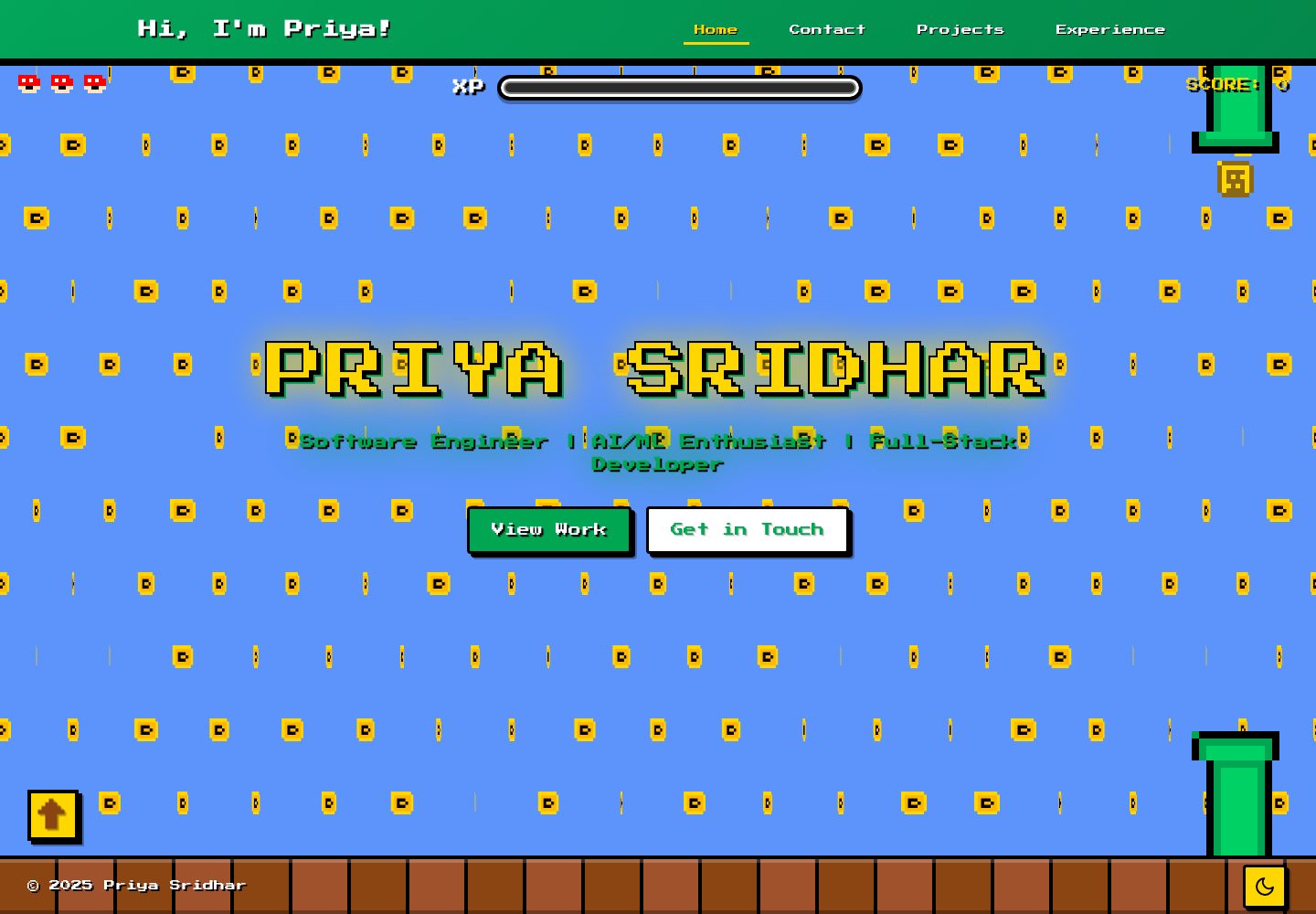
全部视觉元素为纯 CSS 像素艺术,用 div 与 ::before 伪元素的 box-shadow 逐像素绘制,不使用图片、SVG 或图标库
HTML作品集
portfolio-website — HTML 作品集模板
作者 theperiperi
一个以复古游戏(马里奥)为主题的纯 CSS 像素艺术个人作品集网站,包含项目展示、经历时间线、Nerd Wall 与明暗主题切换。
看看你的网站会是什么样
浏览真实页面截图,比较内容排版与手机效果。点击下方缩略图切换,放大查看整页细节。
全部页面与视图 2
截图用于了解视觉与布局,交互效果请以实际项目为准。
采集于 2026-10-13查看来源
值得关注的模板亮点
从已有项目资料中,快速了解它的特点。
金币旋转通过 scaleX 在 1 与 0 之间往返并配合 steps(8) 实现 8-bit 顿挫效果
云层视差动画在桌面端生成 30 层约 450 个元素,随机方向漂移并按不同滚动速度散开,移动端降为 10 层
约 5,400 行原生 CSS,使用自定义属性,未引入 Tailwind、Bootstrap 或 CSS-in-JS
明暗模式通过单个 data 属性切换
内容以 Markdown 管理,项目与经历分别存放在 /content/projects/ 与 /content/experience/
模板详细介绍
该模板是一个复古游戏主题的个人作品集网站。README 说明其视觉元素全部由 CSS 像素艺术构成:金币、水管、云朵、书本与电脑图标等都不是图片、SVG 或图标库,而是用 div 配合 ::before 伪元素通过 box-shadow 逐像素绘制;金币旋转用 scaleX 从 1 到 0 再返回并配合 steps(8) 实现 8-bit 的顿挫感。云层动画灵感来自游戏 Two Dots,桌面端生成 30 层云、约 450 个元素,各自随机方向漂移并以不同滚动速度散开形成视差揭示效果,移动端降为 10 层。样式为约 5,400 行原生 CSS,使用自定义属性,未使用 Tailwind、Bootstrap 或 CSS-in-JS;明暗模式通过单个 data 属性切换。
内容层面,站点提供项目展示(含案例说明)、经历时间线、Nerd Wall 兴趣板块,以及面向桌面、平板和手机的响应式布局。内容以 Markdown 文件管理,项目与经历分别放在 /content/projects/ 和 /content/experience/ 下,前置字段包含 title、description、date。
需要注意,仓库元数据将技术栈标为 HTML,但 README 描述的是 Next.js 与 TypeScript 项目,并给出 npm run dev、默认 3000 端口等启动方式,两者存在不一致,使用前应以仓库实际依赖与文件结构为准。仓库采用 MIT 许可,可免费使用、修改、商用和分发该版本代码,分发时需保留版权与许可声明;演示图片、字体、图标等第三方素材需按各自许可单独核对。
HTML作品集
适合你的项目吗?
适用场景
- 个人开发者搭建带有复古游戏风格的作品集网站
- 用 Markdown 维护项目案例与职业经历时间线,并按年份或日期组织内容
- 展示个人兴趣与性格的 Nerd Wall 板块
- 作为学习纯 CSS 像素艺术与滚动视差动画的参考实现
适合人群
- 希望作品集有强烈个人风格而非通用商务模板的开发者
- 愿意直接修改 CSS 与 Markdown 内容文件的使用者
- 需要明暗主题与移动端适配的个人站点
- 接受以原生 CSS 手写样式、不依赖 CSS 框架的项目
上手与定制指南
结合仓库当前版本的说明,按下面的资料检查内容、配置与运行要求。
- 1
仓库元数据标注技术栈为 HTML,README 则描述为 Next.js 与 TypeScript,使用前请以仓库实际依赖与文件结构为准
- 2
README 给出的启动流程为克隆仓库后执行 npm install(或 yarn install),再运行 npm run dev(或 yarn dev),默认访问 http://localhost:3000
- 3
README 要求 Node.js v14 或更高版本,但未提供依赖清单核对,实际版本要求以 package.json 为准
- 4
项目与经历内容分别添加到 /content/projects/ 与 /content/experience/ 的 Markdown 文件,前置字段包含 title、description、date
- 5
MIT 许可覆盖该版本代码,分发时需保留版权与许可声明;演示图片、字体、图标等第三方素材需单独核对许可
授权与来源资料
使用条件与限制
免费使用 · 保留许可声明本次收录的是公开仓库中采用 MIT 许可的免费版本;免费范围为该版本代码,不代表外部服务或第三方素材免费。
使用时需要遵守
- 允许免费使用、修改、商用和分发该版本代码。
- 分发代码副本或实质性部分时,保留原作者版权声明和完整 MIT 许可声明。
- 代码按现状提供;担保与责任限制以原许可证及适用法律为准。
额外费用与待核对事项
- 演示图片、字体、图标及其他第三方素材需按各自许可核对,不能仅凭代码的 MIT 许可判断。
- 域名、托管、数据库、支付或 AI 等外部服务可能另外收费。
查看原文依据
https://github.com/theperiperi/portfolio-website/blob/main/LICENSEhttps://github.com/theperiperi/portfolio-website/blob/main/README.mdPermission is hereby granted, free of charge
许可证原文
DeepSeek 根据仓库许可证和 README 整理 ·2026-10-13。结果仅覆盖已读取资料,依赖、图片、字体及后续条款变更以各自原文为准。
项目核对记录与介绍依据
模板资料
- 来源平台
- GitHub
- 资料与维护参考分
- 资料较完整 · 80 / 100
- 技术栈
- HTML
- 网站类型
- 作品集
这个分数如何计算
本站按许可资料(最高30分)、演示链接(12分)、预览图(10分)、Star数(15分)、记录的维护时间(15分)、描述完整度(8分)、功能记录(5分)和分类资料(5分)计算。它不是代码、安全或性能测试,也不是 Google 评分;有链接不代表已实测可用。
这个项目需要核对什么
- 记录的仓库更新时间
- 2026-02-21
- 截图检查日期
- 2026-10-13
已收录演示链接。请用你的内容与屏幕尺寸检查;有演示不代表表单、认证或支付已经可用。
目录记录的主要技术栈是 HTML。请通过依赖清单和锁文件核对实际版本与托管要求。这些说明基于收录资料,不代表代码审计或部署实测。
查看具体选型方法 →介绍的制作与核对状态
介绍由 AI 辅助整理目录与仓库资料。仓库作者不等于这篇介绍的审核者。
审核声明: [email protected] · 2026-10-13
查看当时使用的来源资料
SHA-256: 7c7fd3b38906026518a6a51a0694fa49caa97e189c8add25a6a674cbf0fbf4ed
2026-10-13T06:12:37.922Z
来源文件 / 仓库# Personal Portfolio Website Welcome to my personal portfolio website! This is where I showcase my projects, experience, and a bit about myself. Built with modern web technologies, this site reflects my journey as a developer and creator. **🌐 Live Site**: [https://priyadharshini-sridhar.vercel.app/](https://priyadharshini-sridhar.vercel.app/) ## Why it looks like this I've started and abandoned like 10 portfolio sites. Each time I'd get halfway through, realize it was too formal or too content-heavy, and didn't actually represent me as a person — so I'd drop it. This time I wanted something that actually resonated with me and told a story. So enter mario! Every visual element on this site is CSS pixel art. The coins, the pipes, the clouds, the book icon, the computer icon — all of it. No image files, no SVGs, no icon libraries. Each one is a `div` with a `::before` pseudo-element drawing individual pixels using `box-shadow`. The coin spin is `scaleX` going from 1 to 0 and back with `steps(8)` to keep it crunchy and 8-bit. The cloud animation is inspired by my favorite game Two Dots. It has this thing where clouds part as you progress through a level and I always wanted to try to make something just as cool and what better place that a portfolio site. It generates 30 layers of clouds — 450 elements on desktop — each drifting in a random direction, clearing at different scroll speeds so it feels like a parallax reveal. On mobile it drops to 10 layers so your phone doesn't melt. ~5,400 lines of CSS, no Tailwind, no Bootstrap, no CSS-in-JS. Just vanilla CSS with custom properties. Light/dark mode is a single data-attribute toggle. ## About This Project This portfolio website serves as a digital space to highlight my work, skills, and professional experience. It features: - **Projects Showcase**: A curated collection of my best work with detailed case studies - **Experience Timeline**: My professional journey and accomplishments - **Nerd Wall**: A fun section showcasing my interests and personality - **Responsive Design**: Fully optimized for desktop, tablet, and mobile devices - **Dark Mode**: Toggle between light and dark themes for comfortable viewing ## Tech Stack - **Framework**: [Next.js](https://nextjs.org/) with TypeScript - **Styling**: CSS with custom animations - **Content Management**: Markdown-based content system - **Deployment**: Ready for deployment on Vercel, Netlify, or similar platforms ## Getting Started ### Prerequisites - Node.js (v14 or higher) - npm or yarn ### Installation 1. Clone the repository: ```bash git clone https://github.com/theperiperi/portfolio-website.git cd portfolio-website ``` 2. Install dependencies: ```bash npm install # or yarn install ``` 3. Run the development server: ```bash npm run dev # or yarn dev ``` 4. Open [http://localhost:3000](http://localhost:3000) in your browser to see the result. ## 📁 Project Structure ``` portfolio-website/ ├── app/ # Next.js app directory │ ├── experience/ # Experience pages │ ├── projects/ # Project pages │ └── nerd-wall/ # Personal interests section ├── components/ # React components ├── content/ # Markdown content files ├── lib/ # Utility functions and data ├── public/ # Static assets └── styles/ # CSS stylesheets ``` ## Customization Feel free to fork this repository and make it your own! Here's how: 1. **Update Content**: Modify the content files in `/content/` to add your own projects and experiences 2. **Customize Styling**: Edit the CSS files in `/styles/` to match your personal brand 3. **Add Components**: Create new components in `/components/` to extend functionality 4. **Update Data**: Modify `/lib/data/` files to reflect your information ## Adding Your Own Content ### Projects Add new project markdown files to `/content/projects/` with the following structure: ```markdown --- title: Your Project Title description: Brief description date: YYYY-MM-DD --- Your project content here... ``` ### Experience Add experience entries to `/content/experience/` following the same markdown format. ## Contact & Questions Have questions or want to connect? Feel free to reach out (contact details on profile)! ## Contributing While this is a personal portfolio, I'm open to suggestions and improvements! If you find a bug or have an idea: 1. Fork the repository 2. Create your feature branch (`git checkout -b feature/AmazingFeature`) 3. Commit your changes (`git commit -m 'Add some AmazingFeature'`) 4. Push to the branch (`git push origin feature/AmazingFeature`) 5. Open a Pull Request ## License This project is open source and available under the [MIT License](LICENSE). ## Fork This Project Want to use this portfolio as a template for your own? Go ahead! 1. Click the "Fork" button at the top right of this repository 2. Clone your forked repository 3. Customize it with your own content, colors, and style 4. Deploy it and share your work with the world! If you use this template, I'd love to see what you create! Feel free to tag me or send me a link. --- **Built with ❤️ and 🍪s** *Last updated: February 2026*
看看同类模板
对比同技术栈与用途的模板,找到更适合的视觉与内容结构。

simplefolio
⚡️ A minimal portfolio template for Developers
HTML · 作品集

Freelancer
Freelancer 是 Start Bootstrap 出品的单页作品集模板,专为自由职业者、设计师和小型工作室设计。 页面结构清晰,包含多个内容区块、响应式作品集网格,每个作品项目配有模态窗口展示详情。
HTML · 作品集

Resume
Resume 是 Start Bootstrap 推出的简历与 CV 主题,基于 Bootstrap 构建,采用固定侧边栏加内容区块的结构。
HTML · 作品集

Creative
Creative 是 Start Bootstrap 团队维护的一款单页营销模板,定位明确:为创意机构或产品服务提供一个以作品展示和行动号召为核心的落地页。
HTML · 企业官网

Grayscale
Grayscale 是 Start Bootstrap 出品的深色系单页 HTML 模板,基于 Bootstrap 构建。 它的视觉重心放在大尺寸首屏和清晰的内容分区上,整体氛围偏暗,适合摄影、活动或品牌叙事类网站。
HTML · 企业官网

startbootstrap-stylish-portfolio
Stylish Portfolio 是 Start Bootstrap 维护的单页作品集主题,基于 Bootstrap 构建,采用多个内容区块加离屏导航菜单的结构。
HTML · 作品集