The content source is a specified folder in the Obsidian vault, converted via pnpm run sync into Markdown and JSON readable by Astro
AstroBlogStarter
blog-with-astro-boilerplate — Astro Blog Template
By thientranhung
An Astro blog template based on the AstroPaper theme that converts Obsidian notes into site content via a sync script and supports deployment to Cloudflare Workers.
Explore the design
Compare the page layouts and mobile experience. Open any screenshot for a closer look.
Author preview
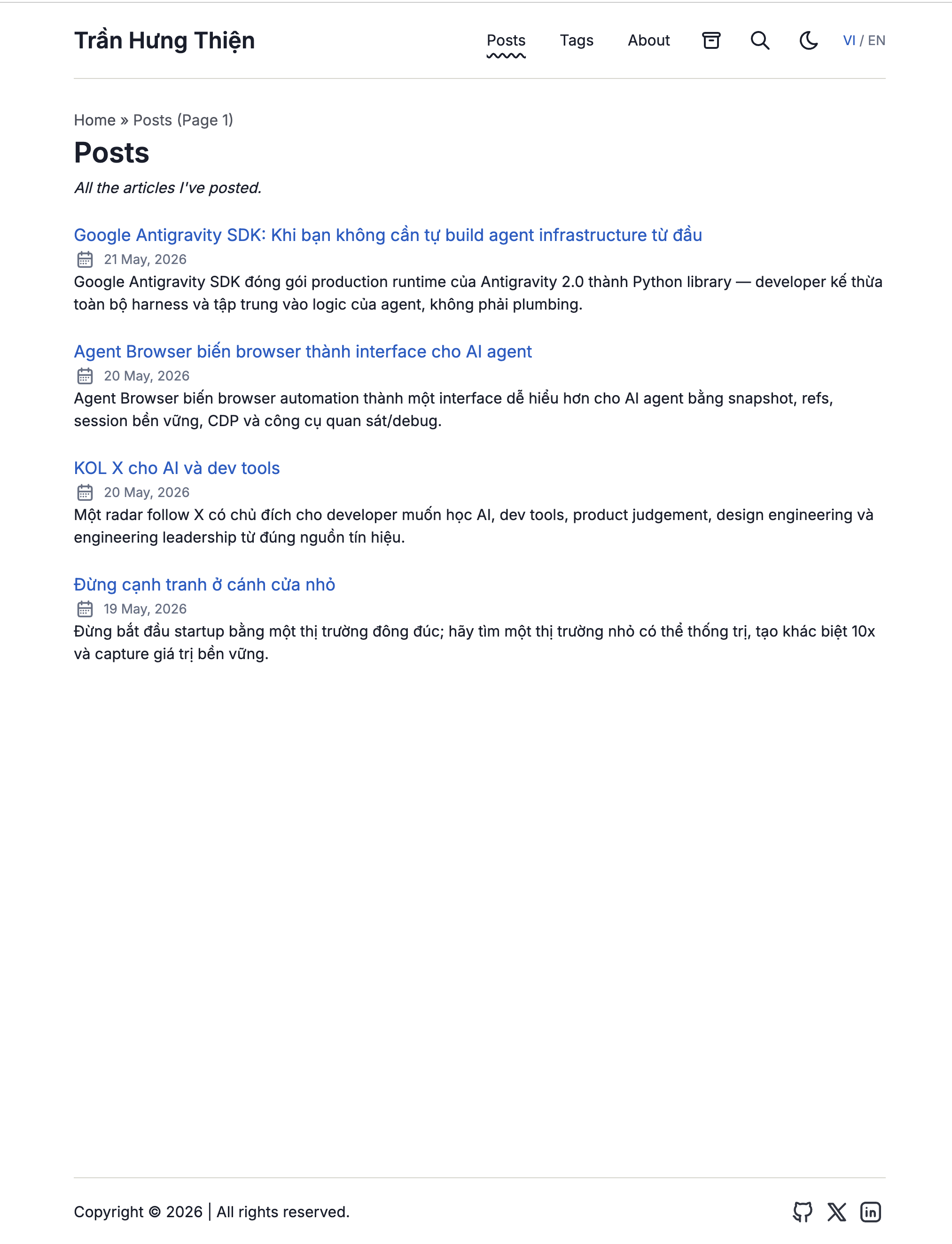
Author-provided previewTop of page
Preview provided in the project README.
One original preview is available. Open the full image to inspect the design.
Screenshots show visual appearance; interactive behavior may differ.
Recorded 2026-10-13View source
What stands out
A quick read of the recorded project description.
Based on the AstroPaper theme, with site metadata centrally configured in astro-paper.config.ts
Supports conversion of Obsidian syntax such as internal links, callouts, highlights, comment stripping, and Mermaid
Frontmatter provides language and translation key fields to associate Vietnamese and English article versions
Images can be uploaded to Cloudflare R2, and commands are provided for deployment to Cloudflare Workers
Template Details
This is an Astro starter for personal blogs, with a theme based on AstroPaper. Its core feature is writing in Obsidian: notes are stored in a specified folder in the Obsidian vault (default 50-Publish), and after running the sync command, a conversion process generates Markdown under src/content/posts and JSON under src/content/generated. Astro only reads the normalized content after sync and does not directly access the Obsidian vault.
To publish an article, you need to set publish_status: publish or published: true in the note's frontmatter, then run the sync and deploy commands in sequence; for local preview, sync first and then start the development server. Frontmatter supports fields such as title, slug, description, cover, tags, series, language, translation key, creation and update times, and canonical. The language can be vi (default) or en, and the translation key is used to associate Vietnamese and English versions of the same article.
Conversion of Obsidian syntax covers internal links and aliases, in-page anchors, image embeds, callouts, highlights, comment stripping, block ID stripping, as well as strikethrough, tables, task lists, and footnotes handled via GFM. Mermaid code blocks are rendered client-side. Images can be uploaded to Cloudflare R2 and referenced via a CDN base URL. Site metadata is configured in astro-paper.config.ts, and style variables are adjusted in src/styles/theme.css.
Before use, you need to prepare the Obsidian vault path and publish folder. Deploying to Cloudflare Workers requires an API Token and account ID, and image uploads also require environment variables such as R2 account, keys, bucket name, and endpoint. The template is MIT licensed and can be used, modified, commercialized, and distributed for free, but third-party assets such as demo images, fonts, and icons need separate license verification, and external services such as domain, hosting, and R2 may incur costs.
AstroBlogStarter
Is it right for your project?
Use Cases
- Personal blogs where you write in Obsidian and want to keep the vault separate from blog content
- Sites that need to maintain both Vietnamese and English versions of articles
- Users who want to deploy the blog to Cloudflare Workers and use R2 for image storage
Suitable For
- Writers accustomed to writing and organizing notes in Obsidian
- Developers using Astro who accept the default structure of the AstroPaper theme
- Users who need a static blog and are willing to configure Cloudflare Workers and R2
Getting started & customization
Use these recorded setup notes alongside the repository instructions for your chosen version.
- 1
Copy .env.example to .env, fill in VAULT_PATH and VAULT_POSTS_FOLDER; image uploads require additional R2-related variables
- 2
Set the site URL, title, description, author, personal links, and social accounts in astro-paper.config.ts, and update the name and description in package.json accordingly
- 3
Before publishing an article, set publish_status: publish or published: true in the Obsidian note's frontmatter
- 4
For local preview, run pnpm run sync first and then pnpm dev (default port 4322); for deployment, use pnpm run deploy
License & source material
Usage conditions & limitations
Free to use · keep license noticeThis entry covers the free version under the MIT license in the public repository; the free scope applies to that version's code and does not mean external services or third-party assets are free.
Must comply with when using
- Free use, modification, commercial use, and distribution of that version's code are permitted.
- When distributing copies or substantial portions of the code, retain the original author's copyright notice and the full MIT license notice.
- The code is provided as is; warranties and limitations of liability are governed by the original license and applicable law.
Additional costs & items to verify
- Demo images, fonts, icons, and other third-party assets must be checked under their respective licenses and cannot be judged solely by the code's MIT license.
- External services such as domain, hosting, database, payment, or AI may incur additional charges.
- Before use, you must provide the absolute path to a local Obsidian vault; the template relies on that external vault as the content source and cannot write independently of Obsidian.
- You must specify the folder in the Obsidian vault used for publishing (default 50-Publish); only notes within that folder will be synced as blog content.
- Deploying to Cloudflare Workers requires a Cloudflare API Token with Workers Scripts: Edit permission, which is an external account and key requirement.
- To automatically upload local Obsidian images to Cloudflare R2 CDN, you need to configure credentials such as the R2 account ID, involving an external paid service.
- Publishing an article requires setting publish_status: publish (or published: true) in the Obsidian note's frontmatter as the publish trigger.
- Content updates rely on manually running pnpm run sync to pull and convert from the Obsidian vault; Astro does not directly read the vault.
View Original Text Basis
Permission is hereby granted, free of charge
Original License Text
VAULT_PATH=/path/to/your/obsidian/vault
Original README
VAULT_POSTS_FOLDER=50-Publish
Original README
CF_API_TOKEN= # needs "Workers Scripts: Edit" permission
Original README
R2_ACCOUNT_ID=
Original README
publish_status: publish
Original README
https://github.com/thientranhung/blog-with-astro-boilerplate/blob/main/LICENSEhttps://github.com/thientranhung/blog-with-astro-boilerplate/blob/main/README.mdpnpm run sync # pull from Obsidian vault
Original README
Compiled by DeepSeek based on repository license and README ·2026-10-13. Results only cover the materials read; dependencies, images, fonts, and subsequent term changes are subject to their respective original texts.
Project checks & description sources
Template Information
- Source platforms
- GitHub
- Documentation and maintenance reference score
- Partly documented · 73 / 100
- Technologies
- Astro
- Website type
- Blog · Starter
How this score is calculated
Our heuristic uses license records (up to 30), a demo link (12), a preview (10), stars (15), recorded maintenance (15), description completeness (8), feature records (5) and classification data (5). It is not a code, security or performance test, or a Google score. A link does not establish tested functionality.
What to verify for this project
- Repository update recorded
- 2026-05-21
- Screenshot last checked
- 2026-10-13
No demo link is recorded. Use the repository instructions to evaluate the project locally; the screenshot alone cannot establish interactive behavior.
The catalog identifies Astro as the primary stack. Check the actual dependency manifest and lockfile for versions and hosting requirements. These notes use recorded metadata, not a code audit or a deployment test.
Use a selection guide →How this description was prepared
AI-assisted description based on catalog records and repository material. Repository authors are not automatically the reviewers of this description.
Review declaration: [email protected] · 2026-10-13
Inspect the recorded source material
SHA-256: 78c26f1a8eacd855bd5386d96f9b817477cfd3de1bef4b0d9c10703b2556c83a
2026-10-13T00:55:31.065Z
Source file / repository# Astro Obsidian Blog Boilerplate
**Preview:**
<img src="./home-blog.png" alt="Astro Obsidian Blog Preview" width="600" />
A professional, high-performance boilerplate for creating a personal blog with Astro (using the AstroPaper theme), syncing your content directly from an Obsidian vault, and deploying to Cloudflare Workers.
## Personalization & Customization
To turn this boilerplate into your own personal blog, follow these steps:
1. **Configure Site Metadata**:
Open [astro-paper.config.ts](file:///Users/tranthien/Documents/2.DEV/3.BLOGS/my-blog-with-astro-boilerplate/astro-paper.config.ts) and modify the `site` and `socials` properties to match your details:
- `url`: Your production website domain (e.g., `https://yourdomain.com`).
- `title`: The title of your blog.
- `description`: The meta description for SEO.
- `author`: Your name.
- `profile`: Your primary profile link (e.g. your GitHub profile).
- `socials`: Update URLs for GitHub, X, LinkedIn, etc.
2. **Configure package.json**:
Open [package.json](file:///Users/tranthien/Documents/2.DEV/3.BLOGS/my-blog-with-astro-boilerplate/package.json) and modify `name` and `description` to match your personal repository details.
3. **Configure Environment Variables**:
Copy `.env.example` to `.env` and fill in your settings:
- `VAULT_PATH`: The absolute path to your Obsidian vault.
- `VAULT_POSTS_FOLDER`: The folder name in Obsidian where your notes to publish are stored (default: `50-Publish`).
- (Optional) Configure Cloudflare R2 credentials if you want to automatically upload local Obsidian images to Cloudflare R2 CDN.
4. **Customize CSS and Styling**:
- Customize your theme colors, fonts, and CSS variables in [src/styles/theme.css](file:///Users/tranthien/Documents/2.DEV/3.BLOGS/my-blog-with-astro-boilerplate/src/styles/theme.css) or modify the layouts under `src/layouts/`.
## How it works
```
Obsidian Vault (50-Publish/)
└─→ pnpm run sync ← transform pipeline
├─→ src/content/posts/*.md
└─→ src/content/generated/*.json
Astro (AstroPaper theme)
└─→ pnpm run deploy ← build + deploy to Cloudflare Workers
```
Astro never reads the vault directly — it only sees the normalized output from `sync`.
## Publishing a post
1. In Obsidian, add to the note's frontmatter:
```yaml
publish_status: publish
```
2. Run sync + deploy:
```bash
pnpm run sync # pull from Obsidian vault
pnpm run deploy # build + deploy to Cloudflare
```
To preview locally before deploying:
```bash
pnpm run sync
pnpm dev # http://localhost:4322
```
## Frontmatter schema
```yaml
title: "Required"
# Publish trigger — either works:
publish_status: publish
published: true
# Optional fields:
slug: "custom-url-slug" # falls back to slugified filename
short_description: "..." # alias for description
description: "..."
featured_image: "https://..." # remote URL — alias for cover
cover: "/Assets/local.jpg" # local vault path
tags: [tag1, tag2]
series: "series-name"
lang: vi # "vi" (default) or "en"
translationKey: "some-key" # links VI/EN post pairs
created: 2026-05-20
updated: 2026-05-20
canonical: "https://..."
```
## Supported Obsidian syntax
| Syntax | Output |
|--------|--------|
| `[[note]]`, `[[note\|alias]]` | Internal link |
| `[[#heading\|alias]]` | In-page anchor link |
| `![[image.png]]` | Image (uploaded to R2) |
| `> [!note]`, `[!warning]`, `[!tip]`, etc. | Styled callout |
| `==highlight==` | `<mark>` yellow highlight |
| `%%comment%%` | Stripped (not rendered) |
| `^block-id` | Stripped |
| `~~strikethrough~~`, tables, `- [ ]` tasks, `[^footnote]` | Via GFM |
| Mermaid code blocks | Client-side rendered |
## Commands
| Command | Description |
|---------|-------------|
| `pnpm run sync` | Sync Obsidian vault → `src/content/` |
| `pnpm dev` | Dev server at localhost:4322 |
| `pnpm run build` | Build to `dist/` (for local preview/debug) |
| `pnpm preview` | Preview production build locally |
| `pnpm run deploy` | Build + deploy to Cloudflare Workers |
## Environment variables
Copy `.env.example` to `.env`:
```bash
VAULT_PATH=/path/to/your/obsidian/vault
VAULT_POSTS_FOLDER=50-Publish
# Cloudflare R2 (for image uploads)
R2_ACCOUNT_ID=
R2_ACCESS_KEY_ID=
R2_SECRET_ACCESS_KEY=
R2_BUCKET_NAME=
R2_ENDPOINT=
CDN_BASE_URL=
# Cloudflare Workers deploy
CF_API_TOKEN= # needs "Workers Scripts: Edit" permission
CF_ACCOUNT_ID=
```
## Tech stack
- **[Astro v6](https://astro.build)** + **[AstroPaper v6](https://github.com/satnaing/astro-paper)** — SSG framework + theme
- **[Cloudflare Workers](https://workers.cloudflare.com)** — hosting
- **[Cloudflare R2](https://developers.cloudflare.com/r2/)** — image storage
- **[Tailwind CSS v4](https://tailwindcss.com)** — styling
- **[Shiki](https://shiki.style)** — code syntax highlighting
- **[Pagefind](https://pagefind.app)** — static search
- **[rehype-callouts](https://github.com/lin-stephanie/rehype-callouts)** — Obsidian callout rendering
Explore similar templates
Compare previews and descriptions within the same stack and category.

astrowind
AstroWind is a free, open-source Astro starter theme using Astro and Tailwind CSS, released under the MIT license.
Astro · Blog

astro-paper
AstroPaper is a minimal, responsive, accessible, and SEO-friendly Astro blog theme. Articles are stored as Markdown/MDX in src/content/posts/, with subdirectories affecting URLs.
Astro · Blog

fuwari
Fuwari is a static blog template built with Astro and Tailwind CSS for personal blogs. It manages posts as Markdown files in src/content/posts/, with frontmatter for title, date, description, cover, tags, categories, draft status, and language.
Astro · Blog

Firefly
Firefly is a clean personal blog theme forked from Astro and Fuwari, offering four background modes, single/double sidebar and list/grid layouts, Pagefind client-side full-text search, and a six-language UI.
Astro · Blog

astro-theme-cactus
Astro Cactus is an Astro-based blog and portfolio theme that uses Markdown/MDX content collections to manage posts, notes, and tags, with frontmatter type-checked by a schema.
Astro · Portfolio

astrofy
Astrofy is a free and open-source personal portfolio website template built with Astro and TailwindCSS, with built-in blog, CV timeline, project showcase, store, and RSS feed modules.
Astro · Portfolio