Uses a GitHub repository as a content database, dynamically reading and displaying Markdown content via the GitHub API
HTMLPortfolio
markdown_website — HTML Portfolio Template
By tobwil
A static personal portfolio website template that uses a GitHub repository as its content source, built with HTML/CSS/JavaScript, and dynamically reads Markdown files via the GitHub API to display projects, posts, and listening content.
Explore the design
Compare the page layouts and mobile experience. Open any screenshot for a closer look.
Desktop homepage1 / 2
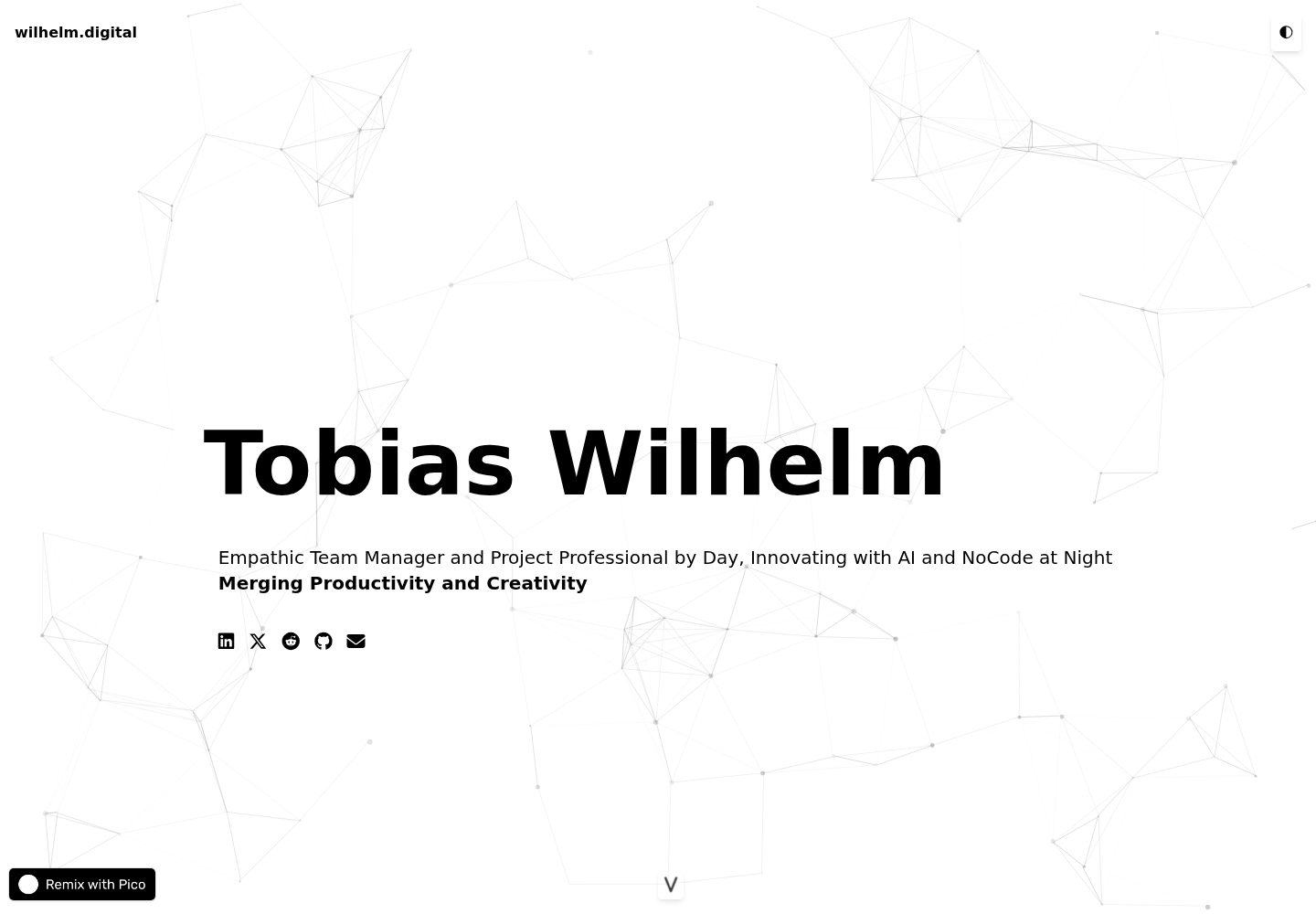
Desktop captureTop of page
Actual screenshot captured by the server browser.
All pages & views 2
Screenshots show visual appearance; interactive behavior may differ.
Recorded 2026-09-30View source
What stands out
A quick read of the recorded project description.
Uses Showdown.js to render Markdown to HTML, with projects, posts, and listening content placed in their respective directories
Responsive layout based on Tailwind CSS, adapting to desktop, tablet, and mobile
Built-in day/night mode toggle and particles.js particle animation background
Footer uses elevator.js to provide a back-to-top interaction with sound effects, plus a scroll hint button
Content is shuffled randomly and paired with a Show More button to control the number of items shown initially
Template Details
This template is a purely static HTML/CSS/JavaScript personal website that treats a GitHub repository as a content database: the page calls the GitHub API in the browser to read Markdown files from directories such as posts, projects, and listening, then renders them to HTML with Showdown.js. As a result, updating content only requires committing Markdown to the repository, with no changes to the page code.
For the interface, the template uses Tailwind CSS for responsive layout, offers a day/night mode toggle, has a particles.js particle animation background, and the footer uses elevator.js to provide an 'elevator' back-to-top interaction with sound effects, along with a scroll hint button. Content is shuffled randomly and expanded via a 'Show More' button. The README provides Markdown format examples for projects, listening, and posts.
Before use, you need to change the baseUrl in the JavaScript to your own GitHub username and repository name, and place Markdown files according to the directory structure; deployment can use GitHub Pages, or you can bind a custom domain. The template relies on the GitHub API to read content, so content visibility and request frequency are subject to GitHub API rules; the README does not explain how to handle offline or private repository scenarios.
HTMLPortfolio
Is it right for your project?
Use Cases
- Building a personal portfolio website to showcase projects on GitHub
- Maintaining a personal content site written in Markdown without a database
- Needing a lightweight static personal homepage with day/night mode and an animated background
- Hosting a personal website with GitHub Pages and optionally binding a custom domain
Suitable For
- Individual developers willing to manage content in Markdown within a GitHub repository
- Those who want to build a portfolio with pure static HTML/CSS/JavaScript
- Showcase-oriented personal sites that need visual effects such as day/night mode and particle backgrounds
- Users who can modify HTML, CSS, and JavaScript themselves for customization
Getting started & customization
Use these recorded setup notes alongside the repository instructions for your chosen version.
- 1
After forking or cloning the repository, change the baseUrl in the JavaScript to your own GitHub username and repository name
- 2
Add content in the posts, projects, and listening directories following the Markdown format given in the README, then commit and push
- 3
Modify HTML, CSS, and JavaScript as needed to adjust titles, links, and styles
- 4
For deployment, you can use GitHub Pages by selecting the branch to publish in the repository settings, or configure a custom domain
- 5
Content is read via the GitHub API, so pay attention to repository visibility and API call limits
License & source material
Usage conditions & limitations
Free to use · keep license noticeThis entry covers the free version under the MIT license in the public repository; the free scope is the code of this version and does not mean that external services or third-party assets are free.
Must comply with when using
- You are allowed to use, modify, commercialize, and distribute the code of this version for free.
- When distributing copies or substantial portions of the code, retain the original author's copyright notice and the full MIT license notice.
- The code is provided as is; warranties and limitations of liability are governed by the original license and applicable law.
Additional costs & items to verify
- The website content is read from a GitHub repository via browser-side calls to the GitHub API, so content display depends on the availability of GitHub services and API rules, and content cannot be fetched normally in an offline environment.
- Before use, you must change the baseUrl in the JavaScript to your own GitHub username and repository name, otherwise content cannot be read.
- Deployment relies on external hosting services such as GitHub Pages, and you are responsible for their terms of use and fees.
- Demo images, fonts, icons, and other third-party assets must be checked against their respective licenses; the code's MIT license alone cannot be used to judge them.
- External services such as domains, hosting, databases, payments, or AI may incur additional charges.
View Original Text Basis
Permission is hereby granted, free of charge
Original License Text
The website dynamically fetches and displays content from GitHub repositories
Original README
const baseUrl = "https://api.github.com/repos/[Your-GitHub-Username]/[Your-Repo-Name]/contents/";
Original README
https://github.com/tobwil/markdown_website/blob/main/LICENSEhttps://github.com/tobwil/markdown_website/blob/main/README.md**GitHub Pages**: You can use GitHub Pages to host your website directly from your GitHub repository.
Original README
Compiled by DeepSeek based on repository license and README ·2026-09-30. Results only cover the materials read; dependencies, images, fonts, and subsequent term changes are subject to their respective original texts.
Project checks & description sources
Template Information
- Source platforms
- GitHub
- Documentation and maintenance reference score
- Partly documented · 72 / 100
- Technologies
- HTML
- Website type
- Portfolio
How this score is calculated
Our heuristic uses license records (up to 30), a demo link (12), a preview (10), stars (15), recorded maintenance (15), description completeness (8), feature records (5) and classification data (5). It is not a code, security or performance test, or a Google score. A link does not establish tested functionality.
What to verify for this project
- Repository update recorded
- 2024-01-11
- Screenshot last checked
- 2026-09-30
A demo link is listed. Check it with your own content and viewport sizes; its presence does not confirm that forms, authentication or payments work.
The catalog identifies HTML as the primary stack. Check the actual dependency manifest and lockfile for versions and hosting requirements. These notes use recorded metadata, not a code audit or a deployment test.
Use a selection guide →How this description was prepared
AI-assisted description based on catalog records and repository material. Repository authors are not automatically the reviewers of this description.
Automatically checked against source and license rules; no manual editorial review.
Inspect the recorded source material
SHA-256: afdf9c9f266e25221aae83cfff572da5b52e73d435468db71b6afff1193abc00
2026-09-30T11:04:54.621Z
Source file / repository# Personal Website via GitHub Markdowns
A Static HTML/CSS/JavaScript Website using GitHub as Database for its content
**[🔗 Remixable DEMO @ PicoApps](https://a.picoapps.xyz/window-population)**
**[🔗 LIVE @ wilhelm.digital](https://wilhelm.digital/)**
## Table of Contents
1. [Features](#features)
2. [Screenshots ☀️ Day Mode](#screenshots-️-day-mode)
3. [Screenshots 🌗 Night Mode](#screenshots--night-mode)
4. [Technologies and Libraries](#technologies-and-libraries)
5. [How to Use?](#how-to-use)
- [Step 1: Clone the Repository](#step-1-clone-the-repository)
- [Step 2: Customize the Website](#step-2-customize-the-website)
- [Step 3: Add Content](#step-3-add-content)
- [Step 4: Deploy the Website](#step-4-deploy-the-website)
# Features
* **Dynamic Content Fetching**: The website dynamically fetches and displays content from GitHub repositories, showcasing projects, posts, and listenings, keeping the content fresh and updated
* **Responsive Design**: Tailored for various device sizes and screen resolutions using Tailwind CSS, ensuring a seamless user experience across desktops, tablets, and mobile devices
* **Interactive Particle Background**: Integrates an animated particle system (using particles.js) as a background, adding a visually engaging and interactive element to the website
* **Dark Mode Toggle**: Includes a user-friendly toggle switch for dark mode, enhancing visual comfort and accessibility for different lighting conditions and user preferences
* **Markdown Rendering**: Utilizes Showdown.js to convert Markdown files into HTML, providing an easy way to write and display styled content
* **Social Media Integration**: Offers quick access to various social media platforms and contact methods, encouraging engagement and connectivity
* **Interactive Footer with Elevator Effect**: The footer, powered by elevator.js, provides a unique, humorous interaction for navigating the page with an 'elevator ride' sound effect
* **Scroll Down Animation**: Features an animated scroll-down button, guiding users to explore more content intuitively
* **Custom Styling for Markdown Content**: Special CSS styling is applied to Markdown content, enhancing readability and visual appeal
* **Content Shuffling and Expansion**: Content is randomly shuffled for variety, and a 'Show More' button is provided for expanded viewing, keeping the initial page view neat while allowing deeper exploration.
# SCREENSHOTS ☀️ Day Mode


---
# SCREENSHOTS 🌗 Night Mode


# Technologies and Libraries
* Tailwind CSS (v2.2.3)
* Font Awesome (v6.4.2)
* Showdown.js (v1.9.1)
* Particles.js (v2.0.0)
* Elevator.js
* Native JavaScript
* HTML5
* CSS3
# How to use?
## Step 1: Clone the Repository
**Fork or Clone the Original Repository**: If the original repository is available on GitHub and allows forking, you can fork it. Alternatively, you can clone it directly to your local machine using Git. For forking, use the GitHub interface. For cloning, use:
```
bash
Copy code
git clone https://github.com/tobwil/markdown_website
```
**Create Your Own Repository**: If you forked the repository, you already have a copy on your GitHub account. If you cloned it, create a new repository on GitHub and push the cloned content to your new repository.
## Step 2: Customize the Website
**Update Repository Links**: In the JavaScript code, change the baseUrl variable to point to your own GitHub repository:
```
javascript
Copy code
const baseUrl = "https://api.github.com/repos/[Your-GitHub-Username]/[Your-Repo-Name]/contents/";
Modify Content: Replace the existing content with your own. This includes updating Markdown files in the 'posts', 'projects', and 'listening' directories.
```
**Adjust HTML and CSS**: Customize the HTML and CSS files to match your personal branding, style preferences, and content layout. Update titles, headings, and links.
**Customize JavaScript**: Modify the JavaScript as needed to suit your content structure and interactivity preferences.
## Step 3: Add Content
**Create Markdown Files**: Add your own Markdown files in the respective folders (posts, projects, listening) in your GitHub repository. These files should contain the content you want to display on your website.
**Commit and Push Changes**: After adding or updating the content, commit your changes and push them to your GitHub repository:
```
bash
Copy code
git add .
git commit -m "Update content"
git push origin master
```
📋 ***Project Markdown Layout***
```
# Title
Subtitle
<br>
<img src="IMAGE URL" height="200">
<br>
## Key Features
* Feature 1
* Feature 2
* Feature 3
<br>
**[<i class="fa-solid fa-up-right-from-square"></i> Uncover the Project - Click Here](PROJECT URL)**
```
📋 ***Listening Markdown Layout***
```
<a href="SPOTIFY URL">
<img src="IMAGE URL" width="200" height="200">
</a>
```
📋 ***Post Markdown Layout***
```
# Title (price)
Subtitle
<br>
[<i class="fa-solid fa-fire"></i> Check it out](LINK URL)
```
## Step 4: Deploy the Website
**GitHub Pages**: You can use GitHub Pages to host your website directly from your GitHub repository. Go to the repository settings on GitHub, find the "Pages" section, and select the branch you want to deploy.
**Custom Domain (Optional)**: If you have a custom domain, you can configure it in the GitHub Pages settings.
Explore similar templates
Compare previews and descriptions within the same stack and category.

simplefolio
Simplefolio is a minimal single-page portfolio template for developers, built with HTML, Bootstrap, SCSS, and Parcel under the MIT license. It includes Hero, About, Projects, Contact, and Footer sections, with content edited in /src/index.html and theme colors controlled by two SCSS variables.
HTML · Portfolio

Freelancer
A bright, single-page Bootstrap portfolio template for freelancers, designers, and small studios. It includes a responsive portfolio grid with modal detail windows and an SB Forms contact form that requires an API token.
HTML · Portfolio

Resume
A single-page resume and CV template from Start Bootstrap, built on Bootstrap with a fixed sidebar and content sections.
HTML · Portfolio

Creative
A single-page marketing template by Start Bootstrap for creative agencies and product services, built on Bootstrap with SCSS, featuring a portfolio grid and call-to-action sections. It includes pre-set SB Forms markers for form integration and npm build scripts for source customization.
HTML · Corporate Website

Grayscale
A dark single-page Bootstrap template from Start Bootstrap for photography, events and brand storytelling, with a large hero and clearly separated sections.
HTML · Corporate Website

startbootstrap-stylish-portfolio
A one-page Bootstrap portfolio theme from Start Bootstrap with multiple content sections and an off-canvas navigation menu. Basic use means editing HTML/CSS under dist and opening index.html; advanced use relies on npm with Pug and SCSS build scripts.
HTML · Portfolio