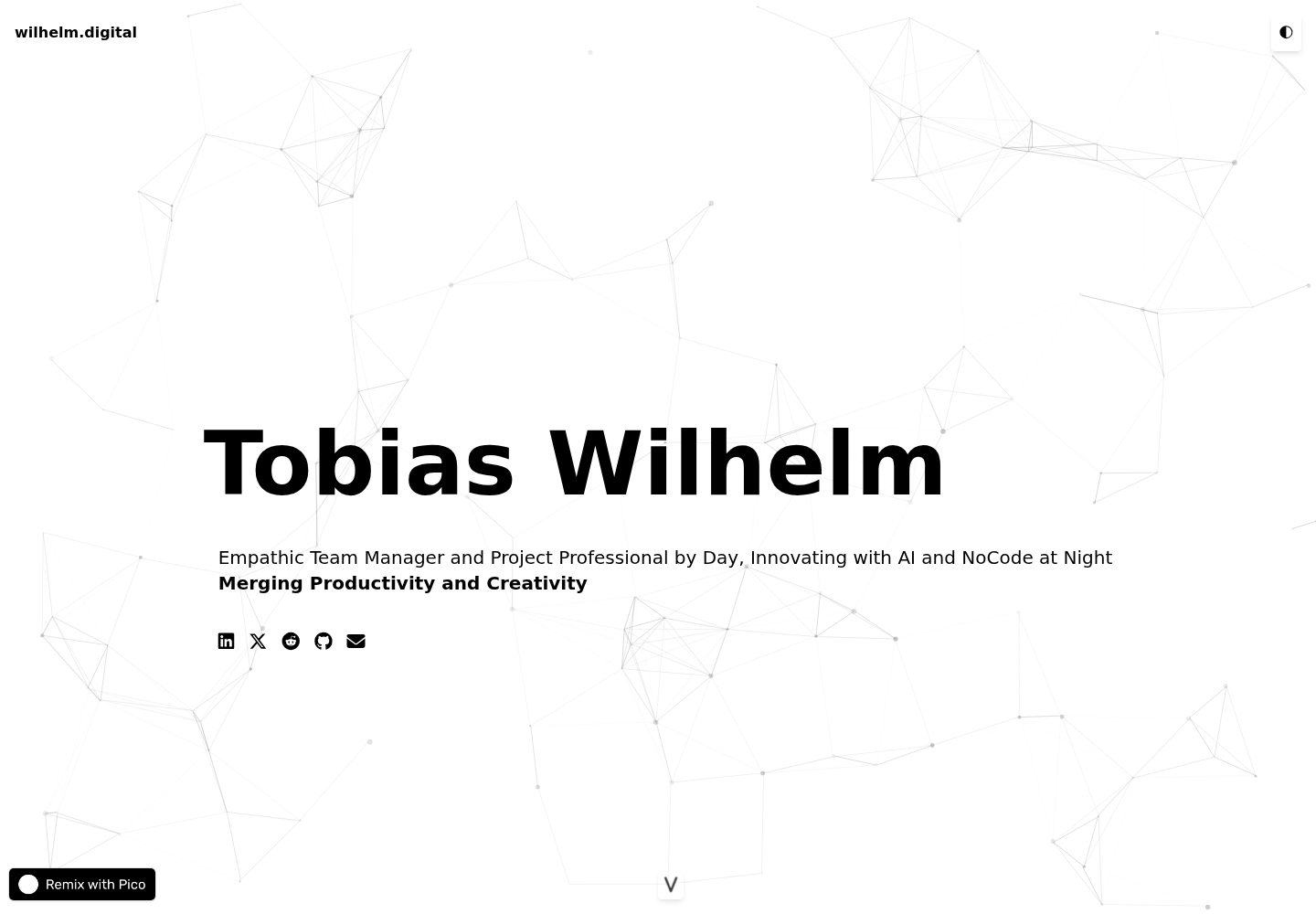
以 GitHub 仓库作为内容数据库,通过 GitHub API 动态读取并展示 Markdown 内容
HTML作品集
markdown_website — HTML 作品集模板
作者 tobwil
一个以 GitHub 仓库作为内容源的静态个人作品集网站模板,用 HTML/CSS/JavaScript 构建,通过 GitHub API 动态读取 Markdown 文件展示项目、文章与收听内容。
看看你的网站会是什么样
浏览真实页面截图,比较内容排版与手机效果。点击下方缩略图切换,放大查看整页细节。
全部页面与视图 2
截图用于了解视觉与布局,交互效果请以实际项目为准。
采集于 2026-09-30查看来源
值得关注的模板亮点
从已有项目资料中,快速了解它的特点。
使用 Showdown.js 将 Markdown 渲染为 HTML,项目、文章、收听内容分别放在对应目录
基于 Tailwind CSS 的响应式布局,适配桌面、平板与手机
内置日间/夜间模式切换,以及 particles.js 粒子动画背景
页脚使用 elevator.js 提供带音效的返回顶部交互,另有滚动提示按钮
内容随机打乱并配有 Show More 按钮,控制首屏展示数量
模板详细介绍
该模板是一个纯静态的 HTML/CSS/JavaScript 个人网站,把 GitHub 仓库当作内容数据库:页面在浏览器端调用 GitHub API 读取仓库中 posts、projects、listening 等目录下的 Markdown 文件,再用 Showdown.js 渲染成 HTML 展示,因此更新内容只需向仓库提交 Markdown,无需改动页面代码。
界面方面,模板使用 Tailwind CSS 做响应式布局,提供日间/夜间模式切换,背景是 particles.js 的粒子动画,页脚使用 elevator.js 实现带音效的“电梯”返回顶部交互,并配有滚动提示按钮。内容会随机打乱顺序,并通过“Show More”按钮展开更多条目。README 给出了项目、收听、文章三类 Markdown 的书写格式示例。
使用前需要把 JavaScript 中的 baseUrl 改为自己的 GitHub 用户名与仓库名,并按目录结构放置 Markdown 文件;部署可选用 GitHub Pages,也可绑定自定义域名。模板依赖 GitHub API 读取内容,因此内容可见性、请求频率等受 GitHub 接口规则约束,README 未说明离线或私有仓库场景下的处理方式。
HTML作品集
适合你的项目吗?
适用场景
- 搭建个人作品集网站,集中展示 GitHub 上的项目
- 维护一个以 Markdown 写作、无需数据库的个人内容站点
- 需要一个带日夜模式和动画背景的轻量静态个人主页
- 用 GitHub Pages 托管并可选绑定自定义域名的个人网站
适合人群
- 愿意用 Markdown 在 GitHub 仓库中管理内容的个人开发者
- 希望用纯静态 HTML/CSS/JavaScript 搭建作品集的人
- 需要日夜模式与粒子背景等视觉效果的展示型个人站点
- 能自行修改 HTML、CSS 与 JavaScript 进行定制的使用者
上手与定制指南
结合仓库当前版本的说明,按下面的资料检查内容、配置与运行要求。
- 1
Fork 或 clone 仓库后,将 JavaScript 中的 baseUrl 改为自己的 GitHub 用户名与仓库名
- 2
在 posts、projects、listening 目录中按 README 给出的 Markdown 格式添加内容,并提交推送
- 3
按需修改 HTML、CSS 与 JavaScript 以调整标题、链接和样式
- 4
部署可使用 GitHub Pages,在仓库设置中选择要发布的分支,也可配置自定义域名
- 5
内容通过 GitHub API 读取,需注意仓库可见性与接口调用限制
授权与来源资料
使用条件与限制
免费使用 · 保留许可声明本次收录的是公开仓库中采用 MIT 许可的免费版本;免费范围为该版本代码,不代表外部服务或第三方素材免费。
使用时需要遵守
- 允许免费使用、修改、商用和分发该版本代码。
- 分发代码副本或实质性部分时,保留原作者版权声明和完整 MIT 许可声明。
- 代码按现状提供;担保与责任限制以原许可证及适用法律为准。
额外费用与待核对事项
- 网站内容通过浏览器端调用 GitHub API 从 GitHub 仓库读取,因此内容展示依赖 GitHub 服务的可用性与接口规则,离线环境无法正常获取内容。
- 使用前必须把 JavaScript 中的 baseUrl 改为自己的 GitHub 用户名与仓库名,否则无法读取内容。
- 部署依赖 GitHub Pages 等外部托管服务,需自行承担相应服务的使用条件与费用。
- 演示图片、字体、图标及其他第三方素材需按各自许可核对,不能仅凭代码的 MIT 许可判断。
- 域名、托管、数据库、支付或 AI 等外部服务可能另外收费。
查看原文依据
Permission is hereby granted, free of charge
许可证原文
The website dynamically fetches and displays content from GitHub repositories
README 原文
const baseUrl = "https://api.github.com/repos/[Your-GitHub-Username]/[Your-Repo-Name]/contents/";
README 原文
https://github.com/tobwil/markdown_website/blob/main/LICENSEhttps://github.com/tobwil/markdown_website/blob/main/README.md**GitHub Pages**: You can use GitHub Pages to host your website directly from your GitHub repository.
README 原文
DeepSeek 根据仓库许可证和 README 整理 ·2026-09-30。结果仅覆盖已读取资料,依赖、图片、字体及后续条款变更以各自原文为准。
项目核对记录与介绍依据
模板资料
- 来源平台
- GitHub
- 资料与维护参考分
- 资料一般 · 72 / 100
- 技术栈
- HTML
- 网站类型
- 作品集
这个分数如何计算
本站按许可资料(最高30分)、演示链接(12分)、预览图(10分)、Star数(15分)、记录的维护时间(15分)、描述完整度(8分)、功能记录(5分)和分类资料(5分)计算。它不是代码、安全或性能测试,也不是 Google 评分;有链接不代表已实测可用。
这个项目需要核对什么
- 记录的仓库更新时间
- 2024-01-11
- 截图检查日期
- 2026-09-30
已收录演示链接。请用你的内容与屏幕尺寸检查;有演示不代表表单、认证或支付已经可用。
目录记录的主要技术栈是 HTML。请通过依赖清单和锁文件核对实际版本与托管要求。这些说明基于收录资料,不代表代码审计或部署实测。
查看具体选型方法 →介绍的制作与核对状态
介绍由 AI 辅助整理目录与仓库资料。仓库作者不等于这篇介绍的审核者。
已完成服务器许可规则与 AI 来源核对;未经过人工编辑审核。
查看当时使用的来源资料
SHA-256: afdf9c9f266e25221aae83cfff572da5b52e73d435468db71b6afff1193abc00
2026-09-30T11:04:54.621Z
来源文件 / 仓库# Personal Website via GitHub Markdowns
A Static HTML/CSS/JavaScript Website using GitHub as Database for its content
**[🔗 Remixable DEMO @ PicoApps](https://a.picoapps.xyz/window-population)**
**[🔗 LIVE @ wilhelm.digital](https://wilhelm.digital/)**
## Table of Contents
1. [Features](#features)
2. [Screenshots ☀️ Day Mode](#screenshots-️-day-mode)
3. [Screenshots 🌗 Night Mode](#screenshots--night-mode)
4. [Technologies and Libraries](#technologies-and-libraries)
5. [How to Use?](#how-to-use)
- [Step 1: Clone the Repository](#step-1-clone-the-repository)
- [Step 2: Customize the Website](#step-2-customize-the-website)
- [Step 3: Add Content](#step-3-add-content)
- [Step 4: Deploy the Website](#step-4-deploy-the-website)
# Features
* **Dynamic Content Fetching**: The website dynamically fetches and displays content from GitHub repositories, showcasing projects, posts, and listenings, keeping the content fresh and updated
* **Responsive Design**: Tailored for various device sizes and screen resolutions using Tailwind CSS, ensuring a seamless user experience across desktops, tablets, and mobile devices
* **Interactive Particle Background**: Integrates an animated particle system (using particles.js) as a background, adding a visually engaging and interactive element to the website
* **Dark Mode Toggle**: Includes a user-friendly toggle switch for dark mode, enhancing visual comfort and accessibility for different lighting conditions and user preferences
* **Markdown Rendering**: Utilizes Showdown.js to convert Markdown files into HTML, providing an easy way to write and display styled content
* **Social Media Integration**: Offers quick access to various social media platforms and contact methods, encouraging engagement and connectivity
* **Interactive Footer with Elevator Effect**: The footer, powered by elevator.js, provides a unique, humorous interaction for navigating the page with an 'elevator ride' sound effect
* **Scroll Down Animation**: Features an animated scroll-down button, guiding users to explore more content intuitively
* **Custom Styling for Markdown Content**: Special CSS styling is applied to Markdown content, enhancing readability and visual appeal
* **Content Shuffling and Expansion**: Content is randomly shuffled for variety, and a 'Show More' button is provided for expanded viewing, keeping the initial page view neat while allowing deeper exploration.
# SCREENSHOTS ☀️ Day Mode


---
# SCREENSHOTS 🌗 Night Mode


# Technologies and Libraries
* Tailwind CSS (v2.2.3)
* Font Awesome (v6.4.2)
* Showdown.js (v1.9.1)
* Particles.js (v2.0.0)
* Elevator.js
* Native JavaScript
* HTML5
* CSS3
# How to use?
## Step 1: Clone the Repository
**Fork or Clone the Original Repository**: If the original repository is available on GitHub and allows forking, you can fork it. Alternatively, you can clone it directly to your local machine using Git. For forking, use the GitHub interface. For cloning, use:
```
bash
Copy code
git clone https://github.com/tobwil/markdown_website
```
**Create Your Own Repository**: If you forked the repository, you already have a copy on your GitHub account. If you cloned it, create a new repository on GitHub and push the cloned content to your new repository.
## Step 2: Customize the Website
**Update Repository Links**: In the JavaScript code, change the baseUrl variable to point to your own GitHub repository:
```
javascript
Copy code
const baseUrl = "https://api.github.com/repos/[Your-GitHub-Username]/[Your-Repo-Name]/contents/";
Modify Content: Replace the existing content with your own. This includes updating Markdown files in the 'posts', 'projects', and 'listening' directories.
```
**Adjust HTML and CSS**: Customize the HTML and CSS files to match your personal branding, style preferences, and content layout. Update titles, headings, and links.
**Customize JavaScript**: Modify the JavaScript as needed to suit your content structure and interactivity preferences.
## Step 3: Add Content
**Create Markdown Files**: Add your own Markdown files in the respective folders (posts, projects, listening) in your GitHub repository. These files should contain the content you want to display on your website.
**Commit and Push Changes**: After adding or updating the content, commit your changes and push them to your GitHub repository:
```
bash
Copy code
git add .
git commit -m "Update content"
git push origin master
```
📋 ***Project Markdown Layout***
```
# Title
Subtitle
<br>
<img src="IMAGE URL" height="200">
<br>
## Key Features
* Feature 1
* Feature 2
* Feature 3
<br>
**[<i class="fa-solid fa-up-right-from-square"></i> Uncover the Project - Click Here](PROJECT URL)**
```
📋 ***Listening Markdown Layout***
```
<a href="SPOTIFY URL">
<img src="IMAGE URL" width="200" height="200">
</a>
```
📋 ***Post Markdown Layout***
```
# Title (price)
Subtitle
<br>
[<i class="fa-solid fa-fire"></i> Check it out](LINK URL)
```
## Step 4: Deploy the Website
**GitHub Pages**: You can use GitHub Pages to host your website directly from your GitHub repository. Go to the repository settings on GitHub, find the "Pages" section, and select the branch you want to deploy.
**Custom Domain (Optional)**: If you have a custom domain, you can configure it in the GitHub Pages settings.
看看同类模板
对比同技术栈与用途的模板,找到更适合的视觉与内容结构。

simplefolio
⚡️ A minimal portfolio template for Developers
HTML · 作品集

Freelancer
Freelancer 是 Start Bootstrap 出品的单页作品集模板,专为自由职业者、设计师和小型工作室设计。 页面结构清晰,包含多个内容区块、响应式作品集网格,每个作品项目配有模态窗口展示详情。
HTML · 作品集

Resume
Resume 是 Start Bootstrap 推出的简历与 CV 主题,基于 Bootstrap 构建,采用固定侧边栏加内容区块的结构。
HTML · 作品集

Creative
Creative 是 Start Bootstrap 团队维护的一款单页营销模板,定位明确:为创意机构或产品服务提供一个以作品展示和行动号召为核心的落地页。
HTML · 企业官网

Grayscale
Grayscale 是 Start Bootstrap 出品的深色系单页 HTML 模板,基于 Bootstrap 构建。 它的视觉重心放在大尺寸首屏和清晰的内容分区上,整体氛围偏暗,适合摄影、活动或品牌叙事类网站。
HTML · 企业官网

startbootstrap-stylish-portfolio
Stylish Portfolio 是 Start Bootstrap 维护的单页作品集主题,基于 Bootstrap 构建,采用多个内容区块加离屏导航菜单的结构。
HTML · 作品集