Converts HTML, Markdown, or a public URL to PDF, returning file bytes or a download link
HTMLAdmin dashboard
mintpdf — HTML Admin dashboard Template
By TrendTweekers
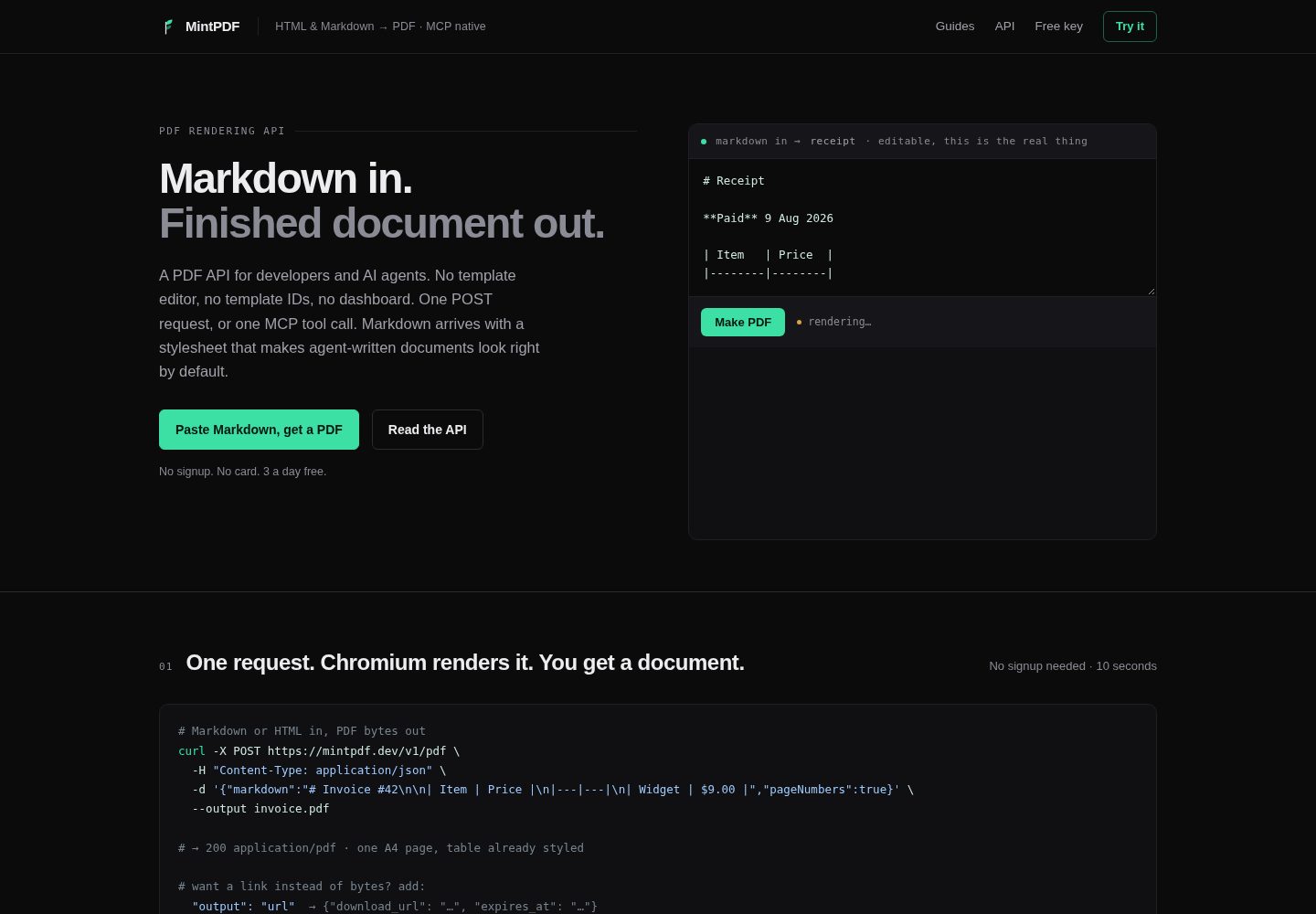
MintPDF is a REST API and MCP server that converts HTML or Markdown to PDF, rendered with Chromium, with no template editor or dashboard.
Explore the design
Compare the page layouts and mobile experience. Open any screenshot for a closer look.
Desktop homepage1 / 2
Desktop captureTop of page
Actual screenshot captured by the server browser.
All pages & views 2
Screenshots show visual appearance; interactive behavior may differ.
Recorded 2026-10-02View source
What stands out
A quick read of the recorded project description.
Provides both a REST API and an MCP streaming HTTP endpoint, with MCP tools generate_pdf and pdf_from_url
Built-in print CSS handles pagination, repeating table headers, widows and orphans, and header/footer styling
Rendered files are deleted after one hour, and request bodies are not logged
MIT licensed, with a Docker image and npm build method, and can be self-hosted
Anonymous: 3 per day; free key: 100 per month; paid tiers offer higher quotas
Template Details
MintPDF accepts HTML, Markdown, or a public web page URL and returns a PDF file or a download link. It uses Chromium as the rendering engine and preprocesses print CSS so tables do not split across pages, table headers repeat, and Markdown output more closely resembles document typesetting. The project provides both a REST API and an MCP streaming HTTP endpoint; the MCP tools include generate_pdf and pdf_from_url, making it easy to generate PDFs within a conversation.
The server does not store documents: rendered files are deleted after one hour, and request bodies are not logged, but keys, email addresses, and usage counts are stored. Anonymous users can render 3 times per day, a free key (email only) allows 100 times per month, and higher quotas are paid tiers. The project is MIT licensed, can be self-hosted, and provides a Docker image and npm build method.
Limitations: Office formats, merging, and splitting are not supported; files are deleted after one hour, and there is no document library; keys and quotas are stored in SQLite, running as a single instance, and multiple replicas sharing the same volume is not feasible; rendering is subject to admission control, returning 503 and Retry-After when over capacity. Submitted HTML executes JavaScript, so the renderer should be treated as untrusted code; SSRF protection is implemented through two layers of resolution, but a narrow window race for DNS rebinding remains.
HTMLBackend
Is it right for your project?
Use Cases
- Generating PDF documents through conversation in MCP clients such as Claude
- Converting Markdown invoices, reports, or briefs to PDF
- Rendering web page URLs to PDF via the REST API for archiving or distribution
- Self-hosting a PDF rendering service to avoid sending document content to an external service
- Adding HTML-to-PDF capability to an application without maintaining Chromium print configuration yourself
Suitable For
- Developers who need to convert HTML or Markdown to PDF programmatically
- Users of MCP clients who want to generate PDFs directly in a conversation
- Teams that want to self-host a PDF rendering service and accept the single-instance limitation
- Scenarios that need to handle print layout such as table pagination and headers/footers
Getting started & customization
Use these recorded setup notes alongside the repository instructions for your chosen version.
- 1
Anonymous calls require no registration; simply send a POST request to /v1/pdf
- 2
A free key is obtained by submitting an email to POST /v1/keys, and requests use the Authorization: Bearer header
- 3
MCP clients can be configured with npx mintpdf-mcp or connect to the hosted endpoint via mcp-remote
- 4
Self-hosting can be done by running npm install && npm run build && npm start, or by using the Docker image
- 5
When self-hosting, set BASE_URL and DATA_DIR; keys and quotas are stored in SQLite
License & source material
Usage conditions & limitations
Free to use · keep license noticeThis entry covers the free version under the MIT license in the public repository; the free scope applies to that version's code and does not mean external services or third-party assets are free.
Must comply with when using
- Free use, modification, commercial use, and distribution of this version's code are permitted.
- When distributing copies or substantial portions of the code, retain the original author's copyright notice and the full MIT license notice.
- The code is provided as is; warranties and limitations of liability are governed by the original license and applicable law.
Additional costs & items to verify
- Demo images, fonts, icons, and other third-party assets must be checked against their respective licenses and cannot be judged solely by the code's MIT license.
- External services such as domains, hosting, databases, payments, or AI may incur separate charges.
- Free quotas are limited: anonymous users can render up to 3 times per day, and a free key (email only) allows up to 100 renders per month; exceeding this requires payment.
- Higher quotas are paid tiers: Solo provides 3,000 renders per month for $19/month, and Team and Scale tiers cost more.
- Rendered files are deleted after one hour, there is no document library, and previous render results cannot be retrieved again; for permanent storage you must save the bytes yourself.
- Office formats, merging, and splitting are not supported; only HTML, Markdown, and web page conversion are supported.
- Single-instance limitation: keys and quotas are stored in SQLite on a mounted volume, and multiple replicas sharing the same volume will not work; horizontal scaling requires switching to a real database first.
- Rendering is subject to admission control; when capacity is exceeded, the API returns 503 and Retry-After rather than queuing indefinitely.
- Submitted HTML executes JavaScript (required for Mermaid and KaTeX), so the renderer should be treated as untrusted code.
- SSRF protection has a narrow window race for DNS rebinding that is not fully eliminated; completely eliminating it would require pinning the resolved address at the socket layer, which has not been implemented.
- Download links are unauthenticated; anyone holding the link can retrieve the file within one hour, and the link itself is the secret.
- Keys, email addresses, and usage counts are stored, although request bodies are not logged.
View Original Text Basis
Permission is hereby granted, free of charge
Original License Text
Want more than 3 renders a day? A free key (email only, no card) raises it to 100 a month:
Original README
| Solo | 3,000 renders/month | $19/month |
Original README
**Files are deleted after one hour.** There is no document library and no way to fetch a render again later.
Original README
**No Office formats, merging or splitting.** This converts HTML, Markdown and web pages, and nothing else.
Original README
**One instance.** Keys and quotas live in SQLite on a mounted volume, so running several replicas against one volume will not work.
Original README
**Renders are admission-controlled.** Over capacity the API returns `503` with `Retry-After` rather than queueing without limit.
Original README
**Submitted HTML executes JavaScript.** It has to: Mermaid diagrams and KaTeX maths are rendered in the page.
Original README
Eliminating it entirely means pinning the resolved address at the socket layer, which is not implemented.
Original README
**Download links** use a `crypto.randomUUID()` identifier and are **not authenticated**: anyone with the link can fetch the file for the hour it exists.
Original README
https://github.com/TrendTweekers/mintpdf/blob/main/LICENSEhttps://github.com/TrendTweekers/mintpdf/blob/main/README.mdKeys, emails and usage counters obviously are stored.
Original README
Compiled by DeepSeek based on repository license and README ·2026-10-04. Results only cover the materials read; dependencies, images, fonts, and subsequent term changes are subject to their respective original texts.
Project checks & description sources
Template Information
- Source platforms
- GitHub
- Documentation and maintenance reference score
- More documented · 83 / 100
- Technologies
- HTML
- Website type
- Admin dashboard
How this score is calculated
Our heuristic uses license records (up to 30), a demo link (12), a preview (10), stars (15), recorded maintenance (15), description completeness (8), feature records (5) and classification data (5). It is not a code, security or performance test, or a Google score. A link does not establish tested functionality.
What to verify for this project
- Repository update recorded
- 2026-10-02
- Screenshot last checked
- 2026-10-04
A demo link is listed. Check it with your own content and viewport sizes; its presence does not confirm that forms, authentication or payments work.
The catalog identifies HTML as the primary stack. Check the actual dependency manifest and lockfile for versions and hosting requirements. These notes use recorded metadata, not a code audit or a deployment test.
Use a selection guide →How this description was prepared
AI-assisted description based on catalog records and repository material. Repository authors are not automatically the reviewers of this description.
Review declaration: [email protected] · 2026-10-04
Inspect the recorded source material
SHA-256: 902e7ad0e792be232e2c49af7b722d219d504ff3fbfd187a6a10cad211340217
2026-10-04T07:36:20.993Z
Source file / repository<div align="center">
<img src="https://raw.githubusercontent.com/TrendTweekers/mintpdf/main/public/mark.svg" width="64" alt="MintPDF">
# MintPDF
**HTML & Markdown → PDF, as a REST API and an MCP server.**
No template editor. No template IDs. No dashboard. No signup to try.
**[mintpdf.dev](https://mintpdf.dev)**
[Try it](#quickstart) · [MCP setup](#use-it-from-claude-or-any-mcp-client) · [API](#api) · [Self-host](#self-host) · [Security](#security) · [Limitations](#limitations)
</div>
---
Send HTML or Markdown, get a PDF back. It is Chromium under the hood, with the print CSS already
worked out so tables don't split across pages, table headers repeat, and Markdown comes out looking
like a document rather than a text file.
- **Pagination is the point.** `break-inside`, repeating `thead`, orphans and widows, and headers
and footers that actually inherit your styling. See [How it works](#how-it-works).
- **MCP native** — `generate_pdf` and `pdf_from_url` over streamable HTTP, so an agent can produce a
document mid-conversation.
- **Documents aren't kept** — rendered files are deleted after an hour, and their contents are
never logged. Keys, emails and usage counters obviously are stored. See [Security](#security).
- **Run it yourself** — MIT, with a published image. The hosted service exists so you don't have to
operate Chromium, not because the renderer is secret.
## Quickstart
No signup, no key:
```bash
curl -X POST https://mintpdf.dev/v1/pdf \
-H "Content-Type: application/json" \
-d '{"markdown":"# Invoice #42\n\n| Item | Price |\n|---|---|\n| Widget | $9.00 |","pageNumbers":true}' \
--output invoice.pdf
```
Want more than 3 renders a day? A free key (email only, no card) raises it to 100 a month:
```bash
curl -X POST https://mintpdf.dev/v1/keys \
-H "Content-Type: application/json" \
-d '{"email":"[email protected]"}'
# → {"key":"pm_…","daily_limit":100} # 100 renders per month
```
Then send `Authorization: Bearer pm_…` with your requests.
## Use it from Claude (or any MCP client)
```json
{
"mcpServers": {
"mintpdf": {
"command": "npx",
"args": ["-y", "mintpdf-mcp"]
}
}
}
```
Prefer the hosted endpoint directly? Use `mcp-remote` instead:
```json
{
"mcpServers": {
"mintpdf": {
"command": "npx",
"args": ["-y", "mcp-remote", "https://mintpdf.dev/mcp"]
}
}
}
```
Restart your client, then just ask:
> "Summarise this thread as a one-page brief with page numbers and give me a PDF."
| Tool | Input | Returns |
|---|---|---|
| `generate_pdf` | `html` **or** `markdown`, plus options | download URL, valid 1 hour |
| `pdf_from_url` | `url` (public http/https), plus options | download URL, valid 1 hour |
## API
### `POST /v1/pdf`
Body takes **exactly one** source, plus options:
| Field | Type | Notes |
|---|---|---|
| `html` | string | Full document or fragment |
| `markdown` | string | Rendered with the default stylesheet |
| `url` | string | Public page to render. Private/internal addresses are blocked |
| `format` | string | `A4` (default), `Letter`, `Legal`, `A3`, `A5` |
| `landscape` | boolean | default `false` |
| `margin` | string | all sides, e.g. `"18mm"` |
| `headerText` / `footerText` | string | small text on every page |
| `pageNumbers` | boolean | adds `3 / 7` to the footer |
| `output` | `"pdf"` \| `"url"` | default returns PDF bytes; `"url"` returns JSON with a link |
### `POST /v1/keys`
`{"email":"[email protected]"}` → a free key. No card, no verification loop.
### `POST /mcp`
MCP streamable-HTTP endpoint, stateless. Same capabilities as the REST API.
### Postman
A ready-made collection covering every endpoint and option lives in
[`postman/`](postman/mintpdf.postman_collection.json). Import it by link:
```
https://raw.githubusercontent.com/TrendTweekers/mintpdf/main/postman/mintpdf.postman_collection.json
```
The first request runs with no key at all, and fetching a free key stores it into the collection
variable automatically, so the rest of the collection works straight after.
## Limits
| Tier | Limit | Price |
|---|---|---|
| Anonymous | 3 renders/day per IP | free, no signup |
| Free key | 100 renders/month | free, email only |
| Solo | 3,000 renders/month | $19/month |
| Team | 12,000 renders/month | $49/month |
| Scale | 50,000 renders/month | $129/month |
## Self-host
MintPDF is MIT-licensed; run your own if you'd rather.
```bash
npm install
npm run build
npm start # http://localhost:3000
node dist/smoke.js # end-to-end render check
```
Or pull the published image, which has Chromium and the fonts baked in:
```bash
docker run -p 3000:3000 \
-e BASE_URL=http://localhost:3000 \
-e DATA_DIR=/data -v mintpdf-data:/data \
ghcr.io/trendtweekers/mintpdf:latest
```
Then it is the same API on your own machine, with no limits and nothing leaving it:
```bash
curl -X POST http://localhost:3000/v1/pdf \
-H "Content-Type: application/json" \
-d '{"markdown":"# Local","pageNumbers":true}' --output local.pdf
```
Images are built and published by CI on every change, and each is smoke-tested by starting the
container and rendering a real PDF from it before being tagged. Tags are `latest` and the short
commit SHA. Building it yourself works too:
```bash
docker build -t mintpdf .
docker run -p 3000:3000 -e BASE_URL=http://localhost:3000 mintpdf
```
Environment: `BASE_URL` (used in download links), `DATA_DIR` (defaults to `/tmp/mintpdf`; mount a
volume to persist keys), `ANON_DAILY_LIMIT`, `FREE_MONTHLY_LIMIT`, `SOLO_MONTHLY_LIMIT`,
`TEAM_MONTHLY_LIMIT`, `SCALE_MONTHLY_LIMIT`, `OVERAGE_FACTOR`, `RENDER_CONCURRENCY`,
`RENDER_QUEUE`, `RENDER_QUEUE_WAIT_MS`.
### Load and admission control
Every render is a Chromium tab, so **memory bounds concurrency long before CPU or cost does**.
Unbounded, a traffic spike opens a tab per request until the OOM reaper kills the container and
every request fails, including ones nearly finished. Measured here: 30 concurrent renders with no
gate left 30 orphaned Chrome processes and an unusable machine.
`RENDER_CONCURRENCY` renders run at once, `RENDER_QUEUE` more may wait, and anything beyond that is
refused immediately with **503 and a `Retry-After`** rather than being allowed to pile up. Turning
some callers away in under a second is strictly better than serving everyone a timeout.
Code defaults are conservative (3 and 20). Measured on one small Railway instance at 10 and 70:
| Burst | Served | Refused | Median | Wall clock | Instance after |
|---|---|---|---|---|---|
| 45 | 45 | 0 | 1.5s | 2.3s | healthy |
| 120 | 81 | 39 | 3.0s | 4.0s | healthy |
| 250 | 80 | 170 | 3.4s | 4.4s | healthy, 0.24s homepage |
Roughly 18 renders a second sustained, with the refused share answered in under 2.7s. Raise the
numbers only against a measurement on your own instance size, never on hope.
If you want a fuller self-hosted PDF toolchain (Office formats, merging, splitting),
[Gotenberg](https://gotenberg.dev) is excellent and does more than this does.
## Security
This service renders HTML and URLs supplied by anyone, so the interesting questions are about what
that content can reach.
**Submitted HTML executes JavaScript.** It has to: Mermaid diagrams and KaTeX maths are rendered in
the page. Treat the renderer as running untrusted code, which is why the network restrictions below
matter more than they would for a static converter.
**SSRF is blocked at two layers.**
1. A submitted `url` is parsed, restricted to `http`/`https`, and resolved. If *any* resolved address
is private, the request is refused with a 400 before a browser is involved.
2. Independently, every request Chromium makes is intercepted and the destination **resolved again at
request time**, then blocked if private. This covers embedded images, stylesheets, fonts,
redirects and `fetch()` from submitted JavaScript, not just the URL you asked for.
The second layer resolves rather than trusting the hostname, and **caches only refusals, never
approvals**: caching "this host is public" would reopen the exact hole the check exists to close.
Unresolvable names fail closed.
Being precise about what that does and does not achieve: a DNS-rebinding attempt can no longer wait
out a cached approval, so it has to win a race between this lookup and Chromium's own, on every
request. That is a much narrower target than a fixed window, but it is a narrowed race rather than a
closed door. Eliminating it entirely means pinning the resolved address at the socket layer, which
is not implemented.
Blocked: loopback, `0.0.0.0`, RFC1918, CGNAT (100.64/10), link-local and cloud metadata
(169.254.169.254); IPv6 loopback, unspecified, link-local, site-local, unique-local, multicast,
NAT64 and Teredo; **IPv4-mapped and IPv4-compatible forms in either spelling**, so `::ffff:10.0.0.1`
and `::ffff:a00:1` are the same address and both are refused; `localhost`/`.local`/`.internal`
names; any public hostname that resolves to a private address; and every scheme except http, https,
data and blob.
Addresses are judged from their bytes rather than by matching text, because the same address has
many spellings and a text match catches one and misses the rest.
There is a test suite for exactly this, and it is meant to be run rather than trusted:
```bash
BASE=https://mintpdf.dev node scratchpad/ssrf_suite.mjs
```
It checks the bypasses above *and* that ordinary rendering still works, because a guard that also
blocks web fonts is a different bug rather than a fix.
The IPv6 parser has its own table of adversarial literals, since an invalid string silently becoming
a valid address is the failure that matters in this kind of code:
```bash
node scratchpad/ipv6_table_test.mjs
```
**Download links** use a `crypto.randomUUID()` identifier and are **not authenticated**: anyone with
the link can fetch the file for the hour it exists. That is deliberate, so a link can be emailed or
handed to a browser, but it means the link is the secret.
**Logging.** Request metadata is logged (method, path, status, duration). **Request bodies are never
logged**, so the HTML and Markdown you send are not written anywhere except the temporary file. The
analytics table stores event kind, path, referrer, country and a daily-salted hash of the IP. No
document content, and no way to reconstruct a document from it.
## Limitations
Worth knowing before you build on it.
- **Files are deleted after one hour.** There is no document library and no way to fetch a render
again later. Generate, use, done. If you need permanence, save the bytes on your side.
- **No Office formats, merging or splitting.** This converts HTML, Markdown and web pages, and
nothing else. [Gotenberg](https://gotenberg.dev) is more mature and covers far more ground if you
are self-hosting and need that.
- **One instance.** Keys and quotas live in SQLite on a mounted volume, so running several replicas
against one volume will not work. Horizontal scaling needs a real database first.
- **Renders are admission-controlled.** Over capacity the API returns `503` with `Retry-After`
rather than queueing without limit. See the table above for measured behaviour.
- **Two days old at the time of writing**, with no paying users yet.
## How it works
TypeScript, Fastify, and Puppeteer driving one shared Chromium with a page per request. `node:sqlite`
holds keys, quotas and events, so there are no native dependencies to build.
The parts that took the actual work are the unglamorous ones:
- **Print CSS.** `break-inside: avoid` on tables, rows, list items, code blocks, blockquotes and
figures; `thead { display: table-header-group }` so headers repeat; `orphans`/`widows`;
`break-after: avoid` on headings so none is stranded at the foot of a page.
- **Header and footer templates**, which are a separate document from your page: they ignore the page
CSS and render at near-zero font size unless the styles are inlined, and they sit outside the
content margins.
- **Admission control**, because one Chromium tab per concurrent request is how the container runs
out of memory.
- **Network isolation** for a renderer that executes untrusted JavaScript. See Security.
## Licence
MIT — see [LICENSE](LICENSE).
Explore similar templates
Compare previews and descriptions within the same stack and category.

gentelella
Gentelella v4 is a free, open-source admin dashboard template maintained by Colorlib, built with vanilla JavaScript, SCSS, and Vite 8 without Bootstrap or jQuery.
HTML · Admin dashboard

coreui-free-bootstrap-admin-template
A free Bootstrap admin template maintained by CoreUI, built on CoreUI's own UI component library. It provides compiled HTML pages and Pug template source code, covering dashboards, authentication, forms, components, icons, and error pages.
HTML · Admin dashboard

dashboards
A collection of responsive dashboard HTML templates open-sourced by Keen IO, built on CSS Grid, offering multiple prebuilt admin data interface layouts.
HTML · Admin dashboard

SB Admin 2
SB Admin 2 is a classic Bootstrap admin template from Start Bootstrap, offering dashboards, charts, tables, and common management pages.
HTML · Admin dashboard

Adminator-admin-dashboard
Adminator 4 is a vanilla HTML, CSS and JavaScript admin dashboard template with a CSS-variable token design system, built-in light and dark themes, no jQuery or Bootstrap dependency, and 18 pages covering dashboards, mail, calendar, charts, forms, tables and error pages.
HTML · Admin dashboard

SB Admin
SB Admin is a lightweight, open-source Bootstrap admin template from Start Bootstrap. It offers a sidebar-and-top-bar layout with data tables, forms, and stat cards, plus responsive design.
HTML · Admin dashboard