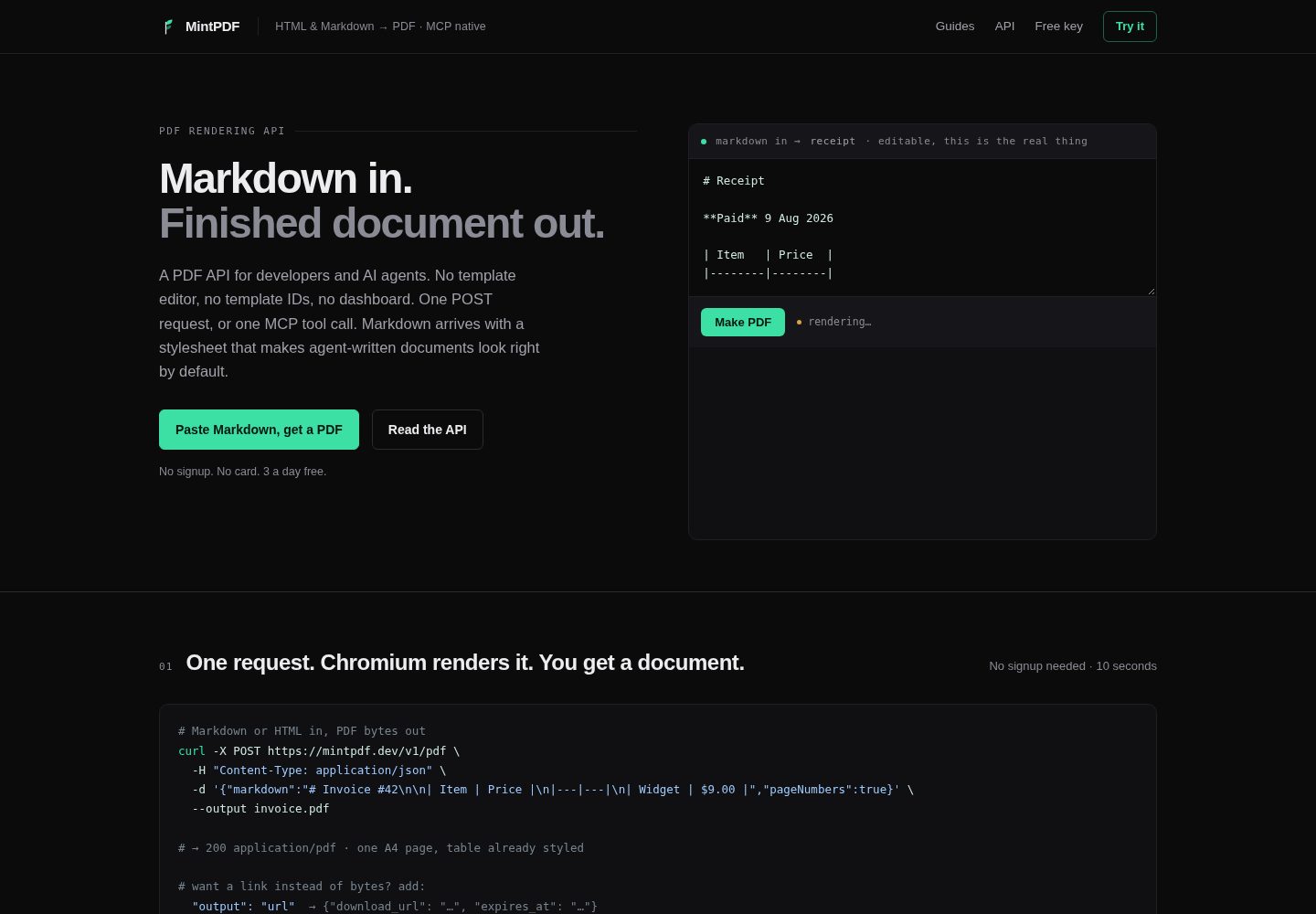
将 HTML、Markdown 或公开 URL 转换为 PDF,返回文件字节或下载链接
HTML后台
mintpdf — HTML 后台模板
作者 TrendTweekers
MintPDF 是一个将 HTML 或 Markdown 转换为 PDF 的 REST API 与 MCP 服务器,基于 Chromium 渲染,不提供模板编辑器或仪表盘。
看看你的网站会是什么样
浏览真实页面截图,比较内容排版与手机效果。点击下方缩略图切换,放大查看整页细节。
全部页面与视图 2
截图用于了解视觉与布局,交互效果请以实际项目为准。
采集于 2026-10-02查看来源
值得关注的模板亮点
从已有项目资料中,快速了解它的特点。
同时提供 REST API 和 MCP 流式 HTTP 端点,MCP 工具为 generate_pdf 与 pdf_from_url
内置打印 CSS 处理分页、表头重复、孤行寡行和页眉页脚样式
渲染文件一小时后删除,请求体不记录日志
MIT 许可,提供 Docker 镜像和 npm 构建方式,可自行托管
匿名每天 3 次,免费密钥每月 100 次,付费档位提供更高配额
模板详细介绍
MintPDF 接收 HTML、Markdown 或公开网页 URL,返回 PDF 文件或下载链接。它使用 Chromium 作为渲染引擎,并预先处理了打印 CSS,使表格不跨页拆分、表头重复,Markdown 输出更接近文档排版。项目同时提供 REST API 和 MCP 流式 HTTP 端点,MCP 工具包括 generate_pdf 和 pdf_from_url,便于在对话中生成 PDF。
服务端不保存文档:渲染文件一小时后删除,请求体不记录日志,但密钥、邮箱和使用计数会存储。匿名用户每天可渲染 3 次,免费密钥(仅需邮箱)每月 100 次,更高配额为付费档位。项目采用 MIT 许可,可自行托管,提供 Docker 镜像和 npm 构建方式。
限制方面:不支持 Office 格式、合并或拆分;文件一小时后删除,没有文档库;密钥和配额存储在 SQLite 中,单实例运行,多副本共享同一卷不可行;渲染受准入控制,超容量返回 503 和 Retry-After。提交的 HTML 会执行 JavaScript,因此渲染器应按不可信代码对待,SSRF 防护通过两层解析实现,但 DNS 重绑定仍存在窄窗口竞争。
HTML后台
适合你的项目吗?
适用场景
- 在 Claude 等 MCP 客户端中通过对话生成 PDF 文档
- 将 Markdown 格式的发票、报告或简报转换为 PDF
- 通过 REST API 将网页 URL 渲染为 PDF 用于存档或分发
- 自行托管 PDF 渲染服务,避免将文档内容发送到外部服务
- 为应用添加 HTML 转 PDF 能力,无需自行维护 Chromium 打印配置
适合人群
- 需要以编程方式将 HTML 或 Markdown 转为 PDF 的开发者
- 使用 MCP 客户端并希望在对话中直接生成 PDF 的用户
- 希望自行托管 PDF 渲染服务并接受单实例限制的团队
- 需要处理表格分页和页眉页脚等打印排版的场景
上手与定制指南
结合仓库当前版本的说明,按下面的资料检查内容、配置与运行要求。
- 1
匿名调用无需注册,直接向 /v1/pdf 发送 POST 请求即可
- 2
免费密钥通过 POST /v1/keys 提交邮箱获取,请求时使用 Authorization: Bearer 头
- 3
MCP 客户端可配置 npx mintpdf-mcp 或通过 mcp-remote 连接托管端点
- 4
自行托管可运行 npm install && npm run build && npm start,或使用 Docker 镜像
- 5
自行托管时需设置 BASE_URL 和 DATA_DIR,密钥和配额存储在 SQLite 中
授权与来源资料
使用条件与限制
免费使用 · 保留许可声明本次收录的是公开仓库中采用 MIT 许可的免费版本;免费范围为该版本代码,不代表外部服务或第三方素材免费。
使用时需要遵守
- 允许免费使用、修改、商用和分发该版本代码。
- 分发代码副本或实质性部分时,保留原作者版权声明和完整 MIT 许可声明。
- 代码按现状提供;担保与责任限制以原许可证及适用法律为准。
额外费用与待核对事项
- 演示图片、字体、图标及其他第三方素材需按各自许可核对,不能仅凭代码的 MIT 许可判断。
- 域名、托管、数据库、支付或 AI 等外部服务可能另外收费。
- 免费额度有限:匿名每天最多3次渲染,使用免费密钥(仅需邮箱)每月最多100次渲染,超出需付费。
- 更高配额为付费档位:Solo 每月3000次渲染收费19美元/月,Team 和 Scale 档位价格更高。
- 渲染文件一小时后删除,没有文档库,无法再次获取之前的渲染结果,需要永久保存须自行保存字节。
- 不支持 Office 格式、合并或拆分,仅支持 HTML、Markdown 和网页转换。
- 单实例限制:密钥和配额存储在挂载卷上的 SQLite 中,多个副本共享同一卷无法工作,水平扩展需要先换用真正的数据库。
- 渲染受准入控制,超出容量时 API 返回 503 和 Retry-After,而不是无限排队。
- 提交的 HTML 会执行 JavaScript(Mermaid 和 KaTeX 需要),因此渲染器应按不可信代码对待。
- SSRF 防护存在未完全消除的 DNS 重绑定窄窗口竞争,彻底消除需要在套接字层固定解析地址,但尚未实现。
- 下载链接未认证,任何持有链接的人在一小时内均可获取文件,链接本身即秘密。
- 密钥、邮箱和使用计数会被存储,尽管请求体不记录日志。
查看原文依据
Permission is hereby granted, free of charge
许可证原文
Want more than 3 renders a day? A free key (email only, no card) raises it to 100 a month:
README 原文
| Solo | 3,000 renders/month | $19/month |
README 原文
**Files are deleted after one hour.** There is no document library and no way to fetch a render again later.
README 原文
**No Office formats, merging or splitting.** This converts HTML, Markdown and web pages, and nothing else.
README 原文
**One instance.** Keys and quotas live in SQLite on a mounted volume, so running several replicas against one volume will not work.
README 原文
**Renders are admission-controlled.** Over capacity the API returns `503` with `Retry-After` rather than queueing without limit.
README 原文
**Submitted HTML executes JavaScript.** It has to: Mermaid diagrams and KaTeX maths are rendered in the page.
README 原文
Eliminating it entirely means pinning the resolved address at the socket layer, which is not implemented.
README 原文
**Download links** use a `crypto.randomUUID()` identifier and are **not authenticated**: anyone with the link can fetch the file for the hour it exists.
README 原文
https://github.com/TrendTweekers/mintpdf/blob/main/LICENSEhttps://github.com/TrendTweekers/mintpdf/blob/main/README.mdKeys, emails and usage counters obviously are stored.
README 原文
DeepSeek 根据仓库许可证和 README 整理 ·2026-10-04。结果仅覆盖已读取资料,依赖、图片、字体及后续条款变更以各自原文为准。
项目核对记录与介绍依据
模板资料
- 来源平台
- GitHub
- 资料与维护参考分
- 资料较完整 · 83 / 100
- 技术栈
- HTML
- 网站类型
- 后台
这个分数如何计算
本站按许可资料(最高30分)、演示链接(12分)、预览图(10分)、Star数(15分)、记录的维护时间(15分)、描述完整度(8分)、功能记录(5分)和分类资料(5分)计算。它不是代码、安全或性能测试,也不是 Google 评分;有链接不代表已实测可用。
这个项目需要核对什么
- 记录的仓库更新时间
- 2026-10-02
- 截图检查日期
- 2026-10-04
已收录演示链接。请用你的内容与屏幕尺寸检查;有演示不代表表单、认证或支付已经可用。
目录记录的主要技术栈是 HTML。请通过依赖清单和锁文件核对实际版本与托管要求。这些说明基于收录资料,不代表代码审计或部署实测。
查看具体选型方法 →介绍的制作与核对状态
介绍由 AI 辅助整理目录与仓库资料。仓库作者不等于这篇介绍的审核者。
审核声明: [email protected] · 2026-10-04
查看当时使用的来源资料
SHA-256: 902e7ad0e792be232e2c49af7b722d219d504ff3fbfd187a6a10cad211340217
2026-10-04T07:36:20.993Z
来源文件 / 仓库<div align="center">
<img src="https://raw.githubusercontent.com/TrendTweekers/mintpdf/main/public/mark.svg" width="64" alt="MintPDF">
# MintPDF
**HTML & Markdown → PDF, as a REST API and an MCP server.**
No template editor. No template IDs. No dashboard. No signup to try.
**[mintpdf.dev](https://mintpdf.dev)**
[Try it](#quickstart) · [MCP setup](#use-it-from-claude-or-any-mcp-client) · [API](#api) · [Self-host](#self-host) · [Security](#security) · [Limitations](#limitations)
</div>
---
Send HTML or Markdown, get a PDF back. It is Chromium under the hood, with the print CSS already
worked out so tables don't split across pages, table headers repeat, and Markdown comes out looking
like a document rather than a text file.
- **Pagination is the point.** `break-inside`, repeating `thead`, orphans and widows, and headers
and footers that actually inherit your styling. See [How it works](#how-it-works).
- **MCP native** — `generate_pdf` and `pdf_from_url` over streamable HTTP, so an agent can produce a
document mid-conversation.
- **Documents aren't kept** — rendered files are deleted after an hour, and their contents are
never logged. Keys, emails and usage counters obviously are stored. See [Security](#security).
- **Run it yourself** — MIT, with a published image. The hosted service exists so you don't have to
operate Chromium, not because the renderer is secret.
## Quickstart
No signup, no key:
```bash
curl -X POST https://mintpdf.dev/v1/pdf \
-H "Content-Type: application/json" \
-d '{"markdown":"# Invoice #42\n\n| Item | Price |\n|---|---|\n| Widget | $9.00 |","pageNumbers":true}' \
--output invoice.pdf
```
Want more than 3 renders a day? A free key (email only, no card) raises it to 100 a month:
```bash
curl -X POST https://mintpdf.dev/v1/keys \
-H "Content-Type: application/json" \
-d '{"email":"[email protected]"}'
# → {"key":"pm_…","daily_limit":100} # 100 renders per month
```
Then send `Authorization: Bearer pm_…` with your requests.
## Use it from Claude (or any MCP client)
```json
{
"mcpServers": {
"mintpdf": {
"command": "npx",
"args": ["-y", "mintpdf-mcp"]
}
}
}
```
Prefer the hosted endpoint directly? Use `mcp-remote` instead:
```json
{
"mcpServers": {
"mintpdf": {
"command": "npx",
"args": ["-y", "mcp-remote", "https://mintpdf.dev/mcp"]
}
}
}
```
Restart your client, then just ask:
> "Summarise this thread as a one-page brief with page numbers and give me a PDF."
| Tool | Input | Returns |
|---|---|---|
| `generate_pdf` | `html` **or** `markdown`, plus options | download URL, valid 1 hour |
| `pdf_from_url` | `url` (public http/https), plus options | download URL, valid 1 hour |
## API
### `POST /v1/pdf`
Body takes **exactly one** source, plus options:
| Field | Type | Notes |
|---|---|---|
| `html` | string | Full document or fragment |
| `markdown` | string | Rendered with the default stylesheet |
| `url` | string | Public page to render. Private/internal addresses are blocked |
| `format` | string | `A4` (default), `Letter`, `Legal`, `A3`, `A5` |
| `landscape` | boolean | default `false` |
| `margin` | string | all sides, e.g. `"18mm"` |
| `headerText` / `footerText` | string | small text on every page |
| `pageNumbers` | boolean | adds `3 / 7` to the footer |
| `output` | `"pdf"` \| `"url"` | default returns PDF bytes; `"url"` returns JSON with a link |
### `POST /v1/keys`
`{"email":"[email protected]"}` → a free key. No card, no verification loop.
### `POST /mcp`
MCP streamable-HTTP endpoint, stateless. Same capabilities as the REST API.
### Postman
A ready-made collection covering every endpoint and option lives in
[`postman/`](postman/mintpdf.postman_collection.json). Import it by link:
```
https://raw.githubusercontent.com/TrendTweekers/mintpdf/main/postman/mintpdf.postman_collection.json
```
The first request runs with no key at all, and fetching a free key stores it into the collection
variable automatically, so the rest of the collection works straight after.
## Limits
| Tier | Limit | Price |
|---|---|---|
| Anonymous | 3 renders/day per IP | free, no signup |
| Free key | 100 renders/month | free, email only |
| Solo | 3,000 renders/month | $19/month |
| Team | 12,000 renders/month | $49/month |
| Scale | 50,000 renders/month | $129/month |
## Self-host
MintPDF is MIT-licensed; run your own if you'd rather.
```bash
npm install
npm run build
npm start # http://localhost:3000
node dist/smoke.js # end-to-end render check
```
Or pull the published image, which has Chromium and the fonts baked in:
```bash
docker run -p 3000:3000 \
-e BASE_URL=http://localhost:3000 \
-e DATA_DIR=/data -v mintpdf-data:/data \
ghcr.io/trendtweekers/mintpdf:latest
```
Then it is the same API on your own machine, with no limits and nothing leaving it:
```bash
curl -X POST http://localhost:3000/v1/pdf \
-H "Content-Type: application/json" \
-d '{"markdown":"# Local","pageNumbers":true}' --output local.pdf
```
Images are built and published by CI on every change, and each is smoke-tested by starting the
container and rendering a real PDF from it before being tagged. Tags are `latest` and the short
commit SHA. Building it yourself works too:
```bash
docker build -t mintpdf .
docker run -p 3000:3000 -e BASE_URL=http://localhost:3000 mintpdf
```
Environment: `BASE_URL` (used in download links), `DATA_DIR` (defaults to `/tmp/mintpdf`; mount a
volume to persist keys), `ANON_DAILY_LIMIT`, `FREE_MONTHLY_LIMIT`, `SOLO_MONTHLY_LIMIT`,
`TEAM_MONTHLY_LIMIT`, `SCALE_MONTHLY_LIMIT`, `OVERAGE_FACTOR`, `RENDER_CONCURRENCY`,
`RENDER_QUEUE`, `RENDER_QUEUE_WAIT_MS`.
### Load and admission control
Every render is a Chromium tab, so **memory bounds concurrency long before CPU or cost does**.
Unbounded, a traffic spike opens a tab per request until the OOM reaper kills the container and
every request fails, including ones nearly finished. Measured here: 30 concurrent renders with no
gate left 30 orphaned Chrome processes and an unusable machine.
`RENDER_CONCURRENCY` renders run at once, `RENDER_QUEUE` more may wait, and anything beyond that is
refused immediately with **503 and a `Retry-After`** rather than being allowed to pile up. Turning
some callers away in under a second is strictly better than serving everyone a timeout.
Code defaults are conservative (3 and 20). Measured on one small Railway instance at 10 and 70:
| Burst | Served | Refused | Median | Wall clock | Instance after |
|---|---|---|---|---|---|
| 45 | 45 | 0 | 1.5s | 2.3s | healthy |
| 120 | 81 | 39 | 3.0s | 4.0s | healthy |
| 250 | 80 | 170 | 3.4s | 4.4s | healthy, 0.24s homepage |
Roughly 18 renders a second sustained, with the refused share answered in under 2.7s. Raise the
numbers only against a measurement on your own instance size, never on hope.
If you want a fuller self-hosted PDF toolchain (Office formats, merging, splitting),
[Gotenberg](https://gotenberg.dev) is excellent and does more than this does.
## Security
This service renders HTML and URLs supplied by anyone, so the interesting questions are about what
that content can reach.
**Submitted HTML executes JavaScript.** It has to: Mermaid diagrams and KaTeX maths are rendered in
the page. Treat the renderer as running untrusted code, which is why the network restrictions below
matter more than they would for a static converter.
**SSRF is blocked at two layers.**
1. A submitted `url` is parsed, restricted to `http`/`https`, and resolved. If *any* resolved address
is private, the request is refused with a 400 before a browser is involved.
2. Independently, every request Chromium makes is intercepted and the destination **resolved again at
request time**, then blocked if private. This covers embedded images, stylesheets, fonts,
redirects and `fetch()` from submitted JavaScript, not just the URL you asked for.
The second layer resolves rather than trusting the hostname, and **caches only refusals, never
approvals**: caching "this host is public" would reopen the exact hole the check exists to close.
Unresolvable names fail closed.
Being precise about what that does and does not achieve: a DNS-rebinding attempt can no longer wait
out a cached approval, so it has to win a race between this lookup and Chromium's own, on every
request. That is a much narrower target than a fixed window, but it is a narrowed race rather than a
closed door. Eliminating it entirely means pinning the resolved address at the socket layer, which
is not implemented.
Blocked: loopback, `0.0.0.0`, RFC1918, CGNAT (100.64/10), link-local and cloud metadata
(169.254.169.254); IPv6 loopback, unspecified, link-local, site-local, unique-local, multicast,
NAT64 and Teredo; **IPv4-mapped and IPv4-compatible forms in either spelling**, so `::ffff:10.0.0.1`
and `::ffff:a00:1` are the same address and both are refused; `localhost`/`.local`/`.internal`
names; any public hostname that resolves to a private address; and every scheme except http, https,
data and blob.
Addresses are judged from their bytes rather than by matching text, because the same address has
many spellings and a text match catches one and misses the rest.
There is a test suite for exactly this, and it is meant to be run rather than trusted:
```bash
BASE=https://mintpdf.dev node scratchpad/ssrf_suite.mjs
```
It checks the bypasses above *and* that ordinary rendering still works, because a guard that also
blocks web fonts is a different bug rather than a fix.
The IPv6 parser has its own table of adversarial literals, since an invalid string silently becoming
a valid address is the failure that matters in this kind of code:
```bash
node scratchpad/ipv6_table_test.mjs
```
**Download links** use a `crypto.randomUUID()` identifier and are **not authenticated**: anyone with
the link can fetch the file for the hour it exists. That is deliberate, so a link can be emailed or
handed to a browser, but it means the link is the secret.
**Logging.** Request metadata is logged (method, path, status, duration). **Request bodies are never
logged**, so the HTML and Markdown you send are not written anywhere except the temporary file. The
analytics table stores event kind, path, referrer, country and a daily-salted hash of the IP. No
document content, and no way to reconstruct a document from it.
## Limitations
Worth knowing before you build on it.
- **Files are deleted after one hour.** There is no document library and no way to fetch a render
again later. Generate, use, done. If you need permanence, save the bytes on your side.
- **No Office formats, merging or splitting.** This converts HTML, Markdown and web pages, and
nothing else. [Gotenberg](https://gotenberg.dev) is more mature and covers far more ground if you
are self-hosting and need that.
- **One instance.** Keys and quotas live in SQLite on a mounted volume, so running several replicas
against one volume will not work. Horizontal scaling needs a real database first.
- **Renders are admission-controlled.** Over capacity the API returns `503` with `Retry-After`
rather than queueing without limit. See the table above for measured behaviour.
- **Two days old at the time of writing**, with no paying users yet.
## How it works
TypeScript, Fastify, and Puppeteer driving one shared Chromium with a page per request. `node:sqlite`
holds keys, quotas and events, so there are no native dependencies to build.
The parts that took the actual work are the unglamorous ones:
- **Print CSS.** `break-inside: avoid` on tables, rows, list items, code blocks, blockquotes and
figures; `thead { display: table-header-group }` so headers repeat; `orphans`/`widows`;
`break-after: avoid` on headings so none is stranded at the foot of a page.
- **Header and footer templates**, which are a separate document from your page: they ignore the page
CSS and render at near-zero font size unless the styles are inlined, and they sit outside the
content margins.
- **Admission control**, because one Chromium tab per concurrent request is how the container runs
out of memory.
- **Network isolation** for a renderer that executes untrusted JavaScript. See Security.
## Licence
MIT — see [LICENSE](LICENSE).
看看同类模板
对比同技术栈与用途的模板,找到更适合的视觉与内容结构。

gentelella
Free admin dashboard template — vanilla JS, SCSS, Vite 8. No Bootstrap, no jQuery.
HTML · 后台

coreui-free-bootstrap-admin-template
Free Bootstrap Admin & Dashboard Template Built for AI-Assisted Development
HTML · 后台

dashboards
Responsive dashboard templates 📊✨
HTML · 后台

SB Admin 2
SB Admin 2 是 Start Bootstrap 推出的开源后台模板,基于 Bootstrap 构建,整体风格偏向经典管理界面。
HTML · 后台

Adminator-admin-dashboard
Adminator is easy to use and well design admin dashboard template with dark mode for web apps, websites, servi…
HTML · 后台

SB Admin
SB Admin 是 Start Bootstrap 推出的开源后台管理模板,基于 Bootstrap 构建,定位是简洁、实用的管理界面。
HTML · 后台