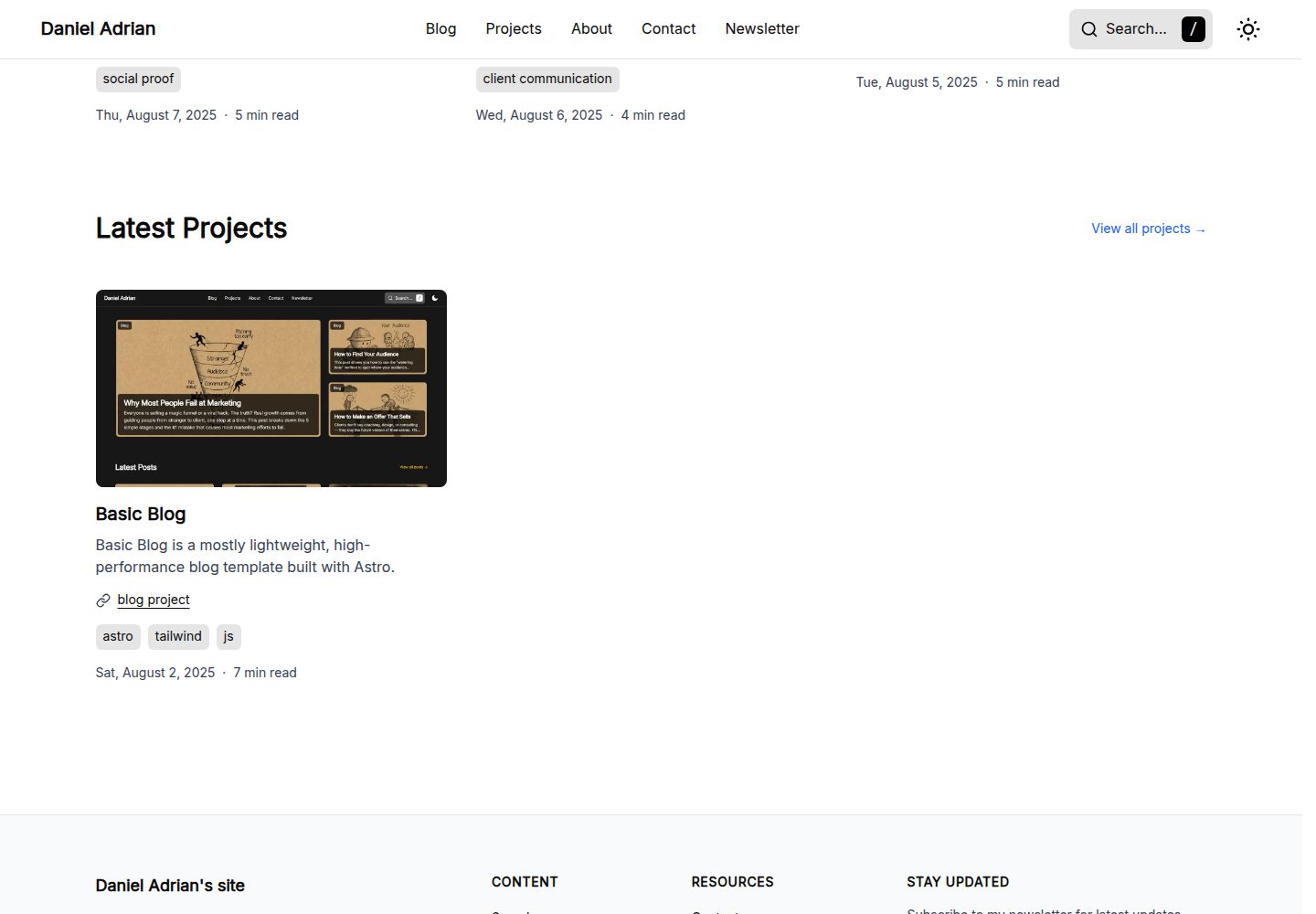
Built with Astro and includes page structures for blog, projects, about, contact, subscribe, and search
AstroBlog
basic-blog — Astro Blog Template
By truedaniyyel
A lightweight Astro-based blog template with light and dark modes, responsive layout, Cloudflare Turnstile form protection, and Cloudinary image optimization.
Explore the design
Compare the page layouts and mobile experience. Open any screenshot for a closer look.
Desktop homepage1 / 3
Desktop captureTop of page
Actual screenshot captured by the server browser.
All pages & views 3
Screenshots show visual appearance; interactive behavior may differ.
Recorded 2026-10-03View source
What stands out
A quick read of the recorded project description.
Provides dark and light modes and adapts to mobile, tablet, and desktop devices
Uses Cloudinary with LQIP placeholders for image loading
Includes Cloudflare Turnstile bot protection and Astro Actions form handling examples
Site settings, SEO metadata, and header/footer navigation are configured centrally in src/site.config.ts
CSP and security response headers are preconfigured in public/_headers, primarily targeting Cloudflare
Template Details
Basic Blog is a blog template built with Astro. The repository is MIT-licensed and free to use, modify, and distribute. The template provides page structures for blog, projects, about, contact, subscribe, and search. Navigation and footer links are configured centrally in src/site.config.ts, where the site title, description, social accounts, and OG image are also maintained.
Styling includes dark and light modes and responsive adaptations for mobile, tablet, and desktop devices. For images, it uses Cloudinary with LQIP low-quality placeholders to display a blurred placeholder before the full image loads. Fonts use Astro's local font provider; font files are placed in src/assets/fonts/, must be registered in astro.config.mjs, and referenced via variables in global.css.
Form functionality depends on external services: the contact and subscribe forms use Cloudflare Turnstile for bot protection and are handled server-side via Astro Actions. The README examples use Resend to send emails and Kit to manage subscriptions; you must configure Cloudinary, Turnstile, and email/subscription service keys in .env yourself. Security headers and CSP rules are in public/_headers, primarily targeting Cloudflare; when deploying to Vercel or Netlify, the rules need to be migrated to the corresponding configuration files.
Note: the README's example code for the form server side is marked by the author as a non-professional implementation and is for reference only; the licenses for third-party assets such as demo images, fonts, and icons must be checked separately; domains, hosting, and external services for email, subscriptions, and images may incur costs.
AstroBlog
Is it right for your project?
Use Cases
- Building a personal technical blog and publishing articles
- Showcasing personal projects and portfolio pages
- Providing a contact form and email subscription entry points
- Content sites that need dark mode and mobile adaptation
Suitable For
- Developers who want to build a blog with Astro
- Personal sites that need ready-made navigation, SEO, and subscription form structures
- Users planning to deploy on Cloudflare and willing to use Turnstile and Cloudinary
Getting started & customization
Use these recorded setup notes alongside the repository instructions for your chosen version.
- 1
Configure variables such as PUBLIC_CLOUDINARY_CLOUD_NAME and PUBLIC_TURNSTILE_SITE_KEY in .env for the forms to work
- 2
Modify the site title, description, social accounts, and header/footer navigation links in src/site.config.ts
- 3
To use the server-side logic for the subscription and contact forms, create src/actions/index.ts and configure keys for your chosen email or subscription service
- 4
When deploying to Vercel or Netlify, migrate the CSP and security header rules in public/_headers to vercel.json or netlify.toml
- 5
To replace fonts, place .woff2 files in src/assets/fonts/ and update the configuration in astro.config.mjs and global.css accordingly
License & source material
Usage conditions & limitations
Free to use · keep license noticeThis listing covers the free version in the public repository under the MIT license; the free scope applies to that version's code and does not mean external services or third-party assets are free.
Must comply with when using
- You may use, modify, use commercially, and distribute the code of this version for free.
- When distributing copies or substantial portions of the code, retain the original author's copyright notice and the full MIT license notice.
- The code is provided as is; warranties and limitations of liability are governed by the original license and applicable law.
Additional costs & items to verify
- The contact and subscription forms depend on Cloudflare Turnstile bot protection; you must apply for and configure Turnstile keys yourself, otherwise the forms will not work.
- Image optimization depends on the Cloudinary service; you must register a Cloudinary account and configure the cloud name yourself, and image hosting and traffic may incur costs.
- The README example uses Resend to send contact form emails; you must register with Resend and configure an API key yourself, which is an external paid/limited service.
- The subscription feature example uses Kit (ConvertKit) to manage subscribers; you must register with Kit and configure an API key and form ID yourself, which is an external service.
- The preconfigured CSP and security header rules primarily target Cloudflare; when deploying to Vercel or Netlify, you must manually migrate the rules to the corresponding configuration files.
- The README's example code for the form server side is marked by the author as a non-professional implementation and is for reference only; verify and adjust it yourself before use.
- Demo images, fonts, icons, and other third-party assets must be checked against their respective licenses and cannot be judged solely by the code's MIT license.
- External services such as domains, hosting, databases, payments, or AI may incur additional charges.
View Original Text Basis
Permission is hereby granted, free of charge
Original License Text
For forms to work, you must add your Turnstile keys to your `.env` file
Original README
PUBLIC_CLOUDINARY_CLOUD_NAME=your_cloud_name_here
Original README
const resend = new Resend(import.meta.env.RESEND_API_KEY);
Original README
const KIT_API_KEY = import.meta.env.KIT_API_KEY;
Original README
If you are deploying to Vercel or Netlify, simply move these rules to a `vercel.json` or `netlify.toml` file respectively.
Original README
https://github.com/truedaniyyel/basic-blog/blob/main/LICENSEhttps://github.com/truedaniyyel/basic-blog/blob/main/README.md*Note: I'm not a pro with this specific setup yet, so take this with a grain of salt.*
Original README
Compiled by DeepSeek based on repository license and README ·2026-10-03. Results only cover the materials read; dependencies, images, fonts, and subsequent term changes are subject to their respective original texts.
Project checks & description sources
Template Information
- Source platforms
- Astro Themes
- Documentation and maintenance reference score
- More documented · 87 / 100
- Technologies
- Astro
- Website type
- Blog
How this score is calculated
Our heuristic uses license records (up to 30), a demo link (12), a preview (10), stars (15), recorded maintenance (15), description completeness (8), feature records (5) and classification data (5). It is not a code, security or performance test, or a Google score. A link does not establish tested functionality.
What to verify for this project
- Repository update recorded
- 2026-04-13
- Screenshot last checked
- 2026-10-03
A demo link is listed. Check it with your own content and viewport sizes; its presence does not confirm that forms, authentication or payments work.
The catalog identifies Astro as the primary stack. Check the actual dependency manifest and lockfile for versions and hosting requirements. These notes use recorded metadata, not a code audit or a deployment test.
Use a selection guide →How this description was prepared
AI-assisted description based on catalog records and repository material. Repository authors are not automatically the reviewers of this description.
Review declaration: [email protected] · 2026-10-04
Inspect the recorded source material
SHA-256: b636c4348dcf7826572218d728b5288ce7ba69cfc317d7144cda099b39059bcb
2026-10-03T14:16:30.118Z
Source file / repository# Basic Blog
**Basic Blog** is a mostly lightweight, high-performance blog template built with Astro 6.

**Features**
- Astro 6+ Ready:
- Native Font Optimization
- Pre-configured CSP (Content Security Policy) and security headers (optimized for Cloudflare, easily adaptable for Vercel or Netlify).

- Dark and Light mode
- Responsive: mobile, tablet, and desktop devices.
- Stack: Astro, Tailwind, and JS.
## Deployment
You will find a `_headers` file located in the `/public` folder. This file handles the Content Security Policy (CSP) and XSS protections mainly for Cloudflare.
If you are deploying to Vercel or Netlify, simply move these rules to a `vercel.json` or `netlify.toml` file respectively.
## Configuration
### Environment Variables
For forms to work, you must add your Turnstile keys to your `.env` file:
```bash
PUBLIC_CLOUDINARY_CLOUD_NAME=your_cloud_name_here
PUBLIC_TURNSTILE_SITE_KEY=0x4AAAAAA...
```
### Site Settings & SEO
Global settings, SEO metadata, and navigation links are managed in `src/site.config.ts`.
Update `SITE_SETTINGS` to change your site title, description, and social media handles:
```typescript
export const SITE_SETTINGS = {
title: "Daniel Adrian's site",
description: "A space to explore ideas and share what I'm learning",
owner: "Daniel Adrian",
ogImages:
"https://res.cloudinary.com/dellp9a4z/image/upload/v1756758385/og-home_ejuqq8.png",
socials: [
{
icon: "github",
label: "GitHub",
url: "https://github.com/truedaniyyel",
handle: "truedaniyyel",
},
],
};
```
### Navigation (Header & Footer)
You can easily manage your site's menu structure by editing the header and footer exports:
```typescript
export const header = [
{
name: "Blog",
url: "/blog",
},
{
name: "Projects",
url: "/projects",
},
{
name: "About",
url: "/about",
},
{
name: "Contact",
url: "/contact",
},
{
name: "Newsletter",
url: "/newsletter",
},
];
export const footer = [
{
title: "Content",
links: [
{
name: "Search",
url: "/search",
},
{
name: "Blog",
url: "/blog",
},
{
name: "Projects",
url: "/projects",
},
{
name: "About",
url: "/about",
},
],
},
{
title: "Resources",
links: [
{
name: "Contact",
url: "/contact",
},
{
name: "Newsletter",
url: "/newsletter",
},
{
name: "RSS",
url: "/rss.xml",
},
{
name: "Sitemap",
url: "/sitemap-index.xml",
},
],
},
];
```
## Metadata & OG Images
You can define custom Open Graph images for both static pages and posts.
### For Static Pages
Pass the `ogImage` prop directly into the `<BaseLayout>` component:
```astro
<BaseLayout
title="Search"
description="Search articles and projects from Daniel Adrian."
ogImage="https://res.cloudinary.com/.../og-search.png"
>
</BaseLayout>
```
### For Blog Posts
Add the image details to the Frontmatter of your Markdown files. The template will automatically use this for the post's social sharing card:
```yaml
image:
src: "https://res.cloudinary.com/.../how_to_build_trust.webp"
alt: "A hand-drawn sketch representing stability with labels: 'Know', 'Like', and 'Trust'."
ogImage:
src: "https://res.cloudinary.com/.../how_to_build_trust.webp"
```
## Image Optimization
This template uses Cloudinary paired with LQIP (Low-Quality Image Placeholders) to ensure a smooth loading experience. When an image is requested, a blurred placeholder is shown until the full-resolution image is ready.
You can find the implementation logic in `src/components/ui/OptimizedImage.astro`:
```astro
<div
class={cn(
"relative overflow-hidden bg-neutral-200 dark:bg-neutral-700",
wrapperClass,
)}
>
{
lqipUrl && (
<img
data-pagefind-ignore
src={lqipUrl}
alt=""
aria-hidden="true"
class={cn(
"absolute inset-0 h-full w-full scale-105 object-cover blur-xl",
imageClass,
)}
loading="eager"
decoding="async"
/>
)
}
<CldImage
src={src}
alt={alt}
class={cn("absolute inset-0 h-full w-full object-cover", imageClass)}
loading={loading}
fetchpriority={fetchPriorityVal}
format="auto"
quality="auto"
{...rest}
/>
</div>
```
## Fonts
Local fonts are stored in `src/assets/fonts/`. To add or change fonts:
1. Drop your `.woff2` files into the fonts folder.
2. Update the `astro.config.mjs` font provider:
```mjs
fonts: [
{
provider: fontProviders.local(),
name: "YourFontName",
cssVariable: "--font-custom",
options: {
variants: [{
src: ["./src/assets/fonts/YourFont.woff2"],
weight: "normal",
style: "normal",
}],
},
},
],
```
3. Update the variable in `src/styles/global.css`:
```css
font-family: var(--font-custom), system-ui, sans-serif;
```
*For more info on using remote fonts (Google Fonts, etc.), check the [Astro Font Provider Reference.](https://docs.astro.build/en/reference/font-provider-reference/)*
## Forms & Bot Protection
The template uses **Cloudflare Turnstile** for non-intrusive bot protection and Astro Actions for server-side processing.
### Newsletter Subscription
Handled via `utils/client-newsletter.ts`. It uses AJAX to submit the form without refreshing the page, providing instant feedback and resetting the Turnstile widget upon success.
### Contact Form
Located in `src/pages/contact.astro`.
- **State Persistence:** Includes a script that caches form data in `sessionStorage`. If the user refreshes or a validation fails, their message isn't lost.
- **Success Handling:** Automatically redirects to a success state and clears the cache once the message is sent.
### Turnstile Implementation
Turnstile code is in `src/components/integrations/turnstile/`:
- `TurnstileWidget.astro`: The UI component that renders the challenge.
- `TurnstileController.astro`: Manages the lifecycle of the widget, including theme switching (light/dark) and automatic cleanup/re-initialization.
### Server-Side Actions
To make the newsletter and contact form functional, you must:
1. Uncomment `export const prerender = false;` in the respective page files (if using SSR).
2. Create `src/actions/index.ts` to define your logic.
**Implementation Example (Resend & Kit)**
*Note: I'm not a pro with this specific setup yet, so take this with a grain of salt.*
```typescript
// src/actions/index.ts
import { ActionError, defineAction } from 'astro:actions';
import { z } from "astro/zod";
import { escapeHtml } from '@utils/escapeHtml';
import { stripCtl } from '@utils/stripCtl';
import { Resend } from 'resend';
const resend = new Resend(import.meta.env.RESEND_API_KEY);
const KIT_FORM_ID = import.meta.env.KIT_FORM_ID;
const KIT_API_KEY = import.meta.env.KIT_API_KEY;
const TURNSTILE_SECRET = import.meta.env.TURNSTILE_SECRET_KEY;
const turnstileField = import.meta.env.DEV
? z
.string()
.optional()
.default('') // dev: missing → ''
: z.string().min(1); // prod: must be non-empty
const fetchWithTimeout = async (url: string, init: RequestInit = {}, ms = 8000) => {
const controller = new AbortController();
const t = setTimeout(() => controller.abort(), ms);
return fetch(url, { ...init, signal: controller.signal }).finally(() => clearTimeout(t));
};
async function verifyTurnstile(token: string, remoteip?: string, expectAction?: string) {
if (import.meta.env.DEV) return true;
if (!TURNSTILE_SECRET) {
console.error('TURNSTILE_SECRET_KEY missing');
return false;
}
const body = new URLSearchParams({
secret: TURNSTILE_SECRET,
response: token,
...(remoteip ? { remoteip } : {}),
});
const res = await fetchWithTimeout('https://challenges.cloudflare.com/turnstile/v0/siteverify', {
method: 'POST',
headers: { 'content-type': 'application/x-www-form-urlencoded' },
body,
}).catch((err) => {
console.warn('Turnstile verify fetch failed/aborted', err);
return undefined;
});
if (!res || !res.ok) {
console.warn('Turnstile verify non-OK', res?.status);
return false;
}
type VerifyResp = {
success: boolean;
hostname?: string;
'error-codes'?: string[];
action?: string;
cdata?: string;
challenge_ts?: string;
};
const json = (await res.json().catch(() => ({}))) as VerifyResp;
if (!json.success) {
console.warn('Turnstile failed', json);
return false;
}
if (expectAction && json.action && json.action !== expectAction) {
console.warn('Unexpected action', json.action);
return false;
}
return true;
}
function getRemoteIp(request: Request): string | undefined {
const h = request.headers;
return (
h.get('CF-Connecting-IP') ??
h.get('x-real-ip') ??
h.get('x-forwarded-for')?.split(',')[0]?.trim() ??
undefined
);
}
export const server = {
contact: defineAction({
accept: 'form',
input: z.object({
name: z.string().min(1).max(100),
email: z.string().email().max(254),
message: z.string().min(1).max(5000),
'cf-turnstile-response': turnstileField,
}),
handler: async ({ name, email, message, 'cf-turnstile-response': token }, ctx) => {
const remoteip = getRemoteIp(ctx.request);
const ok = await verifyTurnstile(token, remoteip, 'contact');
if (!ok) {
throw new ActionError({ code: 'BAD_REQUEST', message: 'Turnstile verification failed.' });
}
const safeName = stripCtl(name);
const safeEmail = stripCtl(email);
const escapeName = escapeHtml(safeName);
const escapeEmail = escapeHtml(safeEmail);
const escapeMessage = escapeHtml(message).replace(/\n/g, '<br>');
try {
const { data, error } = await resend.emails.send({
from: 'Contact Form <[email protected]>',
to: ['[email protected]'],
subject: `New Contact Form Submission from ${safeName}`,
replyTo: `${safeName} <${safeEmail}>`,
html: `
<p>You have a new contact form submission:</p>
<p><strong>Name:</strong> ${escapeName}</p>
<p><strong>Email:</strong> <a href="mailto:${escapeEmail}">${escapeEmail}</a></p>
<p><strong>Message:</strong></p>
<p>${escapeMessage}</p>
<p style="color:#666">Sent from truedaniyyel.com</p>
`,
text:
'You have a new contact form submission:\n\n' +
`Name: ${safeName}\n` +
`Email: ${safeEmail}\n\n` +
`Message:\n${messag}\n` +
'— Sent from truedaniyyel.com',
});
const id = data?.id;
if (error || !id) {
console.error('Resend failed', { error, data });
throw new ActionError({
code: 'BAD_REQUEST',
message: 'Email could not be sent.',
});
}
console.info('Mail sent', { id });
return { ok: true };
} catch (error) {
console.error('Action error', error);
throw new ActionError({
code: 'INTERNAL_SERVER_ERROR',
message: 'Email could not be sent.',
});
}
},
}),
newsletterSubscribe: defineAction({
accept: 'form',
input: z.object({
email: z.string().email().max(254),
'cf-turnstile-response': turnstileField,
}),
handler: async ({ email, 'cf-turnstile-response': token }, ctx) => {
const remoteip = getRemoteIp(ctx.request);
const ok = await verifyTurnstile(token, remoteip, 'newsletter');
if (!ok) {
throw new ActionError({ code: 'BAD_REQUEST', message: 'Turnstile verification failed.' });
}
if (!KIT_API_KEY || !KIT_FORM_ID) {
console.error('Kit env missing', {
hasKey: Boolean(KIT_API_KEY),
hasFormId: Boolean(KIT_FORM_ID),
});
throw new ActionError({
code: 'INTERNAL_SERVER_ERROR',
message: 'Subscription failed.',
});
}
const email_address = stripCtl(email);
const headers = {
'Content-Type': 'application/json',
'X-Kit-Api-Key': KIT_API_KEY,
};
try {
const upsertRes = await fetchWithTimeout('https://api.kit.com/v4/subscribers', {
method: 'POST',
headers,
body: JSON.stringify({ email_address }),
});
const upsertJson = await upsertRes.json().catch(() => ({}));
if (!upsertRes.ok) {
console.error('Kit upsert failed', { status: upsertRes.status, upsertJson });
throw new ActionError({ code: 'BAD_REQUEST', message: 'Subscription failed.' });
}
const attachRes = await fetchWithTimeout(
`https://api.kit.com/v4/forms/${KIT_FORM_ID}/subscribers`,
{
method: 'POST',
headers,
body: JSON.stringify({ email_address }),
},
);
const attachJson = await attachRes.json().catch(() => ({}));
if (!attachRes.ok) {
console.error('Kit form attach failed', { status: attachRes.status, attachJson });
throw new ActionError({ code: 'BAD_REQUEST', message: 'Subscription failed.' });
}
return { ok: true };
} catch (error) {
console.error('Newsletter action error', error);
throw new ActionError({
code: 'INTERNAL_SERVER_ERROR',
message: 'Subscription failed.',
});
}
},
}),
};
```
## Technical Details
Search: Powered by [Pagefind](https://pagefind.app/) for fast, static search.
Image Zoom: Integrated with `medium-zoom` for a clean light-box experience.
Icons: Handled via `astro-icon`.
Code Blocks: Rendered using `astro-expressive-code`.
Explore similar templates
Compare previews and descriptions within the same stack and category.

astrowind
AstroWind is a free, open-source Astro starter theme using Astro and Tailwind CSS, released under the MIT license.
Astro · Blog

astro-paper
AstroPaper is a minimal, responsive, accessible, and SEO-friendly Astro blog theme. Articles are stored as Markdown/MDX in src/content/posts/, with subdirectories affecting URLs.
Astro · Blog

fuwari
Fuwari is a static blog template built with Astro and Tailwind CSS for personal blogs. It manages posts as Markdown files in src/content/posts/, with frontmatter for title, date, description, cover, tags, categories, draft status, and language.
Astro · Blog

Firefly
Firefly is a clean personal blog theme forked from Astro and Fuwari, offering four background modes, single/double sidebar and list/grid layouts, Pagefind client-side full-text search, and a six-language UI.
Astro · Blog

astro-theme-cactus
Astro Cactus is an Astro-based blog and portfolio theme that uses Markdown/MDX content collections to manage posts, notes, and tags, with frontmatter type-checked by a schema.
Astro · Portfolio

astrofy
Astrofy is a free and open-source personal portfolio website template built with Astro and TailwindCSS, with built-in blog, CV timeline, project showcase, store, and RSS feed modules.
Astro · Portfolio