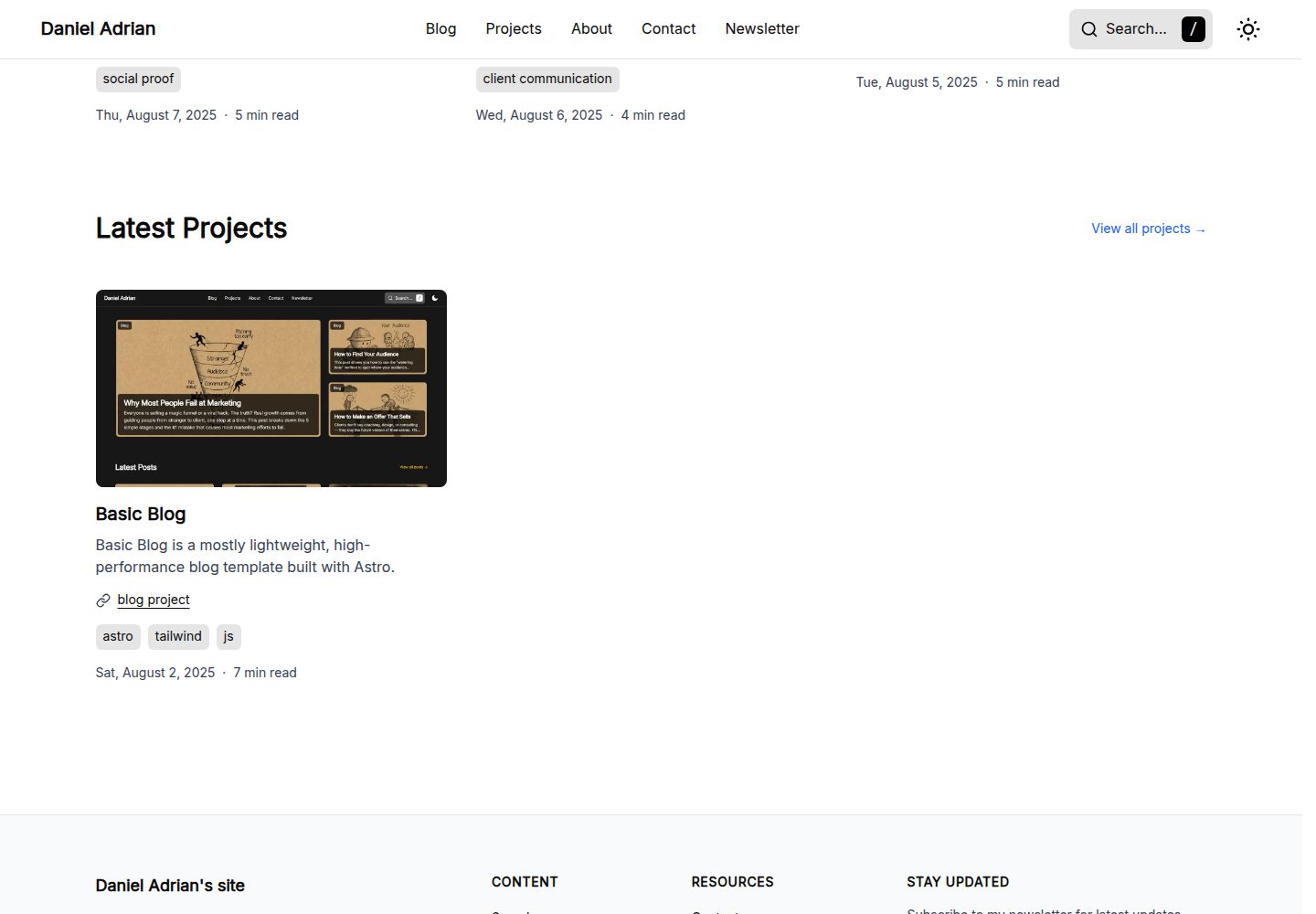
基于 Astro 构建,包含博客、项目、关于、联系、订阅与搜索等页面结构
Astro博客
basic-blog — Astro 博客模板
作者 truedaniyyel
基于 Astro 的轻量博客模板,包含明暗模式、响应式布局、Cloudflare Turnstile 表单防护与 Cloudinary 图片优化。
看看你的网站会是什么样
浏览真实页面截图,比较内容排版与手机效果。点击下方缩略图切换,放大查看整页细节。
全部页面与视图 3
截图用于了解视觉与布局,交互效果请以实际项目为准。
采集于 2026-10-03查看来源
值得关注的模板亮点
从已有项目资料中,快速了解它的特点。
提供深色与浅色模式,并适配手机、平板和桌面设备
使用 Cloudinary 与 LQIP 占位图处理图片加载
内置 Cloudflare Turnstile 机器人防护与 Astro Actions 表单处理示例
站点设置、SEO 元数据与页眉页脚导航集中在 src/site.config.ts 配置
public/_headers 中预置 CSP 与安全响应头,主要面向 Cloudflare
模板详细介绍
Basic Blog 是一个用 Astro 构建的博客模板,仓库采用 MIT 许可,可免费使用、修改和分发。模板提供博客、项目、关于、联系、订阅、搜索等页面结构,导航与页脚链接集中在 src/site.config.ts 中配置,站点标题、描述、社交账号与 OG 图片也在同一文件维护。
样式方面包含深色与浅色模式,并针对手机、平板和桌面设备做响应式适配。图片部分使用 Cloudinary 配合 LQIP 低质量占位图,在完整图片加载前显示模糊占位。字体使用 Astro 的本地字体提供器,字体文件放在 src/assets/fonts/,需在 astro.config.mjs 中注册并在 global.css 中引用变量。
表单功能依赖外部服务:联系表单与订阅表单使用 Cloudflare Turnstile 做机器人防护,并通过 Astro Actions 在服务端处理。README 中的示例使用 Resend 发送邮件、Kit 管理订阅,需要自行配置 .env 中的 Cloudinary、Turnstile 以及邮件/订阅服务密钥。安全头与 CSP 规则放在 public/_headers 中,主要面向 Cloudflare,部署到 Vercel 或 Netlify 时需要把规则迁移到对应配置文件。
需要注意:README 中关于表单服务端的示例代码由作者标注为非专业实现,仅供参考;演示图片、字体、图标等第三方素材的许可需单独核对,域名、托管及邮件、订阅、图片等外部服务可能产生费用。
Astro博客
适合你的项目吗?
适用场景
- 搭建个人技术博客并发布文章
- 展示个人项目与作品集页面
- 提供联系表单与邮件订阅入口
- 需要深色模式与移动端适配的内容站点
适合人群
- 希望使用 Astro 构建博客的开发者
- 需要现成导航、SEO 与订阅表单结构的个人站点
- 计划部署在 Cloudflare 并接受使用 Turnstile 与 Cloudinary 的用户
上手与定制指南
结合仓库当前版本的说明,按下面的资料检查内容、配置与运行要求。
- 1
在 .env 中配置 PUBLIC_CLOUDINARY_CLOUD_NAME、PUBLIC_TURNSTILE_SITE_KEY 等变量,表单才能正常工作
- 2
在 src/site.config.ts 中修改站点标题、描述、社交账号以及页眉页脚导航链接
- 3
如需使用订阅与联系表单的服务端逻辑,需创建 src/actions/index.ts 并按所选邮件或订阅服务配置密钥
- 4
部署到 Vercel 或 Netlify 时,需将 public/_headers 中的 CSP 与安全头规则迁移到 vercel.json 或 netlify.toml
- 5
替换字体时把 .woff2 文件放入 src/assets/fonts/,并在 astro.config.mjs 与 global.css 中同步更新配置
授权与来源资料
使用条件与限制
免费使用 · 保留许可声明本次收录的是公开仓库中采用 MIT 许可的免费版本;免费范围为该版本代码,不代表外部服务或第三方素材免费。
使用时需要遵守
- 允许免费使用、修改、商用和分发该版本代码。
- 分发代码副本或实质性部分时,保留原作者版权声明和完整 MIT 许可声明。
- 代码按现状提供;担保与责任限制以原许可证及适用法律为准。
额外费用与待核对事项
- 联系表单与订阅表单依赖 Cloudflare Turnstile 机器人防护,必须自行申请并配置 Turnstile 密钥,否则表单无法工作。
- 图片优化依赖 Cloudinary 服务,需自行注册 Cloudinary 账号并配置云名称,图片托管与流量可能产生费用。
- README 示例使用 Resend 发送联系表单邮件,需自行注册 Resend 并配置 API 密钥,属于外部付费/限额服务。
- 订阅功能示例使用 Kit(ConvertKit)管理订阅者,需自行注册 Kit 并配置 API 密钥与表单 ID,属于外部服务。
- 预置的 CSP 与安全头规则主要面向 Cloudflare,部署到 Vercel 或 Netlify 时需手动迁移规则到对应配置文件。
- README 中表单服务端示例代码由作者标注为非专业实现,仅供参考,使用前需自行验证与调整。
- 演示图片、字体、图标及其他第三方素材需按各自许可核对,不能仅凭代码的 MIT 许可判断。
- 域名、托管、数据库、支付或 AI 等外部服务可能另外收费。
查看原文依据
Permission is hereby granted, free of charge
许可证原文
For forms to work, you must add your Turnstile keys to your `.env` file
README 原文
PUBLIC_CLOUDINARY_CLOUD_NAME=your_cloud_name_here
README 原文
const resend = new Resend(import.meta.env.RESEND_API_KEY);
README 原文
const KIT_API_KEY = import.meta.env.KIT_API_KEY;
README 原文
If you are deploying to Vercel or Netlify, simply move these rules to a `vercel.json` or `netlify.toml` file respectively.
README 原文
https://github.com/truedaniyyel/basic-blog/blob/main/LICENSEhttps://github.com/truedaniyyel/basic-blog/blob/main/README.md*Note: I'm not a pro with this specific setup yet, so take this with a grain of salt.*
README 原文
DeepSeek 根据仓库许可证和 README 整理 ·2026-10-03。结果仅覆盖已读取资料,依赖、图片、字体及后续条款变更以各自原文为准。
项目核对记录与介绍依据
模板资料
- 来源平台
- Astro Themes
- 资料与维护参考分
- 资料较完整 · 87 / 100
- 技术栈
- Astro
- 网站类型
- 博客
这个分数如何计算
本站按许可资料(最高30分)、演示链接(12分)、预览图(10分)、Star数(15分)、记录的维护时间(15分)、描述完整度(8分)、功能记录(5分)和分类资料(5分)计算。它不是代码、安全或性能测试,也不是 Google 评分;有链接不代表已实测可用。
这个项目需要核对什么
- 记录的仓库更新时间
- 2026-04-13
- 截图检查日期
- 2026-10-03
已收录演示链接。请用你的内容与屏幕尺寸检查;有演示不代表表单、认证或支付已经可用。
目录记录的主要技术栈是 Astro。请通过依赖清单和锁文件核对实际版本与托管要求。这些说明基于收录资料,不代表代码审计或部署实测。
查看具体选型方法 →介绍的制作与核对状态
介绍由 AI 辅助整理目录与仓库资料。仓库作者不等于这篇介绍的审核者。
审核声明: [email protected] · 2026-10-04
查看当时使用的来源资料
SHA-256: b636c4348dcf7826572218d728b5288ce7ba69cfc317d7144cda099b39059bcb
2026-10-03T14:16:30.118Z
来源文件 / 仓库# Basic Blog
**Basic Blog** is a mostly lightweight, high-performance blog template built with Astro 6.

**Features**
- Astro 6+ Ready:
- Native Font Optimization
- Pre-configured CSP (Content Security Policy) and security headers (optimized for Cloudflare, easily adaptable for Vercel or Netlify).

- Dark and Light mode
- Responsive: mobile, tablet, and desktop devices.
- Stack: Astro, Tailwind, and JS.
## Deployment
You will find a `_headers` file located in the `/public` folder. This file handles the Content Security Policy (CSP) and XSS protections mainly for Cloudflare.
If you are deploying to Vercel or Netlify, simply move these rules to a `vercel.json` or `netlify.toml` file respectively.
## Configuration
### Environment Variables
For forms to work, you must add your Turnstile keys to your `.env` file:
```bash
PUBLIC_CLOUDINARY_CLOUD_NAME=your_cloud_name_here
PUBLIC_TURNSTILE_SITE_KEY=0x4AAAAAA...
```
### Site Settings & SEO
Global settings, SEO metadata, and navigation links are managed in `src/site.config.ts`.
Update `SITE_SETTINGS` to change your site title, description, and social media handles:
```typescript
export const SITE_SETTINGS = {
title: "Daniel Adrian's site",
description: "A space to explore ideas and share what I'm learning",
owner: "Daniel Adrian",
ogImages:
"https://res.cloudinary.com/dellp9a4z/image/upload/v1756758385/og-home_ejuqq8.png",
socials: [
{
icon: "github",
label: "GitHub",
url: "https://github.com/truedaniyyel",
handle: "truedaniyyel",
},
],
};
```
### Navigation (Header & Footer)
You can easily manage your site's menu structure by editing the header and footer exports:
```typescript
export const header = [
{
name: "Blog",
url: "/blog",
},
{
name: "Projects",
url: "/projects",
},
{
name: "About",
url: "/about",
},
{
name: "Contact",
url: "/contact",
},
{
name: "Newsletter",
url: "/newsletter",
},
];
export const footer = [
{
title: "Content",
links: [
{
name: "Search",
url: "/search",
},
{
name: "Blog",
url: "/blog",
},
{
name: "Projects",
url: "/projects",
},
{
name: "About",
url: "/about",
},
],
},
{
title: "Resources",
links: [
{
name: "Contact",
url: "/contact",
},
{
name: "Newsletter",
url: "/newsletter",
},
{
name: "RSS",
url: "/rss.xml",
},
{
name: "Sitemap",
url: "/sitemap-index.xml",
},
],
},
];
```
## Metadata & OG Images
You can define custom Open Graph images for both static pages and posts.
### For Static Pages
Pass the `ogImage` prop directly into the `<BaseLayout>` component:
```astro
<BaseLayout
title="Search"
description="Search articles and projects from Daniel Adrian."
ogImage="https://res.cloudinary.com/.../og-search.png"
>
</BaseLayout>
```
### For Blog Posts
Add the image details to the Frontmatter of your Markdown files. The template will automatically use this for the post's social sharing card:
```yaml
image:
src: "https://res.cloudinary.com/.../how_to_build_trust.webp"
alt: "A hand-drawn sketch representing stability with labels: 'Know', 'Like', and 'Trust'."
ogImage:
src: "https://res.cloudinary.com/.../how_to_build_trust.webp"
```
## Image Optimization
This template uses Cloudinary paired with LQIP (Low-Quality Image Placeholders) to ensure a smooth loading experience. When an image is requested, a blurred placeholder is shown until the full-resolution image is ready.
You can find the implementation logic in `src/components/ui/OptimizedImage.astro`:
```astro
<div
class={cn(
"relative overflow-hidden bg-neutral-200 dark:bg-neutral-700",
wrapperClass,
)}
>
{
lqipUrl && (
<img
data-pagefind-ignore
src={lqipUrl}
alt=""
aria-hidden="true"
class={cn(
"absolute inset-0 h-full w-full scale-105 object-cover blur-xl",
imageClass,
)}
loading="eager"
decoding="async"
/>
)
}
<CldImage
src={src}
alt={alt}
class={cn("absolute inset-0 h-full w-full object-cover", imageClass)}
loading={loading}
fetchpriority={fetchPriorityVal}
format="auto"
quality="auto"
{...rest}
/>
</div>
```
## Fonts
Local fonts are stored in `src/assets/fonts/`. To add or change fonts:
1. Drop your `.woff2` files into the fonts folder.
2. Update the `astro.config.mjs` font provider:
```mjs
fonts: [
{
provider: fontProviders.local(),
name: "YourFontName",
cssVariable: "--font-custom",
options: {
variants: [{
src: ["./src/assets/fonts/YourFont.woff2"],
weight: "normal",
style: "normal",
}],
},
},
],
```
3. Update the variable in `src/styles/global.css`:
```css
font-family: var(--font-custom), system-ui, sans-serif;
```
*For more info on using remote fonts (Google Fonts, etc.), check the [Astro Font Provider Reference.](https://docs.astro.build/en/reference/font-provider-reference/)*
## Forms & Bot Protection
The template uses **Cloudflare Turnstile** for non-intrusive bot protection and Astro Actions for server-side processing.
### Newsletter Subscription
Handled via `utils/client-newsletter.ts`. It uses AJAX to submit the form without refreshing the page, providing instant feedback and resetting the Turnstile widget upon success.
### Contact Form
Located in `src/pages/contact.astro`.
- **State Persistence:** Includes a script that caches form data in `sessionStorage`. If the user refreshes or a validation fails, their message isn't lost.
- **Success Handling:** Automatically redirects to a success state and clears the cache once the message is sent.
### Turnstile Implementation
Turnstile code is in `src/components/integrations/turnstile/`:
- `TurnstileWidget.astro`: The UI component that renders the challenge.
- `TurnstileController.astro`: Manages the lifecycle of the widget, including theme switching (light/dark) and automatic cleanup/re-initialization.
### Server-Side Actions
To make the newsletter and contact form functional, you must:
1. Uncomment `export const prerender = false;` in the respective page files (if using SSR).
2. Create `src/actions/index.ts` to define your logic.
**Implementation Example (Resend & Kit)**
*Note: I'm not a pro with this specific setup yet, so take this with a grain of salt.*
```typescript
// src/actions/index.ts
import { ActionError, defineAction } from 'astro:actions';
import { z } from "astro/zod";
import { escapeHtml } from '@utils/escapeHtml';
import { stripCtl } from '@utils/stripCtl';
import { Resend } from 'resend';
const resend = new Resend(import.meta.env.RESEND_API_KEY);
const KIT_FORM_ID = import.meta.env.KIT_FORM_ID;
const KIT_API_KEY = import.meta.env.KIT_API_KEY;
const TURNSTILE_SECRET = import.meta.env.TURNSTILE_SECRET_KEY;
const turnstileField = import.meta.env.DEV
? z
.string()
.optional()
.default('') // dev: missing → ''
: z.string().min(1); // prod: must be non-empty
const fetchWithTimeout = async (url: string, init: RequestInit = {}, ms = 8000) => {
const controller = new AbortController();
const t = setTimeout(() => controller.abort(), ms);
return fetch(url, { ...init, signal: controller.signal }).finally(() => clearTimeout(t));
};
async function verifyTurnstile(token: string, remoteip?: string, expectAction?: string) {
if (import.meta.env.DEV) return true;
if (!TURNSTILE_SECRET) {
console.error('TURNSTILE_SECRET_KEY missing');
return false;
}
const body = new URLSearchParams({
secret: TURNSTILE_SECRET,
response: token,
...(remoteip ? { remoteip } : {}),
});
const res = await fetchWithTimeout('https://challenges.cloudflare.com/turnstile/v0/siteverify', {
method: 'POST',
headers: { 'content-type': 'application/x-www-form-urlencoded' },
body,
}).catch((err) => {
console.warn('Turnstile verify fetch failed/aborted', err);
return undefined;
});
if (!res || !res.ok) {
console.warn('Turnstile verify non-OK', res?.status);
return false;
}
type VerifyResp = {
success: boolean;
hostname?: string;
'error-codes'?: string[];
action?: string;
cdata?: string;
challenge_ts?: string;
};
const json = (await res.json().catch(() => ({}))) as VerifyResp;
if (!json.success) {
console.warn('Turnstile failed', json);
return false;
}
if (expectAction && json.action && json.action !== expectAction) {
console.warn('Unexpected action', json.action);
return false;
}
return true;
}
function getRemoteIp(request: Request): string | undefined {
const h = request.headers;
return (
h.get('CF-Connecting-IP') ??
h.get('x-real-ip') ??
h.get('x-forwarded-for')?.split(',')[0]?.trim() ??
undefined
);
}
export const server = {
contact: defineAction({
accept: 'form',
input: z.object({
name: z.string().min(1).max(100),
email: z.string().email().max(254),
message: z.string().min(1).max(5000),
'cf-turnstile-response': turnstileField,
}),
handler: async ({ name, email, message, 'cf-turnstile-response': token }, ctx) => {
const remoteip = getRemoteIp(ctx.request);
const ok = await verifyTurnstile(token, remoteip, 'contact');
if (!ok) {
throw new ActionError({ code: 'BAD_REQUEST', message: 'Turnstile verification failed.' });
}
const safeName = stripCtl(name);
const safeEmail = stripCtl(email);
const escapeName = escapeHtml(safeName);
const escapeEmail = escapeHtml(safeEmail);
const escapeMessage = escapeHtml(message).replace(/\n/g, '<br>');
try {
const { data, error } = await resend.emails.send({
from: 'Contact Form <[email protected]>',
to: ['[email protected]'],
subject: `New Contact Form Submission from ${safeName}`,
replyTo: `${safeName} <${safeEmail}>`,
html: `
<p>You have a new contact form submission:</p>
<p><strong>Name:</strong> ${escapeName}</p>
<p><strong>Email:</strong> <a href="mailto:${escapeEmail}">${escapeEmail}</a></p>
<p><strong>Message:</strong></p>
<p>${escapeMessage}</p>
<p style="color:#666">Sent from truedaniyyel.com</p>
`,
text:
'You have a new contact form submission:\n\n' +
`Name: ${safeName}\n` +
`Email: ${safeEmail}\n\n` +
`Message:\n${messag}\n` +
'— Sent from truedaniyyel.com',
});
const id = data?.id;
if (error || !id) {
console.error('Resend failed', { error, data });
throw new ActionError({
code: 'BAD_REQUEST',
message: 'Email could not be sent.',
});
}
console.info('Mail sent', { id });
return { ok: true };
} catch (error) {
console.error('Action error', error);
throw new ActionError({
code: 'INTERNAL_SERVER_ERROR',
message: 'Email could not be sent.',
});
}
},
}),
newsletterSubscribe: defineAction({
accept: 'form',
input: z.object({
email: z.string().email().max(254),
'cf-turnstile-response': turnstileField,
}),
handler: async ({ email, 'cf-turnstile-response': token }, ctx) => {
const remoteip = getRemoteIp(ctx.request);
const ok = await verifyTurnstile(token, remoteip, 'newsletter');
if (!ok) {
throw new ActionError({ code: 'BAD_REQUEST', message: 'Turnstile verification failed.' });
}
if (!KIT_API_KEY || !KIT_FORM_ID) {
console.error('Kit env missing', {
hasKey: Boolean(KIT_API_KEY),
hasFormId: Boolean(KIT_FORM_ID),
});
throw new ActionError({
code: 'INTERNAL_SERVER_ERROR',
message: 'Subscription failed.',
});
}
const email_address = stripCtl(email);
const headers = {
'Content-Type': 'application/json',
'X-Kit-Api-Key': KIT_API_KEY,
};
try {
const upsertRes = await fetchWithTimeout('https://api.kit.com/v4/subscribers', {
method: 'POST',
headers,
body: JSON.stringify({ email_address }),
});
const upsertJson = await upsertRes.json().catch(() => ({}));
if (!upsertRes.ok) {
console.error('Kit upsert failed', { status: upsertRes.status, upsertJson });
throw new ActionError({ code: 'BAD_REQUEST', message: 'Subscription failed.' });
}
const attachRes = await fetchWithTimeout(
`https://api.kit.com/v4/forms/${KIT_FORM_ID}/subscribers`,
{
method: 'POST',
headers,
body: JSON.stringify({ email_address }),
},
);
const attachJson = await attachRes.json().catch(() => ({}));
if (!attachRes.ok) {
console.error('Kit form attach failed', { status: attachRes.status, attachJson });
throw new ActionError({ code: 'BAD_REQUEST', message: 'Subscription failed.' });
}
return { ok: true };
} catch (error) {
console.error('Newsletter action error', error);
throw new ActionError({
code: 'INTERNAL_SERVER_ERROR',
message: 'Subscription failed.',
});
}
},
}),
};
```
## Technical Details
Search: Powered by [Pagefind](https://pagefind.app/) for fast, static search.
Image Zoom: Integrated with `medium-zoom` for a clean light-box experience.
Icons: Handled via `astro-icon`.
Code Blocks: Rendered using `astro-expressive-code`.
看看同类模板
对比同技术栈与用途的模板,找到更适合的视觉与内容结构。

astrowind
⭕️ AstroWind: A free template using Astro v7 and Tailwind CSS v4. Astro starter theme.
Astro · 博客

astro-paper
A minimal, accessible and SEO-friendly Astro blog theme.
Astro · 博客

fuwari
✨A static blog template built with Astro.
Astro · 博客

Firefly
Firefly 是一款基于 Astro 的静态博客主题,由 CuteLeaf 在 saicaca 的 Fuwari 模板基础上二次开发,主打清新美观的视觉风格。
Astro · 博客

astro-theme-cactus
A simple Astro theme. Use it to create your blog or website.
Astro · 作品集

astrofy
Astrofy is a free and open-source template for your Personal Portfolio Website built with Astro and TailwindCS…
Astro · 作品集