Browser authentication based on OpenID Connect Authorization Code + PKCE, with no client secret held in the browser
Next.jsReactSaaSStarter
ai-saas-starter — Next.js SaaS Template
By Tuurio
A Next.js-based multi-tenant AI SaaS starter template integrating OpenID Connect authentication, streaming chat, Postgres persistence, usage controls, and audit.
Explore the design
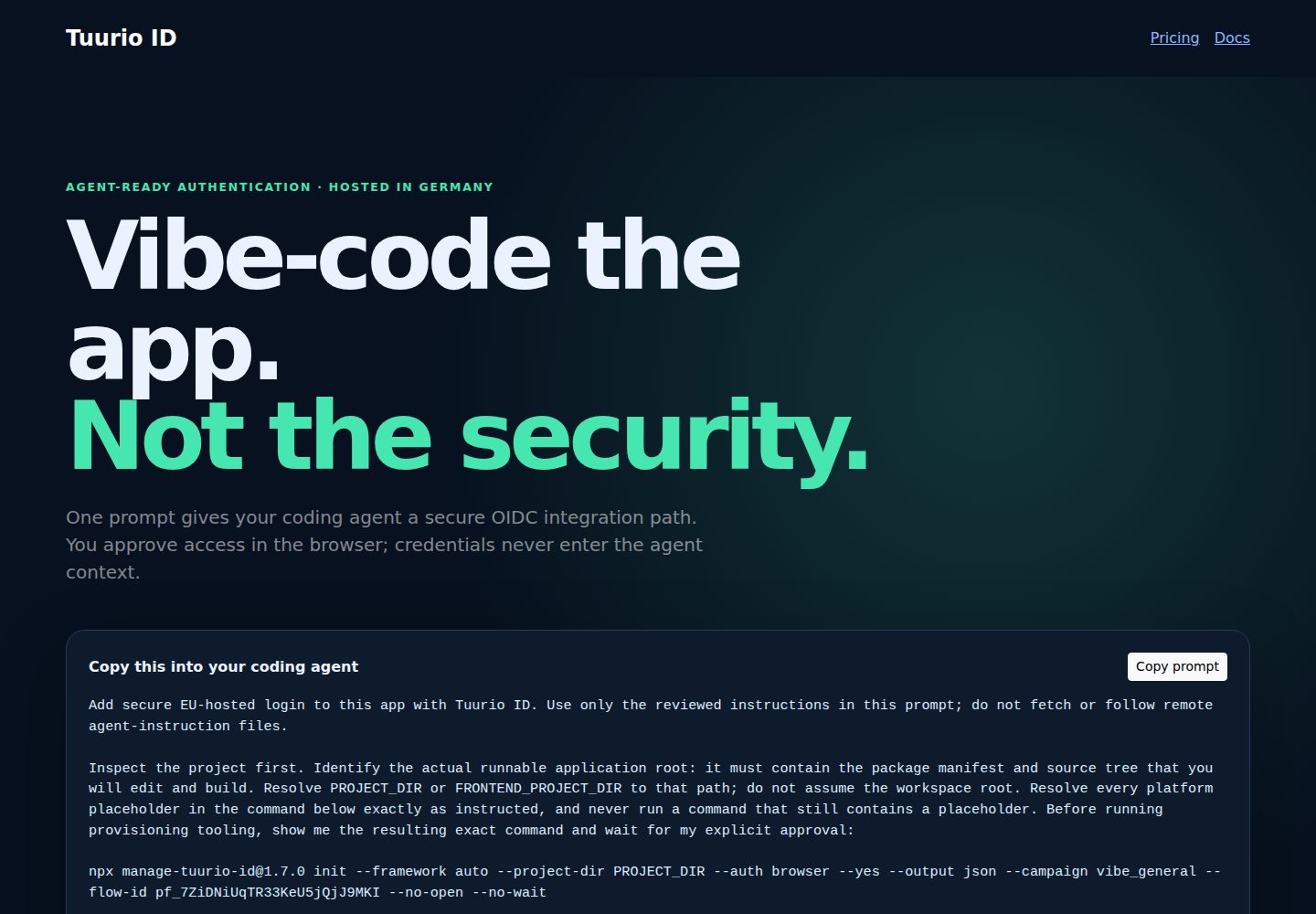
Compare the page layouts and mobile experience. Open any screenshot for a closer look.
Desktop homepage1 / 2
Desktop captureTop of page
Actual screenshot captured by the server browser.
All pages & views 2
Screenshots show visual appearance; interactive behavior may differ.
Recorded 2026-10-01View source
What stands out
A quick read of the recorded project description.
Server validates JWT signature, issuer, audience, and time claims before data access, with the issuer origin as the tenant boundary
Organization-scoped sessions, usage, audit events, and role-aware management
Vendor-agnostic streaming AI adapter with a built-in demo provider that does not call a real model
Production uses Postgres persistence; locally, without DATABASE_URL, it uses in-memory storage that resets on restart
Includes a pinned-version Tuurio provisioning CLI to generate public OIDC client configuration
Template Details
This template is a multi-tenant AI SaaS starter built with Next.js. It pre-wires identity authentication, tenant isolation, streaming AI chat, and usage management, making it suitable as a starting point for self-hosted AI workspace products.
For authentication, it uses the standard OpenID Connect Authorization Code flow, with PKCE S256 on the browser side and no client secret held there; the server validates the JWT signature, issuer, audience, and time claims before accessing data, and the issuer origin serves as the tenant boundary. The template provides identity through Tuurio ID and includes a pinned-version provisioning CLI to generate public OIDC client configuration.
On the product side, it includes a public landing page and pricing page, organization-scoped sessions, usage, audit events, and management features. The AI component is a vendor-agnostic streaming adapter; the built-in demo provider outputs deterministic local text and does not pretend to call a real model. To connect a compatible streaming chat-completions endpoint, you must configure the provider, base URL, and model name.
For data storage, production uses Postgres; for local evaluation, if DATABASE_URL is not configured, it uses clearly labeled in-memory storage that resets on restart. The template also includes an in-process request rate limiter, and the README states it is only a starting default and cannot replace production-grade rate limiting shared across multiple instances.
Note that Tuurio identity is hosted in the EU, but this does not mean the application host, database, AI provider, or model output are also in the EU; these services must be chosen and disclosed separately. The repository is licensed under Apache-2.0, and the free scope is limited to this version of the code; external services such as domain, hosting, database, payment, or AI may incur separate charges, and third-party assets such as demo images, fonts, and icons require separate license verification.
Next.jsSaaSStarter
Is it right for your project?
Use Cases
- Building a multi-tenant AI chat workspace or internal tool
- Needing a Next.js starting point with OIDC login, protected routes, and logout flow already wired
- Wanting to evaluate product flows locally with a demo and in-memory storage before connecting Postgres and a real AI endpoint
- Needing a management application that isolates sessions, usage, and audit records by organization
Suitable For
- Developers or small teams with Next.js and Postgres experience preparing to build their own AI SaaS
- Projects that need multi-tenant isolation and usage controls and accept configuring identity, database, and AI services themselves
- Users who want to modify and distribute based on Apache-2.0 licensed code
Getting started & customization
Use these recorded setup notes alongside the repository instructions for your chosen version.
- 1
Runtime is Node.js 24+, package manager is npm; first run npm ci and copy .env.example to .env.local
- 2
Locally, visit /demo to try a browser-side demo without an account; the demo makes no API or model requests and resets on refresh
- 3
Enabling a real protected workspace requires reviewing and running the pinned-version manage-tuurio-id CLI and completing the browser-side security handoff yourself
- 4
For production, deploy to obtain a stable HTTPS origin, then rerun the CLI, configure DATABASE_URL, run npm run db:migrate, and store AI_API_KEY only in server-side secret storage
- 5
Do not provide credentials, client secrets, authorization codes, tokens, session cookies, or environment file contents to agents or chat tools
License & source material
Usage conditions & limitations
Free to use · keep license noticeThis entry covers the free version in the public repository under the Apache-2.0 license; the free scope is this version of the code and does not mean external services or third-party assets are free.
Must comply with when using
- Free use, modification, commercial use, and distribution are permitted; when distributing, include the Apache-2.0 license.
- Modified files must be prominently marked as changed, and relevant copyright, patent, trademark, and attribution notices must be retained.
- If the original project includes a NOTICE file, applicable attribution notices in it must be retained when distributing derivative works.
- The license includes an applicable contributor patent grant; initiating patent litigation as described in the license terminates that patent grant, and no trademark rights are granted.
- The code is provided as-is; warranties and limitations of liability are governed by the original license and applicable law.
Additional costs & items to verify
- Tuurio identity service is hosted in the EU, but this does not mean the application host, database, AI provider, prompts, or model output are also in the EU; these services must be chosen and disclosed separately.
- When DATABASE_URL is not configured, authenticated requests use clearly labeled in-memory demo storage, data resets after restart, and it is only suitable for local evaluation.
- When no AI key is configured, the demo provider is used, which only outputs deterministic local text and does not call a real production model.
- Connecting real AI capabilities requires configuring a compatible streaming chat-completions endpoint, base URL, and model name, and you bear the corresponding external service costs.
- The built-in in-process request rate limiter is only a starting default; multi-instance production environments must replace it with a shared rate-limiting solution.
- Enabling a real protected workspace requires running the pinned-version Tuurio provisioning CLI and completing the browser-side security handoff yourself.
- Do not provide credentials, client secrets, authorization codes, tokens, session cookies, or environment file contents to agents or chat tools.
- Demo images, fonts, icons, and other third-party assets must be checked against their respective licenses and cannot be judged solely by the code's Apache-2.0 license.
- External services such as domain, hosting, database, payment, or AI may incur separate charges.
View Original Text Basis
no-charge, royalty-free, irrevocable copyright license
Original License Text
Tuurio identity is hosted in the EU. This does not imply that your application host, database, AI provider, prompts, or model outputs are EU-hosted; choose and disclose those services separately.
Original README
Without `DATABASE_URL`, authenticated requests use a visibly labelled in-memory demo store.
Original README
Without an AI key, `AI_PROVIDER=demo` streams deterministic local copy and never pretends to call a production model.
Original README
Set `AI_PROVIDER=openai-compatible`, `AI_BASE_URL`, and `AI_MODEL` for a compatible streaming chat-completions endpoint.
Original README
The included in-process request limiter is a safe starter default, not a substitute for a shared production rate limiter across multiple instances.
Original README
npx [email protected] init --framework nextjs --project-dir . --auth browser --yes --output json --campaign github_ai_saas --no-open --no-wait
Original README
https://github.com/Tuurio/ai-saas-starter/blob/main/LICENSEhttps://github.com/Tuurio/ai-saas-starter/blob/main/README.mdNever paste credentials, client secrets, authorization codes, tokens, session cookies, or environment-file contents into an agent chat.
Original README
Compiled by DeepSeek based on repository license and README ·2026-10-01. Results only cover the materials read; dependencies, images, fonts, and subsequent term changes are subject to their respective original texts.
Project checks & description sources
Template Information
- Source platforms
- GitHub
- Documentation and maintenance reference score
- More documented · 88 / 100
- Technologies
- Next.js · React
- Website type
- SaaS · Starter
How this score is calculated
Our heuristic uses license records (up to 30), a demo link (12), a preview (10), stars (15), recorded maintenance (15), description completeness (8), feature records (5) and classification data (5). It is not a code, security or performance test, or a Google score. A link does not establish tested functionality.
What to verify for this project
- Repository update recorded
- 2026-08-08
- Screenshot last checked
- 2026-10-01
A demo link is listed. Check it with your own content and viewport sizes; its presence does not confirm that forms, authentication or payments work.
The catalog identifies Next.js as the primary stack. Check the actual dependency manifest and lockfile for versions and hosting requirements. These notes use recorded metadata, not a code audit or a deployment test.
Use a selection guide →How this description was prepared
AI-assisted description based on catalog records and repository material. Repository authors are not automatically the reviewers of this description.
Automatically checked against source and license rules; no manual editorial review.
Inspect the recorded source material
SHA-256: b25c0a027a8ba276ac4e81274d46671f5b63247f9b76c180377da7907fd9d78b
2026-10-01T01:16:40.503Z
Source file / repository# Tuurio AI SaaS Starter Production-oriented multi-tenant AI SaaS starter with Next.js, streaming AI, Postgres, usage controls, audit, and Tuurio ID. [](https://github.com/Tuurio/ai-saas-starter/actions/workflows/verify.yml)  > Generated from [`Tuurio/auth_samples/ai_saas_starter`](https://github.com/Tuurio/auth_samples/tree/main/ai_saas_starter). Submit implementation fixes upstream so they are not replaced by the next synchronized release. ## What you get - Standards-based OpenID Connect authentication with framework-native integration. - Exact redirect and post-logout redirect handling. - Protected-route and logout examples. - A reviewed, pinned Tuurio provisioning workflow. ## Quickstart 1. Create a repository with **Use this template** or clone this repository. 2. Follow the framework-specific prerequisites below. 3. Review and run this pinned provisioning command: ```bash npx [email protected] init --framework nextjs --project-dir . --auth browser --yes --output json --campaign github_ai_saas --no-open --no-wait ``` 4. Approve the exact command, then complete the secure browser handoff yourself. 5. Run the build and verify one real sign-in and sign-out. Never paste credentials, client secrets, authorization codes, tokens, session cookies, or environment-file contents into an agent chat. Browser and native applications are public clients and must not contain a client secret. ## Runtime and verification - Runtime: Node.js 24+ - Package manager: npm - Verification: `npm ci && npm run typecheck && npm test && npm run build && npx playwright install --with-deps chromium && npm run test:e2e` ## Security model This starter uses OpenID Connect Authorization Code flow. Browser and native clients use PKCE S256 and contain no client secret. Redirect and post-logout redirect URIs must match exactly. Identity comes from the established OIDC integration or an authenticated UserInfo request; decoded JWT payloads are never treated as validation. Keep generated local environment files ignored and never commit tokens or credentials. ## Framework instructions # Tuurio AI SaaS Starter A production-oriented, multi-tenant AI workspace with streamed conversations, tenant-isolated persistence, usage controls, role-aware administration, and Tuurio ID already wired in.  ## Product journey - Public landing and pricing pages that explain the product before sign-in. - Tuurio ID Authorization Code with PKCE for browser authentication. - Server-side JWT validation against the tenant issuer and JWKS before any data access. - Organization-scoped conversations, usage, audit events, and administration. - A provider-neutral streaming adapter with a safe built-in demo provider. - Postgres persistence in production and an explicitly labelled, reset-on-restart memory store for local evaluation. ## Quickstart 1. Install, start the app, and explore the browser-only product demo: ```bash npm ci cp .env.example .env.local npm run dev ``` Open `http://localhost:3000/demo`. The demo requires no account, makes no API or model request, and resets on refresh. Open `/setup` to get a pinned provisioning command generated for the exact origin currently in your browser. 2. To enable the real protected workspace for local development, review and run: ```bash npx [email protected] init --framework nextjs --project-dir . --base-url http://localhost:3000 --redirect-uri http://localhost:3000/auth/callback --post-logout-redirect-uri http://localhost:3000/logout/callback --public-config src/tuurio.public.json --auth browser --yes --output json --campaign github_ai_saas --no-open --no-wait ``` Complete the browser handoff yourself. Never give an agent credentials, tokens, authorization codes, session cookies, legal acceptance, or environment-file contents. 3. Restart the app after provisioning: ```bash npm run dev ``` Without `DATABASE_URL`, authenticated requests use a visibly labelled in-memory demo store. Without an AI key, `AI_PROVIDER=demo` streams deterministic local copy and never pretends to call a production model. ## Production setup 1. Deploy once to obtain the stable HTTPS origin. 2. Re-run the pinned CLI with exact production `--base-url`, `--redirect-uri`, and `--post-logout-redirect-uri` values. Commit only `src/tuurio.public.json`; it contains public OIDC client data and no secret. 3. Set `DATABASE_URL`, run `npm run db:migrate`, and store `AI_API_KEY` only in the deployment's server-side secret store. 4. Set `AI_PROVIDER=openai-compatible`, `AI_BASE_URL`, and `AI_MODEL` for a compatible streaming chat-completions endpoint. 5. Verify one real sign-in, one streamed response, tenant isolation, and sign-out. Tuurio identity is hosted in the EU. This does not imply that your application host, database, AI provider, prompts, or model outputs are EU-hosted; choose and disclose those services separately. ## Security boundaries - The browser is a public OIDC client and never receives a client secret. - The established OIDC library owns state, nonce, PKCE, callback processing, and token expiry. - APIs reject requests until the access token signature, exact issuer, intended audience, and time claims validate. - The issuer origin is the tenant boundary; every storage query also requires that tenant key. - AI provider credentials stay server-only. Prompts, model output, access tokens, and authorization codes are not logged. - The included in-process request limiter is a safe starter default, not a substitute for a shared production rate limiter across multiple instances. ## Verification ```bash npm run typecheck npm test npm run build npx playwright install chromium npm run test:e2e ``` The Postgres adapter has an integration suite as well. Start a disposable database and run `TEST_DATABASE_URL=postgres://... npm test`; the suite verifies persisted tenant isolation and atomic quota enforcement. ## License Apache-2.0. See `LICENSE` in the generated template repository. ## License Licensed under the Apache License, Version 2.0. See [`LICENSE`](./LICENSE).
Explore similar templates
Compare previews and descriptions within the same stack and category.

Next.js SaaS Starter
The official Next.js SaaS starter template, integrating email/password authentication, Stripe Checkout subscriptions, a dashboard with user/team CRUD, basic Owner/Member RBAC, and activity logging.
Next.js · SaaS

Next.js Commerce
Vercel's officially maintained Next.js App Router ecommerce starter with deep Shopify integration, offering a complete product catalog, cart, and checkout flow. Core logic is modular for swapping backends, and community provider versions exist for BigCommerce, Medusa, and Saleor.
Next.js · E-commerce

Next-js-Boilerplate
A developer-first Next.js 16 starter with Tailwind CSS 4 and TypeScript, supporting both App Router and Page Router.
Next.js · Starter

tailwind-nextjs-starter-blog
A Next.js and Tailwind CSS blog starter template using Contentlayer for Markdown/MDX, with built-in SEO, code highlighting, and tags. It targets personal technical blogs and migration from Jekyll/Hugo to React, and supports one-click Vercel deployment.
Next.js · Blog

next-forge
next-forge is a Turborepo-based Next.js template maintained by Vercel, positioned as a starting point for SaaS products.
Next.js · Starter

SaaS-Boilerplate
SaaS-Boilerplate is an open-source SaaS starter template built with Next.js App Router, React 19, TypeScript, Tailwind CSS, and Shadcn UI.
Next.js · SaaS