Eleventy-based static site starter template for blogs and personal websites
EleventyPortfolioBlogStarter
hylia — Eleventy Portfolio Template
By uxpr
Hylia is a lightweight Eleventy-based starter template preconfigured with Netlify CMS for building a blog or personal website.
Explore the design
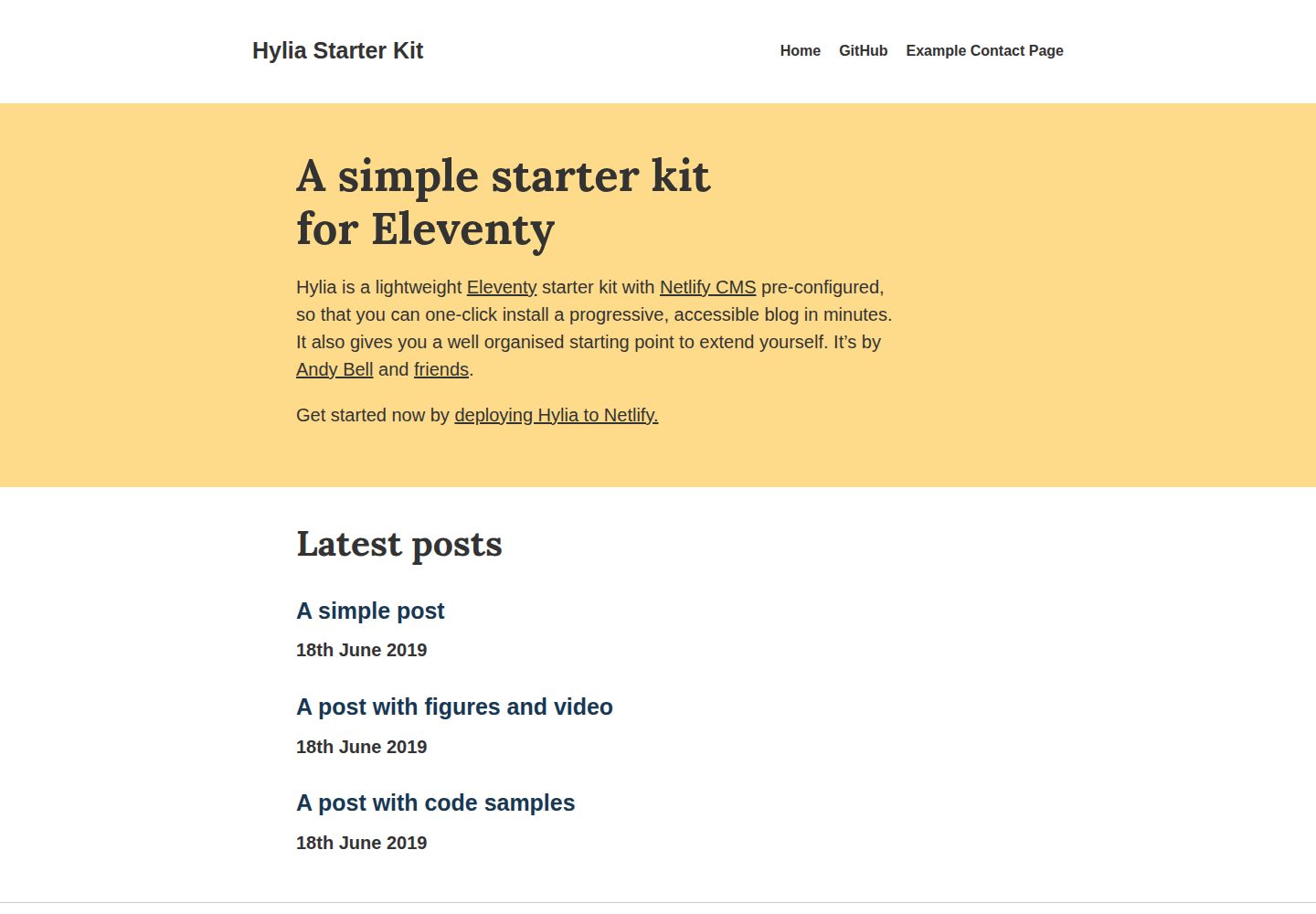
Compare the page layouts and mobile experience. Open any screenshot for a closer look.
Desktop homepage1 / 2
Desktop captureTop of page
Actual screenshot captured by the server browser.
All pages & views 2
Screenshots show visual appearance; interactive behavior may differ.
Recorded 2026-10-12View source
What stands out
A quick read of the recorded project description.
Preconfigured Netlify CMS for editing the homepage, posts, general pages, global data, navigation, and theme in the backend
Built-in tags and tag archives, RSS feed, and a contact form for Netlify Forms
Sass-driven styling system with design tokens and a utility class generator, plus a deletable Styleguide page
Service Worker caches pages to support offline reading of articles
Offers both one-click Netlify deployment and local cloning as onboarding paths
Template Details
Hylia is an Eleventy-based starter template positioned as a lightweight starting point for a blog or personal website. It comes preconfigured with Netlify CMS, supports one-click deployment via Netlify, and can also be run locally after cloning the repository. The template provides CMS-editable content for the homepage, posts, general pages, global site data, navigation, and theme, and includes built-in tags and tag archives, RSS feed, a contact form (for Netlify Forms), and a Service Worker that caches pages for offline reading. The styling layer is powered by Sass, includes design tokens and a utility class generator, and ships with a default Styleguide page that can be deleted. Roadmap items listed in the README (such as Webmentions, pagination, and dark/light mode toggle) are planned content; dark/light mode was added in 0.4.0, while the rest are not yet implemented. Using the template's CMS requires first enabling Identity and Git Gateway on Netlify, so it is not a fully Netlify-independent solution.
EleventyPortfolioBlogStarter
Is it right for your project?
Use Cases
- Quickly build a personal blog with backend editing capabilities using Eleventy
- Establish an extensible starting structure for a personal website, then extend it as needed
- Let non-technical authors write and edit posts in the browser via Netlify CMS
- Static content sites that need RSS feed, tag archives, and offline reading capabilities
Suitable For
- Individual developers who want to build a blog starting from Eleventy
- Users planning to host on Netlify and manage content with Netlify CMS
- Static site projects that need a lightweight frontend, Sass styling system, and design tokens
- Teams willing to configure Identity and Git Gateway on Netlify to enable backend editing
Getting started & customization
Use these recorded setup notes alongside the repository instructions for your chosen version.
- 1
One-click deployment: deploy the repository to Netlify via the Deploy to Netlify button in the README
- 2
Local run: after cloning or forking the repository, run npm install, then npm start, and visit http://localhost:8080
- 3
Production build uses npm run production; Sass compilation and design token regeneration use npm run sass:process and npm run sass:tokens respectively
- 4
Before enabling the CMS, enable Identity in Netlify under Settings > Identity, enable Git Gateway, then invite users and set passwords, and finally visit /admin on the site to log in
- 5
Design tokens can be edited directly in src/_data/tokens.json, and its structure must remain correct; if the Styleguide is not needed, delete src/styleguide.njk to remove that page
License & source material
Usage conditions & limitations
Free to use · keep license noticeThis entry covers the free version under the MIT license in the public repository; the free scope is the code of this version and does not mean external services or third-party assets are free.
Must comply with when using
- Free use, modification, commercial use, and distribution of this version's code are permitted.
- When distributing copies or substantial portions of the code, retain the original author's copyright notice and the full MIT license notice.
- The code is provided as is; warranties and limitations of liability are governed by the original license and applicable law.
Additional costs & items to verify
- Demo images, fonts, icons, and other third-party assets must be checked against their respective licenses and cannot be judged solely by the code's MIT license.
- External services such as domains, hosting, databases, payments, or AI may incur separate charges.
- The CMS must be configured on Netlify before use; backend editing cannot be used independently of Netlify.
- The Identity service must be enabled in Netlify site settings, relying on Netlify platform capabilities.
- Git Gateway must be enabled in Netlify; CMS content editing depends on this external service.
- The contact form targets Netlify Forms, and actual submission handling depends on the Netlify forms service.
- The styling system is based on an undocumented Stalfos v2 WIP version, so extending styles lacks official documentation support.
View Original Text Basis
Permission is hereby granted, free of charge
Original License Text
Before you can use the CMS, you need to do some config in Netlify.
Original README
Once you’ve set up the site on Netlify, go to “Settings” > “Identity” and enable Identity
Original README
Scroll down to the “Git Gateway” area, click “Enable Git Gateway” and follow the steps
Original README
A basic contact form, ready for [Netlify Forms](https://docs.netlify.com/forms/setup/#html-forms)
Original README
https://github.com/uxpr/hylia/blob/master/LICENSE.txthttps://github.com/uxpr/hylia/blob/master/README.mdHylia is based on the [WIP v2 version of Stalfos](https://github.com/hankchizljaw/stalfos/tree/feature/v2), which currently has no documentation
Original README
Compiled by DeepSeek based on repository license and README ·2026-10-12. Results only cover the materials read; dependencies, images, fonts, and subsequent term changes are subject to their respective original texts.
Project checks & description sources
Template Information
- Source platforms
- GitHub
- Documentation and maintenance reference score
- Partly documented · 70 / 100
- Technologies
- Eleventy
- Website type
- Portfolio · Blog · Starter
How this score is calculated
Our heuristic uses license records (up to 30), a demo link (12), a preview (10), stars (15), recorded maintenance (15), description completeness (8), feature records (5) and classification data (5). It is not a code, security or performance test, or a Google score. A link does not establish tested functionality.
What to verify for this project
- Repository update recorded
- 2023-01-09
- Screenshot last checked
- 2026-10-12
A demo link is listed. Check it with your own content and viewport sizes; its presence does not confirm that forms, authentication or payments work.
The catalog identifies Eleventy as the primary stack. Check the actual dependency manifest and lockfile for versions and hosting requirements. These notes use recorded metadata, not a code audit or a deployment test.
Use a selection guide →How this description was prepared
AI-assisted description based on catalog records and repository material. Repository authors are not automatically the reviewers of this description.
Review declaration: [email protected] · 2026-10-13
Inspect the recorded source material
SHA-256: 9be4ef15515f41b9a9483f79bd35762f416fbda5313d9eb8381cfd1dc080041d
2026-10-12T21:08:56.695Z
Source file / repository# A simple starter kit for Eleventy
Hylia is a lightweight [Eleventy](https://11ty.io) starter kit with [Netlify CMS](https://www.netlifycms.org/) pre-configured, so that you can one-click install a progressive, accessible blog in minutes. It also gives you a well organised starting point to extend it for yourself.
Get started now by **[deploying Hylia to Netlify.][deploy-to-netlify]**
[][deploy-to-netlify]
<img src="https://hankchizljaw.imgix.net/hylia-github.jpg?auto=format&q=60" width="550" />
## Features
Hylia version 0.7.0 features:
✍️ A pre-configured [Netlify CMS](https://www.netlifycms.org/) setup
🎨 Customisable design tokens to make it your own
🌍 Customisable global data and navigation
📂 Tags and tag archives
✅ Progressively enhanced, semantic and accessible
🎈 _Super_ lightweight front-end
🚰 Sass powered CSS system with utility class generator
⚙️ Service worker that caches pages so people can read your articles offline
🚀 An RSS feed for your posts
💌 A basic contact form, ready for [Netlify Forms](https://docs.netlify.com/forms/setup/#html-forms)
## Roadmap
💬 [Netlify Forms](https://www.netlify.com/docs/form-handling/) powered comments
💡 ~~Dark/Light mode toggle~~ [Added in 0.4.0](https://github.com/hankchizljaw/hylia/releases/tag/0.4.0)
🗣 Webmentions
📖 Pagination
🐦 Web sharing API integration
🗒 Offline mode with links to cached pages
📄 Documentation site
💅 Proper Sass documentation
✍️ Proper CMS documentation
🖼 A facility for you to be able to add your logo / branding
---
## Getting started
### Method one: One-Click Deploy to Netlify
You can [deploy Hylia to Netlify with one click][deploy-to-netlify] and you’ll be up and running in minutes!
[][deploy-to-netlify]
I recorded a quick start video of me deploying Hylia to Netlify and getting the CMS set up. [Check it out here](https://youtu.be/0hM_0BH-Y_A).
### Method two: Clone / Fork
1. Clone or fork this repo: `git clone https://github.com/hankchizljaw/hylia`
2. `cd` into the project directory and run `npm install`
3. Once all the dependencies are installed run `npm start`
4. Open your browser at `http://localhost:8080` and away you go!
## Terminal commands
### Serve the site locally
```bash
npm start
```
### Build a production version of the site
```bash
npm run production
```
### Compile Sass
```bash
npm run sass:process
```
### Re-generate design tokens for Sass
```bash
npm run sass:tokens
```
## Getting started with the CMS
Before you can use the CMS, you need to do some config in Netlify. Luckily they provide a [very handy guide to get started](https://www.netlify.com/docs/identity/).
In short, though:
- Once you’ve set up the site on Netlify, go to “Settings” > “Identity” and enable Identity
- Scroll down to the “Git Gateway” area, click “Enable Git Gateway” and follow the steps
- Click the “Identity” tab at the top
- Once you’ve enabled identity, click “Invite Users”
- Check the invite link in your inbox and click the link in the email that’s sent to you
- Set a password in the popup box
- Go to `/admin` on your site and login
- You’re in and ready to edit your content!
## Design Tokens and Styleguide
### Design Tokens
Although Hylia has a pretty simple design, you can configure the core design tokens that control the colours, size ratio and fonts.
---
**Note**: _Credit must be given to the hard work [Jina Anne](https://twitter.com/jina) did in order for the concept of design tokens to even exist. You should watch [this video](https://www.youtube.com/watch?v=wDBEc3dJJV8), then [read this article](https://the-pastry-box-project.net/jina-bolton/2015-march-28) and then sign up for [this course](https://aycl.uie.com/virtual_seminars/design_tokens_scaling_design_with_a_single_source_of_truth) to expand your knowledge._
---
To change the design tokens in the CMS, find the “Globals” in the sidebar then in the presented options, select “Theme Settings”.
To change the design tokens directly, edit [`_src/data/tokens.json`](https://github.com/hankchizljaw/hylia/blob/master/src/_data/tokens.json).
The tokens are converted into maps that the Sass uses to compile the front-end CSS, so make sure that you maintain the correct structure of `tokens.json`.
### Styleguide
Your version of Hylia ships with a Styleguide by default. You can see a demo of the Styleguide at <https://hylia.website/styleguide/>.
You can edit the Styleguide by opening [`src/styleguide.njk`](https://github.com/hankchizljaw/hylia/blob/master/src/styleguide.njk). If you don’t want the Styleguide, delete that file and the page will vanish.
## Sass
Hylia is based on the [WIP v2 version of Stalfos](https://github.com/hankchizljaw/stalfos/tree/feature/v2), which currently has no documentation (I know, I’m bad). Here is some very basic documentation for elements of the new framework that you will encounter on this project.
### Configuration
The whole Sass system is powered by central config file, which lives here: [`_src/scss/_config.scss`](https://github.com/hankchizljaw/hylia/blob/master/src/scss/_config.scss).
Before Sass is compiled, a `_tokens.scss` file is generated from the [design tokens config](https://github.com/hankchizljaw/hylia/blob/master/src/_data/tokens.json) which is required.
Key elements:
- `$stalfos-size-scale`: A token driven size scale which by default, is a “Major Third” scale
- `$stalfos-colors`: A token driven map of colours
- `$stalfos-util-prefix`: All pre-built, framework utilities will have this prefix. Example: the wrapper utility is '.sf-wrapper' because the default prefix is 'sf-'
- `$metrics`: Various misc metrics to use around the site
- `$stalfos-config`: This powers everything from utility class generation to breakpoints to enabling/disabling pre-built components/utilities
### How to create a new utility class with the generator
The utility class generator lets you generate whatever you want, with no opinions on class name or properties affected.
To add a new class, add another item to the exists `$stalfos-config` map. This example adds a utility for floating elements.
```scss
'float':('items':('left':'left','right': 'right'
),
'output': 'responsive',
'property': 'float'
);
```
The `output` is set to `responsive` which means every breakpoint will generate a prefixed class for itself. If you only wanted elements to float left in the `md` breakpoint, you’d now be able to add a class of `md:float-left` to your HTML elements.
If you only want standard utility classes generating, set the `output` to `standard`.
### Functions
#### `get-color($key)`
Function tries to match the passed `$key` with the `$stalfos-colors` map. Returns null if it can’t find a match.
#### `get-config-value($key, $group)`
Returns back a 1 dimensional (key value pair) config value if available.
#### `get-size($ratio-key)`
Function tries to match the passed `$ratio-key` with the `$stalfos-size-scale`. Returns null if it can’t find a match.
### Mixins
#### `apply-utility($key, $value-key)`
Grabs the property and value of one of the `$stalfos-config utilities` that the generator will generate a class for.
#### `media-query($key)`
Pass in the key of one of your breakpoints set in `$stalfos-config['breakpoints']` and this mixin will generate the `@media` query with your configured value.
## CMS
Hylia has [Netlify CMS](https://www.netlifycms.org/) pre-configured as standard. You can customise the configuration by editing [`src/admin/config.yml`](https://github.com/hankchizljaw/hylia/blob/master/src/admin/config.yml).
### Content that you can edit
The basic CMS setup allows you to edit the following:
- **Home page**: Edit the content on your homepage
- **Posts**: Create and edit blog posts
- **Generic pages**: Create generic pages that use a similar layout to posts
- **Global site data**: Various bits of global site data such as your url, title, posts per page and author details
- **Navigation**: Edit your primary navigation items
- **Theme**: Edit the design tokens that power the site’s theme
## Get involved
This project is _super_ early and feedback is very much welcome. In order to keep things running smooth, please consult the [contribution guide and code of conduct](https://github.com/hankchizljaw/hylia/blob/master/contributing.md).
The stuff that I need the most help with is:
- Documentation
- [Webmentions](https://www.w3.org/TR/webmention/)
- Performance
[deploy-to-netlify]: https://app.netlify.com/start/deploy?repository=https://github.com/hankchizljaw/hylia&stack=cms
Explore similar templates
Compare previews and descriptions within the same stack and category.

eleventy-base-blog
The officially maintained Eleventy blog starter template, MIT licensed, includes posts, tag pages, archives, an about page, a 404 page, an Atom feed, and sitemap.xml, with per-page CSS bundling, syntax highlighting, and image optimization.
Eleventy · Blog

eleventy-garden
An Eleventy-based digital garden starter template for building a personal knowledge site organized through hyperlinks. It supports Roam-style double-bracket links, backlink display, and hover cards for backlinks.
Eleventy · Starter

eleventastic
Eleventastic is an Eleventy starter kit by Max Böck, used as the base for new 11ty projects. It integrates Sass, Webpack, SVG icon sprites, critical CSS, and HTML minification into the 11ty build without external steps.
Eleventy · Starter

neat-starter
An Eleventy-based static site starter template integrating Netlify CMS, Alpine.js, and Tailwind CSS. It provides a ready-to-run example site, a one-click Netlify deploy button, and an MIT-licensed codebase.
Eleventy · Starter

Eleventy-Starter-Boilerplate
An Eleventy-based blog starter template with Tailwind CSS, Webpack, PostCSS, ESLint, and Prettier, optional Netlify CMS, and built-in SEO metadata, sitemap, and 404 page.
Eleventy · Blog

eleventy-plus-vite
A static site starter combining Eleventy and Vite, with a live-reloading development server, Vite-based production post-processing, a PostCSS pipeline with Autoprefixer and cssnano, critical CSS inlining and asynchronous CSS loading, a web font loading strategy example, fluid typography, basic dark mode, an…
Eleventy · Starter