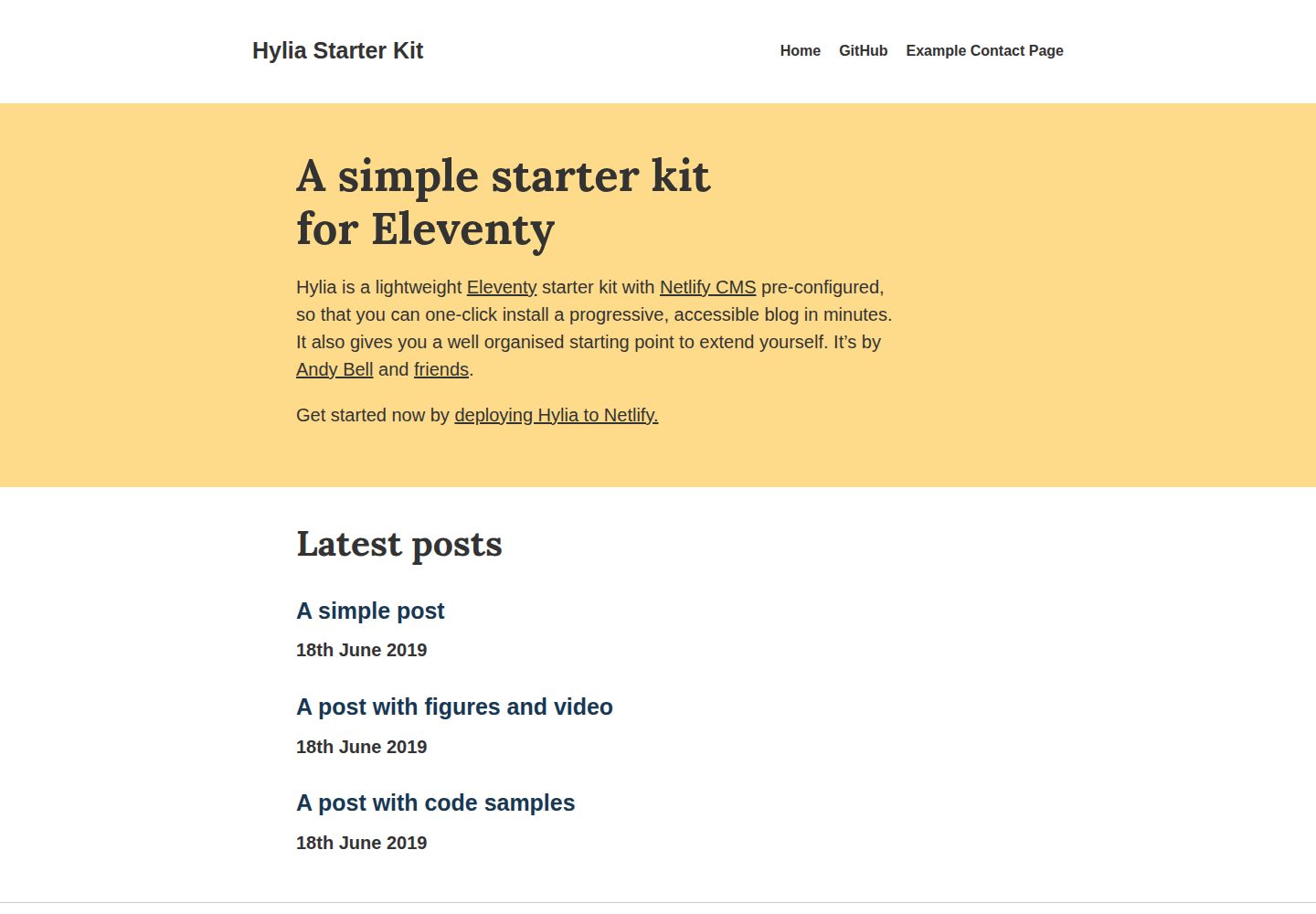
基于 Eleventy 的静态站点启动模板,面向博客与个人网站
Eleventy作品集博客启动器
hylia — Eleventy 作品集模板
作者 uxpr
Hylia 是一个基于 Eleventy 的轻量级启动模板,预配置 Netlify CMS,用于搭建博客或个人网站。
看看你的网站会是什么样
浏览真实页面截图,比较内容排版与手机效果。点击下方缩略图切换,放大查看整页细节。
全部页面与视图 2
截图用于了解视觉与布局,交互效果请以实际项目为准。
采集于 2026-10-12查看来源
值得关注的模板亮点
从已有项目资料中,快速了解它的特点。
预配置 Netlify CMS,可在后台编辑首页、文章、通用页面、全局数据、导航与主题
内置标签与标签归档、RSS 订阅、面向 Netlify Forms 的联系表单
Sass 驱动的样式系统,含设计令牌与工具类生成器,附带可删除的 Styleguide 页面
Service Worker 缓存页面,支持离线阅读文章
提供 Netlify 一键部署与本地克隆两种上手方式
模板详细介绍
Hylia 是一个基于 Eleventy 的启动模板,定位为轻量级博客或个人网站起点。它预配置了 Netlify CMS,可通过 Netlify 一键部署,也支持克隆仓库后在本地运行。模板提供首页、文章、通用页面、全局站点数据、导航和主题等 CMS 可编辑内容,并内置标签与标签归档、RSS 订阅、联系表单(面向 Netlify Forms)以及缓存页面以供离线阅读的 Service Worker。样式层由 Sass 驱动,包含设计令牌(design tokens)与工具类生成器,并附带一个默认的 Styleguide 页面,可自行删除。README 中列出的路线图项目(如 Webmentions、分页、暗色/亮色模式切换等)属于计划内容,其中暗色/亮色模式已在 0.4.0 加入,其余尚未实现。该模板的 CMS 使用需要先在 Netlify 上启用 Identity 与 Git Gateway,因此并非完全脱离 Netlify 的独立方案。
Eleventy作品集博客启动器
适合你的项目吗?
适用场景
- 用 Eleventy 快速搭建一个带后台编辑能力的个人博客
- 为个人网站建立可扩展的起始结构,再按需自行扩展
- 通过 Netlify CMS 让非技术作者在浏览器中撰写和编辑文章
- 需要 RSS 订阅、标签归档与离线阅读能力的静态内容站点
适合人群
- 希望以 Eleventy 为起点搭建博客的个人开发者
- 打算使用 Netlify 托管并借助 Netlify CMS 管理内容的用户
- 需要轻量前端、Sass 样式系统与设计令牌的静态站点项目
- 接受在 Netlify 上配置 Identity 与 Git Gateway 以启用后台编辑的团队
上手与定制指南
结合仓库当前版本的说明,按下面的资料检查内容、配置与运行要求。
- 1
一键部署:通过 README 中的 Deploy to Netlify 按钮将仓库部署到 Netlify
- 2
本地运行:克隆或 fork 仓库后执行 npm install,再运行 npm start,访问 http://localhost:8080
- 3
生产构建使用 npm run production;Sass 编译与设计令牌重新生成分别使用 npm run sass:process 和 npm run sass:tokens
- 4
启用 CMS 前需在 Netlify 的 Settings > Identity 中开启 Identity,并启用 Git Gateway,然后邀请用户并设置密码,最后访问站点的 /admin 登录
- 5
设计令牌可直接编辑 src/_data/tokens.json,需保持其结构正确;不需要 Styleguide 时删除 src/styleguide.njk 即可移除该页面
授权与来源资料
使用条件与限制
免费使用 · 保留许可声明本次收录的是公开仓库中采用 MIT 许可的免费版本;免费范围为该版本代码,不代表外部服务或第三方素材免费。
使用时需要遵守
- 允许免费使用、修改、商用和分发该版本代码。
- 分发代码副本或实质性部分时,保留原作者版权声明和完整 MIT 许可声明。
- 代码按现状提供;担保与责任限制以原许可证及适用法律为准。
额外费用与待核对事项
- 演示图片、字体、图标及其他第三方素材需按各自许可核对,不能仅凭代码的 MIT 许可判断。
- 域名、托管、数据库、支付或 AI 等外部服务可能另外收费。
- 使用 CMS 前必须在 Netlify 上完成配置,无法脱离 Netlify 使用后台编辑功能。
- 需在 Netlify 站点设置中启用 Identity 服务,依赖 Netlify 平台能力。
- 需在 Netlify 中启用 Git Gateway,CMS 内容编辑依赖该外部服务。
- 联系表单面向 Netlify Forms,实际提交处理依赖 Netlify 表单服务。
- 样式系统基于尚无文档的 Stalfos v2 WIP 版本,扩展样式时缺少官方文档支持。
查看原文依据
Permission is hereby granted, free of charge
许可证原文
Before you can use the CMS, you need to do some config in Netlify.
README 原文
Once you’ve set up the site on Netlify, go to “Settings” > “Identity” and enable Identity
README 原文
Scroll down to the “Git Gateway” area, click “Enable Git Gateway” and follow the steps
README 原文
A basic contact form, ready for [Netlify Forms](https://docs.netlify.com/forms/setup/#html-forms)
README 原文
https://github.com/uxpr/hylia/blob/master/LICENSE.txthttps://github.com/uxpr/hylia/blob/master/README.mdHylia is based on the [WIP v2 version of Stalfos](https://github.com/hankchizljaw/stalfos/tree/feature/v2), which currently has no documentation
README 原文
DeepSeek 根据仓库许可证和 README 整理 ·2026-10-12。结果仅覆盖已读取资料,依赖、图片、字体及后续条款变更以各自原文为准。
项目核对记录与介绍依据
模板资料
- 来源平台
- GitHub
- 资料与维护参考分
- 资料一般 · 70 / 100
- 技术栈
- Eleventy
- 网站类型
- 作品集 · 博客 · 启动器
这个分数如何计算
本站按许可资料(最高30分)、演示链接(12分)、预览图(10分)、Star数(15分)、记录的维护时间(15分)、描述完整度(8分)、功能记录(5分)和分类资料(5分)计算。它不是代码、安全或性能测试,也不是 Google 评分;有链接不代表已实测可用。
这个项目需要核对什么
- 记录的仓库更新时间
- 2023-01-09
- 截图检查日期
- 2026-10-12
已收录演示链接。请用你的内容与屏幕尺寸检查;有演示不代表表单、认证或支付已经可用。
目录记录的主要技术栈是 Eleventy。请通过依赖清单和锁文件核对实际版本与托管要求。这些说明基于收录资料,不代表代码审计或部署实测。
查看具体选型方法 →介绍的制作与核对状态
介绍由 AI 辅助整理目录与仓库资料。仓库作者不等于这篇介绍的审核者。
审核声明: [email protected] · 2026-10-13
查看当时使用的来源资料
SHA-256: 9be4ef15515f41b9a9483f79bd35762f416fbda5313d9eb8381cfd1dc080041d
2026-10-12T21:08:56.695Z
来源文件 / 仓库# A simple starter kit for Eleventy
Hylia is a lightweight [Eleventy](https://11ty.io) starter kit with [Netlify CMS](https://www.netlifycms.org/) pre-configured, so that you can one-click install a progressive, accessible blog in minutes. It also gives you a well organised starting point to extend it for yourself.
Get started now by **[deploying Hylia to Netlify.][deploy-to-netlify]**
[][deploy-to-netlify]
<img src="https://hankchizljaw.imgix.net/hylia-github.jpg?auto=format&q=60" width="550" />
## Features
Hylia version 0.7.0 features:
✍️ A pre-configured [Netlify CMS](https://www.netlifycms.org/) setup
🎨 Customisable design tokens to make it your own
🌍 Customisable global data and navigation
📂 Tags and tag archives
✅ Progressively enhanced, semantic and accessible
🎈 _Super_ lightweight front-end
🚰 Sass powered CSS system with utility class generator
⚙️ Service worker that caches pages so people can read your articles offline
🚀 An RSS feed for your posts
💌 A basic contact form, ready for [Netlify Forms](https://docs.netlify.com/forms/setup/#html-forms)
## Roadmap
💬 [Netlify Forms](https://www.netlify.com/docs/form-handling/) powered comments
💡 ~~Dark/Light mode toggle~~ [Added in 0.4.0](https://github.com/hankchizljaw/hylia/releases/tag/0.4.0)
🗣 Webmentions
📖 Pagination
🐦 Web sharing API integration
🗒 Offline mode with links to cached pages
📄 Documentation site
💅 Proper Sass documentation
✍️ Proper CMS documentation
🖼 A facility for you to be able to add your logo / branding
---
## Getting started
### Method one: One-Click Deploy to Netlify
You can [deploy Hylia to Netlify with one click][deploy-to-netlify] and you’ll be up and running in minutes!
[][deploy-to-netlify]
I recorded a quick start video of me deploying Hylia to Netlify and getting the CMS set up. [Check it out here](https://youtu.be/0hM_0BH-Y_A).
### Method two: Clone / Fork
1. Clone or fork this repo: `git clone https://github.com/hankchizljaw/hylia`
2. `cd` into the project directory and run `npm install`
3. Once all the dependencies are installed run `npm start`
4. Open your browser at `http://localhost:8080` and away you go!
## Terminal commands
### Serve the site locally
```bash
npm start
```
### Build a production version of the site
```bash
npm run production
```
### Compile Sass
```bash
npm run sass:process
```
### Re-generate design tokens for Sass
```bash
npm run sass:tokens
```
## Getting started with the CMS
Before you can use the CMS, you need to do some config in Netlify. Luckily they provide a [very handy guide to get started](https://www.netlify.com/docs/identity/).
In short, though:
- Once you’ve set up the site on Netlify, go to “Settings” > “Identity” and enable Identity
- Scroll down to the “Git Gateway” area, click “Enable Git Gateway” and follow the steps
- Click the “Identity” tab at the top
- Once you’ve enabled identity, click “Invite Users”
- Check the invite link in your inbox and click the link in the email that’s sent to you
- Set a password in the popup box
- Go to `/admin` on your site and login
- You’re in and ready to edit your content!
## Design Tokens and Styleguide
### Design Tokens
Although Hylia has a pretty simple design, you can configure the core design tokens that control the colours, size ratio and fonts.
---
**Note**: _Credit must be given to the hard work [Jina Anne](https://twitter.com/jina) did in order for the concept of design tokens to even exist. You should watch [this video](https://www.youtube.com/watch?v=wDBEc3dJJV8), then [read this article](https://the-pastry-box-project.net/jina-bolton/2015-march-28) and then sign up for [this course](https://aycl.uie.com/virtual_seminars/design_tokens_scaling_design_with_a_single_source_of_truth) to expand your knowledge._
---
To change the design tokens in the CMS, find the “Globals” in the sidebar then in the presented options, select “Theme Settings”.
To change the design tokens directly, edit [`_src/data/tokens.json`](https://github.com/hankchizljaw/hylia/blob/master/src/_data/tokens.json).
The tokens are converted into maps that the Sass uses to compile the front-end CSS, so make sure that you maintain the correct structure of `tokens.json`.
### Styleguide
Your version of Hylia ships with a Styleguide by default. You can see a demo of the Styleguide at <https://hylia.website/styleguide/>.
You can edit the Styleguide by opening [`src/styleguide.njk`](https://github.com/hankchizljaw/hylia/blob/master/src/styleguide.njk). If you don’t want the Styleguide, delete that file and the page will vanish.
## Sass
Hylia is based on the [WIP v2 version of Stalfos](https://github.com/hankchizljaw/stalfos/tree/feature/v2), which currently has no documentation (I know, I’m bad). Here is some very basic documentation for elements of the new framework that you will encounter on this project.
### Configuration
The whole Sass system is powered by central config file, which lives here: [`_src/scss/_config.scss`](https://github.com/hankchizljaw/hylia/blob/master/src/scss/_config.scss).
Before Sass is compiled, a `_tokens.scss` file is generated from the [design tokens config](https://github.com/hankchizljaw/hylia/blob/master/src/_data/tokens.json) which is required.
Key elements:
- `$stalfos-size-scale`: A token driven size scale which by default, is a “Major Third” scale
- `$stalfos-colors`: A token driven map of colours
- `$stalfos-util-prefix`: All pre-built, framework utilities will have this prefix. Example: the wrapper utility is '.sf-wrapper' because the default prefix is 'sf-'
- `$metrics`: Various misc metrics to use around the site
- `$stalfos-config`: This powers everything from utility class generation to breakpoints to enabling/disabling pre-built components/utilities
### How to create a new utility class with the generator
The utility class generator lets you generate whatever you want, with no opinions on class name or properties affected.
To add a new class, add another item to the exists `$stalfos-config` map. This example adds a utility for floating elements.
```scss
'float':('items':('left':'left','right': 'right'
),
'output': 'responsive',
'property': 'float'
);
```
The `output` is set to `responsive` which means every breakpoint will generate a prefixed class for itself. If you only wanted elements to float left in the `md` breakpoint, you’d now be able to add a class of `md:float-left` to your HTML elements.
If you only want standard utility classes generating, set the `output` to `standard`.
### Functions
#### `get-color($key)`
Function tries to match the passed `$key` with the `$stalfos-colors` map. Returns null if it can’t find a match.
#### `get-config-value($key, $group)`
Returns back a 1 dimensional (key value pair) config value if available.
#### `get-size($ratio-key)`
Function tries to match the passed `$ratio-key` with the `$stalfos-size-scale`. Returns null if it can’t find a match.
### Mixins
#### `apply-utility($key, $value-key)`
Grabs the property and value of one of the `$stalfos-config utilities` that the generator will generate a class for.
#### `media-query($key)`
Pass in the key of one of your breakpoints set in `$stalfos-config['breakpoints']` and this mixin will generate the `@media` query with your configured value.
## CMS
Hylia has [Netlify CMS](https://www.netlifycms.org/) pre-configured as standard. You can customise the configuration by editing [`src/admin/config.yml`](https://github.com/hankchizljaw/hylia/blob/master/src/admin/config.yml).
### Content that you can edit
The basic CMS setup allows you to edit the following:
- **Home page**: Edit the content on your homepage
- **Posts**: Create and edit blog posts
- **Generic pages**: Create generic pages that use a similar layout to posts
- **Global site data**: Various bits of global site data such as your url, title, posts per page and author details
- **Navigation**: Edit your primary navigation items
- **Theme**: Edit the design tokens that power the site’s theme
## Get involved
This project is _super_ early and feedback is very much welcome. In order to keep things running smooth, please consult the [contribution guide and code of conduct](https://github.com/hankchizljaw/hylia/blob/master/contributing.md).
The stuff that I need the most help with is:
- Documentation
- [Webmentions](https://www.w3.org/TR/webmention/)
- Performance
[deploy-to-netlify]: https://app.netlify.com/start/deploy?repository=https://github.com/hankchizljaw/hylia&stack=cms
看看同类模板
对比同技术栈与用途的模板,找到更适合的视觉与内容结构。

eleventy-base-blog
A starter repository for a blog web site using the Eleventy static site generator.
Eleventy · 博客

eleventy-garden
:seedling: A starter site for building a mind garden with eleventy
Eleventy · 启动器

eleventastic
An Eleventy Starter Kit
Eleventy · 启动器

neat-starter
Starter Template for Netlify CMS, Eleventy, Alpine JS & Tailwind CSS
Eleventy · 启动器

Eleventy-Starter-Boilerplate
🚀 Eleventy Starter is production-ready with SEO-friendly for quickly starting a blog. ⚡ Built with Eleventy, …
Eleventy · 博客

eleventy-plus-vite
A clean and fast Eleventy Starter Project with Vite
Eleventy · 启动器