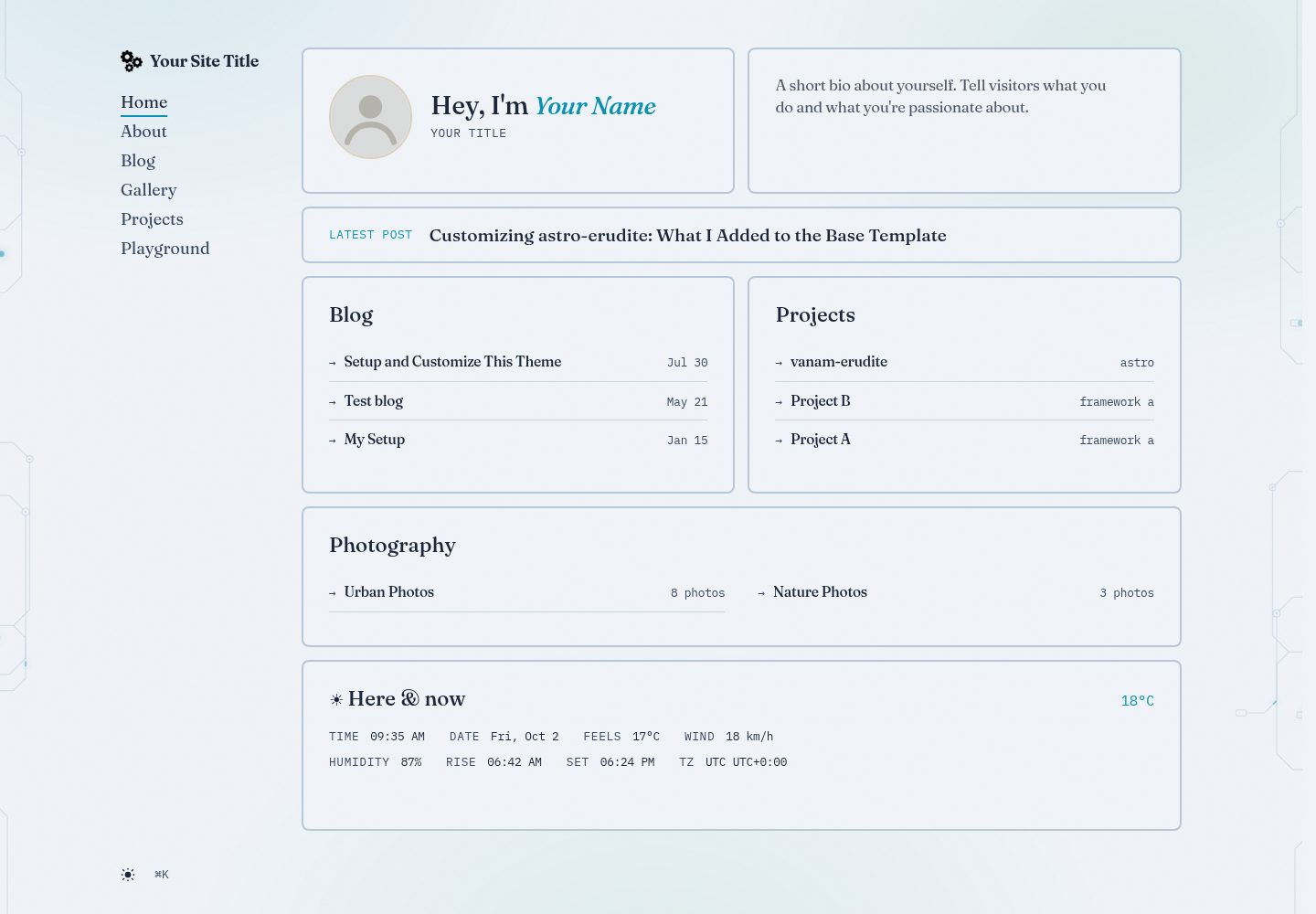
Editorial bento homepage with who/intro, latest posts, blog, projects, and photography tiles plus a live time and weather tile
AstroBlog
vanam-erudite — Astro Blog Template
By vanam-san
A customized Astro personal portfolio and blog theme based on astro-erudite, featuring a bento homepage, gallery, projects, and full-text search.
Explore the design
Compare the page layouts and mobile experience. Open any screenshot for a closer look.
Desktop homepage1 / 3
Desktop captureTop of page
Actual screenshot captured by the server browser.
All pages & views 3
Screenshots show visual appearance; interactive behavior may differ.
Recorded 2026-10-02View source
What stands out
A quick read of the recorded project description.
Command palette supports ⌘K/Ctrl+K and / to focus; production uses Pagefind full-text search, development falls back to a title index
Gallery system with lightbox, keyboard navigation, and automatic tabs; tags are aggregated uniformly across blog, gallery, and projects
Blog supports callouts, math formulas, collapsible/annotated code blocks, and nested sub-posts to form series
Giscus comments and Umami analytics are optional integrations; the site remains fully functional when they are not configured
Ocean Depths theme with cyan/lumen accent colors and glow tokens, automatic light/dark mode via light-dark()
Template Details
vanam-erudite is a personal portfolio and blog site built with Astro, customized from the astro-erudite theme. The homepage uses an editorial bento layout with tiles for who/intro, latest posts, blog, projects, and photography, plus a live time and weather tile (data from wttr.in, no API key, gracefully degrades after an 8-second timeout). Site content is managed through Astro content collections: authors, blog posts, gallery, and projects are placed in their respective directories under src/content. The blog supports nested sub-posts to form series, the gallery supports lightbox and keyboard navigation, and tags are aggregated uniformly across blog, gallery, and projects. Search is powered by Pagefind, indexing dist/ during production builds, with a fallback to a title index in development; the command palette supports ⌘K/Ctrl+K and the / shortcut. Giscus comments and Umami analytics are optional integrations, and the site remains fully functional when they are not configured. Visually, it uses the Ocean Depths theme with cyan/lumen accent colors and glow tokens, automatically switching between light and dark modes via light-dark(). Fonts are Fraunces for display, IBM Plex Sans for body text, and IBM Plex Mono for metadata. The repository is MIT licensed, and the free scope covers the code of this version; demo images, fonts, icons, and other third-party assets must be checked against their respective licenses.
AstroBlog
Is it right for your project?
Use Cases
- Building a static site that combines a personal portfolio and blog
- Managing posts, gallery, and projects with Astro content collections and unified tags
- A blog that needs full-text search, a command palette, and keyboard shortcuts
- A site where comments and analytics can be added on demand and still runs without them
- Deploying to static hosts such as Vercel, Netlify, or Cloudflare Pages
Suitable For
- Developers using Astro and familiar with content collections
- Personal site authors who need a blog, gallery, and project showcase
- Users who prefer a bento layout and editorial typography
- Sites that accept optional third-party services (Giscus, Umami) added on demand
Getting started & customization
Use these recorded setup notes alongside the repository instructions for your chosen version.
- 1
Installing dependencies with Bun is recommended; package-lock.json is outdated and missing Pagefind
- 2
The build command is astro check && astro build && pagefind --site dist; the search index is generated into dist/ at build time
- 3
Set site to the production domain in astro.config.ts; canonical, sitemap, RSS, and social cards depend on it
- 4
Site identity, navigation, and social links are configured in src/consts.ts; authors, blog, gallery, and projects go in their respective directories under src/content
- 5
Giscus and Umami are optional; copy from .env.example and fill in as needed. The site remains fully functional when they are not configured
License & source material
Usage conditions & limitations
Free to use · keep license noticeThis entry covers the free version under the MIT license in the public repository; the free scope covers the code of this version and does not imply that external services or third-party assets are free.
Must comply with when using
- You may use, modify, commercialize, and distribute the code of this version for free.
- When distributing copies or substantial portions of the code, retain the original author's copyright notice and the full MIT license notice.
- The code is provided as is; warranties and limitations of liability are governed by the original license and applicable law.
Additional costs & items to verify
- Building the search index depends on Pagefind and requires installing dependencies with Bun; installing with npm will miss Pagefind due to the outdated lockfile, causing the build to fail.
- Umami analytics is an optional integration and only loads the script after UMAMI_WEBSITE_ID is set; the site remains fully functional when it is not configured.
- Giscus comments are an optional integration; you need to obtain the repository and category IDs from giscus.app and configure environment variables. The site remains fully functional when they are not configured.
- The Fraunces display font is loaded from Google Fonts; the first render requires a network connection, after which it is cached.
- The homepage weather tile depends on the external service wttr.in, requires no API key, and gracefully degrades after an 8-second timeout; when the service is unreachable, the tile shows a placeholder.
- If you enable third-party services such as Umami analytics or Giscus comments, they must be served over HTTPS; there are no other server requirements.
- Demo images, fonts, icons, and other third-party assets must be checked against their respective licenses and cannot be judged solely by the code's MIT license.
- External services such as domains, hosting, databases, payments, or AI may incur additional charges.
View Original Text Basis
Permission is hereby granted, free of charge
Original License Text
The search index is built with [Pagefind](https://pagefind.app/) during `bun run build` — no account or API key needed. (Must install with Bun: `package-lock.json` is stale and lacks Pagefind.)
Original README
- **Umami** — cookieless analytics; script only loads when the website ID is set.
Original README
- **Giscus** — GitHub Discussions comments on posts; needs repo + category IDs from [giscus.app](https://giscus.app).
Original README
Display font (Fraunces) loads from Google Fonts; needs network on first paint, then caches
Original README
plus a live time + weather tile (wttr.in, no key, 8s timeout with graceful fallback)
Original README
https://github.com/vanam-san/vanam-erudite/blob/master/LICENSEhttps://github.com/vanam-san/vanam-erudite/blob/master/README.mdServe over HTTPS if you use analytics/comments third parties — no other server requirements.
Original README
Compiled by DeepSeek based on repository license and README ·2026-10-02. Results only cover the materials read; dependencies, images, fonts, and subsequent term changes are subject to their respective original texts.
Project checks & description sources
Template Information
- Source platforms
- GitHub
- Documentation and maintenance reference score
- More documented · 80 / 100
- Technologies
- Astro
- Website type
- Blog
How this score is calculated
Our heuristic uses license records (up to 30), a demo link (12), a preview (10), stars (15), recorded maintenance (15), description completeness (8), feature records (5) and classification data (5). It is not a code, security or performance test, or a Google score. A link does not establish tested functionality.
What to verify for this project
- Repository update recorded
- 2026-10-01
- Screenshot last checked
- 2026-10-02
A demo link is listed. Check it with your own content and viewport sizes; its presence does not confirm that forms, authentication or payments work.
The catalog identifies Astro as the primary stack. Check the actual dependency manifest and lockfile for versions and hosting requirements. These notes use recorded metadata, not a code audit or a deployment test.
Use a selection guide →How this description was prepared
AI-assisted description based on catalog records and repository material. Repository authors are not automatically the reviewers of this description.
Automatically checked against source and license rules; no manual editorial review.
Inspect the recorded source material
SHA-256: eee02aeb4381bf006988b4c0339468d3a66e7a9fbfb12c3e9083e05965a825d2
2026-10-02T09:36:49.424Z
Source file / repository# vanam-erudite
A personal portfolio and blog built with [Astro](https://astro.build/), based on the [astro-erudite](https://github.com/jktrn/astro-erudite) theme.
## Prerequisites
- [Bun](https://bun.sh/) (recommended) or Node.js ≥ 22
- The search index is built with [Pagefind](https://pagefind.app/) during `bun run build` — no account or API key needed. (Must install with Bun: `package-lock.json` is stale and lacks Pagefind.)
## Quick Start
```bash
git clone https://github.com/vanam-san/vanam-erudite.git
cd vanam-erudite
bun install
bun run dev
```
Visit `http://localhost:4321`. Search (⌘K) falls back to a title index in dev; full-text search works in production builds where Pagefind has indexed `dist/`.
---
## Customize in 7 Steps
### 1. Site identity — `src/consts.ts`
```ts
export const SITE = {
title: "Your Site Title",
description: "A personal blog and portfolio built with Astro.",
locale: "en-US",
dir: "ltr",
defaultPageImage: "/static/opengraph-image.png",
defaultPostImage: "/static/1200x630.png",
} as const
export const HERO = {
name: "Your Name",
title: "Your Title",
bio: "A short bio about yourself.",
} as const
export const NAVIGATION = [
{ href: "/about", label: "About" },
{ href: "/blog", label: "Blog" },
{ href: "/gallery", label: "Gallery" },
{ href: "/projects", label: "Projects" },
{ href: "/playground", label: "Playground" },
]
export const SOCIALS = [
{ href: "https://github.com/yourusername", label: "GitHub", icon: GitHub },
{ href: "https://twitter.com/yourusername", label: "Twitter", icon: Twitter },
{ href: "mailto:[email protected]", label: "Email", icon: Email },
{ href: "/rss.xml", label: "RSS", icon: RSS },
]
```
`HERO` drives the homepage who/intro tiles. `NAVIGATION` renders the sidebar on desktop and the dropdown menu on mobile (Home is added automatically). Also set `site:` in `astro.config.ts` to your production domain — it feeds canonical URLs, sitemap, RSS, and social cards.
### 2. Images — `public/static/`
- `avatar.svg` — homepage avatar placeholder (replace with your square photo, ~500px)
- `opengraph-image.png` / `1200x630.png` / `twitter-card.png` — social cards
- `logo.png` / `logo.svg` — sidebar brand mark (or edit `src/assets/logo.svg`)
- Favicons + `site.webmanifest` at `public/` root
### 3. Authors — `src/content/authors/`
One file per author (id = filename). Referenced from posts via `authors: ['id']`:
```yaml
---
name: 'Your Name'
pronouns: 'he/him'
avatar: 'https://avatars.githubusercontent.com/u/...' # or '/static/you.png'
bio: 'Your bio'
mail: '[email protected]'
socials:
github: 'https://github.com/you'
---
```
### 4. Blog posts — `src/content/blog/`
Create a folder per post with an `index.md` (co-locate images next to it). Nested `subpost.md` files become series parts:
```yaml
---
title: 'Your Post Title'
description: 'A brief description'
date: 2026-01-01
authors: ['author-id']
tags: ['tag1', 'tag2']
image: './cover.png' # optional
pinned: false # optional, pins to top of /blog
draft: false # optional
---
Your content here.
```
Markdown supports callouts (`:::note` / `tip` / `warning` / `caution` / `important`), math, and collapsible/annotated code blocks.
### 5. Galleries — `src/content/gallery/`
Folder per gallery with images and an `index.md`:
```yaml
---
title: 'Gallery Title'
description: 'Description'
date: 2026-01-01
cover: './cover.jpg'
photos:
- './photo1.jpg'
- './photo2.jpg'
---
Optional gallery description.
```
Galleries get listing cards, detail pages with lightbox, and the 3 most recent appear on the homepage photography tile.
### 6. Projects — `src/content/projects/`
One markdown file per project (`link` is required):
```yaml
---
name: 'Project Name'
description: 'Description'
link: 'https://github.com/you/project'
tags: ['TypeScript', 'React']
startDate: 2024-01-01
endDate: 2024-06-01 # optional
---
```
The 3 most recent (by `startDate`) appear on the homepage projects tile.
### 7. Optional services — `.env`
All optional; copy from `.env.example`. The site works fully without them:
```env
UMAMI_WEBSITE_ID=
UMAMI_HOST=cloud.umami.is
GISCUS_REPO=
GISCUS_REPO_ID=
GISCUS_CATEGORY=Comments
GISCUS_CATEGORY_ID=
```
- **Umami** — cookieless analytics; script only loads when the website ID is set.
- **Giscus** — GitHub Discussions comments on posts; needs repo + category IDs from [giscus.app](https://giscus.app).
---
## What's Included
- **Editorial bento homepage** — who/intro/latest-post/blog/projects/photography tiles plus a live time + weather tile (wttr.in, no key, 8s timeout with graceful fallback)
- **Command palette** (⌘K / Ctrl+K, `/` to focus) — full-text [Pagefind](https://pagefind.app/) search in production, title-index fallback in dev
- **Keyboard shortcuts** — press `?` anywhere for the shortcut dialog
- **Circuit backdrop** — animated PCB traces (desktop only), paper grain + theme-aware wash on all screens
- **Designed 404** — bento-style error page, excluded from the search index
- **Gallery system** — collections with lightbox, keyboard nav, auto tag pages
- **Unified tags** — cross-collection (`/tags`) spanning blog, gallery, projects
- **Giscus + Umami** — optional, zero-config-when-absent integrations
- **Ocean Depths theme** — cyan/lume accents, glow tokens, `light-dark()` auto light/dark mode
- **Typography** — Fraunces display, IBM Plex Sans body, IBM Plex Mono meta
## Commands
| Command | Description |
| --------------------- | ---------------------------------------------- |
| `bun run dev` | Start development server |
| `bun run build` | Typecheck + build + index search (`postbuild`) |
| `bun run preview` | Preview production build |
| `bun run format` | Format code with Biome |
| `bun run format:check`| Check formatting without writing |
`bun run build` runs `astro check && astro build && pagefind --site dist`. The `/pagefind` bundle is generated into `dist/` — any static host serves it, nothing extra to deploy.
## Deployment
```bash
bun run build
```
Deploy `dist/` to Vercel, Netlify, Cloudflare Pages, or any static host. Two things to set first:
1. `site:` in `astro.config.ts` → your production domain (canonicals/sitemap/RSS depend on it).
2. Serve over HTTPS if you use analytics/comments third parties — no other server requirements.
## Troubleshooting
| Symptom | Cause / fix |
| ------- | ----------- |
| `pagefind: command not found` on build | Installed with npm (stale lockfile) — use `bun install` |
| Search shows only titles in dev | Expected — full-text index exists only in `dist/` after build |
| Weather tile stuck at `--°C` | wttr.in unreachable/blocked; tile degrades gracefully, no action needed |
| Port already in use | `bun run dev -- --port 4322` |
| Fonts look wrong | Display font (Fraunces) loads from Google Fonts; needs network on first paint, then caches |
---
## Credits
- [astro-erudite](https://github.com/jktrn/astro-erudite) by [@jktrn](https://github.com/jktrn) — base theme
- [merox.dev](https://github.com/meroxdotdev) by Robert Melcher — design inspiration
- [Frontend Design](https://agenticskills.io/skills/frontend-design) — frontend design patterns
- [Theme Factory](https://github.com/anthropics/skills/tree/main/skills/theme-factory) — theme system reference
---
## License
[MIT](LICENSE)
Explore similar templates
Compare previews and descriptions within the same stack and category.

astrowind
AstroWind is a free, open-source Astro starter theme using Astro and Tailwind CSS, released under the MIT license.
Astro · Blog

astro-paper
AstroPaper is a minimal, responsive, accessible, and SEO-friendly Astro blog theme. Articles are stored as Markdown/MDX in src/content/posts/, with subdirectories affecting URLs.
Astro · Blog

fuwari
Fuwari is a static blog template built with Astro and Tailwind CSS for personal blogs. It manages posts as Markdown files in src/content/posts/, with frontmatter for title, date, description, cover, tags, categories, draft status, and language.
Astro · Blog

Firefly
Firefly is a clean personal blog theme forked from Astro and Fuwari, offering four background modes, single/double sidebar and list/grid layouts, Pagefind client-side full-text search, and a six-language UI.
Astro · Blog

astro-theme-cactus
Astro Cactus is an Astro-based blog and portfolio theme that uses Markdown/MDX content collections to manage posts, notes, and tags, with frontmatter type-checked by a schema.
Astro · Portfolio

astrofy
Astrofy is a free and open-source personal portfolio website template built with Astro and TailwindCSS, with built-in blog, CV timeline, project showcase, store, and RSS feed modules.
Astro · Portfolio