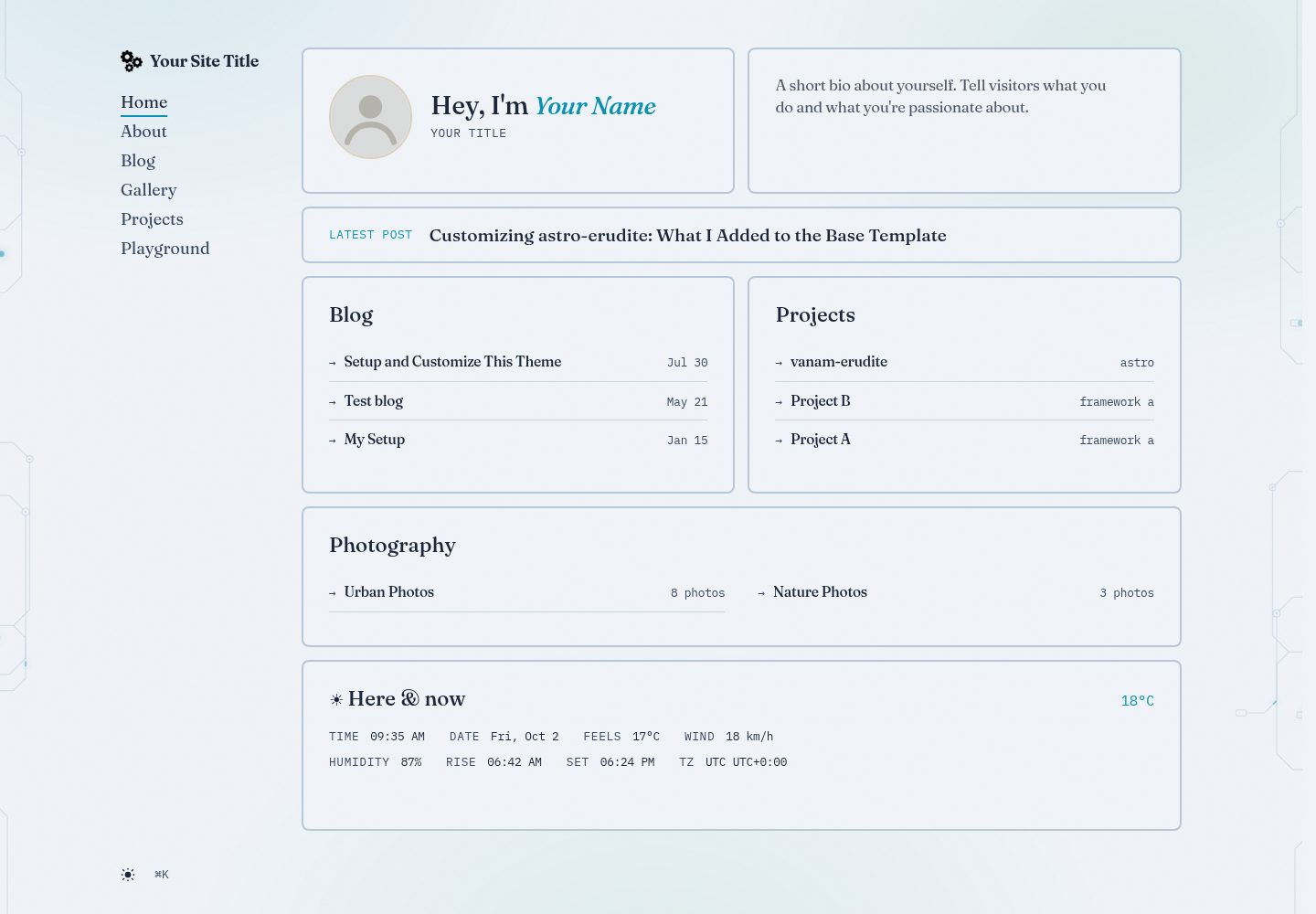
Editorial bento 首页,含 who/intro、最新文章、博客、项目、摄影磁贴与实时时间天气磁贴
Astro博客
vanam-erudite — Astro 博客模板
作者 vanam-san
基于 astro-erudite 定制的 Astro 个人作品集与博客主题,含 bento 首页、图库、项目与全文搜索。
看看你的网站会是什么样
浏览真实页面截图,比较内容排版与手机效果。点击下方缩略图切换,放大查看整页细节。
全部页面与视图 3
截图用于了解视觉与布局,交互效果请以实际项目为准。
采集于 2026-10-02查看来源
值得关注的模板亮点
从已有项目资料中,快速了解它的特点。
命令面板支持 ⌘K/Ctrl+K 与 / 聚焦,生产环境使用 Pagefind 全文搜索,开发环境回退标题索引
图库系统含灯箱、键盘导航与自动标签页,标签在博客、图库、项目间统一聚合
博客支持 callout、数学公式、可折叠/带注释代码块,嵌套子文章形成系列
Giscus 评论与 Umami 分析为可选集成,未配置时站点仍可完整运行
Ocean Depths 主题,青色/流明强调色与 glow token,light-dark() 自动明暗模式
模板详细介绍
vanam-erudite 是一个用 Astro 构建的个人作品集与博客站点,基于 astro-erudite 主题做了定制。首页采用 editorial bento 布局,包含 who/intro、最新文章、博客、项目、摄影等磁贴,并带有一个实时时间与天气磁贴(数据来自 wttr.in,无 API key,超时 8 秒后优雅降级)。站点内容通过 Astro 内容集合管理:作者、博客文章、图库、项目分别放在 src/content 下的对应目录,博客支持嵌套子文章形成系列,图库支持灯箱与键盘导航,标签在博客、图库、项目之间统一聚合。搜索基于 Pagefind,生产构建时索引 dist/,开发环境回退到标题索引;命令面板支持 ⌘K/Ctrl+K 与 / 快捷键。Giscus 评论与 Umami 分析为可选集成,未配置时站点仍可完整运行。视觉上使用 Ocean Depths 主题,青色/流明强调色与 glow token,通过 light-dark() 自动切换明暗模式,字体为 Fraunces 展示体、IBM Plex Sans 正文与 IBM Plex Mono 元信息。仓库采用 MIT 许可,免费范围为该版本代码,演示图片、字体、图标等第三方素材需按各自许可核对。
Astro博客
适合你的项目吗?
适用场景
- 搭建个人作品集与博客合一的静态站点
- 用 Astro 内容集合管理文章、图库与项目并统一标签
- 需要全文搜索、命令面板与键盘快捷键的博客
- 希望评论与分析按需接入、不配置也能运行的站点
- 部署到 Vercel、Netlify、Cloudflare Pages 等静态托管
适合人群
- 使用 Astro 并熟悉内容集合的开发者
- 需要博客、图库、项目展示的个人站点作者
- 偏好 bento 布局与编辑式排版的用户
- 接受可选第三方服务(Giscus、Umami)按需接入的站点
上手与定制指南
结合仓库当前版本的说明,按下面的资料检查内容、配置与运行要求。
- 1
推荐使用 Bun 安装依赖,package-lock.json 已过期且缺少 Pagefind
- 2
构建命令为 astro check && astro build && pagefind --site dist,搜索索引在构建时生成到 dist/
- 3
在 astro.config.ts 设置 site 为生产域名,canonical、sitemap、RSS 与社交卡片依赖它
- 4
站点身份、导航与社交链接在 src/consts.ts 配置,作者、博客、图库、项目分别放在 src/content 对应目录
- 5
Giscus 与 Umami 为可选,从 .env.example 复制并按需填写,未配置时站点仍可完整运行
授权与来源资料
使用条件与限制
免费使用 · 保留许可声明本次收录的是公开仓库中采用 MIT 许可的免费版本;免费范围为该版本代码,不代表外部服务或第三方素材免费。
使用时需要遵守
- 允许免费使用、修改、商用和分发该版本代码。
- 分发代码副本或实质性部分时,保留原作者版权声明和完整 MIT 许可声明。
- 代码按现状提供;担保与责任限制以原许可证及适用法律为准。
额外费用与待核对事项
- 构建搜索索引依赖 Pagefind,且必须使用 Bun 安装依赖;若用 npm 安装会因 lockfile 过期而缺少 Pagefind,导致构建失败。
- Umami 分析为可选集成,仅在设置 UMAMI_WEBSITE_ID 后加载脚本;未配置时站点仍可完整运行。
- Giscus 评论为可选集成,需从 giscus.app 获取仓库与分类 ID 并配置环境变量;未配置时站点仍可完整运行。
- Fraunces 展示字体从 Google Fonts 加载,首次渲染需要网络连接,之后才会缓存。
- 首页天气磁贴依赖外部服务 wttr.in,无需 API key,8 秒超时后优雅降级;服务不可达时磁贴显示占位符。
- 若启用 Umami 分析或 Giscus 评论等第三方服务,需通过 HTTPS 提供服务;除此之外无其他服务器要求。
- 演示图片、字体、图标及其他第三方素材需按各自许可核对,不能仅凭代码的 MIT 许可判断。
- 域名、托管、数据库、支付或 AI 等外部服务可能另外收费。
查看原文依据
Permission is hereby granted, free of charge
许可证原文
The search index is built with [Pagefind](https://pagefind.app/) during `bun run build` — no account or API key needed. (Must install with Bun: `package-lock.json` is stale and lacks Pagefind.)
README 原文
- **Umami** — cookieless analytics; script only loads when the website ID is set.
README 原文
- **Giscus** — GitHub Discussions comments on posts; needs repo + category IDs from [giscus.app](https://giscus.app).
README 原文
Display font (Fraunces) loads from Google Fonts; needs network on first paint, then caches
README 原文
plus a live time + weather tile (wttr.in, no key, 8s timeout with graceful fallback)
README 原文
https://github.com/vanam-san/vanam-erudite/blob/master/LICENSEhttps://github.com/vanam-san/vanam-erudite/blob/master/README.mdServe over HTTPS if you use analytics/comments third parties — no other server requirements.
README 原文
DeepSeek 根据仓库许可证和 README 整理 ·2026-10-02。结果仅覆盖已读取资料,依赖、图片、字体及后续条款变更以各自原文为准。
项目核对记录与介绍依据
模板资料
- 来源平台
- GitHub
- 资料与维护参考分
- 资料较完整 · 80 / 100
- 技术栈
- Astro
- 网站类型
- 博客
这个分数如何计算
本站按许可资料(最高30分)、演示链接(12分)、预览图(10分)、Star数(15分)、记录的维护时间(15分)、描述完整度(8分)、功能记录(5分)和分类资料(5分)计算。它不是代码、安全或性能测试,也不是 Google 评分;有链接不代表已实测可用。
这个项目需要核对什么
- 记录的仓库更新时间
- 2026-10-01
- 截图检查日期
- 2026-10-02
已收录演示链接。请用你的内容与屏幕尺寸检查;有演示不代表表单、认证或支付已经可用。
目录记录的主要技术栈是 Astro。请通过依赖清单和锁文件核对实际版本与托管要求。这些说明基于收录资料,不代表代码审计或部署实测。
查看具体选型方法 →介绍的制作与核对状态
介绍由 AI 辅助整理目录与仓库资料。仓库作者不等于这篇介绍的审核者。
已完成服务器许可规则与 AI 来源核对;未经过人工编辑审核。
查看当时使用的来源资料
SHA-256: eee02aeb4381bf006988b4c0339468d3a66e7a9fbfb12c3e9083e05965a825d2
2026-10-02T09:36:49.424Z
来源文件 / 仓库# vanam-erudite
A personal portfolio and blog built with [Astro](https://astro.build/), based on the [astro-erudite](https://github.com/jktrn/astro-erudite) theme.
## Prerequisites
- [Bun](https://bun.sh/) (recommended) or Node.js ≥ 22
- The search index is built with [Pagefind](https://pagefind.app/) during `bun run build` — no account or API key needed. (Must install with Bun: `package-lock.json` is stale and lacks Pagefind.)
## Quick Start
```bash
git clone https://github.com/vanam-san/vanam-erudite.git
cd vanam-erudite
bun install
bun run dev
```
Visit `http://localhost:4321`. Search (⌘K) falls back to a title index in dev; full-text search works in production builds where Pagefind has indexed `dist/`.
---
## Customize in 7 Steps
### 1. Site identity — `src/consts.ts`
```ts
export const SITE = {
title: "Your Site Title",
description: "A personal blog and portfolio built with Astro.",
locale: "en-US",
dir: "ltr",
defaultPageImage: "/static/opengraph-image.png",
defaultPostImage: "/static/1200x630.png",
} as const
export const HERO = {
name: "Your Name",
title: "Your Title",
bio: "A short bio about yourself.",
} as const
export const NAVIGATION = [
{ href: "/about", label: "About" },
{ href: "/blog", label: "Blog" },
{ href: "/gallery", label: "Gallery" },
{ href: "/projects", label: "Projects" },
{ href: "/playground", label: "Playground" },
]
export const SOCIALS = [
{ href: "https://github.com/yourusername", label: "GitHub", icon: GitHub },
{ href: "https://twitter.com/yourusername", label: "Twitter", icon: Twitter },
{ href: "mailto:[email protected]", label: "Email", icon: Email },
{ href: "/rss.xml", label: "RSS", icon: RSS },
]
```
`HERO` drives the homepage who/intro tiles. `NAVIGATION` renders the sidebar on desktop and the dropdown menu on mobile (Home is added automatically). Also set `site:` in `astro.config.ts` to your production domain — it feeds canonical URLs, sitemap, RSS, and social cards.
### 2. Images — `public/static/`
- `avatar.svg` — homepage avatar placeholder (replace with your square photo, ~500px)
- `opengraph-image.png` / `1200x630.png` / `twitter-card.png` — social cards
- `logo.png` / `logo.svg` — sidebar brand mark (or edit `src/assets/logo.svg`)
- Favicons + `site.webmanifest` at `public/` root
### 3. Authors — `src/content/authors/`
One file per author (id = filename). Referenced from posts via `authors: ['id']`:
```yaml
---
name: 'Your Name'
pronouns: 'he/him'
avatar: 'https://avatars.githubusercontent.com/u/...' # or '/static/you.png'
bio: 'Your bio'
mail: '[email protected]'
socials:
github: 'https://github.com/you'
---
```
### 4. Blog posts — `src/content/blog/`
Create a folder per post with an `index.md` (co-locate images next to it). Nested `subpost.md` files become series parts:
```yaml
---
title: 'Your Post Title'
description: 'A brief description'
date: 2026-01-01
authors: ['author-id']
tags: ['tag1', 'tag2']
image: './cover.png' # optional
pinned: false # optional, pins to top of /blog
draft: false # optional
---
Your content here.
```
Markdown supports callouts (`:::note` / `tip` / `warning` / `caution` / `important`), math, and collapsible/annotated code blocks.
### 5. Galleries — `src/content/gallery/`
Folder per gallery with images and an `index.md`:
```yaml
---
title: 'Gallery Title'
description: 'Description'
date: 2026-01-01
cover: './cover.jpg'
photos:
- './photo1.jpg'
- './photo2.jpg'
---
Optional gallery description.
```
Galleries get listing cards, detail pages with lightbox, and the 3 most recent appear on the homepage photography tile.
### 6. Projects — `src/content/projects/`
One markdown file per project (`link` is required):
```yaml
---
name: 'Project Name'
description: 'Description'
link: 'https://github.com/you/project'
tags: ['TypeScript', 'React']
startDate: 2024-01-01
endDate: 2024-06-01 # optional
---
```
The 3 most recent (by `startDate`) appear on the homepage projects tile.
### 7. Optional services — `.env`
All optional; copy from `.env.example`. The site works fully without them:
```env
UMAMI_WEBSITE_ID=
UMAMI_HOST=cloud.umami.is
GISCUS_REPO=
GISCUS_REPO_ID=
GISCUS_CATEGORY=Comments
GISCUS_CATEGORY_ID=
```
- **Umami** — cookieless analytics; script only loads when the website ID is set.
- **Giscus** — GitHub Discussions comments on posts; needs repo + category IDs from [giscus.app](https://giscus.app).
---
## What's Included
- **Editorial bento homepage** — who/intro/latest-post/blog/projects/photography tiles plus a live time + weather tile (wttr.in, no key, 8s timeout with graceful fallback)
- **Command palette** (⌘K / Ctrl+K, `/` to focus) — full-text [Pagefind](https://pagefind.app/) search in production, title-index fallback in dev
- **Keyboard shortcuts** — press `?` anywhere for the shortcut dialog
- **Circuit backdrop** — animated PCB traces (desktop only), paper grain + theme-aware wash on all screens
- **Designed 404** — bento-style error page, excluded from the search index
- **Gallery system** — collections with lightbox, keyboard nav, auto tag pages
- **Unified tags** — cross-collection (`/tags`) spanning blog, gallery, projects
- **Giscus + Umami** — optional, zero-config-when-absent integrations
- **Ocean Depths theme** — cyan/lume accents, glow tokens, `light-dark()` auto light/dark mode
- **Typography** — Fraunces display, IBM Plex Sans body, IBM Plex Mono meta
## Commands
| Command | Description |
| --------------------- | ---------------------------------------------- |
| `bun run dev` | Start development server |
| `bun run build` | Typecheck + build + index search (`postbuild`) |
| `bun run preview` | Preview production build |
| `bun run format` | Format code with Biome |
| `bun run format:check`| Check formatting without writing |
`bun run build` runs `astro check && astro build && pagefind --site dist`. The `/pagefind` bundle is generated into `dist/` — any static host serves it, nothing extra to deploy.
## Deployment
```bash
bun run build
```
Deploy `dist/` to Vercel, Netlify, Cloudflare Pages, or any static host. Two things to set first:
1. `site:` in `astro.config.ts` → your production domain (canonicals/sitemap/RSS depend on it).
2. Serve over HTTPS if you use analytics/comments third parties — no other server requirements.
## Troubleshooting
| Symptom | Cause / fix |
| ------- | ----------- |
| `pagefind: command not found` on build | Installed with npm (stale lockfile) — use `bun install` |
| Search shows only titles in dev | Expected — full-text index exists only in `dist/` after build |
| Weather tile stuck at `--°C` | wttr.in unreachable/blocked; tile degrades gracefully, no action needed |
| Port already in use | `bun run dev -- --port 4322` |
| Fonts look wrong | Display font (Fraunces) loads from Google Fonts; needs network on first paint, then caches |
---
## Credits
- [astro-erudite](https://github.com/jktrn/astro-erudite) by [@jktrn](https://github.com/jktrn) — base theme
- [merox.dev](https://github.com/meroxdotdev) by Robert Melcher — design inspiration
- [Frontend Design](https://agenticskills.io/skills/frontend-design) — frontend design patterns
- [Theme Factory](https://github.com/anthropics/skills/tree/main/skills/theme-factory) — theme system reference
---
## License
[MIT](LICENSE)
看看同类模板
对比同技术栈与用途的模板,找到更适合的视觉与内容结构。

astrowind
⭕️ AstroWind: A free template using Astro v7 and Tailwind CSS v4. Astro starter theme.
Astro · 博客

astro-paper
A minimal, accessible and SEO-friendly Astro blog theme.
Astro · 博客

fuwari
✨A static blog template built with Astro.
Astro · 博客

Firefly
Firefly 是一款基于 Astro 的静态博客主题,由 CuteLeaf 在 saicaca 的 Fuwari 模板基础上二次开发,主打清新美观的视觉风格。
Astro · 博客

astro-theme-cactus
A simple Astro theme. Use it to create your blog or website.
Astro · 作品集

astrofy
Astrofy is a free and open-source template for your Personal Portfolio Website built with Astro and TailwindCS…
Astro · 作品集