AI community management: routes questions, welcomes new members, finds unanswered threads, and escalates to owners
Next.jsReactAdmin dashboard
community-agent-template — Next.js Admin dashboard Template
By vercel-labs
An AI management bot template for Slack communities, with a Next.js admin panel for viewing activity streams, conversation previews, and settings.
Explore the design
Compare the page layouts and mobile experience. Open any screenshot for a closer look.
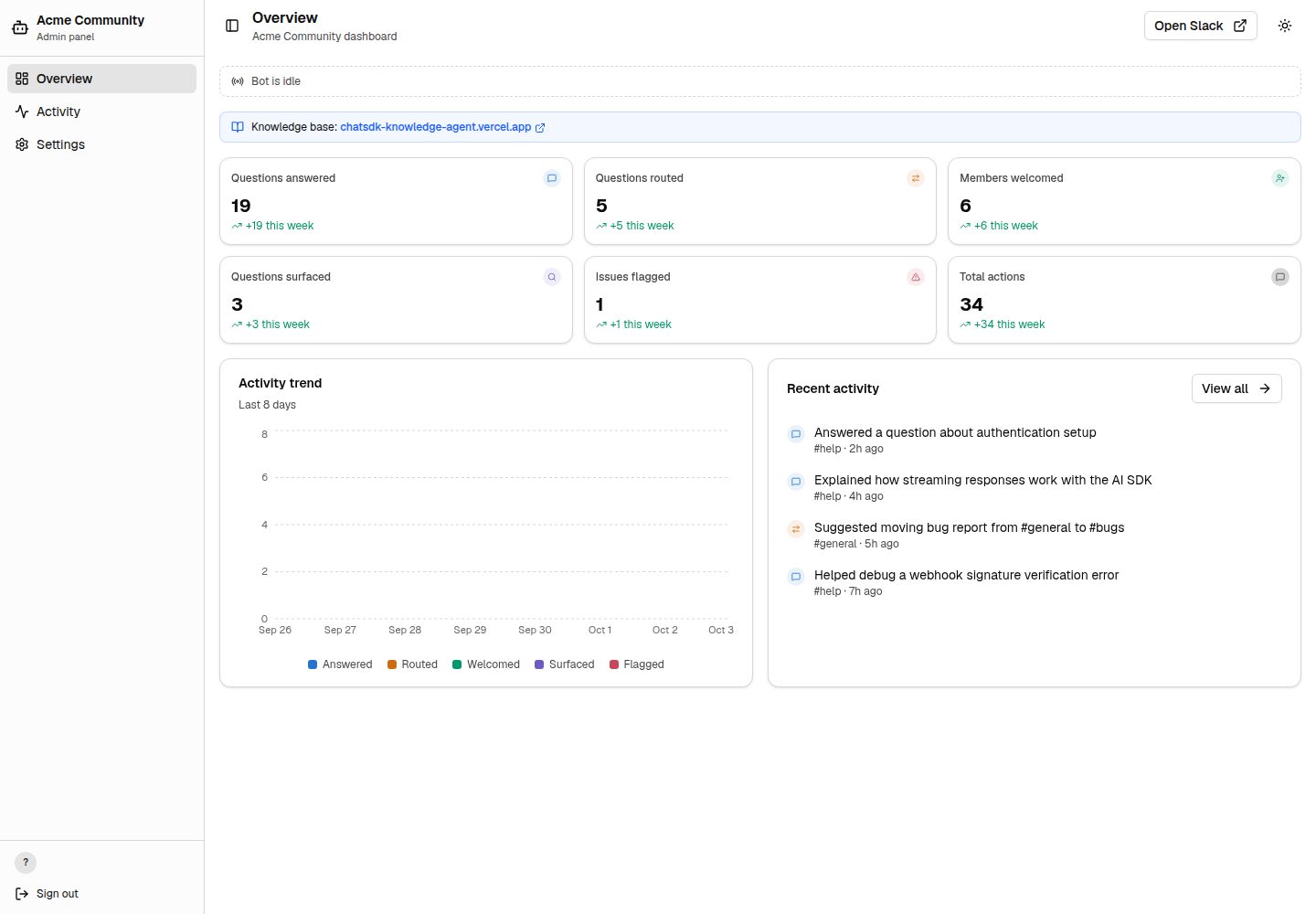
Desktop homepage1 / 3
Desktop captureTop of page
Actual screenshot captured by the server browser.
All pages & views 3
Screenshots show visual appearance; interactive behavior may differ.
Recorded 2026-10-03View source
What stands out
A quick read of the recorded project description.
Channel-aware routing that matches the Slack workspace structure via configurable channel mappings
Vercel Workflow checkpoints every LLM call and tool execution with automatic retries
Admin panel includes real-time streaming indicators, activity stream, type filters, text search, conversation previews, and activity trends
Better Auth's Slack OAuth restricts admin panel access to workspace members
Optionally connects to a Savoir backend to provide the bot with bash and bash_batch sandbox tools
Template Details
This is an open-source template for building an AI-powered Slack community management bot with a built-in Next.js admin panel. The bot side connects to Slack via the Chat SDK and supports native interactions such as typing indicators, thread replies, and direct messages; the AI portion is driven by the AI SDK and can route questions, welcome new members, find unanswered threads, and escalate issues to owners. Channel routing is implemented through configurable channel mappings so the bot understands the workspace structure. Every LLM call and tool execution is checkpointed by Vercel Workflow with automatic retries.
The admin panel provides real-time streaming indicators, an activity stream, type filters, text search, inline conversation previews, activity trends, and a settings page with a channel overview. Access to the admin panel is restricted to workspace members via Better Auth's Slack OAuth. On the data side, Upstash Redis records bot actions, statistics, and conversations.
The template supports a demo mode: when both ADMIN_DEMO_MODE and ALLOW_ADMIN_DEMO_MODE are set, admin authentication is skipped and mock data is used to view the panel, making it easy to preview before connecting a real Slack workspace. These two variables must be removed before connecting a real workspace. Additionally, an optional SAVOIR_API_URL can connect to a deployed Savoir backend to provide the bot with bash and bash_batch sandbox tools; when not configured, the bot can still work using web search, channel routing, and system prompts.
Next.jsAdmin panel
Is it right for your project?
Use Cases
- Deploy an AI bot for a Slack community to automatically answer member questions and guide them to the appropriate channels
- Use the admin panel to view bot activity logs, conversation content, and activity trends
- Preview the admin panel interface in demo mode before connecting Slack
- Connect a knowledge base backend so the bot can retrieve and read community documentation
Suitable For
- Teams that need a Slack community management bot
- Developers who want to build a companion admin panel with Next.js
- Projects that need configurable channel routing and persistent workflows
- Evaluators who want to assess the admin panel first with mock data
Getting started & customization
Use these recorded setup notes alongside the repository instructions for your chosen version.
- 1
Import the repository on Vercel and configure environment variables such as COMMUNITY_NAME, BETTER_AUTH_SECRET, SLACK_CLIENT_ID, SLACK_CLIENT_SECRET, and SLACK_TEAM_ID
- 2
To preview only the admin panel, set ADMIN_DEMO_MODE=true and ALLOW_ADMIN_DEMO_MODE=true to use mock data; remove these before connecting a real Slack workspace
- 3
For full Slack bot configuration, see the repository's docs/setup.md
- 4
Optionally set SAVOIR_API_URL to connect a deployed Savoir backend and enable sandbox tools
- 5
Bot personality, channel mappings, welcome messages, and tools are adjusted in lib/agent.ts, lib/channels.ts, lib/welcome.ts, and workflows/agent-workflow/tools.ts respectively
License & source material
Usage conditions & limitations
Free to use · keep license noticeThis listing covers the free version in the public repository under the MIT license; the free scope is the code of this version and does not imply that external services or third-party assets are free.
Must comply with when using
- Free use, modification, commercial use, and distribution of this version's code are permitted.
- When distributing copies or substantial portions of the code, retain the original author's copyright notice and the full MIT license notice.
- The code is provided as is; warranties and limitations of liability are governed by the original license and applicable law.
Additional costs & items to verify
- Demo images, fonts, icons, and other third-party assets must be checked against their respective licenses and cannot be judged solely by the code's MIT license.
- External services such as domains, hosting, databases, payments, or AI may incur separate charges.
- Demo mode requires setting both ADMIN_DEMO_MODE=true and ALLOW_ADMIN_DEMO_MODE=true; it bypasses admin authentication and uses mock data. These two variables must be removed from Vercel project settings (and local .env.local) before connecting a real Slack workspace.
- The bash and bash_batch sandbox tools require setting SAVOIR_API_URL to connect a deployed Savoir backend; when not configured, the bot can only work using web search, channel routing, and system prompts.
- One-click deployment requires providing environment variables such as COMMUNITY_NAME, BETTER_AUTH_SECRET, SLACK_CLIENT_ID, SLACK_CLIENT_SECRET, and SLACK_TEAM_ID, and linking the Turso integration; AI keys must be added separately after deployment.
- Web search uses Anthropic's native search tool, must run through AI Gateway, and restricts community domains via SEARCH_DOMAINS.
- Bot action logs, statistics, and conversation storage depend on the external Upstash Redis service.
View Original Text Basis
Permission is hereby granted, free of charge
Original License Text
Demo mode requires both `ADMIN_DEMO_MODE=true` and `ALLOW_ADMIN_DEMO_MODE=true`. Together they bypass admin auth and use mock activity so people can open the deployed template before Slack is connected. Before connecting a real Slack workspace, remove both variables from Vercel Project Settings → Environment Variables (and from `.env.local`, if you set them locally).
Original README
This template is designed to work alongside the [Knowledge Agent Template](https://github.com/vercel-labs/knowledge-agent-template). Set `SAVOIR_API_URL` to connect to a deployed Savoir backend, giving the bot `bash` and `bash_batch` tools to search and read your community docs remotely. Without it, the bot still works using web search, channel routing, and the system prompt.
Original README
[](https://vercel.com/new/clone?repository-url=https%3A%2F%2Fgithub.com%2Fvercel-labs%2Fcommunity-agent-template&env=COMMUNITY_NAME,BETTER_AUTH_SECRET,SLACK_CLIENT_ID,SLACK_CLIENT_SECRET,SLACK_TEAM_ID&envDescription=COMMUNITY_NAME%3A%20Name%20in%20bot%20responses%20%7C%20BETTER_AUTH_SECRET%3A%20Run%20%60openssl%20rand%20-base64%2032%60%20%7C%20SLACK_CLIENT_ID%20%26%20SLACK_CLIENT_SECRET%3A%20From%20Slack%20app%20Basic%20Information%20%7C%20SLACK_TEAM_ID%3A%20Workspace%20ID.%20Add%20AI%20keys%20after%20deploy.&envLink=https%3A%2F%2Fgithub.com%2Fvercel-labs%2Fcommunity-agent-template%23configure-environment-variables&project-name=community-agent&repository-name=community-agent&stores=%5B%7B%22type%22%3A%22integration%22%2C%22integrationSlug%22%3A%22turso%22%7D%5D)
Original README
- **Web search**—Anthropic's native web search tool, scoped to your community's domains via `SEARCH_DOMAINS`. Runs through [AI Gateway](https://vercel.com/docs/ai-gateway)
Original README
https://github.com/vercel-labs/community-agent-template/blob/main/LICENSEhttps://github.com/vercel-labs/community-agent-template/blob/main/README.md- [Upstash Redis](https://upstash.com)—bot action logging, stats, and conversation storage
Original README
Compiled by DeepSeek based on repository license and README ·2026-10-04. Results only cover the materials read; dependencies, images, fonts, and subsequent term changes are subject to their respective original texts.
Project checks & description sources
Template Information
- Source platforms
- GitHub
- Documentation and maintenance reference score
- More documented · 87 / 100
- Technologies
- Next.js · React
- Website type
- Admin dashboard
How this score is calculated
Our heuristic uses license records (up to 30), a demo link (12), a preview (10), stars (15), recorded maintenance (15), description completeness (8), feature records (5) and classification data (5). It is not a code, security or performance test, or a Google score. A link does not establish tested functionality.
What to verify for this project
- Repository update recorded
- 2026-05-21
- Screenshot last checked
- 2026-10-04
A demo link is listed. Check it with your own content and viewport sizes; its presence does not confirm that forms, authentication or payments work.
The catalog identifies Next.js as the primary stack. Check the actual dependency manifest and lockfile for versions and hosting requirements. These notes use recorded metadata, not a code audit or a deployment test.
Use a selection guide →How this description was prepared
AI-assisted description based on catalog records and repository material. Repository authors are not automatically the reviewers of this description.
Review declaration: codex-user-requested-batch-review-20261017 · 2026-10-16
Inspect the recorded source material
SHA-256: 9e880d4df9c33363d42c5ea641234beb2ee597ebc80d666313fc9596c03fd9a2
2026-10-04T13:55:24.034Z
Source file / repository# Community Agent Template Open source AI-powered Slack community management bot with a built-in Next.js admin panel. Uses Chat SDK, AI SDK, and Vercel Workflow. **Template.** Fork it, customize it, and deploy your own AI community manager with Vercel. [](https://vercel.com/new/clone?repository-url=https%3A%2F%2Fgithub.com%2Fvercel-labs%2Fcommunity-agent-template&env=COMMUNITY_NAME,BETTER_AUTH_SECRET,SLACK_CLIENT_ID,SLACK_CLIENT_SECRET,SLACK_TEAM_ID&envDescription=COMMUNITY_NAME%3A%20Name%20in%20bot%20responses%20%7C%20BETTER_AUTH_SECRET%3A%20Run%20%60openssl%20rand%20-base64%2032%60%20%7C%20SLACK_CLIENT_ID%20%26%20SLACK_CLIENT_SECRET%3A%20From%20Slack%20app%20Basic%20Information%20%7C%20SLACK_TEAM_ID%3A%20Workspace%20ID.%20Add%20AI%20keys%20after%20deploy.&envLink=https%3A%2F%2Fgithub.com%2Fvercel-labs%2Fcommunity-agent-template%23configure-environment-variables&project-name=community-agent&repository-name=community-agent&stores=%5B%7B%22type%22%3A%22integration%22%2C%22integrationSlug%22%3A%22turso%22%7D%5D) ## Features - **Community manager AI**—routes questions, welcomes members, surfaces unanswered threads, and flags issues to a lead. Powered by [AI SDK](https://ai-sdk.dev) - **Channel-aware routing**—configurable channel map so the bot knows your workspace layout and where to send people - **Durable workflows**—every LLM call and tool execution is a checkpoint with automatic retries via [Vercel Workflow](https://vercel.com/docs/workflow) - **Web search**—Anthropic's native web search tool, scoped to your community's domains via `SEARCH_DOMAINS`. Runs through [AI Gateway](https://vercel.com/docs/ai-gateway) - **Sandbox execution**—optional `bash`/`bash_batch` tools for running commands in a sandboxed environment via the [Knowledge Agent Template](https://github.com/vercel-labs/knowledge-agent-template) API - **Native Slack UI**—typing indicators, threaded replies, and DMs. Powered by [Chat SDK](https://chat-sdk.dev) - **Admin panel**—live dashboard with real-time streaming indicators, ViewTransition animations, activity feed, type filters, text search, inline conversation previews, activity trends, and settings page with channel overview - **Auth**—Slack OAuth via [Better Auth](https://www.better-auth.com) restricts the admin panel to workspace members ## Quick start Try the admin panel without setting up Slack: 1. Import the repo on [vercel.com/new](https://vercel.com/new) 2. Add `ADMIN_DEMO_MODE=true`, `ALLOW_ADMIN_DEMO_MODE=true`, and a `COMMUNITY_NAME` env var (e.g. `DevHub`) 3. Deploy—the dashboard works immediately with mock data Demo mode requires both `ADMIN_DEMO_MODE=true` and `ALLOW_ADMIN_DEMO_MODE=true`. Together they bypass admin auth and use mock activity so people can open the deployed template before Slack is connected. Before connecting a real Slack workspace, remove both variables from Vercel Project Settings → Environment Variables (and from `.env.local`, if you set them locally). For the full Slack bot setup, see [docs/setup.md](docs/setup.md). ## Customization | What to change | File | Details | | --------------- | ---------------------------------------------------------------------------- | ----------------------------------------- | | Bot personality | [`lib/agent.ts`](lib/agent.ts) | System prompt and instructions | | Channel map | [`lib/channels.ts`](lib/channels.ts) | Must match your Slack workspace | | Welcome message | [`lib/welcome.ts`](lib/welcome.ts) | Sent when new members join | | Agent tools | [`workflows/agent-workflow/tools.ts`](workflows/agent-workflow/tools.ts) | Add, remove, or modify tools | | Auth config | [`lib/auth.ts`](lib/auth.ts) | Slack OAuth for the admin panel | | Action type UI | [`config/type-config.ts`](config/type-config.ts) | Icons, labels, and colors per action type | ### Knowledge base This template is designed to work alongside the [Knowledge Agent Template](https://github.com/vercel-labs/knowledge-agent-template). Set `SAVOIR_API_URL` to connect to a deployed Savoir backend, giving the bot `bash` and `bash_batch` tools to search and read your community docs remotely. Without it, the bot still works using web search, channel routing, and the system prompt. ## Docs - [Full setup guide](docs/setup.md)—Slack app, env vars, storage, OAuth, channels, deploy - [Architecture](docs/architecture.md)—how the bot works, key files, workflow constraints - [Admin panel](docs/admin-panel.md)—dashboard pages, live streaming, filters, Next.js patterns - [Testing](docs/testing.md)—test without Slack, simulate actions, mock data ## Built with - [Next.js 16](https://nextjs.org)—App Router with cacheComponents - [Chat SDK](https://chat-sdk.dev)—Slack adapter and bot framework - [AI SDK 6](https://ai-sdk.dev)—AI model integration with AI Gateway support - [Vercel Workflow](https://vercel.com/docs/workflow)—durable workflow execution - [Better Auth](https://www.better-auth.com)—Slack OAuth for the admin panel - [shadcn/ui](https://ui.shadcn.com)—component library - [Upstash Redis](https://upstash.com)—bot action logging, stats, and conversation storage ## License MIT
Explore similar templates
Compare previews and descriptions within the same stack and category.

next-shadcn-dashboard-starter
An MIT-licensed admin dashboard starter built with Next.js 16, shadcn/ui, Tailwind CSS v4, and TypeScript.
Next.js · Admin dashboard

Studio Admin · Radix UI
Studio Admin is an admin dashboard template built with Next.js 16, TypeScript, Tailwind CSS v4, and Shadcn UI.
Next.js · Admin dashboard

free-nextjs-admin-dashboard
A free, open-source admin dashboard template built on Next.js 16, React 19, TypeScript, and Tailwind CSS v4. It provides a collapsible sidebar, charts, tables, authentication forms, modals, dropdowns, and dark mode, with internationalization and RTL support since version 2.4.0.
Next.js · Admin dashboard

materio-mui-nextjs-admin-template-free
Materio Free is a Next.js admin dashboard template based on App Router and MUI, integrating Tailwind CSS and available in TypeScript and JavaScript versions.
Next.js · Admin dashboard
nextjs-postgres-nextauth-tailwindcss-template
A Vercel-maintained Next.js App Router admin dashboard starter with Auth.js GitHub OAuth, Postgres, Tailwind CSS, and Shadcn UI, plus a sample products table, seed endpoint, and CRUD interface.
Next.js · Admin dashboard

shadcn-dashboard-landing-template
An open-source admin dashboard and marketing landing page template built on shadcn/ui and Tailwind CSS, with both Vite + React and Next.js versions in one repository.
Next.js · Admin dashboard