AI 社区管理:路由问题、欢迎新成员、找出未回复线程并向负责人上报
Next.jsReact后台
community-agent-template — Next.js 后台模板
作者 vercel-labs
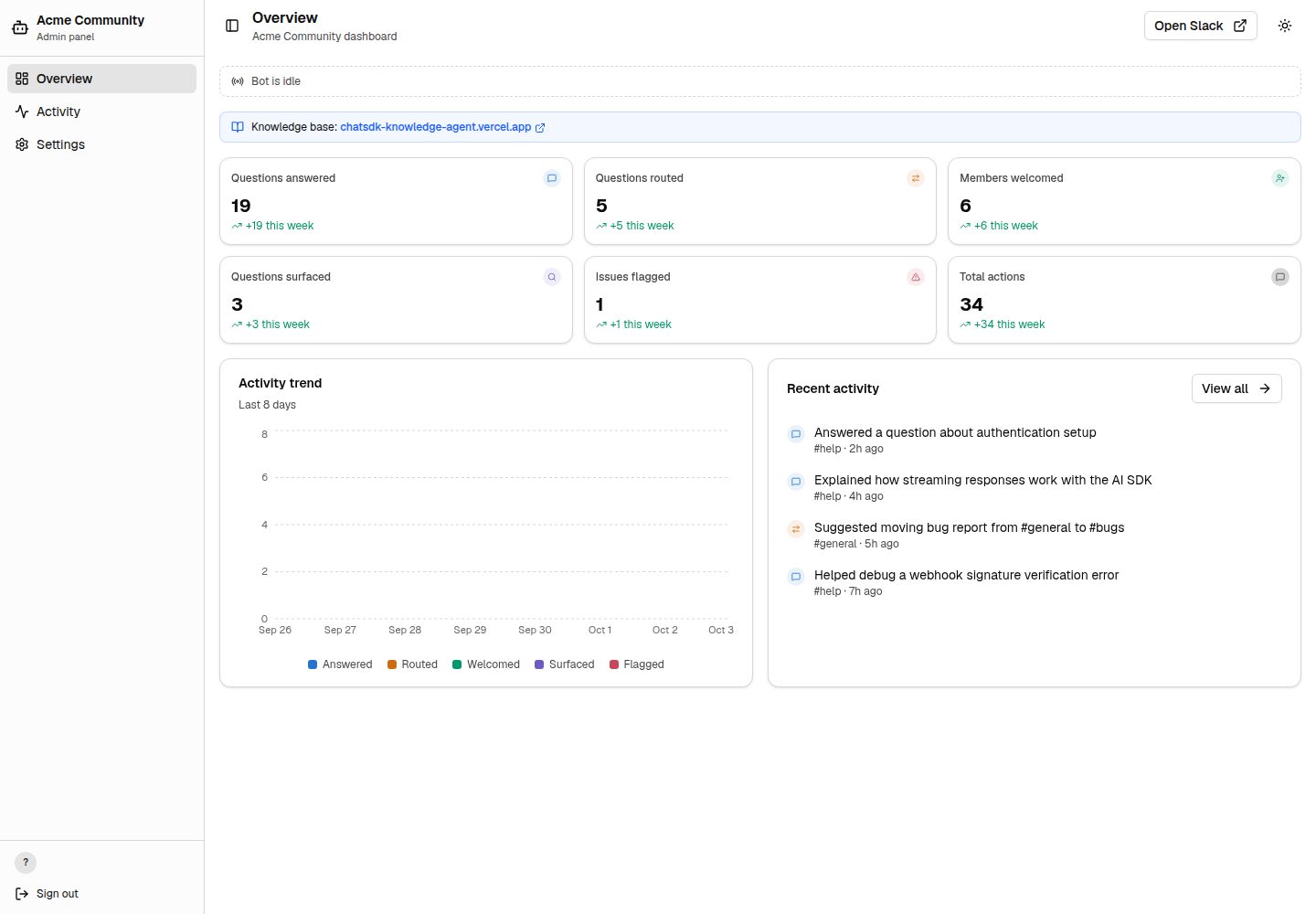
面向 Slack 社区的 AI 管理机器人模板,附带 Next.js 后台面板,可查看活动流、会话预览与设置。
看看你的网站会是什么样
浏览真实页面截图,比较内容排版与手机效果。点击下方缩略图切换,放大查看整页细节。
全部页面与视图 3
截图用于了解视觉与布局,交互效果请以实际项目为准。
采集于 2026-10-03查看来源
值得关注的模板亮点
从已有项目资料中,快速了解它的特点。
频道感知路由,通过可配置的频道映射匹配 Slack 工作区结构
Vercel Workflow 将每次 LLM 调用与工具执行作为检查点并自动重试
后台面板包含实时流式指示、活动流、类型筛选、文本搜索、会话预览与活动趋势
Better Auth 的 Slack OAuth 将管理面板访问限制在工作区成员
可选连接 Savoir 后端,为机器人提供 bash 与 bash_batch 沙箱工具
模板详细介绍
这是一个开源模板,用于搭建 AI 驱动的 Slack 社区管理机器人,并自带一个 Next.js 后台面板。机器人侧基于 Chat SDK 接入 Slack,具备输入中提示、线程回复与私信等原生交互;AI 部分由 AI SDK 驱动,可路由问题、欢迎新成员、找出未被回复的线程并把问题上报给负责人。频道路由通过可配置的频道映射实现,使机器人了解工作区结构。每次 LLM 调用与工具执行都由 Vercel Workflow 作为检查点执行,并支持自动重试。
后台面板提供实时流式指示、活动流、类型筛选、文本搜索、内联会话预览、活动趋势以及包含频道概览的设置页。管理面板的访问通过 Better Auth 的 Slack OAuth 限制在工作区成员范围内。数据侧使用 Upstash Redis 记录机器人动作、统计与会话。
模板支持演示模式:同时设置 ADMIN_DEMO_MODE 与 ALLOW_ADMIN_DEMO_MODE 后,可跳过管理端鉴权并使用模拟数据查看面板,便于在接入真实 Slack 工作区前预览。接入真实工作区前需移除这两个变量。此外,可选地通过 SAVOIR_API_URL 连接已部署的 Savoir 后端,为机器人提供 bash 与 bash_batch 沙箱工具;不配置时机器人仍可依靠网页搜索、频道路由与系统提示工作。
Next.js后台
适合你的项目吗?
适用场景
- 为 Slack 社区部署 AI 机器人,自动回答成员提问并引导到合适频道
- 通过后台面板查看机器人活动记录、会话内容与活动趋势
- 在未接入 Slack 前用演示模式预览管理面板界面
- 连接知识库后端,让机器人检索并读取社区文档
适合人群
- 需要 Slack 社区管理机器人的团队
- 希望以 Next.js 构建配套管理后台的开发者
- 需要可配置频道路由与持久化工作流的项目
- 希望先以模拟数据评估后台面板的评估者
上手与定制指南
结合仓库当前版本的说明,按下面的资料检查内容、配置与运行要求。
- 1
在 Vercel 导入仓库,配置 COMMUNITY_NAME、BETTER_AUTH_SECRET、SLACK_CLIENT_ID、SLACK_CLIENT_SECRET、SLACK_TEAM_ID 等环境变量
- 2
仅预览后台时可设置 ADMIN_DEMO_MODE=true 与 ALLOW_ADMIN_DEMO_MODE=true 使用模拟数据,接入真实 Slack 前需移除
- 3
完整 Slack 机器人配置参见仓库 docs/setup.md
- 4
可选设置 SAVOIR_API_URL 连接已部署的 Savoir 后端以启用沙箱工具
- 5
机器人个性、频道映射、欢迎语与工具分别在 lib/agent.ts、lib/channels.ts、lib/welcome.ts、workflows/agent-workflow/tools.ts 中调整
授权与来源资料
使用条件与限制
免费使用 · 保留许可声明本次收录的是公开仓库中采用 MIT 许可的免费版本;免费范围为该版本代码,不代表外部服务或第三方素材免费。
使用时需要遵守
- 允许免费使用、修改、商用和分发该版本代码。
- 分发代码副本或实质性部分时,保留原作者版权声明和完整 MIT 许可声明。
- 代码按现状提供;担保与责任限制以原许可证及适用法律为准。
额外费用与待核对事项
- 演示图片、字体、图标及其他第三方素材需按各自许可核对,不能仅凭代码的 MIT 许可判断。
- 域名、托管、数据库、支付或 AI 等外部服务可能另外收费。
- 演示模式需同时设置 ADMIN_DEMO_MODE=true 与 ALLOW_ADMIN_DEMO_MODE=true,会绕过管理端鉴权并使用模拟数据;接入真实 Slack 工作区前必须从 Vercel 项目设置(以及本地 .env.local)中移除这两个变量。
- bash 与 bash_batch 沙箱工具需设置 SAVOIR_API_URL 连接已部署的 Savoir 后端才可用;未配置时机器人仅能依靠网页搜索、频道路由与系统提示工作。
- 一键部署需提供 COMMUNITY_NAME、BETTER_AUTH_SECRET、SLACK_CLIENT_ID、SLACK_CLIENT_SECRET、SLACK_TEAM_ID 等环境变量,并关联 Turso 集成;AI 密钥需在部署后另行添加。
- 网页搜索使用 Anthropic 原生搜索工具,需通过 AI Gateway 运行,并按 SEARCH_DOMAINS 限定社区域名。
- 机器人动作日志、统计与会话存储依赖 Upstash Redis 外部服务。
查看原文依据
Permission is hereby granted, free of charge
许可证原文
Demo mode requires both `ADMIN_DEMO_MODE=true` and `ALLOW_ADMIN_DEMO_MODE=true`. Together they bypass admin auth and use mock activity so people can open the deployed template before Slack is connected. Before connecting a real Slack workspace, remove both variables from Vercel Project Settings → Environment Variables (and from `.env.local`, if you set them locally).
README 原文
This template is designed to work alongside the [Knowledge Agent Template](https://github.com/vercel-labs/knowledge-agent-template). Set `SAVOIR_API_URL` to connect to a deployed Savoir backend, giving the bot `bash` and `bash_batch` tools to search and read your community docs remotely. Without it, the bot still works using web search, channel routing, and the system prompt.
README 原文
[](https://vercel.com/new/clone?repository-url=https%3A%2F%2Fgithub.com%2Fvercel-labs%2Fcommunity-agent-template&env=COMMUNITY_NAME,BETTER_AUTH_SECRET,SLACK_CLIENT_ID,SLACK_CLIENT_SECRET,SLACK_TEAM_ID&envDescription=COMMUNITY_NAME%3A%20Name%20in%20bot%20responses%20%7C%20BETTER_AUTH_SECRET%3A%20Run%20%60openssl%20rand%20-base64%2032%60%20%7C%20SLACK_CLIENT_ID%20%26%20SLACK_CLIENT_SECRET%3A%20From%20Slack%20app%20Basic%20Information%20%7C%20SLACK_TEAM_ID%3A%20Workspace%20ID.%20Add%20AI%20keys%20after%20deploy.&envLink=https%3A%2F%2Fgithub.com%2Fvercel-labs%2Fcommunity-agent-template%23configure-environment-variables&project-name=community-agent&repository-name=community-agent&stores=%5B%7B%22type%22%3A%22integration%22%2C%22integrationSlug%22%3A%22turso%22%7D%5D)
README 原文
- **Web search**—Anthropic's native web search tool, scoped to your community's domains via `SEARCH_DOMAINS`. Runs through [AI Gateway](https://vercel.com/docs/ai-gateway)
README 原文
https://github.com/vercel-labs/community-agent-template/blob/main/LICENSEhttps://github.com/vercel-labs/community-agent-template/blob/main/README.md- [Upstash Redis](https://upstash.com)—bot action logging, stats, and conversation storage
README 原文
DeepSeek 根据仓库许可证和 README 整理 ·2026-10-04。结果仅覆盖已读取资料,依赖、图片、字体及后续条款变更以各自原文为准。
项目核对记录与介绍依据
模板资料
- 来源平台
- GitHub
- 资料与维护参考分
- 资料较完整 · 87 / 100
- 技术栈
- Next.js · React
- 网站类型
- 后台
这个分数如何计算
本站按许可资料(最高30分)、演示链接(12分)、预览图(10分)、Star数(15分)、记录的维护时间(15分)、描述完整度(8分)、功能记录(5分)和分类资料(5分)计算。它不是代码、安全或性能测试,也不是 Google 评分;有链接不代表已实测可用。
这个项目需要核对什么
- 记录的仓库更新时间
- 2026-05-21
- 截图检查日期
- 2026-10-04
已收录演示链接。请用你的内容与屏幕尺寸检查;有演示不代表表单、认证或支付已经可用。
目录记录的主要技术栈是 Next.js。请通过依赖清单和锁文件核对实际版本与托管要求。这些说明基于收录资料,不代表代码审计或部署实测。
查看具体选型方法 →介绍的制作与核对状态
介绍由 AI 辅助整理目录与仓库资料。仓库作者不等于这篇介绍的审核者。
审核声明: codex-user-requested-batch-review-20261017 · 2026-10-16
查看当时使用的来源资料
SHA-256: 9e880d4df9c33363d42c5ea641234beb2ee597ebc80d666313fc9596c03fd9a2
2026-10-04T13:55:24.034Z
来源文件 / 仓库# Community Agent Template Open source AI-powered Slack community management bot with a built-in Next.js admin panel. Uses Chat SDK, AI SDK, and Vercel Workflow. **Template.** Fork it, customize it, and deploy your own AI community manager with Vercel. [](https://vercel.com/new/clone?repository-url=https%3A%2F%2Fgithub.com%2Fvercel-labs%2Fcommunity-agent-template&env=COMMUNITY_NAME,BETTER_AUTH_SECRET,SLACK_CLIENT_ID,SLACK_CLIENT_SECRET,SLACK_TEAM_ID&envDescription=COMMUNITY_NAME%3A%20Name%20in%20bot%20responses%20%7C%20BETTER_AUTH_SECRET%3A%20Run%20%60openssl%20rand%20-base64%2032%60%20%7C%20SLACK_CLIENT_ID%20%26%20SLACK_CLIENT_SECRET%3A%20From%20Slack%20app%20Basic%20Information%20%7C%20SLACK_TEAM_ID%3A%20Workspace%20ID.%20Add%20AI%20keys%20after%20deploy.&envLink=https%3A%2F%2Fgithub.com%2Fvercel-labs%2Fcommunity-agent-template%23configure-environment-variables&project-name=community-agent&repository-name=community-agent&stores=%5B%7B%22type%22%3A%22integration%22%2C%22integrationSlug%22%3A%22turso%22%7D%5D) ## Features - **Community manager AI**—routes questions, welcomes members, surfaces unanswered threads, and flags issues to a lead. Powered by [AI SDK](https://ai-sdk.dev) - **Channel-aware routing**—configurable channel map so the bot knows your workspace layout and where to send people - **Durable workflows**—every LLM call and tool execution is a checkpoint with automatic retries via [Vercel Workflow](https://vercel.com/docs/workflow) - **Web search**—Anthropic's native web search tool, scoped to your community's domains via `SEARCH_DOMAINS`. Runs through [AI Gateway](https://vercel.com/docs/ai-gateway) - **Sandbox execution**—optional `bash`/`bash_batch` tools for running commands in a sandboxed environment via the [Knowledge Agent Template](https://github.com/vercel-labs/knowledge-agent-template) API - **Native Slack UI**—typing indicators, threaded replies, and DMs. Powered by [Chat SDK](https://chat-sdk.dev) - **Admin panel**—live dashboard with real-time streaming indicators, ViewTransition animations, activity feed, type filters, text search, inline conversation previews, activity trends, and settings page with channel overview - **Auth**—Slack OAuth via [Better Auth](https://www.better-auth.com) restricts the admin panel to workspace members ## Quick start Try the admin panel without setting up Slack: 1. Import the repo on [vercel.com/new](https://vercel.com/new) 2. Add `ADMIN_DEMO_MODE=true`, `ALLOW_ADMIN_DEMO_MODE=true`, and a `COMMUNITY_NAME` env var (e.g. `DevHub`) 3. Deploy—the dashboard works immediately with mock data Demo mode requires both `ADMIN_DEMO_MODE=true` and `ALLOW_ADMIN_DEMO_MODE=true`. Together they bypass admin auth and use mock activity so people can open the deployed template before Slack is connected. Before connecting a real Slack workspace, remove both variables from Vercel Project Settings → Environment Variables (and from `.env.local`, if you set them locally). For the full Slack bot setup, see [docs/setup.md](docs/setup.md). ## Customization | What to change | File | Details | | --------------- | ---------------------------------------------------------------------------- | ----------------------------------------- | | Bot personality | [`lib/agent.ts`](lib/agent.ts) | System prompt and instructions | | Channel map | [`lib/channels.ts`](lib/channels.ts) | Must match your Slack workspace | | Welcome message | [`lib/welcome.ts`](lib/welcome.ts) | Sent when new members join | | Agent tools | [`workflows/agent-workflow/tools.ts`](workflows/agent-workflow/tools.ts) | Add, remove, or modify tools | | Auth config | [`lib/auth.ts`](lib/auth.ts) | Slack OAuth for the admin panel | | Action type UI | [`config/type-config.ts`](config/type-config.ts) | Icons, labels, and colors per action type | ### Knowledge base This template is designed to work alongside the [Knowledge Agent Template](https://github.com/vercel-labs/knowledge-agent-template). Set `SAVOIR_API_URL` to connect to a deployed Savoir backend, giving the bot `bash` and `bash_batch` tools to search and read your community docs remotely. Without it, the bot still works using web search, channel routing, and the system prompt. ## Docs - [Full setup guide](docs/setup.md)—Slack app, env vars, storage, OAuth, channels, deploy - [Architecture](docs/architecture.md)—how the bot works, key files, workflow constraints - [Admin panel](docs/admin-panel.md)—dashboard pages, live streaming, filters, Next.js patterns - [Testing](docs/testing.md)—test without Slack, simulate actions, mock data ## Built with - [Next.js 16](https://nextjs.org)—App Router with cacheComponents - [Chat SDK](https://chat-sdk.dev)—Slack adapter and bot framework - [AI SDK 6](https://ai-sdk.dev)—AI model integration with AI Gateway support - [Vercel Workflow](https://vercel.com/docs/workflow)—durable workflow execution - [Better Auth](https://www.better-auth.com)—Slack OAuth for the admin panel - [shadcn/ui](https://ui.shadcn.com)—component library - [Upstash Redis](https://upstash.com)—bot action logging, stats, and conversation storage ## License MIT
看看同类模板
对比同技术栈与用途的模板,找到更适合的视觉与内容结构。

next-shadcn-dashboard-starter
Free, open source, AI-friendly admin dashboard template built with Next.js 16, shadcn/ui, Tailwind CSS, and Ty…
Next.js · 后台

Studio Admin · Radix UI
Modern Admin Dashboard Template built with Shadcn UI and Next.js 16
Next.js · 后台

free-nextjs-admin-dashboard
TailAdmin is a Next.js and Tailwind CSS free, open-source admin dashboard template. Provides developers with t…
Next.js · 后台

materio-mui-nextjs-admin-template-free
An enterprise-grade Next.js admin dashboard template. Made with developer experience first: Next.js v14 (App R…
Next.js · 后台
nextjs-postgres-nextauth-tailwindcss-template
Admin dashboard template.
Next.js · 后台

shadcn-dashboard-landing-template
Accelerate your development with a sleek, open-source admin dashboard and landing page built on Vite-React, Ne…
Next.js · 后台