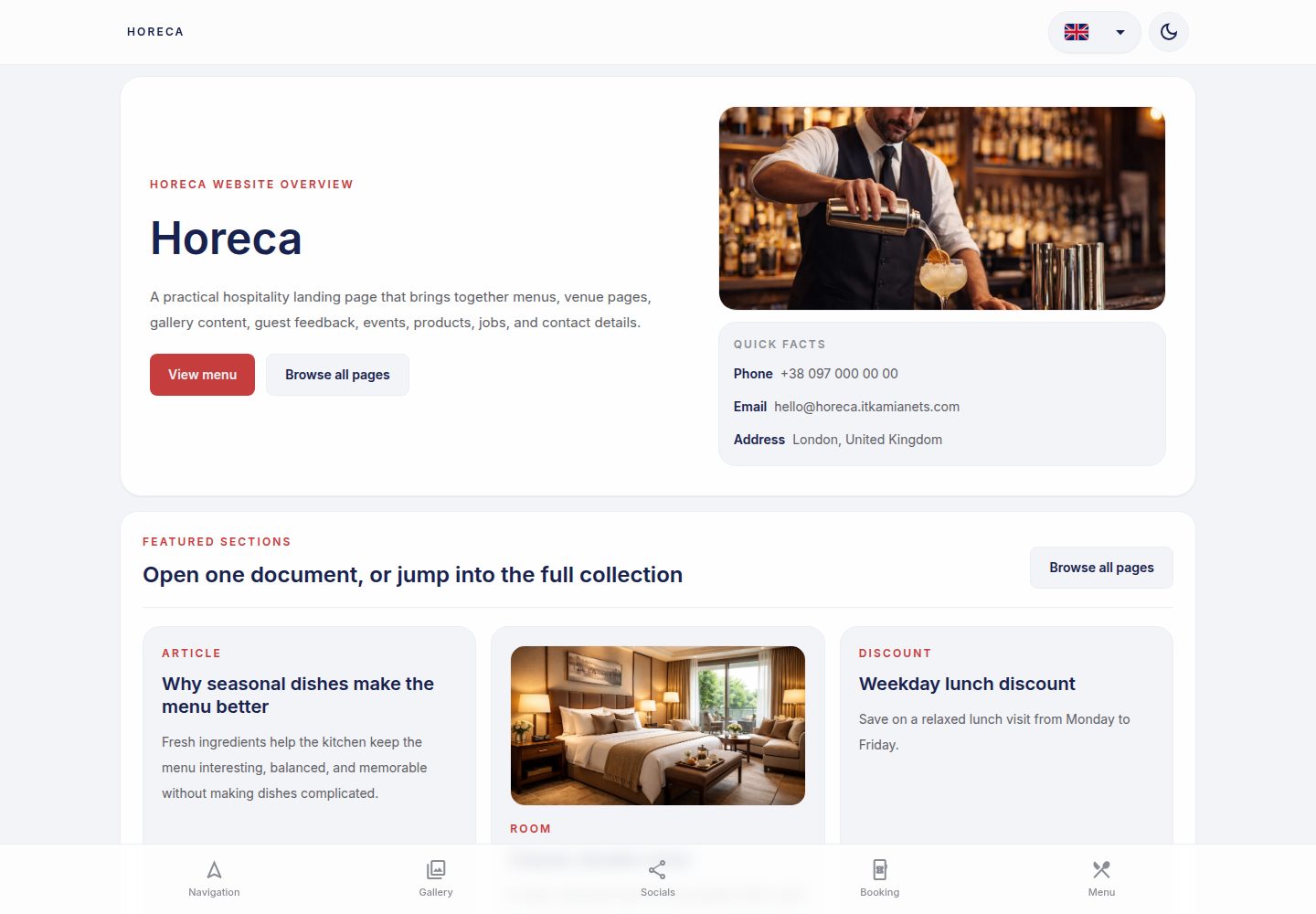
Angular-based SSR prerendering generates static HTML at build time, suitable for static hosting
HTMLCorporate Website
ngx-horeca — HTML Business Template
By vinnytsia-space
An Angular landing page template for the restaurant, café, and hotel industry, using SSR prerendering and TailwindCSS, with built-in multilingual support and static data fallback.
Explore the design
Compare the page layouts and mobile experience. Open any screenshot for a closer look.
Desktop homepage1 / 3
Desktop captureTop of page
Actual screenshot captured by the server browser.
All pages & views 3
Screenshots show visual appearance; interactive behavior may differ.
Recorded 2026-10-08View source
What stands out
A quick read of the recorded project description.
Uses TailwindCSS and shared theme CSS variables for styling, with SCSS for complex component-level styles
Built-in @wawjs/ngx-translate multilingual solution, with UI copy and feature content translations managed in separate directories
Feature pages use an API-first data flow with local JSON fallback and empty-state fallback
Uses Material Symbols Outlined icon set by default, with accessibility usage examples
Includes AI usage guidance (AGENTS.md and the ai/ directory in the package) and a companion Custom GPT link
Template Details
ngx-horeca is an Angular landing page template for the HoReCa (hotel, restaurant, café) industry. The repository contains both a source workspace and an installable @wawjs/ngx-horeca package. The template is primarily a static marketing site; pages are prerendered to HTML at build time via Angular SSR, with output to dist/app/browser and dist/app/server. Deployment uses the browser-side prerendered result, making it suitable for static hosting (e.g., GitHub Pages). In development mode, it runs as a standard Angular SPA.
In terms of content organization, the template distinguishes static marketing pages from feature pages driven by bootstrap/API data (such as dishes, articles, team, events, jobs, reviews, rooms, etc.). Feature pages follow an API-first, local JSON fallback order: when bootstrap data is not ready, a loading state is shown; when data exists, the API takes precedence; when data is empty, a local fallback from src/data/<feature>/<file>.json is used; when both are empty, an empty state is shown, and the two data types are not mixed.
For styling, everyday UI relies mainly on TailwindCSS utility classes, while SCSS is used for complex component-level styles and shared design tokens; theme colors, surfaces, spacing, radii, and motion are managed uniformly through CSS variables in src/styles/_theme.scss. Icons use Material Symbols Outlined, loaded in src/index.html.
Internationalization uses @wawjs/ngx-translate. UI copy is located in src/i18n/<code>.json, and feature content translations are in src/data/<feature>/i18n/<code>.json; Ukrainian source text is used as translation keys, ua.json is a compact source array, and other language arrays must align with its indices. Language metadata is maintained in src/environments/environment.prod.ts.
The template also includes AGENTS.md and AI usage guidance under node_modules/@wawjs/ngx-horeca/ai/, as well as a link to the HoReCa Web Art Work Custom GPT for business research and implementation prompt generation. The repository is MIT licensed, allowing free use, modification, commercial use, and distribution of this version of the code, but third-party assets such as demo images, fonts, and icons require separate license verification, and external services such as domains, hosting, databases, payments, or AI may incur additional fees.
HTMLCorporate website
Is it right for your project?
Use Cases
- Building a static marketing landing page for a restaurant, café, or hotel to showcase services, menus, and spaces
- A multilingual industry site that requires build-time prerendering and deployment via static hosting
- An industry site focused on list content such as dishes, articles, team, events, jobs, reviews, and rooms
- Projects that want to organize frontend code with Angular signals, OnPush change detection, and TailwindCSS
Suitable For
- Frontend developers familiar with Angular and TailwindCSS
- Teams that need a HoReCa industry landing page starting point and will replace content and assets themselves
- Projects planning to deploy a prerendered site using static hosting such as GitHub Pages
- Sites that need multilingual UI and feature content translation structure
Getting started & customization
Use these recorded setup notes alongside the repository instructions for your chosen version.
- 1
After cloning the repository to a new directory, run npm i to install dependencies, then run npm run start to start the development server (default http://localhost:4200)
- 2
Build with npm run build; output is in dist/app/browser and dist/app/server; deployment uses the browser-side prerendered output
- 3
To run the SSR server, execute node dist/app/server/server.mjs after building, though static landing pages typically do not need this
- 4
Dynamic routes (such as dish/:slug, article/:slug) require known static parameters provided via getPrerenderParams() in src/app/app.routes.server.ts
- 5
When adding or modifying translations, update both src/i18n/<code>.json and src/data/<feature>/i18n/<code>.json, keeping indices aligned with ua.json
License & source material
Usage conditions & limitations
Free to use · keep license noticeThis entry covers the free version under the MIT license in the public repository; the free scope is the code of this version and does not imply that external services or third-party assets are free.
Must comply with when using
- Free use, modification, commercial use, and distribution of this version of the code are permitted.
- When distributing copies or substantial portions of the code, retain the original author's copyright notice and the full MIT license notice.
- The code is provided as is; warranties and limitations of liability are governed by the original license and applicable law.
Additional costs & items to verify
- Demo images, fonts, icons, and other third-party assets require verification under their respective licenses and cannot be judged solely by the code's MIT license.
- External services such as domains, hosting, databases, payments, or AI may incur additional fees.
- When deploying, custom domains must be adjusted to your own domain; if using a *.itkamianets.com subdomain, ensure that subdomain has not previously been occupied by its GitHub organization.
- Business research and implementation prompt generation rely on an external Custom GPT link (ChatGPT service); using this feature requires access to an external service and may be subject to its account and fee terms.
- Detailed AI guidance for delivery projects is located in the installed @wawjs/ngx-horeca package; the dependency must be installed first to obtain the complete guidance.
- Directories such as projects/, documentation/, and custom-gpt/ are for source maintainers only and will be removed in the delivered organization repository; the delivered version does not include these contents.
- When using AI outside the IDE, the contents of AGENTS.md must be manually copied into the prompt context first; otherwise, the AI will not automatically follow the project rules.
View Original Text Basis
Permission is hereby granted, free of charge
Original License Text
Custom domain which you should adjust to your own domain so it works properly, any subdomain of `*.itkamianets.com` in case it's not used before on our github org.
Original README
For business research and implementation-prompt generation, use the HoReCa Web Art Work Custom GPT:
Original README
Detailed AI guidance for delivered business projects lives in the installed package:
Original README
Source maintainers can also use this repository's source-only `projects/`, `documentation/`, and `custom-gpt/` folders before those folders are removed from delivered org repositories.
Original README
https://github.com/vinnytsia-space/ngx-horeca/blob/master/LICENSEhttps://github.com/vinnytsia-space/ngx-horeca/blob/master/README.mdIf you use AI outside the IDE and it does not automatically read repository instructions, copy the contents of `AGENTS.md` into the AI prompt/context first.
Original README
Compiled by DeepSeek based on repository license and README ·2026-10-08. Results only cover the materials read; dependencies, images, fonts, and subsequent term changes are subject to their respective original texts.
Project checks & description sources
Template Information
- Source platforms
- GitHub
- Documentation and maintenance reference score
- More documented · 80 / 100
- Technologies
- HTML
- Website type
- Corporate Website
How this score is calculated
Our heuristic uses license records (up to 30), a demo link (12), a preview (10), stars (15), recorded maintenance (15), description completeness (8), feature records (5) and classification data (5). It is not a code, security or performance test, or a Google score. A link does not establish tested functionality.
What to verify for this project
- Repository update recorded
- 2026-10-08
- Screenshot last checked
- 2026-10-08
A demo link is listed. Check it with your own content and viewport sizes; its presence does not confirm that forms, authentication or payments work.
The catalog identifies HTML as the primary stack. Check the actual dependency manifest and lockfile for versions and hosting requirements. These notes use recorded metadata, not a code audit or a deployment test.
Use a selection guide →How this description was prepared
AI-assisted description based on catalog records and repository material. Repository authors are not automatically the reviewers of this description.
Review declaration: [email protected] · 2026-10-08
Inspect the recorded source material
SHA-256: 40eb300ac2db32f56694f0848ce097ad9fa920b136093004f4eafacc5539a814
2026-10-08T10:46:00.299Z
Source file / repository# Angular Landing HoReCa Industry Template (SSR + Prerender)
Modern Angular 22 starter template for building fast landing pages with **SSR prerendering**, **TailwindCSS**, and **GitHub Pages deployment**.
This template is optimized for static landing sites where pages are rendered at **build time** for SEO and performance.
---
# AI Usage
If you use AI outside the IDE and it does not automatically read repository instructions, copy the
contents of `AGENTS.md` into the AI prompt/context first.
This ensures the AI follows the same project-specific rules that Codex uses inside the IDE.
Detailed AI guidance for delivered business projects lives in the installed package:
```text
node_modules/@wawjs/ngx-horeca/ai/
```
Source maintainers can also use this repository's source-only `projects/`, `documentation/`, and
`custom-gpt/` folders before those folders are removed from delivered org repositories.
For business research and implementation-prompt generation, use the HoReCa Web Art Work Custom GPT:
```
https://chatgpt.com/g/g-6a04779f2e2481918bde1f0801eb6ed4-horeca-web-art-work
```
---
# Acknowledge
- Angular **22**
- **SSR prerendering** during build
- **Zoneless Angular**
- State used in HTML class bindings should be exposed as **signals**
- Prefer **Angular Signal Forms** as the primary forms approach when building new forms
- **OnPush change detection by default**
- **TailwindCSS v4**
- Use shared **theme CSS variables** from `src/styles/_theme.scss` for colors, surfaces, spacing, radius, and motion
- **GitHub Pages deployment**
- **Prettier formatting**
- Clean minimal project structure
The project builds both:
```
dist/app/browser
dist/app/server
```
But deployment uses the **browser prerendered output**, making it perfect for static hosting.
---
# Create a new project from this template
Clone the default repository into a new folder with your project name (replace `PROJECT_NAME` with your project name):
```bash
git clone https://github.com/vinnytsia-space/HoReCa.git PROJECT_NAME
cd PROJECT_NAME
npm i
npm run start
```
## What these commands do
- `git clone https://github.com/vinnytsia-space/HoReCa.git PROJECT_NAME`
Downloads the template repository and creates a local folder named `PROJECT_NAME`.
- `cd PROJECT_NAME`
Opens the newly created project folder.
- `npm i`
Installs all project dependencies from `package.json`.
- `npm run start`
Starts the local development server.
After that, open the local URL shown in the terminal, usually [http://localhost:4200](http://localhost:4200)
## Initialize your own git repository
If you want to start fresh instead of keeping the template git history, remove the existing `.git` folder, initialize a new repository, and create the first commit.
Example:
```bash
rm -rf .git
git init
git remote add origin https://github.com/vinnytsia-space/PROJECT_NAME.git
git add .
git commit -m "chore(init): bootstrap project from HoReCa template"
```
`git remote add origin ...` connects your local repository to the remote GitHub repository so future `git push` and `git pull` commands know where your main project lives.
Use a Conventional Commit message for the first commit as well. A good default is:
```text
chore(init): bootstrap project from HoReCa template
```
# Project Structure
```
src/
app/
app.component.ts
app.config.ts
app.config.server.ts
app.routes.ts
app.routes.server.ts
layouts/
pages/
assets/
environments/
i18n/
styles/
styles.scss
```
SSR configuration lives in:
```
app.config.server.ts
app.routes.server.ts
```
---
# Versioning
The source workspace project version and the local `@wawjs/ngx-horeca` package version are the
same platform release version.
When bumping a release, keep these aligned:
- root `package.json` `version`
- `projects/ngx-horeca/package.json` `version`
- root `package.json` dependency on `@wawjs/ngx-horeca`
- root lockfile metadata when `package-lock.json` is present
- `projects/ngx-horeca/RELEASES.md`
Do not change Angular peer ranges such as `^22.0.0` or `>=22.0.0` just because the platform version
changes; those are compatibility ranges, not this template's release version.
---
# Development
Start the development server:
```
npm start
```
or
```
ng serve
```
Application runs at [http://localhost:4200](http://localhost:4200)
Development mode runs as a normal Angular SPA.
---
# Feature Data Flow
Most pages in this repository are static marketing pages. Keep simple content close to the page
unless the content is reused or the feature is backed by bootstrap/API data.
Feature-backed pages, such as dishes, articles, team profiles, events, jobs, reviews, rooms,
products, quests, exhibits, sales, or similar list-like content, must follow the same source
priority and page-state model.
## Bootstrap And Page States
Before bootstrap data has resolved, the feature is in a loading state. Pages should show loading UI
and must not show an empty state yet.
After bootstrap has resolved, a feature has three possible content states:
1. API/bootstrap data exists.
Use the API data as the source of truth.
2. API/bootstrap data is missing, `null`, `undefined`, or an empty array.
Use the matching local fallback file from `src/data/<feature>/<file>.json`.
3. API/bootstrap data and local fallback data are both empty.
Show the standard empty state.
Do not merge API records with local fallback records. A feature should render either API data or
local fallback data, never a mixed list. Normalize records for typing and rendering when needed, but
keep the source choice clear.
Feature services should expose resolved content using this API-first, fallback-second behavior. Page
components should track whether loading has completed so templates can distinguish loading from a
true zero-data state.
Example service pattern:
```ts
import fallbackItems from '../../../data/item/items.json';
readonly loading = signal(true);
readonly items = signal<Item[]>([]);
resolveItems(apiItems?: Item[] | null): void {
const resolvedItems = Array.isArray(apiItems) && apiItems.length > 0 ? apiItems : fallbackItems;
this.items.set(resolvedItems);
this.loading.set(false);
}
```
Example template pattern:
```html
@if (feature.loading()) {
<!-- Loading skeleton or loading section -->
} @else if (feature.items().length > 0) {
<!-- Render feature content -->
} @else {
<!-- Standard empty state -->
}
```
---
# Build
Build the project:
```
npm run build
```
This generates:
```
dist/app/browser
dist/app/server
```
Pages are **prerendered at build time** using Angular SSR.
---
# Running the SSR server (optional)
The template includes a Node server for SSR output. After `npm run build`, it can be run manually:
```
node dist/app/server/server.mjs
```
For most landing pages this is **not required**, because prerendered HTML is already generated.
---
# Prerender Configuration
Static marketing pages should be prerendered by default. Keep prerender configuration in:
```
src/app/app.routes.server.ts
```
Use `RenderMode.Prerender` for regular routes and keep a wildcard prerender route as the default
fallback:
```ts
export const serverRoutes: ServerRoute[] = [
{
path: '**',
renderMode: RenderMode.Prerender,
},
];
```
When a route has dynamic segments, such as `dish/:slug` or `article/:slug`, add a route-specific
`getPrerenderParams()` entry that returns the known static params from local feature data. This keeps
dynamic-looking pages compatible with static hosting.
---
# TailwindCSS
Tailwind is configured via:
```
.postcssrc.json
```
Tailwind should be used as much as possible for everyday UI work.
Prefer Tailwind utilities for:
- layout
- spacing
- typography
- colors
- borders
- sizing
- responsive behavior
Use SCSS only when Tailwind is not the right tool, for example:
- component-specific complex styling
- shared design tokens and mixins
- advanced states or selectors
- small amounts of global styling
Global styles live in:
```
src/styles.scss
```
---
# Icons
This template includes **Material Symbols Outlined** and those should be used as the default icon set across the project.
Loaded in:
```
src/index.html
```
Use icons directly in HTML like this:
```html
<span class="material-symbols-outlined" aria-hidden="true">arrow_forward</span>
```
For accessible buttons, keep the icon decorative and provide a text label or `aria-label` on the button itself:
```html
<button type="button" aria-label="Open menu">
<span class="material-symbols-outlined" aria-hidden="true">menu</span>
</button>
```
---
# Translations And Languages
UI translations live in:
```text
src/i18n/<code>.json
```
Feature-owned content translations live beside fallback data:
```text
src/data/<feature>/i18n/<code>.json
```
Language metadata lives in:
```text
src/environments/environment.prod.ts
```
Translation bootstrap starts in:
```text
src/app/app.config.ts
```
The app uses the `@wawjs/ngx-translate` translation stack:
- `provideTranslate(...)` registers the default interface bundle from `/i18n/`
- `TranslateDirective` and `TranslateService` are the default translation primitives
- Ukrainian source text is used as the translation key, including content that comes from `src/data`
- `ua.json` files are compact source arrays; every other language file is an array with the same
order and length
When adding or updating translations:
- add or update the matching `src/i18n/<code>.json` array for shared UI text
- add or update `src/data/<feature>/i18n/<code>.json` arrays for feature content sourced from `src/data`
- update `environment.languages` when adding or renaming a supported language
- keep Ukrainian source text identical across templates, components, `src/i18n/ua.json`, source
`src/data` files, and feature `src/data/*/i18n/ua.json` arrays
- keep all non-default translation arrays index-aligned with their matching `ua.json`
- store translation text and language labels as real UTF-8 characters, not escaped or re-encoded mojibake
- remove unused translation entries when they are no longer referenced anywhere in the app
- keep fallback content in `src/data` as plain source data, with translations in the feature's `i18n` folder
Supported usage patterns:
- Use the `translate` directive for plain element text content
- Use `TranslateDirective` for text and translated attributes
- Use `[translate]="{ placeholder: 'Текст підказки' }"` for directive-managed translated attributes
- Use `TranslateService.translate('Ключовий текст')()` in TypeScript when the translated value is needed inside `computed()` or composed strings
- For dynamic API or fallback content, pass the real value to the directive, such as `[translate]="dish.name"`
Do not use:
- `TranslatePipe`; it is not available in the current `@wawjs/ngx-translate` package
- feature-specific `*.translations.json` files
- code-side translation maps for page or feature text
- helper methods that turn slugs, IDs, or other generated values into translation keys unless a task explicitly requires that behavior
Examples:
```html
<span translate>Відкрити меню мов</span>
<button
translate
[translate]="{ ariaLabel: 'Перейти на головну сторінку' }"
aria-label="Перейти на головну сторінку"
type="button"
></button>
<span [translate]="dish.name">{{ dish.name }}</span>
```
```ts
private readonly _translateService = inject(TranslateService);
protected readonly toggleLabel = computed(() =>
this._translateService.translate('Перемкнути темну тему')(),
);
```
---
# SCSS Conventions
Use SCSS in a way that matches modern Angular defaults:
- Keep most styles inside the component `.scss` file.
- Use `src/styles.scss` only for truly global styles like resets, tokens, typography, and utility layers.
- Prefer CSS variables for colors, spacing, and theming that may change at runtime.
- Use SCSS features like `@use`, mixins, and partials for authoring convenience and shared design tokens.
- Avoid deep selector nesting. Keep selectors simple and local to the component.
- Avoid `::ng-deep` and `ViewEncapsulation.None` unless there is a clear integration reason.
- Prefer class bindings in templates over heavy inline style bindings.
Recommended split:
```text
src/styles.scss -> global entry point
src/app/**/**/*.scss -> component-local styles
src/styles/_theme.scss -> shared theme CSS variables
```
---
# Environments
This template includes Angular environment files and they can be used for different runtime setups such as local development and production builds.
Available files:
```text
src/environments/environment.ts
src/environments/environment.prod.ts
```
Typical use cases:
- API base URLs
- feature flags
- analytics toggles
- external service configuration
Production builds replace `environment.ts` with `environment.prod.ts` through Angular file replacements.
Keep environment files limited to public front-end configuration. Do not store secrets in them.
---
# Deployment
Deployment is handled automatically via **GitHub Actions**.
Workflow:
```
.github/workflows/deploy.yml
```
Steps:
1. Install dependencies
2. Build Angular app
3. Copy `CNAME`
4. Push build output to `gh-pages`
The deployed folder is:
```
dist/app/browser
```
---
# Domain
Custom domain which you should adjust to your own domain so it works properly, any subdomain of `*.itkamianets.com` in case it's not used before on our github org.
```
ngx.itkamianets.com
```
Configured via:
```
CNAME
```
---
# Code Style
Formatting is handled by:
- `.editorconfig`
- `.prettierrc`
Key conventions:
- **tabs**
- **single quotes**
- **100 character line width**
---
# NPM Scripts
Start development:
```
npm start
```
Build project:
```
npm run build
```
---
# Requirements
Recommended environment:
```
Node.js 20+
npm 11+
```
---
# Code structure guide
## Pages
Application pages should be created inside:
```text
src/app/pages/
```
Each page should have its own folder and its own component file.
Example:
```text
src/app/pages/home/home.component.ts
src/app/pages/about/about.component.ts
```
Generate a page component with Angular CLI:
```bash
ng generate component pages/home
```
or shorter:
```bash
ng g c pages/home
```
Pages should be lazy loaded from `src/app/app.routes.ts`.
Example route config:
```ts
import { Routes } from '@angular/router';
export const routes: Routes = [
{
path: '',
loadComponent: () => import('./pages/home/home.component').then((m) => m.HomeComponent),
},
{
path: 'about',
loadComponent: () => import('./pages/about/about.component').then((m) => m.AboutComponent),
},
];
```
---
## Feature structure for back-end connected modules
If a part of the app needs its own business logic and back-end integration, create a dedicated feature folder inside:
```text
src/app/feature/
```
Each feature should keep its own internal structure.
Example:
```text
src/app/feature/user/
src/app/feature/user/components/
src/app/feature/user/directives/
src/app/feature/user/interfaces/
src/app/feature/user/pages/
src/app/feature/user/pipes/
src/app/feature/user/services/
```
Example service location:
```text
src/app/feature/user/services/user.service.ts
```
Suggested CLI commands:
Create feature page:
```bash
ng g c feature/user/pages/user-profile
```
Create feature component:
```bash
ng g c feature/user/components/user-card
```
Create feature directive:
```bash
ng g d feature/user/directives/user-focus
```
Create feature pipe:
```bash
ng g p feature/user/pipes/user-name
```
Create feature service:
```bash
ng g s feature/user/services/user
```
Interfaces are usually created manually:
```text
src/app/feature/user/interfaces/user.interface.ts
src/app/feature/user/interfaces/user-response.interface.ts
```
For small focused features, colocated feature files are also valid when that structure keeps the
feature simpler.
Feature-backed list pages should also keep their static fallback data in:
```text
src/data/<feature>/<file>.json
```
Use that file only when bootstrap/API data for the feature is missing or empty. Do not merge fallback
items into API-provided lists.
---
## Generic shared code
Generic reusable code that is not tied to one specific feature can live directly under `src/app`.
Example shared folders:
```text
src/app/components/
src/app/directives/
src/app/interfaces/
src/app/pipes/
src/app/services/
```
Example shared pipe location:
```text
src/app/pipes/phone.pipe.ts
```
Suggested CLI commands:
Create shared component:
```bash
ng g c components/page-header
```
Create shared directive:
```bash
ng g d directives/autofocus
```
Create shared pipe:
```bash
ng g p pipes/phone
```
Create shared service:
```bash
ng g s services/api
```
Interfaces are usually created manually:
```text
src/app/interfaces/api-response.interface.ts
src/app/interfaces/select-option.interface.ts
```
---
## Development summary
Use these locations by default:
- `src/app/pages` - app-level lazy loaded pages
- `src/app/feature/<name>` - feature-specific code with back-end/business logic
- `src/app/components`, `directives`, `pipes`, `services`, `interfaces` - generic shared code
# License
MIT
Explore similar templates
Compare previews and descriptions within the same stack and category.

mazer
Mazer is a free and open-source Bootstrap 5 admin dashboard and landing page template that does not depend on jQuery. It provides prebuilt releases, source builds, and CDN inclusion, and includes dark mode, perfect-scrollbar, and ApexCharts examples.
HTML · Admin dashboard

Freelancer
A bright, single-page Bootstrap portfolio template for freelancers, designers, and small studios. It includes a responsive portfolio grid with modal detail windows and an SB Forms contact form that requires an API token.
HTML · Portfolio

Creative
A single-page marketing template by Start Bootstrap for creative agencies and product services, built on Bootstrap with SCSS, featuring a portfolio grid and call-to-action sections. It includes pre-set SB Forms markers for form integration and npm build scripts for source customization.
HTML · Corporate Website

startbootstrap-agency
Agency is a one-page Bootstrap portfolio theme from Start Bootstrap, MIT licensed. It includes a responsive portfolio grid with modal details and a preconfigured SB Forms contact form that requires an API token.
HTML · Corporate Website

startbootstrap-landing-page
A general-purpose Bootstrap landing page template from Start Bootstrap, MIT licensed, with a Pug/SCSS/npm build pipeline.
HTML · Corporate Website

Landing-Page
A general-purpose landing page HTML template maintained by Tailwind Toolbox, written in pure HTML and loading the complete Tailwind CSS via CDN.
HTML · Corporate Website