基于 Angular 的 SSR 预渲染,构建时生成静态 HTML,适合静态托管
HTML企业官网
ngx-horeca — HTML 企业官网模板
作者 vinnytsia-space
面向餐饮、咖啡馆与酒店行业的 Angular 落地页模板,采用 SSR 预渲染与 TailwindCSS,内置多语言与静态数据回退机制。
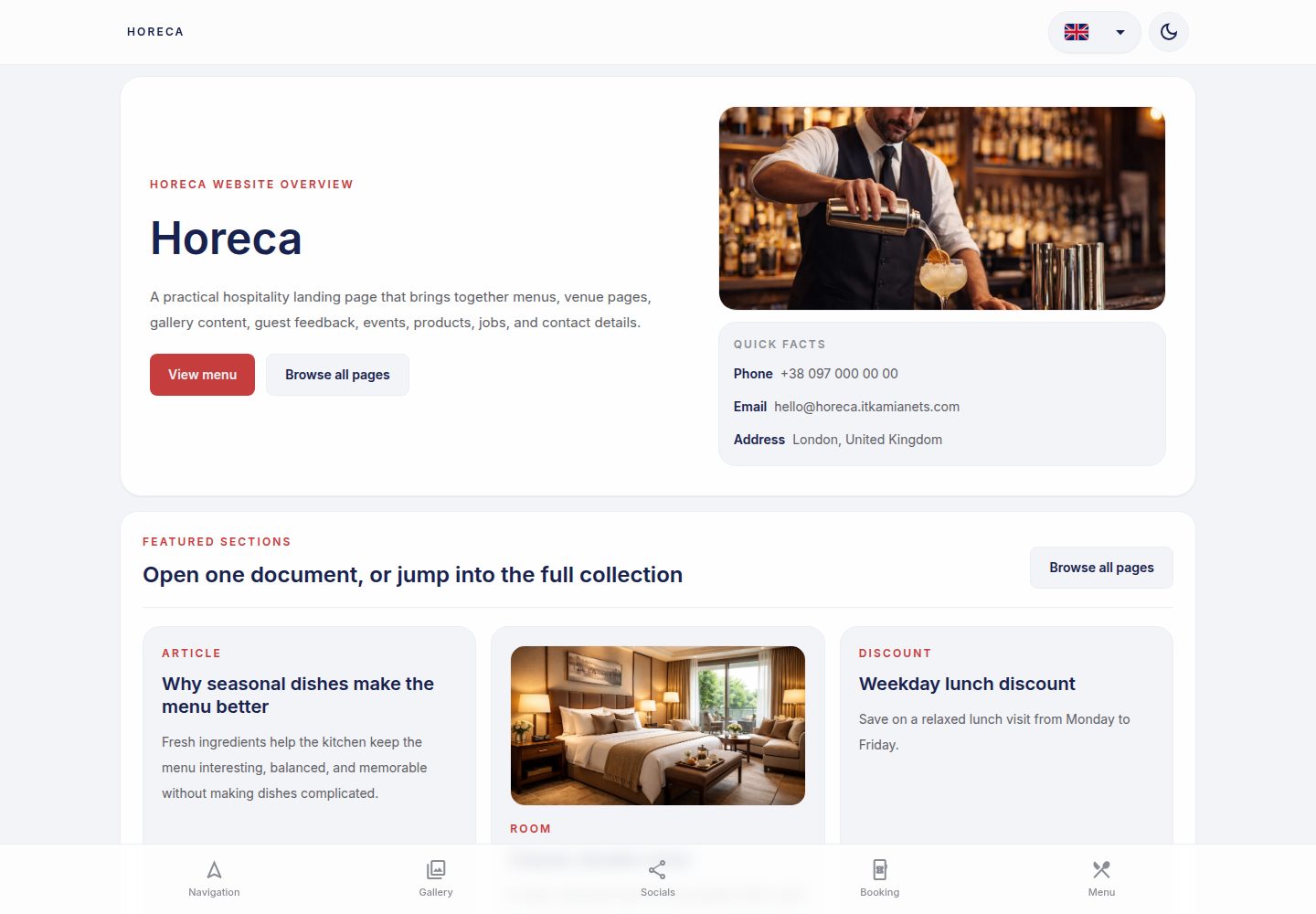
看看你的网站会是什么样
浏览真实页面截图,比较内容排版与手机效果。点击下方缩略图切换,放大查看整页细节。
全部页面与视图 3
截图用于了解视觉与布局,交互效果请以实际项目为准。
采集于 2026-10-08查看来源
值得关注的模板亮点
从已有项目资料中,快速了解它的特点。
使用 TailwindCSS 与共享主题 CSS 变量组织样式,SCSS 用于组件级复杂样式
内置 @wawjs/ngx-translate 多语言方案,界面文案与功能内容翻译分目录管理
功能页采用 API 优先、本地 JSON 回退、空状态兜底的数据流模式
默认使用 Material Symbols Outlined 图标集,并提供无障碍用法示例
包含 AI 使用指引(AGENTS.md 与包内 ai/ 目录)及配套 Custom GPT 链接
模板详细介绍
ngx-horeca 是一个面向 HoReCa(酒店、餐饮、咖啡馆)行业的 Angular 落地页模板,仓库中同时包含源码工作区与可安装的 @wawjs/ngx-horeca 包。模板以静态营销页为主,页面在构建时通过 Angular SSR 预渲染为 HTML,产物输出到 dist/app/browser 与 dist/app/server,部署时使用浏览器端预渲染结果,适合静态托管(如 GitHub Pages)。开发模式则作为普通 Angular SPA 运行。
内容组织上,模板区分静态营销页与由 bootstrap/API 数据驱动的功能页(如菜品、文章、团队、活动、职位、评价、房间等)。功能页遵循 API 优先、本地 JSON 回退的顺序:bootstrap 数据未就绪时显示加载态;数据存在时以 API 为准;数据为空时使用 src/data/<feature>/<file>.json 中的本地回退;两者都为空时显示空状态,且不混合两类数据。
样式方面,日常 UI 以 TailwindCSS 工具类为主,SCSS 用于组件级复杂样式与共享设计令牌;主题色、表面、间距、圆角与动效等通过 src/styles/_theme.scss 中的 CSS 变量统一管理。图标使用 Material Symbols Outlined,在 src/index.html 中加载。
国际化使用 @wawjs/ngx-translate,界面文案位于 src/i18n/<code>.json,功能内容翻译位于 src/data/<feature>/i18n/<code>.json;以乌克兰语源文本作为翻译键,ua.json 为紧凑源数组,其他语言数组需与其索引对齐。语言元数据在 src/environments/environment.prod.ts 中维护。
模板还包含 AGENTS.md 与 node_modules/@wawjs/ngx-horeca/ai/ 下的 AI 使用指引,以及用于业务调研与实现提示生成的 HoReCa Web Art Work Custom GPT 链接。仓库采用 MIT 许可,允许免费使用、修改、商用与分发该版本代码,但演示图片、字体、图标等第三方素材需单独核对许可,域名、托管、数据库、支付或 AI 等外部服务可能另行收费。
HTML企业官网
适合你的项目吗?
适用场景
- 为餐厅、咖啡馆或酒店搭建静态营销落地页,展示服务、菜单与空间
- 需要构建时预渲染、以静态托管方式部署的多语言行业站点
- 以菜品、文章、团队、活动、职位、评价、房间等列表内容为主的行业站点
- 希望以 Angular 信号、OnPush 变更检测与 TailwindCSS 组织前端代码的项目
适合人群
- 熟悉 Angular 与 TailwindCSS 的前端开发者
- 需要 HoReCa 行业落地页起点并自行替换内容与素材的团队
- 计划使用 GitHub Pages 等静态托管部署预渲染站点的项目
- 需要多语言界面与功能内容翻译结构的站点
上手与定制指南
结合仓库当前版本的说明,按下面的资料检查内容、配置与运行要求。
- 1
克隆仓库到新目录后执行 npm i 安装依赖,再运行 npm run start 启动开发服务器(默认 http://localhost:4200)
- 2
构建使用 npm run build,产物位于 dist/app/browser 与 dist/app/server;部署使用浏览器端预渲染输出
- 3
如需运行 SSR 服务器,可在构建后执行 node dist/app/server/server.mjs,但静态落地页通常不需要
- 4
动态路由(如 dish/:slug、article/:slug)需在 src/app/app.routes.server.ts 中通过 getPrerenderParams() 提供已知静态参数
- 5
新增或修改翻译时,需同步更新 src/i18n/<code>.json 与 src/data/<feature>/i18n/<code>.json,并保持与 ua.json 索引对齐
授权与来源资料
使用条件与限制
免费使用 · 保留许可声明本次收录的是公开仓库中采用 MIT 许可的免费版本;免费范围为该版本代码,不代表外部服务或第三方素材免费。
使用时需要遵守
- 允许免费使用、修改、商用和分发该版本代码。
- 分发代码副本或实质性部分时,保留原作者版权声明和完整 MIT 许可声明。
- 代码按现状提供;担保与责任限制以原许可证及适用法律为准。
额外费用与待核对事项
- 演示图片、字体、图标及其他第三方素材需按各自许可核对,不能仅凭代码的 MIT 许可判断。
- 域名、托管、数据库、支付或 AI 等外部服务可能另外收费。
- 部署时需将自定义域名调整为自有域名;若使用 *.itkamianets.com 子域,须确保该子域此前未被其 GitHub 组织占用。
- 业务调研与实现提示生成依赖外部 Custom GPT 链接(ChatGPT 服务),使用该功能需访问外部服务并可能受其账号与费用条款约束。
- 面向交付项目的详细 AI 指引位于已安装的 @wawjs/ngx-horeca 包内,需先安装该依赖包才能获取完整指引。
- projects/、documentation/、custom-gpt/ 等目录为源码维护者专用,且在交付的组织仓库中会被移除,交付版本不包含这些内容。
- 在 IDE 之外使用 AI 时,需先手动将 AGENTS.md 内容复制进提示上下文,否则 AI 不会自动遵循项目规则。
查看原文依据
Permission is hereby granted, free of charge
许可证原文
Custom domain which you should adjust to your own domain so it works properly, any subdomain of `*.itkamianets.com` in case it's not used before on our github org.
README 原文
For business research and implementation-prompt generation, use the HoReCa Web Art Work Custom GPT:
README 原文
Detailed AI guidance for delivered business projects lives in the installed package:
README 原文
Source maintainers can also use this repository's source-only `projects/`, `documentation/`, and `custom-gpt/` folders before those folders are removed from delivered org repositories.
README 原文
https://github.com/vinnytsia-space/ngx-horeca/blob/master/LICENSEhttps://github.com/vinnytsia-space/ngx-horeca/blob/master/README.mdIf you use AI outside the IDE and it does not automatically read repository instructions, copy the contents of `AGENTS.md` into the AI prompt/context first.
README 原文
DeepSeek 根据仓库许可证和 README 整理 ·2026-10-08。结果仅覆盖已读取资料,依赖、图片、字体及后续条款变更以各自原文为准。
项目核对记录与介绍依据
模板资料
- 来源平台
- GitHub
- 资料与维护参考分
- 资料较完整 · 80 / 100
- 技术栈
- HTML
- 网站类型
- 企业官网
这个分数如何计算
本站按许可资料(最高30分)、演示链接(12分)、预览图(10分)、Star数(15分)、记录的维护时间(15分)、描述完整度(8分)、功能记录(5分)和分类资料(5分)计算。它不是代码、安全或性能测试,也不是 Google 评分;有链接不代表已实测可用。
这个项目需要核对什么
- 记录的仓库更新时间
- 2026-10-08
- 截图检查日期
- 2026-10-08
已收录演示链接。请用你的内容与屏幕尺寸检查;有演示不代表表单、认证或支付已经可用。
目录记录的主要技术栈是 HTML。请通过依赖清单和锁文件核对实际版本与托管要求。这些说明基于收录资料,不代表代码审计或部署实测。
查看具体选型方法 →介绍的制作与核对状态
介绍由 AI 辅助整理目录与仓库资料。仓库作者不等于这篇介绍的审核者。
审核声明: [email protected] · 2026-10-08
查看当时使用的来源资料
SHA-256: 40eb300ac2db32f56694f0848ce097ad9fa920b136093004f4eafacc5539a814
2026-10-08T10:46:00.299Z
来源文件 / 仓库# Angular Landing HoReCa Industry Template (SSR + Prerender)
Modern Angular 22 starter template for building fast landing pages with **SSR prerendering**, **TailwindCSS**, and **GitHub Pages deployment**.
This template is optimized for static landing sites where pages are rendered at **build time** for SEO and performance.
---
# AI Usage
If you use AI outside the IDE and it does not automatically read repository instructions, copy the
contents of `AGENTS.md` into the AI prompt/context first.
This ensures the AI follows the same project-specific rules that Codex uses inside the IDE.
Detailed AI guidance for delivered business projects lives in the installed package:
```text
node_modules/@wawjs/ngx-horeca/ai/
```
Source maintainers can also use this repository's source-only `projects/`, `documentation/`, and
`custom-gpt/` folders before those folders are removed from delivered org repositories.
For business research and implementation-prompt generation, use the HoReCa Web Art Work Custom GPT:
```
https://chatgpt.com/g/g-6a04779f2e2481918bde1f0801eb6ed4-horeca-web-art-work
```
---
# Acknowledge
- Angular **22**
- **SSR prerendering** during build
- **Zoneless Angular**
- State used in HTML class bindings should be exposed as **signals**
- Prefer **Angular Signal Forms** as the primary forms approach when building new forms
- **OnPush change detection by default**
- **TailwindCSS v4**
- Use shared **theme CSS variables** from `src/styles/_theme.scss` for colors, surfaces, spacing, radius, and motion
- **GitHub Pages deployment**
- **Prettier formatting**
- Clean minimal project structure
The project builds both:
```
dist/app/browser
dist/app/server
```
But deployment uses the **browser prerendered output**, making it perfect for static hosting.
---
# Create a new project from this template
Clone the default repository into a new folder with your project name (replace `PROJECT_NAME` with your project name):
```bash
git clone https://github.com/vinnytsia-space/HoReCa.git PROJECT_NAME
cd PROJECT_NAME
npm i
npm run start
```
## What these commands do
- `git clone https://github.com/vinnytsia-space/HoReCa.git PROJECT_NAME`
Downloads the template repository and creates a local folder named `PROJECT_NAME`.
- `cd PROJECT_NAME`
Opens the newly created project folder.
- `npm i`
Installs all project dependencies from `package.json`.
- `npm run start`
Starts the local development server.
After that, open the local URL shown in the terminal, usually [http://localhost:4200](http://localhost:4200)
## Initialize your own git repository
If you want to start fresh instead of keeping the template git history, remove the existing `.git` folder, initialize a new repository, and create the first commit.
Example:
```bash
rm -rf .git
git init
git remote add origin https://github.com/vinnytsia-space/PROJECT_NAME.git
git add .
git commit -m "chore(init): bootstrap project from HoReCa template"
```
`git remote add origin ...` connects your local repository to the remote GitHub repository so future `git push` and `git pull` commands know where your main project lives.
Use a Conventional Commit message for the first commit as well. A good default is:
```text
chore(init): bootstrap project from HoReCa template
```
# Project Structure
```
src/
app/
app.component.ts
app.config.ts
app.config.server.ts
app.routes.ts
app.routes.server.ts
layouts/
pages/
assets/
environments/
i18n/
styles/
styles.scss
```
SSR configuration lives in:
```
app.config.server.ts
app.routes.server.ts
```
---
# Versioning
The source workspace project version and the local `@wawjs/ngx-horeca` package version are the
same platform release version.
When bumping a release, keep these aligned:
- root `package.json` `version`
- `projects/ngx-horeca/package.json` `version`
- root `package.json` dependency on `@wawjs/ngx-horeca`
- root lockfile metadata when `package-lock.json` is present
- `projects/ngx-horeca/RELEASES.md`
Do not change Angular peer ranges such as `^22.0.0` or `>=22.0.0` just because the platform version
changes; those are compatibility ranges, not this template's release version.
---
# Development
Start the development server:
```
npm start
```
or
```
ng serve
```
Application runs at [http://localhost:4200](http://localhost:4200)
Development mode runs as a normal Angular SPA.
---
# Feature Data Flow
Most pages in this repository are static marketing pages. Keep simple content close to the page
unless the content is reused or the feature is backed by bootstrap/API data.
Feature-backed pages, such as dishes, articles, team profiles, events, jobs, reviews, rooms,
products, quests, exhibits, sales, or similar list-like content, must follow the same source
priority and page-state model.
## Bootstrap And Page States
Before bootstrap data has resolved, the feature is in a loading state. Pages should show loading UI
and must not show an empty state yet.
After bootstrap has resolved, a feature has three possible content states:
1. API/bootstrap data exists.
Use the API data as the source of truth.
2. API/bootstrap data is missing, `null`, `undefined`, or an empty array.
Use the matching local fallback file from `src/data/<feature>/<file>.json`.
3. API/bootstrap data and local fallback data are both empty.
Show the standard empty state.
Do not merge API records with local fallback records. A feature should render either API data or
local fallback data, never a mixed list. Normalize records for typing and rendering when needed, but
keep the source choice clear.
Feature services should expose resolved content using this API-first, fallback-second behavior. Page
components should track whether loading has completed so templates can distinguish loading from a
true zero-data state.
Example service pattern:
```ts
import fallbackItems from '../../../data/item/items.json';
readonly loading = signal(true);
readonly items = signal<Item[]>([]);
resolveItems(apiItems?: Item[] | null): void {
const resolvedItems = Array.isArray(apiItems) && apiItems.length > 0 ? apiItems : fallbackItems;
this.items.set(resolvedItems);
this.loading.set(false);
}
```
Example template pattern:
```html
@if (feature.loading()) {
<!-- Loading skeleton or loading section -->
} @else if (feature.items().length > 0) {
<!-- Render feature content -->
} @else {
<!-- Standard empty state -->
}
```
---
# Build
Build the project:
```
npm run build
```
This generates:
```
dist/app/browser
dist/app/server
```
Pages are **prerendered at build time** using Angular SSR.
---
# Running the SSR server (optional)
The template includes a Node server for SSR output. After `npm run build`, it can be run manually:
```
node dist/app/server/server.mjs
```
For most landing pages this is **not required**, because prerendered HTML is already generated.
---
# Prerender Configuration
Static marketing pages should be prerendered by default. Keep prerender configuration in:
```
src/app/app.routes.server.ts
```
Use `RenderMode.Prerender` for regular routes and keep a wildcard prerender route as the default
fallback:
```ts
export const serverRoutes: ServerRoute[] = [
{
path: '**',
renderMode: RenderMode.Prerender,
},
];
```
When a route has dynamic segments, such as `dish/:slug` or `article/:slug`, add a route-specific
`getPrerenderParams()` entry that returns the known static params from local feature data. This keeps
dynamic-looking pages compatible with static hosting.
---
# TailwindCSS
Tailwind is configured via:
```
.postcssrc.json
```
Tailwind should be used as much as possible for everyday UI work.
Prefer Tailwind utilities for:
- layout
- spacing
- typography
- colors
- borders
- sizing
- responsive behavior
Use SCSS only when Tailwind is not the right tool, for example:
- component-specific complex styling
- shared design tokens and mixins
- advanced states or selectors
- small amounts of global styling
Global styles live in:
```
src/styles.scss
```
---
# Icons
This template includes **Material Symbols Outlined** and those should be used as the default icon set across the project.
Loaded in:
```
src/index.html
```
Use icons directly in HTML like this:
```html
<span class="material-symbols-outlined" aria-hidden="true">arrow_forward</span>
```
For accessible buttons, keep the icon decorative and provide a text label or `aria-label` on the button itself:
```html
<button type="button" aria-label="Open menu">
<span class="material-symbols-outlined" aria-hidden="true">menu</span>
</button>
```
---
# Translations And Languages
UI translations live in:
```text
src/i18n/<code>.json
```
Feature-owned content translations live beside fallback data:
```text
src/data/<feature>/i18n/<code>.json
```
Language metadata lives in:
```text
src/environments/environment.prod.ts
```
Translation bootstrap starts in:
```text
src/app/app.config.ts
```
The app uses the `@wawjs/ngx-translate` translation stack:
- `provideTranslate(...)` registers the default interface bundle from `/i18n/`
- `TranslateDirective` and `TranslateService` are the default translation primitives
- Ukrainian source text is used as the translation key, including content that comes from `src/data`
- `ua.json` files are compact source arrays; every other language file is an array with the same
order and length
When adding or updating translations:
- add or update the matching `src/i18n/<code>.json` array for shared UI text
- add or update `src/data/<feature>/i18n/<code>.json` arrays for feature content sourced from `src/data`
- update `environment.languages` when adding or renaming a supported language
- keep Ukrainian source text identical across templates, components, `src/i18n/ua.json`, source
`src/data` files, and feature `src/data/*/i18n/ua.json` arrays
- keep all non-default translation arrays index-aligned with their matching `ua.json`
- store translation text and language labels as real UTF-8 characters, not escaped or re-encoded mojibake
- remove unused translation entries when they are no longer referenced anywhere in the app
- keep fallback content in `src/data` as plain source data, with translations in the feature's `i18n` folder
Supported usage patterns:
- Use the `translate` directive for plain element text content
- Use `TranslateDirective` for text and translated attributes
- Use `[translate]="{ placeholder: 'Текст підказки' }"` for directive-managed translated attributes
- Use `TranslateService.translate('Ключовий текст')()` in TypeScript when the translated value is needed inside `computed()` or composed strings
- For dynamic API or fallback content, pass the real value to the directive, such as `[translate]="dish.name"`
Do not use:
- `TranslatePipe`; it is not available in the current `@wawjs/ngx-translate` package
- feature-specific `*.translations.json` files
- code-side translation maps for page or feature text
- helper methods that turn slugs, IDs, or other generated values into translation keys unless a task explicitly requires that behavior
Examples:
```html
<span translate>Відкрити меню мов</span>
<button
translate
[translate]="{ ariaLabel: 'Перейти на головну сторінку' }"
aria-label="Перейти на головну сторінку"
type="button"
></button>
<span [translate]="dish.name">{{ dish.name }}</span>
```
```ts
private readonly _translateService = inject(TranslateService);
protected readonly toggleLabel = computed(() =>
this._translateService.translate('Перемкнути темну тему')(),
);
```
---
# SCSS Conventions
Use SCSS in a way that matches modern Angular defaults:
- Keep most styles inside the component `.scss` file.
- Use `src/styles.scss` only for truly global styles like resets, tokens, typography, and utility layers.
- Prefer CSS variables for colors, spacing, and theming that may change at runtime.
- Use SCSS features like `@use`, mixins, and partials for authoring convenience and shared design tokens.
- Avoid deep selector nesting. Keep selectors simple and local to the component.
- Avoid `::ng-deep` and `ViewEncapsulation.None` unless there is a clear integration reason.
- Prefer class bindings in templates over heavy inline style bindings.
Recommended split:
```text
src/styles.scss -> global entry point
src/app/**/**/*.scss -> component-local styles
src/styles/_theme.scss -> shared theme CSS variables
```
---
# Environments
This template includes Angular environment files and they can be used for different runtime setups such as local development and production builds.
Available files:
```text
src/environments/environment.ts
src/environments/environment.prod.ts
```
Typical use cases:
- API base URLs
- feature flags
- analytics toggles
- external service configuration
Production builds replace `environment.ts` with `environment.prod.ts` through Angular file replacements.
Keep environment files limited to public front-end configuration. Do not store secrets in them.
---
# Deployment
Deployment is handled automatically via **GitHub Actions**.
Workflow:
```
.github/workflows/deploy.yml
```
Steps:
1. Install dependencies
2. Build Angular app
3. Copy `CNAME`
4. Push build output to `gh-pages`
The deployed folder is:
```
dist/app/browser
```
---
# Domain
Custom domain which you should adjust to your own domain so it works properly, any subdomain of `*.itkamianets.com` in case it's not used before on our github org.
```
ngx.itkamianets.com
```
Configured via:
```
CNAME
```
---
# Code Style
Formatting is handled by:
- `.editorconfig`
- `.prettierrc`
Key conventions:
- **tabs**
- **single quotes**
- **100 character line width**
---
# NPM Scripts
Start development:
```
npm start
```
Build project:
```
npm run build
```
---
# Requirements
Recommended environment:
```
Node.js 20+
npm 11+
```
---
# Code structure guide
## Pages
Application pages should be created inside:
```text
src/app/pages/
```
Each page should have its own folder and its own component file.
Example:
```text
src/app/pages/home/home.component.ts
src/app/pages/about/about.component.ts
```
Generate a page component with Angular CLI:
```bash
ng generate component pages/home
```
or shorter:
```bash
ng g c pages/home
```
Pages should be lazy loaded from `src/app/app.routes.ts`.
Example route config:
```ts
import { Routes } from '@angular/router';
export const routes: Routes = [
{
path: '',
loadComponent: () => import('./pages/home/home.component').then((m) => m.HomeComponent),
},
{
path: 'about',
loadComponent: () => import('./pages/about/about.component').then((m) => m.AboutComponent),
},
];
```
---
## Feature structure for back-end connected modules
If a part of the app needs its own business logic and back-end integration, create a dedicated feature folder inside:
```text
src/app/feature/
```
Each feature should keep its own internal structure.
Example:
```text
src/app/feature/user/
src/app/feature/user/components/
src/app/feature/user/directives/
src/app/feature/user/interfaces/
src/app/feature/user/pages/
src/app/feature/user/pipes/
src/app/feature/user/services/
```
Example service location:
```text
src/app/feature/user/services/user.service.ts
```
Suggested CLI commands:
Create feature page:
```bash
ng g c feature/user/pages/user-profile
```
Create feature component:
```bash
ng g c feature/user/components/user-card
```
Create feature directive:
```bash
ng g d feature/user/directives/user-focus
```
Create feature pipe:
```bash
ng g p feature/user/pipes/user-name
```
Create feature service:
```bash
ng g s feature/user/services/user
```
Interfaces are usually created manually:
```text
src/app/feature/user/interfaces/user.interface.ts
src/app/feature/user/interfaces/user-response.interface.ts
```
For small focused features, colocated feature files are also valid when that structure keeps the
feature simpler.
Feature-backed list pages should also keep their static fallback data in:
```text
src/data/<feature>/<file>.json
```
Use that file only when bootstrap/API data for the feature is missing or empty. Do not merge fallback
items into API-provided lists.
---
## Generic shared code
Generic reusable code that is not tied to one specific feature can live directly under `src/app`.
Example shared folders:
```text
src/app/components/
src/app/directives/
src/app/interfaces/
src/app/pipes/
src/app/services/
```
Example shared pipe location:
```text
src/app/pipes/phone.pipe.ts
```
Suggested CLI commands:
Create shared component:
```bash
ng g c components/page-header
```
Create shared directive:
```bash
ng g d directives/autofocus
```
Create shared pipe:
```bash
ng g p pipes/phone
```
Create shared service:
```bash
ng g s services/api
```
Interfaces are usually created manually:
```text
src/app/interfaces/api-response.interface.ts
src/app/interfaces/select-option.interface.ts
```
---
## Development summary
Use these locations by default:
- `src/app/pages` - app-level lazy loaded pages
- `src/app/feature/<name>` - feature-specific code with back-end/business logic
- `src/app/components`, `directives`, `pipes`, `services`, `interfaces` - generic shared code
# License
MIT
看看同类模板
对比同技术栈与用途的模板,找到更适合的视觉与内容结构。

mazer
Free and Open-source Bootstrap 5 Admin Dashboard Template and Landing Page
HTML · 后台

Freelancer
Freelancer 是 Start Bootstrap 出品的单页作品集模板,专为自由职业者、设计师和小型工作室设计。 页面结构清晰,包含多个内容区块、响应式作品集网格,每个作品项目配有模态窗口展示详情。
HTML · 作品集

Creative
Creative 是 Start Bootstrap 团队维护的一款单页营销模板,定位明确:为创意机构或产品服务提供一个以作品展示和行动号召为核心的落地页。
HTML · 企业官网

startbootstrap-agency
Agency 是 Start Bootstrap 维护的单页代理商作品集主题,基于 Bootstrap 构建,MIT 许可。
HTML · 企业官网

startbootstrap-landing-page
这是 Start Bootstrap 系列中一款通用型落地页模板,基于 Bootstrap 构建,定位是给产品或服务做单页推广。
HTML · 企业官网

Landing-Page
Tailwind CSS Starter Template - Landing Page
HTML · 企业官网