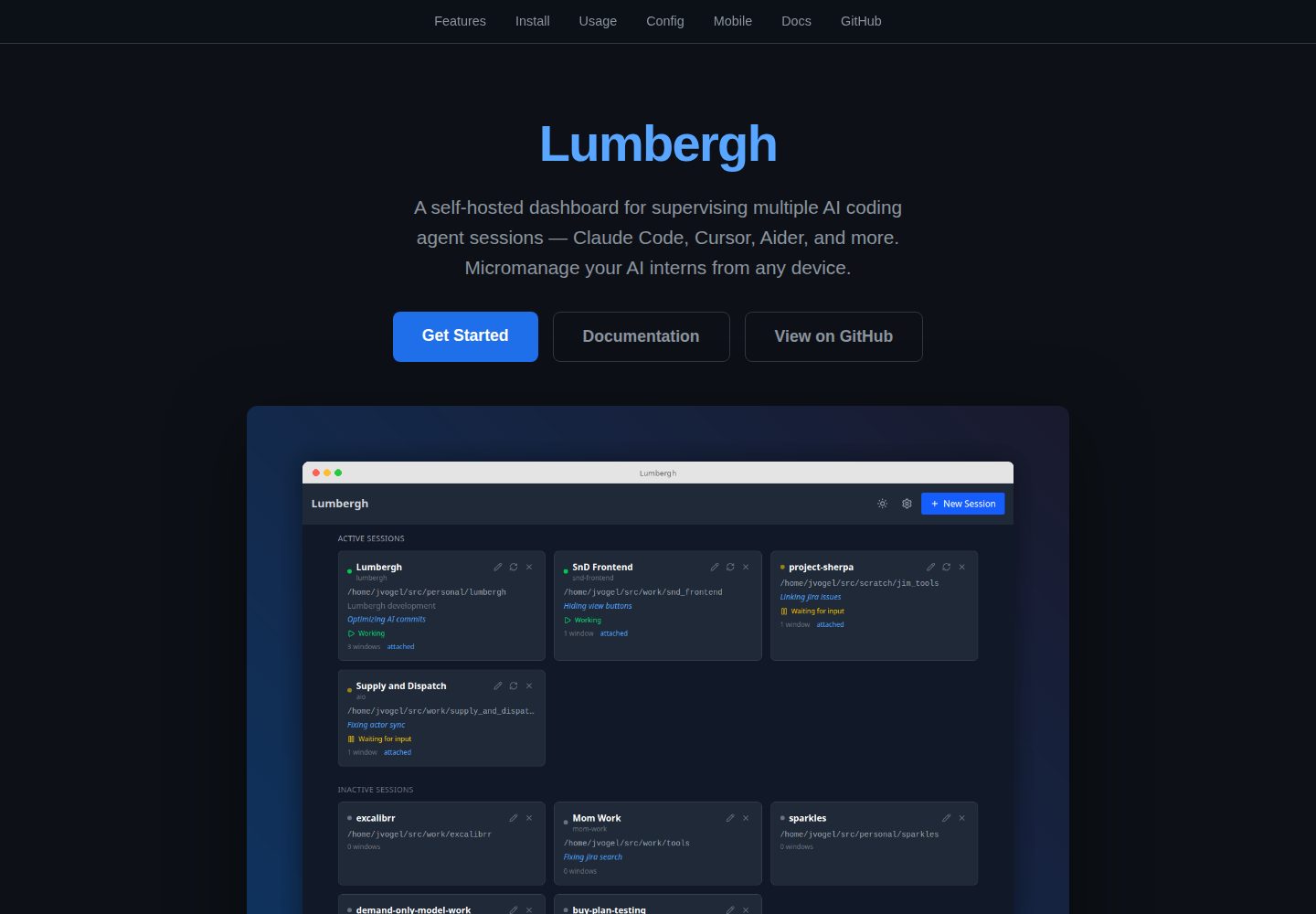
Multi-session dashboard that centralizes all Claude Code sessions and detects their running status
ReactAdmin dashboard
lumbergh — React Admin dashboard Template
By voglster
Lumbergh is a self-hosted web dashboard for supervising multiple Claude Code sessions in tmux, offering live terminals, Git diff viewing, file browsing, todos and prompt templates, with mobile PWA support.
Explore the design
Compare the page layouts and mobile experience. Open any screenshot for a closer look.
Desktop homepage1 / 2
Desktop captureTop of page
Actual screenshot captured by the server browser.
All pages & views 2
Screenshots show visual appearance; interactive behavior may differ.
Recorded 2026-10-03View source
What stands out
A quick read of the recorded project description.
Interactive live terminals via xterm.js and WebSocket
Git diff viewer and commit history graph to track changes as the AI writes code
Syntax-highlighted file browser, plus per-project todos and draft notes
Built-in Manager AI chat panel for cross-session review and coordination
One-click prompt templates with variable support, and a responsive PWA installable on phones
Template Details
Lumbergh is aimed at developers who need to run multiple Claude Code sessions at once, bringing AI coding processes scattered across tmux windows into a single self-hosted web interface. The backend is built on Python 3.11+, FastAPI, libtmux and TinyDB, while the frontend uses React, Vite, TypeScript, xterm.js and Tailwind; startup depends on tmux and git, and on Windows psmux replaces tmux, with no WSL required.
The dashboard lists all Claude Code sessions and detects their status, providing interactive real terminals through xterm.js and WebSocket. A Git diff viewer tracks diffs, commits and branch changes as the AI writes code, alongside a Git commit history graph and a syntax-highlighted file browser. A built-in Manager AI chat panel is used for cross-session review and coordination, prompt templates support variables and one-click sending, and each project can maintain todos, draft notes and shared files. The interface is responsive, installable as a PWA on phones or tablets, and supports dark and light theme switching.
Installation is via uv tool install pylumbergh followed by running lumbergh, which opens at http://localhost:8420 by default; pip installation is also possible. In development mode, bootstrap.sh creates a tmux session with three windows: claude, backend and frontend, and the Vite dev server proxies /api to port 8420. The repository is released under the MIT license, but third-party assets such as demo images, fonts and icons require separate license checks, and external services such as hosting, databases or AI may incur additional costs.
ReactBackend
Is it right for your project?
Use Cases
- Running multiple Claude Code sessions simultaneously and needing to view each one's status and output in a single interface
- Remotely checking terminals and Git diffs and sending prompts from a phone or tablet
- Maintaining prompt templates with variables for repetitive tasks and delivering them to a chosen session in one click
- Continuously checking diffs, commits and branch changes while the AI writes code
- Recording todos and draft notes per project and sharing context across multiple sessions
Suitable For
- Developers who use tmux to manage multiple Claude Code sessions
- Users who want a self-hosted dashboard and do not rely on third-party hosting services
- People who need to check in on and intervene in AI coding processes from mobile devices at any time
- Teams using a Python 3.11+ environment and accepting uv or pip installation
Getting started & customization
Use these recorded setup notes alongside the repository instructions for your chosen version.
- 1
tmux and git must be installed on the machine before running; on Windows, psmux replaces tmux and WSL is not required
- 2
The install command is uv tool install pylumbergh followed by running lumbergh; pip install pylumbergh is also possible
- 3
The default access address is http://localhost:8420; startup checks tmux/git and reports missing items
- 4
Development mode additionally requires uv, npm and Claude Code; run bootstrap.sh and then visit http://localhost:5420
- 5
The repository code is MIT-licensed, but third-party assets such as demo images, fonts and icons, as well as external services, require separate license and cost checks
License & source material
Usage conditions & limitations
Free to use · keep license noticeThis listing covers the free version under the MIT license in the public repository; the free scope is that version's code and does not mean external services or third-party assets are free.
Must comply with when using
- Free use, modification, commercial use and distribution of this version's code are permitted.
- When distributing copies or substantial portions of the code, retain the original author's copyright notice and the full MIT license notice.
- The code is provided as is; warranties and limitations of liability are governed by the original license and applicable law.
Additional costs & items to verify
- tmux and git must be installed on the machine before use, otherwise it cannot run; on Windows, psmux must be used instead of tmux.
- Development mode additionally requires uv, npm and Claude Code beyond tmux and git.
- On Windows, tmux is not used; instead it relies on psmux (a PowerShell tmux clone).
- Some proxy detection checklist content is adapted from the Apache-2.0-licensed herdr project; use or redistribution of that part must comply with its license terms.
- Demo images, fonts, icons and other third-party assets must be checked against their respective licenses and cannot be judged solely by the code's MIT license.
- External services such as domains, hosting, databases, payments or AI may incur separate charges.
View Original Text Basis
Permission is hereby granted, free of charge
Original License Text
You need `tmux` and `git` on your machine.
Original README
You'll need **uv**, **npm**, and **Claude Code** in addition to tmux and git.
Original README
Lumbergh runs natively on Windows using [`psmux`](https://pypi.org/project/psmux/) (a PowerShell-based tmux clone) in place of tmux.
Original README
https://github.com/voglster/lumbergh/blob/main/LICENSEhttps://github.com/voglster/lumbergh/blob/main/README.mdAgent-detection manifest *content* (`backend/lumbergh/detect/manifests/`) was adapted from [herdr](https://github.com/ogulcancelik/herdr) (Apache-2.0), reworked into Lumbergh's own manifest schema.
Original README
Compiled by DeepSeek based on repository license and README ·2026-10-03. Results only cover the materials read; dependencies, images, fonts, and subsequent term changes are subject to their respective original texts.
Project checks & description sources
Template Information
- Source platforms
- GitHub
- Documentation and maintenance reference score
- More documented · 87 / 100
- Technologies
- React
- Website type
- Admin dashboard
How this score is calculated
Our heuristic uses license records (up to 30), a demo link (12), a preview (10), stars (15), recorded maintenance (15), description completeness (8), feature records (5) and classification data (5). It is not a code, security or performance test, or a Google score. A link does not establish tested functionality.
What to verify for this project
- Repository update recorded
- 2026-09-09
- Screenshot last checked
- 2026-10-03
A demo link is listed. Check it with your own content and viewport sizes; its presence does not confirm that forms, authentication or payments work.
The catalog identifies React as the primary stack. Check the actual dependency manifest and lockfile for versions and hosting requirements. These notes use recorded metadata, not a code audit or a deployment test.
Use a selection guide →How this description was prepared
AI-assisted description based on catalog records and repository material. Repository authors are not automatically the reviewers of this description.
Automatically checked against source and license rules; no manual editorial review.
Inspect the recorded source material
SHA-256: d90181ce6f78c4531299a76ddde4ffbeef3aedb8064d42ee4b9827af558a0d54
2026-10-03T04:17:51.206Z
Source file / repository# Lumbergh **Micromanage your AI interns.** A self-hosted web dashboard for supervising multiple Claude Code sessions running in tmux. Watch diffs roll in, fire off prompts, check todos, and keep your AI workers on task -- all from your browser (or your phone). [](https://pypi.org/project/pylumbergh/) [](https://pypi.org/project/pylumbergh/) [](LICENSE) [](https://pypi.org/project/pylumbergh/) **[Read the full documentation](https://voglster.github.io/lumbergh/)** -- guides, configuration, mobile/PWA setup, screenshots, and more.  ## Install in 30 seconds You need `tmux` and `git` on your machine. Then: ```bash uv tool install pylumbergh lumbergh ``` Open **http://localhost:8420**. Done. ### Windows Lumbergh runs natively on Windows using [`psmux`](https://pypi.org/project/psmux/) (a PowerShell-based tmux clone) in place of tmux. WSL is not required. ```powershell uv tool install psmux uv tool install pylumbergh lumbergh ``` `pywinpty` is installed automatically as a dependency. > **What's uv?** [uv](https://docs.astral.sh/uv/) is a fast Python package manager from [Astral](https://astral.sh/). It handles installing Python tools in isolated environments so they don't conflict with anything else on your system. Install it with: > > ```bash > curl -LsSf https://astral.sh/uv/install.sh | sh > ``` > > Don't want uv? `pip install pylumbergh` works too. Lumbergh checks for tmux/git on startup and tells you what's missing. ## What you get - **Multi-session dashboard** -- all your Claude Code sessions at a glance, with live status detection - **Live terminals** -- interact with real terminal sessions via xterm.js + WebSockets - **Git diff viewer** -- watch diffs, commits, and branch changes as the AI writes code - **Git graph** -- interactive commit history visualization - **File browser** -- browse project files with syntax highlighting - **Manager AI** -- built-in AI chat pane for reviewing and coordinating work across sessions - **Prompt templates** -- reusable prompts with variables, fire them with one click - **Todos & scratchpad** -- per-project notes and task tracking - **Shared files** -- share context across sessions - **Mobile-first + PWA** -- responsive design, installable on your phone or tablet ([setup guide](https://voglster.github.io/lumbergh/docs/guides/mobile/)) - **Dark and light themes** -- toggle with one click > *"Being able to code anywhere is a real game changer. Before, I had to lug around my laptop -- now I just pull out my phone."* > > -- @jcamierpy24 ## Development Want to contribute or hack on Lumbergh? ```bash git clone https://github.com/voglster/lumbergh.git cd lumbergh ./bootstrap.sh ``` This creates a tmux session with three windows (claude, backend, frontend) and opens `http://localhost:5420` with hot-reloading. You'll need **uv**, **npm**, and **Claude Code** in addition to tmux and git. The Vite dev server proxies `/api` requests to the backend on port 8420, so the frontend and API appear same-origin during development. **Tech stack:** Python 3.11+ / FastAPI / libtmux / TinyDB on the backend. React / Vite / TypeScript / xterm.js / Tailwind on the frontend. Run `./lint.sh` before submitting PRs -- it handles formatting and catches errors. ## Links - [Issues](https://github.com/voglster/lumbergh/issues) - [Changelog](https://github.com/voglster/lumbergh/releases) ## Acknowledgements Agent-detection manifest *content* (`backend/lumbergh/detect/manifests/`) was adapted from [herdr](https://github.com/ogulcancelik/herdr) (Apache-2.0), reworked into Lumbergh's own manifest schema. ## License MIT
Explore similar templates
Compare previews and descriptions within the same stack and category.
ant-design-pro
Ant Design Pro is an enterprise-grade React admin scaffold built on React 19, Umi Max 4, and antd 6 with TypeScript.
React · Admin dashboard

coreui-free-react-admin-template
CoreUI's free React admin template, built on React and the CoreUI component library, provides dashboard layouts, sidebar navigation, routing, and example views. It includes .cursorrules, ARCHITECTURE.md, and DEVELOPMENT.md context files, plus JSDoc comments and PropTypes, to support AI-assisted development.
React · Admin dashboard

fastapi-react
A Cookiecutter template for FastAPI + React (TypeScript) full-stack projects, integrating PostgreSQL, SQLAlchemy, Alembic, Celery, Redis, JWT authentication, a react-admin admin panel, and a Docker Compose development environment with Nginx reverse proxy.
React · Admin dashboard

react-antd-admin-template
A React + Ant Design admin template for mid- and back-office products, with built-in login/logout, dynamic routing, permission checks, and user management.
React · Admin dashboard

react-saas-template
A React and Material-UI template for SaaS or admin websites, offering dashboard, chart, blog, payment, and file upload components. It uses Create-React-App, React-Router, Recharts, React-Stripe-js, React-Dropzone, and React-Cropper, with theme colors centralized in src/theme.js.
React · Admin dashboard

react-material-admin
React Material Admin is an MIT-licensed React admin template by Flatlogic, built on Material-UI. It provides dashboards, charts, tables, authentication, profile, and notification pages, with three color themes and responsive layouts.
React · Admin dashboard