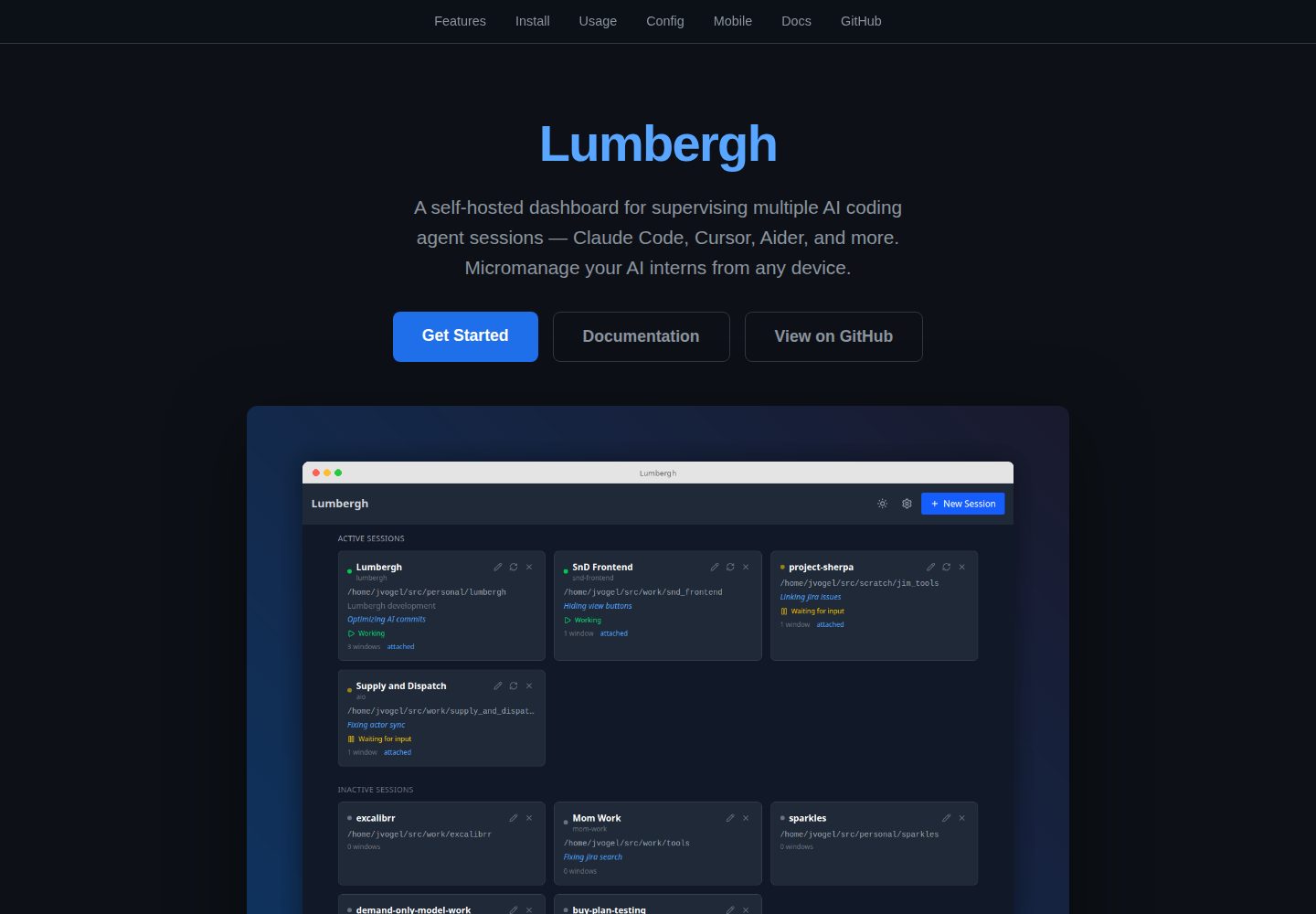
多会话仪表盘集中展示所有 Claude Code 会话并检测运行状态
React后台
lumbergh — React 后台模板
作者 voglster
Lumbergh 是一个自托管的 Web 仪表盘,用于在 tmux 中同时监管多个 Claude Code 会话,提供实时终端、Git 差异查看、文件浏览、待办与提示词模板等功能,并支持移动端 PWA。
看看你的网站会是什么样
浏览真实页面截图,比较内容排版与手机效果。点击下方缩略图切换,放大查看整页细节。
全部页面与视图 2
截图用于了解视觉与布局,交互效果请以实际项目为准。
采集于 2026-10-03查看来源
值得关注的模板亮点
从已有项目资料中,快速了解它的特点。
通过 xterm.js 与 WebSocket 提供可交互的实时终端
Git 差异查看器与提交历史图,跟踪 AI 编码过程中的改动
带语法高亮的文件浏览器,以及按项目维护的待办与草稿笔记
内置 Manager AI 聊天面板,用于跨会话审阅与协调
支持变量的一键提示词模板,以及可安装到手机的响应式 PWA
模板详细介绍
Lumbergh 面向需要同时运行多个 Claude Code 会话的开发者,把分散在 tmux 窗口中的 AI 编码进程集中到一个自托管 Web 界面里管理。后端基于 Python 3.11+、FastAPI、libtmux 与 TinyDB,前端使用 React、Vite、TypeScript、xterm.js 和 Tailwind;启动时依赖 tmux 与 git,Windows 上改用 psmux 替代 tmux,无需 WSL。
仪表盘会列出所有 Claude Code 会话并检测其状态,通过 xterm.js 与 WebSocket 提供可交互的真实终端。Git 差异查看器可跟踪 AI 写代码过程中的 diff、提交与分支变化,另有 Git 提交历史图和带语法高亮的文件浏览器。内置 Manager AI 聊天面板用于跨会话审阅与协调工作,提示词模板支持变量并一键发送,每个项目还可维护待办、草稿笔记与共享文件。界面为响应式设计,可安装为手机或平板上的 PWA,并支持深色与浅色主题切换。
安装方式为 uv tool install pylumbergh 后运行 lumbergh,默认在 http://localhost:8420 打开;也可用 pip 安装。开发模式下 bootstrap.sh 会创建包含 claude、backend、frontend 三个窗口的 tmux 会话,Vite 开发服务器把 /api 代理到 8420 端口。仓库以 MIT 许可发布,但演示图片、字体、图标等第三方素材需另行核对许可,托管、数据库或 AI 等外部服务可能产生额外费用。
React后台
适合你的项目吗?
适用场景
- 同时运行多个 Claude Code 会话,需要在一个界面里查看各自状态与输出
- 在手机或平板上远程查看终端、Git 差异并发送提示词
- 为重复性任务维护带变量的提示词模板,一键投递给指定会话
- 在 AI 写代码过程中持续检查 diff、提交与分支变化
- 为每个项目记录待办、草稿笔记并在多个会话间共享上下文
适合人群
- 使用 tmux 管理多个 Claude Code 会话的开发者
- 希望自托管仪表盘、不依赖第三方托管服务的用户
- 需要在移动设备上随时查看和干预 AI 编码进程的人
- 使用 Python 3.11+ 环境并接受 uv 或 pip 安装方式的团队
上手与定制指南
结合仓库当前版本的说明,按下面的资料检查内容、配置与运行要求。
- 1
运行前需在机器上安装 tmux 与 git;Windows 使用 psmux 替代 tmux,无需 WSL
- 2
安装命令为 uv tool install pylumbergh 后运行 lumbergh,也可用 pip install pylumbergh
- 3
默认访问地址为 http://localhost:8420,启动时会检查 tmux/git 并提示缺失项
- 4
开发模式需额外安装 uv、npm 与 Claude Code,运行 bootstrap.sh 后访问 http://localhost:5420
- 5
仓库代码为 MIT 许可,但演示图片、字体、图标等第三方素材及外部服务需单独核对许可与费用
授权与来源资料
使用条件与限制
免费使用 · 保留许可声明本次收录的是公开仓库中采用 MIT 许可的免费版本;免费范围为该版本代码,不代表外部服务或第三方素材免费。
使用时需要遵守
- 允许免费使用、修改、商用和分发该版本代码。
- 分发代码副本或实质性部分时,保留原作者版权声明和完整 MIT 许可声明。
- 代码按现状提供;担保与责任限制以原许可证及适用法律为准。
额外费用与待核对事项
- 使用前必须在机器上安装 tmux 与 git,否则无法运行;Windows 上需改用 psmux 替代 tmux。
- 开发模式除 tmux 与 git 外,还需额外安装 uv、npm 与 Claude Code。
- Windows 上不使用 tmux,而是依赖 psmux(PowerShell 版 tmux 克隆)运行。
- 部分代理检测清单内容改编自 Apache-2.0 许可的 herdr 项目,使用或再分发该部分时需遵守其许可条件。
- 演示图片、字体、图标及其他第三方素材需按各自许可核对,不能仅凭代码的 MIT 许可判断。
- 域名、托管、数据库、支付或 AI 等外部服务可能另外收费。
查看原文依据
Permission is hereby granted, free of charge
许可证原文
You need `tmux` and `git` on your machine.
README 原文
You'll need **uv**, **npm**, and **Claude Code** in addition to tmux and git.
README 原文
Lumbergh runs natively on Windows using [`psmux`](https://pypi.org/project/psmux/) (a PowerShell-based tmux clone) in place of tmux.
README 原文
https://github.com/voglster/lumbergh/blob/main/LICENSEhttps://github.com/voglster/lumbergh/blob/main/README.mdAgent-detection manifest *content* (`backend/lumbergh/detect/manifests/`) was adapted from [herdr](https://github.com/ogulcancelik/herdr) (Apache-2.0), reworked into Lumbergh's own manifest schema.
README 原文
DeepSeek 根据仓库许可证和 README 整理 ·2026-10-03。结果仅覆盖已读取资料,依赖、图片、字体及后续条款变更以各自原文为准。
项目核对记录与介绍依据
模板资料
- 来源平台
- GitHub
- 资料与维护参考分
- 资料较完整 · 87 / 100
- 技术栈
- React
- 网站类型
- 后台
这个分数如何计算
本站按许可资料(最高30分)、演示链接(12分)、预览图(10分)、Star数(15分)、记录的维护时间(15分)、描述完整度(8分)、功能记录(5分)和分类资料(5分)计算。它不是代码、安全或性能测试,也不是 Google 评分;有链接不代表已实测可用。
这个项目需要核对什么
- 记录的仓库更新时间
- 2026-09-09
- 截图检查日期
- 2026-10-03
已收录演示链接。请用你的内容与屏幕尺寸检查;有演示不代表表单、认证或支付已经可用。
目录记录的主要技术栈是 React。请通过依赖清单和锁文件核对实际版本与托管要求。这些说明基于收录资料,不代表代码审计或部署实测。
查看具体选型方法 →介绍的制作与核对状态
介绍由 AI 辅助整理目录与仓库资料。仓库作者不等于这篇介绍的审核者。
已完成服务器许可规则与 AI 来源核对;未经过人工编辑审核。
查看当时使用的来源资料
SHA-256: d90181ce6f78c4531299a76ddde4ffbeef3aedb8064d42ee4b9827af558a0d54
2026-10-03T04:17:51.206Z
来源文件 / 仓库# Lumbergh **Micromanage your AI interns.** A self-hosted web dashboard for supervising multiple Claude Code sessions running in tmux. Watch diffs roll in, fire off prompts, check todos, and keep your AI workers on task -- all from your browser (or your phone). [](https://pypi.org/project/pylumbergh/) [](https://pypi.org/project/pylumbergh/) [](LICENSE) [](https://pypi.org/project/pylumbergh/) **[Read the full documentation](https://voglster.github.io/lumbergh/)** -- guides, configuration, mobile/PWA setup, screenshots, and more.  ## Install in 30 seconds You need `tmux` and `git` on your machine. Then: ```bash uv tool install pylumbergh lumbergh ``` Open **http://localhost:8420**. Done. ### Windows Lumbergh runs natively on Windows using [`psmux`](https://pypi.org/project/psmux/) (a PowerShell-based tmux clone) in place of tmux. WSL is not required. ```powershell uv tool install psmux uv tool install pylumbergh lumbergh ``` `pywinpty` is installed automatically as a dependency. > **What's uv?** [uv](https://docs.astral.sh/uv/) is a fast Python package manager from [Astral](https://astral.sh/). It handles installing Python tools in isolated environments so they don't conflict with anything else on your system. Install it with: > > ```bash > curl -LsSf https://astral.sh/uv/install.sh | sh > ``` > > Don't want uv? `pip install pylumbergh` works too. Lumbergh checks for tmux/git on startup and tells you what's missing. ## What you get - **Multi-session dashboard** -- all your Claude Code sessions at a glance, with live status detection - **Live terminals** -- interact with real terminal sessions via xterm.js + WebSockets - **Git diff viewer** -- watch diffs, commits, and branch changes as the AI writes code - **Git graph** -- interactive commit history visualization - **File browser** -- browse project files with syntax highlighting - **Manager AI** -- built-in AI chat pane for reviewing and coordinating work across sessions - **Prompt templates** -- reusable prompts with variables, fire them with one click - **Todos & scratchpad** -- per-project notes and task tracking - **Shared files** -- share context across sessions - **Mobile-first + PWA** -- responsive design, installable on your phone or tablet ([setup guide](https://voglster.github.io/lumbergh/docs/guides/mobile/)) - **Dark and light themes** -- toggle with one click > *"Being able to code anywhere is a real game changer. Before, I had to lug around my laptop -- now I just pull out my phone."* > > -- @jcamierpy24 ## Development Want to contribute or hack on Lumbergh? ```bash git clone https://github.com/voglster/lumbergh.git cd lumbergh ./bootstrap.sh ``` This creates a tmux session with three windows (claude, backend, frontend) and opens `http://localhost:5420` with hot-reloading. You'll need **uv**, **npm**, and **Claude Code** in addition to tmux and git. The Vite dev server proxies `/api` requests to the backend on port 8420, so the frontend and API appear same-origin during development. **Tech stack:** Python 3.11+ / FastAPI / libtmux / TinyDB on the backend. React / Vite / TypeScript / xterm.js / Tailwind on the frontend. Run `./lint.sh` before submitting PRs -- it handles formatting and catches errors. ## Links - [Issues](https://github.com/voglster/lumbergh/issues) - [Changelog](https://github.com/voglster/lumbergh/releases) ## Acknowledgements Agent-detection manifest *content* (`backend/lumbergh/detect/manifests/`) was adapted from [herdr](https://github.com/ogulcancelik/herdr) (Apache-2.0), reworked into Lumbergh's own manifest schema. ## License MIT
看看同类模板
对比同技术栈与用途的模板,找到更适合的视觉与内容结构。
ant-design-pro
Ant Design Pro 是 Ant Design 官方推出的企业级中后台前端脚手架,基于 React 19、Umi Max 4 和 antd 6 构建,内置 TypeScript 支持。
React · 后台

coreui-free-react-admin-template
Free React Admin & Dashboard Template Built for AI-Assisted Development
React · 后台

fastapi-react
fastapi-react 是一个基于 Cookiecutter 的模板,用于快速搭建 FastAPI 与 React(TypeScript)的全栈项目。
React · 后台

react-antd-admin-template
一个基于React+Antd的后台管理模版,在线预览https://nlrx-wjc.github.io/react-antd-admin-template/
React · 后台

react-saas-template
🌊 Template for building an SaaS / admin website using React + Material-UI
React · 后台

react-material-admin
☄️React Material Admin is a React template built with Material-UI
React · 后台