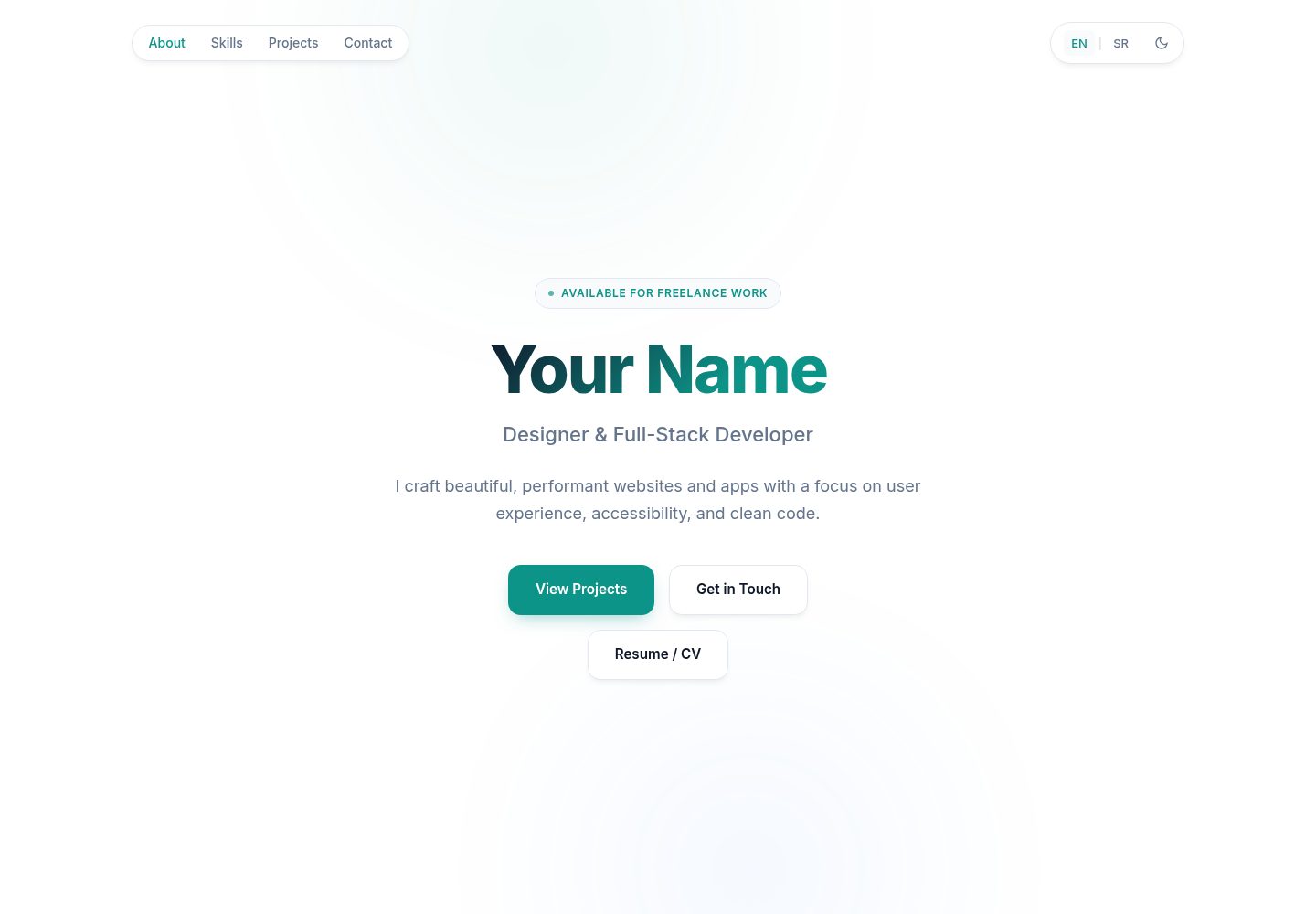
Single-file structure: all HTML, CSS, and JavaScript are contained in index.html, with no build steps or dependencies
HTMLPortfolio
portfolio-website — HTML Portfolio Template
By Vojislav77
A single-file HTML personal portfolio template with built-in light/dark themes, English/Serbian language switching, and SEO metadata. Edit index.html directly to publish.
Explore the design
Compare the page layouts and mobile experience. Open any screenshot for a closer look.
Desktop homepage1 / 2
Desktop captureTop of page
Actual screenshot captured by the server browser.
All pages & views 2
Screenshots show visual appearance; interactive behavior may differ.
Recorded 2026-10-13View source
What stands out
A quick read of the recorded project description.
Built-in light/dark theme toggle, with the user's choice saved in the browser
Built-in English and Serbian translations, switchable via data-i18n attributes, and supports extending to other languages in the same way
Includes Open Graph, Twitter cards, and JSON-LD structured data, plus robots.txt and sitemap.xml
Responsive layout and mobile menu, with keyboard support, reduced motion preference, and print styles
Project cards are arranged in a grid, and the grid adjusts automatically when cards are added or removed
Template Details
This is a single-file portfolio website template. All content is contained in index.html, with no build tools or dependencies. The page includes a hero section, skill tags, a project card grid, and contact information, along with a mobile menu, light/dark theme toggle (saved in the browser), and English/Serbian translation switching. For SEO, it provides Open Graph, Twitter cards, and JSON-LD structured data, and the repository also includes robots.txt and sitemap.xml.
To use it, push the repository to GitHub and select the branch and root directory in Settings → Pages to publish to GitHub Pages; you can also open index.html directly in a browser to view it locally. Before publishing, replace the name, email, project links, social links, resume button link, social preview image, analytics ID, and the name and URL in the JSON-LD in index.html. Also replace the YOUR-USERNAME placeholders in robots.txt and sitemap.xml with the actual address.
Limitations: the template itself does not provide a backend, form handling, or content management; Google Analytics is optional and disabled if left blank; the resume button defaults to # and requires you to add a PDF and modify the link; if a translation object is missing a key for a language, switching languages will leave that element with the previous language's text, so both language entries must be kept complete. The licensing of third-party assets such as demo images, fonts, and icons must be checked separately; the code's MIT license does not cover these assets.
HTMLPortfolio
Is it right for your project?
Use Cases
- An individual developer or designer needs a static portfolio page that can be deployed directly to GitHub Pages
- You want to maintain a portfolio with a single HTML file without introducing build tools or front-end frameworks
- You need bilingual display beyond Chinese and English, and want to use the existing translation structure as a template to add more languages
- You need to configure basic search engine and social sharing metadata for a portfolio page
- You want to quickly adjust colors via CSS variables while keeping both light and dark themes
Suitable For
- Individual users familiar with HTML and CSS who can edit source files directly
- Developers using GitHub Pages or any static hosting to publish a site
- Lightweight portfolio needs that only require a project list, skill tags, and contact information
- Users who want to control page content themselves without relying on a backend or database
Getting started & customization
Use these recorded setup notes alongside the repository instructions for your chosen version.
- 1
Open index.html directly in a browser to preview; no dependencies to install or build commands to run
- 2
To publish to GitHub Pages, select the branch and root directory (/) in the repository's Settings → Pages
- 3
Replace the placeholder content in index.html: name, email, project links, social links, resume button link, social preview image, analytics ID, and the name and URL in the JSON-LD
- 4
Replace YOUR-USERNAME in the Sitemap line of robots.txt and in the loc of sitemap.xml with the actual domain or GitHub Pages address, and update lastmod when content changes significantly
- 5
The resume button defaults to #; you must place a PDF in the project directory and modify the corresponding href for it to work
License & source material
Usage conditions & limitations
Free to use · keep license noticeThis entry covers the free version under the MIT license in the public repository; the free scope is the code of that version and does not imply that external services or third-party assets are free.
Must comply with when using
- You are allowed to use, modify, commercially use, and distribute the code of this version for free.
- When distributing copies or substantial portions of the code, retain the original author's copyright notice and the full MIT license notice.
- The code is provided as is; warranties and limitations of liability are governed by the original license and applicable law.
Additional costs & items to verify
- Demo images, fonts, icons, and other third-party assets must be checked under their respective licenses; they cannot be judged solely by the code's MIT license.
- External services such as domains, hosting, databases, payments, or AI may incur additional charges.
- Google Analytics is an optional feature and is enabled only when an analytics ID is filled in the configuration; if left blank, it is disabled and no external analytics service will load.
- The YOUR-USERNAME placeholders in robots.txt and sitemap.xml must be replaced with the actual domain or GitHub Pages address; otherwise, the sitemap and index files point to the wrong address.
- The resume/CV button defaults to # and has no effect until you add a PDF and modify the href.
- If a translation object is missing a key for a language, switching languages will leave that element with the previous language's text, so both language entries must be kept complete.
- Submitting the sitemap to Google Search Console is an optional search engine indexing step that requires you to register and use that external service yourself.
View Original Text Basis
Permission is hereby granted, free of charge
Original License Text
Optional Google Analytics support via config
Original README
Both contain the placeholder `YOUR-USERNAME` — replace it with your real address:
Original README
The button in the hero section (~line 467) links to `#` by default — it does nothing until you connect a file.
Original README
If a value is missing in one language, that element keeps its previous language's text when you switch (so keep both sides complete)
Original README
https://github.com/Vojislav77/portfolio-website/blob/main/LICENSEhttps://github.com/Vojislav77/portfolio-website/blob/main/README.mdconsider submitting your sitemap in [Google Search Console](https://search.google.com/search-console).
Original README
Compiled by DeepSeek based on repository license and README ·2026-10-13. Results only cover the materials read; dependencies, images, fonts, and subsequent term changes are subject to their respective original texts.
Project checks & description sources
Template Information
- Source platforms
- GitHub
- Documentation and maintenance reference score
- More documented · 80 / 100
- Technologies
- HTML
- Website type
- Portfolio
How this score is calculated
Our heuristic uses license records (up to 30), a demo link (12), a preview (10), stars (15), recorded maintenance (15), description completeness (8), feature records (5) and classification data (5). It is not a code, security or performance test, or a Google score. A link does not establish tested functionality.
What to verify for this project
- Repository update recorded
- 2026-08-23
- Screenshot last checked
- 2026-10-13
A demo link is listed. Check it with your own content and viewport sizes; its presence does not confirm that forms, authentication or payments work.
The catalog identifies HTML as the primary stack. Check the actual dependency manifest and lockfile for versions and hosting requirements. These notes use recorded metadata, not a code audit or a deployment test.
Use a selection guide →How this description was prepared
AI-assisted description based on catalog records and repository material. Repository authors are not automatically the reviewers of this description.
Review declaration: [email protected] · 2026-10-13
Inspect the recorded source material
SHA-256: 14279cc92572608f58c84311d809f9229e7831f942936b95745ced74b6cbd70b
2026-10-13T08:35:27.746Z
Source file / repository# Portfolio Website <img width="1280" height="640" alt="banner" src="https://github.com/user-attachments/assets/4a25ac40-7a1f-4075-978a-9aa9c5f2901e" /> A single-file portfolio website. No build tools, no dependencies — just `index.html`. ## Features - Light / dark theme (saved in browser) - Built-in translations (English / Serbian) with easy switching - Fully responsive with mobile menu - SEO ready (Open Graph, Twitter cards, JSON-LD structured data) - Accessible (keyboard friendly, reduced-motion support, print styles) - Optional Google Analytics support via config ## Quick start Open `index.html` in your browser. That's it. To publish free on GitHub Pages: 1. Push this repository to GitHub 2. **Settings → Pages → Source**: select your branch and `/` (root) 3. Your site will be live at `https://<username>.github.io/<repo-name>/` ## SEO files `robots.txt` and `sitemap.xml` help search engines index your site. Both contain the placeholder `YOUR-USERNAME` — replace it with your real address: - **GitHub Pages**: `https://<username>.github.io/<repo-name>/` - **Custom domain**: `https://yourdomain.com/` Files to update: `robots.txt` (the `Sitemap:` line) and `sitemap.xml` (the `<loc>` URL). Also update `<lastmod>` in `sitemap.xml` whenever you make significant changes, and consider submitting your sitemap in [Google Search Console](https://search.google.com/search-console). ## Before you publish — checklist Search for these placeholders in `index.html` and replace them with your own: | What | Where | Placeholder | |---|---|---| | Your name | Hero section (~line 459) and translations (~line 595) | `Your Name` | | Email | Contact section (~line 577) | `[email protected]` | | Project links | Each project card's `Live Demo` / `Source` hrefs | `#` | | Resume/CV button | Hero section (~line 467) — see [Resume / CV button](#resume--cv-button) | `href="#"` | | Social links | Contact section (~line 562, marked `EDIT: YOUR LINKS`) | `github.com`, `linkedin.com` | | Social preview image | `<meta name="site-image">` (~line 11) | empty | | Analytics ID | `<meta name="ga-id">` (~line 7) | empty = disabled | | Structured data | JSON-LD block (~line 370) | name, url, sameAs | | Sitemap URL | `sitemap.xml` + `robots.txt` | `YOUR-USERNAME` (see [SEO files](#seo-files)) | ## Editing the website ### Site title & description Edit the CONFIG block at the top of `<head>` (~lines 5–12): ```html <meta name="site-title" content="Portfolio — Designer & Developer"> <meta name="site-desc" content="I craft beautiful, performant websites..."> <meta name="site-image" content="https://yoursite.com/preview.png"> ``` These automatically update the page title and all social-sharing tags. Also update the matching static `<title>`, `<meta name="description">`, and `og:` / `twitter:` tags right below them (search engines read those first). ### Colors All colors are CSS variables at the top of the `<style>` block: ```css :root { --accent: #0d9488; /* buttons, links, highlights */ --bg: #ffffff; /* page background */ --text: #0f172a; /* body text */ } [data-theme="dark"] { /* dark mode equivalents below */ } ``` ### Skills Edit the pills inside `<div class="skills-grid">` (~line 477): ```html <span class="pill">TypeScript</span> ``` Add or remove as many as you like — they wrap automatically. ### Resume / CV button The button in the hero section (~line 467) links to `#` by default — it does nothing until you connect a file. To make it work: 1. Add your PDF to the project folder (e.g. `resume.pdf`) 2. Update the link in the hero section: ```html <!-- Opens the PDF in a new tab --> <a href="resume.pdf" target="_blank" rel="noopener" class="btn btn-secondary" data-i18n="hero.ctaResume">Resume / CV</a> <!-- Or forces the browser to download it --> <a href="resume.pdf" download class="btn btn-secondary" data-i18n="hero.ctaResume">Resume / CV</a> ``` The button label is translated via the `hero.ctaResume` key in the `translations` object ("Resume / CV" / "Biografija") — see [Translating](#translating). ## Adding a new project Each project has two parts: a card in the HTML and entries in the translations. **Step 1** — Add a card inside `<div class="projects-grid">` (~line 497): ```html <article class="card reveal"> <h3 data-i18n="project7.title">My New Project</h3> <p data-i18n="project7.desc">A short one-sentence description of the project.</p> <div class="card-tags"><span>React</span><span>API</span></div> <div class="card-footer"> <a href="https://example.com" class="link"><span data-i18n="project.linkLive">Live Demo</span> →</a> <a href="https://github.com/me/project" class="link"><span data-i18n="project.linkCode">Source</span> →</a> </div> </article> ``` Use the next free number (`project7`, `project8`, ...). The tags (`card-tags`) are plain HTML — no translation needed unless you want them localized. **Step 2** — Add matching entries to **both** languages in the `translations` object (~line 595): ```js // inside en: { project7: { title: "My New Project", desc: "A short one-sentence description of the project." }, // inside sr: { project7: { title: "Moj Novi Projekat", desc: "Kratak opis projekta u jednoj rečenici." }, ``` The grid resizes automatically — any number of cards works. To remove a project, delete its whole `<article class="card reveal">...</article>` block and its two translation entries. ## Translating All visible text comes from the `translations` object near the bottom of `index.html` (~line 595). Text in the HTML is only a fallback shown before JavaScript loads (and what search engines index). Rules: - Keep key names identical between `en` and `sr` — only change the values - Any element with `data-i18n="hero.bio"` displays `translations.<lang>.hero.bio` - If a value is missing in one language, that element keeps its previous language's text when you switch (so keep both sides complete) - To add a third language: copy an existing language block, rename the key (e.g. `de`), translate the values, then add a button in the header: ```html <button data-lang="de">DE</button> ``` Note: the footer year updates automatically — don't put it in translations. Only `footer.name` and `footer.rights` are translatable. ## License The template code is released under the [MIT License](LICENSE) — free to use, modify, and build your own portfolio.
Explore similar templates
Compare previews and descriptions within the same stack and category.

simplefolio
Simplefolio is a minimal single-page portfolio template for developers, built with HTML, Bootstrap, SCSS, and Parcel under the MIT license. It includes Hero, About, Projects, Contact, and Footer sections, with content edited in /src/index.html and theme colors controlled by two SCSS variables.
HTML · Portfolio

Freelancer
A bright, single-page Bootstrap portfolio template for freelancers, designers, and small studios. It includes a responsive portfolio grid with modal detail windows and an SB Forms contact form that requires an API token.
HTML · Portfolio

Resume
A single-page resume and CV template from Start Bootstrap, built on Bootstrap with a fixed sidebar and content sections.
HTML · Portfolio

Creative
A single-page marketing template by Start Bootstrap for creative agencies and product services, built on Bootstrap with SCSS, featuring a portfolio grid and call-to-action sections. It includes pre-set SB Forms markers for form integration and npm build scripts for source customization.
HTML · Corporate Website

Grayscale
A dark single-page Bootstrap template from Start Bootstrap for photography, events and brand storytelling, with a large hero and clearly separated sections.
HTML · Corporate Website

startbootstrap-stylish-portfolio
A one-page Bootstrap portfolio theme from Start Bootstrap with multiple content sections and an off-canvas navigation menu. Basic use means editing HTML/CSS under dist and opening index.html; advanced use relies on npm with Pug and SCSS build scripts.
HTML · Portfolio