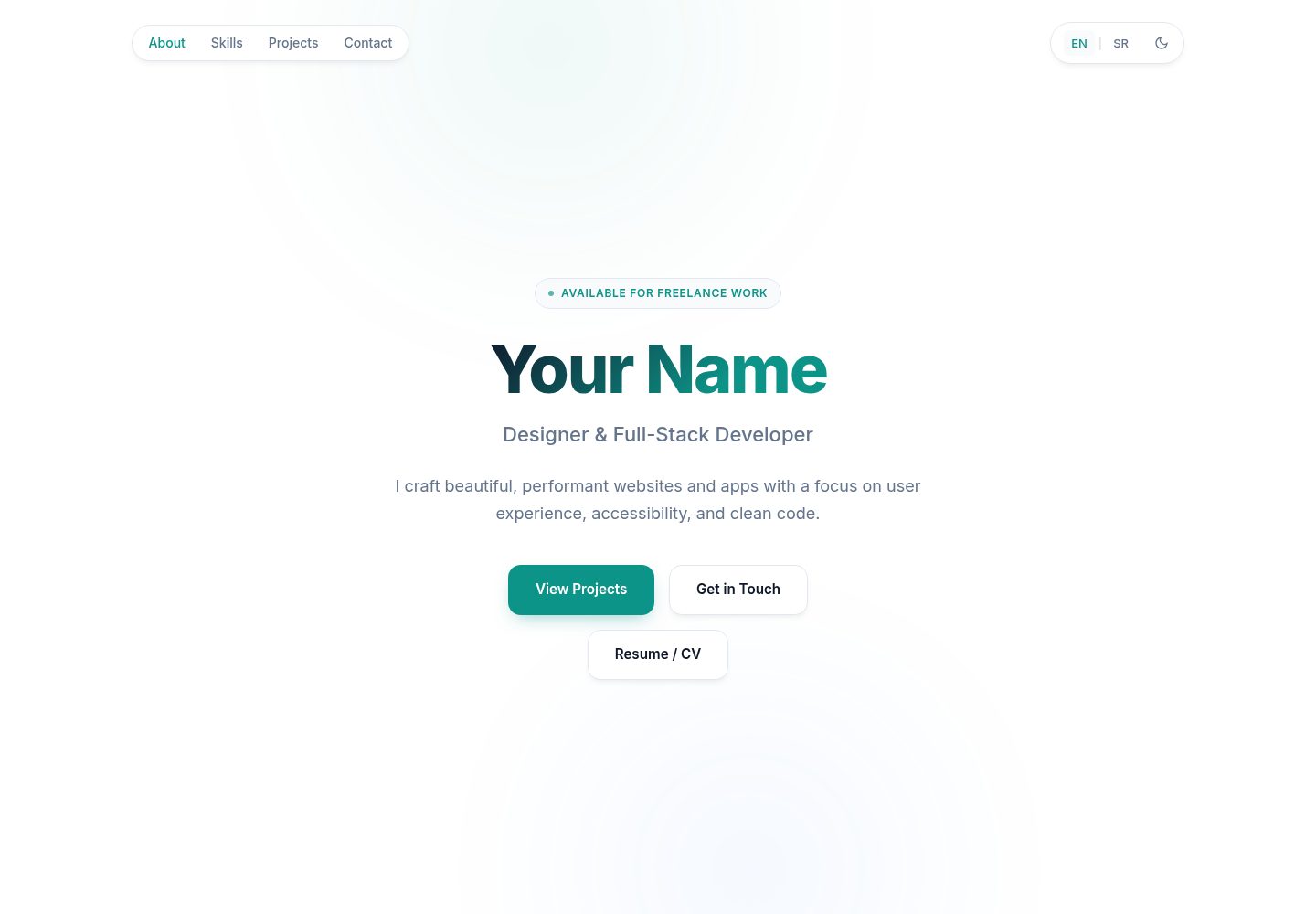
单文件结构:全部 HTML、CSS 与 JavaScript 集中在 index.html,无构建步骤与依赖
HTML作品集
portfolio-website — HTML 作品集模板
作者 Vojislav77
单文件 HTML 个人作品集模板,内置明暗主题、英/塞双语切换与 SEO 元数据,直接编辑 index.html 即可发布。
看看你的网站会是什么样
浏览真实页面截图,比较内容排版与手机效果。点击下方缩略图切换,放大查看整页细节。
全部页面与视图 2
截图用于了解视觉与布局,交互效果请以实际项目为准。
采集于 2026-10-13查看来源
值得关注的模板亮点
从已有项目资料中,快速了解它的特点。
内置明暗主题切换,用户选择保存在浏览器中
内置英语与塞尔维亚语翻译,可通过 data-i18n 属性切换,并支持按同样方式扩展其他语言
包含 Open Graph、Twitter 卡片与 JSON-LD 结构化数据,并附带 robots.txt 和 sitemap.xml
响应式布局与移动端菜单,支持键盘操作、减少动态效果偏好和打印样式
项目卡片以网格排列,增删卡片数量后网格自动调整
模板详细介绍
这是一个单文件作品集网站模板,全部内容集中在 index.html 中,不使用构建工具,也没有依赖。页面包含 Hero 区、技能标签、项目卡片网格和联系方式,并带有移动端菜单、明暗主题切换(保存在浏览器中)以及英语/塞尔维亚语翻译切换。SEO 方面提供 Open Graph、Twitter 卡片和 JSON-LD 结构化数据,仓库另附 robots.txt 与 sitemap.xml。
使用方式是把仓库推到 GitHub,在 Settings → Pages 中选择分支与根目录即可发布到 GitHub Pages;也可以直接在浏览器中打开 index.html 本地查看。发布前需要替换 index.html 中的姓名、邮箱、项目链接、社交链接、简历按钮链接、社交预览图、分析 ID 以及 JSON-LD 中的名称与 URL,同时把 robots.txt 和 sitemap.xml 里的 YOUR-USERNAME 占位符改成实际地址。
限制方面:模板本身不提供后端、表单处理或内容管理功能;Google Analytics 为可选配置,留空即禁用;简历按钮默认指向 #,需要自行放入 PDF 并修改链接;翻译对象中若某一语言缺少键值,切换语言时该元素会保留上一语言的文本,因此需要保持两种语言条目完整。演示图片、字体、图标等第三方素材的许可需单独核对,代码的 MIT 许可不覆盖这些素材。
HTML作品集
适合你的项目吗?
适用场景
- 个人开发者或设计师需要一个可直接部署到 GitHub Pages 的静态作品集页面
- 希望用单个 HTML 文件维护作品集,不引入构建工具或前端框架
- 需要中英之外的双语展示,并希望以现有翻译结构为模板添加更多语言
- 需要为作品集页面配置基础的搜索引擎与社交分享元数据
- 想通过 CSS 变量快速调整配色,并保留明暗两套主题
适合人群
- 熟悉 HTML 与 CSS、能直接编辑源文件的个人用户
- 使用 GitHub Pages 或任意静态托管发布站点的开发者
- 只需要展示项目列表、技能标签和联系方式的轻量作品集需求
- 希望自行控制页面内容、不依赖后台或数据库的用户
上手与定制指南
结合仓库当前版本的说明,按下面的资料检查内容、配置与运行要求。
- 1
在浏览器中直接打开 index.html 即可预览,无需安装依赖或运行构建命令
- 2
发布到 GitHub Pages 时,在仓库 Settings → Pages 中选择分支与根目录(/)
- 3
替换 index.html 中的占位内容:姓名、邮箱、项目链接、社交链接、简历按钮链接、社交预览图、分析 ID 以及 JSON-LD 中的名称与 URL
- 4
将 robots.txt 的 Sitemap 行和 sitemap.xml 的 loc 中的 YOUR-USERNAME 替换为实际域名或 GitHub Pages 地址,并在内容有较大改动时更新 lastmod
- 5
简历按钮默认链接为 #,需把 PDF 放入项目目录并修改对应 href 才能生效
授权与来源资料
使用条件与限制
免费使用 · 保留许可声明本次收录的是公开仓库中采用 MIT 许可的免费版本;免费范围为该版本代码,不代表外部服务或第三方素材免费。
使用时需要遵守
- 允许免费使用、修改、商用和分发该版本代码。
- 分发代码副本或实质性部分时,保留原作者版权声明和完整 MIT 许可声明。
- 代码按现状提供;担保与责任限制以原许可证及适用法律为准。
额外费用与待核对事项
- 演示图片、字体、图标及其他第三方素材需按各自许可核对,不能仅凭代码的 MIT 许可判断。
- 域名、托管、数据库、支付或 AI 等外部服务可能另外收费。
- Google Analytics 为可选功能,需在配置中填写分析 ID 才会启用;留空即禁用,不填写则不会加载任何外部分析服务。
- robots.txt 与 sitemap.xml 中的 YOUR-USERNAME 占位符必须替换为实际域名或 GitHub Pages 地址,否则站点地图与索引文件指向错误地址。
- 简历/CV 按钮默认链接为 #,在自行放入 PDF 并修改 href 之前点击无任何效果。
- 翻译对象中若某语言缺少对应键值,切换语言时该元素会保留上一语言的文本,因此必须保持两种语言条目完整。
- 提交站点地图到 Google Search Console 属于可选的搜索引擎收录步骤,需要自行注册并使用该外部服务。
查看原文依据
Permission is hereby granted, free of charge
许可证原文
Optional Google Analytics support via config
README 原文
Both contain the placeholder `YOUR-USERNAME` — replace it with your real address:
README 原文
The button in the hero section (~line 467) links to `#` by default — it does nothing until you connect a file.
README 原文
If a value is missing in one language, that element keeps its previous language's text when you switch (so keep both sides complete)
README 原文
https://github.com/Vojislav77/portfolio-website/blob/main/LICENSEhttps://github.com/Vojislav77/portfolio-website/blob/main/README.mdconsider submitting your sitemap in [Google Search Console](https://search.google.com/search-console).
README 原文
DeepSeek 根据仓库许可证和 README 整理 ·2026-10-13。结果仅覆盖已读取资料,依赖、图片、字体及后续条款变更以各自原文为准。
项目核对记录与介绍依据
模板资料
- 来源平台
- GitHub
- 资料与维护参考分
- 资料较完整 · 80 / 100
- 技术栈
- HTML
- 网站类型
- 作品集
这个分数如何计算
本站按许可资料(最高30分)、演示链接(12分)、预览图(10分)、Star数(15分)、记录的维护时间(15分)、描述完整度(8分)、功能记录(5分)和分类资料(5分)计算。它不是代码、安全或性能测试,也不是 Google 评分;有链接不代表已实测可用。
这个项目需要核对什么
- 记录的仓库更新时间
- 2026-08-23
- 截图检查日期
- 2026-10-13
已收录演示链接。请用你的内容与屏幕尺寸检查;有演示不代表表单、认证或支付已经可用。
目录记录的主要技术栈是 HTML。请通过依赖清单和锁文件核对实际版本与托管要求。这些说明基于收录资料,不代表代码审计或部署实测。
查看具体选型方法 →介绍的制作与核对状态
介绍由 AI 辅助整理目录与仓库资料。仓库作者不等于这篇介绍的审核者。
审核声明: [email protected] · 2026-10-13
查看当时使用的来源资料
SHA-256: 14279cc92572608f58c84311d809f9229e7831f942936b95745ced74b6cbd70b
2026-10-13T08:35:27.746Z
来源文件 / 仓库# Portfolio Website <img width="1280" height="640" alt="banner" src="https://github.com/user-attachments/assets/4a25ac40-7a1f-4075-978a-9aa9c5f2901e" /> A single-file portfolio website. No build tools, no dependencies — just `index.html`. ## Features - Light / dark theme (saved in browser) - Built-in translations (English / Serbian) with easy switching - Fully responsive with mobile menu - SEO ready (Open Graph, Twitter cards, JSON-LD structured data) - Accessible (keyboard friendly, reduced-motion support, print styles) - Optional Google Analytics support via config ## Quick start Open `index.html` in your browser. That's it. To publish free on GitHub Pages: 1. Push this repository to GitHub 2. **Settings → Pages → Source**: select your branch and `/` (root) 3. Your site will be live at `https://<username>.github.io/<repo-name>/` ## SEO files `robots.txt` and `sitemap.xml` help search engines index your site. Both contain the placeholder `YOUR-USERNAME` — replace it with your real address: - **GitHub Pages**: `https://<username>.github.io/<repo-name>/` - **Custom domain**: `https://yourdomain.com/` Files to update: `robots.txt` (the `Sitemap:` line) and `sitemap.xml` (the `<loc>` URL). Also update `<lastmod>` in `sitemap.xml` whenever you make significant changes, and consider submitting your sitemap in [Google Search Console](https://search.google.com/search-console). ## Before you publish — checklist Search for these placeholders in `index.html` and replace them with your own: | What | Where | Placeholder | |---|---|---| | Your name | Hero section (~line 459) and translations (~line 595) | `Your Name` | | Email | Contact section (~line 577) | `[email protected]` | | Project links | Each project card's `Live Demo` / `Source` hrefs | `#` | | Resume/CV button | Hero section (~line 467) — see [Resume / CV button](#resume--cv-button) | `href="#"` | | Social links | Contact section (~line 562, marked `EDIT: YOUR LINKS`) | `github.com`, `linkedin.com` | | Social preview image | `<meta name="site-image">` (~line 11) | empty | | Analytics ID | `<meta name="ga-id">` (~line 7) | empty = disabled | | Structured data | JSON-LD block (~line 370) | name, url, sameAs | | Sitemap URL | `sitemap.xml` + `robots.txt` | `YOUR-USERNAME` (see [SEO files](#seo-files)) | ## Editing the website ### Site title & description Edit the CONFIG block at the top of `<head>` (~lines 5–12): ```html <meta name="site-title" content="Portfolio — Designer & Developer"> <meta name="site-desc" content="I craft beautiful, performant websites..."> <meta name="site-image" content="https://yoursite.com/preview.png"> ``` These automatically update the page title and all social-sharing tags. Also update the matching static `<title>`, `<meta name="description">`, and `og:` / `twitter:` tags right below them (search engines read those first). ### Colors All colors are CSS variables at the top of the `<style>` block: ```css :root { --accent: #0d9488; /* buttons, links, highlights */ --bg: #ffffff; /* page background */ --text: #0f172a; /* body text */ } [data-theme="dark"] { /* dark mode equivalents below */ } ``` ### Skills Edit the pills inside `<div class="skills-grid">` (~line 477): ```html <span class="pill">TypeScript</span> ``` Add or remove as many as you like — they wrap automatically. ### Resume / CV button The button in the hero section (~line 467) links to `#` by default — it does nothing until you connect a file. To make it work: 1. Add your PDF to the project folder (e.g. `resume.pdf`) 2. Update the link in the hero section: ```html <!-- Opens the PDF in a new tab --> <a href="resume.pdf" target="_blank" rel="noopener" class="btn btn-secondary" data-i18n="hero.ctaResume">Resume / CV</a> <!-- Or forces the browser to download it --> <a href="resume.pdf" download class="btn btn-secondary" data-i18n="hero.ctaResume">Resume / CV</a> ``` The button label is translated via the `hero.ctaResume` key in the `translations` object ("Resume / CV" / "Biografija") — see [Translating](#translating). ## Adding a new project Each project has two parts: a card in the HTML and entries in the translations. **Step 1** — Add a card inside `<div class="projects-grid">` (~line 497): ```html <article class="card reveal"> <h3 data-i18n="project7.title">My New Project</h3> <p data-i18n="project7.desc">A short one-sentence description of the project.</p> <div class="card-tags"><span>React</span><span>API</span></div> <div class="card-footer"> <a href="https://example.com" class="link"><span data-i18n="project.linkLive">Live Demo</span> →</a> <a href="https://github.com/me/project" class="link"><span data-i18n="project.linkCode">Source</span> →</a> </div> </article> ``` Use the next free number (`project7`, `project8`, ...). The tags (`card-tags`) are plain HTML — no translation needed unless you want them localized. **Step 2** — Add matching entries to **both** languages in the `translations` object (~line 595): ```js // inside en: { project7: { title: "My New Project", desc: "A short one-sentence description of the project." }, // inside sr: { project7: { title: "Moj Novi Projekat", desc: "Kratak opis projekta u jednoj rečenici." }, ``` The grid resizes automatically — any number of cards works. To remove a project, delete its whole `<article class="card reveal">...</article>` block and its two translation entries. ## Translating All visible text comes from the `translations` object near the bottom of `index.html` (~line 595). Text in the HTML is only a fallback shown before JavaScript loads (and what search engines index). Rules: - Keep key names identical between `en` and `sr` — only change the values - Any element with `data-i18n="hero.bio"` displays `translations.<lang>.hero.bio` - If a value is missing in one language, that element keeps its previous language's text when you switch (so keep both sides complete) - To add a third language: copy an existing language block, rename the key (e.g. `de`), translate the values, then add a button in the header: ```html <button data-lang="de">DE</button> ``` Note: the footer year updates automatically — don't put it in translations. Only `footer.name` and `footer.rights` are translatable. ## License The template code is released under the [MIT License](LICENSE) — free to use, modify, and build your own portfolio.
看看同类模板
对比同技术栈与用途的模板,找到更适合的视觉与内容结构。

simplefolio
⚡️ A minimal portfolio template for Developers
HTML · 作品集

Freelancer
Freelancer 是 Start Bootstrap 出品的单页作品集模板,专为自由职业者、设计师和小型工作室设计。 页面结构清晰,包含多个内容区块、响应式作品集网格,每个作品项目配有模态窗口展示详情。
HTML · 作品集

Resume
Resume 是 Start Bootstrap 推出的简历与 CV 主题,基于 Bootstrap 构建,采用固定侧边栏加内容区块的结构。
HTML · 作品集

Creative
Creative 是 Start Bootstrap 团队维护的一款单页营销模板,定位明确:为创意机构或产品服务提供一个以作品展示和行动号召为核心的落地页。
HTML · 企业官网

Grayscale
Grayscale 是 Start Bootstrap 出品的深色系单页 HTML 模板,基于 Bootstrap 构建。 它的视觉重心放在大尺寸首屏和清晰的内容分区上,整体氛围偏暗,适合摄影、活动或品牌叙事类网站。
HTML · 企业官网

startbootstrap-stylish-portfolio
Stylish Portfolio 是 Start Bootstrap 维护的单页作品集主题,基于 Bootstrap 构建,采用多个内容区块加离屏导航菜单的结构。
HTML · 作品集