Built-in browser admin panel available only in development, offering a split-pane MDX editor, 2-second debounced autosave, component palette insertion, drag-and-drop image upload, and iframe live preview
AstroReactAdmin dashboardBlogTool Site
astro-blog — Astro Admin dashboard Template
By vstorm-co
An Astro and React blog template with a built-in browser admin panel available only in development. Write and publish posts in MDX, with no framework runtime loaded on reading pages.
Explore the design
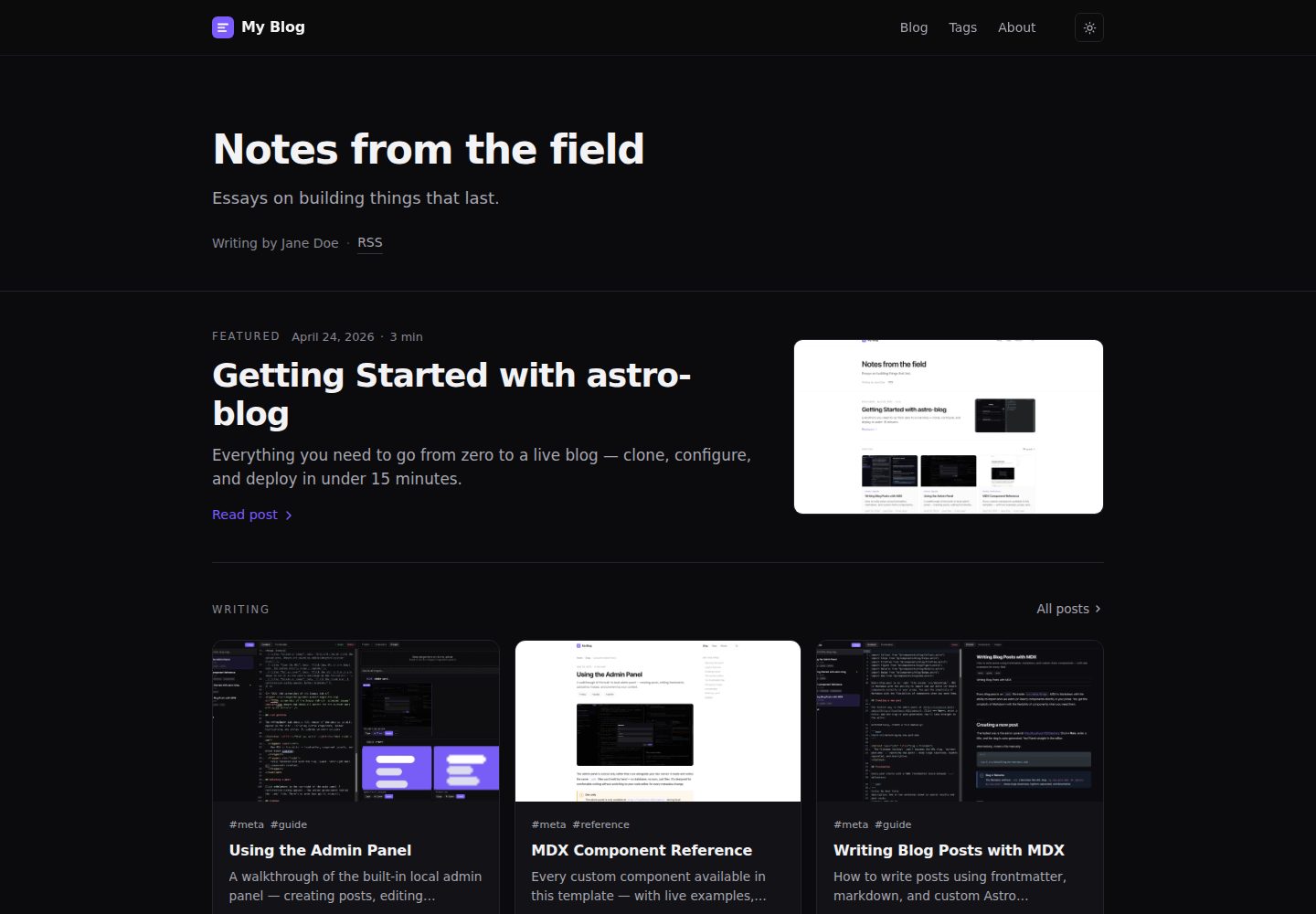
Compare the page layouts and mobile experience. Open any screenshot for a closer look.
Desktop homepage1 / 3
Desktop captureTop of page
Actual screenshot captured by the server browser.
All pages & views 3
Screenshots show visual appearance; interactive behavior may differ.
Recorded 2026-10-02View source
What stands out
A quick read of the recorded project description.
Reading pages load no framework runtime, and the homepage JavaScript is 0 KB
Includes 22 MDX components grouped as Prose, Data, Media, Technical, and Structure; adding a component only requires three annotation lines in the .astro file for the panel to recognize it
Site title, author, navigation, social links, theme colors, and feature toggles are configured in the single file src/site.config.ts
Supports drafts, pinned posts, scheduled publishing, tag pages, RSS, sitemap, and robots.txt, with frontmatter validated by a Zod schema
Provides a new-post scaffold, image WebP optimization and OG image generation scripts, plus ESLint, Prettier, Husky, and Vitest configuration
Template Details
astro-blog is an Astro blog template that includes a browser-based admin panel. Once the development server is running, visit /admin/ to write in a split-pane MDX editor with autosave, component palette insertion, drag-and-drop image upload, and live preview; this panel exists only in development, and the production build removes the corresponding route. Posts are stored as MDX files in src/data/blog/, with frontmatter validated by a Zod schema and support for fields such as draft, pinned, cover, per-post OG image, and canonicalURL. Reading pages load no framework runtime, and the homepage JavaScript is 0 KB. The template includes 22 MDX components covering callouts, data, media, technical documentation, and structural typography; tag pages, RSS, sitemap, and robots.txt are generated at build time. Site identity, navigation, social links, theme colors, and feature toggles are centralized in src/site.config.ts and src/socials.ts. Scheduled publishing relies on setting pubDate to a future time and takes effect on the next build; the repository provides a GitHub Actions workflow that triggers the deploy hook hourly, requiring you to configure the DEPLOY_HOOK_URL and SCHEDULED_REBUILD variables yourself. Search, dynamic OG images, GitHub edit links, and similar features are optional toggles, some disabled by default.
AstroReactAdmin panelBlogUtility site
Is it right for your project?
Use Cases
- Personal technical blog: write long-form posts in MDX and lay out code and command-line content with components such as Callout, Terminal, FileTree, and Diff
- Writers who prefer not to edit files directly: compose, insert images, and preview in the browser admin panel, then commit to the repository
- Blogs that need scheduled publishing: set pubDate to a future time and combine a deploy hook with a scheduled rebuild workflow to publish automatically
- Static blogs deployed to Vercel, Netlify, or Cloudflare Pages, with one-click deploy entries for each and Cloudflare _headers and _redirects files provided in the repository
Suitable For
- Developers familiar with Astro and MDX who want file-based content and a Git workflow
- Individual bloggers who need an in-browser writing interface but do not want to introduce a database or CMS service
- Sites focused on zero JavaScript on reading pages and static build output
- Environments using Bun or npm as the package manager with Node version 20 or higher
Getting started & customization
Use these recorded setup notes alongside the repository instructions for your chosen version.
- 1
Pull the template with degit, install dependencies, and run the development server, then visit localhost:4321/admin/ to enter the admin panel
- 2
First modify the site identity, navigation, and feature toggles in src/site.config.ts, and update the social links in src/socials.ts
- 3
Replace public/favicon.svg and public/og-default.png (1200×630), and delete the sample posts in src/data/blog/
- 4
For scheduled publishing, configure the DEPLOY_HOOK_URL secret and SCHEDULED_REBUILD variable in the repository, with the GitHub Actions workflow triggering hourly
- 5
Search, dynamic OG images, GitHub edit links, and similar features are optional and must be enabled in the configuration; search depends on the Pagefind build step
License & source material
Usage conditions & limitations
Free to use · keep license noticeThis entry covers the free version under the MIT license in the public repository; the free scope is the code of that version and does not imply that external services or third-party assets are free.
Must comply with when using
- You may use, modify, commercialize, and distribute the code of this version for free.
- When distributing copies or substantial portions of the code, retain the original author's copyright notice and the complete MIT license notice.
- The code is provided as is; warranties and limitations of liability are governed by the original license and applicable law.
Additional costs & items to verify
- The browser admin panel is available only in development; the production build removes that route, so it cannot be used on a live site.
- The admin panel has no authentication and writes directly to the local file system; it binds only to 127.0.0.1 and must not be exposed publicly.
- Scheduled publishing requires you to configure a deploy hook secret and repository variable, and depends on the build hook service of an external hosting platform.
- Search is disabled by default; once enabled, it requires an additional Pagefind build step.
- Per-post dynamic OG image generation is disabled by default and must be enabled manually.
- The template does not include a comment system; if comments are needed, you must integrate a third-party service yourself (such as Giscus).
- The template does not provide internationalization support; multilingual sites must be implemented yourself following Astro's official approach.
- Demo images, fonts, icons, and other third-party assets must be checked against their respective licenses and cannot be judged solely by the code's MIT license.
- External services such as domains, hosting, databases, payments, or AI may incur separate charges.
View Original Text Basis
Permission is hereby granted, free of charge
Original License Text
The admin panel is dev-only — production builds 404 the route.
Original README
**No.** It has no authentication and writes to your filesystem. It binds to `127.0.0.1` in dev and production builds 404 the route.
Original README
1. Add a `DEPLOY_HOOK_URL` repo secret (Vercel / Netlify / CF each provide one). 2. Set repo variable `SCHEDULED_REBUILD=1`.
Original README
search: false, // Pagefind-powered /search/ page (requires build step)
Original README
dynamicOg: false, // per-post OG via Satori
Original README
We don't ship a comment system.
Original README
https://github.com/vstorm-co/astro-blog/blob/main/LICENSEhttps://github.com/vstorm-co/astro-blog/blob/main/README.mdNot in this template. Use [Astro's i18n recipe](https://docs.astro.build/en/recipes/i18n/) directly.
Original README
Compiled by DeepSeek based on repository license and README ·2026-10-02. Results only cover the materials read; dependencies, images, fonts, and subsequent term changes are subject to their respective original texts.
Project checks & description sources
Template Information
- Source platforms
- GitHub
- Documentation and maintenance reference score
- More documented · 88 / 100
- Technologies
- Astro · React
- Website type
- Admin dashboard · Blog · Tool Site
How this score is calculated
Our heuristic uses license records (up to 30), a demo link (12), a preview (10), stars (15), recorded maintenance (15), description completeness (8), feature records (5) and classification data (5). It is not a code, security or performance test, or a Google score. A link does not establish tested functionality.
What to verify for this project
- Repository update recorded
- 2026-09-14
- Screenshot last checked
- 2026-10-02
A demo link is listed. Check it with your own content and viewport sizes; its presence does not confirm that forms, authentication or payments work.
The catalog identifies Astro as the primary stack. Check the actual dependency manifest and lockfile for versions and hosting requirements. These notes use recorded metadata, not a code audit or a deployment test.
Use a selection guide →How this description was prepared
AI-assisted description based on catalog records and repository material. Repository authors are not automatically the reviewers of this description.
Automatically checked against source and license rules; no manual editorial review.
Inspect the recorded source material
SHA-256: 495e5f4535a14164a08eff6d84b672248fc3c38f9eaba71e575b12680b2857fb
2026-10-02T17:02:20.132Z
Source file / repository<h1 align="center">astro-blog 📝</h1>
<p align="center">
The blog template that ships with a <b>browser-based admin panel</b> — write and publish MDX posts without touching a text editor.<br>
Built on <b>Astro 6 + Tailwind CSS 4</b>, zero JS on reading pages, 100 Lighthouse across all four categories.
</p>
<p align="center">
<a href="https://github.com/vstorm-co/astro-blog/actions/workflows/ci.yml"><img src="https://github.com/vstorm-co/astro-blog/actions/workflows/ci.yml/badge.svg" alt="CI"></a>
<a href="https://astro.build"><img src="https://astro.badg.es/v2/built-with-astro/tiny.svg" alt="Made with Astro"></a>
<a href="https://nodejs.org"><img src="https://img.shields.io/badge/node-%3E%3D20-brightgreen?logo=node.js&logoColor=white" alt="Node ≥ 20"></a>
<a href="https://bun.sh"><img src="https://img.shields.io/badge/bun-%3E%3D1-f9f1e1?logo=bun&logoColor=black" alt="Bun ≥ 1"></a>
<a href="https://opensource.org/licenses/MIT"><img src="https://img.shields.io/badge/License-MIT-yellow.svg" alt="License: MIT"></a>
<a href="https://github.com/vstorm-co/astro-blog/blob/main/SECURITY.md"><img src="https://img.shields.io/badge/security-policy-blueviolet?logo=shieldsdotio&logoColor=white" alt="Security Policy"></a>
<a href="https://x.com/Kacper95682155"><img src="https://img.shields.io/badge/X-000000?logo=x&logoColor=white" alt="X"></a>
</p>
<p align="center">
<a href="https://astro-blog-kappa-rouge.vercel.app/">
<img src="https://img.shields.io/badge/🖥️%20Live%20Demo-Visit%20Site-6d4fe8?style=for-the-badge" alt="Live Demo">
</a>
</p>
<table width="100%"><tr>
<td width="50%"><img src="./assets/hero_dark.png" alt="Dark mode" width="100%"></td>
<td width="50%"><img src="./assets/hero_light.png" alt="Light mode" width="100%"></td>
</tr></table>
<p align="center">
<img src="./assets/admin_panel.png" alt="astro-blog — admin panel" width="100%">
</p>
---
## 🚀 Quick Start
```bash
bunx degit vstorm-co/astro-blog my-blog && cd my-blog && bun install && bun run dev
```
Open **http://localhost:4321/admin/** — your blog editor is ready.
> **npm users:** `npx degit vstorm-co/astro-blog my-blog && cd my-blog && npm install && npm run dev`
---
## ✨ Features
- 🛠 **Built-in admin panel** — browser-based MDX editor with live preview, autosave, drag-and-drop images, and a component palette. Stripped from every production build.
- ⚡ **Zero JS on reading pages** — no framework runtime, no hydration cost. Home page ships 0 KB of JavaScript.
- 📝 **MDX-first** with 22 ready-made blog components: `Callout`, `Figure`, `Stat`, `Timeline`, `Terminal`, `FileTree`, `Diff`, `Gallery`, `Tweet`, `Bookmark`, and more
- 🎨 **Single-file config** — title, author, nav, socials, accent colour, feature flags all in `src/site.config.ts`
- 🌗 **Dark + light mode** with pre-paint init (zero FOUC) and `prefers-color-scheme` fallback
- ✍️ **Scheduled posts** — set a future `pubDate`, post goes live on the next build after that time
- 🏷️ **Tag pages** auto-generated from frontmatter
- 📡 **RSS feed, sitemap, robots.txt** built at compile time
- 🚀 **One-click deploy** to Vercel, Netlify, or Cloudflare Pages
- 🔷 **TypeScript + Zod schemas** — typed frontmatter, zero runtime surprises
- 🔒 **ESLint + Prettier + Husky** — enforced code style from the first commit
---
## ✅ Lighthouse Score
<p align="center">
<img src="./assets/lighthouse.png" alt="astro-blog Lighthouse score — 100 Performance, 100 Accessibility, 100 Best Practices, 100 SEO" width="710">
</p>
---
## 🆚 Why astro-blog?
| | **astro-blog** | AstroPaper | Fuwari | Raw Astro |
| ---------------------------- | :------------: | :--------: | :----: | :-------: |
| Admin panel (browser editor) | ✅ | ❌ | ❌ | ❌ |
| Zero JS on reading pages | ✅ | ❌ | ❌ | ✅ |
| 100 Lighthouse (all 4) | ✅ | ✅ | — | — |
| 22 MDX components | ✅ | ❌ | ❌ | ❌ |
| Drag-and-drop image upload | ✅ | ❌ | ❌ | ❌ |
| Scheduled posts | ✅ | ❌ | ❌ | ❌ |
| Single-file config | ✅ | ✅ | ✅ | ❌ |
| Dark + light mode | ✅ | ✅ | ✅ | — |
| One-click deploy | ✅ | ✅ | ✅ | — |
The admin panel is the differentiator — no other Astro blog template ships one.
---
## 🛠 First 10 Minutes
After cloning, open `src/site.config.ts` and work through this list:
1. **Set your identity** — `website`, `title`, `author`, `description`, `accent`
2. **Update socials** — edit `src/socials.ts`, keep only the providers you use
3. **Rewrite the About page** — `src/data/pages/about.mdx` or use the admin panel
4. **Delete example posts** — remove everything in `src/data/blog/` and write your own
5. **Replace the favicon** — drop your SVG at `public/favicon.svg`
6. **Set an OG image** — 1200×630 PNG at `public/og-default.png` (or run `python3 scripts/generate-og.py`)
7. **Deploy** — push to GitHub and click one of the deploy buttons below
8. **Protect `main`** — on GitHub: require PR + CI green before merge
9. **Turn on Discussions** — for open-ended questions from readers
10. **Fill `.github/FUNDING.yml`** — if you accept sponsorship
---
## 🖊️ Writing Posts
### Option A — Admin panel (recommended)
Start the dev server and open `localhost:4321/admin/`:
- **Split-pane MDX editor** with autosave (2 s debounce, `Cmd+S` forces save)
- **Component palette** — click Insert, snippet + import land at your cursor
- **Image drag-and-drop** — files written to `public/images/blog/<slug>/`
- **Live preview** inside an iframe of the real post layout
- **Rename slug / delete post** from the sidebar
The admin panel is dev-only — production builds 404 the route.
### Option B — CLI
```bash
bun run new-post "My post title"
# → src/data/blog/my-post-title.mdx (draft: true by default)
```
### Frontmatter reference
```yaml
---
title: "My post title"
description: "One-line summary — used in meta tags and post cards."
pubDate: 2026-05-01
updatedDate: 2026-05-15 # optional
author: "Jane Doe"
tags: ["astro", "mdx"]
draft: false # excluded from prod builds when true
featured: false # pinned to the home page featured strip
cover: "./cover.jpg" # optional, relative to the MDX file
ogImage: "/custom-og.png" # optional per-post OG override
canonicalURL: "https://…" # optional, for cross-posts
---
```
### Scheduling a post
Set `pubDate` to a future date. The post is invisible until the next build after that time. For automatic builds:
1. Add a `DEPLOY_HOOK_URL` repo secret (Vercel / Netlify / CF each provide one).
2. Set repo variable `SCHEDULED_REBUILD=1`.
3. `.github/workflows/scheduled-rebuild.yml` hits the hook hourly.
---
## 🧩 MDX Components
22 components grouped by purpose:
| Group | Components |
| ------------- | -------------------------------------------------------- |
| **Prose** | `Callout` `InfoCard` `PullQuote` `Aside` |
| **Data** | `Stat` `TwoColumn` `Comparison` `Timeline` |
| **Media** | `Figure` `Gallery` `VideoEmbed` `Tweet` `Bookmark` |
| **Technical** | `CodeGroup` `Terminal` `FileTree` `Diff` `Kbd` `Details` |
| **Structure** | `Steps` `Badge` `Divider` |
All components live in `src/components/blog/`. See them in action in `src/data/blog/mdx-component-reference.mdx`.
### Adding your own component
Drop an `.astro` file in `src/components/blog/` with three annotation comments:
```astro
{/* @mdx-label MyComponent */}
{/* @mdx-description One-line description shown in the palette. */}
{
/* @mdx-snippet
<MyComponent prop="example">
Body text
</MyComponent>
*/
}
```
The admin palette picks it up on the next refresh — no other code changes needed.
---
## ⚙️ Configuration
| File | What you change |
| ----------------------- | --------------------------------------------------------- |
| `src/site.config.ts` | Title, author, nav, socials, accent colour, feature flags |
| `src/socials.ts` | Social links and share targets |
| `src/styles/global.css` | Design tokens — colours, fonts, radii, shadows |
| `src/styles/prose.css` | Post body typography |
| `src/data/blog/` | Blog posts |
| `src/data/pages/` | About / Uses / Now / etc. |
| `public/favicon.svg` | Favicon |
| `public/og-default.png` | Default OG image (1200 × 630 px) |
### Feature flags
```ts
features: {
search: false, // Pagefind-powered /search/ page (requires build step)
archive: true, // /archive/ — chronological post list
dynamicOg: false, // per-post OG via Satori
editPost: false, // "Edit on GitHub" link on each post
adminPanel: true, // dev-only admin UI
lightAndDarkMode: true, // theme toggle visible / hidden
}
```
---
## ⚡ Commands
| Command | Action |
| -------------------------- | ------------------------------------ |
| `bun run dev` | Start dev server at `localhost:4321` |
| `bun run build` | Type-check + build to `./dist/` |
| `bun run preview` | Preview the production build locally |
| `bun run new-post "Title"` | Scaffold a new draft post |
| `bun run optimize-images` | Resize + convert blog images to WebP |
| `bun run lint` | Run ESLint |
| `bun run format` | Format with Prettier |
| `bun run test` | Run Vitest unit tests |
---
## 🗂 Project Structure
```
src/
├─ site.config.ts # ← start here: identity, nav, features
├─ socials.ts
├─ content.config.ts # Zod schemas
├─ data/
│ ├─ blog/ # MDX posts
│ └─ pages/ # About, Uses, etc.
├─ layouts/ # Base / Post / Page
├─ components/
│ ├─ blog/ # 22 MDX components
│ ├─ layout/ # Header / Footer / SEO
│ ├─ home/ # Hero / LatestPosts / FeaturedStrip
│ ├─ post/ # PostCard / TOC / Pagination / ShareLinks
│ ├─ islands/ # React islands (CopyCode, Search, TOC scrollspy)
│ └─ admin/ # dev-only admin panel
├─ lib/
│ ├─ posts.ts # content helpers
│ ├─ schemas.ts # JSON-LD builders
│ └─ slug.ts
├─ pages/ # file-based routes
└─ styles/ # global.css, prose.css
public/
├─ favicon.svg
├─ og-default.png
├─ _headers / _redirects # Cloudflare Pages headers
└─ images/blog/<slug>/ # per-post images (managed by admin)
scripts/
├─ new-post.ts # post scaffolder
├─ optimize-images.py # WebP optimiser
└─ generate-og.py # OG image generator
```
---
## 🚢 Deploy
| Platform | One-click |
| -------------------- | -------------------------------------------------------------------------------------------------------------------------------------------------------------- |
| **Vercel** | [](https://vercel.com/new/clone?repository-url=https://github.com/vstorm-co/astro-blog) |
| **Netlify** | [](https://app.netlify.com/start/deploy?repository=https://github.com/vstorm-co/astro-blog) |
| **Cloudflare Pages** | [](https://deploy.workers.cloudflare.com/?url=https://github.com/vstorm-co/astro-blog) |
Security headers and `/admin/*` blockers are pre-configured for all three in `vercel.json`, `netlify.toml`, and `public/_headers`.
---
## 🛠 Tech Stack
| | |
| ------------------------ | ----------------------------------------------------------------------------------------------------- |
| **Framework** | [Astro 6](https://astro.build) |
| **Content** | [MDX](https://mdxjs.com) + Astro Content Collections |
| **Styling** | [Tailwind CSS 4](https://tailwindcss.com) + CSS custom properties |
| **Syntax highlighting** | [Shiki](https://shiki.style) via Expressive Code |
| **Editor (admin)** | [CodeMirror 6](https://codemirror.net) |
| **Type checking** | [TypeScript](https://www.typescriptlang.org) strict mode |
| **Testing** | [Vitest](https://vitest.dev) |
| **Linting / formatting** | [ESLint](https://eslint.org) + [Prettier](https://prettier.io) |
| **Git hooks** | [Husky](https://typicode.github.io/husky) + [lint-staged](https://github.com/lint-staged/lint-staged) |
---
## ❓ FAQ
**Why Astro, not Next.js?**
Content-first. Zero JS by default, typed frontmatter via content collections, no runtime framework lock-in.
**Can I use pure Markdown instead of MDX?**
Yes — rename `.mdx` → `.md`. The content loader accepts both. MDX components only work in `.mdx` files.
**How do I add comments?**
We don't ship a comment system. [Giscus](https://giscus.app) takes ~10 lines at the bottom of `src/layouts/PostLayout.astro`.
**Is the admin panel safe to expose publicly?**
**No.** It has no authentication and writes to your filesystem. It binds to `127.0.0.1` in dev and production builds 404 the route.
**Will there be i18n?**
Not in this template. Use [Astro's i18n recipe](https://docs.astro.build/en/recipes/i18n/) directly.
---
## ⭐ Star History
<p align="center">
<a href="https://www.star-history.com/#vstorm-co/astro-blog&type=date">
<img src="https://api.star-history.com/svg?repos=vstorm-co/astro-blog&type=date" alt="Star History" width="600">
</a>
</p>
---
## 🤝 Contributing
See [`CONTRIBUTING.md`](./CONTRIBUTING.md) for coding conventions, commit style, and how to run the test suite. Issues and PRs welcome.
Please read [`CODE_OF_CONDUCT.md`](./CODE_OF_CONDUCT.md) before participating. Report security vulnerabilities via [`SECURITY.md`](./SECURITY.md).
## 📄 License
[MIT](./LICENSE) © [Vstorm](https://github.com/vstorm-co)
---
<div align="center">
### Need a custom blog or content platform?
<p>We're <a href="https://vstorm.co"><b>Vstorm</b></a> — an Applied Agentic AI Engineering Consultancy.<br>
astro-blog is the template we use for our own writing. We build production-grade web apps too.</p>
<a href="https://vstorm.co/contact-us/">
<img src="https://img.shields.io/badge/Talk%20to%20us%20%E2%86%92-0066FF?style=for-the-badge&logoColor=white" alt="Talk to us">
</a>
<br><br>
Built on <a href="https://astro.build">Astro</a> · <a href="https://tailwindcss.com">Tailwind CSS</a> · <a href="https://mdxjs.com">MDX</a> · <a href="https://shiki.style">Shiki</a> · <a href="https://codemirror.net">CodeMirror</a>
</div>
Explore similar templates
Compare previews and descriptions within the same stack and category.

AdminLTE
AdminLTE is a free, open-source admin dashboard template built on Bootstrap 5 and vanilla JavaScript, with no jQuery dependency.
Astro · Admin dashboard

astrowind
AstroWind is a free, open-source Astro starter theme using Astro and Tailwind CSS, released under the MIT license.
Astro · Blog

astro-paper
AstroPaper is a minimal, responsive, accessible, and SEO-friendly Astro blog theme. Articles are stored as Markdown/MDX in src/content/posts/, with subdirectories affecting URLs.
Astro · Blog

fuwari
Fuwari is a static blog template built with Astro and Tailwind CSS for personal blogs. It manages posts as Markdown files in src/content/posts/, with frontmatter for title, date, description, cover, tags, categories, draft status, and language.
Astro · Blog

Firefly
Firefly is a clean personal blog theme forked from Astro and Fuwari, offering four background modes, single/double sidebar and list/grid layouts, Pagefind client-side full-text search, and a six-language UI.
Astro · Blog

astro-theme-cactus
Astro Cactus is an Astro-based blog and portfolio theme that uses Markdown/MDX content collections to manage posts, notes, and tags, with frontmatter type-checked by a schema.
Astro · Portfolio