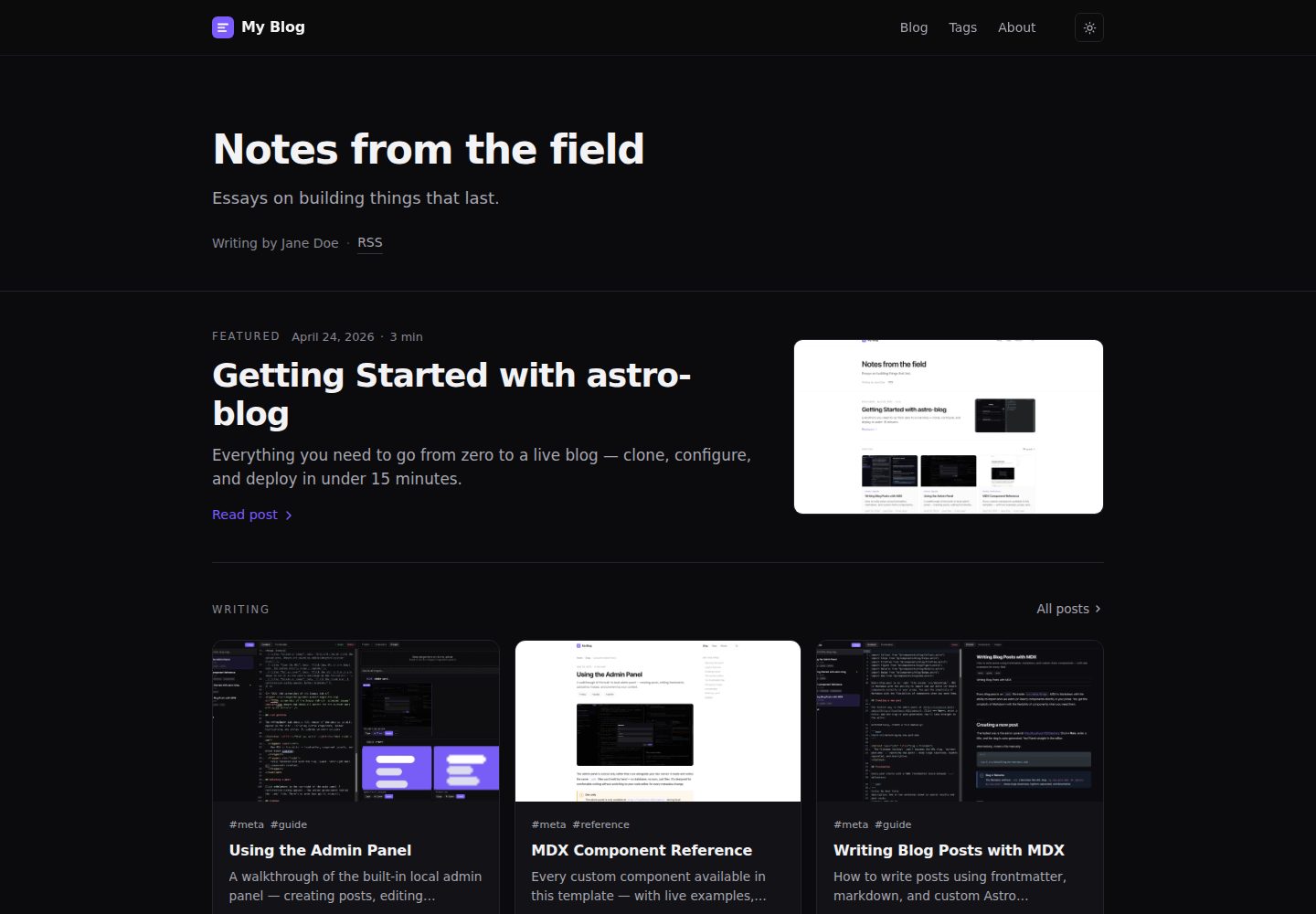
内置仅开发环境可用的浏览器后台面板,提供分栏 MDX 编辑器、2 秒防抖自动保存、组件面板插入、图片拖拽上传与 iframe 实时预览
AstroReact后台博客工具站
astro-blog — Astro 后台模板
作者 vstorm-co
基于 Astro 与 React 的博客模板,内置仅开发环境可用的浏览器后台面板,用 MDX 撰写与发布文章,阅读页面不加载框架运行时。
看看你的网站会是什么样
浏览真实页面截图,比较内容排版与手机效果。点击下方缩略图切换,放大查看整页细节。
全部页面与视图 3
截图用于了解视觉与布局,交互效果请以实际项目为准。
采集于 2026-10-02查看来源
值得关注的模板亮点
从已有项目资料中,快速了解它的特点。
阅读页面不加载框架运行时,首页 JavaScript 为 0 KB
内置 22 个 MDX 组件,按 Prose、Data、Media、Technical、Structure 分组,新增组件只需在 .astro 文件中添加三行注解即可被面板识别
站点标题、作者、导航、社交、主题色与功能开关集中在 src/site.config.ts 单文件配置
支持草稿、置顶、定时发布、标签页、RSS、sitemap 与 robots.txt,frontmatter 由 Zod schema 校验
提供 new-post 脚手架、图片 WebP 优化与 OG 图生成脚本,以及 ESLint、Prettier、Husky 与 Vitest 配置
模板详细介绍
astro-blog 是一个 Astro 博客模板,附带浏览器端管理面板。开发服务器启动后访问 /admin/ 即可在分栏 MDX 编辑器中写作,支持自动保存、组件面板插入、图片拖拽上传与实时预览;该面板仅存在于开发环境,生产构建会移除对应路由。文章以 MDX 文件存放在 src/data/blog/,frontmatter 由 Zod schema 校验,支持草稿、置顶、封面、单篇 OG 图与 canonicalURL 等字段。阅读页面不加载框架运行时,首页 JavaScript 为 0 KB。模板内置 22 个 MDX 组件,覆盖提示、数据、媒体、技术文档与结构类排版;标签页、RSS、sitemap、robots.txt 在构建时生成。站点身份、导航、社交链接、主题色与功能开关集中在 src/site.config.ts 与 src/socials.ts。定时发布依赖将 pubDate 设为未来时间,并在下次构建后生效;仓库提供 GitHub Actions 工作流按小时触发部署钩子,需要自行配置 DEPLOY_HOOK_URL 与 SCHEDULED_REBUILD 变量。搜索、动态 OG、GitHub 编辑链接等为可选功能开关,默认部分关闭。
AstroReact后台博客工具站
适合你的项目吗?
适用场景
- 个人技术博客:用 MDX 写长文,借助 Callout、Terminal、FileTree、Diff 等组件排版代码与命令行内容
- 希望不直接编辑文件的写作者:在浏览器后台面板中完成写作、插图与预览,再提交到仓库
- 需要定时发布的博客:将 pubDate 设为未来时间,配合部署钩子与定时重建工作流自动上线
- 部署到 Vercel、Netlify 或 Cloudflare Pages 的静态博客,仓库提供对应的一键部署入口与 Cloudflare 的 _headers、_redirects 文件
适合人群
- 熟悉 Astro 与 MDX、希望以文件为内容源并保留 Git 工作流的开发者
- 需要浏览器内写作界面但不想引入数据库或 CMS 服务的个人博主
- 关注阅读页面零 JavaScript 与静态构建输出的站点
- 使用 Bun 或 npm 作为包管理器、Node 版本不低于 20 的环境
上手与定制指南
结合仓库当前版本的说明,按下面的资料检查内容、配置与运行要求。
- 1
使用 degit 拉取模板后安装依赖并运行开发服务器,访问 localhost:4321/admin/ 进入后台面板
- 2
先修改 src/site.config.ts 中的站点身份、导航与功能开关,并更新 src/socials.ts 中的社交链接
- 3
替换 public/favicon.svg 与 public/og-default.png(1200×630),删除 src/data/blog/ 中的示例文章
- 4
定时发布需在仓库中配置 DEPLOY_HOOK_URL 密钥与 SCHEDULED_REBUILD 变量,由 GitHub Actions 工作流按小时触发
- 5
搜索、动态 OG、GitHub 编辑链接等为可选功能,需在配置中开启;搜索依赖 Pagefind 构建步骤
授权与来源资料
使用条件与限制
免费使用 · 保留许可声明本次收录的是公开仓库中采用 MIT 许可的免费版本;免费范围为该版本代码,不代表外部服务或第三方素材免费。
使用时需要遵守
- 允许免费使用、修改、商用和分发该版本代码。
- 分发代码副本或实质性部分时,保留原作者版权声明和完整 MIT 许可声明。
- 代码按现状提供;担保与责任限制以原许可证及适用法律为准。
额外费用与待核对事项
- 浏览器后台管理面板仅在开发环境可用,生产构建会移除该路由,无法在线上站点使用。
- 后台面板无身份验证且直接写入本地文件系统,仅绑定 127.0.0.1,禁止公开暴露。
- 定时发布需自行配置部署钩子密钥与仓库变量,并依赖外部托管平台的构建钩子服务。
- 搜索功能默认关闭,启用后需额外执行 Pagefind 构建步骤。
- 每篇文章动态生成 OG 图默认关闭,需手动开启。
- 模板不包含评论系统,如需评论须自行集成第三方服务(如 Giscus)。
- 模板不提供国际化支持,多语言站点需自行按 Astro 官方方案实现。
- 演示图片、字体、图标及其他第三方素材需按各自许可核对,不能仅凭代码的 MIT 许可判断。
- 域名、托管、数据库、支付或 AI 等外部服务可能另外收费。
查看原文依据
Permission is hereby granted, free of charge
许可证原文
The admin panel is dev-only — production builds 404 the route.
README 原文
**No.** It has no authentication and writes to your filesystem. It binds to `127.0.0.1` in dev and production builds 404 the route.
README 原文
1. Add a `DEPLOY_HOOK_URL` repo secret (Vercel / Netlify / CF each provide one). 2. Set repo variable `SCHEDULED_REBUILD=1`.
README 原文
search: false, // Pagefind-powered /search/ page (requires build step)
README 原文
dynamicOg: false, // per-post OG via Satori
README 原文
We don't ship a comment system.
README 原文
https://github.com/vstorm-co/astro-blog/blob/main/LICENSEhttps://github.com/vstorm-co/astro-blog/blob/main/README.mdNot in this template. Use [Astro's i18n recipe](https://docs.astro.build/en/recipes/i18n/) directly.
README 原文
DeepSeek 根据仓库许可证和 README 整理 ·2026-10-02。结果仅覆盖已读取资料,依赖、图片、字体及后续条款变更以各自原文为准。
项目核对记录与介绍依据
模板资料
- 来源平台
- GitHub
- 资料与维护参考分
- 资料较完整 · 88 / 100
- 技术栈
- Astro · React
- 网站类型
- 后台 · 博客 · 工具站
这个分数如何计算
本站按许可资料(最高30分)、演示链接(12分)、预览图(10分)、Star数(15分)、记录的维护时间(15分)、描述完整度(8分)、功能记录(5分)和分类资料(5分)计算。它不是代码、安全或性能测试,也不是 Google 评分;有链接不代表已实测可用。
这个项目需要核对什么
- 记录的仓库更新时间
- 2026-09-14
- 截图检查日期
- 2026-10-02
已收录演示链接。请用你的内容与屏幕尺寸检查;有演示不代表表单、认证或支付已经可用。
目录记录的主要技术栈是 Astro。请通过依赖清单和锁文件核对实际版本与托管要求。这些说明基于收录资料,不代表代码审计或部署实测。
查看具体选型方法 →介绍的制作与核对状态
介绍由 AI 辅助整理目录与仓库资料。仓库作者不等于这篇介绍的审核者。
已完成服务器许可规则与 AI 来源核对;未经过人工编辑审核。
查看当时使用的来源资料
SHA-256: 495e5f4535a14164a08eff6d84b672248fc3c38f9eaba71e575b12680b2857fb
2026-10-02T17:02:20.132Z
来源文件 / 仓库<h1 align="center">astro-blog 📝</h1>
<p align="center">
The blog template that ships with a <b>browser-based admin panel</b> — write and publish MDX posts without touching a text editor.<br>
Built on <b>Astro 6 + Tailwind CSS 4</b>, zero JS on reading pages, 100 Lighthouse across all four categories.
</p>
<p align="center">
<a href="https://github.com/vstorm-co/astro-blog/actions/workflows/ci.yml"><img src="https://github.com/vstorm-co/astro-blog/actions/workflows/ci.yml/badge.svg" alt="CI"></a>
<a href="https://astro.build"><img src="https://astro.badg.es/v2/built-with-astro/tiny.svg" alt="Made with Astro"></a>
<a href="https://nodejs.org"><img src="https://img.shields.io/badge/node-%3E%3D20-brightgreen?logo=node.js&logoColor=white" alt="Node ≥ 20"></a>
<a href="https://bun.sh"><img src="https://img.shields.io/badge/bun-%3E%3D1-f9f1e1?logo=bun&logoColor=black" alt="Bun ≥ 1"></a>
<a href="https://opensource.org/licenses/MIT"><img src="https://img.shields.io/badge/License-MIT-yellow.svg" alt="License: MIT"></a>
<a href="https://github.com/vstorm-co/astro-blog/blob/main/SECURITY.md"><img src="https://img.shields.io/badge/security-policy-blueviolet?logo=shieldsdotio&logoColor=white" alt="Security Policy"></a>
<a href="https://x.com/Kacper95682155"><img src="https://img.shields.io/badge/X-000000?logo=x&logoColor=white" alt="X"></a>
</p>
<p align="center">
<a href="https://astro-blog-kappa-rouge.vercel.app/">
<img src="https://img.shields.io/badge/🖥️%20Live%20Demo-Visit%20Site-6d4fe8?style=for-the-badge" alt="Live Demo">
</a>
</p>
<table width="100%"><tr>
<td width="50%"><img src="./assets/hero_dark.png" alt="Dark mode" width="100%"></td>
<td width="50%"><img src="./assets/hero_light.png" alt="Light mode" width="100%"></td>
</tr></table>
<p align="center">
<img src="./assets/admin_panel.png" alt="astro-blog — admin panel" width="100%">
</p>
---
## 🚀 Quick Start
```bash
bunx degit vstorm-co/astro-blog my-blog && cd my-blog && bun install && bun run dev
```
Open **http://localhost:4321/admin/** — your blog editor is ready.
> **npm users:** `npx degit vstorm-co/astro-blog my-blog && cd my-blog && npm install && npm run dev`
---
## ✨ Features
- 🛠 **Built-in admin panel** — browser-based MDX editor with live preview, autosave, drag-and-drop images, and a component palette. Stripped from every production build.
- ⚡ **Zero JS on reading pages** — no framework runtime, no hydration cost. Home page ships 0 KB of JavaScript.
- 📝 **MDX-first** with 22 ready-made blog components: `Callout`, `Figure`, `Stat`, `Timeline`, `Terminal`, `FileTree`, `Diff`, `Gallery`, `Tweet`, `Bookmark`, and more
- 🎨 **Single-file config** — title, author, nav, socials, accent colour, feature flags all in `src/site.config.ts`
- 🌗 **Dark + light mode** with pre-paint init (zero FOUC) and `prefers-color-scheme` fallback
- ✍️ **Scheduled posts** — set a future `pubDate`, post goes live on the next build after that time
- 🏷️ **Tag pages** auto-generated from frontmatter
- 📡 **RSS feed, sitemap, robots.txt** built at compile time
- 🚀 **One-click deploy** to Vercel, Netlify, or Cloudflare Pages
- 🔷 **TypeScript + Zod schemas** — typed frontmatter, zero runtime surprises
- 🔒 **ESLint + Prettier + Husky** — enforced code style from the first commit
---
## ✅ Lighthouse Score
<p align="center">
<img src="./assets/lighthouse.png" alt="astro-blog Lighthouse score — 100 Performance, 100 Accessibility, 100 Best Practices, 100 SEO" width="710">
</p>
---
## 🆚 Why astro-blog?
| | **astro-blog** | AstroPaper | Fuwari | Raw Astro |
| ---------------------------- | :------------: | :--------: | :----: | :-------: |
| Admin panel (browser editor) | ✅ | ❌ | ❌ | ❌ |
| Zero JS on reading pages | ✅ | ❌ | ❌ | ✅ |
| 100 Lighthouse (all 4) | ✅ | ✅ | — | — |
| 22 MDX components | ✅ | ❌ | ❌ | ❌ |
| Drag-and-drop image upload | ✅ | ❌ | ❌ | ❌ |
| Scheduled posts | ✅ | ❌ | ❌ | ❌ |
| Single-file config | ✅ | ✅ | ✅ | ❌ |
| Dark + light mode | ✅ | ✅ | ✅ | — |
| One-click deploy | ✅ | ✅ | ✅ | — |
The admin panel is the differentiator — no other Astro blog template ships one.
---
## 🛠 First 10 Minutes
After cloning, open `src/site.config.ts` and work through this list:
1. **Set your identity** — `website`, `title`, `author`, `description`, `accent`
2. **Update socials** — edit `src/socials.ts`, keep only the providers you use
3. **Rewrite the About page** — `src/data/pages/about.mdx` or use the admin panel
4. **Delete example posts** — remove everything in `src/data/blog/` and write your own
5. **Replace the favicon** — drop your SVG at `public/favicon.svg`
6. **Set an OG image** — 1200×630 PNG at `public/og-default.png` (or run `python3 scripts/generate-og.py`)
7. **Deploy** — push to GitHub and click one of the deploy buttons below
8. **Protect `main`** — on GitHub: require PR + CI green before merge
9. **Turn on Discussions** — for open-ended questions from readers
10. **Fill `.github/FUNDING.yml`** — if you accept sponsorship
---
## 🖊️ Writing Posts
### Option A — Admin panel (recommended)
Start the dev server and open `localhost:4321/admin/`:
- **Split-pane MDX editor** with autosave (2 s debounce, `Cmd+S` forces save)
- **Component palette** — click Insert, snippet + import land at your cursor
- **Image drag-and-drop** — files written to `public/images/blog/<slug>/`
- **Live preview** inside an iframe of the real post layout
- **Rename slug / delete post** from the sidebar
The admin panel is dev-only — production builds 404 the route.
### Option B — CLI
```bash
bun run new-post "My post title"
# → src/data/blog/my-post-title.mdx (draft: true by default)
```
### Frontmatter reference
```yaml
---
title: "My post title"
description: "One-line summary — used in meta tags and post cards."
pubDate: 2026-05-01
updatedDate: 2026-05-15 # optional
author: "Jane Doe"
tags: ["astro", "mdx"]
draft: false # excluded from prod builds when true
featured: false # pinned to the home page featured strip
cover: "./cover.jpg" # optional, relative to the MDX file
ogImage: "/custom-og.png" # optional per-post OG override
canonicalURL: "https://…" # optional, for cross-posts
---
```
### Scheduling a post
Set `pubDate` to a future date. The post is invisible until the next build after that time. For automatic builds:
1. Add a `DEPLOY_HOOK_URL` repo secret (Vercel / Netlify / CF each provide one).
2. Set repo variable `SCHEDULED_REBUILD=1`.
3. `.github/workflows/scheduled-rebuild.yml` hits the hook hourly.
---
## 🧩 MDX Components
22 components grouped by purpose:
| Group | Components |
| ------------- | -------------------------------------------------------- |
| **Prose** | `Callout` `InfoCard` `PullQuote` `Aside` |
| **Data** | `Stat` `TwoColumn` `Comparison` `Timeline` |
| **Media** | `Figure` `Gallery` `VideoEmbed` `Tweet` `Bookmark` |
| **Technical** | `CodeGroup` `Terminal` `FileTree` `Diff` `Kbd` `Details` |
| **Structure** | `Steps` `Badge` `Divider` |
All components live in `src/components/blog/`. See them in action in `src/data/blog/mdx-component-reference.mdx`.
### Adding your own component
Drop an `.astro` file in `src/components/blog/` with three annotation comments:
```astro
{/* @mdx-label MyComponent */}
{/* @mdx-description One-line description shown in the palette. */}
{
/* @mdx-snippet
<MyComponent prop="example">
Body text
</MyComponent>
*/
}
```
The admin palette picks it up on the next refresh — no other code changes needed.
---
## ⚙️ Configuration
| File | What you change |
| ----------------------- | --------------------------------------------------------- |
| `src/site.config.ts` | Title, author, nav, socials, accent colour, feature flags |
| `src/socials.ts` | Social links and share targets |
| `src/styles/global.css` | Design tokens — colours, fonts, radii, shadows |
| `src/styles/prose.css` | Post body typography |
| `src/data/blog/` | Blog posts |
| `src/data/pages/` | About / Uses / Now / etc. |
| `public/favicon.svg` | Favicon |
| `public/og-default.png` | Default OG image (1200 × 630 px) |
### Feature flags
```ts
features: {
search: false, // Pagefind-powered /search/ page (requires build step)
archive: true, // /archive/ — chronological post list
dynamicOg: false, // per-post OG via Satori
editPost: false, // "Edit on GitHub" link on each post
adminPanel: true, // dev-only admin UI
lightAndDarkMode: true, // theme toggle visible / hidden
}
```
---
## ⚡ Commands
| Command | Action |
| -------------------------- | ------------------------------------ |
| `bun run dev` | Start dev server at `localhost:4321` |
| `bun run build` | Type-check + build to `./dist/` |
| `bun run preview` | Preview the production build locally |
| `bun run new-post "Title"` | Scaffold a new draft post |
| `bun run optimize-images` | Resize + convert blog images to WebP |
| `bun run lint` | Run ESLint |
| `bun run format` | Format with Prettier |
| `bun run test` | Run Vitest unit tests |
---
## 🗂 Project Structure
```
src/
├─ site.config.ts # ← start here: identity, nav, features
├─ socials.ts
├─ content.config.ts # Zod schemas
├─ data/
│ ├─ blog/ # MDX posts
│ └─ pages/ # About, Uses, etc.
├─ layouts/ # Base / Post / Page
├─ components/
│ ├─ blog/ # 22 MDX components
│ ├─ layout/ # Header / Footer / SEO
│ ├─ home/ # Hero / LatestPosts / FeaturedStrip
│ ├─ post/ # PostCard / TOC / Pagination / ShareLinks
│ ├─ islands/ # React islands (CopyCode, Search, TOC scrollspy)
│ └─ admin/ # dev-only admin panel
├─ lib/
│ ├─ posts.ts # content helpers
│ ├─ schemas.ts # JSON-LD builders
│ └─ slug.ts
├─ pages/ # file-based routes
└─ styles/ # global.css, prose.css
public/
├─ favicon.svg
├─ og-default.png
├─ _headers / _redirects # Cloudflare Pages headers
└─ images/blog/<slug>/ # per-post images (managed by admin)
scripts/
├─ new-post.ts # post scaffolder
├─ optimize-images.py # WebP optimiser
└─ generate-og.py # OG image generator
```
---
## 🚢 Deploy
| Platform | One-click |
| -------------------- | -------------------------------------------------------------------------------------------------------------------------------------------------------------- |
| **Vercel** | [](https://vercel.com/new/clone?repository-url=https://github.com/vstorm-co/astro-blog) |
| **Netlify** | [](https://app.netlify.com/start/deploy?repository=https://github.com/vstorm-co/astro-blog) |
| **Cloudflare Pages** | [](https://deploy.workers.cloudflare.com/?url=https://github.com/vstorm-co/astro-blog) |
Security headers and `/admin/*` blockers are pre-configured for all three in `vercel.json`, `netlify.toml`, and `public/_headers`.
---
## 🛠 Tech Stack
| | |
| ------------------------ | ----------------------------------------------------------------------------------------------------- |
| **Framework** | [Astro 6](https://astro.build) |
| **Content** | [MDX](https://mdxjs.com) + Astro Content Collections |
| **Styling** | [Tailwind CSS 4](https://tailwindcss.com) + CSS custom properties |
| **Syntax highlighting** | [Shiki](https://shiki.style) via Expressive Code |
| **Editor (admin)** | [CodeMirror 6](https://codemirror.net) |
| **Type checking** | [TypeScript](https://www.typescriptlang.org) strict mode |
| **Testing** | [Vitest](https://vitest.dev) |
| **Linting / formatting** | [ESLint](https://eslint.org) + [Prettier](https://prettier.io) |
| **Git hooks** | [Husky](https://typicode.github.io/husky) + [lint-staged](https://github.com/lint-staged/lint-staged) |
---
## ❓ FAQ
**Why Astro, not Next.js?**
Content-first. Zero JS by default, typed frontmatter via content collections, no runtime framework lock-in.
**Can I use pure Markdown instead of MDX?**
Yes — rename `.mdx` → `.md`. The content loader accepts both. MDX components only work in `.mdx` files.
**How do I add comments?**
We don't ship a comment system. [Giscus](https://giscus.app) takes ~10 lines at the bottom of `src/layouts/PostLayout.astro`.
**Is the admin panel safe to expose publicly?**
**No.** It has no authentication and writes to your filesystem. It binds to `127.0.0.1` in dev and production builds 404 the route.
**Will there be i18n?**
Not in this template. Use [Astro's i18n recipe](https://docs.astro.build/en/recipes/i18n/) directly.
---
## ⭐ Star History
<p align="center">
<a href="https://www.star-history.com/#vstorm-co/astro-blog&type=date">
<img src="https://api.star-history.com/svg?repos=vstorm-co/astro-blog&type=date" alt="Star History" width="600">
</a>
</p>
---
## 🤝 Contributing
See [`CONTRIBUTING.md`](./CONTRIBUTING.md) for coding conventions, commit style, and how to run the test suite. Issues and PRs welcome.
Please read [`CODE_OF_CONDUCT.md`](./CODE_OF_CONDUCT.md) before participating. Report security vulnerabilities via [`SECURITY.md`](./SECURITY.md).
## 📄 License
[MIT](./LICENSE) © [Vstorm](https://github.com/vstorm-co)
---
<div align="center">
### Need a custom blog or content platform?
<p>We're <a href="https://vstorm.co"><b>Vstorm</b></a> — an Applied Agentic AI Engineering Consultancy.<br>
astro-blog is the template we use for our own writing. We build production-grade web apps too.</p>
<a href="https://vstorm.co/contact-us/">
<img src="https://img.shields.io/badge/Talk%20to%20us%20%E2%86%92-0066FF?style=for-the-badge&logoColor=white" alt="Talk to us">
</a>
<br><br>
Built on <a href="https://astro.build">Astro</a> · <a href="https://tailwindcss.com">Tailwind CSS</a> · <a href="https://mdxjs.com">MDX</a> · <a href="https://shiki.style">Shiki</a> · <a href="https://codemirror.net">CodeMirror</a>
</div>
看看同类模板
对比同技术栈与用途的模板,找到更适合的视觉与内容结构。

AdminLTE
AdminLTE - Free admin dashboard template based on Bootstrap 5
Astro · 后台

astrowind
⭕️ AstroWind: A free template using Astro v7 and Tailwind CSS v4. Astro starter theme.
Astro · 博客

astro-paper
A minimal, accessible and SEO-friendly Astro blog theme.
Astro · 博客

fuwari
✨A static blog template built with Astro.
Astro · 博客

Firefly
Firefly 是一款基于 Astro 的静态博客主题,由 CuteLeaf 在 saicaca 的 Fuwari 模板基础上二次开发,主打清新美观的视觉风格。
Astro · 博客

astro-theme-cactus
A simple Astro theme. Use it to create your blog or website.
Astro · 作品集