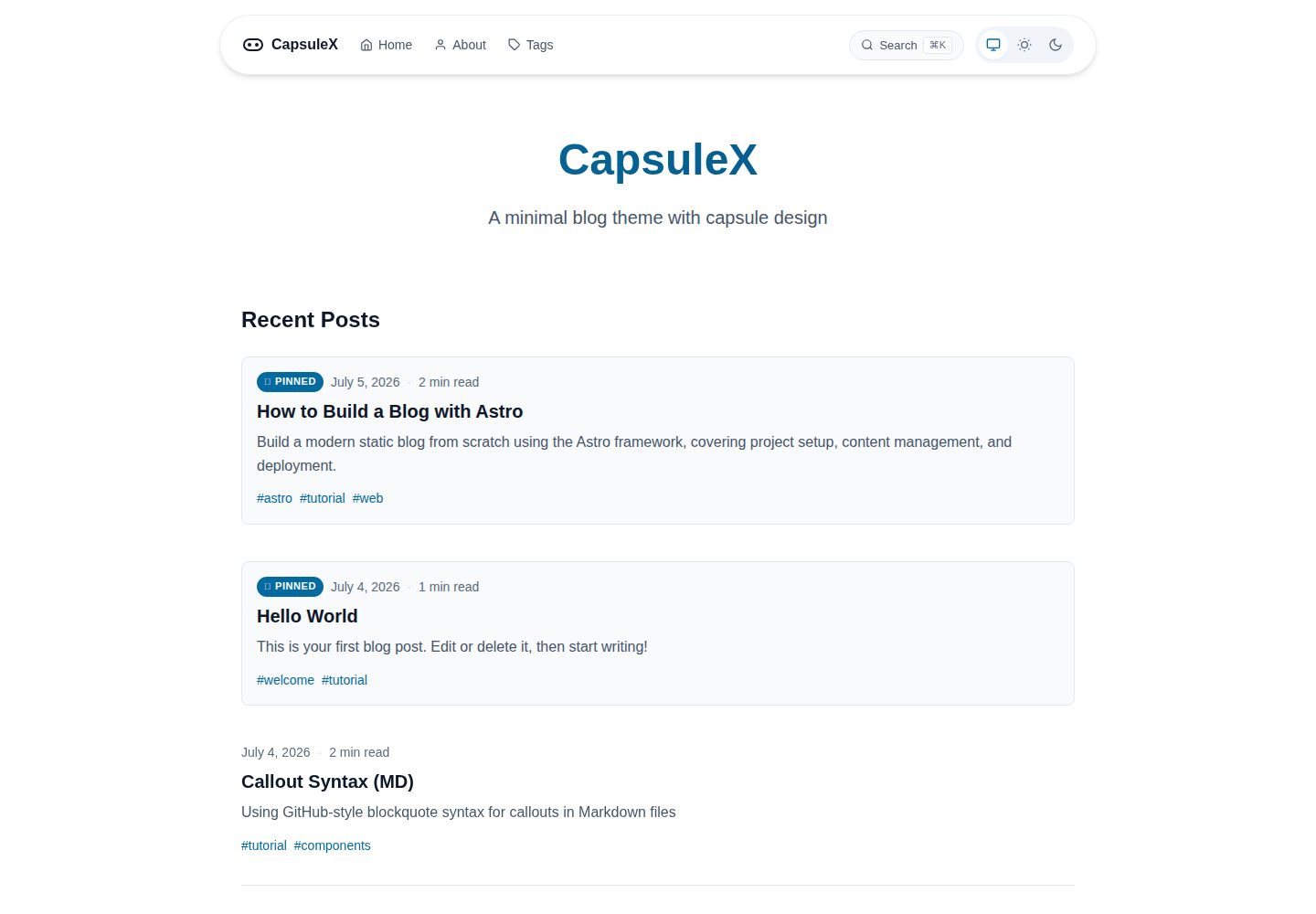
Capsule-shaped floating navigation bar with glassmorphism background blur, fixed at the top of the page
AstroBlog
capsule-x — Astro Blog Template
By wangjacks
CapsuleX is a minimal Astro blog theme featuring capsule-shaped floating navigation and modern typography, with support for Markdown/MDX writing, tags, search, and RSS.
Explore the design
Compare the page layouts and mobile experience. Open any screenshot for a closer look.
Desktop homepage1 / 3
Desktop captureTop of page
Actual screenshot captured by the server browser.
All pages & views 3
Screenshots show visual appearance; interactive behavior may differ.
Recorded 2026-10-02View source
What stands out
A quick read of the recorded project description.
Auto/light/dark three-state theme switching, with a hamburger menu on mobile
Article pages include a sticky table of contents, reading progress bar, reading time estimate, and previous/next navigation
Supports GitHub-style callout blocks, code block filename labels and diff syntax, and an image lightbox
Fuse.js client-side search with a modal UI and ⌘K shortcut
RSS automatically generated via @astrojs/rss and declared for auto-discovery in the head
Template Details
CapsuleX is an Astro blog theme open-sourced by wangjacks on GitHub, positioned as a minimal, modern personal blog. Its most distinctive design feature is the fixed capsule-shaped floating navigation bar at the top, which uses a glassmorphism (background blur) effect; the footer also follows the capsule style and holds social links. The theme offers auto/light/dark three-state switching, and uses a hamburger menu on mobile.
For reading experience, article pages include a sticky sidebar table of contents on desktop and a capsule-style table of contents button on mobile, a top reading progress bar, reading time estimated by word count, previous/next article navigation at the end, and a pinned field to pin articles. Content components support GitHub-style callout blocks such as [!NOTE], [!TIP], [!WARNING], and [!INFO]; code blocks can display filename labels, diff syntax, and a copy button; images can be clicked to enter a lightbox operated with arrow keys and ESC. The tag system provides a separate page for each tag to filter articles by tag.
For interaction and retrieval, the theme uses Astro's ClientRouter for page transitions, fades in articles on scroll, and provides a capsule-style back-to-top button; search is performed client-side with Fuse.js, presented in a modal and supporting the ⌘K shortcut; RSS is automatically generated by @astrojs/rss and declared for auto-discovery in the page head.
Note that the README explicitly marks the theme as beta, with no official release or npm package; usage is by cloning directly from the repository. Site title, description, author, navigation, social links, and feature toggles are configured centrally in src/config.ts. The theme generates static HTML and can be deployed to Vercel, Netlify, or other static hosting services.
AstroBlog
Is it right for your project?
Use Cases
- Building a personal technical blog or essay site written in Markdown/MDX
- A static content site that needs tag categorization, site search, and RSS subscription
- A minimal blog that wants capsule navigation and glassmorphism as visual features
- A static site deployed to Vercel, Netlify, or other static hosting services
Suitable For
- Users who use Astro and accept cloning from the repository rather than installing an npm package
- Bloggers who prefer minimal typography, capsule-style navigation, and dark mode
- Sites that need reading aids such as pinned articles, tag pages, and reading progress
- Developers who can accept a beta-stage theme and handle issues and contributions themselves
Getting started & customization
Use these recorded setup notes alongside the repository instructions for your chosen version.
- 1
The README marks the theme as beta, with no official release or npm package; it must be used by cloning from the GitHub repository
- 2
After installing dependencies, run npm run dev; the default development address is http://localhost:4321
- 3
Site title, description, author, navigation, social links, and feature toggles are configured centrally in src/config.ts
- 4
Articles are placed in src/content/blog/ and use frontmatter fields such as title, description, and pubDate
- 5
The build output is static HTML and can be deployed to Vercel, Netlify, or other static hosting platforms
License & source material
Usage conditions & limitations
Free to use · keep license noticeThis entry covers the free version in the public repository under the Apache-2.0 license; the free scope is the code of that version and does not mean external services or third-party assets are free.
Must comply with when using
- Free use, modification, commercial use, and distribution are permitted; the Apache-2.0 license must be included when distributing.
- Modified files must be prominently marked as changed, and relevant copyright, patent, trademark, and attribution notices must be retained.
- If the original project includes a NOTICE file, applicable attribution notices in it must be retained when distributing derivative works.
- The license includes an applicable contributor patent grant; initiating patent litigation as described in the license terminates that patent grant, and no trademark rights are granted.
- The code is provided as-is; warranties and limitations of liability are governed by the original license and applicable law.
Additional costs & items to verify
- The theme is in beta, with no official release or npm package; it can only be used by cloning directly from the GitHub repository and cannot be installed via a package manager.
- Demo images, fonts, icons, and other third-party assets must be checked against their respective licenses; they cannot be judged solely by the code's Apache-2.0 license.
- External services such as domains, hosting, databases, payments, or AI may incur additional charges.
View Original Text Basis
no-charge, royalty-free, irrevocable copyright license
Original License Text
https://github.com/wangjacks/capsule-x/blob/main/LICENSEhttps://github.com/wangjacks/capsule-x/blob/main/README.mdThis theme is in beta. There are no official releases or npm packages yet. If you want to use it, clone directly from the repository.
Original README
Compiled by DeepSeek based on repository license and README ·2026-10-02. Results only cover the materials read; dependencies, images, fonts, and subsequent term changes are subject to their respective original texts.
Project checks & description sources
Template Information
- Source platforms
- GitHub
- Documentation and maintenance reference score
- More documented · 87 / 100
- Technologies
- Astro
- Website type
- Blog
How this score is calculated
Our heuristic uses license records (up to 30), a demo link (12), a preview (10), stars (15), recorded maintenance (15), description completeness (8), feature records (5) and classification data (5). It is not a code, security or performance test, or a Google score. A link does not establish tested functionality.
What to verify for this project
- Repository update recorded
- 2026-08-24
- Screenshot last checked
- 2026-10-02
A demo link is listed. Check it with your own content and viewport sizes; its presence does not confirm that forms, authentication or payments work.
The catalog identifies Astro as the primary stack. Check the actual dependency manifest and lockfile for versions and hosting requirements. These notes use recorded metadata, not a code audit or a deployment test.
Use a selection guide →How this description was prepared
AI-assisted description based on catalog records and repository material. Repository authors are not automatically the reviewers of this description.
Automatically checked against source and license rules; no manual editorial review.
Inspect the recorded source material
SHA-256: ff3c87bd6f2e309d04b3efc697af6233b8322b133ec54b6086ea79baf5bbee8d
2026-10-02T16:51:15.395Z
Source file / repository<p align="center">
<img src="public/logo.svg" alt="CapsuleX Logo" width="120">
</p>
<h1 align="center">CapsuleX</h1>
<p align="center">
A minimal, modern blog theme for Astro with capsule floating navigation.
</p>
<p align="center">
<a href="https://capsule-x-brown.vercel.app">Demo</a> •
<a href="https://github.com/wangjacks/capsule-x">GitHub</a>
</p>
---
> [!NOTE]
> This theme is in beta. There are no official releases or npm packages yet. If you want to use it, clone directly from the repository.
>
> If you make any contributions but get no reply or need help, please leave a issue.
## Features
### Navigation & Layout
- **Capsule Floating Navigation** — Glassmorphism nav bar with backdrop blur, fixed at top
- **Tri-State Theme Switcher** — Auto (follow device) / Light / Dark with smooth transitions
- **Responsive Design** — Mobile-first, hamburger menu on small screens
- **Footer** — Capsule-style footer with social links
### Reading Experience
- **Floating TOC** — Desktop sticky sidebar + mobile capsule toggle button
- **Reading Progress Bar** — Fixed top line, scales as you scroll
- **Estimated Reading Time** — Based on word count (EN ~200 WPM, CN ~400 CPM)
- **Prev/Next Navigation** — Bottom of each post, responsive grid
- **Pinned Posts** — Pin important articles to the top of the list
### Content Components
- **Callout Blocks** — GitHub-style `[!NOTE]`, `[!WARNING]`, `[!TIP]`, `[!INFO]` syntax
- **Code Block Enhancements** — Filename labels, diff syntax, copy button (Shiki transformers)
- **Image Lightbox** — Click to view fullscreen, keyboard navigation (← → ESC)
- **Tags System** — Filter posts by tags with dedicated tag pages
### Interaction & Animation
- **Scroll Fade-in Animations** — Posts fade in as you scroll
- **View Transitions API** — Smooth page transitions with Astro's ClientRouter
- **Back to Top Button** — Capsule style, appears after scrolling
### Search & Feed
- **Client-Side Search** — Fuse.js powered, modal UI with keyboard shortcut (⌘K)
- **RSS Feed** — Auto-generated with `@astrojs/rss`, auto-discovery in head
---
## Quick Start
```bash
# Clone the repository
git clone https://github.com/wangjacks/capsule-x.git
cd capsule-x
# Install dependencies
npm install
# Start dev server
npm run dev
```
Open [http://localhost:4321](http://localhost:4321) in your browser.
---
## Configuration
All settings are centralized in `src/config.ts`:
```ts
export const siteConfig = {
title: 'CapsuleX',
description: 'A minimal blog theme with capsule design',
author: 'Your Name',
site: 'https://your-domain.com',
lang: 'en',
nav: [
{ title: 'Home', href: '/' },
{ title: 'About', href: '/about' },
{ title: 'Tags', href: '/tags' },
],
social: {
github: 'https://github.com/your-username',
},
features: {
readingProgress: true,
backToTop: true,
callout: true,
lightbox: true,
rss: true,
search: true,
},
};
```
### Feature Toggles
| Feature | Default | Description |
|---------|---------|-------------|
| `readingProgress` | `true` | Reading progress bar on post pages |
| `backToTop` | `true` | Back to top button |
| `callout` | `true` | Callout blocks in blog posts |
| `lightbox` | `true` | Image lightbox on click |
| `rss` | `true` | RSS feed generation |
| `search` | `true` | Client-side search with Fuse.js |
---
## Writing Content
### Blog Posts
Create `.md` or `.mdx` files in `src/content/blog/`:
```markdown
---
title: "Your Post Title"
description: "A brief description"
pubDate: 2026-07-04
tags: ["tag1", "tag2"]
pinned: false
---
Your content here...
```
### Frontmatter Options
| Field | Type | Required | Description |
|-------|------|----------|-------------|
| `title` | `string` | Yes | Post title |
| `description` | `string` | Yes | Post description |
| `pubDate` | `date` | Yes | Publication date |
| `tags` | `string[]` | No | Post tags |
| `pinned` | `boolean` | No | Pin to top of list |
| `draft` | `boolean` | No | Exclude from build |
### Callout Blocks (Markdown)
```markdown
> [!NOTE]
> This is a note callout.
> [!TIP]
> This is a tip callout.
> [!WARNING]
> This is a warning callout.
> [!CAUTION]
> This is a caution callout.
```
### Code Blocks
````markdown
```ts title="src/utils.ts"
export function greet(name: string): string {
return `Hello, ${name}!`;
}
```
```diff
- oldFunction();
+ newFunction();
```
````
---
## Project Structure
```
capsule-x/
├── public/ # Static assets (favicon, logo, images)
├── src/
│ ├── components/ # UI components
│ │ ├── BackToTop.astro
│ │ ├── CodeBlockCopy.astro
│ │ ├── Footer.astro
│ │ ├── Lightbox.astro
│ │ ├── Navigation.astro
│ │ ├── ReadingProgress.astro
│ │ ├── Search.astro
│ │ ├── SearchModal.astro
│ │ └── TableOfContents.astro
│ ├── content/
│ │ ├── about/ # About page content
│ │ └── blog/ # Blog posts (Markdown/MDX)
│ ├── layouts/
│ │ └── BaseLayout.astro
│ ├── pages/
│ │ ├── index.astro # Home page
│ │ ├── about.astro # About page
│ │ ├── tags/ # Tag pages
│ │ ├── rss.xml.js # RSS feed
│ │ └── 404.astro # 404 page
│ ├── styles/
│ │ ├── global.css # Global styles & CSS variables
│ │ └── callout.css # Callout block styles
│ ├── utils/
│ │ └── readingTime.ts # Reading time calculator
│ └── config.ts # Site configuration
├── docs/ # Project documentation
├── astro.config.mjs # Astro configuration
├── package.json
└── tsconfig.json
```
---
## Development
```bash
# Start dev server
npm run dev
# Build for production
npm run build
# Preview production build
npm run preview
```
### Tech Stack
| Layer | Technology |
|-------|------------|
| Framework | Astro 7 |
| Content | Markdown / MDX |
| Styling | CSS Variables + Native CSS |
| Syntax Highlighting | Shiki |
| Search | Fuse.js |
| RSS | @astrojs/rss |
---
## Deployment
### Vercel
```bash
# Install Vercel CLI
npm i -g vercel
# Deploy
vercel
```
### Netlify
```bash
# Build command
npm run build
# Publish directory
dist
```
### Other Platforms
CapsuleX generates static HTML, so it can be deployed to any static hosting service.
---
## Contributing
Contributions are welcome! Please feel free to submit a Pull Request.
1. Fork the repository
2. Create your feature branch (`git checkout -b feature/amazing-feature`)
3. Commit your changes (`git commit -m 'feat: add amazing feature'`)
4. Push to the branch (`git push origin feature/amazing-feature`)
5. Open a Pull Request
---
## License
[Apache 2.0](LICENSE)
Explore similar templates
Compare previews and descriptions within the same stack and category.

astrowind
AstroWind is a free, open-source Astro starter theme using Astro and Tailwind CSS, released under the MIT license.
Astro · Blog

astro-paper
AstroPaper is a minimal, responsive, accessible, and SEO-friendly Astro blog theme. Articles are stored as Markdown/MDX in src/content/posts/, with subdirectories affecting URLs.
Astro · Blog

fuwari
Fuwari is a static blog template built with Astro and Tailwind CSS for personal blogs. It manages posts as Markdown files in src/content/posts/, with frontmatter for title, date, description, cover, tags, categories, draft status, and language.
Astro · Blog

Firefly
Firefly is a clean personal blog theme forked from Astro and Fuwari, offering four background modes, single/double sidebar and list/grid layouts, Pagefind client-side full-text search, and a six-language UI.
Astro · Blog

astro-theme-cactus
Astro Cactus is an Astro-based blog and portfolio theme that uses Markdown/MDX content collections to manage posts, notes, and tags, with frontmatter type-checked by a schema.
Astro · Portfolio

astrofy
Astrofy is a free and open-source personal portfolio website template built with Astro and TailwindCSS, with built-in blog, CV timeline, project showcase, store, and RSS feed modules.
Astro · Portfolio