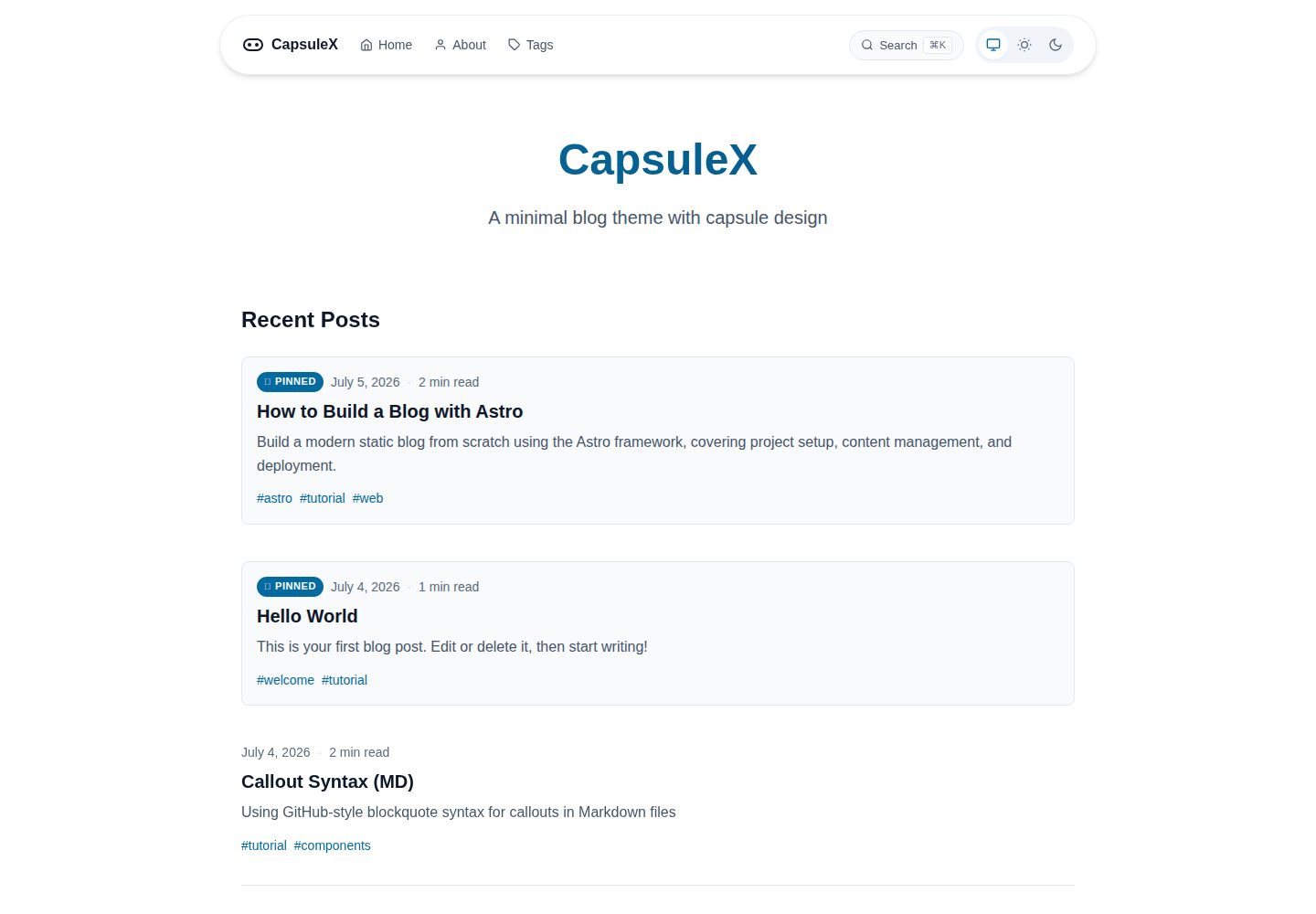
胶囊形悬浮导航栏,玻璃拟态背景模糊,固定于页面顶部
Astro博客
capsule-x — Astro 博客模板
作者 wangjacks
CapsuleX 是一个基于 Astro 的极简博客主题,以胶囊形悬浮导航和现代排版为视觉特征,支持 Markdown/MDX 写作、标签、搜索与 RSS。
看看你的网站会是什么样
浏览真实页面截图,比较内容排版与手机效果。点击下方缩略图切换,放大查看整页细节。
全部页面与视图 3
截图用于了解视觉与布局,交互效果请以实际项目为准。
采集于 2026-10-02查看来源
值得关注的模板亮点
从已有项目资料中,快速了解它的特点。
自动/浅色/深色三态主题切换,移动端使用汉堡菜单
文章页含粘性目录、阅读进度条、阅读时间估算与上一篇/下一篇导航
支持 GitHub 风格 Callout 块、代码块文件名标签与 diff 语法、图片灯箱
Fuse.js 客户端搜索,模态框 UI 并支持 ⌘K 快捷键
基于 @astrojs/rss 自动生成 RSS,并在 head 中声明自动发现
模板详细介绍
CapsuleX 是 wangjacks 在 GitHub 上开源的 Astro 博客主题,定位为极简、现代风格的个人博客。它最明显的设计特征是顶部固定的胶囊形悬浮导航栏,采用玻璃拟态(背景模糊)效果,页脚也沿用胶囊样式并放置社交链接。主题提供自动/浅色/深色三态切换,移动端使用汉堡菜单。
阅读体验方面,文章页包含桌面端粘性侧边栏目录与移动端胶囊式目录按钮、顶部阅读进度条、按字数估算的阅读时间、文末上一篇/下一篇导航,以及将文章置顶的 pinned 字段。内容组件支持 GitHub 风格的 [!NOTE]、[!TIP]、[!WARNING]、[!INFO] 等 Callout 块,代码块可显示文件名标签、diff 语法并带复制按钮,图片点击可进入灯箱并用方向键与 ESC 操作。标签系统为每篇文章提供按标签筛选的独立页面。
交互与检索方面,主题使用 Astro 的 ClientRouter 实现页面过渡,滚动时文章淡入,并提供胶囊样式的返回顶部按钮;搜索基于 Fuse.js 在客户端完成,以模态框呈现并支持 ⌘K 快捷键;RSS 由 @astrojs/rss 自动生成,并在页面 head 中声明自动发现。
需要留意的是,README 明确标注该主题处于 beta 阶段,尚无正式发布版本或 npm 包,使用方式是从仓库直接克隆;站点标题、描述、作者、导航、社交链接与各功能开关集中在 src/config.ts 中配置。主题生成静态 HTML,可部署到 Vercel、Netlify 或其他静态托管服务。
Astro博客
适合你的项目吗?
适用场景
- 搭建以 Markdown/MDX 写作的个人技术博客或随笔站点
- 需要标签分类、站内搜索与 RSS 订阅的静态内容站
- 希望以胶囊导航和玻璃拟态作为视觉特征的极简博客
- 部署到 Vercel、Netlify 或其他静态托管服务的静态站点
适合人群
- 使用 Astro 并接受从仓库克隆而非安装 npm 包的使用者
- 偏好极简排版、胶囊式导航与深色模式的博客作者
- 需要置顶文章、标签页与阅读进度等阅读辅助功能的站点
- 能接受 beta 阶段主题、自行处理问题与贡献的开发者
上手与定制指南
结合仓库当前版本的说明,按下面的资料检查内容、配置与运行要求。
- 1
README 标注主题处于 beta,无正式发布或 npm 包,需从 GitHub 仓库克隆使用
- 2
安装依赖后运行 npm run dev,默认开发地址为 http://localhost:4321
- 3
站点标题、描述、作者、导航、社交链接与功能开关集中在 src/config.ts 配置
- 4
文章放在 src/content/blog/,使用 title、description、pubDate 等 frontmatter 字段
- 5
构建产物为静态 HTML,可部署到 Vercel、Netlify 或其他静态托管平台
授权与来源资料
使用条件与限制
免费使用 · 保留许可声明本次收录的是公开仓库中采用 Apache-2.0 许可的免费版本;免费范围为该版本代码,不代表外部服务或第三方素材免费。
使用时需要遵守
- 允许免费使用、修改、商用和分发;分发时需随附 Apache-2.0 许可证。
- 修改过的文件需显著标明改动,并保留相关版权、专利、商标及归属声明。
- 若原项目附有 NOTICE 文件,分发衍生作品时需保留其中适用的归属声明。
- 许可包含适用的贡献者专利授权;发起许可所述专利诉讼会终止该专利授权,且不授予商标使用权。
- 代码按现状提供;担保与责任限制以原许可证及适用法律为准。
额外费用与待核对事项
- 该主题处于 beta 阶段,尚无正式发布版本或 npm 包,只能从 GitHub 仓库直接克隆使用,无法通过包管理器安装。
- 演示图片、字体、图标及其他第三方素材需按各自许可核对,不能仅凭代码的 Apache-2.0 许可判断。
- 域名、托管、数据库、支付或 AI 等外部服务可能另外收费。
查看原文依据
no-charge, royalty-free, irrevocable copyright license
许可证原文
https://github.com/wangjacks/capsule-x/blob/main/LICENSEhttps://github.com/wangjacks/capsule-x/blob/main/README.mdThis theme is in beta. There are no official releases or npm packages yet. If you want to use it, clone directly from the repository.
README 原文
DeepSeek 根据仓库许可证和 README 整理 ·2026-10-02。结果仅覆盖已读取资料,依赖、图片、字体及后续条款变更以各自原文为准。
项目核对记录与介绍依据
模板资料
- 来源平台
- GitHub
- 资料与维护参考分
- 资料较完整 · 87 / 100
- 技术栈
- Astro
- 网站类型
- 博客
这个分数如何计算
本站按许可资料(最高30分)、演示链接(12分)、预览图(10分)、Star数(15分)、记录的维护时间(15分)、描述完整度(8分)、功能记录(5分)和分类资料(5分)计算。它不是代码、安全或性能测试,也不是 Google 评分;有链接不代表已实测可用。
这个项目需要核对什么
- 记录的仓库更新时间
- 2026-08-24
- 截图检查日期
- 2026-10-02
已收录演示链接。请用你的内容与屏幕尺寸检查;有演示不代表表单、认证或支付已经可用。
目录记录的主要技术栈是 Astro。请通过依赖清单和锁文件核对实际版本与托管要求。这些说明基于收录资料,不代表代码审计或部署实测。
查看具体选型方法 →介绍的制作与核对状态
介绍由 AI 辅助整理目录与仓库资料。仓库作者不等于这篇介绍的审核者。
已完成服务器许可规则与 AI 来源核对;未经过人工编辑审核。
查看当时使用的来源资料
SHA-256: ff3c87bd6f2e309d04b3efc697af6233b8322b133ec54b6086ea79baf5bbee8d
2026-10-02T16:51:15.395Z
来源文件 / 仓库<p align="center">
<img src="public/logo.svg" alt="CapsuleX Logo" width="120">
</p>
<h1 align="center">CapsuleX</h1>
<p align="center">
A minimal, modern blog theme for Astro with capsule floating navigation.
</p>
<p align="center">
<a href="https://capsule-x-brown.vercel.app">Demo</a> •
<a href="https://github.com/wangjacks/capsule-x">GitHub</a>
</p>
---
> [!NOTE]
> This theme is in beta. There are no official releases or npm packages yet. If you want to use it, clone directly from the repository.
>
> If you make any contributions but get no reply or need help, please leave a issue.
## Features
### Navigation & Layout
- **Capsule Floating Navigation** — Glassmorphism nav bar with backdrop blur, fixed at top
- **Tri-State Theme Switcher** — Auto (follow device) / Light / Dark with smooth transitions
- **Responsive Design** — Mobile-first, hamburger menu on small screens
- **Footer** — Capsule-style footer with social links
### Reading Experience
- **Floating TOC** — Desktop sticky sidebar + mobile capsule toggle button
- **Reading Progress Bar** — Fixed top line, scales as you scroll
- **Estimated Reading Time** — Based on word count (EN ~200 WPM, CN ~400 CPM)
- **Prev/Next Navigation** — Bottom of each post, responsive grid
- **Pinned Posts** — Pin important articles to the top of the list
### Content Components
- **Callout Blocks** — GitHub-style `[!NOTE]`, `[!WARNING]`, `[!TIP]`, `[!INFO]` syntax
- **Code Block Enhancements** — Filename labels, diff syntax, copy button (Shiki transformers)
- **Image Lightbox** — Click to view fullscreen, keyboard navigation (← → ESC)
- **Tags System** — Filter posts by tags with dedicated tag pages
### Interaction & Animation
- **Scroll Fade-in Animations** — Posts fade in as you scroll
- **View Transitions API** — Smooth page transitions with Astro's ClientRouter
- **Back to Top Button** — Capsule style, appears after scrolling
### Search & Feed
- **Client-Side Search** — Fuse.js powered, modal UI with keyboard shortcut (⌘K)
- **RSS Feed** — Auto-generated with `@astrojs/rss`, auto-discovery in head
---
## Quick Start
```bash
# Clone the repository
git clone https://github.com/wangjacks/capsule-x.git
cd capsule-x
# Install dependencies
npm install
# Start dev server
npm run dev
```
Open [http://localhost:4321](http://localhost:4321) in your browser.
---
## Configuration
All settings are centralized in `src/config.ts`:
```ts
export const siteConfig = {
title: 'CapsuleX',
description: 'A minimal blog theme with capsule design',
author: 'Your Name',
site: 'https://your-domain.com',
lang: 'en',
nav: [
{ title: 'Home', href: '/' },
{ title: 'About', href: '/about' },
{ title: 'Tags', href: '/tags' },
],
social: {
github: 'https://github.com/your-username',
},
features: {
readingProgress: true,
backToTop: true,
callout: true,
lightbox: true,
rss: true,
search: true,
},
};
```
### Feature Toggles
| Feature | Default | Description |
|---------|---------|-------------|
| `readingProgress` | `true` | Reading progress bar on post pages |
| `backToTop` | `true` | Back to top button |
| `callout` | `true` | Callout blocks in blog posts |
| `lightbox` | `true` | Image lightbox on click |
| `rss` | `true` | RSS feed generation |
| `search` | `true` | Client-side search with Fuse.js |
---
## Writing Content
### Blog Posts
Create `.md` or `.mdx` files in `src/content/blog/`:
```markdown
---
title: "Your Post Title"
description: "A brief description"
pubDate: 2026-07-04
tags: ["tag1", "tag2"]
pinned: false
---
Your content here...
```
### Frontmatter Options
| Field | Type | Required | Description |
|-------|------|----------|-------------|
| `title` | `string` | Yes | Post title |
| `description` | `string` | Yes | Post description |
| `pubDate` | `date` | Yes | Publication date |
| `tags` | `string[]` | No | Post tags |
| `pinned` | `boolean` | No | Pin to top of list |
| `draft` | `boolean` | No | Exclude from build |
### Callout Blocks (Markdown)
```markdown
> [!NOTE]
> This is a note callout.
> [!TIP]
> This is a tip callout.
> [!WARNING]
> This is a warning callout.
> [!CAUTION]
> This is a caution callout.
```
### Code Blocks
````markdown
```ts title="src/utils.ts"
export function greet(name: string): string {
return `Hello, ${name}!`;
}
```
```diff
- oldFunction();
+ newFunction();
```
````
---
## Project Structure
```
capsule-x/
├── public/ # Static assets (favicon, logo, images)
├── src/
│ ├── components/ # UI components
│ │ ├── BackToTop.astro
│ │ ├── CodeBlockCopy.astro
│ │ ├── Footer.astro
│ │ ├── Lightbox.astro
│ │ ├── Navigation.astro
│ │ ├── ReadingProgress.astro
│ │ ├── Search.astro
│ │ ├── SearchModal.astro
│ │ └── TableOfContents.astro
│ ├── content/
│ │ ├── about/ # About page content
│ │ └── blog/ # Blog posts (Markdown/MDX)
│ ├── layouts/
│ │ └── BaseLayout.astro
│ ├── pages/
│ │ ├── index.astro # Home page
│ │ ├── about.astro # About page
│ │ ├── tags/ # Tag pages
│ │ ├── rss.xml.js # RSS feed
│ │ └── 404.astro # 404 page
│ ├── styles/
│ │ ├── global.css # Global styles & CSS variables
│ │ └── callout.css # Callout block styles
│ ├── utils/
│ │ └── readingTime.ts # Reading time calculator
│ └── config.ts # Site configuration
├── docs/ # Project documentation
├── astro.config.mjs # Astro configuration
├── package.json
└── tsconfig.json
```
---
## Development
```bash
# Start dev server
npm run dev
# Build for production
npm run build
# Preview production build
npm run preview
```
### Tech Stack
| Layer | Technology |
|-------|------------|
| Framework | Astro 7 |
| Content | Markdown / MDX |
| Styling | CSS Variables + Native CSS |
| Syntax Highlighting | Shiki |
| Search | Fuse.js |
| RSS | @astrojs/rss |
---
## Deployment
### Vercel
```bash
# Install Vercel CLI
npm i -g vercel
# Deploy
vercel
```
### Netlify
```bash
# Build command
npm run build
# Publish directory
dist
```
### Other Platforms
CapsuleX generates static HTML, so it can be deployed to any static hosting service.
---
## Contributing
Contributions are welcome! Please feel free to submit a Pull Request.
1. Fork the repository
2. Create your feature branch (`git checkout -b feature/amazing-feature`)
3. Commit your changes (`git commit -m 'feat: add amazing feature'`)
4. Push to the branch (`git push origin feature/amazing-feature`)
5. Open a Pull Request
---
## License
[Apache 2.0](LICENSE)
看看同类模板
对比同技术栈与用途的模板,找到更适合的视觉与内容结构。

astrowind
⭕️ AstroWind: A free template using Astro v7 and Tailwind CSS v4. Astro starter theme.
Astro · 博客

astro-paper
A minimal, accessible and SEO-friendly Astro blog theme.
Astro · 博客

fuwari
✨A static blog template built with Astro.
Astro · 博客

Firefly
Firefly 是一款基于 Astro 的静态博客主题,由 CuteLeaf 在 saicaca 的 Fuwari 模板基础上二次开发,主打清新美观的视觉风格。
Astro · 博客

astro-theme-cactus
A simple Astro theme. Use it to create your blog or website.
Astro · 作品集

astrofy
Astrofy is a free and open-source template for your Personal Portfolio Website built with Astro and TailwindCS…
Astro · 作品集