Back end based on Laravel, front end using Tailwind, with Webpack and Laravel Mix handling module bundling and SCSS supported
LaravelStarter
base-site — Laravel Starter Template
By waynestate
A Laravel website starter template maintained by Wayne State University, featuring a Tailwind front end, Webpack build, menu and CMS page JSON integration, a style guide, and a testing toolchain.
Explore the design
Compare the page layouts and mobile experience. Open any screenshot for a closer look.
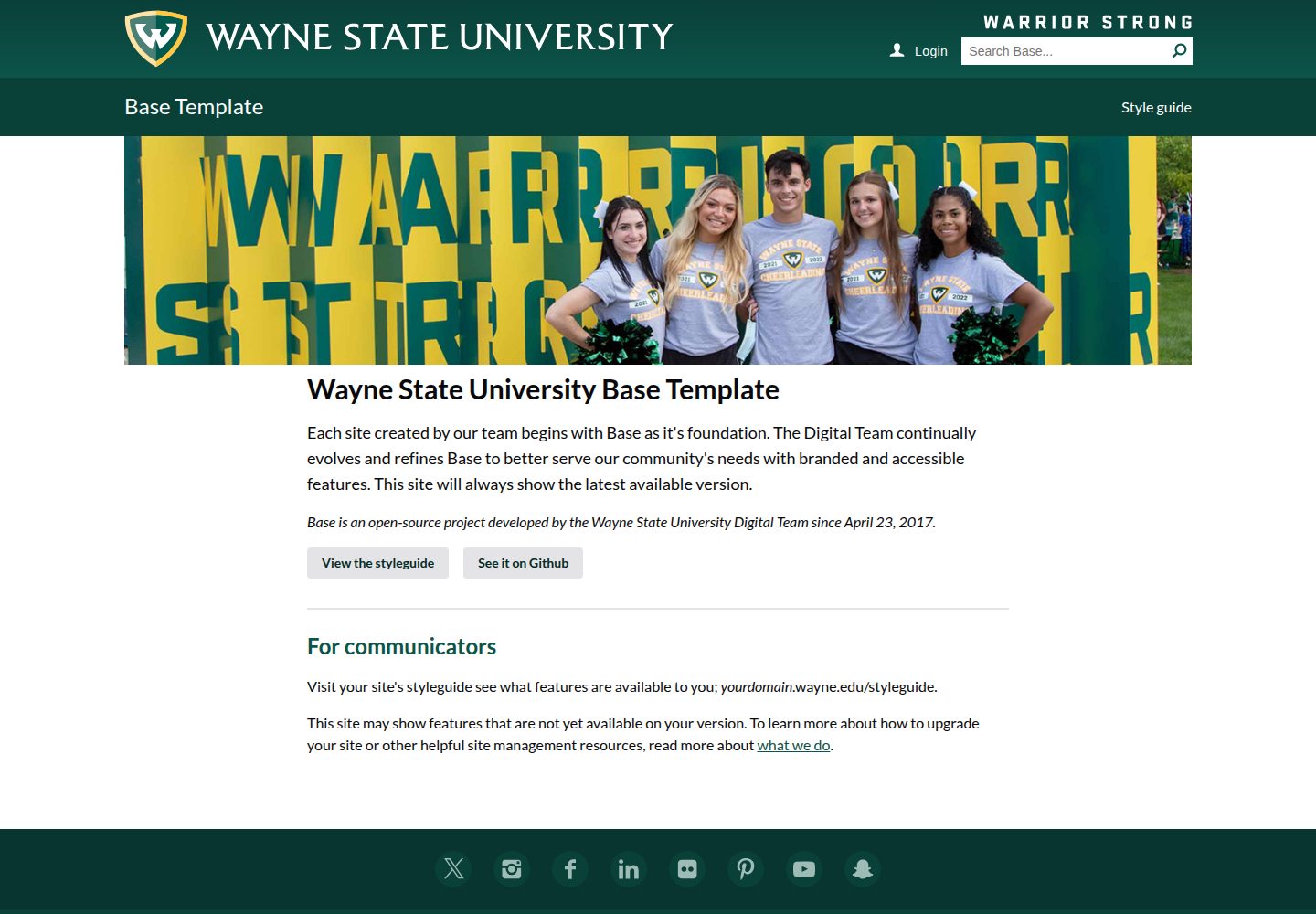
Desktop homepage1 / 2
Desktop captureTop of page
Actual screenshot captured by the server browser.
All pages & views 2
Screenshots show visual appearance; interactive behavior may differ.
Recorded 2026-10-01View source
What stands out
A quick read of the recorded project description.
Menu system includes a cross-page top menu, a conditional left menu, and a slide-out menu triggered at a variable breakpoint
Pages can be automatically generated by the CMS or reproduced with JSON files in the public directory and matched to a specified controller
Provides a complete style guide displaying all available components with PHP faker data; the Hero supports a single image or carousel
Integrates PHPUnit, Laravel Pint, PHPStan/Larastan, ESLint, Stylelint, and commit hooks
Uses Envoy for zero-downtime deployment, supports deployment by branch or environment, and manages environment configuration via PHPDotenv
Template Details
base-site is a website starter repository open-sourced by Wayne State University on GitHub for creating new websites. The back end is based on Laravel, the front end uses Tailwind, module bundling is handled by Webpack and Laravel Mix, and SCSS is supported. The repository provides a demo site at base.wayne.edu where you can view actual page results.
The template includes a fairly complete page and component system: the top menu persists across pages and follows scrolling; pages with child items display a left menu, otherwise a full-width layout is used; a slide-out menu is triggered at a variable breakpoint, containing the top-level menu, left menu, promotional slot below the menu, and banner promotional slot. The Hero supports a single image or a carousel. YouTube videos can automatically play in a lightbox.
For content integration, pages are automatically generated by the CMS, or JSON files can be written to the public directory to reproduce the page structure, which after route matching is passed to a specified controller; the menu structure can likewise be pulled from the CMS or replaced with array data in MenuRepository. The repository also provides a complete style guide displaying every available component with PHP faker data; news list/detail and people list/detail have corresponding controllers and CMS page creation steps.
The development and quality toolchain includes: PHPUnit tests, Laravel Pint code style checks, PHPStan/Larastan static analysis, ESLint and Stylelint, and commit hooks requiring these checks to pass. Deployment uses Envoy for zero-downtime deployment, supporting deployment by branch or environment. Environment configuration is managed via PHPDotenv, and site options are centralized in config/base.php.
Note: some dependencies mentioned in the README (such as Laravel Mix, Laravel 5.6 documentation links, Faker) may have changed as the project evolves; before use, refer to the repository's actual dependency manifest. The licensing of third-party assets such as demo images, fonts, and icons must be verified separately; the MIT license covers only the code.
LaravelStarter
Is it right for your project?
Use Cases
- Building a website with Laravel as the back end for a university or institution that needs common page structures such as menus, news, and people
- Projects that need to integrate CMS-generated pages with custom controllers and JSON page data
- Laravel projects that want to reference a complete style guide and component library to unify front-end visuals
- Teams that need a zero-downtime deployment process and a fairly complete toolchain for testing, static analysis, and code style checks
Suitable For
- Developers familiar with Laravel and Blade templates who need a ready-made starter skeleton
- Institutional website projects that need basic page components such as menus, news, people, and a style guide
- Teams that want to organize content through CMS page JSON integration while retaining the ability to extend with custom controllers
- Projects that value testing, static analysis, and code style checks and need an Envoy deployment process
Getting started & customization
Use these recorded setup notes alongside the repository instructions for your chosen version.
- 1
Follow the README steps: configure Laravel Homestead, clone the repository, then run make install, make build, make watch in sequence, and open https://domain.local:3000/ to view BrowserSync
- 2
Site options are configured in config/base.php; server-related configuration comes from the .env file, which must be manually created or updated on the deployment server
- 3
Before deployment, set variables such as $appname, $server_map, $source_repo, and $deploy_basepath in Envoy.blade.php
- 4
To use the WSU API, apply for an API key at [email protected]
- 5
Some dependencies and documentation links in the README may be outdated; before use, verify the repository's actual dependency manifest
License & source material
Usage conditions & limitations
Free to use · keep license noticeThis entry covers the free version under the MIT license in the public repository; the free scope is the code of this version and does not mean external services or third-party assets are free.
Must comply with when using
- Free use, modification, commercial use, and distribution of this version's code are permitted.
- When distributing copies or substantial portions of the code, retain the original author's copyright notice and the complete MIT license notice.
- The code is provided as is; warranties and limitations of liability are governed by the original license and applicable law.
Additional costs & items to verify
- Using the API provided by WSU requires applying for an API key at [email protected]; this is an external service credential requirement, not a code license restriction.
- The development environment depends on a Laravel Homestead virtual machine, which requires additional installation and configuration.
- Deployment requires configuring the server variables in Envoy.blade.php yourself and having access to the target server.
- Demo images, fonts, icons, and other third-party assets must be verified under their respective licenses and cannot be judged solely by the code's MIT license.
- External services such as domains, hosting, databases, payments, or AI may incur additional charges.
View Original Text Basis
Permission is hereby granted, free of charge
Original License Text
Request a WSU API key Email [email protected] with your request.
Original README
Setup laravel homestead: http://laravel.com/docs/homestead
Original README
https://github.com/waynestate/base-site/blob/master/LICENSEhttps://github.com/waynestate/base-site/blob/master/README.mdSetup the following config variables in `Envoy.blade.php`
Original README
Compiled by DeepSeek based on repository license and README ·2026-10-01. Results only cover the materials read; dependencies, images, fonts, and subsequent term changes are subject to their respective original texts.
Project checks & description sources
Template Information
- Source platforms
- GitHub
- Documentation and maintenance reference score
- More documented · 87 / 100
- Technologies
- Laravel
- Website type
- Starter
How this score is calculated
Our heuristic uses license records (up to 30), a demo link (12), a preview (10), stars (15), recorded maintenance (15), description completeness (8), feature records (5) and classification data (5). It is not a code, security or performance test, or a Google score. A link does not establish tested functionality.
What to verify for this project
- Repository update recorded
- 2026-09-30
- Screenshot last checked
- 2026-10-01
A demo link is listed. Check it with your own content and viewport sizes; its presence does not confirm that forms, authentication or payments work.
The catalog identifies Laravel as the primary stack. Check the actual dependency manifest and lockfile for versions and hosting requirements. These notes use recorded metadata, not a code audit or a deployment test.
Use a selection guide →How this description was prepared
AI-assisted description based on catalog records and repository material. Repository authors are not automatically the reviewers of this description.
Automatically checked against source and license rules; no manual editorial review.
Inspect the recorded source material
SHA-256: 5be946b722f117055a8ae38afb5626cc1d95ae5796f95e91ffed7e92fc81ed51
2026-10-01T02:25:02.110Z
Source file / repositoryBase Template
================
| Branch | Build | Coverage |
---|-------------------------------------------------------------------------------------------------------------------------------------------------------------------|---
| Master |  | [](https://coveralls.io/github/waynestate/base-site?branch=master) |
| Develop |  | [](https://coveralls.io/github/waynestate/base-site?branch=develop) |
Starter repository for creating a new website. Live demo can be found at https://base.wayne.edu/.
## Features
* Backend built on [Laravel](https://laravel.com/)
* Frontend built on [Tailwind](https://tailwindcss.com/)
* Module bundling using [Webpack](https://webpack.github.io/)
* Fluent webpack API using [Laravel Mix](https://laravel.com/docs/5.6/mix)
* Zero downtime deployment using [Envoy](https://laravel.com/docs/5.6/envoy)
* Configure multiple enviorments using [PHPDotenv](https://github.com/vlucas/phpdotenv)
* SCSS support
* Automatically inject JS/CSS while developing using [BrowserSync](https://browsersync.io/)
* [100% test code coverage](https://base.wayne.edu/coverages)
* [Public API documentation](https://base.wayne.edu/api)
* Commit hook that require the following to pass:
* Tests using [PHPUnit](https://phpunit.de/)
* PHP linting using [Laravel Pint](https://laravel.com/docs/9.x/pint)
* Static analysis using [PHPStan/Larastan](https://github.com/larastan/larastan)
* JS linting using [ESLint](http://eslint.org/)
* CSS/SCSS linting using [Stylelint](https://stylelint.io/)
* Menus
* Top level menu carried across all pages that follows you down the page as you scroll
* Left menu if a page has subitems, otherwise its a full width page
* Slideout menu that is triggered on a variable breakpoint that includes
* The top level menu grouped together
* Left menu
* Under menu promotions
* Banner promotion
* [Full styleguide](https://base.wayne.edu/styleguide) detailing out every available component using [PHP faker data](https://github.com/fzaninotto/Faker)
* [Single](https://base.wayne.edu/styleguide/hero/full) or [rotating](https://base.wayne.edu/styleguide/hero/full/rotate) hero images using [Flickity](https://flickity.metafizzy.co/)
* Automatically lightbox youtube videos using [Media Box](https://github.com/pinceladasdaweb/mediabox)
* Easy integration with a CMS by writing custom .json files to the public directory which are matched by to a route and sent to the specified controller
## Setup
1. Setup laravel homestead: http://laravel.com/docs/homestead
1. Clone the repository
1. run `make install`
1. run `make build`
1. run `make watch`
1. open https://domain.local:3000/ (for BrowserSync)
## Deployment
* Setup the following config variables in `Envoy.blade.php`
* `$appname`
* `$server_map`
* `$source_repo`
* `$deploy_basepath`
* Development: `envoy run deploy` or `make deploy`
* Production: `envoy run deploy --on="production"` or `make deployproduction`
* Any branch: `envoy run deploy --branch=feature/feature`
## Run tests
phpunit
## Run test coverage
1. `make coverage`
1. Open the coverages/index.html file in your browser
## Run static analysis
make phpstan
Or to run without progress bar (useful in CI environments):
make phpstandry
## Check for outdated packages
make status
## Update packages
make update
## Configure the site
1. Open `/config/base.php`
1. Edit the options to configure the site, some values are present in the `.env` file.
1. Server specific configuration options come from the `.env` file which need to be manually created/updated on the servers the app is deployed to.
## Request a WSU API key
Email [email protected] with your request.
## Adding `.env` variables
1. Add a config option to `config/base.php` called your_key using the `env()` function.
1. Using it in blade: `<script>var KEY = { API_KEY: {{ config('base.your_key' }} };</script> .`
1. Using it in PHP: `<?php $key = config('base.your_key'); ?>`
1. Add a blank entry to your local `.env.example` file for `your_key`
1. Add an entry with the actual value to your local `.env` file.
1. Commit the .env.example file. You may want to put the actual value in the example file when necessary.
1. Once the site is deployed you will want to add the actual value to the `.env` on each server.
## Developing global data that is passed down to all views via the `$request->data` variable
1. Open the folder `/app/Repositories`.
1. Create new class and implement the interface `RequestDataRepositoryContract`.
1. Fill out the `getRequestData` method and return an array.
1. Add the callback under the site in `config/base.php`
### Developing controllers
1. Open the folder `/app/Http/Controllers/`
1. This folder contains all the selectable templates from the CMS.
1. Controllers should:
* Dependency inject repositories into the constructor.
* Call repositories to obtain data to send to the view.
## Developing views
1. Open `/resources/views/`
1. This folder contains all the views for the front-end using the [blade templating engine](https://laravel.com/docs/)
1. Files must be saved in the format of: `homepage.blade.php`
1. Components: Contains views that are reusable
## Pages
Pages are written from the content management system automatically. To replicate what it writes you can use the following JSON format to create pages. Example homeage: `storage/app/public/index.json`.
```
{
"site" : {
"id" : 1,
"title" : "Base Site",
"subsite-folder" : null,
"parent" : {
"id" : null
}
},
"page" : {
"id" : 1,
"controller" : "HomepageController",
"title" : "Welcome!",
"description": "Lorem ipsum dolor sit amet, consectetur adipiscing elit. Sed turpis lorem, malesuada eu tellus vel, pharetra consequat lacus. Vestibulum eu metus nec massa viverra iaculis. Pellentesque libero eros, varius non sem et, dapibus aliquam magna. Praesent ultri",
"content" : {
"main" : "<p>Lorem ipsum dolor sit amet, consectetur adipiscing elit. Sed turpis lorem, malesuada eu tellus vel, pharetra consequat lacus. Vestibulum eu metus nec massa viverra iaculis. Pellentesque libero eros, varius non sem et, dapibus aliquam magna.</p>"
},
"keywords" : "",
"updated-at" : "",
"canonical" : ""
},
"menu" : {
"id" : 1
},
"data" : {
}
}
```
## Menus
Menus are automatically pulled from the content management system. To replicate the structure you can use the following array and replace the code in `App\Repositories\MenuRepository@getAllMenus`.
```
<?php
$menus = [
1 => [ // The menu_id specified from the .json file
1 => [ // First menu item
'menu_item_id' => '1', // Auto incrementing ID
'is_active' => '1', // To output the menu item or not
'page_id' => '1', // Page ID specified from the .json file
'target' => '', // HTML <a target="">
'display_name' => 'Home', // Title of the menu item
'class_name' => '', // CSS class name to be appended to the menu item
'relative_url' => '/', // The relative URL to this page
'submenu' => [], // Subitems, follow same structure and include another submenu => []
],
2 => [ // Second menu item...
],
],
];
```
## News listing & view
1. Create a CMS page called `news` in the root of the site and select the `ArticleController` as the template.
1. Create a CMS page called `news/topic` in the root of the site and select the `ArticleController` as the template.
1. Create a CMS page called `news/topics` in the root of the site and select the `TopicController` as the template.
1. If you need news for a subsite, follow these steps again while being within that subsite.
## Profile listing & view
1. Create a CMS page for the profile listing page (ex: `profiles`) and select the `ProfileController` as the template.
1. Create a CMS page for the profile view, it must be: `profile` and select the `ProfileController` as the template.
1. You can now visit `https://domain.local/profiles` and `http://domain.local/profile/{accessid}`.
## Style guide development for a new feature
Feature names should be singular and CamelCased. To create a new feature called "Spotlight": `php artisan base:feature Spotlight`
## Adding SVG icons
1. Load the fontello-config.json file into http://fontello.com/
1. Select the new icons and download the set.
1. Load the waynestate.svg file into https://icomoon.io/app/#/select
1. Select all the icons and download the set.
1. Open the new SVG icon(s) in the editor of your choice.
1. Save each file under resources/views/svg as a blade partial.
1. Remove the comment from the svg file.
1. Apply this code to the svg tag: `class="{{ $class ?? '' }}" aria-labelledby="{{ $name ?? '' }}"`.
## Using SVG icons
1. `<svg>` replace with: `@svg('filename', 'optional classes', 'optional label')`
## Lazy loading
1. `<img>` replace with: `@image('/path/to/image.jpg', 'alt text', 'optional classes')`
1. Background images: `<div data-src="/path/to/image.jpg"></div>`
## Contributing
Please see [CONTRIBUTING](CONTRIBUTING.md) for details.
## Licensing
Base Template is open-sourced software licensed under the [MIT license](http://opensource.org/licenses/MIT).
Explore similar templates
Compare previews and descriptions within the same stack and category.

sage
Sage is a WordPress starter theme maintained by Roots, using Laravel Blade components and templates, Vite builds, Tailwind CSS, and built-in block editor support.
Laravel · Starter

wave
Wave is an open-source SaaS starter kit built on Laravel and released under the MIT license.
Laravel · SaaS

filament-starter
A Laravel TALL stack starter template maintained by Log1x, with a preconfigured Filament admin panel and plugins including Curator, Gravatar, Exceptions, Jobs Monitor, Breezy, Peek, and Logger.
Laravel · Starter

electrik
Electrik is a Laravel SaaS starter kit installed as a Composer package, with authentication, teams, Stripe subscription billing, and the Slate 3 interface under the Electrik\ namespace rather than copied into App\.
Laravel · SaaS

php-saas
php-saas is a Laravel-based SaaS starter positioned as an everything-included kit. It generates new projects via a global Composer command and includes authentication with two-factor, API tokens, Stripe and Paddle billing, and project, team, and organization management.
Laravel · SaaS

filament-jetstream
A Laravel starter kit that implements Jetstream-like authentication and account features using Filament's native panels and components. It includes login, registration, two-factor authentication, session management, user profiles, and optional teams and API tokens.
Laravel · Starter